# mulesoft CloudHub - Full Documentation --- product: CloudHub --- # Add Certificates to a Dedicated Load Balancer > For the full documentation index, see: https://docs.mulesoft.com/llms.txt When you create a dedicated load balancer (DLB), you must add at least one certificate. You can add additional certificates to a DLB using Runtime Manager or the command-line interface. The certificate must be contained in one unencrypted, PEM-encoded file. If you are migrating a certificate created with Windows tools: - Remove all "Bag Attributes" and "Key Attributes". - Convert all end-of-line characters from `\r\n` to `\n`, if necessary. This file must contain the entire certificate chain ordered sequentially:
| Certificate | Example |
|---|---|
The Primary Certificate | -----BEGIN CERTIFICATE----- |
The Intermediate Certificate | -----BEGIN CERTIFICATE----- |
| Hardware | Software |
|---|---|
Check Point Security Gateway | R77.10 or later |
Cisco ASA | ASA 8.2 or later |
Cisco IOS | Cisco IOS 12.4 or later |
Dell SonicWALL | SonicOS 5.9 or later |
Fortinet Fortigate 40+ Series | FortiOS 4.0 or later |
Juniper J-Series Service Router | JunOS 9.5 or later |
Juniper SRX-Series Services Gateway | JunOS 11.0 or later |
Juniper SSG | ScreenOS 6.1 or 6.2 or later |
Juniper ISG | ScreenOS 6.1 or 6.2 or later |
Netgate pfSense | OS 2.2.5 or later |
Palo Alto Networks | PANOS 4.1.2 or later |
Yamaha |
|
Microsoft Windows Server |
|
Zyxel Zywall Series |
|
| Value in request | Effect on POST (create) | Effect on PUT (update) |
|---|---|---|
| Worker starts with both flags | Worker starts with both flags |
| Worker starts without the flags (default) | Worker starts without the flags |
| Treated as | Leaves the stored value unchanged |
| Input | Canonical form | JVM flag applied to the worker |
|---|---|---|
|
|
|
|
|
|
|
|
|
|
| Boot-time default GC applies |
Any other value | HTTP 400 with an allow-list error | — |
| Value in request | Effect on POST (create) | Effect on PUT (update) |
|---|---|---|
| Stores the canonical form | Updates to the canonical form and audits the change |
| Leaves the field | Leaves the stored value unchanged |
| Stores | Clears any existing override and audits the change |
Any other non-empty string | HTTP 400 | HTTP 400 |
| Endpoints | Control Plane | Rate Limit Per Client IP Address | Status Code |
|---|---|---|---|
All except specified endpoints | U.S. | 75 requests per second |
|
EU | 25 requests per second | ||
Government Cloud |
| Endpoints | Control Plane | Rate Limit Per Client IP Address | Status Code |
|---|---|---|---|
Endpoints under | |||
| U.S. | 75 requests per minute |
|
EU | 25 requests per minute | ||
Government Cloud | |||
Endpoints under | |||
| All | 10 requests per second |
|
| |||
| |||
| 1 request per minute |
| |
| Status Code | Description |
|---|---|
200 | The operation was successful. |
201 | The resource (such as an application) was created. The |
404 | The resource was not found. |
409 | When creating a resource (such as a server, server group, or deployment), a resource with that name already exists. |
429 | The operation was unsuccessful due to reaching the rate limit. |
500 | The operation was unsuccessful. See the HTTP body for details. |
503 | The operation was unsuccessful due to a temporary condition, such as server overload or reaching a rate limit. Retry the operation. |
| Method | Endpoint | Description |
|---|---|---|
|
| List all applications. |
|
| Create and deploy a new application. |
|
| Get details for a specific application. |
|
| Update application metadata (workers, runtime version, properties). |
|
| Delete an application. |
| Method | Endpoint | Description |
|---|---|---|
|
| Search application log entries. |
|
| Retrieve logs for a specific deployment. |
|
| Retrieve logs for a specific instance. |
|
| Download the log file for a specific instance. |
| Method | Endpoint | Description |
|---|---|---|
|
| List notifications. |
|
| Create a notification. |
|
| Mark a notification as read or unread. |
|
| List alerts for an application. |
|
| Create an alert. |
|
| Update an alert. |
|
| Delete an alert. |
| Method | Endpoint | Description |
|---|---|---|
|
| List all schedules for an application. |
|
| Update all schedules for an application. |
|
| Update a specific schedule. |
| Method | Endpoint | Description |
|---|---|---|
|
| List load balancers in an organization. |
|
| Create a load balancer. |
|
| Get details for a specific load balancer. |
|
| Update a load balancer (mapping rules, certificates, cipher suites). |
|
| Delete a load balancer. |
|
| List available cipher suites. |
|
| Initiate a DLB log download. |
|
| Check DLB log download status. |
| Method | Endpoint | Description |
|---|---|---|
|
| List VPCs in an organization. |
|
| Create a VPC. |
|
| Update a VPC (associated environments, firewall rules). |
|
| Remove a VPC. |
|
| Create a VPN connection. |
|
| Delete a VPN connection. |
|
| List Transit Gateway attachments in an organization. |
|
| Create a Transit Gateway attachment. |
|
| Update a Transit Gateway attachment. |
|
| Remove a Transit Gateway attachment. |
| Method | Endpoint | Description |
|---|---|---|
|
| List diagnostics for an application. |
|
| Get diagnostics for an instance without persisting them. |
|
| Generate and persist diagnostics for an instance. |
|
| Download a diagnostic. |
|
| Check if analysis can be triggered. |
|
| Get the latest analysis for an instance. |
|
| Trigger an analysis for an instance. |
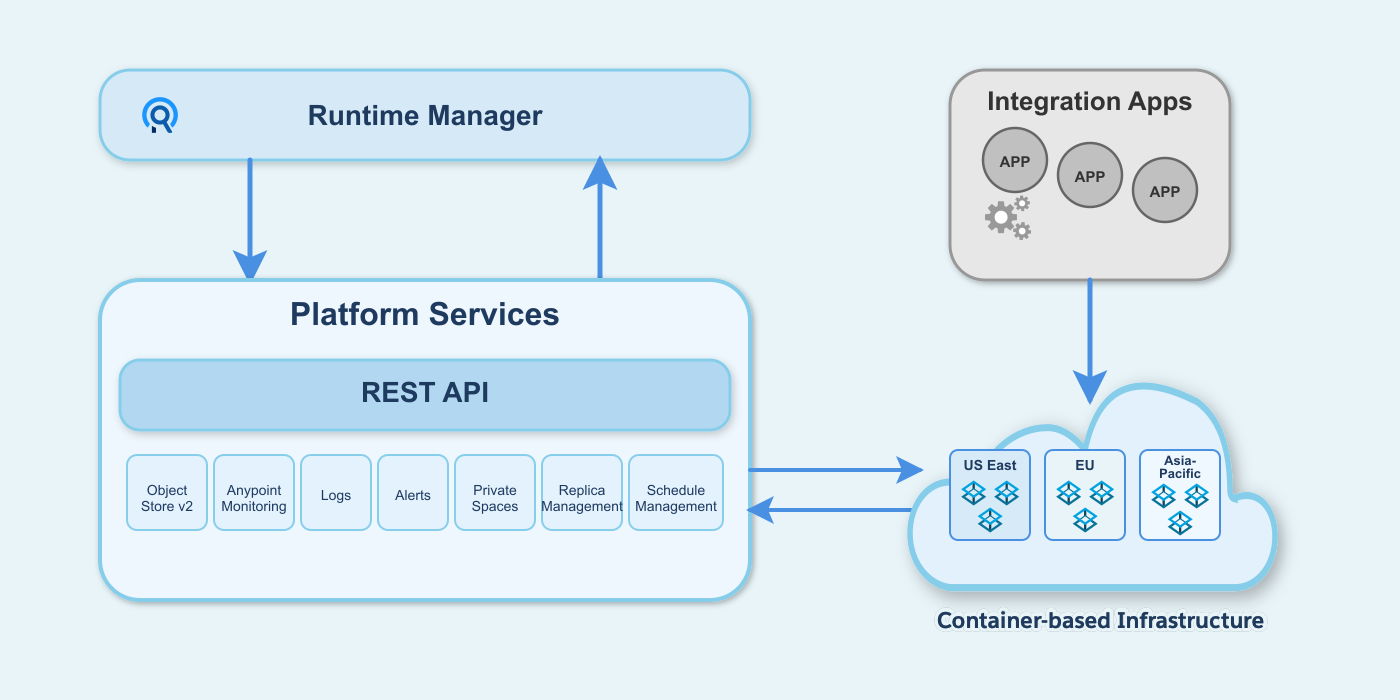
| Applications that you create and deploy to CloudHub to perform integration logic for your business | |
| User interface that enables you to deploy and monitor integrations, and configure your account | |
| Shared CloudHub platform services and APIs, which includes CloudHub Insight, alerting, logging, account management, virtual private cloud/secure data gateway, and load balancing | |
| An elastic cloud of workers, Mule instances that run integration applications |
| Worker Size | Worker Memory | Heap Memory | Disk Storage Size |
|---|---|---|---|
0.1 vCores | 1 GB | 500 MB | 8 GB |
0.2 vCores | 2 GB | 1 GB | 8 GB |
1 vCore | 4 GB | 2 GB | 12 GB |
2 vCores | 8 GB | 4 GB | 40 GB |
4 vCores | 16 GB | 8 GB | 88 GB |
8 vCores | 32 GB | 16 GB | 168 GB |
16 vCores | 64 GB | 32 GB | 328 GB |
| Command | Description |
|---|---|
Describes the history of the alarm | |
Lists all alerts in the environment | |
Copies a CloudHub application | |
Deletes an application | |
Deploys a new application | |
Shows application details | |
Download application logs to specified directory | |
Lists all applications in the environment | |
Modifies an existing application, optionally updating the ZIP file | |
Restarts a running application | |
Starts an application | |
Stops a running application | |
Tail application logs | |
Lists all supported regions | |
Lists all available runtimes |
| Flag | Description | Example |
|---|---|---|
| Set a property ( |
|
| Flag | Description | Example |
|---|---|---|
| Name and version of the runtime environment. |
|
| Set the name of the release channel to be used for the selected Mule version |
|
| Set the name of the Java version to be used for the selected Mule version |
|
| Number of workers |
|
| Size of the workers in vCores |
|
| Name of the region to deploy to |
|
| Set a property ( |
|
`--propertiesFile | Overwrite all properties with values from this file |
|
| Enable or disable persistent queues |
|
`--[no-]persistentQueuesEncrypted ` | Enable or disable persistent queue encryption |
|
| Enable or disable static IPs |
|
| Enable or disable Object Store V |
|
| Enable or disable Object Store V2 |
|
| Automatically restart app when not responding |
|
| Specify the response format |
|
| Set the timeout value in miliseconds |
|
| Flag | Description | Example |
|---|---|---|
| Name and version of the runtime environment. |
|
| Set the name of the release channel to be used for the selected Mule version |
|
| Set the name of the Java version to be used for the selected Mule version |
|
| Number of workers |
|
| Size of the workers in vCores |
|
| Name of the region to deploy to |
|
| Set a property ( |
|
`--propertiesFile | Overwrite all properties with values from this file |
|
| Enable or disable persistent queues |
|
`--[no-]persistentQueuesEncrypted ` | Enable or disable persistent queue encryption |
|
| Enable or disable static IPs |
|
| Enable or disable Object Store V |
|
| Enable or disable Object Store V2 |
|
| Automatically restart app when not responding |
|
| Specify the response format |
|
| Set the timeout value in miliseconds |
|
| Command | Description |
|---|---|
Adds an IP or range of IPs to the load balancer allowlist | |
Removes an IP or range of IPs from the load balancer allowlist | |
Creates a load balancer | |
Deletes a load balancer | |
Shows load balancer details | |
Disables dynamic IPs | |
Enables dynamic IPs | |
Lists all load balancers in an organization | |
Adds a proxy mapping rule at the specified index | |
Lists the proxy mapping rules for a load balancer | |
Removes a proxy mapping rule | |
Adds an additional certificate to an existing load balancer | |
Shows the load balancer configuration for a particular certificate | |
Removes a certificate from a load balancer | |
Sets the default certificate that the load balancer will serve | |
Starts a load balancer | |
Stops a load balancer | |
Adds an IP or range of IPs to the load balancer allowlist | |
Removes an IP or range of IPs from the load balancer allowlist |
| Value | Description | Example |
|---|---|---|
| Name of the Anypoint VPC to which this load balancer is bound. |
|
| Name for the load balancer. |
|
| Absolute path to the |
|
| Absolute path to the |
|
| Flag | Description | Example |
|---|---|---|
| Client certificate file |
|
| Certificate revocation list file |
|
| Specifies the Load balancer HTTP behavior. It can be set to |
|
| TLS version used for communication between customer and DLB |
|
| TLS version used for communication between DLB and Mule worker |
|
| Uses dynamic IPs, which are not persistent through restarts |
|
| Specifies the client verification mode. It can be set to |
|
| Value | Description | Example |
|---|---|---|
| Name of the load balancer to which this rule is applied. |
|
| Name of the URI of your input URL |
|
| Name of the app of your output URL to which the request is forwarded |
|
| URI of the app of your output URL to which the request is forwarded | / |
| Flag | Description | Example |
|---|---|---|
`--certificateName ` | Certificate name |
|
| Set the protocol used by your application to communicate internally with your load balancer |
|
| Value | Description | Example |
|---|---|---|
| Name for the load balancer. |
|
| Absolute path to the |
|
| Absolute path to the |
|
| Flag | Description | Example |
|---|---|---|
| Client certificate file |
|
| Certificate Revocation List file |
|
| Specifies the client verification mode. It can be set to |
|
| Flag | Description | Example |
|---|---|---|
| Specifies the Load balancer HTTP behavior |
|
| Command | Description |
|---|---|
Shares an Anypoint VPC with a list of Business Groups | |
Creates a new Anypoint VPC | |
Deletes an existing Anypoint VPC | |
Show Anypoint VPC details | |
Sets the domain names that are resolved using your internal DNS servers | |
Clears the list domain names that are resolved using your internal DNS servers | |
Modifies the Anypoint VPC association to Runtime Manager environments | |
Adds a firewall rule for Mule applications in this Anypoint VPC | |
Shows firewall rule for Mule applications in this Anypoint VPC | |
Removes a firewall rule for Mule applications in this Anypoint VPC | |
Lists all Anypoint VPCs |
| Flag | Description | Example |
|---|---|---|
| A domain to resolve on the special DNS server list |
|
| IP address for a DNS server to resolve special domains on |
|
| Value | Description | Example |
|---|---|---|
| Name of the Anypoint VPC to which this load balancer is bound |
|
| IP address in CIDR notation for the firewall to allow |
|
| The protocol to use in the rules. It can be |
|
| The port from which the firewall will allow requests. It can go from 0 to 65535 |
|
| optional In case a port range is needed, the |
|
| Party | Responsibility |
|---|---|
MuleSoft | Keeps the control plane available, including the Anypoint Platform UI, deployment APIs, and platform services within the provisioned region. |
MuleSoft | Patches infrastructure, applies security updates, and maintains the worker cloud. |
MuleSoft | Distributes workers across two or more availability zones within the same region when you use multiple workers. |
MuleSoft | Restarts applications automatically in a different availability zone when a worker or availability zone fails. |
You | Define and implement a cross-region DR strategy for your primary and backup regions. |
You | Decide when to trigger a regional failover, for example, based on health checks or business criteria. |
You | Configure Global Server Load Balancing (GSLB) or a Dedicated Load Balancer (DLB), and set routing rules that direct traffic to a backup region during a disaster. |
You | Deploy and maintain applications in more than one region when you need cross-region DR. |
You | Replicate and back up the external data stores that your applications use across regions, such as databases and object stores. |
You | Set up Anypoint VPC in each region where you need network connectivity for DR. |
| Use Case | Suggested HA Configuration | Implications |
|---|---|---|
You want to scale out your application, but you are satisfied with the existing highly available CloudHub architecture in terms of preventing service interruption or message loss. | Persistent queues are not enabled. Number of Workers: 2 or more |
|
You have a high-stakes process for which you need to protect against message loss, but you are not experiencing issues with handling processing load and are OK with some service interruption in the case of a data center outage. | Persistent queues are enabled. Number of Workers: 1 |
|
You have a high-stakes process for which you need to protect against message loss, avoid any chance of service interruption, and handle large processing loads. | Persistent queues are enabled. Number of Workers: 2 or more |
|
You have an application that does not have any special requirements regarding either processing load or message loss. | Persistent queues are not enabled. Number of Workers: 1 |
|
| VM Queues in On-Premises Applications | VM Queues in Applications deployed to CloudHub |
|---|---|
You can configure the maximum number of outstanding messages using the queue-profile element. | There is no limit to the number of outstanding messages in CloudHub. Even if you have a queue-profile element coded in your application with a maximum number of outstanding messages, CloudHub allows unlimited outstanding messages if you deploy the application to CloudHub with the Persistent Queues checkbox checked. |
You can toggle the persistence of the queue using the queue-profile element. | The persistence of your queue is managed using the Persistent Queues checkbox in the Advanced Details section of the deployment dialog. Even if you have a queue-profile element coded in your application, CloudHub overrides these settings when you deploy the application to CloudHub with the Persistent Queues checkbox checked. |
You can define a queue store for your VM queue to use. | CloudHub manages the queue store for you, so there is no need to define a queue store. |
Transaction commits and rollbacks for XA transactions operate according to the two-phase commit algorithm. | In CloudHub, there is an important exception to the way the two-phase commit algorithm works for XA transactions when a message is being added to a queue. See the known issue described below for details. Note: when CloudHub consumes messages from a persistent queue, this exception to the two-phase commit algorithm does not apply. |
myapp.region.cloudhub.io | Load balancer. Ports 80 and 443 forward to |
mule-worker-myapp.region.cloudhub.io | The external IP address of the Mule workers. Public HTTP services are exposed on: |
mule-worker-internal-myapp.region.cloudhub.io | The internal IP address of the Mule workers. The IP addresses for this DNS record are accessible only within a customer’s private Anypoint VPC. These IP addresses are not accessible for workers running in the MuleSoft shared VPC. Internal HTTP services are exposed on: |
| AWS Region | CIDR |
|---|---|
ca-central-1 |
|
us-west-1 |
|
us-west-2 |
|
us-east-2 |
|
us-east-1 |
|
ap-northeast-1 |
|
ap-southeast-1 |
|
ap-southeast-2 |
|
eu-central-1 |
|
eu-central-1 (EU Control Plane) |
|
eu-west-1 |
|
eu-west-1 (EU Control Plane) |
|
eu-west-2 |
|
sa-east-1 |
|
us-gov-west-1 |
|
| Region Name | Region | Example DNS Record |
|---|---|---|
US Control Plane Regions | ||
US East (N. Virginia) | us-e1 |
|
US East (Ohio) | us-e2 |
|
US West (N. California) | us-w1 |
|
US West (Oregon) | us-w2 |
|
Canada (Central) | ca-c1 |
|
South America (Sao Paulo) | br-s1 |
|
Asia Pacific (Singapore) | sg-s1 |
|
Asia Pacific (Sydney) | au-s1 |
|
Asia Pacific (Tokyo) | jp-e1 |
|
EU (Ireland) | ir-e1 |
|
EU (Frankfurt) | de-c1 |
|
UK (London) | uk-e1 |
|
MuleSoft Government Cloud | ||
US Gov West | usg-w1.gov |
|
EU Control Plane Regions | ||
EU (Ireland) | ir-e1.eu1 |
|
EU (Frankfurt) | de-c1.eu1 |
|
| Event | Message |
|---|---|
Worker will restart | A worker |
Worker has restarted | Restart SUCCEEDED for worker |
Worker restart failed | Restart FAILED for worker |
Maximum Restarts attempted for a worker | We’ve reached the maximum amount of restart attempts. |
Worker needs restarting, but restarts are disabled | A worker |
| Severity Level | Severity Definition | Patch Applied Within |
|---|---|---|
P0 | Critical | 7 days |
P1 | High | 30 days |
| Channel Type | Release Cadence | Differentiators | Support Coverage |
|---|---|---|---|
Edge | Up to three times per year |
| For versions 4.9 and later:
For version 4.8:
For versions 4.5 to 4.7:
|
LTS | Periodic (Scheduled for February) |
| For version 4.6 and later:
|
| Mule Version | Release Date | Java Version | End of Standard Support | End of Extended Support |
|---|---|---|---|---|
4.13 Edge | October 2026 | 17 | March 2027 | June 2027 |
4.12 Edge | June 2026 | 17 | November 2026 | February 2027 |
4.11 Edge | February 2026 | 17 | July 2026 | October 2026 |
4.10 Edge | October 2025 | 17 | March 2026 | June 2026 |
4.9 LTS | February 2025 | 17 | August 2027 | February 2028 |
4.9 Edge | February 2025 | 17 | November 2025 | February 2026 |
4.8 Edge | October 2024 | 8, 11, and 17 | March 2025 | June 2025 |
4.7 Edge | June 2024 | 8, 11, and 17 | October 2024 | February 2025 |
4.6 LTS | February 2024 | 8, 11, and 17 | August 2026 | February 2027 |
4.6 Edge | February 2024 | 8, 11, and 17 | June 2024 | October 2024 |
4.5 Edge | October 2023 | 8 and 11 | February 2024 | June 2024 |
| Action | CloudHub |
|---|---|
Deploy net new apps | Deploy to the latest minor-patch version available under Standard Support of each channel. |
Auto-upgrade | MuleSoft applies two distinct types of automatic updates:
Runtime version compatibility: Apps running Mule runtime 4.9 or earlier aren’t auto-upgraded to Mule runtime 4.10 or later. Mule 4.10 removes support for TLS 1.0 and 1.1, which can cause compatibility issues and break existing applications if upgraded automatically. Apps running earlier versions, such as Mule 4.6, can be auto-upgraded only as far as the Mule 4.9 release line and are moved to the latest available Mule 4.9 patch. To use Mule runtime 4.10 or later, upgrade your application manually. |
Self-upgrade | For apps in the Edge channel, you can manually upgrade during the fixed window after the runtime version reaches End of Standard Support. See patching schedule for CloudHub and CloudHub 2.0.
|
Rollback | Available to the previously used version |
Restart apps | Always |
Keep running applications | Until End of Extended Support |
End of Extended Support | Shutdown running apps. |
Retirement | Mule apps don’t reach End of Life because they’re always auto-upgraded. |
Supportability | All Mule apps are under Standard Support. |
| Hybrid Standalone | CloudHub - AMI / CloudHub 2.0 / Runtime Fabric - Docker image | ||||
|---|---|---|---|---|---|
Case | Release Date | Description | Patch/Build | Mule Runtime | Runtime Manager/Maven/API Tag for New Deployment |
1 | Oct 3, 2023 | First release of 4.5.0 | 0th patch and 1st build | 4.5.0 | 4.5.0:1e |
2 | Nov 7, 2023 | Second release of 4.5 | 1st patch and 1st build | 4.5.1 | 4.5.1:1e |
3 | Nov 7, 2023 | Another build on same day for CloudHub, CloudHub 2.0, and Runtime Fabric | 1st patch and 2nd build | Not Available | 4.5.1:2e |
4 | Nov 7, 2023 | OS updates only for CloudHub, CloudHub 2.0, and Runtime Fabric | 1st patch and 3rd build | Not Available | 4.5.1:3e |
5 | Dec 5, 2023 | Second patch version of 4.5 | 2nd patch and 1st build | 4.5.2 | 4.5.2:1e |
6 | Jan 2, 2024 | Hot fix for a Mule runtime regression | 3rd patch & 1st build | 4.5.3 | 4.5.3:1e |
7 | Feb 6, 2024 | Release of new minor | 0th patch and 1st build | 4.6.0 | 4.6.0:1e (Edge) / 4.6.0:1 (LTS) |
| CloudHub | CloudHub 2.0 |
|---|---|
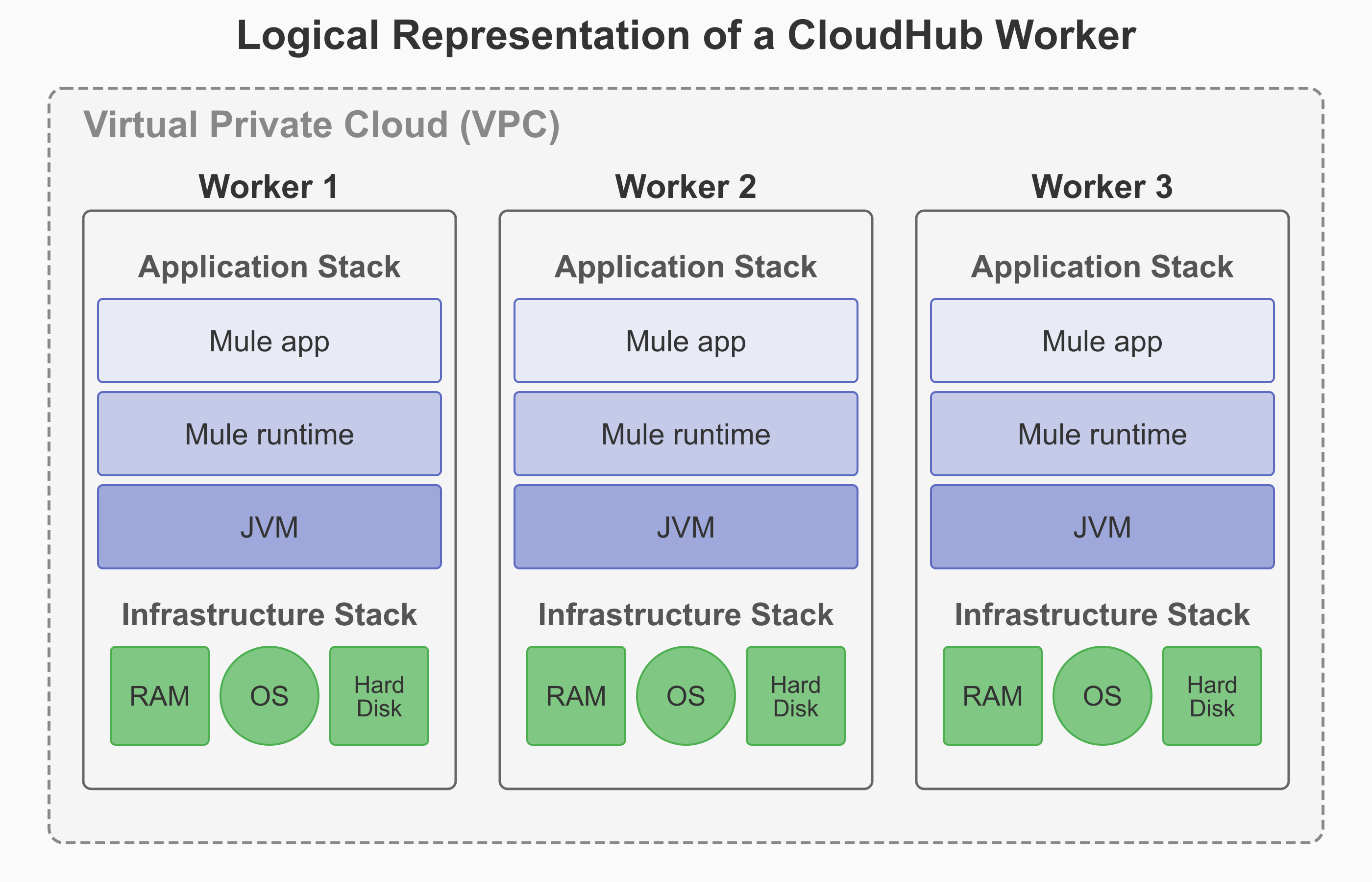
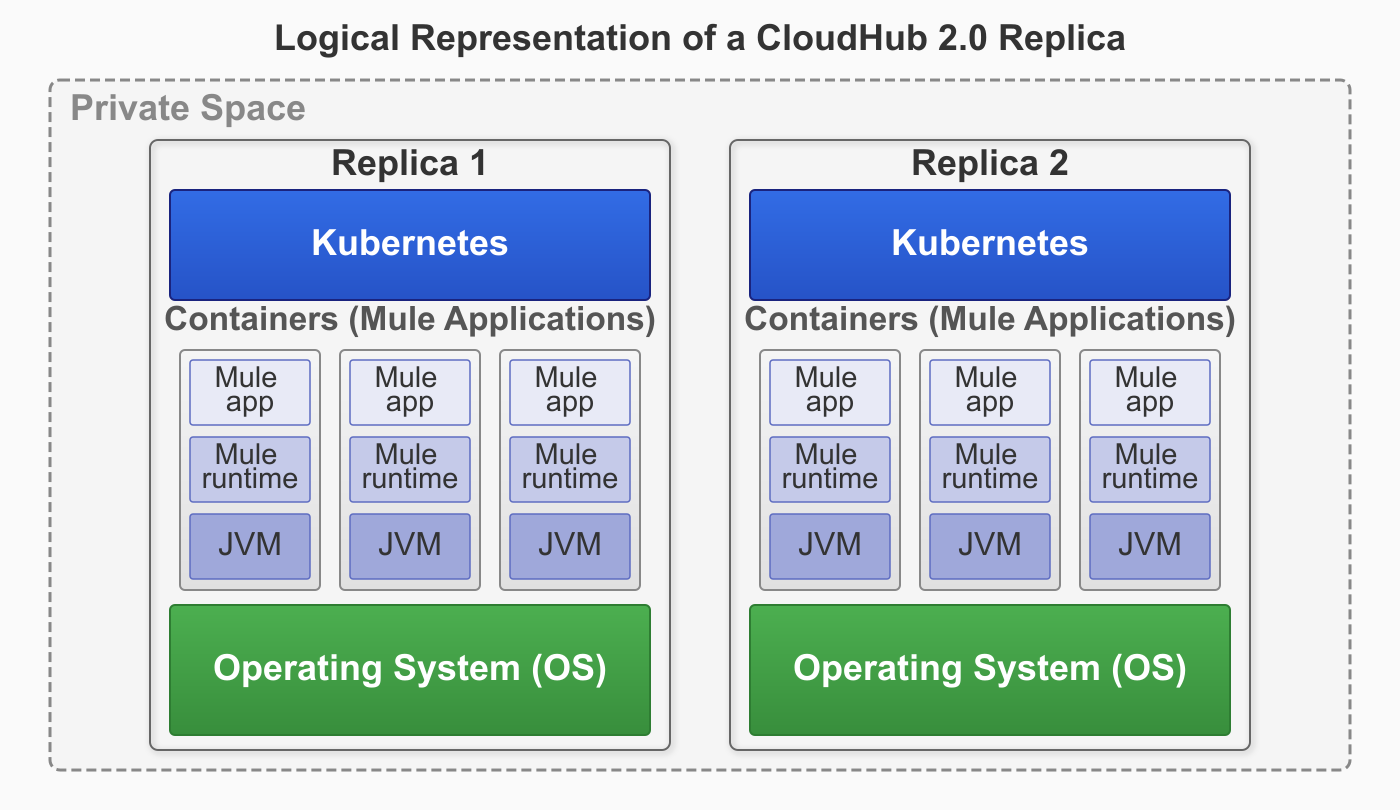
The CloudHub architecture includes two major components: Anypoint Platform services and a multitenant cloud of virtual machines distributed across global regions where your applications run. Individual instances of an application are called workers. CloudHub uses a VM-based infrastructure. | The CloudHub 2.0 architecture includes two major components: Anypoint Platform services and a multitenant cloud of containerized replicas distributed across global regions where your applications run. Individual instances of an application are called replicas. CloudHub 2.0 uses a container-based infrastructure. |
|
|
| CloudHub | CloudHub 2.0 |
|---|---|
A Virtual Private Cloud (VPC) is a virtual, private, and isolated cloud network segment for hosting CloudHub workers. | A private space is a virtual, private, and isolated logical space in CloudHub 2.0 for running Mule apps. |
Static IPs are managed per application, not at the VPC level. Turn on Static IPs for individual apps to receive their own set of egress static IPs. | Static IPs are provisioned at the private space level. All applications in the same private space share these outbound static IPs. |
CloudHub provides a Shared Load Balancer (SLB) by default for all apps. The Dedicated Load Balancer (DLB) is optional, and you create and configure it within the VPC. | CloudHub 2.0 automatically provisions a fully managed ingress load balancer for the private space. |
TLS/SSL certificates require manual configuration. The SLB uses the platform’s wildcard certificate. For custom domains, create a DLB and upload PEM-encoded certificates and private keys. | CloudHub 2.0 automatically creates a default TLS context for the private space with wildcard certificates for both internal and public endpoints. You can configure custom vanity domains with your own TLS context for both internal and external endpoints. |
| CloudHub | CloudHub 2.0 |
|---|---|
|
|
Contact the MuleSoft Support team to enable VPC peering and AWS Direct Connect. | CloudHub 2.0 supports Transit Gateway or VPN tunnel. |
| CloudHub Ingress (Inbound) Rules | CloudHub 2.0 Ingress (Inbound) Rules |
|---|---|
CloudHub adds firewall rules automatically when you create a VPC. | CloudHub 2.0 adds firewall rules automatically when you create a private space. |
By default, all traffic to a VPC is blocked unless explicitly allowed by a firewall rule. However, CloudHub automatically creates four default inbound firewall rules when you create a VPC. | Traffic to a private space is blocked unless explicitly allowed by a firewall rule. |
CloudHub creates four default inbound rules automatically:
| CloudHub 2.0 creates two default inbound rules automatically:
|
CloudHub supports HTTP, HTTPS, and TCP protocols. The Dedicated Load Balancer (DLB) also supports WebSockets (ws and wss). | CloudHub 2.0 supports HTTP, HTTPS, and TCP protocols. The upgrade tooling does not support TCP traffic migration yet. |
The maximum number of firewall rules is approximately 35 per VPC, depending on the number of rules CloudHub requires. | The maximum number of inbound firewall rules is 300. |
| Egress (Outbound) Rules |
|---|
CloudHub doesn’t support egress firewall rules. It allows all outbound traffic by default. |
CloudHub 2.0 creates two default outbound rules automatically. You can configure additional rules and application-level egress rules for granular control. The maximum number of outbound firewall rules is 300. |
CloudHub 2.0 adds two egress rules by default. You can delete these rules if you want to block all outbound traffic for security reasons:
|
| CloudHub 2.0 Application-Level Egress Rules |
|---|
CloudHub 2.0 supports egress firewall rules at the application level. Application-level egress rules are independent of private-space-level firewall rules. See Configuring Application-Level Egress Rules. |
Turn on application-level egress rules in Runtime Manager. |
In CloudHub 2.0, egress traffic passes through both application-level control (enforced first) and private-space-level control (enforced after application-level control). |
Apply application-level egress rules when you deploy your application. See Apply Application-Level Egress Rules. |
You can configure application-level egress connections, such as:
|
| CloudHub | CloudHub 2.0 |
|---|---|
CloudHub supports static IP addresses at the application level. | CloudHub 2.0 supports static IP addresses at the private space level. |
If you turn on Static IPs for an application, CloudHub provides outbound static IPs. | CloudHub 2.0 provides inbound and outbound static IPs at the private space level. |
Applications deployed to the same VPC don’t automatically share static IPs. If you turn on Static IPs for an application, it receives its own set of outbound static IPs. Inbound static IPs are available only through a DLB, and all applications behind the same DLB share them. | Applications deployed to the same private space use the same set of inbound and outbound static IPs. To have unique static IPs per application, use a different private space. |
| CloudHub | CloudHub 2.0 |
|---|---|
CloudHub provides two types of load balancing:
| CloudHub 2.0 automatically provides a fully managed ingress load balancer for each private space with a simplified architecture that removes the need to select or create load balancers. |
CloudHub load balancers provide round-robin load distribution across workers. | CloudHub 2.0 provides a fully managed ingress load balancer for each private space that automatically balances inbound traffic across multiple application replicas. The ingress load balancer auto-scales to accommodate traffic. You can configure this load balancer to meet your specific requirements. |
CloudHub doesn’t support load balancer logs for the DLB. The SLB has no log access. | Download ingress traffic logs from Runtime Manager for full visibility into ingress traffic and troubleshooting. |
You can assign up to four load balancer units (up to eight workers total) to a Dedicated Load Balancer (DLB) for high availability and load distribution. The Shared Load Balancer (SLB) provides fully managed high availability with no customer configuration required. | CloudHub 2.0 automatically distributes application replicas across two or more availability zones (AZs) for built-in high availability and fault tolerance. If you use the VPC upgrade tool, the private space inherits the same number of AZs as the original CloudHub VPC. |
URL decoding is enabled by default at the ingress layer for both SLB and DLB:
| URL encoding is enabled by default at the ingress layer for both Shared Space (SS) and Private Space (PS). CloudHub 2.0 does not support URL decoding at the ingress layer. URLs remain encoded as received from the client. |
| CloudHub | CloudHub 2.0 |
|---|---|
SSL termination happens at the DLB layer. | SSL termination happens at the ingress load balancer layer. |
The communication between the DLB and the Mule application is internal to the VPC. | Applications inside a private space communicate using the ingress load balancer via the internal endpoint. This depends on the application protocol. |
Supported protocols:
| |
An application can have multiple endpoints, depending on the domain and TLS context configuration. |
| CloudHub | CloudHub 2.0 |
|---|---|
CloudHub doesn’t provide native mutual TLS (mTLS) capability. The Dedicated Load Balancer (DLB) handles mTLS at the infrastructure level, performing client certificate validation and forwarding certificate information to applications via HTTP headers. | CloudHub 2.0 provides native mTLS with TLS contexts and truststores. Configure mTLS at the private space level with centralized management. CloudHub 2.0 also supports forward SSL, which forwards client certificate information to applications via HTTP headers. |
CloudHub supports limited Certificate Authority (CA) certificates through the DLB. It accepts certificate files in PEM format only. | CloudHub 2.0 provides dynamic certificate management, application-level truststore access, and in-place updates without redeployment. Upload truststore files in PEM and JKS formats. |
| CloudHub | CloudHub 2.0 |
|---|---|
Implement URL rewriting at the DLB level using mapping rules. Configure a DLB to use this feature. | Implement URL rewrite at the application level using domains and endpoints for a more flexible, per-app configuration. |
| CloudHub | CloudHub 2.0 |
|---|---|
The internal worker hostname | Use one of these three options:
|
| CloudHub | CloudHub 2.0 |
|---|---|
CloudHub persistent queues store VM queue messages externally to the application. Use this feature mainly with VM components. Turn on CloudHub persistent queues on a per-application basis. | Anypoint MQ provides persistent message storage in cloud infrastructure, eliminating VM-dependent queue management. Anypoint MQ provides asynchronous message processing, event-driven architectures, and cross-application communication. Configure Anypoint MQ on a per-application basis with automatic scaling and high availability. |
| CloudHub | CloudHub 2.0 |
|---|---|
During deployment, CloudHub automatically replaces the application archive’s | CloudHub 2.0 merges the |
Download the application and runtime logs separately. | CloudHub 2.0 merges application and runtime logs into a single log stream. To find runtime logs, download the application log and check for runtime-related messages. |
CloudHub stores logs in the region where it was first deployed. If you move the app to another region, the logs remain stored in the initial deployment region. To reset this log retention configuration, delete and re-create the app. | CloudHub 2.0 stores logs in the region where the application is currently deployed. You can’t move the app to a different region once deployed. To reset this log retention configuration, delete and re-create the app. |
CloudHub has limited control over log forwarding. | If you deselect Forward application logs to Anypoint Platform within the app configuration in Runtime Manager:
This provides more granular control over platform log forwarding. |
For more information, see CloudHub 1.0 Logging FAQ | For more information, see CloudHub 2.0 Logging FAQ |
| CloudHub | CloudHub 2.0 |
|---|---|
For affected applications, CloudHub prevents overlapping executions of the same Scheduler even when the Scheduler source’s | CloudHub 2.0 honors the |
| CloudHub | CloudHub 2.0 |
|---|---|
Use maven and | App deployment with maven and
For more information, see Deploy Applications to CloudHub 2.0 Using the Mule Maven Plugin. |
The maximum size of a Mule application (ZIP or JAR) file is 200 MB. | The maximum size of a Mule application JAR file is 350 MB. |
Names are unique per control plane. | Names are unique per private space. CloudHub 2.0 adds a six-character unique ID to the application name that you specify in the public endpoint URL:
|
The DLB supports a maximum HTTP POST (payload) size of 200 MB. | The maximum HTTP request size is 1 GB. |
| CloudHub | CloudHub 2.0 |
|---|---|
See CloudHub Workers. |
| CloudHub | CloudHub 2.0 |
|---|---|
A worker in CloudHub is a dedicated Amazon Elastic Compute Cloud (EC2) virtual machine instance that runs your Mule application. It functions as a full, independent virtual server with its own operating system, memory, CPU resources, and isolated runtime environment. | A replica in CloudHub 2.0 is a dedicated, containerized instance of Mule runtime engine that runs your integration application. Each replica provides complete isolation between applications with its own isolated environment, allocated memory (heap and total), CPU resources (vCores), and storage capacity. |
If you select Automatically restart application when not responding, CloudHub monitors the worker and automatically restarts the application if necessary. | CloudHub 2.0 provides self-healing capabilities that automatically recover applications from both Mule process failures and underlying infrastructure failures. If either the Mule process or the infrastructure fails, CloudHub 2.0 automatically restarts the application on healthy infrastructure without your intervention. Application crash recovery is enabled by default. |
|
|
| CloudHub | CloudHub 2.0 |
|---|---|
CloudHub doesn’t support Mule clustering. You can run multiple workers for scale and High Availability (HA), but they’re independent runtimes without cluster semantics. There’s no distributed in-memory state or cluster-aware components. | CloudHub 2.0 supports Mule clustering. Multiple replicas of the same app form a managed cluster, enabling cluster-aware runtime behavior. This includes shared memory and distributed locking across runtime replicas, with a single primary replica running the application logic and secondary replica(s) available for high-availability if the primary goes down. |
CloudHub scales applications by deploying multiple workers (up to eight) for each application. The SLB automatically distributes traffic across these workers. For applications that need shared state, store that state externally (for example, in a database or Object Store). Workers can’t share in-memory state. | CloudHub 2.0 scales applications by deploying multiple replicas (up to sixteen) for each application. The platform’s cluster mode coordinates behavior across these replicas automatically. For applications with stateful requirements, use Mule’s native clustered features (such as clustered object stores and clustered caches) to maintain state across replicas. |
CloudHub achieves HA with two or more workers. It supports availability across AZs, and the platform handles failover. | CloudHub 2.0 provides fully managed HA. The platform automatically spreads replicas across two or more AZs, with round-robin HTTP load balancing and cluster-aware recovery. If you use the VPC upgrade tool, the private space inherits the same number of AZs as the original CloudHub VPC. |
CloudHub monitors workers and automatically performs restarts. Blue-green deployment at the DLB or SLB layer provides seamless cutover, but this process lacks cluster draining and coordination within the runtime. | CloudHub 2.0 provides orchestrated restarts and rolling updates across replicas. Cluster-aware coordination minimizes impact during upgrades and failures. |
You manage worker counts and rely on external stores for shared state. | CloudHub 2.0 provides fully managed clustering. Select replica counts, and the platform handles cluster formation, health, placement, and recovery. |
| CloudHub | CloudHub 2.0 |
|---|---|
CloudHub triggers custom alerts when your application sends notifications to Runtime Manager using Anypoint Connector for CloudHub (CloudHub Connector). For more information, see Custom Application Alerts. | CloudHub 2.0 enables application deployment success and failure alerts. For custom alerting, CloudHub 2.0 leverages Anypoint Monitoring Alerts For more information, see Configuring Application Alerts. |
| Status | Tunnel 1/2 | Description |
|---|---|---|
|
| The VPN connection is recently created, and actions are pending in the background. You might see this status for 10-15 minutes after creating a VPN. |
|
| The VPN connection is created, but the remote side is not configured or is not sending traffic. |
|
| The VPN connection is created, and the remote side established the connection successfully. Tunnels operate in active/active or active/passive mode, depending on the routing configuration and your VPN device type. |
|
| The VPN connection is not created. Delete the VPN and try again. If this failure recurs, contact MuleSoft Support. |
| Inbound HTTP Mode | Maximum Allowlist Entries |
|---|---|
Off | 240 |
On | 120 |
Redirect | 120 |
| Rule # | Input Path | Target App | Output Path | Protocol |
|---|---|---|---|---|
1 | /{app}/ | {app} | / | http |
| Rule # | Input Path | Target App | Output Path | Protocol |
|---|---|---|---|---|
1 | / | {subdomain} | / | https |
| Rule # | Input Path | Target App | Output Path | Protocol |
|---|---|---|---|---|
1 | / | {subdomain}-app | / | https |
| Rule # | Input Path | Target App | Output Path | Protocol |
|---|---|---|---|---|
1 | / | myApp | / | http |
| Rule # | Input Path | Target App | Output Path | Protocol |
|---|---|---|---|---|
1 | /{layera}/{domaina}/v{versiona}/ | dev-{layera}-{domaina}-{versiona}-myapp | /api/ | http |
| Rule # | Input Path | Target App | Output Path | Protocol |
|---|---|---|---|---|
1 | /v1/applicationX | application-x | /api/ | http |
2 | /v1/applicationY | application-y | /api/ | http |
3 | /v2/applicationx | application-x-v2 | /api/ | http |
| Priority | Input Path | Target App | Output Path | Protocol |
|---|---|---|---|---|
1 | /api/v1/ | default-app | /api/v1/ | http |
2 | /api/v1/secondapp/ | second-app | /api/v1 | http |
| Priority | Input Path | Target App | Output Path | Protocol |
|---|---|---|---|---|
1 | /api/v1/secondapp/ | second-app | /api/v1 | http |
2 | /api/v1/ | default-app | /api/v1/ | http |
| Header Name | Description | Value |
|---|---|---|
| Enables HTTP Strict Transport Security (HSTS) to force HTTPS connections and prevent protocol downgrade attacks. |
|
| Prevents MIME type sniffing attacks by instructing browsers to not override the declared content type. |
|
| Prevents browsers from loading your web page in iframes to protect against click-jacking. |
|
| Enables basic cross-site scripting (XSS) protection in browsers that support it. |
|
| Preserves the original request path before the system applies the DLB mapping rules. It’s injected in the DLB request to the upstream server. | Original request path. For example, |