---
schema_version: "1"
id: a1dfecb2d72fabc8bab03e59e3e4621bdfdf31fbd085852d7ee1c8622804a7b5
title: Sending MDNs to Multiple Partners
collection: mulesoft
version: current
locale: en-us
portal_url: https://docs.salesforce.com/mulesoft/current/en-us/as2-connector/6.9/as2-connector-example-multiple-partners.md
canonical_url: https://docs.mulesoft.com/as2-connector/6.9/as2-connector-example-multiple-partners
source_site: docs.mulesoft.com
content_type: documentation
content_hash: 5726bcd8b651c7969d2319301c16cacad3e2cb535a7a28525029c8d602b2db8f
description: MuleSoft Documentation Site
release: "6.9"
latest: false
---
---
product: AS2 Connector
version: 6.9
---

# Sending MDNs to Multiple Partners

> For the full documentation index, see: https://docs.mulesoft.com/llms.txt

The following example shows how to send Message Disposition Notifications (MDNs) to multiple
partners. This example contains two flows:

- The first flow configures an AS2 listener endpoint to receive inbound AS2 messages.

- The second flow receives message payloads and AS2 sender and receiver information via HTTP. It
  then uses the **Send with Sync MDN** operation to send outbound AS2 messages to a target AS2
  endpoint.

This example is similar to the
[Receiving AS2 Messages and Sending Back MDNs](https://docs.mulesoft.com/as2-connector/6.9/as2-connector-example-receive-send) example, except
that for this example:

- The partner information must already exist in the configured keystore.

- You must configure the partner information as follows in the **Partners** tab of the global
  element:

  - Set the **Listener Mode** field to **Shared mode** and specify details for the additional
    partner.

  - Leave the **Partner config** section of this tab blank or the connector will returns errors. The
    following screenshot highlights this section.
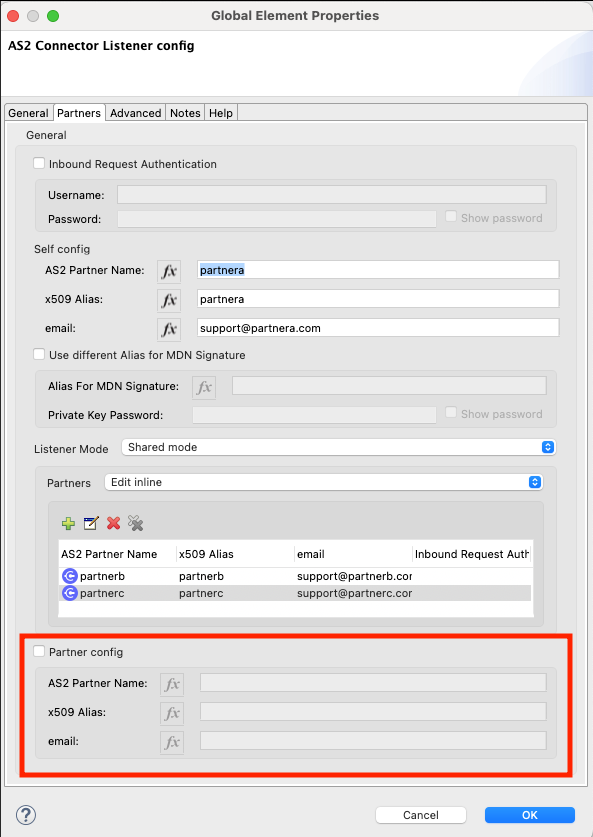
    ![Do not configure fields in the highlighted section of the AS2 Connector Listener config screen](/mulesoft/current/en-us/as2-connector/6.9/_images/as2-connector-example-multi-caveat.png)

## Configuring an AS2 Listener Endpoint to Receive Inbound AS2 Messages

This flow listens for inbound AS2 messages from AS2 Connector send operations and other sources,
such as mendelson AS2 software and HTTP requests:
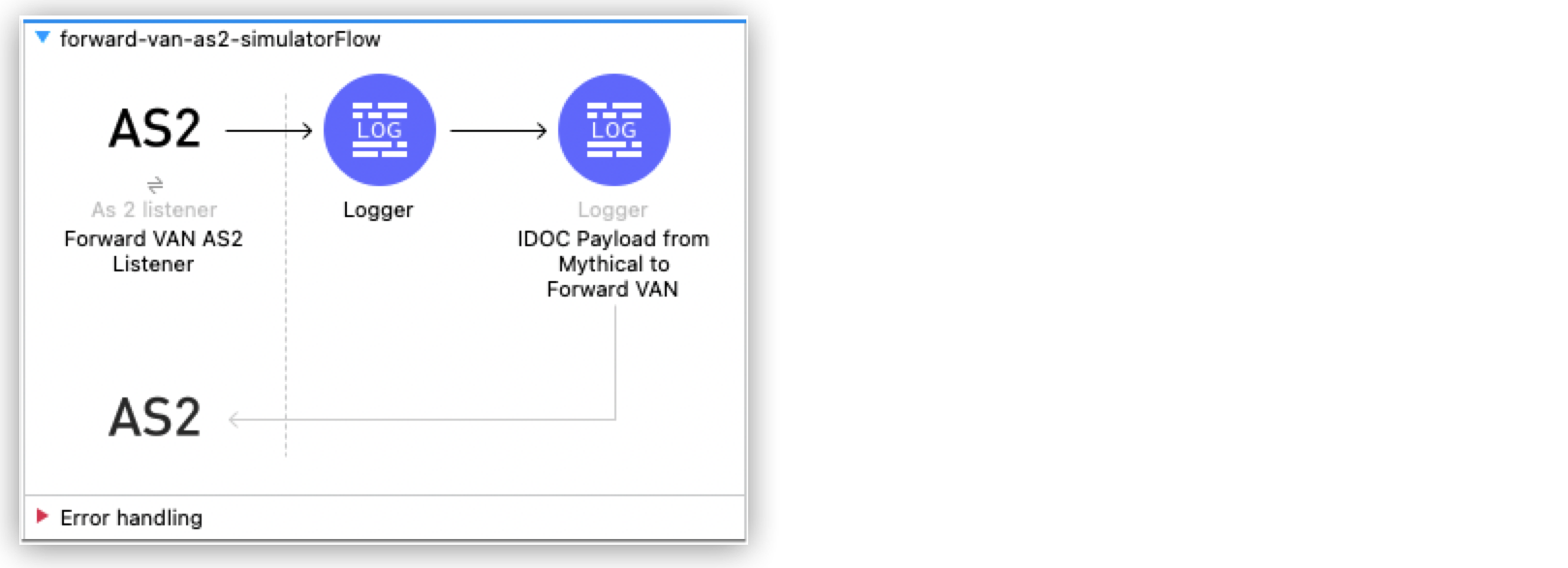
![Flow for exposing the AS2 listener endpoint](/mulesoft/current/en-us/as2-connector/6.9/_images/as2-connector-example-mdn1.png)

You can specify partner information in **shared mode** either by entering it directly or by using an
inline expression.

Paste this code into your Studio XML editor to quickly load the flow for this example into your Mule
app. In this XML code, the partner information is entered directly:

```xml
<?xml version="1.0" encoding="UTF-8"?>
<mule xmlns:http="http://www.mulesoft.org/schema/mule/http"
	xmlns:as2-mule4="http://www.mulesoft.org/schema/mule/as2-mule4" xmlns="http://www.mulesoft.org/schema/mule/core"
	xmlns:doc="http://www.mulesoft.org/schema/mule/documentation"
	xmlns:xsi="http://www.w3.org/2001/XMLSchema-instance" xsi:schemaLocation="
http://www.mulesoft.org/schema/mule/http http://www.mulesoft.org/schema/mule/http/current/mule-http.xsd http://www.mulesoft.org/schema/mule/core http://www.mulesoft.org/schema/mule/core/current/mule.xsd
http://www.mulesoft.org/schema/mule/as2-mule4 http://www.mulesoft.org/schema/mule/as2-mule4/current/mule-as2-mule4.xsd">
	<http:listener-config name="HTTP_Server_Config" doc:name="HTTP Listener config" >
		<http:listener-connection host="0.0.0.0" port="8081" />
	</http:listener-config>
	<as2-mule4:listener-config name="AS2_Server_Listener" doc:name="AS2 Connector Listener config" httpListenerConfig="HTTP_Server_Config" securityLevel="SIGNED_ENCRYPTED">
		<as2-mule4:self-config as2Name="partnera" x509Alias="partnera" email="support@partnera.com"/>
		<as2-mule4:listener-mode >
			<as2-mule4:shared-mode>
				<as2-mule4:partner-configs >
					<as2-mule4:partner-detail-extended as2Name="partnerb" x509Alias="partnerb" email="support@partnerb.com" />
					<as2-mule4:partner-detail-extended as2Name="partnerc" x509Alias="partnerc" email="support@partnerc.com" />
				</as2-mule4:partner-configs>
			</as2-mule4:shared-mode>
		</as2-mule4:listener-mode>
		<as2-mule4:key-store-config keystorePassword="test" keystorePath="as2/partnera.p12" privateKeyPassword="test" />
	</as2-mule4:listener-config>
	<flow name="AS2Listener" >
		<as2-mule4:as2-listener doc:name="As 2 listener" config-ref="AS2_Server_Listener" path="/as2-receive"/>
		<logger level="INFO" doc:name="Message Received!" message="Message Received: #[payload]"/>
	</flow>
</mule>
```

To specify partner information with an inline expression, use this XML code:

```xml
<?xml version="1.0" encoding="UTF-8"?>
<mule xmlns:http="http://www.mulesoft.org/schema/mule/http"
	xmlns:as2-mule4="http://www.mulesoft.org/schema/mule/as2-mule4" xmlns="http://www.mulesoft.org/schema/mule/core"
	xmlns:doc="http://www.mulesoft.org/schema/mule/documentation"
	xmlns:xsi="http://www.w3.org/2001/XMLSchema-instance" xsi:schemaLocation="
http://www.mulesoft.org/schema/mule/http http://www.mulesoft.org/schema/mule/http/current/mule-http.xsd http://www.mulesoft.org/schema/mule/core http://www.mulesoft.org/schema/mule/core/current/mule.xsd
http://www.mulesoft.org/schema/mule/as2-mule4 http://www.mulesoft.org/schema/mule/as2-mule4/current/mule-as2-mule4.xsd">
	<http:listener-config name="HTTP_Server_Config" doc:name="HTTP Listener config" >
		<http:listener-connection host="0.0.0.0" port="8081" />
	</http:listener-config>

	<as2-mule4:listener-config name="AS2_Server_Listener" doc:name="AS2 Connector Listener config" httpListenerConfig="HTTP_Server_Config" securityLevel="SIGNED_ENCRYPTED">
    	<as2-mule4:self-config as2Name="partnera" x509Alias="partnera" email="support@partnera.com"/>
    	<as2-mule4:listener-mode >
        	<as2-mule4:shared-mode partnerConfigs='#[[&#10;	{as2Name:"partnerb", x509Alias:"partnerb", email:"support@partnerb.com"},&#10;	{as2Name:"partnerc", x509Alias:"partnerc", email:"support@partnerc.com"}&#10;]]' />
    	</as2-mule4:listener-mode>
    	<as2-mule4:key-store-config keystorePassword="test" keystorePath="as2/partnera.p12" privateKeyPassword="test" />
	</as2-mule4:listener-config>
	<flow name="AS2Listener" >
		<as2-mule4:as2-listener doc:name="As 2 listener" config-ref="AS2_Server_Listener" path="/as2-receive"/>
		<logger level="INFO" doc:name="Message Received!" message="Message Received: #[payload]"/>
	</flow>
</mule>
```

## Sending Outbound AS2 Messages to the Configured AS2 Endpoint

This flow listens for messages, logs a message and its payload, and then uses the **Send with Sync
MDN** operation to forward the message to the exposed AS2 endpoint:
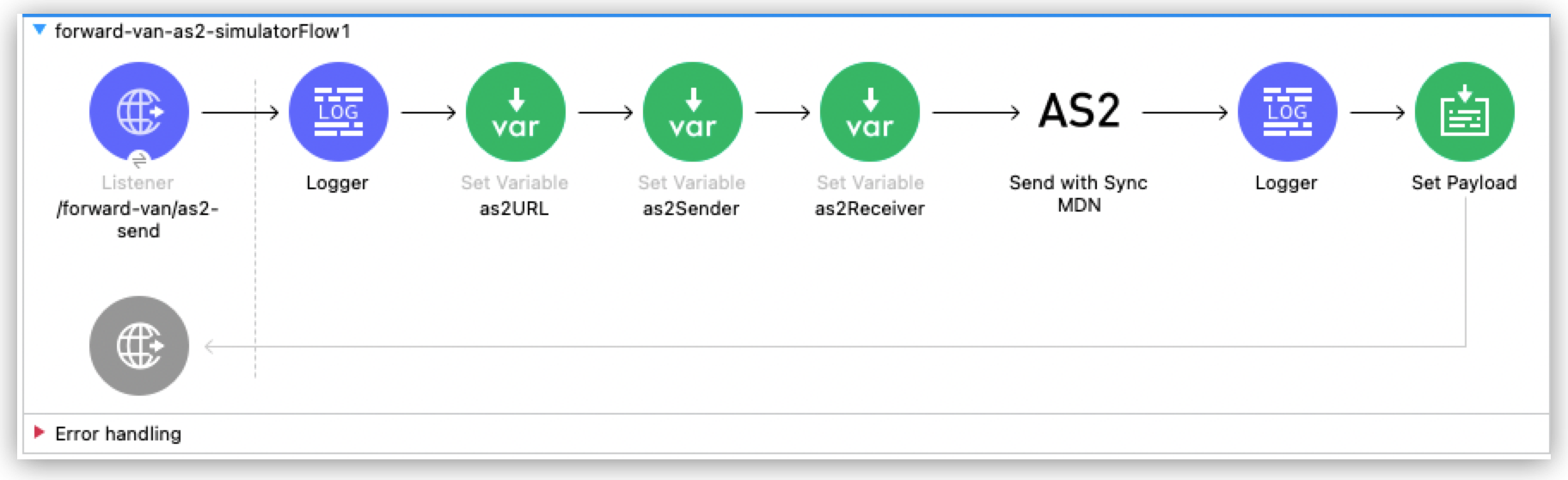
![Flow for forwarding AS2 messages to the exposed endpoint](/mulesoft/current/en-us/as2-connector/6.9/_images/as2-connector-mdn2-example.png)

Paste this code into your Studio XML editor to quickly load the flow for this example into your Mule
app:

```xml
<?xml version="1.0" encoding="UTF-8"?>
<mule xmlns:ee="http://www.mulesoft.org/schema/mule/ee/core" xmlns:tls="http://www.mulesoft.org/schema/mule/tls"
	xmlns:http="http://www.mulesoft.org/schema/mule/http"
	xmlns:as2-mule4="http://www.mulesoft.org/schema/mule/as2-mule4" xmlns="http://www.mulesoft.org/schema/mule/core" xmlns:doc="http://www.mulesoft.org/schema/mule/documentation" xmlns:xsi="http://www.w3.org/2001/XMLSchema-instance" xsi:schemaLocation="http://www.mulesoft.org/schema/mule/core http://www.mulesoft.org/schema/mule/core/current/mule.xsd
http://www.mulesoft.org/schema/mule/as2-mule4 http://www.mulesoft.org/schema/mule/as2-mule4/current/mule-as2-mule4.xsd
http://www.mulesoft.org/schema/mule/http http://www.mulesoft.org/schema/mule/http/current/mule-http.xsd
http://www.mulesoft.org/schema/mule/tls http://www.mulesoft.org/schema/mule/tls/current/mule-tls.xsd
http://www.mulesoft.org/schema/mule/ee/core http://www.mulesoft.org/schema/mule/ee/core/current/mule-ee.xsd">
	<http:listener-config name="HTTP_Listener_config" doc:name="HTTP Listener config" basePath="b2b" >
		<http:listener-connection protocol="HTTPS" host="0.0.0.0" port="${https.port}" >
			<tls:context >
				<tls:key-store type="jks" path="rootca.jks" alias="rootca" keyPassword="test" password="test" />
			</tls:context>
		</http:listener-connection>
	</http:listener-config>
	<configuration-properties doc:name="Configuration properties" file="app.properties" />
	<as2-mule4:send-config name="AS2_Connector_Send_config" doc:name="AS2 Connector Send config" >
		<as2-mule4:connection partnerURL="#[vars.as2URL]" >
			<tls:context >
				<tls:trust-store insecure="true" />
			</tls:context>
		</as2-mule4:connection>
		<as2-mule4:self-config as2Name="#[vars.as2Sender]" x509Alias="#[vars.as2Sender]" email="support@forward-van.com" />
		<as2-mule4:partner-config as2Name="#[vars.as2Receiver]" x509Alias="#[vars.as2Receiver]" email="support@mythical.com"/>
		<as2-mule4:requester-config subject="EDI" messageIntegrityCheckAlgorithm="SHA256" mdnMessageIntegrityCheckAlgorithm="SHA256" encryptionAlgorithm="DES_EDE3" requestReceipt="SIGNED_REQUIRED"/>
		<as2-mule4:keystore-config keystorePassword="test" keystorePath="as2/forward-van.p12" privateKeyPassword="test" />
	</as2-mule4:send-config>
	<flow name="forward-van-as2-simulatorFlow1" >
		<http:listener doc:name="/forward-van/as2-send" config-ref="HTTP_Listener_config" path="/forward-van/as2-send"/>
		<logger level="INFO" doc:name="Logger" message="Forward VAN is sending IDOC to Mythical via AS2"/>
		<set-variable value="#[attributes.headers.'as2-URL']" doc:name="as2URL" variableName="as2URL"/>
		<set-variable value="#[attributes.headers.'as2-from']" doc:name="as2Sender" variableName="as2Sender"/>
		<set-variable value="#[attributes.headers.'as2-to']" doc:name="as2Receiver" variableName="as2Receiver"/>
		<as2-mule4:send-with-sync-mdn doc:name="Send with Sync MDN" config-ref="AS2_Connector_Send_config" outputMimeType="application/EDI-X12">
			<as2-mule4:custom-headers ><![CDATA[#[output application/java
---
{
	"PLANT-CODE" : "ABC-12345"
}]]]></as2-mule4:custom-headers>
		</as2-mule4:send-with-sync-mdn>
		<logger level="INFO" doc:name="Logger" message="#[output application/json --- attributes]"/>
		<set-payload value="#[output application/json --- attributes.as2MdnAttributes]" doc:name="Set Payload" />
	</flow>
</mule>
```

## See Also

- [AS2 Connector Examples](https://docs.mulesoft.com/as2-connector/6.9/as2-connector-examples)

- [Introduction to Anypoint Connectors](https://docs.mulesoft.com/connectors/introduction/introduction-to-anypoint-connectors)

- [Salesforce Help](https://help.salesforce.com)
