---
schema_version: "1"
id: e93c7401d5779fa315d6f454bad3fc9ec9469455159984dc23d2c7ab73471bf7
title: Building, Implementing, and Testing an OData V2 API
collection: mulesoft
version: current
locale: en-us
portal_url: https://docs.salesforce.com/mulesoft/current/en-us/apikit/latest/creating-an-odatav2-api-with-apikit.md
canonical_url: https://docs.mulesoft.com/apikit/latest/creating-an-odatav2-api-with-apikit
source_site: docs.mulesoft.com
content_type: documentation
content_hash: 973d2217f87ec5ed5ef410218086df6151e1c23a6130bc176cbb0de528cab0e7
description: MuleSoft Documentation Site
release: 4.x
latest: true
---
---
product: APIkit
version: 4.x
is-latest-version: true
---
# Building, Implementing, and Testing an OData V2 API
> For the full documentation index, see: https://docs.mulesoft.com/llms.txt
Build an OData v2 REST API with APIkit for OData and the MySQL walkthrough: generate flows from RAML
types, connect to a sample database, and exercise HTTP and OData endpoints. The OData MySQL example
packages a working Maven project you import into Anypoint Studio.
## Before You Begin
Install this software to create and use an OData REST API with APIkit:
- OData Plugin
- Mule runtime engine 4.1.1 or later
- Anypoint Studio 7.1.4 or later
Additionally, you must download the [OData example entity data model](https://docs.mulesoft.com/apikit/latest/_attachments/odata.raml).
## Implement an OData v2 API Using the APIkit OData Extension
This section walks through implementing an OData-enabled REST API:
1. In Studio, select **File** > **New** > **Mule Project**.
2. In the **Project Name** field, type the name of your Mule project.
3. Click **Finish**.
4. Copy the `odata.raml` file you downloaded in the prerequisites section to the
`/src/main/resources/api` directory in your project.
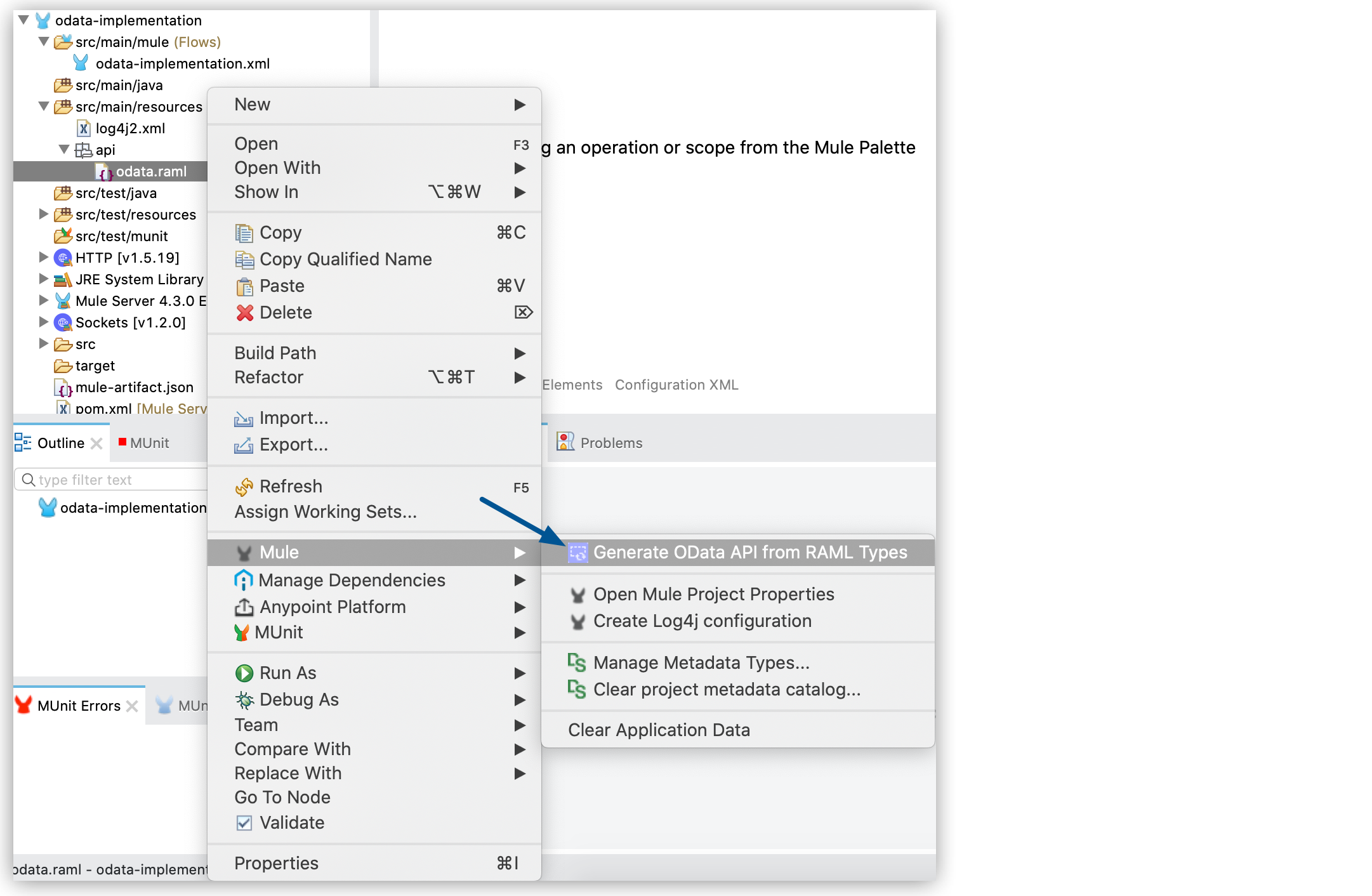
5. In the project explorer, right-click `odata.raml` and select **Mule** > **Generate OData API
from RAML Types**.
6. The OData extension generates the necessary files for your OData API implementation:
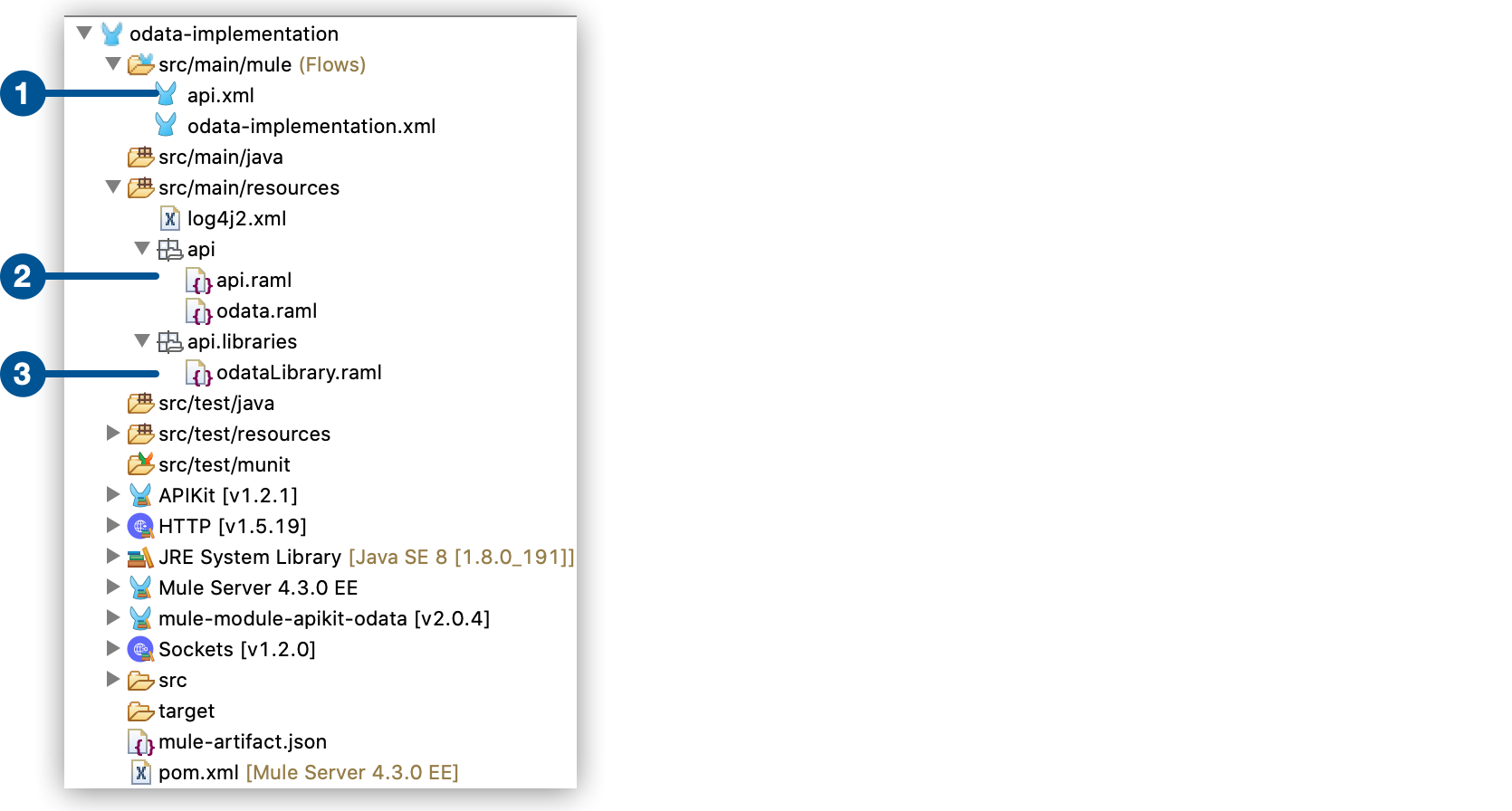
1
Mule configuration file with the flows for the API implementation
2
Generated RAML definition
3
Generated RAML libraries
7. Add the necessary logic for your API implementation in the flows.
## OData MySQL Example
The OData MySQL example is a fully functional OData API packaged as a Maven project. In this
example, the data source, the app, and the service are local.
First, you install a MySQL database and load tables using a provided script. Next, you import the
compressed project into Studio, which includes a MySQL database driver. You can examine the flows to
see how to implement the endpoints you need by accessing the data. Then you run the project and call
the REST and OData services.
### Install and Populate a MySQL Database
1. Install a MySQL database and launch MySQL.
2. Download the MySQL project example
[apikit-odata-example-main.jar](https://docs.mulesoft.com/apikit/latest/_attachments/apikit-odata-example-main.jar).
3. Run the `example.sql` script located in `src/main/resources` using MySQL commands to load data
into a database named `apikit-odata-example`.
### Implement the OData API
1. In Studio, Select **File** > **Import**.
2. Select **Anypoint Studio** > **Packaged mule application (.jar)** > **Next**.
3. Browse for the `apikit-odata-example-main.jar` file and click **Finish**.
4. In Studio, edit the `mule-configuration.properties` file in the `src/main/resources` folder, and
set the following properties to access the local MySQL database:
```html
ds.db.port=3306 ds.db.user=
ds.db.host=
ds.db.database=apikit-odata-example ds.db.password=
```
5. Run the API locally by right-clicking the project, and selecting **Run As** > **Mule
Application**.
You can now access the REST and OData Service.
## Access the REST and OData Service
To run the API locally:
1. Right-click the project, and select **Run As** > **Mule Application**.
2. Access the REST and OData Service by using the following URLs:
- REST API: `/api`
- OData API: `/api/odata.svc`
The following examples cover a few of the many REST calls and OData queries you can use.
### Retrieve a List of Customers
Call the REST API to retrieve the list of customers:
http://localhost:8081/api/customers
The response is:
```JSON
{
"entries": [
{
"ContactName": "Maria Anders",
"ContactTitle": "Sales Representative",
"CompanyName": "Alfreds Futterkiste",
"CustomerID": ""
},
{
"ContactName": "Maria Anders",
"ContactTitle": "Sales Representative",
"CompanyName": "Alfreds Futterkiste",
"CustomerID": "ALFKI"
},
]
}
```
### Access a Description of the OData Service
Get information about the collections behind this service:
http://localhost:8081/api/odata.svc
The response is:
```xml
Defaultcustomersorders
```
### Get OData Service Metadata
The service metadata exposes the structure of OData service resources, operations, and EDM for a
given service.
Get the metadata for HTTP services:
http://localhost:8081/api/odata.svc/$metadata
The response aligns with the `odata.raml` EDM you used to build the HTTP Services API example:
```xml
...
```
### Create a Customer Entity Using OData Service
Create a POST request with the following body:
BOTTMBottom-Dollar MarketsElizabeth LincolnAccounting Manager
The request must have the following headers:
Content-Type: application/xml Accept: application/xml
Call the REST API to create a customer entity:
http://localhost:8081/api/odata.svc/customers
### Query the Data Source
Issue OData queries to get the list of customers in XML and JSON format:
http://localhost:8081/api/odata.svc/customers
http://localhost:8081/api/odata.svc/customers?$format=json
Issue an OData query to get the tenth customer in the customer list:
http://localhost:8081/api/odata.svc/customers?$format=json&$top=1&$skip=10&$inlinecount=allpages
The response is:
```json
{
"d": {
"results": [
{
"__metadata": {
"uri": "http:/localhost:8081/api/odata.svc/customers('BOTTM')",
"type": "odata2.namespace.customers"
},
"CompanyName": "Bottom-Dollar Markets",
"ContactName": "Elizabeth Lincoln",
"ContactTitle": "Accounting Manager",
"CustomerID": "BOTTM"
}
],
"__count": "98"
}
}
```
## Implement Endpoints for an OData API
You can implement API endpoints such as the `get:/customers:config` and `get:/orders:config` flows
using Anypoint Studio. The output format of the flows must be JSON. For more information, see the
[complete functioning example](https://docs.mulesoft.com/apikit/latest/creating-an-odatav4-api-with-apikit#odata-mysql-example).
### Declare Input Variables for a GET
1. Declare a variable for the APIkit OData Service variable that contains the fields of your entity
in a list of strings (List). For example:
```javascript
var entityFields = vars.odata.fields;
```
2. Declare a variable for the APIkit OData Service variable that filters into 'http.query.params'.
For example:
```javascript
var filters = attributes.queryParams;
```
3. Declare a variable for the APIkit OData Service variable that contains the keys of your entity.
For example:
```javascript
var keys = vars.odata.keyNames;
```
4. Declare a variable for the APIkit OData Service variable that contains the table name. For
example:
```javascript
var remoteEntityName = vars.odata.remoteEntityName;
```
### Declare Input Variables for a POST
1. Declare a variable for the APIkit OData Service inbound property that contains the entity’s
name:
```javascript
var remoteEntityName = vars.odata.remoteEntityName;
```
2. Declare a variable for transforming your payload into something like this: { myKey1: 'myValue1',
myKey2: 'myValue2'}.
```javascript
var valuesFromPayload = {
keys: payload pluck $$,
values: payload pluck "'$'"
}
```
3. Declare two variables, and use 'joinBy' to transform your keys and values into
comma-separated-values (CSV). For example:
```javascript
var columns = ( (valuesFromPayload.keys map "`$`" ) joinBy ", ") // myKey1, myKey2
var values = (valuesFromPayload.values joinBy ", ") // 'myValue1', 'myValue2'
```
### Format Output
The output for each flow must conform to the following format:
```xml
{
"entries":
[
{},
{},
{}
]
}
```
## See Also
- [APIkit for OData v2 Module Reference](https://docs.mulesoft.com/apikit/latest/apikit-odatav2-extension-reference)
- [Deploy to CloudHub](https://docs.mulesoft.com/cloudhub/deploying-to-cloudhub)