---
schema_version: "1"
id: 333be84698bde3be35d9492087943030e7f5a1e20931b07fcbd2f435b32fe751
title: Iteratively Design and Implement APIs
collection: mulesoft
version: current
locale: en-us
portal_url: https://docs.salesforce.com/mulesoft/current/en-us/anypoint-code-builder/imp-implement-local-apis.md
canonical_url: https://docs.mulesoft.com/anypoint-code-builder/imp-implement-local-apis
source_site: docs.mulesoft.com
content_type: documentation
content_hash: 8ec01c9491f657fd9a27c62cd702af0c1adce15e01945ac41c988b83a4c3ac95
description: MuleSoft Documentation Site
latest: true
---
---
product: Anypoint Code Builder
version: master
---
# Iteratively Design and Implement APIs
> For the full documentation index, see: https://docs.mulesoft.com/llms.txt
Using Anypoint Code Builder, you can scaffold an API specification into a new integration project
without first publishing the API to Anypoint Exchange. As you make changes, you sync changes in the
project by re-scaffolding the spec. For example, after adding a new endpoint to your API spec, you
re-scaffold to add a new flow for that endpoint to the configuration XML file.
Anypoint Code Builder supports scaffolding these schema fragment files if they’re referenced from
API specs:
| Avro | JSON | RAML |
|---|
AsyncAPI | Yes | Yes | No |
GraphQL | No | No | Yes |
OData | No | No | Yes |
REST | No | Yes | Yes |
SOAP | No | No | Yes |
If you add a fragment that isn’t supported, the scaffolder doesn’t add these fragments as project
dependencies when you import the spec from Exchange. However, you can scaffold schemas that are
specified inline within the spec.
For AsyncAPI specifications, iterative design and implementation is not supported at this time.
After syncing the API spec and related Mule project, you can modify the API specification and
implement changes simultaneously.
By using this method to implement the API, you reflect your changes to your API design directly into
the interface in your Mule project. Iterating between API design and implementation tasks speeds up
the development process.
When you’re ready, publish your API specification to Exchange and deploy your Mule project.
When you scaffold your API specification into a new integration project, Anypoint Code Builder
creates a configuration XML for your implementation.
## Multi-Root Workspace Considerations
When you scaffold an API, Anypoint Code Builder creates a _multi-root workspace_ in VS Code with
both the API spec and integration projects and keeps them synchronized.
VS Code uses a file with the extension `.code-workspace` to store your multi-root workspace. This
file maps the folders for your API spec and implementation projects.
> [!IMPORTANT] For your projects to work properly, the `.code-workspace` file _must not reside_
> within either project folder.
In addition, Anypoint Code Builder permits only one pair of iterative design and implementation
project folders per multi-root workspace.
For general information about using workspaces in Anypoint Code Builder, see
[Working with Workspaces](https://docs.mulesoft.com/anypoint-code-builder/start-workspaces).
For more information, see
[Multi-root Workspaces](https://code.visualstudio.com/docs/editing/workspaces/multi-root-workspaces)
in the VS Code documentation.
## Before You Begin
- [Set up and access Anypoint Code Builder](https://docs.mulesoft.com/anypoint-code-builder/start-acb).
- [Create and test your API specification](https://docs.mulesoft.com/anypoint-code-builder/des-create-api-specs).
## Scaffold an API Spec into a New Implementation Project
To scaffold the current API spec into a new implementation project:
1. Click the  (**Implement this local API**) icon in the
activity bar:
Alternatively, use the Command Palette.
Show me how
1. Open the Command Palette
- Use the keyboard shortcuts:
- Mac: Cmd+Shift+p
- Windows: Ctrl+Shift+p
- Select **View** > **Command Palette**.
2. Select the following command:
```command
MuleSoft: Implement this Local API
```
2. At the prompt, click **OK**:

After the workspace is created, Anypoint Code Builder builds and packages the API specification,
and publishes it to a local Maven repository as a snapshot.
3. Navigate to a directory for your new project, and click **Save**.
Anypoint Code Builder starts creating a multi-root workspace with your API specification and
Mule project.
In the multi-root workspace, you can work with both your API specification and Mule project
folders at the same time.
> [!IMPORTANT] Do not accept the default location.
>
> Save your `.code-workspace` file in a directory outside of your project folder, _not_ within
> your API spec folder.
4. When prompted, provide project configuration details:
1. Provide a name for your Mule project.
2. Navigate to a folder for your Mule project, and click **Select target folder**.
3. Select a Mule runtime version for the project.
4. Select a Java version for the project.
Anypoint Code Builder scaffolds your local API specification into a new Mule project and
displays a message when complete:

Both the API spec and the Mule project open, for example:
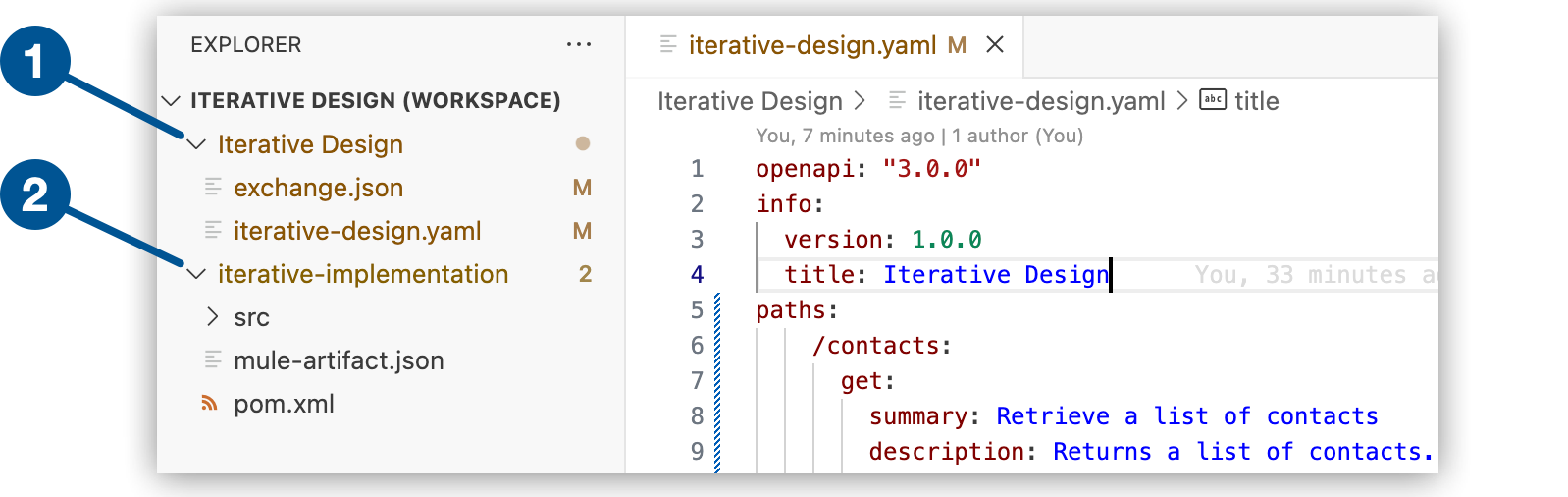
| 1 | API spec |
| 2 | Implementation project |
5. In the Explorer view, open the configuration XML file for your interface.
6. Click the  (**Show canvas UI**) icon in the activity bar to open
the canvas if it doesn’t open automatically.
Notice that the new Mule project includes flows for each endpoint, a built-in XML-based router,
and error handlers, which you then implement within a Mule application.
You can switch between the spec and the implementation project in the Explorer view.
To close or reopen your workspace later, see [Working with Workspaces](https://docs.mulesoft.com/anypoint-code-builder/start-workspaces).
## Re-Scaffold the API Spec
After making changes to your API spec, such as adding a new endpoint, re-scaffold the spec to update
your Mule project:
1. In the Explorer view, navigate to the API spec file.
2. Open the Command Palette.
Show me how
- Use the keyboard shortcuts:
- Mac: Cmd+Shift+p
- Windows: Ctrl+Shift+p
- Select **View** > **Command Palette**.
3. Select the following command:
```command
MuleSoft: Re-scaffold this local API
```
> [!NOTE] This command is available only for API specifications that haven’t been published to
> Anypoint Exchange. If you publish the spec to Exchange, re-scaffolding is no longer available
> for that asset.
After you see the message that your project was rescaffolded successfully, navigate to your
implementation XML file, and notice the new flow was added.
## See Also
- [Working with Workspaces](https://docs.mulesoft.com/anypoint-code-builder/start-workspaces)
- [Iteratively Design and Implement an API Specification](https://docs.mulesoft.com/anypoint-code-builder/tut-local-api-specification) Tutorial