---
schema_version: "1"
id: de2f51ec74a27a9d46dcfe5dc0b935271ab0ba77a68b739e2ba3d4f6a37226d0
title: Shopper Products
collection: developer
version: current
locale: en-us
portal_url: https://docs.salesforce.com/developer/current/en-us/commerce-cloud/commerce-api/references/generated-api-specs/shopper-products.md
canonical_url: https://developer.salesforce.com/docs/commerce/commerce-api/references/shopper-products
source_site: developer.salesforce.com
content_type: documentation
content_hash: dbf008852c65832e8511be61881f339359ea36b811f0b1fffb72e76642328580
products:
- B2C Commerce API
- Salesforce APIs
---
Shopper Products
# Shopper Products
[Download API specification](https://developer.salesforce.com/static/commercecloud/commerce-api/shopper-products/shopper-products-oas-v1-public.yaml)
## API Overview
The Shopper Products API enables you to access product details for products that are online, merchandised to a particular site catalog, and ready to be sold. You can use these product details to merchandise the product on other ecommerce channels. To set up category navigation paths on other commerce apps or storefronts, you can use the Categories API.
### Authentication & Authorization
The client requesting the product information must have access to the Products resource. The Shopper Products API requires a shopper access token from the Shopper Login and API Access Service (SLAS).
You must include the relevant scopes in the client ID used to generate the SLAS token. For a full list of required permissions, see the [Authorization Scopes Catalog.](https://developer.salesforce.com/docs/commerce/commerce-api/guide/auth-z-scope-catalog.html)
For details on how to request a shopper access token from SLAS, see the guest user flows for [public clients](https://developer.salesforce.com/docs/commerce/commerce-api/guide/slas-public-client.html#guest-user) and [private clients](https://developer.salesforce.com/docs/commerce/commerce-api/guide/slas-private-client.html#guest-user) in the SLAS guides.
### Customization
#### Custom Properties
This API supports custom properties (prefixed with `c_`). For details, see [Custom Properties.](https://developer.salesforce.com/docs/commerce/commerce-api/guide/custom-properties.html)
#### Hooks
For details on working with hooks, see [Extensibility with Hooks.](https://developer.salesforce.com/docs/commerce/commerce-api/guide/extensibility_via_hooks.html)
### Request Details
#### Property Selection
This API supports the `select` query parameter for filtering response properties. For details, see [Property Selection.](https://developer.salesforce.com/docs/commerce/commerce-api/guide/scapi-property-selection.html)
#### URL Encoding
If resource identifiers in request parameters contain commas (`,`) or percent signs (`%`), they must be URL encoded. For details, see [Encode URL Special Characters.](https://developer.salesforce.com/docs/commerce/commerce-api/guide/url-encode.html)
### Response Details
#### Personalization
Responses from this API can be personalized using the [Shopper Context API.](https://developer.salesforce.com/docs/commerce/commerce-api/guide/shopper-context-api.html) By setting context attributes such as customer group, source code, or store ID, you can retrieve personalized promotions, pricing, and shipping methods. For details on how personalization interacts with caching, see [Personalized Caching.](https://developer.salesforce.com/docs/commerce/commerce-api/guide/server-side-web-tier-caching.html#personalized-caching)
#### Caching
Caching is provided for this API. For details, see [Server-Side Web-Tier Caching.](https://developer.salesforce.com/docs/commerce/commerce-api/guide/server-side-web-tier-caching.html)
#### Timeouts
Shopper API requests must respond within 10 seconds, including any hook execution. If a response exceeds this threshold, an HTTP 504 status code is returned. For details, see [Timeouts and Limits.](https://developer.salesforce.com/docs/commerce/commerce-api/guide/timeouts-limits.html)
#### Error Handling
Error responses follow the [RFC 7807](https://datatracker.ietf.org/doc/html/rfc7807) problem detail format. To trace errors, include a `correlation-id` header in your request — the response returns it as `x-correlation-id`. For details, see [HTTP Status Codes and Errors.](https://developer.salesforce.com/docs/commerce/commerce-api/guide/error-response-codes.html)
### Use Cases
#### Get a Single Product
Retrieve product details by ID. Replace `{access_token}` with a valid SLAS token.
```sh
curl "https://{shortCode}.api.commercecloud.salesforce.com/product/shopper-products/v1/organizations/{organizationId}/products/25695327M?siteId=RefArch" \
-H "Authorization: Bearer {access_token}"
```
#### Get Multiple Products
Retrieve up to 24 products in a single request:
```sh
curl "https://{shortCode}.api.commercecloud.salesforce.com/product/shopper-products/v1/organizations/{organizationId}/products?ids=25695327M,25519318M&siteId=RefArch" \
-H "Authorization: Bearer {access_token}"
```
#### Populate Product Listing Pages
Use the Shopper Product API so that a customer, browsing on a commerce shopping app built using Commerce Cloud APIs, can see a list of products. For example, hydrate a list of products (max 24). The API returns product details including images, prices, promotions, and product availability.

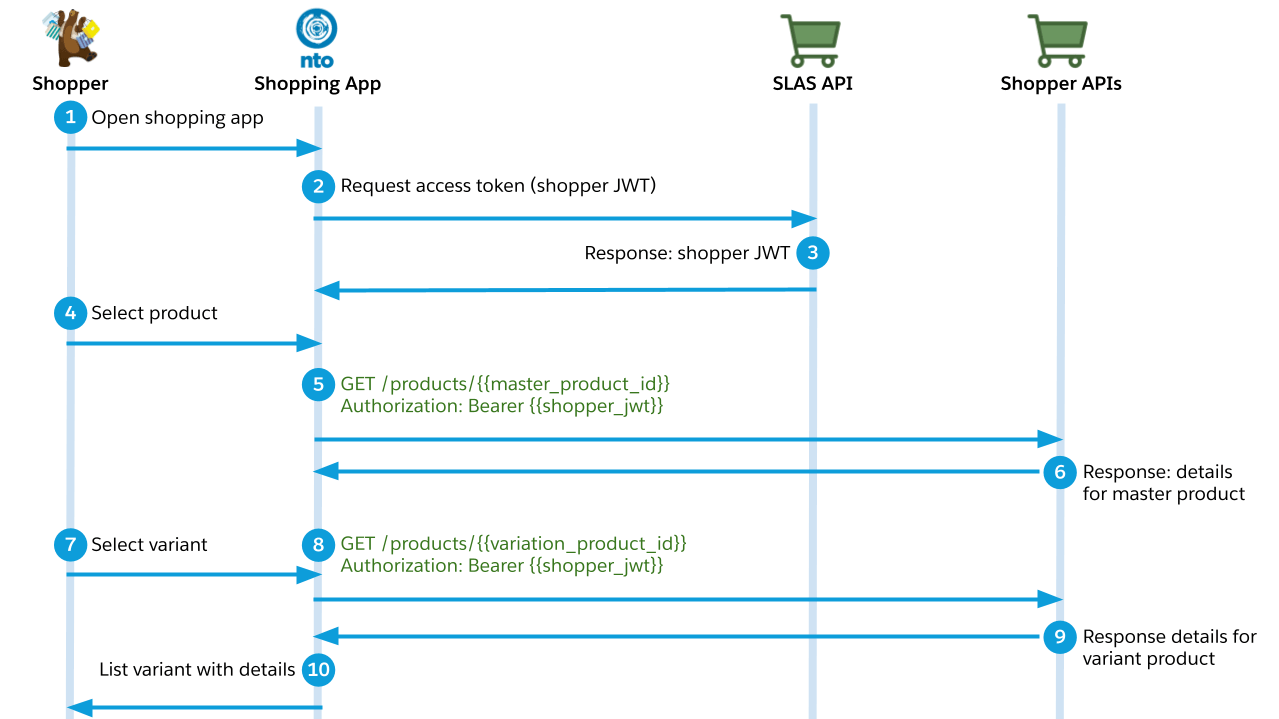
#### Get Variation Product Details on an Ecommerce Channel
Use the API so that a customer, browsing on a commerce shopping app built using Commerce Cloud APIs, can switch between different variation products. The API returns product details including images, prices, promotions, and available to sell inventory.
#### Retrieve Promotion Information
Promotions provide discounts to shoppers when they meet certain purchase requirements.
Promotion information is described in detail in [Promotion Details](https://developer.salesforce.com/docs/commerce/commerce-api/guide/promotion-details.html), but the following list provides several key points:
* Pricing discounts for basket and shipping promotions are NEVER returned by the 'getProduct' or 'getProducts' endpoint.
* Promotional pricing is ONLY returned for products that are included with non-conditional promotions.
* Callout messages are ALWAYS returned by the 'getProduct' and 'getProducts' endpoints.
By default, 'getProduct' and 'getProducts' return promotion information for a queried product. Promotion information includes both pricing and callout message information. However, the specific pricing and callout information that is fetched is determined by:
* Promotion Type
* Product Type
* Product Purchase Requirements
Some promotions can be displayed on a Product Data Page (PDP) or Product Listing page (PLP), while other promotions are displayed in the context of a basket, such as an order level promotion: "add the product to your basket to view price information". It is important to understand what is included in the response when designing a PDP or PLP on top of SCAPI to ensure your design aligns with implementable features.
##### Shopper Personalization
The SCAPI response can be personalized using the Shopper Context API or hooks. By setting specific values in the Shopper Context API, you can modify the response of the 'getProduct' or 'getProducts' endpoint based on the shopper's context. For instance, you can offer a 5% discount or free shipping to shoppers using mobile devices.
##### JWA Caching
The response is cached in JWA, which means promotion data contained in the response is also cached based on the TTL (Time to Live) specified in the Business Manager [Feature Switches](https://help.salesforce.com/s/articleView?id=cc.b2c_feature_switches.htm&type=5) configuration. When the shopper context value is updated, a check is conducted to see if the updated shopper context affects the retrieval of product-promotion data. If it does, then the response is fetched from the source and cached in the JWA.
For details, see [Server-Side Web-Tier Caching.](https://developer.salesforce.com/docs/commerce/commerce-api/guide/server-side-web-tier-caching.html)
### Resources
#### Product
A full representation of a product or service that is to merchandise. A ready to merchandise product is one that is online, categorized, and published to a channel. The information associated with a product includes, the product name, description, custom and system attributes, variations, price, availability, and images.
#### Category
Categories and subcategories are the structure by which products are organized and grouped in a catalog and on a storefront. Categories can have relationships to other categories. Further, each category can provide context that is inherited by subcategories. For example, a category can have an assigned attribute. A product assigned to that category or any subcategory inherits the categories’s attribute value. Once the product is removed from the category, the attribute value is no longer inherited by the product. You can also use category linking for site hierarchical navigation. For example, inside the Clothing category you may have Men’s, and inside the Men’s category you may have Pants.
Categories are not tags.
### Related APIs
* [Products (Admin)](https://developer.salesforce.com/docs/commerce/commerce-api/references/products?meta=Summary) — Manage product catalogs, variations, and options.
**Version:** 1.13.0
## Servers
* `https://{shortCode}.api.commercecloud.salesforce.com/product/shopper-products/v1`
* `shortCode (default shortCode) An eight-character string assigned to a realm for routing purposes. See [Base URL and Request Formation.](https://developer.salesforce.com/docs/commerce/commerce-api/guide/base-url.html)`
## Security
* `ShopperToken` (oauth2) ShopperToken authentication follows the authorization code grant flow, as defined by the OAuth 2.1 standard. Depending on the type of OAuth client (public or private), this authorization flow has further requirements. For a detailed description of the authorization flow, see the [SLAS overview](https://developer.salesforce.com/docs/commerce/commerce-api/references?meta=shopper-login:Summary). A shopper token allows you to access the Shopper API endpoints of both the Open Commerce API (OCAPI) and the B2C Commerce API. These endpoints can be used to build headless storefronts and other applications. The `ShopperToken` security scheme is a parent of other security schemes, such as `ShopperTokenTsob`. A Shopper API endpoint can require a specific child scheme (`ShopperTokenTsob`, for example) that cannot be accessed with a regular shopper token.
* OAuth flow clientCredentials (tokenUrl: https://{shortCode}.api.commercecloud.salesforce.com/shopper/auth/v1/organizations/{organizationId}/oauth2/token)
* Scope sfcc.shopper-products: scope granting read-access to product endpoints
* Scope sfcc.shopper-categories: scope granting read-access to category endpoints
* OAuth flow authorizationCode (authorizationUrl: https://{shortCode}.api.commercecloud.salesforce.com/shopper/auth/v1/organizations/{organizationId}/oauth2/authorize, tokenUrl: https://{shortCode}.api.commercecloud.salesforce.com/shopper/auth/v1/organizations/{organizationId}/oauth2/token)
* Scope sfcc.shopper-products: scope granting read-access to product endpoints
* Scope sfcc.shopper-categories: scope granting read-access to category endpoints
* `ShopperClientContextToken` (oauth2) ShopperClientContextToken is a separate security scheme used to track and validate client context information. It is valid for Guest shoppers flows only using SLAS private clients. For registered shoppers, use existing ShopperToken flows. For authentication details, see the [SLAS overview](https://developer.salesforce.com/docs/commerce/commerce-api/references?meta=shopper-login:Summary). This token allows access to Shopper API endpoints for guest shoppers only.
* OAuth flow clientCredentials (tokenUrl: https://{shortCode}.api.commercecloud.salesforce.com/shopper/auth/v1/organizations/{organizationId}/oauth2/token?hint=client\_context)
* Scope sfcc.shopper-products: scope granting read-access to product endpoints
* Scope sfcc.shopper-categories: scope granting read-access to category endpoints
## Operations
### GET Returns product details for multiple products.
`GET /organizations/{organizationId}/products`
Operation ID: `getProducts`. Security: ShopperToken (sfcc.shopper-products, sfcc.shopper-standard); ShopperClientContextToken (sfcc.shopper-products, sfcc.shopper-standard).
Allows access to multiple product details with a single request. Only products that are online and assigned to a site catalog are returned. The maximum number of product IDs that you can request is 24. In addition to product details, the availability, images, price, bundled\_products, set\_products, recommendations, product options, variations, shipping\_methods, and promotions for the products are included, as applicable.
#### Parameters
* `organizationId` (path, OrganizationId, required) An identifier for the Salesforce Commerce Cloud organization the request is being made by. It consists of a prefix 'f\_ecom\_' followed by a 4-character [realm identifier](https://developer.salesforce.com/docs/commerce/commerce-api/guide/base-url.html#realm-id) and a 3-character [instance type identifier](https://developer.salesforce.com/docs/commerce/commerce-api/guide/base-url.html#instance-id).
_Example_
```
f_ecom_zzxy_prd
```
* `ids` (query, array of object, required, style: form, explode: false) The IDs of the requested products (comma-separated, max 24 IDs).
Maximum items: 100.
_Example_
```
apple-ipod-shuffle,apple-ipod-nano
```
_Example_
```
[
"apple-ipod-shuffle",
"apple-ipod-nano"
]
```
* `inventoryIds` (query, array of object, style: form, explode: false) The optional inventory list IDs, for which the availability should be shown (comma-separated, max 5 inventoryListIDs).
Maximum items: 5.
_Example_
```
Site1InventoryList,Site2InventoryList,Site3InventoryList,Site4InventoryList,Site5InventoryList
```
_Example_
```
[
"Site1InventoryList",
"Site2InventoryList",
"Site3InventoryList",
"Site4InventoryList",
"Site5InventoryList"
]
```
* `expand` (query, array of string, style: form, explode: false) All expand parameters except page\_meta\_tags and slug are used for the request when no expand parameter is provided. The value "none" may be used to turn off all expand options. The page\_meta\_tags expand value is optional and available starting from B2C Commerce version 25.2. The availability expand is deprecated. Use the Shopper Availability API instead for better caching performance. The primary\_category expand returns the full breadcrumb path (root to leaf) for each product's primary category. The slug expand populates the slug field on the product. Available starting from B2C Commerce version 26.8.
Items: Allowed values: `none`, `availability`, `bundled_products`, `links`, `promotions`, `options`, `images`, `prices`, `variations`, `set_products`, `recommendations`, `shipping_methods`, `page_meta_tags`, `primary_category`, `slug`. Example: `promotions`.
_Example_
```
prices,promotions
```
_Example_
```
[
"prices",
"promotions"
]
```
* `allImages` (query, boolean) The flag that indicates whether to retrieve the whole image model for the requested product.
Example: `true`.
* `imgTypes` (query, string) Filters product images by viewType with optional count limits per type. This parameter requires the images expand parameter. When used, the response includes the imageGroups property filtered by the specified image types. The format is a comma-separated list of image types with optional counts: :,:. If the count is omitted, all images of that type are returned. If specified, the count limits the number of images returned for that type. For example, imgTypes=large:2,small:1 returns up to 2 large images and 1 small image per product in the imageGroups. If imgTypes is used without expand=images, it is ignored and imageGroups aren't included in the response.
Maximum length: 50. Example: `large:3,small:1`.
_Example_
```
large:3,small:1
```
* `perPricebook` (query, boolean) The flag that indicates whether to retrieve the per PriceBook prices and tiered prices (if available) for requested Products. Available end of June, 2021.
Example: `true`.
* `siteId` (query, SiteId, required) The identifier of the site that a request is being made in the context of. Attributes might have site specific values, and some objects may only be assigned to specific sites.
_Example: SiteId_
```
RefArch
```
* `select` (query, Select)
_Example: select_
```
(**)
```
* `locale` (query, LocaleCode) A descriptor for a geographical region by both a language and country code. By combining these two, regional differences in a language can be addressed, such as with the request header parameter `Accept-Language` following [RFC 2616](https://tools.ietf.org/html/rfc2616) & [RFC 1766](https://tools.ietf.org/html/rfc1766). This can also just refer to a language code, also RFC 2616/1766 compliant, as a default if there is no specific match for a country. Finally, can also be used to define default behavior if there is no locale specified.
_Example: LanguageCountry_
```
en-US
```
_Example: CountryCode_
```
US
```
* `currency` (query, CurrencyCode) A three letter uppercase currency code conforming to the [ISO 4217](https://www.iso.org/iso-4217-currency-codes.html) standard, or the string `N/A` indicating that a currency is not applicable.
_Example: CurrencyCode_
```
USD
```
* `sfdc_usid` (header, string (uuid)) A unique shopper identifier (USID) for tracking client context. Used with endpoints secured with ShopperClientContextToken. This header is required for all endpoints secured with ShopperClientContextToken.
Example: `550e8400-e29b-41d4-a716-446655440000`.
* `sfdc_dw_dnt` (header, string) Do Not Track header for privacy preferences. Used with endpoints secured with ShopperClientContextToken. If this header is not passed with endpoints secured with ShopperClientContextToken default value of 0 will be used.
Allowed values: `0`, `1`. Example: `1`.
* `personalized` (query, string)
Controls whether personalization is applied to the response. Set to `none` to opt out of personalized response handling so the response is safe to cache at the CDN layer.
When set to `none`, the server skips applying personalization to the response.
Setting `personalized=none` is necessary but not sufficient for CDN caching: a response is only cached when the endpoint is also cacheable in the [server-side web-tier cache](https://developer.salesforce.com/docs/commerce/commerce-api/guide/server-side-web-tier-caching.html), subject to its TTLs and invalidation. A call that is uncacheable in the web tier is not cached at the CDN either. See [CDN caching](https://developer.salesforce.com/docs/commerce/commerce-api/guide/cdn-caching.html).
Allowed values: `none`. Example: `none`.
* `sfdc_shopper_context` (header, string) Shopper context information (for example clientIP, sourceCode, and customQualifiers) passed in from a trusted backend application.
#### Responses
* **200** Success.
Media type: `application/json`. Schema: `ProductResult`.
* **400** Bad Request
Media type: `application/problem+json`. Schema: `ErrorResponse`.
_Example: GetProductsBadRequestResponseExample_
```
{
"title": "Bad Request",
"type": "https://api.commercecloud.salesforce.com/documentation/error/v1/errors/validation",
"detail": "Maximum number of products you can request in one call is 25."
}
```
_Example: MalformedSelectorResponseExample_
```
{
"title": "Malformed Selector",
"type": "https://api.commercecloud.salesforce.com/documentation/error/v1/errors/malformed-selector",
"detail": "The property selector '(data.(name, imageGroups.(**))' is malformed.",
"selector": "(data.(name, imageGroups.(**))"
}
```
* **401** Your access token is invalid or expired and can’t be used to identify a user.
Media type: `application/problem+json`. Schema: `ErrorResponse`.
_Example: UnauthorizedExample_
```
{
"type": "https://api.commercecloud.salesforce.com/documentation/error/v1/errors/unauthorized",
"title": "Unauthorized",
"detail": "Unauthorized request"
}
```
### GET Returns product details for a single product.
`GET /organizations/{organizationId}/products/{id}`
Operation ID: `getProduct`. Security: ShopperToken (sfcc.shopper-products, sfcc.shopper-standard); ShopperClientContextToken (sfcc.shopper-products, sfcc.shopper-standard).
Allows access to product details for a single product ID. Only products that are online and assigned to a site catalog are returned. In addition to product details, the availability, images, price, bundled\_products, set\_products, recommendations, product options, variations, shipping\_methods, and promotions for the products are included, as applicable.
#### Parameters
* `organizationId` (path, OrganizationId, required) An identifier for the Salesforce Commerce Cloud organization the request is being made by. It consists of a prefix 'f\_ecom\_' followed by a 4-character [realm identifier](https://developer.salesforce.com/docs/commerce/commerce-api/guide/base-url.html#realm-id) and a 3-character [instance type identifier](https://developer.salesforce.com/docs/commerce/commerce-api/guide/base-url.html#instance-id).
_Example_
```
f_ecom_zzxy_prd
```
* `id` (path, ProductId, required) The ID of the requested product.
* `inventoryIds` (query, array of object, style: form, explode: false) The optional inventory list IDs, for which the availability should be shown (comma-separated, max 5 inventoryListIDs).
Maximum items: 5.
_Example_
```
Site1InventoryList,Site2InventoryList,Site3InventoryList,Site4InventoryList,Site5InventoryList
```
_Example_
```
[
"Site1InventoryList",
"Site2InventoryList",
"Site3InventoryList",
"Site4InventoryList",
"Site5InventoryList"
]
```
* `expand` (query, array of string, style: form, explode: false) All expand parameters except page\_meta\_tags and slug are used for the request when no expand parameter is provided. The value "none" may be used to turn off all expand options. The page\_meta\_tags expand value is optional and available starting from B2C Commerce version 25.2. The availability expand is deprecated. Use the Shopper Availability API instead for better caching performance. The primary\_category expand returns the full breadcrumb path (root to leaf) for the product's primary category. The slug expand populates the slug field on the product. Available starting from B2C Commerce version 26.8.
Items: Allowed values: `none`, `availability`, `bundled_products`, `links`, `promotions`, `options`, `images`, `prices`, `variations`, `set_products`, `recommendations`, `shipping_methods`, `page_meta_tags`, `primary_category`, `slug`. Example: `links`.
_Example_
```
prices,promotions
```
_Example_
```
[
"prices",
"promotions"
]
```
* `allImages` (query, boolean) The flag that indicates whether to retrieve the whole image model for the requested product.
Example: `true`.
* `imgTypes` (query, string) Filters product images by viewType with optional count limits per type. This parameter requires the images expand parameter. When used, the response includes the imageGroups property filtered by the specified image types. The format is a comma-separated list of image types with optional counts: :,:. If the count is omitted, all images of that type are returned. If specified, the count limits the number of images returned for that type. For example, imgTypes=large:2,small:1 returns up to 2 large images and 1 small image per product in the imageGroups. If imgTypes is used without expand=images, it is ignored and imageGroups aren't included in the response.
Maximum length: 50. Example: `large:3,small:1`.
_Example_
```
large:3,small:1
```
* `perPricebook` (query, boolean) The flag that indicates whether to retrieve the per PriceBook prices and tiered prices (if available) for requested Products. Available end of June, 2021.
Example: `true`.
* `select` (query, Select)
_Example: select_
```
(**)
```
* `currency` (query, CurrencyCode) A three letter uppercase currency code conforming to the [ISO 4217](https://www.iso.org/iso-4217-currency-codes.html) standard, or the string `N/A` indicating that a currency is not applicable.
_Example: CurrencyCode_
```
USD
```
* `locale` (query, LocaleCode) A descriptor for a geographical region by both a language and country code. By combining these two, regional differences in a language can be addressed, such as with the request header parameter `Accept-Language` following [RFC 2616](https://tools.ietf.org/html/rfc2616) & [RFC 1766](https://tools.ietf.org/html/rfc1766). This can also just refer to a language code, also RFC 2616/1766 compliant, as a default if there is no specific match for a country. Finally, can also be used to define default behavior if there is no locale specified.
_Example: LanguageCountry_
```
en-US
```
_Example: CountryCode_
```
US
```
* `siteId` (query, SiteId, required) The identifier of the site that a request is being made in the context of. Attributes might have site specific values, and some objects may only be assigned to specific sites.
_Example: SiteId_
```
RefArch
```
* `sfdc_usid` (header, string (uuid)) A unique shopper identifier (USID) for tracking client context. Used with endpoints secured with ShopperClientContextToken. This header is required for all endpoints secured with ShopperClientContextToken.
Example: `550e8400-e29b-41d4-a716-446655440000`.
* `sfdc_dw_dnt` (header, string) Do Not Track header for privacy preferences. Used with endpoints secured with ShopperClientContextToken. If this header is not passed with endpoints secured with ShopperClientContextToken default value of 0 will be used.
Allowed values: `0`, `1`. Example: `1`.
* `personalized` (query, string)
Controls whether personalization is applied to the response. Set to `none` to opt out of personalized response handling so the response is safe to cache at the CDN layer.
When set to `none`, the server skips applying personalization to the response.
Setting `personalized=none` is necessary but not sufficient for CDN caching: a response is only cached when the endpoint is also cacheable in the [server-side web-tier cache](https://developer.salesforce.com/docs/commerce/commerce-api/guide/server-side-web-tier-caching.html), subject to its TTLs and invalidation. A call that is uncacheable in the web tier is not cached at the CDN either. See [CDN caching](https://developer.salesforce.com/docs/commerce/commerce-api/guide/cdn-caching.html).
Allowed values: `none`. Example: `none`.
* `sfdc_shopper_context` (header, string) Shopper context information (for example clientIP, sourceCode, and customQualifiers) passed in from a trusted backend application.
#### Responses
* **200** Success.
Media type: `application/json`. Schema: `Product`.
_Example: GetProductResponseExample_
```
{
"brand": "Apple",
"currency": "USD",
"id": "apple-ipod-shuffle",
"imageGroups": [
{
"images": [
{
"alt": "Apple iPod Shuffle, , large",
"link": "https://example.com/on/demandware.static/-/Sites-electronics-catalog/default/dwc2cc65b0/images/large/ipod-shuffle-silver.jpg",
"title": "Apple iPod Shuffle, "
}
],
"viewType": "large"
},
{
"images": [
{
"alt": "Apple iPod Shuffle, , medium",
"link": "https://example.com/on/demandware.static/-/Sites-electronics-catalog/default/dw5f36aab1/images/medium/ipod-shuffle-silver.jpg",
"title": "Apple iPod Shuffle, "
}
],
"viewType": "medium"
},
{
"images": [
{
"alt": "Apple iPod Shuffle, , small",
"link": "https://example.com/on/demandware.static/-/Sites-electronics-catalog/default/dw2b078e02/images/small/ipod-shuffle-silver.jpg",
"title": "Apple iPod Shuffle, "
}
],
"viewType": "small"
}
],
"inventory": {
"ats": 0,
"backorderable": false,
"id": "SiteGenesisList",
"orderable": true,
"preorderable": false,
"stockLevel": 999999
},
"longDescription": "Supports AAC, protected AAC, MP3, MP3 VBR, Audible, WAV and AIFF for immediate playback of multiple formats.",
"master": {
"masterId": "apple-ipod-shuffle",
"orderable": false,
"price": 45.99
},
"minOrderQuantity": 1,
"name": "Apple iPod Shuffle",
"pageDescription": "With the same size circular control pad as the previous model on a much more compact case with a built-in clip, the updated shuffle is ready to rock and easily tags along when you're on the go.",
"pageKeywords": "Apple, iPod, Shuffle, MP3, Music Player",
"pageMetaTags": [
{
"id": "description",
"value": "The updated Shuffle features the same-sized circular control pad in a more compact, clip-on case, making it perfect for on-the-go use.",
"type": "name"
},
{
"id": "robots",
"value": "index, follow",
"type": "name"
},
{
"id": "title",
"value": "Buy the Apple iPod Shuffle for USD 45.99-69.00.",
"type": "title"
},
{
"id": "og:title",
"value": "Apple iPod Shuffle",
"type": "property"
},
{
"id": "product",
"value": "{\"@context\":\"https://schema.org/\",\"@type\":\"Product\",\"name\":\"Apple iPod Shuffle\",\"sku\":\"apple-ipod-shuffle\",\"offers\":{\"@type\":\"AggregateOffer\",\"priceCurrency\":\"USD\",\"lowPrice\":\"45.99\",\"highPrice\":\"69.00\"}}",
"type": "jsonld"
}
],
"pageTitle": "Apple iPod Shuffle",
"price": 45.99,
"priceMax": 69,
"primaryCategoryId": "electronics-digital-media-players",
"primaryCategory": {
"id": "electronics-digital-media-players",
"name": "iPod & MP3 Players",
"slug": "ipod-mp3-players",
"parentCategoryTree": [
{
"id": "electronics",
"name": "Electronics",
"slug": "electronics"
}
]
},
"shortDescription": "With the same size circular control pad as the previous model on a much more compact case with a built-in clip, the updated shuffle is ready to rock and easily tags along when you're on the go.",
"stepQuantity": 1,
"type": {
"master": true
},
"variants": [
{
"orderable": true,
"price": 45.99,
"productId": "apple-ipod-shuffle-silver-1g",
"variationValues": {
"color": "Silver",
"memorySize": "1 GB"
}
},
{
"orderable": true,
"price": 49,
"productId": "apple-ipod-shuffle-blue-1g",
"variationValues": {
"color": "Blue",
"memorySize": "1 GB"
}
},
{
"orderable": true,
"price": 49,
"productId": "apple-ipod-shuffle-green-1g",
"variationValues": {
"color": "Green",
"memorySize": "1 GB"
}
},
{
"orderable": true,
"price": 49,
"productId": "apple-ipod-shuffle-red-1g",
"variationValues": {
"color": "Red",
"memorySize": "1 GB"
}
},
{
"orderable": true,
"price": 49,
"productId": "apple-ipod-shuffle-fuscia-1g",
"variationValues": {
"color": "Fuscia",
"memorySize": "1 GB"
}
},
{
"orderable": true,
"price": 60,
"productId": "apple-ipod-shuffle-silver-2g",
"variationValues": {
"color": "Silver",
"memorySize": "2 GB"
}
},
{
"orderable": true,
"price": 69,
"productId": "apple-ipod-shuffle-green-2g",
"variationValues": {
"color": "Green",
"memorySize": "2 GB"
}
},
{
"orderable": true,
"price": 60,
"productId": "apple-ipod-shuffle-red-2g",
"variationValues": {
"color": "Red",
"memorySize": "2 GB"
}
},
{
"orderable": true,
"price": 69,
"productId": "apple-ipod-shuffle-fuscia-2g",
"variationValues": {
"color": "Fuscia",
"memorySize": "2 GB"
}
}
],
"variationAttributes": [
{
"id": "color",
"name": "Color",
"values": [
{
"name": "Silver",
"orderable": false,
"value": "Silver"
},
{
"name": "Blue",
"orderable": false,
"value": "Blue"
},
{
"name": "Green",
"orderable": false,
"value": "Green"
},
{
"name": "Red",
"orderable": false,
"value": "Red"
},
{
"name": "Fuscia",
"orderable": false,
"value": "Fuscia"
}
]
},
{
"id": "memorySize",
"name": "Memory Size",
"values": [
{
"name": "1 GB",
"orderable": true,
"value": "1 GB"
},
{
"name": "2 GB",
"orderable": true,
"value": "2 GB"
}
]
}
]
}
```
* **400** Bad Request.
Media type: `application/problem+json`. Schema: `ErrorResponse`.
_Example MalformedSelectorResponseExample: same as GET /organizations/{organizationId}/products 400 response._
* **401** Your access token is invalid or expired and can’t be used to identify a user.
Media type: `application/problem+json`. Schema: `ErrorResponse`.
_Example: UnauthorizedExample_
```
{
"type": "https://api.commercecloud.salesforce.com/documentation/error/v1/errors/unauthorized",
"title": "Unauthorized",
"detail": "Unauthorized request"
}
```
* **404** Product Not Found.
Media type: `application/problem+json`. Schema: `ErrorResponse`.
_Example: GetProductNotFoundResponseExample_
```
{
"title": "Product Not Found",
"type": "https://api.commercecloud.salesforce.com/documentation/error/v1/errors/product-not-found",
"detail": "No product with ID 'pple-ipod-shuffle' for site 'SiteGenesis' could be found.",
"productId": "pple-ipod-shuffle",
"siteId": "SiteGenesis"
}
```
### GET Returns product image data for a single product.
`GET /organizations/{organizationId}/products/{productId}/images`
Operation ID: `getProductImages`. Security: ShopperToken (sfcc.shopper-products); ShopperClientContextToken (sfcc.shopper-products).
Returns a Product document for the specified product ID, focused on imageGroups and related image fields. Only online products assigned to a site catalog are returned.
Use the following parameters to control image output: imgTypes — Filters which catalog view types to include, with optional per-type image limits. Defaults to all view types with a 200-image cap per type.
allImages — Controls whether the full image model is returned.
variationAttribute — Narrows image selection by variation context. Applies only when allImages is true.
#### Parameters
* `organizationId` (path, OrganizationId, required) An identifier for the Salesforce Commerce Cloud organization the request is being made by. It consists of a prefix 'f\_ecom\_' followed by a 4-character [realm identifier](https://developer.salesforce.com/docs/commerce/commerce-api/guide/base-url.html#realm-id) and a 3-character [instance type identifier](https://developer.salesforce.com/docs/commerce/commerce-api/guide/base-url.html#instance-id).
_Example_
```
f_ecom_zzxy_prd
```
* `productId` (path, ProductId, required) The ID of the product whose images to retrieve.
* `imgTypes` (query, string) Comma-separated list of view types to include in the response, with optional per-type image limits. Each item is either viewType or viewType:count. If omitted, all catalog view types are returned, up to 200 images per view type. If present, only the listed view types are included. The image count defaults to 200 per view type when no limit is specified.
Maximum length: 50. Example: `large:3,small:1`.
_Example_
```
large:3,small:1
```
* `allImages` (query, boolean) When true, returns all variation-specific image groups rather than only the best-matching group for the product's variation attribute values. Default: false.
Default: `false`. Example: `false`.
* `variationAttribute` (query, array of string, style: form, explode: false) Variation attribute values used to filter image groups when allImages=true. Format: \=. This parameter can be repeated for multiple attributes. Example: color=red&variationAttribute=size=L
Items: Minimum length: 1. Maximum length: 256. Example: `color=red`.
_Example_
```
[
"color=red"
]
```
* `siteId` (query, SiteId, required) The identifier of the site that a request is being made in the context of. Attributes might have site specific values, and some objects may only be assigned to specific sites.
_Example: SiteId_
```
RefArch
```
* `locale` (query, LocaleCode) A descriptor for a geographical region by both a language and country code. By combining these two, regional differences in a language can be addressed, such as with the request header parameter `Accept-Language` following [RFC 2616](https://tools.ietf.org/html/rfc2616) & [RFC 1766](https://tools.ietf.org/html/rfc1766). This can also just refer to a language code, also RFC 2616/1766 compliant, as a default if there is no specific match for a country. Finally, can also be used to define default behavior if there is no locale specified.
_Example: LanguageCountry_
```
en-US
```
_Example: CountryCode_
```
US
```
* `sfdc_usid` (header, string (uuid)) A unique shopper identifier (USID) for tracking client context. Used with endpoints secured with ShopperClientContextToken. This header is required for all endpoints secured with ShopperClientContextToken.
Example: `550e8400-e29b-41d4-a716-446655440000`.
* `sfdc_dw_dnt` (header, string) Do Not Track header for privacy preferences. Used with endpoints secured with ShopperClientContextToken. If this header is not passed with endpoints secured with ShopperClientContextToken default value of 0 will be used.
Allowed values: `0`, `1`. Example: `1`.
* `personalized` (query, string)
Controls whether personalization is applied to the response. Set to `none` to opt out of personalized response handling so the response is safe to cache at the CDN layer.
When set to `none`, the server skips applying personalization to the response.
Setting `personalized=none` is necessary but not sufficient for CDN caching: a response is only cached when the endpoint is also cacheable in the [server-side web-tier cache](https://developer.salesforce.com/docs/commerce/commerce-api/guide/server-side-web-tier-caching.html), subject to its TTLs and invalidation. A call that is uncacheable in the web tier is not cached at the CDN either. See [CDN caching](https://developer.salesforce.com/docs/commerce/commerce-api/guide/cdn-caching.html).
Allowed values: `none`. Example: `none`.
* `sfdc_shopper_context` (header, string) Shopper context information (for example clientIP, sourceCode, and customQualifiers) passed in from a trusted backend application.
#### Responses
* **200** Success.
Media type: `application/json`. Schema: `ProductImages`.
_Example: GetProductImagesResponseExample_
```
{
"id": "apple-ipod-shuffle",
"imageGroups": [
{
"images": [
{
"alt": "Apple iPod Shuffle, large",
"disBaseLink": "https://example.com/on/demandware.static/-/Sites-electronics-catalog/default/dwc2cc65b0/images/large/ipod-shuffle-silver.jpg",
"link": "https://example.com/on/demandware.static/-/Sites-electronics-catalog/default/dwc2cc65b0/images/large/ipod-shuffle-silver.jpg",
"title": "Apple iPod Shuffle"
},
{
"alt": "Apple iPod Shuffle Blue, large",
"disBaseLink": "https://example.com/on/demandware.static/-/Sites-electronics-catalog/default/dw1a2b3c4d/images/large/ipod-shuffle-blue.jpg",
"link": "https://example.com/on/demandware.static/-/Sites-electronics-catalog/default/dw1a2b3c4d/images/large/ipod-shuffle-blue.jpg",
"title": "Apple iPod Shuffle Blue"
}
],
"variationAttributes": [
{
"id": "color",
"values": [
{
"value": "Blue"
}
]
}
],
"viewType": "large"
},
{
"images": [
{
"alt": "Apple iPod Shuffle, small",
"link": "https://example.com/on/demandware.static/-/Sites-electronics-catalog/default/dw2b078e02/images/small/ipod-shuffle-silver.jpg",
"title": "Apple iPod Shuffle"
}
],
"viewType": "small"
},
{
"images": [
{
"alt": "Apple iPod Shuffle Silver Swatch",
"link": "https://example.com/on/demandware.static/-/Sites-electronics-catalog/default/dw3c089f13/images/swatch/ipod-shuffle-silver-swatch.jpg",
"title": "Silver"
},
{
"alt": "Apple iPod Shuffle Blue Swatch",
"link": "https://example.com/on/demandware.static/-/Sites-electronics-catalog/default/dw4d090g24/images/swatch/ipod-shuffle-blue-swatch.jpg",
"title": "Blue"
}
],
"viewType": "swatch"
}
]
}
```
* **400** Bad Request.
Media type: `application/problem+json`. Schema: `ErrorResponse`.
_Example: GetProductImagesBadRequestResponseExample_
```
{
"title": "Bad Request",
"type": "https://api.commercecloud.salesforce.com/documentation/error/v1/errors/validation",
"detail": "The 'imgTypes' parameter value 'large:abc' is invalid. Counts must be positive integers."
}
```
* **401** Your access token is invalid or expired and can’t be used to identify a user.
Media type: `application/problem+json`. Schema: `ErrorResponse`.
_Example: UnauthorizedExample_
```
{
"type": "https://api.commercecloud.salesforce.com/documentation/error/v1/errors/unauthorized",
"title": "Unauthorized",
"detail": "Unauthorized request"
}
```
* **404** Product Not Found.
Media type: `application/problem+json`. Schema: `ErrorResponse`.
_Example: GetProductImagesNotFoundResponseExample_
```
{
"title": "Product Not Found",
"type": "https://api.commercecloud.salesforce.com/documentation/error/v1/errors/product-not-found",
"detail": "No product with ID 'unknown-product-id' for site 'SiteGenesis' could be found.",
"productId": "unknown-product-id",
"siteId": "SiteGenesis"
}
```
#### Extension points
* `sfcc.product.shopper-products.v1.products.productId.images.beforeGET` (before) Called before retrieving product images.
* `sfcc.product.shopper-products.v1.products.productId.images.modifyGETResponse` (modifyResponse) Called to modify the product images response.
### GET Returns price details for a single product.
`GET /organizations/{organizationId}/products/{productId}/prices`
Operation ID: `getProductPrices`. Security: ShopperToken (sfcc.shopper-products); ShopperClientContextToken (sfcc.shopper-products).
Returns price details for a single product that is online and assigned to a site catalog. Returns the effective sales price, tiered prices, and per-pricebook prices. Prices are personalized by customer group and pricebook. Responses are not CDN-cached but are eligible for JWA caching with a 15-minute TTL.
#### Parameters
* `organizationId` (path, OrganizationId, required) An identifier for the Salesforce Commerce Cloud organization the request is being made by. It consists of a prefix 'f\_ecom\_' followed by a 4-character [realm identifier](https://developer.salesforce.com/docs/commerce/commerce-api/guide/base-url.html#realm-id) and a 3-character [instance type identifier](https://developer.salesforce.com/docs/commerce/commerce-api/guide/base-url.html#instance-id).
_Example_
```
f_ecom_zzxy_prd
```
* `productId` (path, ProductId, required) The ID of the product whose prices to retrieve.
_Example_
```
apple-ipod-shuffle
```
* `siteId` (query, SiteId, required) The identifier of the site that a request is being made in the context of. Attributes might have site specific values, and some objects may only be assigned to specific sites.
_Example: SiteId_
```
RefArch
```
* `locale` (query, LocaleCode) A descriptor for a geographical region by both a language and country code. By combining these two, regional differences in a language can be addressed, such as with the request header parameter `Accept-Language` following [RFC 2616](https://tools.ietf.org/html/rfc2616) & [RFC 1766](https://tools.ietf.org/html/rfc1766). This can also just refer to a language code, also RFC 2616/1766 compliant, as a default if there is no specific match for a country. Finally, can also be used to define default behavior if there is no locale specified.
_Example: LanguageCountry_
```
en-US
```
_Example: CountryCode_
```
US
```
* `currency` (query, CurrencyCode) A three letter uppercase currency code conforming to the [ISO 4217](https://www.iso.org/iso-4217-currency-codes.html) standard, or the string `N/A` indicating that a currency is not applicable.
_Example: CurrencyCode_
```
USD
```
* `sfdc_usid` (header, string (uuid)) A unique shopper identifier (USID) for tracking client context. Used with endpoints secured with ShopperClientContextToken. This header is required for all endpoints secured with ShopperClientContextToken.
Example: `550e8400-e29b-41d4-a716-446655440000`.
* `sfdc_dw_dnt` (header, string) Do Not Track header for privacy preferences. Used with endpoints secured with ShopperClientContextToken. If this header is not passed with endpoints secured with ShopperClientContextToken default value of 0 will be used.
Allowed values: `0`, `1`. Example: `1`.
* `personalized` (query, string)
Controls whether personalization is applied to the response. Set to `none` to opt out of personalized response handling so the response is safe to cache at the CDN layer.
When set to `none`, the server skips applying personalization to the response.
Setting `personalized=none` is necessary but not sufficient for CDN caching: a response is only cached when the endpoint is also cacheable in the [server-side web-tier cache](https://developer.salesforce.com/docs/commerce/commerce-api/guide/server-side-web-tier-caching.html), subject to its TTLs and invalidation. A call that is uncacheable in the web tier is not cached at the CDN either. See [CDN caching](https://developer.salesforce.com/docs/commerce/commerce-api/guide/cdn-caching.html).
Allowed values: `none`. Example: `none`.
* `sfdc_shopper_context` (header, string) Shopper context information (for example clientIP, sourceCode, and customQualifiers) passed in from a trusted backend application.
#### Responses
* **200** Success.
Media type: `application/json`. Schema: `PricesResult`.
_Example: GetProductPricesResponseExample_
```
{
"productId": "apple-ipod-shuffle",
"price": 89.99,
"priceMax": 99.99,
"pricePerUnit": 8.99,
"pricePerUnitMax": 9.99,
"pricePerUnitUnit": "kg",
"tieredPrices": [
{
"price": 89.99,
"pricebook": "usd-sale-pricebook",
"quantity": 1
},
{
"price": 79.99,
"pricebook": "usd-sale-pricebook",
"quantity": 10
},
{
"price": 69.99,
"pricebook": "usd-sale-pricebook",
"quantity": 50
}
],
"prices": {
"usd-sale-pricebook": 89.99,
"usd-list-pricebook": 99.99
}
}
```
* **400** Bad Request.
Media type: `application/problem+json`. Schema: `ErrorResponse`.
_Example: GetProductPricesBadRequestResponseExample_
```
{
"title": "Bad Request",
"type": "https://api.commercecloud.salesforce.com/documentation/error/v1/errors/validation",
"detail": "The locale 'xx-INVALID' is not valid."
}
```
* **401** Your access token is invalid or expired and can’t be used to identify a user.
Media type: `application/problem+json`. Schema: `ErrorResponse`.
_Example: UnauthorizedExample_
```
{
"type": "https://api.commercecloud.salesforce.com/documentation/error/v1/errors/unauthorized",
"title": "Unauthorized",
"detail": "Unauthorized request"
}
```
* **404** Product Not Found.
Media type: `application/problem+json`. Schema: `ErrorResponse`.
_Example: GetProductPricesNotFoundResponseExample_
```
{
"title": "Product Not Found",
"type": "https://api.commercecloud.salesforce.com/documentation/error/v1/errors/product-not-found",
"detail": "No product with ID 'unknown-product' for site 'SiteGenesis' could be found.",
"productId": "unknown-product",
"siteId": "SiteGenesis"
}
```
#### Extension points
* `sfcc.product.shopper-products.v1.products.productId.prices.beforeGET` (before) called before retrieving product price details.
* `sfcc.product.shopper-products.v1.products.productId.prices.modifyGETResponse` (modifyResponse) called to modify the product price details response.
### GET Returns active promotion details for a single product.
`GET /organizations/{organizationId}/products/{productId}/promotions`
Operation ID: `getProductPromotions`. Security: ShopperToken (sfcc.shopper-products); ShopperClientContextToken (sfcc.shopper-products).
Returns active promotion details for a single product that is online and assigned to a site catalog. Active promotions are filtered by customer group, campaign date range, and time slot. Promotions are personalized. Responses are not CDN-cached but are eligible for JWA caching with a 15-minute TTL.
#### Parameters
* `organizationId` (path, OrganizationId, required) An identifier for the Salesforce Commerce Cloud organization the request is being made by. It consists of a prefix 'f\_ecom\_' followed by a 4-character [realm identifier](https://developer.salesforce.com/docs/commerce/commerce-api/guide/base-url.html#realm-id) and a 3-character [instance type identifier](https://developer.salesforce.com/docs/commerce/commerce-api/guide/base-url.html#instance-id).
_Example_
```
f_ecom_zzxy_prd
```
* `productId` (path, ProductId, required) The ID of the product whose promotions to retrieve.
_Example_
```
apple-ipod-shuffle
```
* `siteId` (query, SiteId, required) The identifier of the site that a request is being made in the context of. Attributes might have site specific values, and some objects may only be assigned to specific sites.
_Example: SiteId_
```
RefArch
```
* `locale` (query, LocaleCode) A descriptor for a geographical region by both a language and country code. By combining these two, regional differences in a language can be addressed, such as with the request header parameter `Accept-Language` following [RFC 2616](https://tools.ietf.org/html/rfc2616) & [RFC 1766](https://tools.ietf.org/html/rfc1766). This can also just refer to a language code, also RFC 2616/1766 compliant, as a default if there is no specific match for a country. Finally, can also be used to define default behavior if there is no locale specified.
_Example: LanguageCountry_
```
en-US
```
_Example: CountryCode_
```
US
```
* `currency` (query, CurrencyCode) A three letter uppercase currency code conforming to the [ISO 4217](https://www.iso.org/iso-4217-currency-codes.html) standard, or the string `N/A` indicating that a currency is not applicable.
_Example: CurrencyCode_
```
USD
```
* `sfdc_usid` (header, string (uuid)) A unique shopper identifier (USID) for tracking client context. Used with endpoints secured with ShopperClientContextToken. This header is required for all endpoints secured with ShopperClientContextToken.
Example: `550e8400-e29b-41d4-a716-446655440000`.
* `sfdc_dw_dnt` (header, string) Do Not Track header for privacy preferences. Used with endpoints secured with ShopperClientContextToken. If this header is not passed with endpoints secured with ShopperClientContextToken default value of 0 will be used.
Allowed values: `0`, `1`. Example: `1`.
* `personalized` (query, string)
Controls whether personalization is applied to the response. Set to `none` to opt out of personalized response handling so the response is safe to cache at the CDN layer.
When set to `none`, the server skips applying personalization to the response.
Setting `personalized=none` is necessary but not sufficient for CDN caching: a response is only cached when the endpoint is also cacheable in the [server-side web-tier cache](https://developer.salesforce.com/docs/commerce/commerce-api/guide/server-side-web-tier-caching.html), subject to its TTLs and invalidation. A call that is uncacheable in the web tier is not cached at the CDN either. See [CDN caching](https://developer.salesforce.com/docs/commerce/commerce-api/guide/cdn-caching.html).
Allowed values: `none`. Example: `none`.
* `sfdc_shopper_context` (header, string) Shopper context information (for example clientIP, sourceCode, and customQualifiers) passed in from a trusted backend application.
#### Responses
* **200** Success.
Media type: `application/json`. Schema: `PromotionsResult`.
_Example: GetProductPromotionsResponseExample_
```
{
"productId": "apple-ipod-shuffle",
"productPromotions": [
{
"promotionId": "20off-electronics",
"calloutMsg": "Save 20%!",
"promotionalPrice": 71.99
},
{
"promotionId": "free-shipping-50",
"calloutMsg": "Free Shipping"
}
]
}
```
* **400** Bad Request.
Media type: `application/problem+json`. Schema: `ErrorResponse`.
_Example: GetProductPromotionsBadRequestResponseExample_
```
{
"title": "Bad Request",
"type": "https://api.commercecloud.salesforce.com/documentation/error/v1/errors/validation",
"detail": "The locale 'xx-INVALID' is not valid."
}
```
* **401** Your access token is invalid or expired and can’t be used to identify a user.
Media type: `application/problem+json`. Schema: `ErrorResponse`.
_Example: UnauthorizedExample_
```
{
"type": "https://api.commercecloud.salesforce.com/documentation/error/v1/errors/unauthorized",
"title": "Unauthorized",
"detail": "Unauthorized request"
}
```
* **404** Product Not Found.
Media type: `application/problem+json`. Schema: `ErrorResponse`.
_Example GetProductPromotionsNotFoundResponseExample: same as GET /organizations/{organizationId}/products/{productId}/prices 404 response._
#### Extension points
* `sfcc.product.shopper-products.v1.products.productId.promotions.beforeGET` (before) called before retrieving product promotion details.
* `sfcc.product.shopper-products.v1.products.productId.promotions.modifyGETResponse` (modifyResponse) called to modify the product promotions response.
### GET Returns category and subcategory details for one or more categories.
`GET /organizations/{organizationId}/categories`
Operation ID: `getCategories`. Security: ShopperToken (sfcc.shopper-categories, sfcc.shopper-standard); ShopperClientContextToken (sfcc.shopper-categories, sfcc.shopper-standard).
When you use the URL template, the server returns multiple categories (a result object of category documents). You can use this template to obtain up to 50 categories in a single request. You must enclose the list of IDs in parentheses. If a category identifier contains parenthesis or the separator sign, you must URL encode the character.
#### Parameters
* `organizationId` (path, OrganizationId, required) An identifier for the Salesforce Commerce Cloud organization the request is being made by. It consists of a prefix 'f\_ecom\_' followed by a 4-character [realm identifier](https://developer.salesforce.com/docs/commerce/commerce-api/guide/base-url.html#realm-id) and a 3-character [instance type identifier](https://developer.salesforce.com/docs/commerce/commerce-api/guide/base-url.html#instance-id).
_Example_
```
f_ecom_zzxy_prd
```
* `ids` (query, array of object, required, style: form, explode: false) The comma separated list of category IDs or slugs (max 50). For each value, if a category exists with that value as its ID, it is returned (ID takes precedence). Otherwise, the value is treated as a slug. If a slug is provided, it must be URL-encoded (for example, `mens%2Fclothing` for the slug `mens/clothing`).
Maximum items: 50.
_Example_
```
electronics-digital-cameras,electronics-televisions
```
_Example_
```
[
"electronics-digital-cameras",
"electronics-televisions"
]
```
* `levels` (query, integer (int32)) Specifies how many levels of nested subcategories you want the server to return. The default value is 1. Valid values are 0, 1, or 2. Only online subcategories are returned.
Allowed values: `0`, `1`, `2`. Minimum: 0. Example: `1`.
* `locale` (query, LocaleCode) A descriptor for a geographical region by both a language and country code. By combining these two, regional differences in a language can be addressed, such as with the request header parameter `Accept-Language` following [RFC 2616](https://tools.ietf.org/html/rfc2616) & [RFC 1766](https://tools.ietf.org/html/rfc1766). This can also just refer to a language code, also RFC 2616/1766 compliant, as a default if there is no specific match for a country. Finally, can also be used to define default behavior if there is no locale specified.
_Example: LanguageCountry_
```
en-US
```
_Example: CountryCode_
```
US
```
* `siteId` (query, SiteId, required) The identifier of the site that a request is being made in the context of. Attributes might have site specific values, and some objects may only be assigned to specific sites.
_Example: SiteId_
```
RefArch
```
* `sfdc_usid` (header, string (uuid)) A unique shopper identifier (USID) for tracking client context. Used with endpoints secured with ShopperClientContextToken. This header is required for all endpoints secured with ShopperClientContextToken.
Example: `550e8400-e29b-41d4-a716-446655440000`.
* `sfdc_dw_dnt` (header, string) Do Not Track header for privacy preferences. Used with endpoints secured with ShopperClientContextToken. If this header is not passed with endpoints secured with ShopperClientContextToken default value of 0 will be used.
Allowed values: `0`, `1`. Example: `1`.
* `personalized` (query, string)
Controls whether personalization is applied to the response. Set to `none` to opt out of personalized response handling so the response is safe to cache at the CDN layer.
When set to `none`, the server skips applying personalization to the response.
Setting `personalized=none` is necessary but not sufficient for CDN caching: a response is only cached when the endpoint is also cacheable in the [server-side web-tier cache](https://developer.salesforce.com/docs/commerce/commerce-api/guide/server-side-web-tier-caching.html), subject to its TTLs and invalidation. A call that is uncacheable in the web tier is not cached at the CDN either. See [CDN caching](https://developer.salesforce.com/docs/commerce/commerce-api/guide/cdn-caching.html).
Allowed values: `none`. Example: `none`.
* `sfdc_shopper_context` (header, string) Shopper context information (for example clientIP, sourceCode, and customQualifiers) passed in from a trusted backend application.
#### Responses
* **200** Success.
Media type: `application/json`. Schema: `CategoryResult`.
_Example: GetCategoriesResponseExample_
```
{
"limit": 2,
"data": [
{
"id": "electronics-digital-cameras",
"image": "https://example.com/on/demandware.static/-/Sites-storefront-catalog-en/default/dw3535377d/images/slot/sub_banners/cat-banner-electronics-camera.jpg",
"name": "Digital Cameras",
"slug": "digital-cameras",
"onlineSubCategoriesCount": 0,
"pageDescription": "Shop the latest digital cameras from all the top brands, makes and models at Salesforce Commerce Cloud.",
"pageKeywords": "cameras, digital camerasm point and shoot, slr",
"pageTitle": "Digital Cameras",
"parentCategoryId": "electronics",
"parent_category_tree": [
{
"id": "electronics",
"name": "electronics",
"slug": "electronics"
}
]
},
{
"categories": [
{
"id": "electronics-televisions-flat-screen",
"image": "https://example.com/on/demandware.static/-/Sites-storefront-catalog-en/default/dwc3940e75/images/slot/sub_banners/cat-banner-electronics-tv.jpg",
"name": "Flat Screen",
"slug": "flat-screen",
"pageDescription": "Shop all Flat Screen Televisions including the latest in LCD and Plasma technology from all the latest brands, makes and models at Salesforce Commerce Cloud.",
"pageKeywords": "flat screen, flat screen television, LCD, plasma, HDTV",
"pageTitle": "LCD & Plasma High Definition Flat Screen Televisions",
"parentCategoryId": "electronics-televisions",
"parent_category_tree": [
{
"id": "electronics",
"name": "electronics",
"slug": "electronics"
}
]
},
{
"id": "electronics-televisions-projection",
"image": "https://example.com/on/demandware.static/-/Sites-storefront-catalog-en/default/dwc3940e75/images/slot/sub_banners/cat-banner-electronics-tv.jpg",
"name": "Projection",
"slug": "projection",
"onlineSubCategoriesCount": 0,
"pageDescription": "Shop all Projection Televisions from all the latest brands, makes and models at Salesforce Commerce Cloud.",
"pageKeywords": "projection, projection televisions, HDTV",
"pageTitle": "Projection High Definition Televisions",
"parentCategoryId": "electronics-televisions",
"parent_category_tree": [
{
"id": "electronics",
"name": "electronics",
"slug": "electronics"
}
]
}
],
"id": "electronics-televisions",
"image": "https://example.com/on/demandware.static/-/Sites-storefront-catalog-en/default/dwc3940e75/images/slot/sub_banners/cat-banner-electronics-tv.jpg",
"name": "Televisions",
"slug": "televisions",
"onlineSubCategoriesCount": 2,
"pageDescription": "Shop the latest Televisions including LCD, Plasma, Flat Screens, Projection including all the top brands, makes and models at Salesforce Commerce Cloud.",
"pageKeywords": "televisions, tvs, LCD, plasma, flat screen, high definition, HDTV, projection",
"pageTitle": "Televisions Including LCD, Plasma & More in High Definition",
"parentCategoryId": "electronics",
"parent_category_tree": [
{
"id": "electronics",
"name": "electronics",
"slug": "electronics"
}
]
}
],
"total": 2
}
```
* **400** Bad Request.
Media type: `application/problem+json`. Schema: `ErrorResponse`.
_Example: GetCategoriesBadRequestResponseExample_
```
{
"title": "Bad Request",
"type": "https://api.commercecloud.salesforce.com/documentation/error/v1/errors/validation",
"detail": "Maximum number of categories you can request in one call is 50."
}
```
* **401** Your access token is invalid or expired and can’t be used to identify a user.
Media type: `application/problem+json`. Schema: `ErrorResponse`.
_Example: UnauthorizedExample_
```
{
"type": "https://api.commercecloud.salesforce.com/documentation/error/v1/errors/unauthorized",
"title": "Unauthorized",
"detail": "Unauthorized request"
}
```
### GET Returns category and subcategory details for a single category.
`GET /organizations/{organizationId}/categories/{id}`
Operation ID: `getCategory`. Security: ShopperToken (sfcc.shopper-categories, sfcc.shopper-standard); ShopperClientContextToken (sfcc.shopper-categories, sfcc.shopper-standard).
When you use the URL template, the server returns a category identified by the ID. By default, the server also returns the first level of subcategories, but you can specify an additional level using the levels parameter.
This endpoint fetches both online and offline categories. For offline categories, only the top-level category is returned, not offline subcategories.
Using a large value for levels can cause performance issues when there is a large and deep category tree.
#### Parameters
* `id` (path, CategoryId, required) The ID or slug of the requested category. If a category exists with the given value as its ID, it is returned (ID takes precedence). Otherwise, the value is treated as a slug. If a slug is provided, it must be URL-encoded (for example, `mens%2Fclothing` for the slug `mens/clothing`).
* `organizationId` (path, OrganizationId, required) An identifier for the Salesforce Commerce Cloud organization the request is being made by. It consists of a prefix 'f\_ecom\_' followed by a 4-character [realm identifier](https://developer.salesforce.com/docs/commerce/commerce-api/guide/base-url.html#realm-id) and a 3-character [instance type identifier](https://developer.salesforce.com/docs/commerce/commerce-api/guide/base-url.html#instance-id).
_Example_
```
f_ecom_zzxy_prd
```
* `levels` (query, integer (int32)) Specifies how many levels of nested subcategories you want the server to return. The default value is 1. Valid values are 0, 1, or 2. Only online subcategories are returned.
Allowed values: `0`, `1`, `2`. Minimum: 0. Example: `1`.
* `locale` (query, LocaleCode) A descriptor for a geographical region by both a language and country code. By combining these two, regional differences in a language can be addressed, such as with the request header parameter `Accept-Language` following [RFC 2616](https://tools.ietf.org/html/rfc2616) & [RFC 1766](https://tools.ietf.org/html/rfc1766). This can also just refer to a language code, also RFC 2616/1766 compliant, as a default if there is no specific match for a country. Finally, can also be used to define default behavior if there is no locale specified.
_Example: LanguageCountry_
```
en-US
```
_Example: CountryCode_
```
US
```
* `siteId` (query, SiteId, required) The identifier of the site that a request is being made in the context of. Attributes might have site specific values, and some objects may only be assigned to specific sites.
_Example: SiteId_
```
RefArch
```
* `sfdc_usid` (header, string (uuid)) A unique shopper identifier (USID) for tracking client context. Used with endpoints secured with ShopperClientContextToken. This header is required for all endpoints secured with ShopperClientContextToken.
Example: `550e8400-e29b-41d4-a716-446655440000`.
* `sfdc_dw_dnt` (header, string) Do Not Track header for privacy preferences. Used with endpoints secured with ShopperClientContextToken. If this header is not passed with endpoints secured with ShopperClientContextToken default value of 0 will be used.
Allowed values: `0`, `1`. Example: `1`.
* `personalized` (query, string)
Controls whether personalization is applied to the response. Set to `none` to opt out of personalized response handling so the response is safe to cache at the CDN layer.
When set to `none`, the server skips applying personalization to the response.
Setting `personalized=none` is necessary but not sufficient for CDN caching: a response is only cached when the endpoint is also cacheable in the [server-side web-tier cache](https://developer.salesforce.com/docs/commerce/commerce-api/guide/server-side-web-tier-caching.html), subject to its TTLs and invalidation. A call that is uncacheable in the web tier is not cached at the CDN either. See [CDN caching](https://developer.salesforce.com/docs/commerce/commerce-api/guide/cdn-caching.html).
Allowed values: `none`. Example: `none`.
* `sfdc_shopper_context` (header, string) Shopper context information (for example clientIP, sourceCode, and customQualifiers) passed in from a trusted backend application.
#### Responses
* **200** Success.
Media type: `application/json`. Schema: `Category`.
_Example: GetCategoryResponseExample_
```
{
"categories": [
{
"id": "electronics-televisions",
"image": "https://example.com/on/demandware.static/-/Sites-storefront-catalog-en/default/dwc3940e75/images/slot/sub_banners/cat-banner-electronics-tv.jpg",
"name": "Televisions",
"slug": "televisions",
"onlineSubCategoriesCount": 2,
"pageDescription": "Shop the latest Televisions including LCD, Plasma, Flat Screens, Projection including all the top brands, makes and models at Salesforce Commerce Cloud.",
"pageKeywords": "televisions, tvs, LCD, plasma, flat screen, high definition, HDTV, projection",
"pageTitle": "Televisions Including LCD, Plasma & More in High Definition",
"parentCategoryId": "electronics",
"parent_category_tree": [
{
"id": "electronics",
"name": "electronics",
"slug": "electronics"
}
],
"c_enableCompare": true,
"c_showInMenu": true,
"c_slotBannerImage": "https://example.com/on/demandware.static/-/Sites-storefront-catalog-en/default/dw1d6f6411/images/slot/landing/cat-landing-tv.jpg"
},
{
"id": "electronics-digital-cameras",
"image": "https://example.com/on/demandware.static/-/Sites-storefront-catalog-en/default/dw3535377d/images/slot/sub_banners/cat-banner-electronics-camera.jpg",
"name": "Digital Cameras",
"slug": "digital-cameras",
"onlineSubCategoriesCount": 0,
"pageDescription": "Shop the latest digital cameras from all the top brands, makes and models at Salesforce Commerce Cloud.",
"pageKeywords": "cameras, digital camerasm point and shoot, slr",
"pageTitle": "Digital Cameras",
"parentCategoryId": "electronics",
"parent_category_tree": [
{
"id": "electronics",
"name": "electronics",
"slug": "electronics"
}
],
"c_enableCompare": true,
"c_showInMenu": true,
"c_slotBannerImage": "https://example.com/on/demandware.static/-/Sites-storefront-catalog-en/default/dw1a543dc7/images/slot/landing/cat-landing-camera.jpg"
},
{
"id": "electronics-digital-media-players",
"image": "https://example.com/on/demandware.static/-/Sites-storefront-catalog-en/default/dw7e9353db/images/slot/sub_banners/cat-banner-electronics-mp3.jpg",
"name": "iPod & MP3 Players",
"slug": "ipod-mp3-players",
"onlineSubCategoriesCount": 0,
"pageDescription": "Shop Digital Media Players including iPods, Creative Zen, Sony & the latest from all the top brands, makes and models at Salesforce Commerce Cloud.",
"pageKeywords": "mp3, iPods, mp3 players",
"pageTitle": "iPod & MP3 Digital Media Players",
"parentCategoryId": "electronics",
"parent_category_tree": [
{
"id": "electronics",
"name": "electronics",
"slug": "electronics"
}
],
"c_enableCompare": true,
"c_showInMenu": true,
"c_slotBannerImage": "https://example.com/on/demandware.static/-/Sites-storefront-catalog-en/default/dw9f3d289a/images/slot/landing/cat-landing-mp3.jpg"
},
{
"id": "electronics-gps-units",
"image": "https://example.com/on/demandware.static/-/Sites-storefront-catalog-en/default/dw6ea864f2/images/slot/sub_banners/cat-banner-electronics-gps.jpg",
"name": "GPS Navigation",
"slug": "gps-navigation",
"onlineSubCategoriesCount": 0,
"pageDescription": "Shop the latest in GPS units from Garmin and Tom Tom along with other brands, makes and models at Salesforce Commerce Cloud.",
"pageKeywords": "gps, gps units, garmin, tom tom",
"pageTitle": "GPS Units",
"parentCategoryId": "electronics",
"parent_category_tree": [
{
"id": "electronics",
"name": "electronics",
"slug": "electronics"
}
],
"c_enableCompare": true,
"c_showInMenu": true,
"c_slotBannerImage": "https://example.com/on/demandware.static/-/Sites-storefront-catalog-en/default/dwad4e06f8/images/slot/landing/cat-landing-gps.jpg"
},
{
"id": "electronics-gaming",
"image": "https://example.com/on/demandware.static/-/Sites-storefront-catalog-en/default/dw9da58d91/images/slot/sub_banners/cat-banner-electronics.jpg",
"name": "Gaming",
"slug": "gaming",
"onlineSubCategoriesCount": 2,
"pageDescription": "Shop games and game consoles from Xbox, Xbox360, Playstation 2, Playstation 3, Game Cube, Wii, Playstation Portable and Nintento DS at Salesforce Commerce Cloud.",
"pageKeywords": "gaming, xbox, xbox360, ps3, ps2, playstaion 3, psp, game cube, wii, nintendo, nintendo ds",
"pageTitle": "Gaming",
"parentCategoryId": "electronics",
"parent_category_tree": [
{
"id": "electronics",
"name": "electronics",
"slug": "electronics"
}
],
"c_enableCompare": true,
"c_showInMenu": true,
"c_slotBannerImage": "https://example.com/on/demandware.static/-/Sites-storefront-catalog-en/en_US/v1551233475301/images/slot/landing/cat-landing-gaming.jpg"
}
],
"id": "electronics",
"name": "Electronics",
"slug": "electronics",
"onlineSubCategoriesCount": 5,
"pageDescription": "Shop Electronics including the latest in televisions, digital cameras, camcorders, mp3, ipod, mobil phones, GPS & gaming at Salesforce Commerce Cloud",
"pageKeywords": "televisions, digital cameras, camcorders, mp3, ipod, mobil phones, GPS, gaming",
"pageTitle": "Shop Electronics Including Televisions, Digital Cameras, iPods & More",
"parentCategoryId": "root",
"parent_category_tree": [
{
"id": "root",
"name": "root",
"slug": "root"
}
],
"c_enableCompare": true,
"c_headerMenuOrientation": "Vertical",
"c_showInMenu": true
}
```
* **400** Bad Request.
Media type: `application/problem+json`. Schema: `ErrorResponse`.
_Example GetCategoryBadRequestResponseExample: same as GET /organizations/{organizationId}/categories 400 response._
* **401** Your access token is invalid or expired and can’t be used to identify a user.
Media type: `application/problem+json`. Schema: `ErrorResponse`.
_Example: UnauthorizedExample_
```
{
"type": "https://api.commercecloud.salesforce.com/documentation/error/v1/errors/unauthorized",
"title": "Unauthorized",
"detail": "Unauthorized request"
}
```
* **404** No online or offline category was found with the specified ID.
Media type: `application/problem+json`. Schema: `ErrorResponse`.
_Example: GetCategoryNotFoundResponseExample_
```
{
"title": "Category Not Found",
"type": "https://api.commercecloud.salesforce.com/documentation/error/v1/errors/product-not-found",
"detail": "No category with ID 'electronics-televi' for site 'SiteGenesis' could be found.",
"productId": "electronics-televi",
"siteId": "SiteGenesis"
}
```
## Schemas
### OrganizationId
An identifier for the Salesforce Commerce Cloud organization the request is being made by. It consists of a prefix 'f\_ecom\_' followed by a 4-character [realm identifier](https://developer.salesforce.com/docs/commerce/commerce-api/guide/base-url.html#realm-id) and a 3-character [instance type identifier](https://developer.salesforce.com/docs/commerce/commerce-api/guide/base-url.html#instance-id).
Type: `string`.
Pattern: ^f\_ecom\_\[a-z\]{4}\_(prd|stg|dev|s\[0-9\]{2}|\[0-9\]{3})$. Example: `f_ecom_zzxy_prd`.
### ProductId
The id (SKU) of the product.
Type: `string`.
Minimum length: 1. Maximum length: 100. Example: `apple-ipod-classic`.
### InventoryId
The inventory ID.
Type: `string`.
Minimum length: 1. Maximum length: 256. Example: `Site1InventoryList`.
### SiteId
The identifier of the site that a request is being made in the context of. Attributes might have site specific values, and some objects may only be assigned to specific sites
Type: `string`.
Minimum length: 1. Maximum length: 32. Example: `RefArch`.
### Select
The property selector declaring which fields are included into the response payload. You can specify a single field name, a comma-separated list of names or work with wildcards. You can also specify array operations and filter expressions. The actual selector value must be enclosed within parentheses. For more information, please read the documentation about property selectors [here](https://developer.salesforce.com/docs/commerce/commerce-api/guide/scapi-property-selection.html).
Type: `string`.
Minimum length: 1. Pattern: ^\[(\].\*\[)\]$. Example: `(name,id,variationAttributes.(**))`.
### LocaleCode
A descriptor for a geographical region by both a language and country code. By combining these two, regional differences in a language can be addressed, such as with the request header parameter `Accept-Language` following [RFC 2616](https://tools.ietf.org/html/rfc2616) & [RFC 1766](https://tools.ietf.org/html/rfc1766). This can also just refer to a language code, also RFC 2616/1766 compliant, as a default if there is no specific match for a country. Finally, can also be used to define default behavior if there is no locale specified.
One of: `LanguageCountry`, `LanguageCode`, `DefaultFallback`.
### CurrencyCode
A three letter uppercase currency code conforming to the [ISO 4217](https://www.iso.org/iso-4217-currency-codes.html) standard, or the string `N/A` indicating that a currency is not applicable.
Type: `string`.
Pattern: ^(\[A-Z\]\[A-Z\]\[A-Z\]|N/A)$. Example: `USD`.
### ProductResult
Result document containing an array of products.
* `limit` (_integer (int32)_, required) The number of returned documents.
Example: `12`.
* `data` (_array of Product_, required) The array of product documents.
* `total` (_integer (int32)_, required) The total number of documents.
Example: `12`.
### ErrorResponse
* `title` (_string_, required) A short, human-readable summary of the problem type. It will not change from occurrence to occurrence of the problem, except for purposes of localization
Maximum length: 256. Example: `You do not have enough credit`.
* `type` (_string_, required) A URI reference \[RFC3986\] that identifies the problem type. This specification encourages that, when dereferenced, it provide human-readable documentation for the problem type (e.g., using HTML \[W3C.REC-html5-20141028\]). When this member is not present, its value is assumed to be "about:blank". It accepts relative URIs; this means that they must be resolved relative to the document's base URI, as per \[RFC3986\], Section 5.
Maximum length: 2048. Example: `NotEnoughMoney`.
* `detail` (_string_, required) A human-readable explanation specific to this occurrence of the problem.
Example: `Your current balance is 30, but that costs 50`.
* `instance` (_string_) A URI reference that identifies the specific occurrence of the problem. It may or may not yield further information if dereferenced. It accepts relative URIs; this means that they must be resolved relative to the document's base URI, as per \[RFC3986\], Section 5.
Maximum length: 2048. Example: `/account/12345/msgs/abc`.
### Product
Any product that is sold, shown alone, and does not have variations such as different sizes or colors. A product has no reliance on any other product for inheritance. _A product has a SKU and can have a product option, which has a different SKU_.
* `brand` (_string_) The product's brand.
Example: `Apple`.
* `bundledProducts` (_array of BundledProduct_) The array of all bundled products of this product.
* `currency` (_CurrencyCode_)
* `ean` (_string_) The European Article Number of the product.
Example: `8essdf9w3`.
* `fetchDate` (_integer (int32)_)
Example: `5`.
* `id` (_ProductId_, required)
* `imageGroups` (_array of ImageGroup_) The array of product image groups.
* `inventories` (_array of Inventory_) The array of product inventories explicitly requested via the 'inventory\_ids' query parameter. This property is only returned in context of the 'availability' expansion.
* `inventory` (_object_) The site default inventory information. This property is only returned in context of the 'availability' expansion.
Includes all fields of `Inventory`.
* `longDescription` (_string_) The localized product's long description.
Example: `Awesome long description of product`.
* `manufacturerName` (_string_) The product's manufacturer name.
Example: `Apple`.
* `manufacturerSku` (_string_) The product's manufacturer SKU.
Example: `2ND8834`.
* `master` (_object_) The master product information, only for types: master, variation group, and variant.
Includes all fields of `Master`.
* `minOrderQuantity` (_number (double)_) The minimum order quantity for this product.
Example: `2`.
* `name` (_string_) The localized product name.
Example: `Apple IPod Classic`.
* `options` (_array of Option_) The array of product options, only for type option. This array can be empty.
* `pageDescription` (_string_) The localized product's page description.
Example: `Really good Product`.
* `pageKeywords` (_string_) The localized product's page description.
Example: `Ipod, Music Player`.
* `pageTitle` (_string_) The localized product's page title.
Example: `Apple IPod Classic`.
* `pageMetaTags` (_array of PageMetaTag_) Page Meta tags associated with the given product.
* `price` (_number (double)_) The sales price of the product. In case of complex products, like master or set, this is the minimum price of related child products.
Example: `59.99`.
* `pricePerUnit` (_number (double)_) The price per unit if defined for the product
Example: `19.99`.
* `pricePerUnitMax` (_number (double)_) The max price per unit typically for a master product's variant.
Example: `29.99`.
* `priceMax` (_number (double)_) The maximum sales of related child products in complex products like master or set.
Example: `69.99`.
* `priceRanges` (_array of PriceRange_) Array of one or more price range objects representing one or more Pricebooks in context for the site.
* `prices` (_object_) The prices map with pricebook IDs and their values.
Additional properties: `number (double)`.
* `primaryCategoryId` (_string_) The ID of the products primary category.
Example: `electronics`.
* `primaryCategory` (_object_) The primary category of the product, including its full ancestor breadcrumb path (root to leaf, root category node excluded). Only present when the primary\_category expand is requested.
* `id` (_string_) The ID of the primary category.
Minimum length: 1. Maximum length: 256. Example: `electronics-digital-media-players`.
* `name` (_string_) The localized name of the primary category.
Minimum length: 1. Maximum length: 256. Example: `iPod & MP3 Players`.
* `slug` (_string_) SEO path persisted for the primary category. This property is omitted when no category URL mapping exists for the requested locale.
Minimum length: 1. Maximum length: 256. Example: `electronics/ipod-mp3-players`.
* `parentCategoryTree` (_array of object_) The list of ancestor categories from root to the primary category (root category node excluded).
* `id` (_string_) The ID of the ancestor category.
Minimum length: 1. Maximum length: 256. Example: `electronics`.
* `name` (_string_) The name of the ancestor category.
Minimum length: 1. Maximum length: 256. Example: `Electronics`.
* `slug` (_string_) SEO path persisted for the primary category. This property is omitted when no category URL mapping exists for the requested locale.
Minimum length: 1. Maximum length: 256. Example: `electronics/ipod-mp3-players`.
* `productLinks` (_array of ProductLink_) The array of source and target product links information.
* `productPromotions` (_array of ProductPromotion_) An array of active customer product promotions for this product, sorted by promotion priority using SORT\_BY\_EXCLUSIVITY ordering (exclusivity → rank → promotion class → discount type → best discount → ID). This array can be empty. Coupon promotions are not returned in this array. See [PromotionPlan.SORT\_BY\_EXCLUSIVITY](https://salesforcecommercecloud.github.io/b2c-dev-doc/docs/current/scriptapi/html/index.html?target=class_dw_campaign_PromotionPlan.html) for more details.
* `recommendations` (_array of Recommendation_) Returns a list of recommendations.
* `setProducts` (_array of Product_) The array of set products of this product.
* `shortDescription` (_string_) The localized product short description.
Example: `Awesome Product`.
* `slug` (_string_) The SEO URL slug for the product. Only present when the slug expand is requested and the slug feature is enabled.
Maximum length: 256. Example: `modern-dress-shirt/74974310M.html`.
* `slugUrl` (_string_) The complete link to this product's storefront page.
Example: `https://www.example.com/on/store/Sites-MySite/default/Product-Show?pid=MyProduct`.
* `stepQuantity` (_number (double)_) The steps in which the order amount of the product can be increased.
Example: `2`.
* `tieredPrices` (_array of ProductPriceTable_) The document represents list of tiered prices if the product is a variant
* `type` (_object_) The product type information. Can be one or more of the following values: item, master, variation\_group, variant, bundle, and set.
Includes all fields of `ProductType`.
* `unit` (_string_) The sales unit of the product.
Example: `lbs`.
* `upc` (_string_) The Universal Product Code (UPC).
Example: `JSDU876`.
* `validFrom` (_string (date-time)_) The time a product is valid from.
Example: `9999-12-31T00:00:00.0Z`.
* `validTo` (_string (date-time)_) The time a product is valid to.
Example: `9999-12-31T23:59:59.0Z`.
* `variants` (_array of Variant_) The array of actual variants. Only for master, variation group, and variant types. This array can be empty.
* `variationAttributes` (_array of VariationAttribute_) Sorted array of variation attributes information. Only for master, variation group, and variant types. This array can be empty.
* `variationGroups` (_array of VariationGroup_) The array of actual variation groups. Only for master, variation group, and variant types. This array can be empty.
* `variationValues` (_object_) The actual variation attribute ID - value pairs. Only for variant and variation group types.
Additional properties: `string`.
* `shippingMethods` (_array of ShippingMethod_) The array of applicable shipping methods for this product. This array can be empty. This property is only returned in context of the 'shipping\_methods' expansion.
Additional properties: `any`.
Additional Property Support
This type supports additional properties passed along with the defined properties of this API. To indicate that the properties were defined and expected to be handled as additional properties, they are expected to be prefixed with a `c_`. The type will reject any property that does not fit this pattern, only allowing additional properties beginning with the known prefix.
Example: `c_trackingId`.
### ProductImages
Document containing only the image groups for a product. Contains no price, availability, or other non-image data.
* `id` (_ProductId_, required)
* `imageGroups` (_array of ImageGroup_) Array of image groups for this product. Each group corresponds to a view type and optionally to specific variation attribute values.
### PricesResult
Document representing the price details for a single product. Contains only price-related fields; no images, availability, variations, or other product data are included. Price fields are absent when no pricebook is configured for the requested site and locale context — only `productId` is guaranteed in the response.
* `productId` (_string_, required) The ID of the product.
Minimum length: 1. Maximum length: 100. Example: `apple-ipod-shuffle`.
* `price` (_number (double)_) The effective sales price of the product. For complex products (master, set), this is the minimum price of the related child products.
Example: `89.99`.
* `priceMax` (_number (double)_) The maximum sales price. For complex products (master, set), this is the maximum price of the related child products.
Example: `99.99`.
* `pricePerUnit` (_number (double)_) The price per unit if defined for the product.
Example: `8.99`.
* `pricePerUnitMax` (_number (double)_) The maximum price per unit, typically for a master product's variant.
Example: `9.99`.
* `pricePerUnitUnit` (_string_) The unit of measure for the per-unit price (e.g. "kg", "lb").
Minimum length: 1. Maximum length: 256. Example: `kg`.
* `tieredPrices` (_array of ProductPriceTable_) The list of tiered prices for the product. Each entry represents a price for a given pricebook and minimum order quantity threshold. Uses the effective (lowest) winning price from the merged applicable pricebooks for each quantity tier — matching the SCAPI product endpoint's tieredPrices field.
* `prices` (_object_) A map of pricebook IDs to their corresponding prices for this product.
Additional properties: `number (double)`.
Example: `89.99`.
_Example_
```
{
"usd-sale-pricebook": 89.99,
"usd-list-pricebook": 99.99
}
```
* `currency` (_CurrencyCode_)
* `priceRanges` (_array of ProductPriceRange_) Per-pricebook min/max price ranges. Only present for complex products (master, variation group, product set) that have variants with differing prices.
### PromotionsResult
Document representing the active promotion details for a single product. Contains only promotion-related fields; no price, images, availability, variations, or other product data are included. Active promotions are filtered by customer group, campaign date range, and time slot.
* `productId` (_string_, required) The ID of the product.
Minimum length: 1. Maximum length: 100. Example: `apple-ipod-shuffle`.
* `productPromotions` (_array of schemas-ProductPromotion_) An array of active customer promotions applicable to this product, sorted by promotion priority using SORT\_BY\_EXCLUSIVITY ordering (exclusivity → rank → promotion class → discount type → best discount → ID). This array can be empty. Coupon promotions are not returned in this array.
### CategoryId
The ID of the category.
Type: `string`.
Minimum length: 1. Maximum length: 256. Example: `mens`.
### CategoryResult
Result document containing an array of categories.
Includes all fields of `ResultBase`.
* `data` (_array of Category_, required) The array of category documents.
### Category
Categories allow products to be organized into hierarchical structures. Categories can have relationships to other parent categories. Each category can also provide a context inherited by subcategories. For example, a category may have an attribute value assigned to it, and any product assigned to the category or a subcategory would inherit the attribute value as long as the product is assigned. Once the product is removed from the category those attribute values would no longer be in the context of the product. Linking of categories is also used for Site hierarchical navigation. For example, inside 'Clothing' you may have 'Mens', and inside 'Mens' you may have 'Pants'. Categories are not _Tags._
* `categories` (_array of Category_) Array of subcategories. Can be empty.
* `description` (_string_) The localized description of the category.
Example: `Category description for Men's Category`.
* `id` (_CategoryId_, required)
* `image` (_string_) The URL of the category image.
Example: `https://example.com/images/large/mens-category.jpg`.
* `name` (_string_) The localized name of the category.
Example: `Mens`.
* `onlineSubCategoriesCount` (_integer (int64)_) The total number of online sub-categories. This information will be available from B2C Commerce version 24.5.
Example: `20`.
* `pageDescription` (_string_) The localized page description of the category.
Example: `This category ahs all men's clothing`.
* `pageKeywords` (_string_) The localized page keywords of the category.
Example: `Mens, shirts`.
* `pageTitle` (_string_) The localized page title of the category.
Example: `Men's Category`.
* `parentCategoryId` (_string_) The ID of the parent category.
Example: `apparel`.
* `parentCategoryTree` (_array of PathRecord_) The List of the parent categories.
* `slug` (_string_) SEO path persisted for the category. This property is omitted when no category URL mapping exists for the requested locale.
Minimum length: 1. Maximum length: 256. Example: `mens/cloting`.
* `thumbnail` (_string_) The URL of the category thumbnail.
Example: `https://www.exampleimage.com/images/categoryImage.jpg`.
Additional properties: `any`.
Additional Property Support
This type supports additional properties passed along with the defined properties of this API. To indicate that the properties were defined and expected to be handled as additional properties, they are expected to be prefixed with a `c_`. The type will reject any property that does not fit this pattern, only allowing additional properties beginning with the known prefix.
Example: `c_trackingId`.
### LanguageCountry
A concatenated version of the standard Language and Country codes, combined with a hyphen '`-`'.
Type: `string`.
Pattern: ^\[a-z\]\[a-z\]-\[A-Z\]\[A-Z\]$. Example: `en-US`.
### LanguageCode
A two letter lowercase language code conforming to the [ISO 639-1](https://www.iso.org/iso-639-language-codes.html) standard. Additionally, this may be used to submit requests with the header parameter `Accept-Language`, following [RFC 2616](https://tools.ietf.org/html/rfc2616) & [RFC 1766](https://tools.ietf.org/html/rfc1766).
Type: `string`.
Pattern: ^\[a-z\]\[a-z\]$. Example: `en`.
### DefaultFallback
A specialized value indicating the system default values for locales.
Type: `string`.
Default: `default`. Pattern: ^default$. Example: `default`.
### BundledProduct
A bundle of products that can be bought together (all or nothing). Each product in the bundle can itself be bought independently, but this is outside of the context of the bundle. A bundle is a purchasing convenience. _Product bundle has a SKU and price._
* `id` (_string_, required)
Example: `823476`.
* `product` (_object_, required) The product being bundled.
Includes all fields of `Product`.
* `quantity` (_number (double)_, required) For the product being bundled, the quantity added to the bundle.
Example: `5`.
### ImageGroup
Document representing an image group containing a list of images for a particular view type and an optional variation value.
* `images` (_array of Image_, required) The images of the image group.
* `variationAttributes` (_array of VariationAttribute_) Returns a list of variation attributes applying to this image group.
* `viewType` (_string_, required) The image view type.
Example: `hi-res`.
### Inventory
Document representing inventory information of the current product for a particular inventory list.
* `ats` (_number (double)_) The Available To Sell (ATS) of the product. If it is infinity, the return value is 999999. The value can be overwritten by the OCAPI setting 'product.inventory.ats.max\_threshold'.
Example: `15`.
* `backorderable` (_boolean_) A flag indicating whether the product is backorderable.
Example: `true`.
* `id` (_InventoryId_, required)
* `inStockDate` (_string (date-time)_) A flag indicating the date when the product will be in stock.
Example: `9999-12-31T00:00:00.0Z`.
* `orderable` (_boolean_) A flag indicating whether at least one of the products is available to sell.
Example: `true`.
* `preorderable` (_boolean_) A flag indicating whether the product is preorderable.
Example: `false`.
* `stockLevel` (_number (double)_) The stock level of the product. If it is infinity, the return value is 999999. The value can be overwritten by the OCAPI setting 'product.inventory.stock\_level.max\_threshold'.
Example: `10`.
### Master
The master product is a representation of a group of variant products. This is a non-buyable entity, provides inheritable attributes for its product variants, and is used for navigation. _Doesn't have a SKU._
* `masterId` (_object_, required) The ID (SKU) of the master product.
Includes all fields of `ProductId`.
* `orderable` (_boolean_) A flag indicating whether at least one of the variants can be ordered.
Example: `true`.
* `price` (_object_) The minimum sales price of the related variants.
Includes all fields of `Price`.
* `priceMax` (_object_) The maximum sales price of the related variants.
Includes all fields of `Price`.
* `prices` (_object_) List of sale prices.
Additional properties: `number (double)`.
### Option
Product options enable you to sell configurable products that have optional accessories, upgrades, or additional services. Options are always purchased with a product and can't be purchased separately. _Product Option has a SKU and a price associated with it._
* `description` (_string_) The localized description of the option.
Example: `Get this Option`.
* `id` (_object_, required) The ID of the option.
Example: `Warranty`.
Includes all fields of `ProductId`.
Example: `Warranty`.
* `image` (_string_) The URL to the option image.
Example: `https://www.exampleimage.com/images/optionImage.jpg`.
* `name` (_string_) The localized name of the option.
Example: `Warranty`.
* `values` (_array of OptionValue_) The array of option values. This array can be empty.
### PageMetaTag
Document representing a Page Meta Tag object.
* `id` (_string_) The ID of the Page Meta Tag.
Example: `title`.
* `value` (_string_) Locale-specific value of the Page Meta Tag, evaluated by resolving the rule set for the given Business Manager ID.
Example: `Buy the Long Sleeve Covered Placket Blouse for USD 61.99.`.
* `type` (_string_)
The kind of Page Meta Tag, indicating how the storefront should render the value. Documented values are `name`, `property`, `title`, and `jsonld`:
* `name` — render as ``.
* `property` — render as `` (e.g. Open Graph tags).
* `title` — render as the HTML `` element.
* `jsonld` — JSON-LD structured data, intended for rendering inside `<script type="application/ld+json">`. The field may be absent when the kind cannot be determined. Clients should treat unknown values as opaque so additional kinds can be introduced without breaking the contract.
Maximum length: 64. Example: `name`.
### PriceRange
Document representing price ranges for a product which happens to be a master product (per Pricebook)
* `maxPrice` (_object_) Maximum price for the given pricebook (usually for a master Product would be the price for the Variant which has the highest price out of all Variants in that pricebook)
Includes all fields of `Price`.
* `minPrice` (_object_) Minimum price for the given pricebook (usually for a master Product would be the price for the Variant which has the least price out of all Variants in that pricebook)
Includes all fields of `Price`.
* `pricebook` (_string_) The active pricebook from which the min and the max prices are calculated. The pricebook is based on the site context of the request as defined in ECOM.
Example: `usd-list-pricebook`.
### ProductLink
Document representing a link between two products. It contains the ID of the source and target products, the type of product link, and the URLs to retrieve product data.
* `sourceProductId` (_object_, required) The semantic ID of the product this product link is coming from.
Example: `824756924`.
Includes all fields of `ProductId`.
Example: `824756924`.
* `sourceProductLink` (_string_, required) The URL addressing the product this product link is coming from.
Example: `Link`.
* `targetProductId` (_object_, required) The semantic ID of the product this product link is pointing to.
Example: `2TR93459`.
Includes all fields of `ProductId`.
Example: `2TR93459`.
* `targetProductLink` (_string_, required) The URL addressing the product this product link is pointing to.
Example: `Link`.
* `type` (_string_, required) The type of product link.
Allowed values: `cross_sell`, `replacement`, `up_sell`, `accessory`, `newer_version`, `alt_orderunit`, `spare_part`, `other`. Example: `up_sell`.
### ProductPromotion
Document representing a product promotion.
* `calloutMsg` (_string_, required) The localized call-out message of the promotion.
Example: `Fantastic promotion`.
* `promotionId` (_string_, required) The unique ID of the promotion.
Example: `summerSale`.
* `promotionalPrice` (_object_, required) The promotional price for this product.
Includes all fields of `Price`.
### Recommendation
Document representing a product recommendation.
* `calloutMsg` (_string_) The localized callout message of the recommendation.
Example: `Absolutely recommended`.
* `image` (_Image_)
* `longDescription` (_string_) The localized long description of the recommendation.
Example: `Really good detailed product description`.
* `name` (_string_) The localized name of the recommendation.
Example: `Apple Ipod Shuffle`.
* `recommendationType` (_RecommendationType_, required)
* `recommendedItemId` (_string_) The recommended item ID of the recommendation.
Example: `apple-ipod-shuffle`.
* `shortDescription` (_string_) The localized short description of the recommendation.
Example: `Product description`.
### ProductPriceTable
Tiered Price Level Object
* `price` (_object_) Price for the product for the specified tier for the specified pricebook
Includes all fields of `Price`.
* `pricebook` (_string_) The active pricebook for which this price is defined
Example: `usd-list-pricebook`.
* `quantity` (_number (double)_) Quantity tier for which the price is defined.
Example: `1`.
### ProductType
Document representing a product type.
* `bundle` (_boolean_) A flag indicating whether the product is a bundle.
Example: `true`.
* `item` (_boolean_) A flag indicating whether the product is a standard item.
Example: `false`.
* `master` (_boolean_) A flag indicating whether the product is a master.
Example: `true`.
* `option` (_boolean_) A flag indicating whether the product is an option.
Example: `false`.
* `set` (_boolean_) A flag indicating whether the product is a set.
Example: `true`.
* `variant` (_boolean_) A flag indicating whether the product is a variant.
Example: `false`.
* `variationGroup` (_boolean_) A flag indicating whether the product is a variation group.
Example: `false`.
### Variant
A product which is a variation within a master product that describes different colors, sizes, or other variation attributes. _Has a SKU._
* `orderable` (_boolean_) A flag indicating whether the variant is orderable.
Example: `true`.
* `price` (_object_) The sales price of the variant.
Includes all fields of `Price`.
* `productId` (_object_, required) The ID (SKU) of the variant.
Example: `8W4756834`.
Includes all fields of `ProductId`.
Example: `8W4756834`.
* `tieredPrices` (_array of ProductPriceTable_) List of tiered prices if the product is a variant
* `variationValues` (_object_) The actual variation attribute ID - value pairs.
Additional properties: `string`.
### VariationAttribute
Document representing a variation attribute.
* `id` (_string_, required) The ID of the variation attribute.
Minimum length: 1. Example: `color`.
* `name` (_string_) The localized display name of the variation attribute.
Example: `Color`.
* `values` (_array of VariationAttributeValue_) The sorted array of variation values. This array can be empty.
### VariationGroup
Representation of a group of variant products by an attribute. This is a non-buyable entity, provides inheritable attributes for its product variants, and is used for navigation. _Doesn't have a SKU._
* `orderable` (_boolean_, required) A flag indicating whether the variation group is orderable.
Example: `false`.
* `price` (_object_, required) The sales price of the variation group.
Includes all fields of `Price`.
* `productId` (_object_, required) The ID (SKU) of the variation group.
Example: `49345VG`.
Includes all fields of `ProductId`.
Example: `49345VG`.
* `variationValues` (_object_, required) The actual variation attribute ID - value pairs.
Additional properties: `string`.
### ShippingMethod
Document representing a shipping method.
* `description` (_string_) The localized description of the shipping method.
Example: `Order received within 7-10 business days`.
* `externalShippingMethod` (_string_) The external shipping method.
* `id` (_string_, required) The shipping method ID.
Maximum length: 256. Example: `001`.
* `name` (_string_) The localized name of the shipping method.
Example: `Ground`.
* `price` (_number (double)_) The shipping cost total, including shipment level costs, product level fix, and surcharge costs. It is read only.
Example: `15`.
* `shippingPromotions` (_array of ShippingPromotion_) The array of active customer shipping promotions for this shipping method. This array can be empty.
Additional properties: `any`.
Additional Property Support
This type supports additional properties passed along with the defined properties of this API. To indicate that the properties were defined and expected to be handled as additional properties, they are expected to be prefixed with a `c_`. The type will reject any property that does not fit this pattern, only allowing additional properties beginning with the known prefix.
Example: `c_trackingId`.
### ProductPriceRange
Document representing the min/max price range for a single pricebook. Only present for complex products (master, variation group, product set).
* `pricebook` (_string_) The ID of the pricebook.
Minimum length: 1. Maximum length: 256. Example: `usd-sale-pricebook`.
* `minPrice` (_number (double)_) The minimum price across all variants for this pricebook.
Example: `19.99`.
* `maxPrice` (_number (double)_) The maximum price across all variants for this pricebook.
Example: `99.99`.
### schemas-ProductPromotion
Document representing an active promotion applicable to a product.
* `promotionId` (_string_, required) The unique ID of the promotion.
Minimum length: 1. Maximum length: 256. Example: `20off-electronics`.
* `calloutMsg` (_string_, required) The localized call-out message of the promotion.
Minimum length: 1. Maximum length: 4000. Example: `Save 20%!`.
* `promotionalPrice` (_number (double)_) The promotional price for this product. Only present for PRODUCT class promotions.
Example: `71.99`.
### ResultBase
Schema defining generic list result. Each response schema of a resource requiring a list response should extend this schema. Additionally it needs to be defined what data is returned.
* `limit` (_integer (int32)_, required) Maximum records to retrieve per request. The limit with its constraints (minimum, maximum, default) is defined by the request parameter `limit` of the endpoint returning this schema.
Example: `10`.
* `total` (_Total_, required)
### PathRecord
Document representing most basic info (id and name) of a category or catalog.
* `id` (_string_) The id of the category path.
Example: `mens`.
* `name` (_string_) The name of the category path.
Example: `mens`.
* `slug` (_string_) SEO path persisted for the category. This property is omitted when no category URL mapping exists for the requested locale.
Minimum length: 1. Maximum length: 256. Example: `mens/cloting`.
### Image
Product image
* `alt` (_string_) The localized alternative text of the image.
Example: `Apple iPod Shuffle, large`.
* `disBaseLink` (_string_) Base URL for the Dynamic Image Service (DIS) address. This is only shown if the image is stored on the server and DIS is enabled.
Example: `https://example.com/images/large/ipod-shuffle-silver.jpg`.
* `link` (_string_, required) The URL of the actual image.
Minimum length: 1. Example: `https://example.com/on/demandware.static/-/Sites-electronics-catalog/default/dwc2/images/large/ipod-shuffle.jpg`.
* `title` (_string_) The localized title of the image.
Example: `Apple iPod Shuffle`.
### Price
Document representing a price for a product
Type: `number (double)`.
Example: `12.99`.
### OptionValue
Document representing an option value.
* `default` (_boolean_) A flag indicating whether this option value is the default one.
Example: `true`.
* `id` (_object_, required) The ID of the option value.
Example: `5YR`.
Includes all fields of `ProductId`.
Example: `5YR`.
* `name` (_string_) The localized name of the option value.
Example: `5 Year Warranty`.
* `price` (_object_) The effective price of the option value.
Includes all fields of `Price`.
### RecommendationType
Document representing a recommendation type.
* `displayValue` (_string_, required) The localized display value of the recommendation type.
Example: `UpSell`.
* `value` (_integer (int32)_, required) The value of the recommendation type.
Example: `2`.
### VariationAttributeValue
Document representing a variation attribute value.
* `description` (_string_) The localized description of the variation value.
Example: `Color of the product`.
* `image` (_object_) The first product image for the configured viewtype and this variation value.
Includes all fields of `Image`.
* `imageSwatch` (_object_) The first product image for the configured viewtype and this variation value (typically the swatch image).
Includes all fields of `Image`.
* `name` (_string_) The localized display name of the variation value.
Example: `Red`.
* `orderable` (_boolean_) A flag indicating whether at least one variant with this variation attribute value is available to sell.
Example: `true`.
* `value` (_string_, required) The actual variation value.
Minimum length: 1. Example: `red`.
### ShippingPromotion
Document representing a shipping promotion.
* `calloutMsg` (_string_) The localized callout message of the promotion.
Example: `$30 Fixed Shipping Amount Above 150`.
* `promotionId` (_string_) The unique ID of the promotion.
Example: `$30FixedShippingAmountAbove150`.
* `promotionName` (_string_) The localized promotion name.
Example: `$30 Fixed Shipping Amount Above 150`.
Additional properties: `any`.
Additional Property Support
This type supports additional properties passed along with the defined properties of this API. To indicate that the properties were defined and expected to be handled as additional properties, they are expected to be prefixed with a `c_`. The type will reject any property that does not fit this pattern, only allowing additional properties beginning with the known prefix.
Example: `c_trackingId`.
### Total
The total number of hits that match the search's criteria. This can be greater than the number of results returned as search results are pagenated.
Type: `integer (int32)`.
Default: `0`. Minimum: 0. Example: `10`.