
---
schema_version: "1"
id: 7812fb9ea00fa5a4a702f8cb95bec9d094eaee47e1923724dbb98e69bf393fcf
title: 以事件為導向的結構
collection: architect
version: next
locale: zh-tw
portal_url: https://docs.salesforce.com/architect/next/zh-tw/decision-guides/guides/event-driven.md
canonical_url: https://staging.architect.salesforce.com/docs/architect/zh-tw/decision-guides/guide/event-driven.html
source_site: staging.architect.salesforce.com
content_type: documentation
content_hash: f3c36225022d3eb5b7998e89c9f62e3c1793eef4baa5a18956079d7faf2f6400
products:
  - 決策指南
  - Architect Site Content Repo
updated_at: 2026-03-01T00:00:00Z
---
# 針對以事件為導向的結構使用正確的工具和模式

## 概觀

以事件為導向的結構支援事件的有效生產與耗用,其會傳達系統或應用程式狀態變更。這些結構可啟用系統之間的彈性連線,並支援流程,以及跨系統運作的近乎即時更新。雖然事件驅動結構的優點很容易看見,但實作詳細資料並非總是如此明確。您在以事件為導向的結構模式中需要考量哪些功能?這些模式可解決哪些特定問題?解決方案適用的特殊考量事項為何,以及處理解決方案的最佳模式為何?

本指南呈現使用 Salesforce 技術時,用來建立最佳事件驅動結構的模式。其中也會討論 Salesforce 提供的撤銷工具,並提供用於選取使用個案的工具建議。如需有關涉及 Salesforce 的資料層級整合資訊,請參閱我們的「[資料整合決策指南](/docs/architect/zh-tw/decision-guides/guide/data-integration)」。

## 接待時間

- **針對不需要要求同步回應的流程,使用以事件為導向的結構。**本指南概述的模式是針對資料的一致性、可擴展性和重複使用所設計,這有助於隨著您組織的應用程式環境發展將技術債務降至最低。(如需詳細資訊,請參閱 [Well-Architected - 輸送量](/docs/architect/zh-tw/well-architected/guide/reliable#輸出)。)

- **如果 MuleSoft 或其他 Enterprise Service Bus (ESB) 解決方案是您現有的基礎,請盡可能使用它。**這些解決方案是針對支援以事件為導向的結構模式而打造,並具有強大的功能,可讓您在整個企業中重複使用整合。

- **將 Pub/Sub API 用於任何未來的發佈/訂閱模式,而非使用其他 API (包括串流 API) 建立您自己的事件處理常式。**現在 Pub/Sub API 已廣泛可用,請將其用於任何新的發佈/訂閱模式。計畫在可行時使用其他平台 API (例如串流 API 或自訂 Apex 服務) 將現有事件通訊移轉至 Pub/Sub API。

- **平台事件和變更資料取得 (CDC) 是發佈其他系統需要取用的記錄和欄位變更的偏好機制。**我們不建議針對新實作使用 PushTopic 和一般事件。Salesforce 會繼續支援目前功能內的 PushTopic 和一般事件,但不會計畫進一步投資此技術。

## 範疇中的產品

<table style="border:none;width:100%">
  <tbody>
    <tr style="border:none">
      <td style="text-align:center;vertical-align:middle;border:none;padding:0.25rem 0"><!-- Image: Salesforce Platform logo --><img style="border:none;margin:2rem 0rem;width:52px;height:52px;object-fit:contain" src="https://a.sfdcstatic.com/developer-website/prod/images/architect/salesforce.svg" alt="Salesforce Platform"></td>
      <td style="vertical-align:middle;border:none;padding:0.25rem 0"><a href="https://www.salesforce.com/platform/agentforce-platform">Salesforce Platform</a> 是一個全方位、 AI 驅動的平台,可將員工、自主 AI 工作人員、公司資料和應用程式整合到一個可靠的系統中,以增強生產力與客戶體驗。透過連接 Customer 360 應用程式、Data Cloud 和 Slack 來進行端對端自動化,以便建立「真正的企業」。</td>
    </tr>
    <tr style="border:none">
      <td style="text-align:center;vertical-align:middle;border:none;padding:0.25rem 0"><!-- Image: MuleSoft logo --><img style="border:none;margin:2rem 0rem;width:52px;height:52px;object-fit:contain" src="https://architect.salesforce.com/ns-assets/logos/mulesoft-new.png" alt="MuleSoft"></td>
      <td style="vertical-align:middle;border:none;padding:0.25rem 0"><a href="https://www.salesforce.com/mulesoft/">MuleSoft</a> 是 Salesforce 領先的整合平台,可讓組織在內部部署和雲端環境之間連線應用程式、資料和裝置。MuleSoft 是一個平台,可讓 IT 平台在系統之間解除鎖定資料、開發可調整整合和自動化架構,並快速建立不同的連線體驗。</td>
    </tr>
  </tbody>
</table>

## 決策點

針對需要近乎即時通知的情境、分配大量或複雜訊息的處理負載,以及整合如 IoT 和行動裝置等系統,這些情況都建議使用事件驅動結構 (EDA)。然而,EDA 不應針對需要立即同步的人類回應的流程進行實作,因為其設計用於非同步執行。如果來源資料變更的頻率太少,以至於簡單的模式 (例如批次處理) 足夠,則其也不適用。

### 使用事件驅動結構的時機

以下是一些常見的案例,通常適合以事件為導向的結構:

<table style="width:100%">
<thead>
<tr><th scope="col">決策點</th><th scope="col">指引</th></tr>
</thead>
<tbody>
<tr><td><strong>近乎即時的通知</strong></td><td>以事件為導向的結構模式 (例如發佈/訂閱、對應和串流) 可能在多個應用程式需要近乎即時地通知狀態變更或記錄更新的情況下運作良好。</td></tr>
<tr><td><strong>平行處理</strong></td><td>如發佈/訂閱等模式可能在大量資料或高度複雜訊息需要在多個系統之間分配處理負載的情況下運作良好。</td></tr>
<tr><td><strong>大量讀取</strong></td><td>「傳送的訊息」和「排隊」模式通常用於組織遇到高峰的情況,且產生的訊息量可能超過訂閱者立即處理訊息的能力。</td></tr>
<tr><td><strong>大量寫入</strong></td><td>在許多情況下,「串流」與「排入排入」模式可以順利運作,其中組織在產生的訊息數量上漲。</td></tr>
<tr><td><strong>將相同資料傳送至不同的系統</strong></td><td>雖然發佈/訂閱通常是需要將相同資料傳送至多個系統的組織相當常見的解決方案,但此處涵蓋的大多數模式都可處理此問題。請務必仔細檢閱這些項目以找出最合適的項目。</td></tr>
<tr><td><strong>頻繁導入新系統或裝置</strong></td><td>發佈/訂閱、串流和排入類型模式通常適用於整體橫向傾向為流動的情境,且會定期新增新的系統和裝置。在此情節下,新系統或裝置只需要成為 Event Bus 的訂閱者,或關聯到某個指南,才能開始接收訊息,而不需要自訂點對點整合。</td></tr>
<tr><td><strong>IoT 裝置</strong></td><td>由於 IoT 裝置通常會提供頻繁的更新,且在某些情況下也會產生一系列訊息,因此當將其整合至 IT 環境時,「串流」與「排隊」模式通常會運作良好。</td></tr>
<tr><td><strong>離線行動裝置與系統</strong></td><td>行動裝置需要在具有低品質或不存在網際網路存取權的區域中工作,或在傳送訊息時可能為離線的系統,這些裝置將受益於「排隊」模式,其能夠在重新上線後連線至其排隊,並再取回任何相關訊息。</td></tr>
</tbody>
</table>

大多數的大型組織擁有複雜的 IT 環境,其系統組合具有不同的功能。您的組織有可能或可能擁有不支援以事件為導向之整合的舊版系統。您可能也會在事件驅動的整合沒有意義的情況下使用個案,即使系統會支援這些個案 (例如,SFTP 檔案從第三方傳輸)。如果您回溯了一步,並查看整個組織的 IT 環境,您可能會使用混合的模式來支援不同的案例,就像其他結構解決方案一樣。當您決定使用以事件為導向的整合方法,請將其視為工具箱中的另一個工具。它可且應用於正確的案例中,但並非要對每個系統強制執行的方法。開發全方位整合策略可協助您判斷本指南中所述模式何時可能或可能不適當。

### 不使用事件驅動結構的時機

許多案例都需要以事件為導向的結構,在某些案例中,即使以事件為導向的結構並非最適合,它們仍會運作。但在某些情況下,無法使用以事件為導向的結構。以下是一些決策點問題,可協助您識別這些情況:

<table style="width:100%">
<thead>
<tr><th scope="col">決策點</th><th scope="col">要詢問的指引/問題</th></tr>
</thead>
<tbody>
<tr><td><strong>業務需求</strong></td><td>[使用事件驅動結構時](#使用事件驅動結構的時機) 區段中所述的任何功能是否有真正的業務需求?</td></tr>
<tr><td><strong>技術需求</strong></td><td>您設計的整合是否符合不同的模式,例如資料虛擬化、批次或要求/回覆?換句話說,您是否正在嘗試將正方形指標置於圓洞中?</td></tr>
<tr><td><strong>需要人類等待回應的流程</strong></td><td>任何涉及人類從目標系統等待回應的整合不適合以事件為導向的結構,因為其專為非同步執行而設計,且無法保證回應時間。在實作技術解決方案之前,請先考量此類流程是否對您的組織最佳。如需詳細資訊,請參閱 [Well-Architected - 流程設計](/docs/architect/zh-tw/well-architected/guide/automated#流程設計)。</td></tr>
<tr><td><strong>經常變更來源資料</strong></td><td>如果來源系統中的資料變更不常見,因此有足夠的定期更新,您可能可以使用 [批次模式] (https://developer.salesforce.com/docs/atlas.en-us.integration_patterns_and_practices.meta/integration_patterns_and_practices/integ_pat_batch_data_sync.htm) 來簡化結構,而非以事件為導向的模式。</td></tr>
<tr><td><strong>實作需求</strong></td><td>大多數解決方案中涉及的系統是否支援以事件為導向的結構?將以事件為導向的結構與不支援它們的系統 (例如升級、自訂或中介軟體) 搭配使用時,需要什麼?符合這些需求需要付出多少精力?</td></tr>
<tr><td><strong>訊息結構穩定性</strong></td><td>您的訊息結構需要變更的頻率為何?哪些系統會受到此類變更的影響,以及補救流程會是什麼?</td></tr>
<tr><td><strong>組織管理</strong></td><td>您是否具備了監管結構,以確保所有利害關係人都瞭解並能夠考量訊息結構、觸發和其他結構和流程相關決策的變更?</td></tr>
<tr><td><strong>必要技能集</strong></td><td>您的工作人員是否擁有事件驅動結構的經驗,他們會知道如何支援它們嗎?</td></tr>
</tbody>
</table>

## 使用個案

各種以事件為導向的結構模式。某些是一般用途模式,可套用在沒有事件驅動以外任何特殊需求的使用個案中;例如,請參閱 [Well-Architected - Interoperability](/docs/architect/zh-tw/well-architected/guide/composable#互通性)。其他模式適用於此處討論的特定使用個案,例如涉及大量資料的整合,或需要更長訊息保留的情境。

### 模式概略

下表比較此文件中所列模式的屬性。當您需要識別指定使用個案的潛在模式時,請將其作為快速參考。

<table style="width:100%">
<thead>
<tr><th scope="col">模式</th><th scope="col">近乎即時</th><th scope="col">唯一訊息複製</th><th scope="col">保固交付</th><th scope="col">減少訊息大小</th><th scope="col">轉換資料</th></tr>
</thead>
<tbody>
<tr><td>發佈 / 訂閱</td><td>✓</td><td>✓</td><td>✓</td><td></td><td></td></tr>
<tr><td>透鏡圖</td><td>✓</td><td>✓</td><td>✓</td><td></td><td></td></tr>
<tr><td>傳送的訊息</td><td>✓</td><td></td><td>✓</td><td>✓</td><td>✓</td></tr>
<tr><td>串流</td><td>✓</td><td>✓</td><td>✓</td><td></td><td></td></tr>
<tr><td>排隊</td><td>✓</td><td>✓</td><td>✓</td><td></td><td></td></tr>
</tbody>
</table>

### 事件驅動結構的工具

Salesforce 提供多種工具來協助您解決以事件為導向的使用個案。此表格包含可用工具的概觀概觀。

<table style="width:100%">
<thead>
<tr><th scope="col"></th><th scope="col">工具</th><th scope="col">描述</th><th scope="col">必要技能</th></tr>
</thead>
<tbody>
<tr><th scope="row">MuleSoft</th><td><a href="https://docs.mulesoft.com/general/">Anypoint 平台</a></td><td>使用 API 圖層來啟用資料整合的平台。</td><td>專業程式碼</td></tr>
<tr><th scope="row"></th><td><a href="https://docs.mulesoft.com/salesforce-pubsub-connector/latest/">Salesforce Pub/Sub 連接器</a></td><td>適用於 Pub/Sub API 的連接器,此連接器提供發佈和訂閱平台事件、即時事件監視事件和變更資料擷取事件的單一介面。</td><td>專業程式碼</td></tr>
<tr><th scope="row"></th><td><a href="https://docs.mulesoft.com/jms-connector/latest/">MuleSoft Anypoint JMS 連接器</a></td><td>針對實作 Java 訊息服務 (JMS) 規格的任何訊息服務,此連接器可將訊息傳送與接收至任何訊息服務的列和主題。</td><td>專業程式碼</td></tr>
<tr><th scope="row"></th><td><a href="https://docs.mulesoft.com/kafka-connector/latest/">MuleSoft Anypoint Apache Kafka 連接器</a></td><td>可在 Apache Kafka 與企業應用程式和服務之間移動資料的連接器。</td><td>專業程式碼</td></tr>
<tr><th scope="row"></th><td><a href="https://github.com/SolaceProducts/pubsubplus-connector-mule-docs/blob/main/doc/user-guide.md">MuleSoft Anypoint Solace 連接器</a></td><td>使用 JCSMP Java SDK 的原生 API 整合,適用於 Solace PubSub+ 事件經紀人的連接器</td><td>專業程式碼</td></tr>
<tr><th scope="row"></th><td><a href="https://docs.mulesoft.com/mq/mq-connectors">MuleSoft Anypoint MQ 連接器</a></td><td>可讓客戶在其應用程式之間執行進階非同步傳訊的多租戶雲端傳訊服務。</td><td>專業程式碼</td></tr>
<tr><th scope="row"></th><td><a href="https://docs.mulesoft.com/mqtt3-connector/latest/">MuleSoft Anypoint MQTT 連接器</a></td><td>符合通訊協定 v3.x 的 MQTT (Message Queuing Telemetry Transport) MuleSoft 擴充功能。</td><td>專業程式碼</td></tr>
<tr><th scope="row"></th><td><a href="https://docs.mulesoft.com/amqp-connector/latest/">MuleSoft Anypoint AMQP 連接器</a></td><td>此連接器可讓您的應用程式使用 AMQP 0.9.1 相容的經紀人來發佈和取用訊息。</td><td>專業程式碼</td></tr>
<tr><th scope="row"></th><td><a href="https://docs.mulesoft.com/release-notes/platform/event-driven-api">MuleSoft Anypoint 事件驅動 (非同步) API</a></td><td>產業無效的語言,透過將以事件為導向的 API 分隔成事件、管道和運輸層級來支援發佈。</td><td>專業程式碼</td></tr>
<tr><th scope="row"></th><td><a href="https://docs.mulesoft.com/mq/">MuleSoft Anypoint MQ</a></td><td>可讓客戶在應用程式之間執行進階非同步傳訊的多租戶雲端傳訊服務。</td><td>專業程式碼</td></tr>
<tr><th scope="row"></th><td><a href="https://docs.mulesoft.com/mule-runtime/latest/streaming-about">MuleSoft Anypoint 資料串流</a></td><td>可在 MuleSoft Anypoint 中發佈和訂閱串流資料的架構。</td><td>專業程式碼</td></tr>
<tr><th scope="row">Salesforce Platform</th><td>Heroku 上的 <a href="https://elements.heroku.com/addons/heroku-kafka">Apache Kafka</a></td><td>提供 Apache Kafka 作為服務的 Heroku 附加元件,並將完整的平台整合至 Heroku 平台。</td><td>專業程式碼</td></tr>
<tr><th scope="row"></th><td><a href="https://developer.salesforce.com/docs/atlas.en-us.change_data_capture.meta/change_data_capture/cdc_intro.htm">變更資料取</a>取</td><td>變更事件記錄會將變更發佈至 Salesforce 記錄。變更包括建立新記錄、更新現有記錄、刪除記錄,以及取消刪除記錄。</td><td>低程式碼對 Pro-code</td></tr>
<tr><th scope="row"></th><td><a href="https://developer.salesforce.com/docs/atlas.en-us.api.meta/api/sforce_api_om_outboundmessaging.htm">輸出訊息</a></td><td>更新 Salesforce 中的欄位值時,傳送 XML 訊息至外部端點的動作。</td><td>低程式碼</td></tr>
<tr><th scope="row"></th><td><a href="https://developer.salesforce.com/docs/atlas.en-us.platform_events.meta/platform_events/platform_events_intro.htm">平台事件</a></td><td>包含自訂事件資料的安全且可調整訊息。</td><td>低程式碼對 Pro-code</td></tr>
<tr><th scope="row"></th><td><a href="https://developer.salesforce.com/docs/platform/pub-sub-api/overview">Pub/Sub API</a></td><td>可啟用平台事件訂閱、變更 資料擷取 事件和/或即時事件監視事件的 API。</td><td>專業程式碼</td></tr>
<tr><th scope="row"></th><td><a href="https://help.salesforce.com/s/articleView?id=sf.ev_relay_intro.htm">事件轉送</a></td><td>啟用要從 Salesforce 傳送至 Amazon EventBridge 的平台事件和變更資料擷取事件。請注意,事件轉送只會連線至 AWS Eventbridge。</td><td>低程式碼</td></tr>
<tr><th scope="row"></th><td></td><td></td><td></td></tr>
</tbody>
</table>

### 發佈/訂閱

當重要記錄在核心應用程式內變更狀態時 (例如,訂單的狀態從「正在處理」移至「已出貨」),多個其他系統可能需要近乎即時的通知來執行其各自的工作。當這些變更量很高且訊息很複雜時,會產生特定業務需求,使傳統點對點整合變得繁重且難以維護。為每個相依應用程式建立脆弱且自訂的連線會導致技術負債,並阻礙組織快速擴展。需要強大的整合方法來管理這些頻繁的資料同步化,而無須將來源系統直接連接至每個耗用系統。

#### 發佈/訂閱模式

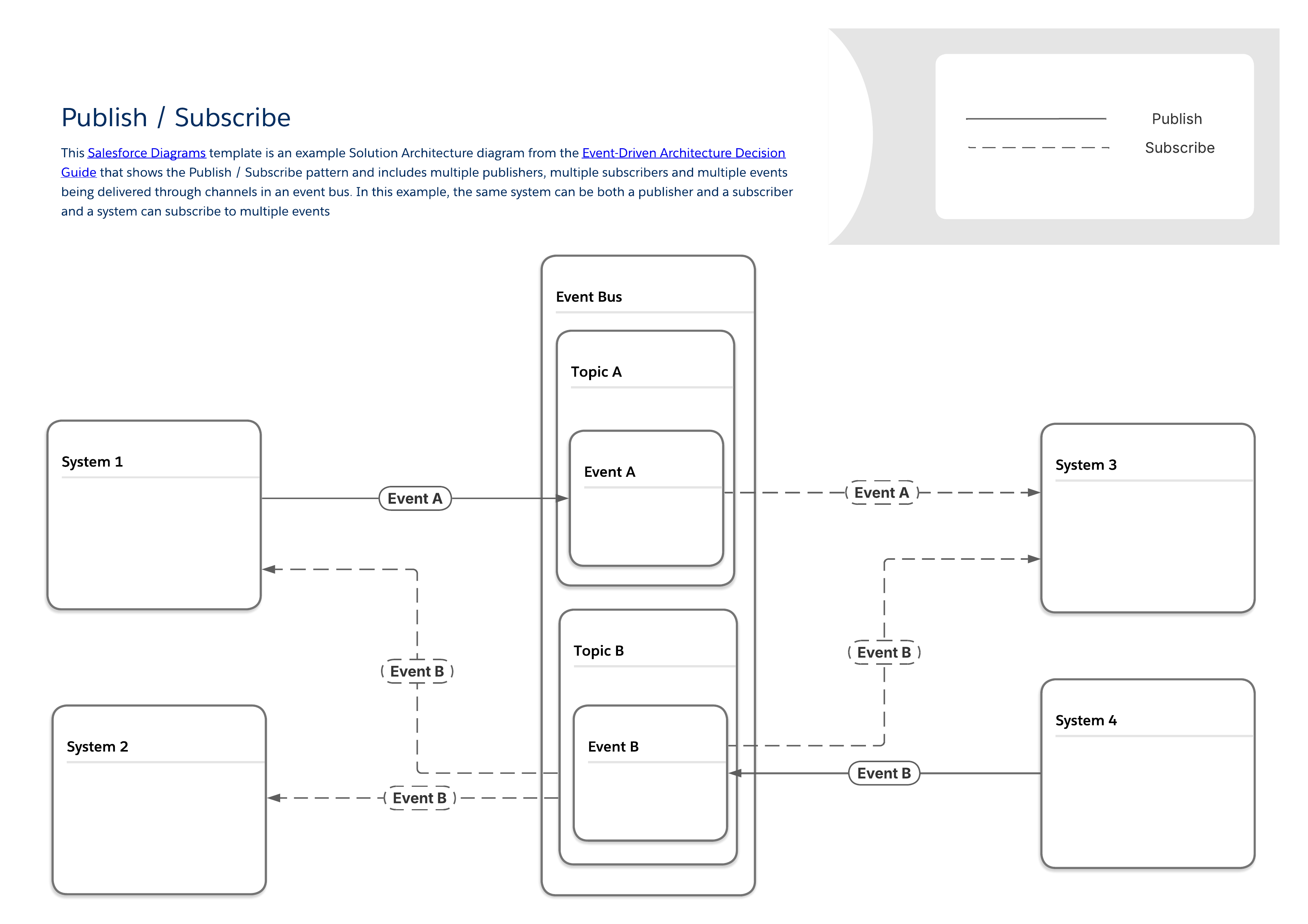
下圖說明一般發佈/訂閱模式,其中多個發行者和訂閱者透過 Event Bus 共用資料。此基礎模式是可在本指南其餘部分找到的更具體模式基礎。此模式的一些重要特性包括:

- 發行者與訂閱者之間沒有直接連線。發行者只需將訊息傳送至 Event Bus,便可將訊息廣播至想要聆聽訊息的任何其他系統。

- 相同的系統可以是發行者與訂閱者。

- 系統可以發佈或訂閱多種類型的事件。

- 如同本指南中所有的模式,發佈/訂閱模式屬於一般整合模式種類,稱為遠端程序叫用 (RPI) 或簡單[「觸發忘記」。](/docs/architect/zh-tw/fundamentals/guide/integration-patterns#遠端流程叫用--觸發與忘記)

<!-- Image: Publish/subscribe pattern diagram (Level 2) -->
<img style="border:1px solid #e5e5e5;margin:2rem 0rem" src="https://a.sfdcstatic.com/developer-website/prod/images/architect/Event Driven Architecture Diagrams - Publish - Subscribe L2.png" alt="此層級 2 圖顯示發佈/訂閱模式的範例,其中包含多個發行者、多個訂閱者,以及透過 Event Bus 中的管道傳送的多個事件。在此模式中,相同的系統可以是發行者和訂閱者,且系統可以訂閱多個事件。">

#### 與發佈/訂閱模式相關的工具

<table style="width:100%">
<thead>
<tr><th colspan="2" scope="colgroup"></th><th colspan="4" scope="colgroup">事件流程與行為</th><th colspan="2" scope="colgroup">裝載考量事項</th></tr>
<tr><th scope="col">可用的工具</th><th scope="col"></th><th scope="col">必要技能</th><th scope="col">發佈透過</th><th scope="col">訂閱透過</th><th scope="col">重複執行期間</th><th scope="col">裝載結構</th><th scope="col">裝載限制</th></tr>
</thead>
<tbody>
<tr><th scope="row">MuleSoft</th><td><a href="https://docs.mulesoft.com/general/">Anypoint 平台</a></td><td>專業程式碼</td><td>API</td><td>API</td><td><a href="https://docs.mulesoft.com/mule-runtime/latest/redelivery-policy">已設定</a></td><td><a href="https://docs.mulesoft.com/mule-runtime/latest/about-mule-message">已定義使用者</a></td><td>無</td></tr>
<tr><th scope="row"></th><td><a href="https://docs.mulesoft.com/salesforce-pubsub-connector/latest/">Salesforce Pub/Sub 連接器</a></td><td>專業程式碼</td><td>API</td><td>API</td><td><a href="https://docs.mulesoft.com/mule-runtime/latest/redelivery-policy">已設定</a></td><td><a href="https://docs.mulesoft.com/mule-runtime/latest/about-mule-message">已定義使用者</a></td><td>無</td></tr>
<tr><th scope="row"></th><td><a href="https://docs.mulesoft.com/jms-connector/latest/">MuleSoft Anypoint JMS 連接器</a></td><td>專業程式碼</td><td>API</td><td>API</td><td><a href="https://docs.mulesoft.com/mule-runtime/latest/redelivery-policy">已設定</a></td><td><a href="https://docs.mulesoft.com/mule-runtime/latest/about-mule-message">已定義使用者</a></td><td>無</td></tr>
<tr><th scope="row"></th><td><a href="https://docs.mulesoft.com/kafka-connector/latest/">MuleSoft Anypoint Apache Kafka 連接器</a></td><td>專業程式碼</td><td>API</td><td>API</td><td><a href="https://docs.mulesoft.com/mule-runtime/latest/redelivery-policy">已設定</a></td><td><a href="https://docs.mulesoft.com/mule-runtime/latest/about-mule-message">已定義使用者</a></td><td>無</td></tr>
<tr><th scope="row"></th><td><a href="https://github.com/SolaceProducts/pubsubplus-connector-mule-docs/blob/main/doc/user-guide.md">MuleSoft Anypoint Solace 連接器</a></td><td>專業程式碼</td><td>API</td><td>API</td><td><a href="https://docs.mulesoft.com/mule-runtime/latest/redelivery-policy">已設定</a></td><td><a href="https://docs.mulesoft.com/mule-runtime/latest/about-mule-message">已定義使用者</a></td><td>無</td></tr>
<tr><th scope="row"></th><td><a href="https://docs.mulesoft.com/mq/mq-connectors">MuleSoft Anypoint MQ 連接器</a></td><td>專業程式碼</td><td>API</td><td>API</td><td><a href="https://docs.mulesoft.com/mule-runtime/latest/redelivery-policy">已設定</a></td><td><a href="https://docs.mulesoft.com/mule-runtime/latest/about-mule-message">已定義使用者</a></td><td>無</td></tr>
<tr><th scope="row"></th><td><a href="https://docs.mulesoft.com/mqtt3-connector/latest/">MuleSoft Anypoint MQTT 連接器</a></td><td>專業程式碼</td><td>API</td><td>API</td><td><a href="https://docs.mulesoft.com/mule-runtime/latest/redelivery-policy">已設定</a></td><td><a href="https://docs.mulesoft.com/mule-runtime/latest/about-mule-message">已定義使用者</a></td><td>無</td></tr>
<tr><th scope="row"></th><td><a href="https://docs.mulesoft.com/amqp-connector/latest/">MuleSoft Anypoint AMQP 連接器</a></td><td>專業程式碼</td><td>API</td><td>API</td><td><a href="https://docs.mulesoft.com/mule-runtime/latest/redelivery-policy">已設定</a></td><td><a href="https://docs.mulesoft.com/mule-runtime/latest/about-mule-message">已定義使用者</a></td><td>無</td></tr>
<tr><th scope="row"></th><td><a href="https://docs.mulesoft.com/release-notes/platform/event-driven-api">MuleSoft Anypoint 事件驅動 (非同步) API</a></td><td>專業程式碼</td><td>API</td><td>API</td><td><a href="https://docs.mulesoft.com/mule-runtime/latest/redelivery-policy">已設定</a></td><td><a href="https://docs.mulesoft.com/mule-runtime/latest/about-mule-message">已定義使用者</a></td><td>無</td></tr>
<tr><th scope="row"></th><td><a href="https://docs.mulesoft.com/mq/">MuleSoft Anypoint MQ</a></td><td>專業程式碼</td><td>API</td><td>API</td><td><a href="https://docs.mulesoft.com/mule-runtime/latest/redelivery-policy">已設定</a></td><td><a href="https://docs.mulesoft.com/mule-runtime/latest/about-mule-message">已定義使用者</a></td><td>無</td></tr>
<tr><th scope="row">Salesforce Platform</th><td>Heroku 上的 <a href="https://elements.heroku.com/addons/heroku-kafka">Apache Kafka</a></td><td>專業程式碼</td><td>API,Heroku Postgres 中的記錄變更</td><td>無</td><td>1-6 週</td><td><a href="https://kafka.apache.org/documentation/#messageformat">已定義使用者</a></td><td><a href="https://kafka.apache.org/documentation/#messageformat">已定義使用者</a></td></tr>
<tr><th scope="row"></th><td><a href="https://developer.salesforce.com/docs/atlas.en-us.change_data_capture.meta/change_data_capture/cdc_intro.htm">變更資料取</a>取</td><td>低程式碼對 Pro-code</td><td>記錄變更</td><td>Apex、API、Lightning Web 元件 (LWC)</td><td>3 天</td><td><a href="https://developer.salesforce.com/docs/atlas.en-us.change_data_capture.meta/change_data_capture/cdc_message_structure.htm">預先定義</a></td><td>1 MB</td></tr>
<tr><th scope="row"></th><td><a href="https://developer.salesforce.com/docs/atlas.en-us.api.meta/api/sforce_api_om_outboundmessaging.htm">輸出訊息*</a></td><td>低程式碼</td><td>流程與工作流程規則</td><td>無</td><td>24 小時</td><td><a href="https://developer.salesforce.com/docs/atlas.en-us.api.meta/api/sforce_api_om_outboundmessaging_wsdl.htm">已定義使用者</a></td><td>每則訊息 100 個通知</td></tr>
<tr><th scope="row"></th><td><a href="https://developer.salesforce.com/docs/atlas.en-us.platform_events.meta/platform_events/platform_events_intro.htm">平台事件</a></td><td>低程式碼對 Pro-code</td><td>API、Apex、流程</td><td>Apex、API、Flow、LWC</td><td>3 天</td><td><a href="https://developer.salesforce.com/docs/atlas.en-us.232.0.platform_events.meta/platform_events/platform_events_define_ui.htm">已定義使用者</a></td><td>1 MB</td></tr>
<tr><th scope="row"></th><td><a href="https://developer.salesforce.com/docs/platform/pub-sub-api/overview">Pub/Sub API</a></td><td>專業程式碼</td><td>Pub/Sub API 或 API、Apex、流程</td><td>Pub/Sub API</td><td>3 天</td><td><a href="https://developer.salesforce.com/docs/platform/pub-sub-api/overview">已定義使用者</a></td><td>1 MB</td></tr>
<tr><th scope="row"></th><td><a href="https://help.salesforce.com/s/articleView?id=sf.ev_relay_intro.htm">事件轉送**</a></td><td>低程式碼</td><td>平台事件、變更資料擷取</td><td>API</td><td>3 天</td><td><a href="https://developer.salesforce.com/docs/atlas.en-us.232.0.platform_events.meta/platform_events/platform_events_define_ui.htm">已定義使用者</a></td><td>1 MB</td></tr>
<tr><td colspan="8">*Salesforce 會在目前的功能中繼續支援輸出訊息,但不打算進一步投資此技術。 **事件轉送只會連線至 AWS Eventbridge</td></tr>
</tbody>
</table>

### 透鏡圖

當組織需要將立即更新傳送至大量用戶端應用程式 (例如推送通知或 SMS 訊息) 至行動裝置時,為每個單一收件者建立唯一傳輸的傳統程序會迅速變成可擴充性瓶頸。在此案例中,核心業務需求是將單一資訊 (例如帳戶警示或重要服務變更通知) 快速且高效能地散佈至多個端點應用程式。滿足此需求的簡化方法涉及透過單一路由訊息,這會作為所有耗用系統事件資訊的中心點。此方法可減少管理多個個別訊息複本的需求,藉此改善效能。

#### 透鏡圖

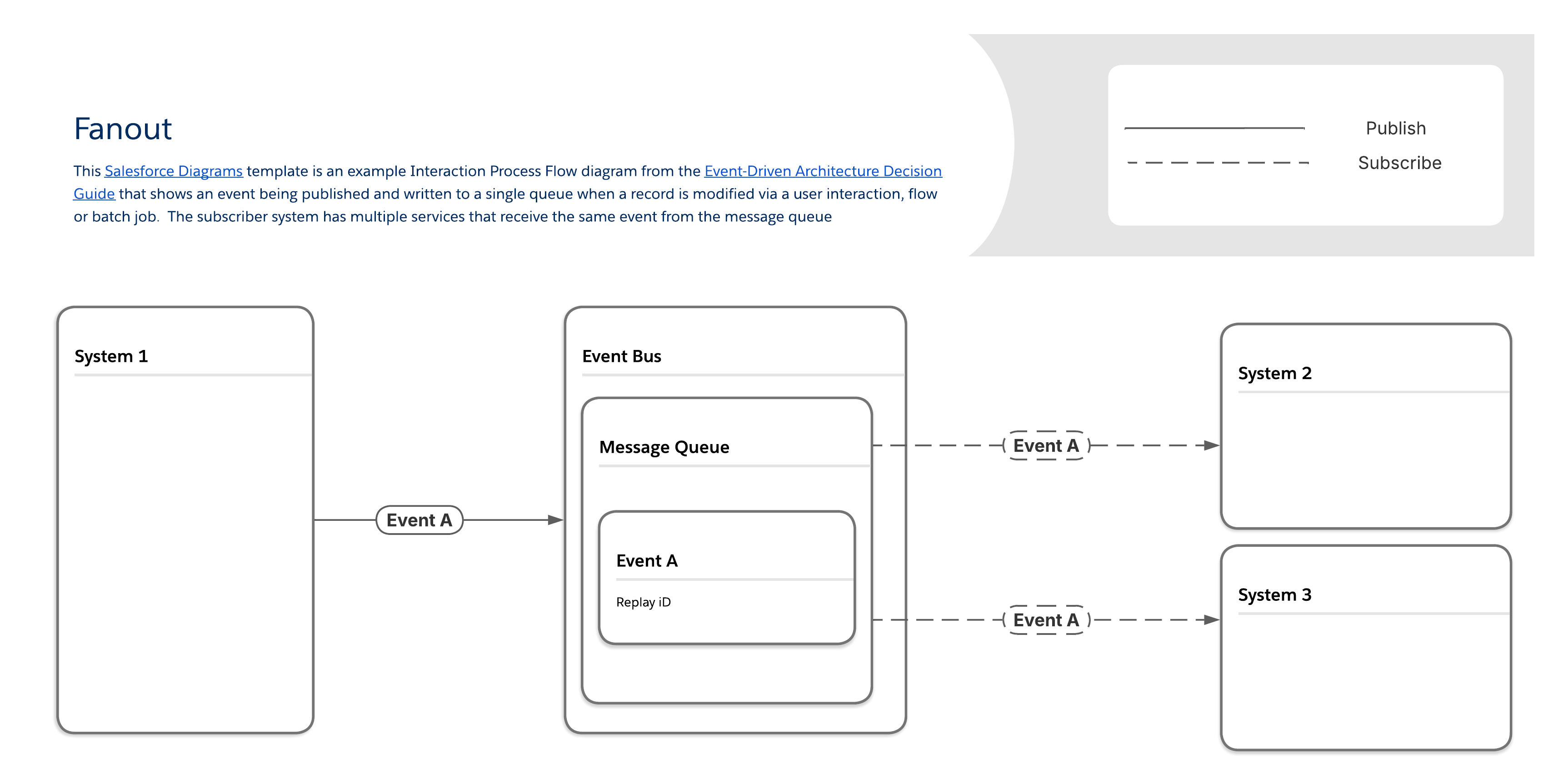
透過「下拉式」模式,訊息會透過單一訊息列傳送至一或多個目的地 (亦即聆聽用戶或訂閱者)。訂閱者會從其自己的唯一複本取用同一則訊息,而不是從其中的同一則訊息。(請注意,雖然這可改善效能,但也會使驗證特定訂閱者是否收到訊息變得更難。)

<!-- Image: Fanout pattern diagram (Level 3) -->
<img style="border:1px solid #e5e5e5;margin:2rem 0rem" src="https://a.sfdcstatic.com/developer-website/prod/images/architect/Event Driven Architecture Diagrams - Fanout L3.png" alt="此層級 3 文件與實作圖表顯示了對外模式的範例。 此圖表描述當透過使用者互動、流程或批次工作修改記錄時,發佈並寫入單一排隊的事件。 訂閱者系統有多個服務會從訊息排隊接收相同的事件。">

#### 與顯示模式相關的工具

<table style="width:100%">
<thead>
<tr><th colspan="2" scope="colgroup"></th><th colspan="4" scope="colgroup">事件流程與行為</th><th colspan="2" scope="colgroup">裝載考量事項</th></tr>
<tr><th scope="col">可用的工具</th><th scope="col"></th><th scope="col">必要技能</th><th scope="col">發佈透過</th><th scope="col">訂閱透過</th><th scope="col">重複執行期間</th><th scope="col">裝載結構</th><th scope="col">裝載限制</th></tr>
</thead>
<tbody>
<tr><th scope="row">MuleSoft</th><td><a href="https://docs.mulesoft.com/jms-connector/latest/">MuleSoft Anypoint JMS 連接器</a></td><td>專業程式碼</td><td>API</td><td>API</td><td><a href="https://docs.mulesoft.com/mule-runtime/latest/redelivery-policy">已設定</a></td><td><a href="https://docs.mulesoft.com/mule-runtime/latest/about-mule-message">已定義使用者</a></td><td>無</td></tr>
<tr><th scope="row"></th><td><a href="https://docs.mulesoft.com/salesforce-pubsub-connector/latest/">Salesforce Pub/Sub 連接器</a></td><td>專業程式碼</td><td>API</td><td>API</td><td><a href="https://docs.mulesoft.com/mule-runtime/latest/redelivery-policy">已設定</a></td><td><a href="https://docs.mulesoft.com/mule-runtime/latest/about-mule-message">已定義使用者</a></td><td>無</td></tr>
<tr><th scope="row"></th><td><a href="https://docs.mulesoft.com/kafka-connector/latest/">MuleSoft Anypoint Apache Kafka 連接器</a></td><td>專業程式碼</td><td>API</td><td>API</td><td><a href="https://docs.mulesoft.com/mule-runtime/latest/redelivery-policy">已設定</a></td><td><a href="https://docs.mulesoft.com/mule-runtime/latest/about-mule-message">已定義使用者</a></td><td>無</td></tr>
<tr><th scope="row"></th><td><a href="https://github.com/SolaceProducts/pubsubplus-connector-mule-docs/blob/main/doc/user-guide.md">MuleSoft Anypoint Solace 連接器</a></td><td>專業程式碼</td><td>API</td><td>API</td><td><a href="https://docs.mulesoft.com/mule-runtime/latest/redelivery-policy">已設定</a></td><td><a href="https://docs.mulesoft.com/mule-runtime/latest/about-mule-message">已定義使用者</a></td><td>無</td></tr>
<tr><th scope="row"></th><td><a href="https://docs.mulesoft.com/mq/mq-connectors">MuleSoft Anypoint MQ 連接器</a></td><td>專業程式碼</td><td>API</td><td>API</td><td><a href="https://docs.mulesoft.com/mule-runtime/latest/redelivery-policy">已設定</a></td><td><a href="https://docs.mulesoft.com/mule-runtime/latest/about-mule-message">已定義使用者</a></td><td>無</td></tr>
<tr><th scope="row"></th><td><a href="https://docs.mulesoft.com/mqtt3-connector/latest/">MuleSoft Anypoint MQTT 連接器</a></td><td>專業程式碼</td><td>API</td><td>API</td><td><a href="https://docs.mulesoft.com/mule-runtime/latest/redelivery-policy">已設定</a></td><td><a href="https://docs.mulesoft.com/mule-runtime/latest/about-mule-message">已定義使用者</a></td><td>無</td></tr>
<tr><th scope="row"></th><td><a href="https://docs.mulesoft.com/amqp-connector/latest/">MuleSoft Anypoint AMQP 連接器</a></td><td>專業程式碼</td><td>API</td><td>API</td><td><a href="https://docs.mulesoft.com/mule-runtime/latest/redelivery-policy">已設定</a></td><td><a href="https://docs.mulesoft.com/mule-runtime/latest/about-mule-message">已定義使用者</a></td><td>無</td></tr>
<tr><th scope="row"></th><td><a href="https://docs.mulesoft.com/mq/">MuleSoft Anypoint MQ</a></td><td>專業程式碼</td><td>API</td><td>API</td><td><a href="https://docs.mulesoft.com/mule-runtime/latest/redelivery-policy">已設定</a></td><td><a href="https://docs.mulesoft.com/mule-runtime/latest/about-mule-message">已定義使用者</a></td><td>無</td></tr>
<tr><th scope="row">Salesforce Platform</th><td>Heroku 上的 <a href="https://elements.heroku.com/addons/heroku-kafka">Apache Kafka</a></td><td>專業程式碼</td><td>API,Heroku Postgres 中的記錄變更</td><td>無</td><td>1-6 週</td><td><a href="https://kafka.apache.org/documentation/#messageformat">已定義使用者</a></td><td><a href="https://kafka.apache.org/documentation/#messageformat">已定義使用者</a></td></tr>
<tr><th scope="row"></th><td><a href="https://developer.salesforce.com/docs/atlas.en-us.change_data_capture.meta/change_data_capture/cdc_intro.htm">變更資料取</a>取</td><td>低程式碼對 Pro-code</td><td>記錄變更</td><td>Apex、API、Lightning Web 元件 (LWC)</td><td>3 天</td><td><a href="https://developer.salesforce.com/docs/atlas.en-us.change_data_capture.meta/change_data_capture/cdc_message_structure.htm">預先定義</a></td><td>1 MB</td></tr>
<tr><th scope="row"></th><td><a href="https://developer.salesforce.com/docs/atlas.en-us.platform_events.meta/platform_events/platform_events_intro.htm">平台事件</a></td><td>低程式碼對 Pro-code</td><td>API、Apex、流程</td><td>Apex、API、Flow、LWC</td><td>3 天</td><td><a href="https://developer.salesforce.com/docs/atlas.en-us.232.0.platform_events.meta/platform_events/platform_events_define_ui.htm">已定義使用者</a></td><td>1 MB</td></tr>
<tr><th scope="row"></th><td><a href="https://developer.salesforce.com/docs/platform/pub-sub-api/overview">Pub/Sub API</a></td><td>專業程式碼</td><td>Pub/Sub API 或 Apex、API、流程</td><td>Pub/Sub API</td><td>3 天</td><td><a href="https://developer.salesforce.com/docs/platform/pub-sub-api/overview">已定義使用者</a></td><td>1 MB</td></tr>
<tr><th scope="row"></th><td><a href="https://help.salesforce.com/s/articleView?id=sf.ev_relay_intro.htm">事件轉送*</a></td><td>低程式碼</td><td>平台事件、變更資料擷取</td><td>API</td><td>3 天</td><td><a href="https://developer.salesforce.com/docs/atlas.en-us.232.0.platform_events.meta/platform_events/platform_events_define_ui.htm">已定義使用者</a></td><td>1 MB</td></tr>
<tr><td colspan="8">*事件轉送只會將資料傳送至 AWS Eventbridge</td></tr>
</tbody>
</table>

### 傳送的訊息

某些事件案例的特點為訊息量大幅流入,可能會壓倒同步化和轉換程序的容量,或處理和轉換事件資料所需的複雜多步驟邏輯。

某些範例包括:

- **季節性量高峰:**線上零售商在其產品的選擇「季節性」時,可能會遇到數量高峰。當大量客戶同時進行購買時,產生的事件數量可能暫時超過同步化和轉換流程的容量。請參閱 [Well-Architected - 資料處理](/docs/architect/zh-tw/well-architected/guide/automated#資料處理)以取得詳細資訊。

- **個案或索賠管理:**以服務為基礎的公司在中斷期間,可能會遇到個案或索賠數量的激增。

- **複雜資料轉換:**需要複雜邏輯來轉換訊息的組織通常會擔心事件的產生速度比其轉換的速度快。

#### 傳送的訊息模式

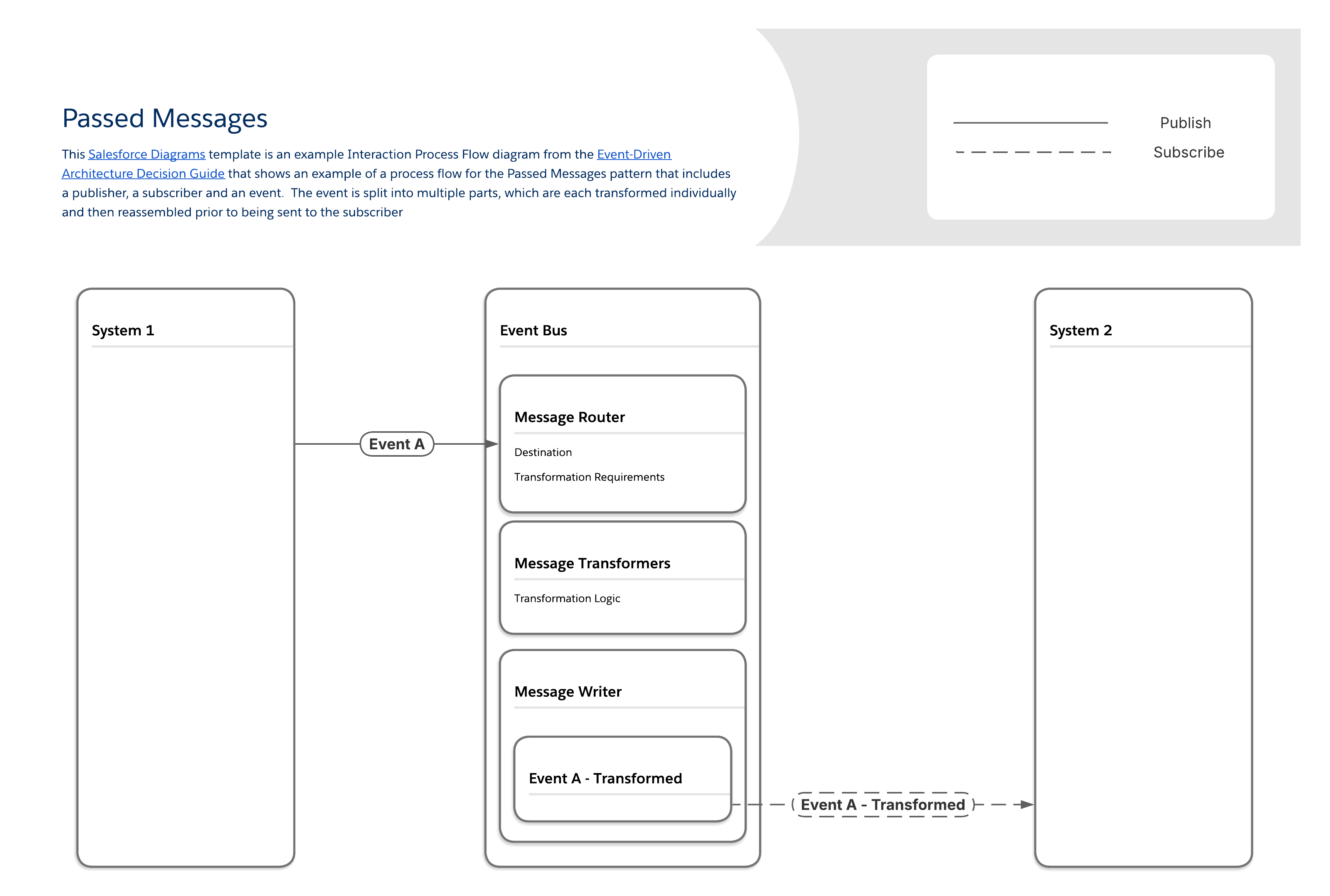
此模式可解決訊息產生速度超過可轉換的挑戰。其可確保可安全地處理大量訊息和必要的資料操作,將串流訊息平台整合到專屬元件中,並將訊息處理邏輯分段。

「傳送的訊息」模式可透過將訊息處理邏輯分段至多個元件來運作:

- 一個元件會處理訊息路由,決定必要轉換和最終目的地。

- 個別的元件集會處理訊息轉換的不同層級 (例如,欄位對應、物件關係等)。

- 最後一個元件會撰寫最後修改後的訊息。

<!-- Image: Passed messages pattern diagram (Level 3) -->
<img style="border:1px solid #e5e5e5;margin:2rem 0rem" src="https://a.sfdcstatic.com/developer-website/prod/images/architect/Event Driven Architecture Diagrams - Passed Messages L3.png" alt="此層級 3 文件與實作圖表顯示流程流程範例,適用於傳送訊息模式,其中包含發行者、訂閱者和訊息。 訊息會分割成多個部分,這些部分會個別轉換,然後在傳送給訂閱者前重新組合。">

#### 與傳送訊息模式相關的工具

<table style="width:100%">
<thead>
<tr><th colspan="2" scope="colgroup"></th><th colspan="4" scope="colgroup">事件流程與行為</th><th colspan="2" scope="colgroup">裝載考量事項</th></tr>
<tr><th scope="col">可用的工具</th><th scope="col"></th><th scope="col">必要技能</th><th scope="col">發佈透過</th><th scope="col">訂閱透過</th><th scope="col">重複執行期間</th><th scope="col">裝載結構</th><th scope="col">裝載限制</th></tr>
</thead>
<tbody>
<tr><th scope="row">MuleSoft</th><td><a href="https://docs.mulesoft.com/kafka-connector/latest/">MuleSoft Anypoint Apache Kafka 連接器</a></td><td>專業程式碼</td><td>API</td><td>API</td><td><a href="https://docs.mulesoft.com/mule-runtime/latest/redelivery-policy">已設定</a></td><td><a href="https://docs.mulesoft.com/mule-runtime/latest/about-mule-message">已定義使用者</a></td><td>無</td></tr>
<tr><th scope="row"></th><td><a href="https://docs.mulesoft.com/salesforce-pubsub-connector/latest/">Salesforce Pub/Sub 連接器</a></td><td>專業程式碼</td><td>API</td><td>API</td><td><a href="https://docs.mulesoft.com/mule-runtime/latest/redelivery-policy">已設定</a></td><td><a href="https://docs.mulesoft.com/mule-runtime/latest/about-mule-message">已定義使用者</a></td><td>無</td></tr>
<tr><th scope="row">Salesforce Platform</th><td>Heroku 上的 <a href="https://elements.heroku.com/addons/heroku-kafka">Apache Kafka</a></td><td>專業程式碼</td><td>API,Heroku Postgres 中的記錄變更</td><td>無</td><td>1-6 週</td><td><a href="https://kafka.apache.org/documentation/#messageformat">已定義使用者</a></td><td><a href="https://kafka.apache.org/documentation/#messageformat">已定義使用者</a></td></tr>
<tr><th scope="row"></th><td><a href="https://developer.salesforce.com/docs/atlas.en-us.change_data_capture.meta/change_data_capture/cdc_intro.htm">變更資料取</a>取</td><td>低程式碼對 Pro-code</td><td>記錄變更</td><td>Apex、API、Lightning Web 元件 (LWC)</td><td>3 天</td><td><a href="https://developer.salesforce.com/docs/atlas.en-us.change_data_capture.meta/change_data_capture/cdc_message_structure.htm">預先定義</a></td><td>1 MB</td></tr>
<tr><th scope="row"></th><td><a href="https://developer.salesforce.com/docs/atlas.en-us.platform_events.meta/platform_events/platform_events_intro.htm">平台事件</a></td><td>低程式碼對 Pro-code</td><td>API、Apex、流程</td><td>Apex、API、Flow、LWC</td><td>3 天</td><td><a href="https://developer.salesforce.com/docs/atlas.en-us.232.0.platform_events.meta/platform_events/platform_events_define_ui.htm">已定義使用者</a></td><td>1 MB</td></tr>
<tr><th scope="row"></th><td><a href="https://developer.salesforce.com/docs/platform/pub-sub-api/overview">Pub/Sub API</a></td><td>專業程式碼</td><td>Pub/Sub API 或 API,Apex 流程</td><td>Pub/Sub API</td><td>3 天</td><td><a href="https://developer.salesforce.com/docs/platform/pub-sub-api/overview">已定義使用者</a></td><td>1 MB</td></tr>
<tr><th scope="row"></th><td><a href="https://help.salesforce.com/s/articleView?id=sf.ev_relay_intro.htm">事件轉送*</a></td><td>低程式碼</td><td>平台事件、變更資料擷取</td><td>API</td><td>3 天</td><td><a href="https://developer.salesforce.com/docs/atlas.en-us.232.0.platform_events.meta/platform_events/platform_events_define_ui.htm">已定義使用者</a></td><td>1 MB</td></tr>
<tr><td colspan="8">*事件轉送只會將資料傳送至 AWS Eventbridge</td></tr>
</tbody>
</table>

### 串流

某些產生者會產生連續的事件串流。常見範例為媒體串流,其中涉及自然發生為離散事件的使用者互動。多個系統必須同時回應相同的使用者行為,而不會封鎖核心串流體驗。

請考量音樂串流平台的事件。這些可能包括:

- 追蹤已啟動/已暫停/已略過事件

- 聆聽包含時間戳記的工作階段事件

- 播放清單建立/修改事件

- 社交共用事件

- 下載以供離線聆聽

#### 串流模式

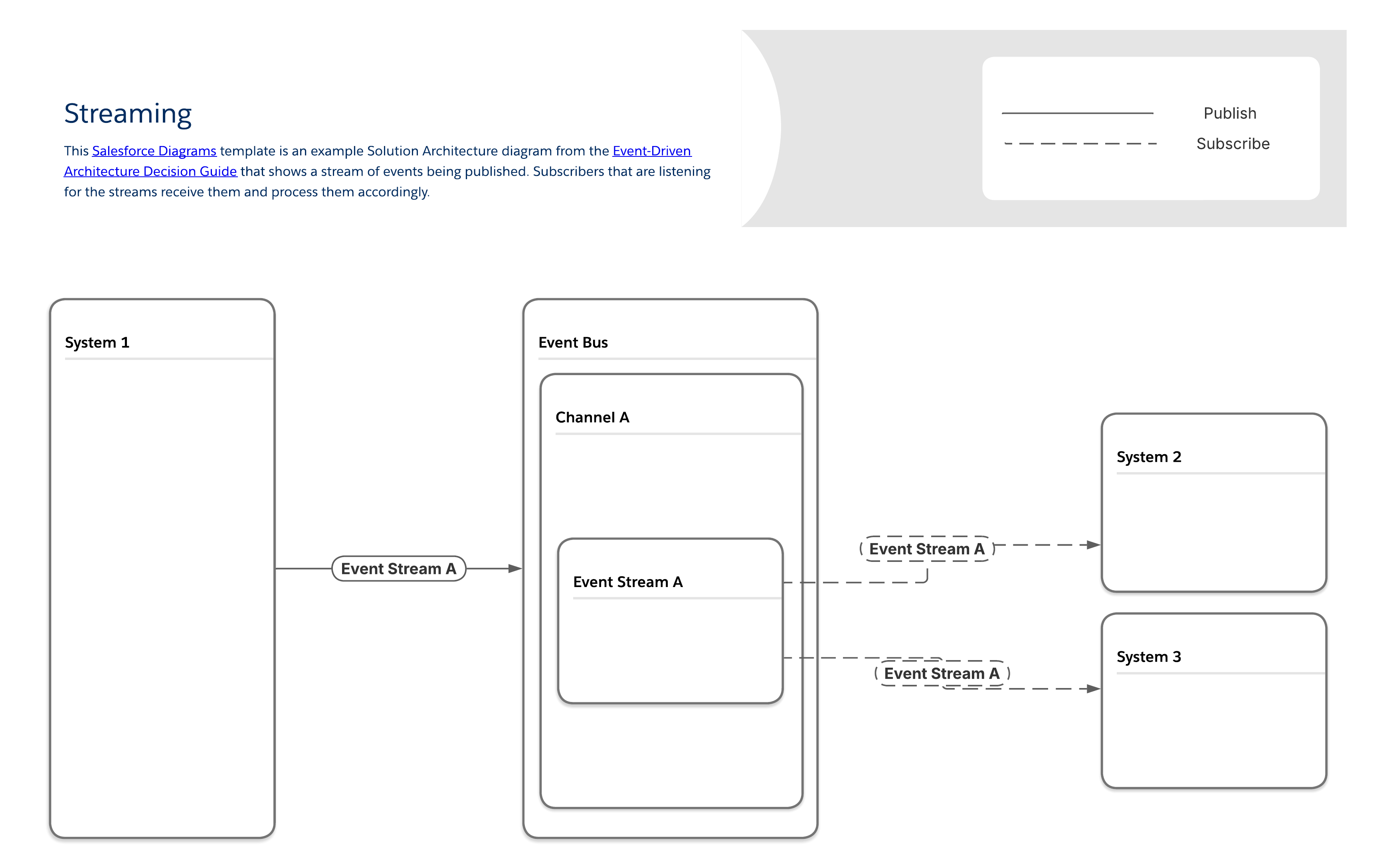
在「串流」模式中,訂閱者會存取每個事件串流,並以接收的確切順序處理事件。每個訊息串流的唯一複本會傳送給每個訂閱者,讓您能夠傳送訂閱者特定的內容,並識別哪些訂閱者會收到哪些串流。

<!-- Image: Streaming pattern diagram (Level 3) -->
<img style="border:1px solid #e5e5e5;margin:2rem 0rem" src="https://a.sfdcstatic.com/developer-website/prod/images/architect/Event Driven Architecture Diagrams - Streaming - L3.png" alt="此層級 3 文件與實作圖表顯示串流模式的範例,此模式描述正在發佈的事件串流。正在聆聽串流的訂閱者會接收串流並相應地處理。">

#### 與串流模式相關的工具

<table style="width:100%">
<thead>
<tr><th colspan="2" scope="colgroup"></th><th colspan="4" scope="colgroup">事件流程與行為</th><th colspan="2" scope="colgroup">裝載考量事項</th></tr>
<tr><th scope="col">可用的工具</th><th scope="col"></th><th scope="col">必要技能</th><th scope="col">發佈透過</th><th scope="col">訂閱透過</th><th scope="col">重複執行期間</th><th scope="col">裝載結構</th><th scope="col">裝載限制</th></tr>
</thead>
<tbody>
<tr><th scope="row">MuleSoft</th><td><a href="https://docs.mulesoft.com/mule-runtime/latest/streaming-about">MuleSoft Anypoint 資料串流</a></td><td>專業程式碼</td><td>API</td><td>API</td><td><a href="https://docs.mulesoft.com/mule-runtime/latest/redelivery-policy">已設定</a></td><td><a href="https://docs.mulesoft.com/mule-runtime/latest/about-mule-message">已定義使用者</a></td><td>無</td></tr>
<tr><th scope="row"></th><td><a href="https://docs.mulesoft.com/salesforce-pubsub-connector/latest/">Salesforce Pub/Sub 連接器</a></td><td>專業程式碼</td><td>API</td><td>API</td><td><a href="https://docs.mulesoft.com/mule-runtime/latest/redelivery-policy">已設定</a></td><td><a href="https://docs.mulesoft.com/mule-runtime/latest/about-mule-message">已定義使用者</a></td><td>無</td></tr>
<tr><th scope="row"></th><td><a href="https://docs.mulesoft.com/kafka-connector/latest/">MuleSoft Anypoint Apache Kafka 連接器</a></td><td>專業程式碼</td><td>API</td><td>API</td><td><a href="https://docs.mulesoft.com/mule-runtime/latest/redelivery-policy">已設定</a></td><td><a href="https://docs.mulesoft.com/mule-runtime/latest/about-mule-message">已定義使用者</a></td><td>無</td></tr>
<tr><th scope="row">Salesforce Platform</th><td>Heroku 上的 <a href="https://elements.heroku.com/addons/heroku-kafka">Apache Kafka</a></td><td>專業程式碼</td><td>API,Heroku Postgres 中的記錄變更</td><td>無</td><td>1-6 週</td><td><a href="https://kafka.apache.org/documentation/#messageformat">已定義使用者</a></td><td><a href="https://kafka.apache.org/documentation/#messageformat">已定義使用者</a></td></tr>
<tr><th scope="row"></th><td><a href="https://developer.salesforce.com/docs/platform/pub-sub-api/overview">Pub/Sub API</a></td><td>專業程式碼</td><td>Pub/Sub API 或 API,Apex 流程</td><td>Pub/Sub API</td><td>3 天</td><td><a href="https://developer.salesforce.com/docs/platform/pub-sub-api/overview">已定義使用者</a></td><td>1 MB</td></tr>
</tbody>
</table>

#### 串流事件訂單管理

為了讓串流有意義,其所有事件及其相關聯的訊息都必須以正確的順序顯示。如果您在來自不同系統的串流中來源資料,則必須納入其他訂購邏輯作為設計流程的一部分。

### 排隊

查詢使用個案很普遍。範例包括:

- **低品質的網際網路連線:**Field Service 組織或其他組織,其中具有行動裝置的小組需要在品質不佳或間斷網際網路存取權的區域中工作,會受益於將這些裝置上應用程式連線至其中的排隊,並在恢復連線時取回任何相關訊息。

- **訊息緩衝:**當訊息量有時超過訂閱者的處理容量,且延遲增加不會產生額外的問題時,可能會有用於緩衝來儲存過多訊息並避免資料遺失。

- **運輸管理:**需要監視車隊的物流組織可以使用此模式,以近乎即時檢視每部車輛正在使用的路線,並確保司機的效率盡可能高。

- **IoT 裝置:**製造商經常使用產生快速資料串流的系統,而這些串流可能會對其他系統造成下游影響。此模式可用來識別在發生跨多個系統的災難性失敗之前,需要人類介入的事件序列。

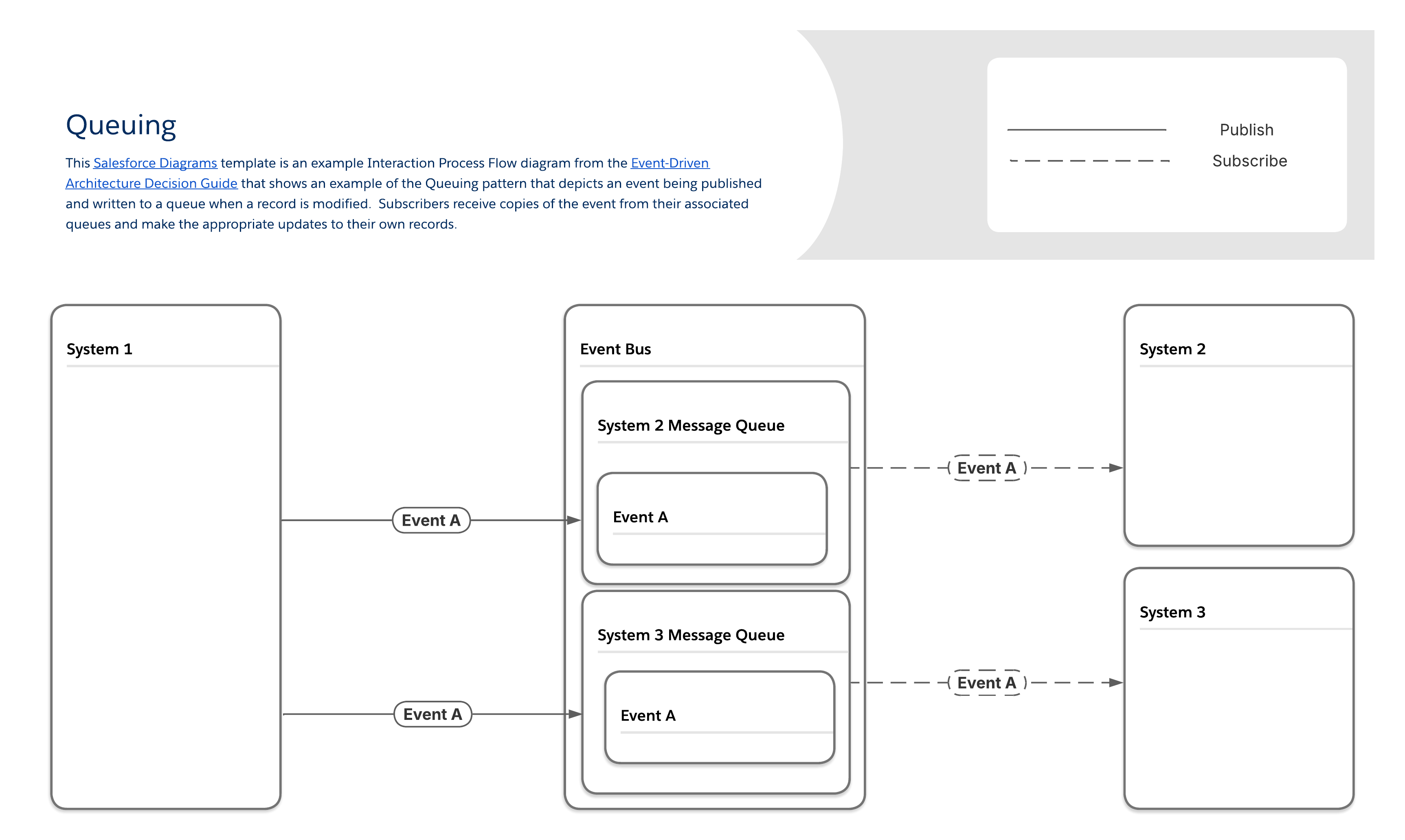
#### 列入模式

生產人員會在「排隊」模式中,傳送訊息給排隊,這些排隊會保留訊息,直到訂閱者將訊息提取為止。大多數訊息排列會遵循先進先出 (FIFO) 順序,並在取出訊息之後刪除每則訊息。每個訂閱者都有獨一無二且需要額外的設定步驟,但仍可保證傳送並識別哪些訂閱者接收了哪些訊息。

<!-- Image: Queuing pattern diagram (Level 3) -->
<img style="border:1px solid #e5e5e5;margin:2rem 0rem" src="https://a.sfdcstatic.com/developer-website/prod/images/architect/Event Driven Architecture Diagrams - Queuing L3.png" alt="此層級 3 文件與實作圖表顯示列出模式的範例,此模式描述在修改記錄時發佈的事件,並寫入至列出。訂閱者會從相關聯的列出接收事件的複本,並對自己的記錄進行適當的更新。">

#### 與排入模式相關的工具

<table style="width:100%">
<thead>
<tr><th colspan="2" scope="colgroup"></th><th colspan="4" scope="colgroup">事件流程與行為</th><th colspan="2" scope="colgroup">裝載考量事項</th></tr>
<tr><th scope="col">可用的工具</th><th scope="col"></th><th scope="col">必要技能</th><th scope="col">發佈透過</th><th scope="col">訂閱透過</th><th scope="col">重複執行期間</th><th scope="col">裝載結構</th><th scope="col">裝載限制</th></tr>
</thead>
<tbody>
<tr><th scope="row">MuleSoft</th><td><a href="https://docs.mulesoft.com/mq/">MuleSoft Anypoint MQ</a></td><td>專業程式碼</td><td>API</td><td>API</td><td><a href="https://docs.mulesoft.com/mule-runtime/4.3/redelivery-policy">已設定</a></td><td><a href="https://docs.mulesoft.com/mule-runtime/latest/about-mule-message">已定義使用者</a></td><td>無</td></tr>
<tr><th scope="row"></th><td><a href="https://docs.mulesoft.com/salesforce-pubsub-connector/latest/">Salesforce Pub/Sub 連接器</a></td><td>專業程式碼</td><td>API</td><td>API</td><td><a href="https://docs.mulesoft.com/mule-runtime/latest/redelivery-policy">已設定</a></td><td><a href="https://docs.mulesoft.com/mule-runtime/latest/about-mule-message">已定義使用者</a></td><td>無</td></tr>
<tr><th scope="row"></th><td><a href="https://docs.mulesoft.com/kafka-connector/latest/">MuleSoft Anypoint Apache Kafka 連接器</a></td><td>專業程式碼</td><td>API</td><td>API</td><td><a href="https://docs.mulesoft.com/mule-runtime/latest/redelivery-policy">已設定</a></td><td><a href="https://docs.mulesoft.com/mule-runtime/latest/about-mule-message">已定義使用者</a></td><td>無</td></tr>
<tr><th scope="row"></th><td><a href="https://docs.mulesoft.com/mq/mq-connectors">MuleSoft Anypoint MQ 連接器</a></td><td>專業程式碼</td><td>API</td><td>API</td><td><a href="https://docs.mulesoft.com/mule-runtime/latest/redelivery-policy">已設定</a></td><td><a href="https://docs.mulesoft.com/mule-runtime/latest/about-mule-message">已定義使用者</a></td><td>無</td></tr>
<tr><th scope="row"></th><td><a href="https://docs.mulesoft.com/mqtt3-connector/latest/">MuleSoft Anypoint MQTT 連接器</a></td><td>專業程式碼</td><td>API</td><td>API</td><td><a href="https://docs.mulesoft.com/mule-runtime/latest/redelivery-policy">已設定</a></td><td><a href="https://docs.mulesoft.com/mule-runtime/latest/about-mule-message">已定義使用者</a></td><td>無</td></tr>
<tr><th scope="row"></th><td><a href="https://docs.mulesoft.com/amqp-connector/latest/">MuleSoft Anypoint AMQP 連接器</a></td><td>專業程式碼</td><td>API</td><td>API</td><td><a href="https://docs.mulesoft.com/mule-runtime/latest/redelivery-policy">已設定</a></td><td><a href="https://docs.mulesoft.com/mule-runtime/latest/about-mule-message">已定義使用者</a></td><td>無</td></tr>
<tr><th scope="row">Salesforce Platform</th><td>Heroku 上的 <a href="https://elements.heroku.com/addons/heroku-kafka">Apache Kafka</a></td><td>專業程式碼</td><td>API,Heroku Postgres 中的記錄變更</td><td>無</td><td>1-6 週</td><td><a href="https://kafka.apache.org/documentation/#messageformat">已定義使用者</a></td><td><a href="https://kafka.apache.org/documentation/#messageformat">已定義使用者</a></td></tr>
<tr><th scope="row"></th><td><a href="https://developer.salesforce.com/docs/atlas.en-us.change_data_capture.meta/change_data_capture/cdc_intro.htm">變更資料取</a>取</td><td>低程式碼對 Pro-code</td><td>記錄變更</td><td>Apex、API、Lightning Web 元件 (LWC)</td><td>3 天</td><td><a href="https://developer.salesforce.com/docs/atlas.en-us.change_data_capture.meta/change_data_capture/cdc_message_structure.htm">預先定義</a></td><td>1 MB</td></tr>
<tr><th scope="row"></th><td><a href="https://developer.salesforce.com/docs/atlas.en-us.platform_events.meta/platform_events/platform_events_intro.htm">平台事件</a></td><td>低程式碼對 Pro-code</td><td>API、Apex、流程</td><td>Apex、API、Flow、LWC</td><td>3 天</td><td><a href="https://developer.salesforce.com/docs/atlas.en-us.232.0.platform_events.meta/platform_events/platform_events_define_ui.htm">已定義使用者</a></td><td>1 MB</td></tr>
<tr><th scope="row"></th><td><a href="https://developer.salesforce.com/docs/platform/pub-sub-api/overview">Pub/Sub API</a></td><td>專業程式碼</td><td>Pub/Sub API 或 API、Apex、流程</td><td>Pub/Sub API</td><td>3 天</td><td><a href="https://developer.salesforce.com/docs/platform/pub-sub-api/overview">已定義使用者</a></td><td>1 MB</td></tr>
<tr><th scope="row"></th><td><a href="https://help.salesforce.com/s/articleView?id=sf.ev_relay_intro.htm">事件轉送*</a></td><td>低程式碼</td><td>平台事件、變更資料擷取</td><td>API</td><td>3 天</td><td><a href="https://developer.salesforce.com/docs/atlas.en-us.232.0.platform_events.meta/platform_events/platform_events_define_ui.htm">已定義使用者</a></td><td>1 MB</td></tr>
<tr><td colspan="8">*事件轉送只會將資料傳送至 AWS Eventbridge</td></tr>
</tbody>
</table>

#### 記憶體與儲存空間管理

由於「排隊」模式的非同步性質,因此在將訊息新增至排隊與該訊息提取之間可能會有較長的延遲。達號需要記憶體或儲存空間來保留其訊息,因此其無法無限成長,這表示如果在達號中累積足夠的訊息,則無限離線的訂閱者可能會造成失敗。如果訂閱者處理時間過長,則訊息緩衝可能會產生相同的效果,進而導致大量訊息堆積在他們的排隊中。若要減少這些風險,請針對所有訊息排列執行完整的儲存空間需求分析,並視需要設計流程,在未在設定的時間內或當訊息達到預先決定的容量時清除並停用訊息。

## 非功能考量事項

### 從點對點整合移轉

即使您完全相信以事件為導向的結構適合您的組織,您仍可能會從已經擁有大量點對點整合的環境開始。為專案獲得資金來一次取代所有整合可能很困難,甚至可能無法直接將以事件為導向的結構與一些舊版系統搭配使用。在這些案例中,您可以先轉換最關鍵業務的應用程式,然後在其在未來專案中更新或取代時轉換其他系統,以逐步移轉至較寬鬆的架構。此方法可讓您輕鬆將新應用程式新增至 Event Bus,並讓整體 IT 環境在隨著系統持續新增的時間保持可調整和彈性。

### 寬鬆連接系統中的權衡

身為結構設計師,我們知道每個結構都有權衡。以事件為導向的結構也不例外。雖然充滿寬鬆連接系統的環境可高度調整和彈性,但還需要考量一些權衡因素:

- **整體整合策略:**無論您決定要使用的工具和模式為何,請務必從建立策略開始,以瞭解資料如何在組織的各個系統之間共用。此策略應包含您組織的資料目標、資料可共用的方式和使用模式,以及資料來源、目標、結構和擁有權與存取需求。

- **舊版系統的支援:**您的組織可能有舊版系統,只是不支援以事件為導向的結構模式。雖然可能會建立因應措施 (例如,使用透過訂閱事件,然後透過不同的資料傳輸方式將輸出傳送至目標系統作為逐步解說的流程),但您可能想要在此個案中考慮其他整合方法。

- **訊息的結構變更:**一旦發行者與訂閱者之間定義並同意初始訊息結構,可能會難以變更,特別是當訂閱者為外部使用者時。有數種方法可以解決此問題。您可以使用版本化端點,但請確保為每個版本定義並傳達明確的生命週期,以便您的開發人員不必同時維護太多版本。如果 Heroku 上的 Apache Kafka 屬於您的橫向,您也可以考慮使用結構描述登錄或類似工具,但請確保橫向中的其他系統也支援 (並使用)。

- **缺少發行者與訂閱者之間的可視性:**在大多數以事件為導向的結構模式中,發行者不會知道其訂閱者的狀態。因此,如果發行者在所有訂閱者離線時傳送重要訊息,則訊息可能不會傳送。您可以使用重新執行功能來解決此問題,或針對所有重要訊息新增在個別伺服器上執行的冗餘訂閱者。

- **效能瓶頸:**隨著以事件為導向的結構擴展,如果發生過多發行者嘗試同時傳訊太多訂閱者,則 Event Bus 可能會成為訊息傳送的瓶頸。您可以透過增加分配至 Event Bus 的記憶體和處理資源,或使用多個 Event Bus 並列處理不同類型的訊息來解決此問題。

## 相關最佳作法

### 實作事件驅動的結構

實作以事件為導向的結構之前,請考量您是否真的需要先使用一個架構。上一節描述適用於每個事件驅動結構模式的常見業務案例。您也可以在 [Well-Architected - Interoperability](/docs/architect/zh-tw/well-architected/guide/composable#互通性) 中深入瞭解。檢閱實作以事件為導向的結構時要考量的挑戰,以判斷您考量的模式是否最適合您特定的使用個案。

請注意,雖然本指南涵蓋的大多數案例涉及整合,但以事件為導向的結構也可以用來透過使用平台事件在單一 Salesforce 組織內傳送訊息,例如。設計使用平台事件作為內部傳訊系統的程序時,請務必記住任何適用的[事件分配限制](https://developer.salesforce.com/docs/atlas.en-us.platform_events.meta/platform_events/platform_event_limits.htm)。

### 避免使用反模式

事件驅動結構的反模式通常來自使用事件作為 Salesforce 組織內內部通訊的因應措施。常見的反模式包括:

- **從與相同事件物件相關聯的 Apex 觸發發出事件:**這會導致無限觸發迴圈。

- **在 DML 交易完成前,從 Apex 發佈事件:**如果交易失敗並回復,任何具有「立即發佈」發佈行為的已發佈事件都不會包含在回復行為中。

- **在流程中發佈事件以協調後續的自動化:**在多個自動化之間協調邏輯的最佳方法是使用 [子流程](https://developer.salesforce.com/docs/atlas.en-us.salesforce_vpm_implementation_guide.meta/salesforce_vpm_implementation_guide/vpm_designer_elements_subflow.htm)或 [Flow Orchestrator](https://help.salesforce.com/s/articleView?id=sf.orchestrator_flow_orchestrator.htm)。

- **建立執行階段相依性:**若未採取適當的[步驟](https://medium.com/salesforce-architects/5-anti-patterns-in-package-dependency-design-and-how-to-avoid-them-87bb50331cb8)去除執行階段相依性,請勿發佈事件以協助封裝之間通訊。

- **不必要的大型裝載:**提出要求時,最好在裝載中傳送及接收盡可能少量的資料。使用者的每個動作都可能產生多個要求,因此有效處理這些要求十分重要。傳送超過必要的資料會造成傳輸速度變慢且處理時間增加。

- **未選擇性處理應用程式事件:**當有多個元件正在聆聽應用程式事件時,開發人員應確保事件處理常式只會在實際需要且實用時執行。例如,在 Lightning 主控台中,未聚焦的索引標籤中包含的元件仍可聆聽,即使它們不可見。開發人員可以使用各種技術,例如使用背景公用程式項目作為唯一接聽者,或呼叫 getEnclosingTabId() 來判斷元件的此例項是否包含在焦點索引標籤內,以確保每個事件僅在預期的時間處理。

- **使用「平台事件」不正確發佈行為:**「平台事件」有兩種發佈行為—「立即發佈」和「認可後發佈」。將即時平台事件用於使用個案 (例如「記錄」) 相當有用,無論交易是否成功與認可,您都會在其中發佈記錄事件。不過,對於即時平台事件,請特別小心使用「立即發佈」。事件可以在相同交易內由訂閱者耗用,並導致列鎖定或其他競爭狀況。

### 設計有效的事件

實作以事件為導向的結構時,成功的關鍵之一是設定事件本身設計方式的標準。細節會根據您組織的使用個案而有所不同,但以下是一些一般原則:

- **決定事件裝載的最佳結構。**較小的訊息大小會減少處理時間,但以大量訊息轟炸訂閱者可能會造成效能瓶頸。您可能需要迭代裝載大小與結構,以找到正確的平衡。MuleSoft 和類似的 ESB 工具能夠在與您的事件相關聯的訊息中設計自訂裝載,這可協助您視覺化資料結構,以改善訂閱者端的效能。(如需詳細資訊,請參閱 [Well-Architected - API Management](/docs/architect/zh-tw/well-architected/guide/composable#api-管理)。)

- **考量您的程序端對端。**確定您未建立任何「無限迴圈」案例,這在首展整合後可能難以追蹤。範例為兩個系統在更新記錄時發佈事件,同時聆聽彼此的事件,這兩個系統在處理時會觸發其他已發佈事件。

  您可以透過將邏輯新增至兩個系統來修正此類型的反模式,以確保由於耗用事件而進行的變更不會導致發佈新的事件。您也應確保記錄所有事件、其相關聯的觸發,以及可能受影響的下游系統。在設計工作階段期間,請使用此文件作為參考,以協助盡早抓住無盡的迴圈和類似情況。(如需詳細資訊,請參閱 [Well-Architected - 流程設計](/docs/architect/zh-tw/well-architected/guide/automated#流程設計)。)

- **在系統之間使用常見命名慣例。**一致的命名慣例是所有軟體開發 (包括以事件為導向的結構) 的最佳作法。花時間記錄事件名稱、結構、相關聯物件和錯誤處理流程的一組標準,以確保系統之間的一致性。(如需詳細資訊,請參閱 [Well-Architected - 設計標準](/docs/architect/zh-tw/well-architected/guide/intentional#設計標準)。)

## 資源

<table style="width:100%">
<thead>
<tr><th scope="col">模式</th><th scope="col">資源</th></tr>
</thead>
<tbody>
<tr><td>發佈/訂閱</td><td><a href="/docs/architect/zh-tw/well-architected/guide/reliable#輸出">Salesforce 結構良好 - 輸出量</a><br><a href="/docs/architect/zh-tw/well-architected/guide/automated#資料處理">Salesforce 結構良好 - 資料處理</a><br><a href="/docs/architect/zh-tw/well-architected/guide/composable#互通性">Salesforce 結構良好 - 互通性</a><br><a href="https://medium.com/salesforce-architects/achieve-architectural-efficiency-with-event-relays-c8d4ec7f07af">部落格貼文:使用事件轉送達成結構效率</a><br><a href="https://medium.com/salesforce-architects/announcing-pub-sub-api-generally-available-3980c9eaf0b7">部落格貼文:公告 Pub/Sub API 廣泛可用</a><br><a href="https://blogs.mulesoft.com/dev-guides/api-design/moving-from-restful-to-eventful/">部落格貼文:從 RESTful 移至 Eventful</a><br><a href="https://blogs.mulesoft.com/dev-guides/event-driven-architectures-asyncapi/">部落格貼文:以事件為導向的結構與非同步 API 規格</a><br><a href="https://youtu.be/0WJjmmw1ryM">影片:發佈 / 訂閱模式逐步解說</a></td></tr>
<tr><td>透鏡圖</td><td><a href="https://developer.salesforce.com/blogs/2021/08/how-to-work-within-platform-events-delivery-limits">部落格貼文:如何在平台事件傳送限制內工作</a><br><a href="https://youtu.be/zSncRUcucEU">影片:透鏡模式逐步解說</a></td></tr>
<tr><td>傳送的訊息</td><td><a href="https://youtu.be/U87nErhMuqw">影片:傳送訊息模式逐步解說</a></td></tr>
<tr><td>串流</td><td><a href="https://medium.com/salesforce-architects/designing-for-high-volume-writes-in-salesforce-285689a08100">部落格貼文:針對 Salesforce</a> 中的大量寫入進行設計<br><a href="https://youtu.be/-_1CDUI40fY">影片:串流模式逐步解說</a><br><a href="https://docs.mulesoft.com/mule-runtime/4.3/streaming-about">文件:在 Mule 應用程式中串流</a></td></tr>
<tr><td>排隊</td><td><a href="https://medium.com/salesforce-architects/designing-for-high-volume-writes-in-salesforce-285689a08100">部落格貼文:針對 Salesforce</a> 中的大量寫入進行設計<br><a href="https://blogs.mulesoft.com/dev-guides/api-design/event-payment-apis/">部落格貼文:如何使用事件的 API</a> 設計付款結構<br><a href="https://youtu.be/jQvSKbMRbh0">影片:列入模式逐步解說</a></td></tr>
</tbody>
</table>