---
schema_version: "1"
id: 5ab371ddf95a6a777ef0f3cd076db332c1457d27be707068d07b3960c9e83222
title: 基于步骤的异步框架
collection: architect
version: next
locale: zh-cn
portal_url: https://docs.salesforce.com/architect/next/zh-cn/decision-guides/guides/step-based-async-framework.md
canonical_url: https://staging.architect.salesforce.com/docs/architect/zh-cn/decision-guides/guide/step-based-async-framework.html
source_site: staging.architect.salesforce.com
content_type: documentation
content_hash: 74428ac06e6ccbac739134d0b49abbf4ec2aaef295313703ac8a59216ca73f42
products:
- 决策指南
- Architect Site Content Repo
updated_at: 2025-11-01T00:00:00Z
---
## 概览
现代 Salesforce 架构越来越多地由异步处理提供支持;异步处理不是为了方便,而是规模的战略要求。近年来,我们看到越来越多的公司面临着数据量激增、涉及多个接触点的复杂集成以及全天候运行的自主系统的兴起等问题。所有这些因素都推动架构师设计异步优先的系统。
Salesforce 上的异步处理通常意味着围绕调控器限制和复杂性进行设计。这些限制充当防护栏和架构约束,有助于生产批量安全的、可扩展的系统。虽然没有平台限制直接用于管理复杂性,但[设计模式](https://refactoring.guru/design-patterns)可以帮助降低这方面的风险。在内部,Salesforce 通常会推动平台向前发展,以测试新功能并自动化复杂的业务流程。我们构建了一个基于步骤的异步处理框架,用于运行具有任意数量步骤的异步作业。通过集中日志记录,每个步骤都可以独立运行、重试和重新启动,并具有共享治理控制和完全操作可见性。本文档概述了其主要架构组件:可排队 Apex 和最终确定器、计划流、Apex 光标、可调用操作以及与 Slack 的集成。这些组件共同提供了一个适合不断发展的业务需求的模块化、可扩展和可观察的架构。
## 重要外卖
- 现代 Salesforce 架构应采用异步优先的方法,以实现规模、弹性和运营透明度。
- 将复杂工作分解为独立可执行的步骤可实现可预测的性能、更安全的重试、检查点、回滚和模块化演进,而无需重新设计核心工作流。
- 该框架提供了对整体式和老化批处理作业、链式异步调用和深度嵌套流的可扩展替代方案,并专为必须在 Salesforce 中水平扩展而没有平台外编排的高用量工作负载构建。
- 确定性和可观察的执行通过集中的日志记录和治理来确保进度跟踪、SLA 监控、故障诊断和审计级透明度。
- 设计用于企业级严格性,包括跨长时间运行的业务流程的统一治理、合规性和分布式状态控制。
## 平台最佳实践
在查看要求之前,以下是何时使用类似框架的一些注意事项。首先,请考虑哪个系统是真理的唯一来源。如果您的 Salesforce 组织对外部数据的依赖最少,但需要从数百条记录扩展到数百万条记录,请考虑基于步骤的异步框架。
如果满足以下条件**,请**使用此框架:
- 大部分(或所有)要处理的信息已经存在于您的 CRM 中。
- 维护提取转换加载 (ETL) 作业以协调外部数据的前期或持续成本太高。
- 您需要推迟按既定计划处理大量 Salesforce 记录。
- 您可以将处理分解为离散的步骤。例如,您可以创建一组层次结构或基于树的记录,特别是如果数据量向下扇出层次结构或树。
如果出现以下情况**,请勿**使用此框架:
- 创建或更新记录需要立即重新计算。
- 集成具有挑战性,因为外部系统托管记录更新的主要数据。(考虑使用批量 API 将更新的数据推送到 Salesforce。)
请记住这些实践,让我们回顾一下我们的要求并开始构建。
## 细分要求
考虑问题陈述:
> 给定需要每天运行的作业,请检查某些记录是否满足预先建立的标准,以便进一步处理。如果是,则启动这些处理作业。处理记录可能意味着从多个外部系统提取数据以执行计算。作业中的步骤应通过 Slack 通知人员已处理记录已准备好进行审核。步骤还应根据第一轮通知后的可配置延迟,将通知上报到角色层次结构中的经理和上级。
此问题涉及几个不同的步骤,其中一些步骤可以相互独立发生。拆分工作有很多方法。以下是一组:
- 计划程序。
- 处理记录的步骤界面和具体实施(无论处理类型如何)。
- 组织步骤的处理器。
- 计划程序调用的 Apex 可调用。
- 通知部分。我们使用 [Apex Slack SDK](https://developer.salesforce.com/docs/platform/salesforce-slack-sdk/guide/overview.html)。
- “可配置的延迟”短语隐藏着一些复杂性。我们将在本文后面回顾这种复杂性。
以下是构建框架的意见图:
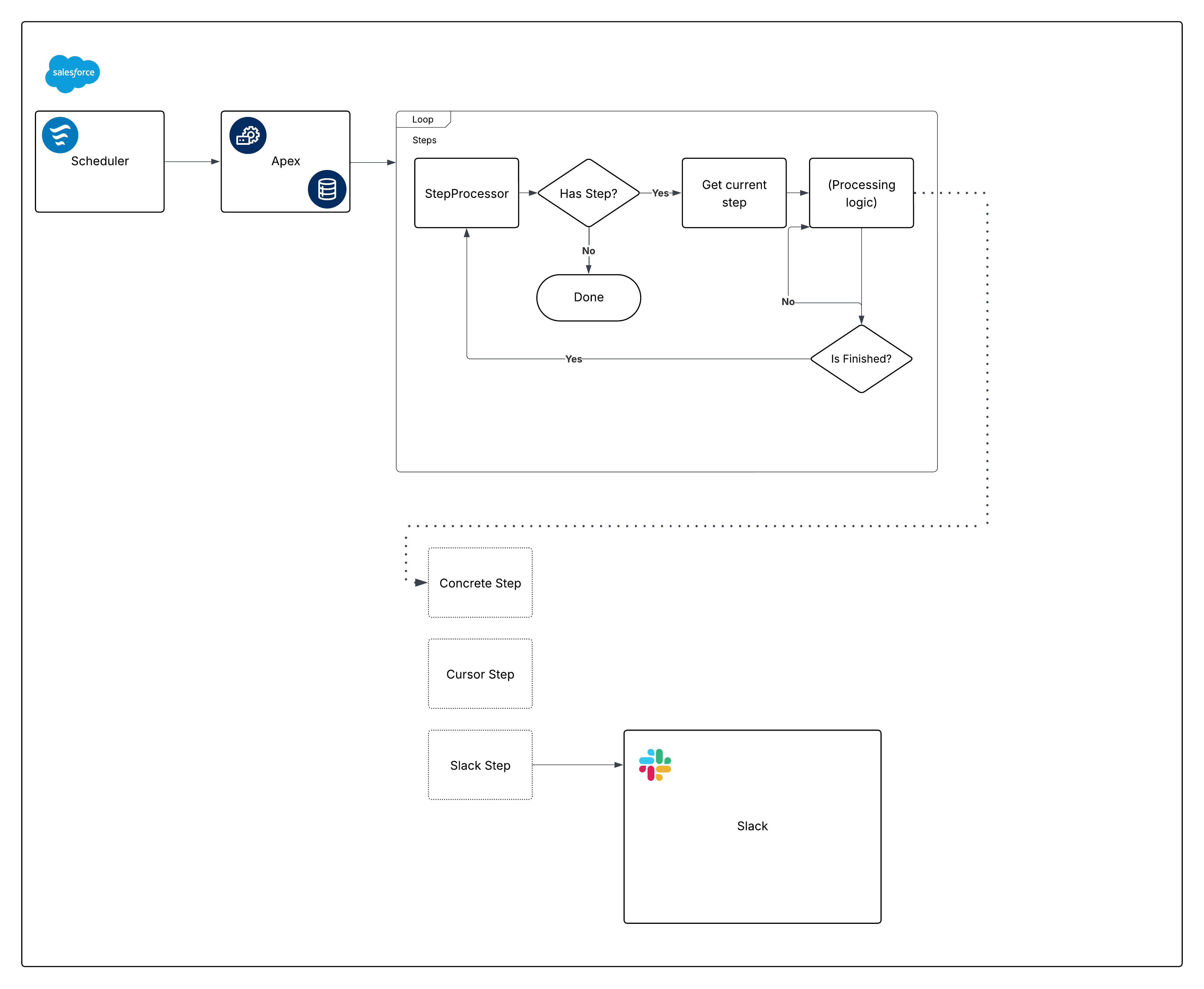 现在,分解该图表,并开始构建各个部分。
## 使用计划流计划
计划流作为计划机制提供了几个优势:
- 计划流可以打包并部署为元数据。对于通过 Apex(或通过计划作业页面)计划的作业,情况并非如此。
- “等待”元素对于需要标注的框架至关重要。通过在流中使用它,在框架的可调用部分中不需要标注。
- 计划粒度满足要求:计划流的最小间隔是每天。如果您需要更高的频率(例如每小时),请重新考虑此要求的计划流。
配置计划流时的另一个注意事项是环境门控。在调用 Apex 操作前,添加评估`{!$Api.Enterprise_Server_URL_100}`变量的决策元素。这确保了作业仅在预期的环境中运行,例如 UAT 和生产。这种模式很重要,因为 Sandbox 在 SDLC 期间经常刷新或新创建,如果没有明确的环境检查,计划流可能会无意中在框架不打算运行的环境中执行。在决策元素中使用 `contains` 运算符会使设置适应未来的 Sandbox 创建或 URL 更改。
最后,考虑框架应如何捕获失败。在流调用任何操作时,请始终添加错误路径;例如,您可以将错误连接到 [Nebula Logger 的](https://www.nebulalogger.com/)“添加日志条目”操作。星云日志记录器将日志写入自定义对象,因此客户应了解日志数据会消耗组织存储 — 默认情况下,日志会在组织中存储 14 天,然后进行清理;此保留期可配置。星云日志记录器还使用平台事件发布日志,因此日志条目独立于主要数据处理事务保存 — 这将确保捕获失败,即使主要流或 Apex 操作回滚。在考虑添加日志记录框架时,客户应评估预期的日志量和保留要求。
以下是流的外观:
现在,分解该图表,并开始构建各个部分。
## 使用计划流计划
计划流作为计划机制提供了几个优势:
- 计划流可以打包并部署为元数据。对于通过 Apex(或通过计划作业页面)计划的作业,情况并非如此。
- “等待”元素对于需要标注的框架至关重要。通过在流中使用它,在框架的可调用部分中不需要标注。
- 计划粒度满足要求:计划流的最小间隔是每天。如果您需要更高的频率(例如每小时),请重新考虑此要求的计划流。
配置计划流时的另一个注意事项是环境门控。在调用 Apex 操作前,添加评估`{!$Api.Enterprise_Server_URL_100}`变量的决策元素。这确保了作业仅在预期的环境中运行,例如 UAT 和生产。这种模式很重要,因为 Sandbox 在 SDLC 期间经常刷新或新创建,如果没有明确的环境检查,计划流可能会无意中在框架不打算运行的环境中执行。在决策元素中使用 `contains` 运算符会使设置适应未来的 Sandbox 创建或 URL 更改。
最后,考虑框架应如何捕获失败。在流调用任何操作时,请始终添加错误路径;例如,您可以将错误连接到 [Nebula Logger 的](https://www.nebulalogger.com/)“添加日志条目”操作。星云日志记录器将日志写入自定义对象,因此客户应了解日志数据会消耗组织存储 — 默认情况下,日志会在组织中存储 14 天,然后进行清理;此保留期可配置。星云日志记录器还使用平台事件发布日志,因此日志条目独立于主要数据处理事务保存 — 这将确保捕获失败,即使主要流或 Apex 操作回滚。在考虑添加日志记录框架时,客户应评估预期的日志量和保留要求。
以下是流的外观:
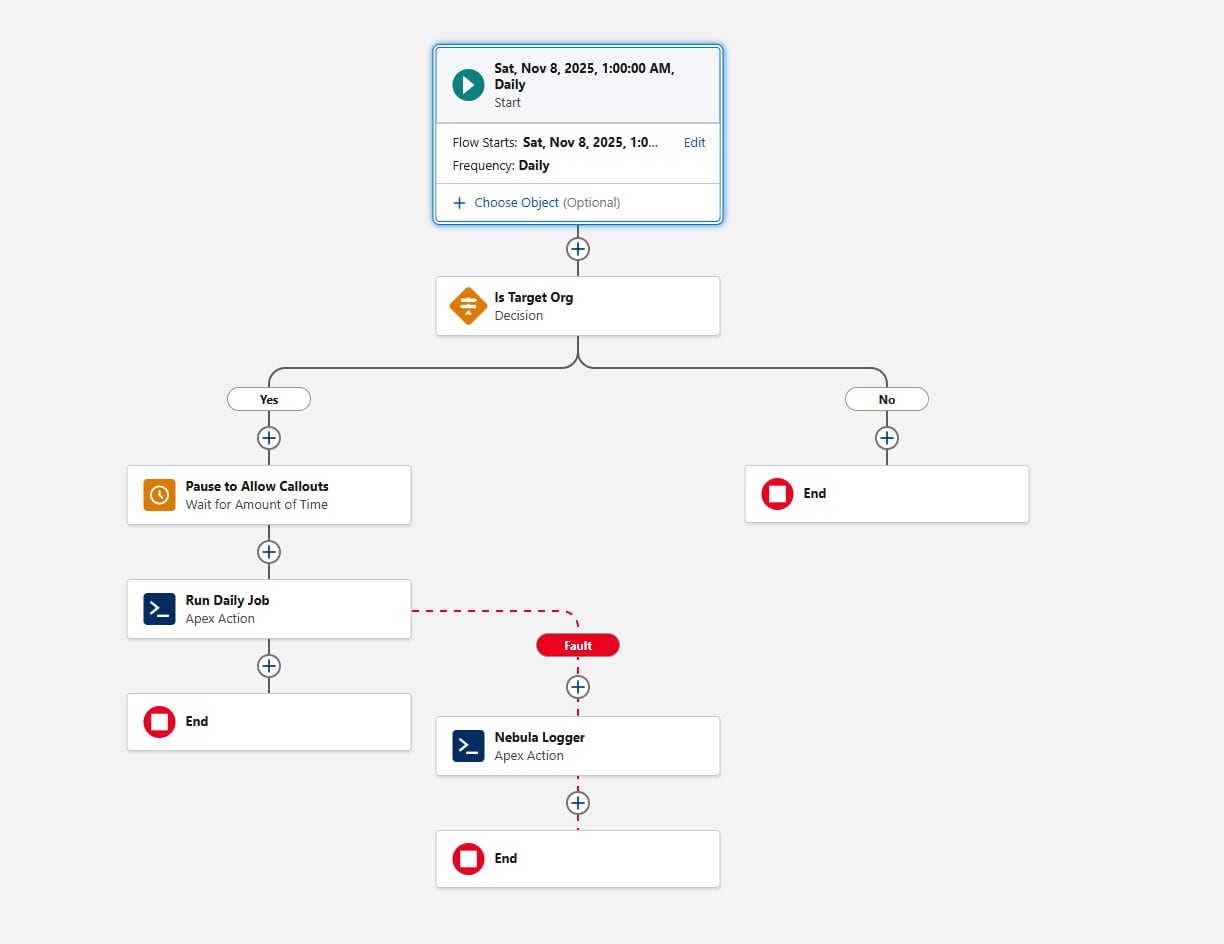 现在,让我们继续讨论 Apex 代码的第一部分,满足计划要求。
## 创建步骤界面
定义`Step`界面:
```java
public interface Step {
void execute();
void finalize();
String getName();
Boolean shouldRestart();
}
```
对于本文,为清楚起见,`step`界面显示为外部类。框架本身是灵活的 — 只要所有步骤类引用相同的界面,团队就可以使用他们喜欢的任何 Apex 打包模式来组织界面及其实施。
关于在我们的界面中定义的方法,有一些需要注意的事项:
- `execute` 目前虽然没有参数,但在我们传递`State`类(或接口)以在顺序重要时在步骤之间编排数据时有所改进。
- `getName` 可以返回`System.Type`值,而不是`String`。目标是为编排层提供一种在不公开其他属性的情况下记录步骤名称的方法。
以下是第一个具体实施,显示了这些组件如何相互配合。除了稍后的一个例外,我们建议使用可排队 Apex 在 Apex 中实施异步处理;批量 Apex 通常是不必要的(不鼓励使用`@future`方法)。Queueable Apex 启动迅速,通过 Apex 光标,与批处理 Apex 相比有许多优势。
### Apex 类似光标的实施
[Apex 光标](https://developer.salesforce.com/docs/atlas.en-us.apexcode.meta/apexcode/apex_cursors.htm)为传统的批量 Apex 模型提供了现代替代方案。与批处理相似,光标实施可以分块获取记录(每批最多 2,000 条)。但是,光标允许在单个事务中进行多次提取,从而为大批量操作提供了更高的吞吐量。
当将光标作为此框架的一部分时,团队应该了解当前的测试和可模拟性限制。测试中的光标行为可能与生产行为不同,因此重要的是设计测试策略,避免依赖光标内部,而是在边界处验证编排逻辑。随着平台的发展,这些领域将继续改进,但核心指导仍然是:与批处理 Apex 相比,光标在许多用例中提供了更高的性能和更低的编排开销。
要定义系统提供的光标和您自己的代码之间的明确边界,我们建议在实施`Step`界面时创建类似光标的表示。考虑以下代码:
```java
public inherited sharing abstract class CursorStep implements Step {
private static final Integer MAX_CHUNK_SIZE = 2000;
protected Cursor cursor;
private Integer chunkSize = System.Limits.getLimitDMLRows();
private Integer position = 0;
protected abstract Cursor getCursor();
protected abstract void innerExecute(List records);
public abstract String getName();
public virtual CursorStep withChunkSize(Integer chunkSize) {
this.chunkSize = chunkSize;
return this;
}
public void execute() {
this.cursor = this.cursor ?? this.getCursor();
this.cursor.setFetchesPerTransaction(this.getFetchesPerTransaction());
List records = new List();
if (this.shouldAdvance()) {
records = this.cursor.fetch(this.position, this.chunkSize);
this.position += this.chunkSize;
}
this.innerExecute(records);
}
public virtual void finalize() {
Logger.info('finished cursor step for ' + this.getName());
}
public virtual Boolean shouldRestart() {
return this.position < this.cursor.getNumRecords();
}
protected virtual Integer getFetchesPerTransaction() {
Integer maxRecordsPerFetchCall = 2000;
if (this.chunkSize < maxRecordsPerFetchCall) {
return this.chunkSize;
}
// Integer division rounds down
// which is perfect for our use-case
return this.chunkSize / maxRecordsPerFetchCall;
}
protected virtual Boolean shouldAdvance() {
return true;
}
}
```
请注意`Cursor`类。Apex 光标是`Database.Cursor`的实例,但我们的`Cursor`实施使我们对光标的缺点具有灵活性。以下是实施:
```java
public virtual without sharing class Cursor {
private static final Integer MAX_FETCHES_PER_TRANSACTION = Limits.getLimitFetchCallsOnApexCursor();
@TestVisible
private static Integer maxRecordsPerFetchCall = 2000;
private Integer cursorNumRecords;
private Integer fetchesPerTransaction = MAX_FETCHES_PER_TRANSACTION;
private final Database.Cursor cursor;
public Cursor(
String finalQuery,
Map bindVars,
System.AccessLevel accessLevel
) {
try {
this.cursor = Database.getCursorWithBinds(finalQuery, bindVars, accessLevel);
} catch (FatalCursorException e) {
Logger.newEntry(
System.LoggingLevel.WARN,
'Error creating cursor. This can happen if there' +
' are no records returned by the query: ' + e.getMessage()
);
}
}
public Cursor setFetchesPerTransaction(Integer possibleFetchesPerTransaction) {
// Handle accidental round downs from Integer division
if (possibleFetchesPerTransaction == 0) {
return this;
}
if (possibleFetchesPerTransaction > MAX_FETCHES_PER_TRANSACTION) {
Logger.newEntry(
System.LoggingLevel.DEBUG,
'Fetches per transaction: ' +
possibleFetchesPerTransaction +
' exceeded platform max fetches per transaction: ' +
MAX_FETCHES_PER_TRANSACTION +
', defaulting to platform max'
);
possibleFetchesPerTransaction = MAX_FETCHES_PER_TRANSACTION;
}
this.fetchesPerTransaction = possibleFetchesPerTransaction;
return this;
}
@SuppressWarnings('PMD.EmptyStatementBlock')
protected Cursor() {
}
public virtual List fetch(Integer start, Integer advanceBy) {
if (this.getNumRecords() == 0) {
Logger.newEntry(
System.LoggingLevel.DEBUG,
'Bypassing fetch call, no records to fetch'
);
return new List();
}
Integer localStart = start;
List results = new List();
while (
Limits.getFetchCallsOnApexCursor() < this.fetchesPerTransaction &&
results.size() < this.getNumRecords() &&
localStart < start + advanceBy
) {
Integer actualAdvanceBy = this.getAdvanceBy(localStart, advanceBy);
results.addAll(this.cursor?.fetch(localStart, actualAdvanceBy) ?? new List());
localStart += actualAdvanceBy;
}
return results;
}
public virtual Integer getNumRecords() {
this.cursorNumRecords = this.cursorNumRecords ?? this.cursor?.getNumRecords() ?? 0;
return this.cursorNumRecords;
}
protected Integer getAdvanceBy(Integer start, Integer advanceBy) {
Integer possibleFetchSize = Math.min(advanceBy, this.getNumRecords() - start);
if (possibleFetchSize > maxRecordsPerFetchCall) {
Logger.newEntry(
System.LoggingLevel.DEBUG,
'Fetch size: ' +
possibleFetchSize +
' exceeded platform max fetch size of ' +
maxRecordsPerFetchCall +
', defaulting to max fetch size'
);
possibleFetchSize = maxRecordsPerFetchCall;
} else if (possibleFetchSize < 0) {
possibleFetchSize = 0;
}
return possibleFetchSize;
}
}
```
对于本文的其余部分,我们在引用 Apex 类时省略了 `sharing` 声明。在实践中,请确保顶级类明确使用,无论是否共享,以符合您的对象模型和权限。
另请注意,我们的`Cursor`实施委派到平台`Database.Cursor`,下面将讨论其他好处。
首先,以下是相应的测试:
```java
@IsTest
private class CursorTest {
@IsTest
static void itCapsAdvanceByArgument() {
String accountName = 'helloWorld!';
insert new Account(Name = accountName);
String query = 'SELECT Name FROM Account WHERE Name = :bindVar0';
Map bindVars = new Map{ 'bindVar0' => accountName };
Cursor instance = new Cursor(query, bindVars, System.AccessLevel.SYSTEM_MODE);
Assert.areEqual(1, instance.getNumRecords());
Assert.areEqual(accountName, instance.fetch(0, 1000).get(0).get('Name'));
Assert.areEqual(1, System.Limits.getApexCursorRows());
}
@IsTest
static void itCapsMaxRecordsPerFetchCall() {
Cursor.maxRecordsPerFetchCall = 20;
Integer oneMoreThanMaxFetch = Cursor.maxRecordsPerFetchCall + 1;
List accounts = new List();
for (Integer i = 0; i < oneMoreThanMaxFetch; i++) {
accounts.add(new Account(Name = 'Fetch ' + i));
}
insert accounts;
Exception ex;
List results;
Cursor instance = new Cursor(
'SELECT Id FROM Account',
new Map(),
System.AccessLevel.SYSTEM_MODE
);
try {
results = instance.fetch(0, oneMoreThanMaxFetch);
} catch (System.InvalidParameterValueException e) {
ex = e;
}
Assert.areEqual(null, ex?.getMessage());
Assert.areEqual(2, Limits.getFetchCallsOnApexCursor());
Assert.areEqual(oneMoreThanMaxFetch, results.size());
}
@IsTest
static void itFetchesMultipleTimesPerTransactionWhenMoreThanMaxFetch() {
Cursor.maxRecordsPerFetchCall = 20;
List accounts = new List();
Set expectedFetchNames = new Set();
for (Integer i = 0; i < Cursor.maxRecordsPerFetchCall + 1; i++) {
String accountName = 'Fetch' + i;
expectedFetchNames.add(accountName);
accounts.add(new Account(Name = accountName));
}
insert accounts;
Integer oneMoreThanMaxFetch = Cursor.maxRecordsPerFetchCall + 1;
Cursor instance = new Cursor(
'SELECT Name FROM Account',
new Map(),
System.AccessLevel.SYSTEM_MODE
);
List results = instance.setFetchesPerTransaction(2).fetch(0, oneMoreThanMaxFetch);
Assert.areEqual(Cursor.maxRecordsPerFetchCall + 1, results.size());
Assert.areEqual(2, Limits.getFetchCallsOnApexCursor());
Set actuallyFetchedNames = new Set();
for (Account account : (List) results) {
actuallyFetchedNames.add(account.Name);
}
Assert.areEqual(expectedFetchNames, actuallyFetchedNames);
}
@IsTest
static void itFetchesMultipleTimesPerTransaction() {
Cursor.maxRecordsPerFetchCall = 1;
insert new List{ new Account(Name = 'One'), new Account(Name = 'Two') };
Cursor instance = new Cursor(
'SELECT Id FROM Account',
new Map(),
System.AccessLevel.SYSTEM_MODE
)
.setFetchesPerTransaction(2);
List results = instance.fetch(0, 2);
Assert.areEqual(2, instance.getNumRecords());
Assert.areEqual(2, results.size());
results = instance.fetch(2, 1);
Assert.areEqual(0, results.size());
}
@IsTest
static void fetchesCorrectAmountOfRecords() {
List accounts = new List();
for (Integer i = 0; i < 10; i++) {
accounts.add(new Account(Name = 'Fetch ' + i));
}
insert accounts;
Cursor instance = new Cursor(
'SELECT Id FROM Account',
new Map(),
System.AccessLevel.SYSTEM_MODE
)
.setFetchesPerTransaction(10);
List results = instance.fetch(0, 2);
Assert.areEqual(2, results.size(), '' + results);
Assert.areEqual(1, Limits.getFetchCallsOnApexCursor());
}
@IsTest
static void doesNotExceedPlatformMaxFetch() {
List accounts = new List();
for (Integer i = 0; i < 101; i++) {
accounts.add(new Account(Name = 'Fetch ' + i));
}
insert accounts;
Test.startTest();
Cursor instance = new Cursor(
'SELECT Id FROM Account',
new Map(),
System.AccessLevel.SYSTEM_MODE
)
.setFetchesPerTransaction(100);
Integer counter = 0;
List results;
while (counter <= 100) {
results = instance.fetch(counter, counter + 1);
counter++;
}
Test.stopTest();
Assert.areEqual(101, counter);
Assert.areEqual(0, results.size());
}
}
```
通过将`Cursor`虚拟化,当具体的`CursorStep`实施不需要迭代大型记录集时,它们可以在没有`Database.Cursor`的情况下运行,类似于在批处理 Apex 中返回`System.Iterable`而不是`Database.QueryLocator`。以下是示例:
```java
public abstract class CursorLikeImplementation extends CursorStep {
private final Cursor cursorLike;
public CursorLikeImplementation(List previouslyRetrievedRecords) {
this.cursorLike = new CursorLike(previouslyRetrievedRecords);
}
public override String getName() {
return CursorLikeImplementation.class.getName();
}
public override Cursor getCursor() {
return this.cursorLike;
}
private class CursorLike extends Cursor {
private final List records;
public CursorLike(List records) {
super();
this.records = records;
}
public override List fetch(Integer position, Integer chunkSize) {
// clone, to keep the underlying list type
List clonedRecords = this.records.clone();
clonedRecords.clear();
for (Integer i = position; i < this.getAdvanceBy(position, chunkSize); i++) {
clonedRecords.add(this.records[i]);
}
return clonedRecords;
}
public override Integer getNumRecords() {
return this.records.size();
}
}
}
```
请注意,由于该类也是抽象的,因此它将`innerExecute`的具体实施留给子类。
`CursorLike` 内部子类也有另一种选择。如果您知道像这样的步骤的具体版本不会通过其他调控器限制,您可以从 `CursorLike.fetch` 返回 `this.records` 并覆盖父`CursorStep.shouldRestart()`以返回 false。这允许您迭代仅受每个异步事务 12 MB 的 Apex 堆限制限制的列表。
### 其他可能的基于步骤的实施
在分页大量数据时,我们基于光标的实施为我们提供了很大的灵活性。同时 , `Step` 界面让我们可以灵活地描述和封装各种步骤。
考虑基于流的步骤:
```java
public virtual class FlowStep implements Step {
private final Invocable.Action specificFlow;
private Boolean shouldRestart = false;
public FlowStep(String specificFlowName, Map inputs) {
this.specificFlow = Invocable.Action.createCustomAction('flow', specificFlowName);
this.specificFlow.setInvocations(new List>{ inputs });
}
public void execute() {
List results = this.specificFlow.invoke();
for (Invocable.Action.Result result : results) {
if (result.isSuccess()) {
Map outputParams = result.getOutputParameters();
Object potentialShouldRestartValue = outputParams.get('shouldRestart');
// Flow does not enforce Booleans being initialized
// so a null check is sadly necessary here
if (potentialShouldRestartValue != null) {
this.shouldRestart = this.shouldRestart ||
Boolean.valueOf(potentialShouldRestartValue);
}
} else {
List errorMessages = new List();
for (Invocable.Action.Error error : result.getErrors()) {
errorMessages.add(
'Error code: ' + error.getCode() +
', error message: ' + error.getMessage()
);
}
Logger.error(
'An error occurred within your auto-launched flow:\n' +
String.join(errorMessages, '\n\t')
);
}
}
}
public virtual void finalize() {
Logger.info(this.getName() + ' finished processing');
}
public String getName() {
return FlowStep.class.getName() + ':' + this.specificFlow.getName();
}
public Boolean shouldRestart() {
return this.shouldRestart;
}
}
```
因为流不能返回符合 Apex 定义类型的输出参数,所以我们在使用前要检查`shouldRestart`输出参数。
一些步骤可能会带有标记。您可以实施逻辑来决定要包含哪些步骤,或者对禁用的功能使用禁止步骤。[空对象模式](https://refactoring.guru/introduce-null-object)是降低编排层复杂性的常见方法:
```java
@SuppressWarnings('PMD.EmptyStatementBlock')
public class NoOpStep implements Step {
// The null object pattern is commonly implemented
// as a singleton to reduce memory consumption
public static final NoOpStep SELF {
get {
SELF = SELF ?? new NoOpStep();
}
private set;
}
public void execute() {
}
public void finalize() {
}
String getName() {
return NoOpStep.class.getName();
}
Boolean shouldRestart() {
return false;
}
}
```
我们现在有很多构件可以使用。让我们看看负责迭代步骤的编排层。
## 创建步骤处理器
处理器是架构中的转折点。我们必须决定由谁定义初始化哪些步骤,以及在哪里初始化。选项包括:
- 让处理器定义哪些步骤映射到业务逻辑。此选项简单,但在可读性方面扩展性较差。
- 使用自定义元数据 (CMDT) 定义映射。元数据关系字段不支持`ApexClass`,这会将类名称拼写松散地耦合到业务流程设置中。通过将字段设置为选项列表并验证类型是否存在(`Type.forName()`或查询`ApexClass`),您可以降低管理员风险,但由于 CMDT 记录不支持触发器,验证将在运行时进行。此路线可测试,但管理员仍只能在生产中创建 CMDT 记录,请谨慎操作。
- 使用记录定义映射。非管理员可以配置步骤,但部署会变得更加困难,环境也会发生变化。小心行事。
[Clean Code](https://www.oreilly.com/library/view/clean-code-a/9780136083238/) 中有句名言介绍了如何处理这一特殊的复杂性:
> 这个问题的解决方案是埋在抽象工厂的地下室中\[用于制作对象的]`switch`语句,永远不要让任何人看到它。
请谨记这一点,因为我们当前的步骤数量定义明确,并且不太可能增长得太大,所以步骤处理器也可以成为步骤的工厂。这可以使用枚举来驱动 switch 语句:
```java
public enum StepType {
TYPE_ONE,
TYPE_TWO,
TYPE_THREE,
TYPE_FOUR
// etc ...
}
```
然后为了我们的`StepProcessor`:
```java
public StepProcessor implements System.Queueable, System.Finalizer,
Database.AllowsCallouts {
private final List steps = new List();
private Step currentStep;
public StepProcessor setSteps(List stepTypes) {
for (StepType type : stepTypes) {
switch on type {
WHEN TYPE_ONE {
this.addTypeOneSteps();
}
WHEN TYPE_TWO {
this.addTypeTwoSteps();
}
// ... etc
}
}
this.cleanSteps();
return this;
}
public void execute(System.QueueableContext context) {
this.currentStep = this.currentStep ?? this.steps.remove(0);
if (context != null) {
System.attachFinalizer(this);
Logger.setAsyncContext(context);
}
Logger.info('Executing step ' + this.currentStep.getName());
try {
this.currentStep.execute();
} catch (Exception e) {
Logger.exception('Unexpected exception', e);
}
Logger.info('Finished executing step ' + this.currentStep.getName());
Logger.saveLog();
}
public void execute(System.FinalizerContext context) {
Logger.info('Executing finalizer for step ' + this.currentStep.getName());
Logger.setAsyncContext(context);
switch on context?.getResult() {
when UNHANDLED_EXCEPTION {
// see the note below about this logging paradigm
Logger.warn(
'Failed to run on step' + this.currentStep,
context?.getException()
);
}
when else {
this.currentStep.finalize();
if (this.currentStep.shouldRestart()) {
this.kickoff();
} else if (this.steps.isEmpty() == false) {
this.currentStep = this.steps.remove(0);
this.kickoff();
} else {
Logger.info('Finished executing steps');
}
}
}
Logger.info(
'Finished executing finalizer for step ' +
this.currentStep.getName()
);
Logger.saveLog();
}
public String kickoff() {
return this.steps.isEmpty() ? null : System.enqueueJob(this);
}
private void cleanSteps() {
for (Integer reverseIndex = this.steps.size() - 1;
reverseIndex >= 0; reverseIndex--) {
if (this.steps[reverseIndex] instanceof NoOpStep) {
this.steps.remove(reverseIndex);
}
}
}
private void addTypeOneSteps() {
this.steps.addAll(
new List {
new ExampleCursorStepOne(),
new ExampleCursorStepTwo()
}
);
}
private void addTypeTwoSteps() {
this.steps.addAll(
new List {
new FlowStep('
ExampleInvocableName',
new Map( 'exampleParameter' => true)
),
new ExampleCursorStepThree()
}
);
}
}
```
显示的工厂方法,例如 `addTypeOneSteps()`,可以委派功能标记等关注;`cleanSteps()` 对收集的步骤执行一次性检查,以确保在真正异步之前没有任何“空”步骤。这可能看起来像这样:
```java
private Step getStepOrDefault(String customPermissionName, Step defaultStep) {
if (System.FeatureManagement.checkPermission(customPermissionName)) {
return defaultStep;
}
return NoOpStep.SELF;
}
```
自从在“计划流”部分提到星云记录器以来,我们没有讨论过错误处理。这是因为 `System.Finalizer` 允许我们全面记录所有错误条件,而无需在每个步骤中添加特定的错误处理。每个`Step`侧重于运行,而我们记录并重新抛出任何不愉快的路径,以便它们在单元测试中出现。这支持安全迭代和生产级警报(对所有 WARN 和 ERROR 日志使用 [Slack Logger 星云](https://github.com/jongpie/NebulaLogger/tree/main/nebula-logger/plugins/slack)插件 ) 。
有关错误日志记录的一个注意事项:将步骤实例传递到日志消息中,假设对日志中可见的内容有一定程度的 Trust。Apex 类的默认`toString()`包括消息中的所有静态和实例级属性。这可能是可取的 — 也可能泄露敏感信息。虽然日志记录和安全性不是这里的重点,但是请注意对于一些系统,遵守像 `Step` 这样的界面也可能涉及强制覆盖`toString()`。
```java
public interface Step {
void execute();
void finalize();
String getName();
Boolean shouldRestart();
String toString();
}
```
这种方法让每个对象创建者负责决定允许打印的内容,这可能是可取的。
在日志记录级别:在`StepProcessor`级别,我们使用 `INFO`,即最高的非错误级别。随着您在应用程序中变得越来越细,日志级别应该相应地降低。单个步骤可能会将`DEBUG`用于高级信息,并将`FINE`、`FINER`和`FINEST`保留给越来越详细的输出。记录既是一门艺术,也是一门科学,但遵循这些原则有助于保持日志的一致性和有用性。
### 在步骤处理器中处理其他复杂性
在继续之前,让我们简要地考虑一下让我们的步骤处理器托管使用步骤的逻辑的决定。在大型代码库中,考虑使`StepProcessor`成为虚拟或抽象的,并让子类确定具体步骤来建立适当的关注点分离。
## Apex 可调用图层
计划程序最终会调用 Apex。在其余设置完成后,可调用 Apex 部分可以决定哪些步骤应运行并将`List`传递给处理器:
```java
public class DailyJobExecutor {
@InvocableMethod(label='Execute Daily Job')
public static void executeJob() {
Logger.info('Executing daily Job');
List correspondingTypes = new List();
// based on [business logic], determine which step types
// should be included for any daily invocation
if (correspondingTypes.isEmpty() == false) {
try {
new StepProcessor().setSteps(correspondingTypes).kickoff();
} catch (Exception ex) {
Logger.exception('Error starting job', ex);
}
}
}
Logger.saveLog();
}
```
这是等式的简单部分 — 使用记录、数据或逻辑来确定要运行哪个步骤类型。可调用操作很简单,因为我们在其他地方封装了复杂性。我们还防止了意外异常,并使每个部分易于单独测试。
## 在调用 Slack 之前处理延迟
[Apex Slack SDK](https://developer.salesforce.com/docs/platform/salesforce-slack-sdk/guide/overview.html)超出了本文的范围,但需求中的一个潜在障碍值得重新审视:根据可配置的延迟通知角色层次结构中的上级人员。从纸面上讲,这很简单,您可能(正确地)考虑在`StepProcessor`中`System.enqueueJob(this)`。对于 [System.AsyncOptions](https://developer.salesforce.com/docs/atlas.en-us.apexref.meta/apexref/apex_class_System_AsyncOptions.htm),我们最初倾向于使用`enqueueJob`过载来满足这一要求。
但目前通过`System.AsyncOptions.MinimumQueueableDelayInMinutes`的最大延迟为 10 分钟。因为要求是 120 分钟,所以还有一些选项。一种幼稚的方法可能看起来像这样:
```java
public class ExampleDelayedNotifier implements Step {
private final List notifications = new List();
private final Slack.BotClient botClient = Slack.App
.getAppByKey('some-slack-app-key')
.getBotClientForTeam('slack team id');
// account for the initial delay,
// so 120 - 10 = 110
private Integer delayMinutes = 110;
public void execute() {
if ( this.delayInMinutes > 0) {
return;
}
Integer maximumAllowedCallouts = 100;
while (this.notifications.isEmpty() == false && maximumAllowedCallouts > 0) {
this.botClient.chatPostMessage(this.notifications.remove(0));
maximumAllowedCallouts--;
}
}
public void finalize() {
this.delayInMinutes -= 10;
}
public String getName() {
return ExampleDelayedNotifier.class.getName();
}
public Boolean shouldRestart() {
return this.delayInMinutes > 0 || this.notifications.isEmpty() == false;
}
}
```
实际上,延迟会传递到该类,因为延迟是配置驱动的。
除非您确定只有一个延迟通知类型,否则我们不建议使用这种方法。在开始之前,它会烧掉 11 个额外的异步作业(或者更多,如果延迟增加)。对于一个工作来说,这个成本可能还不错 — 对许多人来说不是。您还需要向`Step`界面添加方法,以便每个步骤可以告诉处理器在重新启动之前需要等待多长时间,这会增加噪音。
这给我们留下了两个有趣的可能性:
- 如果您已经以适当的时间间隔计划了轮询作业,您可以将延迟的步骤插入到现有作业框架中。指定的延迟在 15 分钟后到达(15 分钟是 Apex 计划 CRON 表达式的最小刷新间隔),您也应该可以。这大致匹配可调用 Apex 示例;计划改为通过 Apex 执行。换句话说,您可以重复使用相同的基于 `Step` 的架构来根据“开始于”时间戳处理记录,并根据选项列表或映射到之前显示的`StepType`枚举值的多选选项列表决定使用哪些步骤。
- 或者,如果您愿意定义额外的外部 Apex 类,请回到使用`System.scheduleBatch()`的批处理 Apex(与支持内部类的 Queueable Apex 不同,批处理 Apex 类必须是外部类)。
考虑批处理 Apex 示例。虽然我们通常建议使用 Queueable Apex 来实现灵活性和控制性,但这是 Batch Apex 仍然占主导地位的一个情况:
```java
public class DelayedNotifier implements Database.Batchable
现在,让我们继续讨论 Apex 代码的第一部分,满足计划要求。
## 创建步骤界面
定义`Step`界面:
```java
public interface Step {
void execute();
void finalize();
String getName();
Boolean shouldRestart();
}
```
对于本文,为清楚起见,`step`界面显示为外部类。框架本身是灵活的 — 只要所有步骤类引用相同的界面,团队就可以使用他们喜欢的任何 Apex 打包模式来组织界面及其实施。
关于在我们的界面中定义的方法,有一些需要注意的事项:
- `execute` 目前虽然没有参数,但在我们传递`State`类(或接口)以在顺序重要时在步骤之间编排数据时有所改进。
- `getName` 可以返回`System.Type`值,而不是`String`。目标是为编排层提供一种在不公开其他属性的情况下记录步骤名称的方法。
以下是第一个具体实施,显示了这些组件如何相互配合。除了稍后的一个例外,我们建议使用可排队 Apex 在 Apex 中实施异步处理;批量 Apex 通常是不必要的(不鼓励使用`@future`方法)。Queueable Apex 启动迅速,通过 Apex 光标,与批处理 Apex 相比有许多优势。
### Apex 类似光标的实施
[Apex 光标](https://developer.salesforce.com/docs/atlas.en-us.apexcode.meta/apexcode/apex_cursors.htm)为传统的批量 Apex 模型提供了现代替代方案。与批处理相似,光标实施可以分块获取记录(每批最多 2,000 条)。但是,光标允许在单个事务中进行多次提取,从而为大批量操作提供了更高的吞吐量。
当将光标作为此框架的一部分时,团队应该了解当前的测试和可模拟性限制。测试中的光标行为可能与生产行为不同,因此重要的是设计测试策略,避免依赖光标内部,而是在边界处验证编排逻辑。随着平台的发展,这些领域将继续改进,但核心指导仍然是:与批处理 Apex 相比,光标在许多用例中提供了更高的性能和更低的编排开销。
要定义系统提供的光标和您自己的代码之间的明确边界,我们建议在实施`Step`界面时创建类似光标的表示。考虑以下代码:
```java
public inherited sharing abstract class CursorStep implements Step {
private static final Integer MAX_CHUNK_SIZE = 2000;
protected Cursor cursor;
private Integer chunkSize = System.Limits.getLimitDMLRows();
private Integer position = 0;
protected abstract Cursor getCursor();
protected abstract void innerExecute(List records);
public abstract String getName();
public virtual CursorStep withChunkSize(Integer chunkSize) {
this.chunkSize = chunkSize;
return this;
}
public void execute() {
this.cursor = this.cursor ?? this.getCursor();
this.cursor.setFetchesPerTransaction(this.getFetchesPerTransaction());
List records = new List();
if (this.shouldAdvance()) {
records = this.cursor.fetch(this.position, this.chunkSize);
this.position += this.chunkSize;
}
this.innerExecute(records);
}
public virtual void finalize() {
Logger.info('finished cursor step for ' + this.getName());
}
public virtual Boolean shouldRestart() {
return this.position < this.cursor.getNumRecords();
}
protected virtual Integer getFetchesPerTransaction() {
Integer maxRecordsPerFetchCall = 2000;
if (this.chunkSize < maxRecordsPerFetchCall) {
return this.chunkSize;
}
// Integer division rounds down
// which is perfect for our use-case
return this.chunkSize / maxRecordsPerFetchCall;
}
protected virtual Boolean shouldAdvance() {
return true;
}
}
```
请注意`Cursor`类。Apex 光标是`Database.Cursor`的实例,但我们的`Cursor`实施使我们对光标的缺点具有灵活性。以下是实施:
```java
public virtual without sharing class Cursor {
private static final Integer MAX_FETCHES_PER_TRANSACTION = Limits.getLimitFetchCallsOnApexCursor();
@TestVisible
private static Integer maxRecordsPerFetchCall = 2000;
private Integer cursorNumRecords;
private Integer fetchesPerTransaction = MAX_FETCHES_PER_TRANSACTION;
private final Database.Cursor cursor;
public Cursor(
String finalQuery,
Map bindVars,
System.AccessLevel accessLevel
) {
try {
this.cursor = Database.getCursorWithBinds(finalQuery, bindVars, accessLevel);
} catch (FatalCursorException e) {
Logger.newEntry(
System.LoggingLevel.WARN,
'Error creating cursor. This can happen if there' +
' are no records returned by the query: ' + e.getMessage()
);
}
}
public Cursor setFetchesPerTransaction(Integer possibleFetchesPerTransaction) {
// Handle accidental round downs from Integer division
if (possibleFetchesPerTransaction == 0) {
return this;
}
if (possibleFetchesPerTransaction > MAX_FETCHES_PER_TRANSACTION) {
Logger.newEntry(
System.LoggingLevel.DEBUG,
'Fetches per transaction: ' +
possibleFetchesPerTransaction +
' exceeded platform max fetches per transaction: ' +
MAX_FETCHES_PER_TRANSACTION +
', defaulting to platform max'
);
possibleFetchesPerTransaction = MAX_FETCHES_PER_TRANSACTION;
}
this.fetchesPerTransaction = possibleFetchesPerTransaction;
return this;
}
@SuppressWarnings('PMD.EmptyStatementBlock')
protected Cursor() {
}
public virtual List fetch(Integer start, Integer advanceBy) {
if (this.getNumRecords() == 0) {
Logger.newEntry(
System.LoggingLevel.DEBUG,
'Bypassing fetch call, no records to fetch'
);
return new List();
}
Integer localStart = start;
List results = new List();
while (
Limits.getFetchCallsOnApexCursor() < this.fetchesPerTransaction &&
results.size() < this.getNumRecords() &&
localStart < start + advanceBy
) {
Integer actualAdvanceBy = this.getAdvanceBy(localStart, advanceBy);
results.addAll(this.cursor?.fetch(localStart, actualAdvanceBy) ?? new List());
localStart += actualAdvanceBy;
}
return results;
}
public virtual Integer getNumRecords() {
this.cursorNumRecords = this.cursorNumRecords ?? this.cursor?.getNumRecords() ?? 0;
return this.cursorNumRecords;
}
protected Integer getAdvanceBy(Integer start, Integer advanceBy) {
Integer possibleFetchSize = Math.min(advanceBy, this.getNumRecords() - start);
if (possibleFetchSize > maxRecordsPerFetchCall) {
Logger.newEntry(
System.LoggingLevel.DEBUG,
'Fetch size: ' +
possibleFetchSize +
' exceeded platform max fetch size of ' +
maxRecordsPerFetchCall +
', defaulting to max fetch size'
);
possibleFetchSize = maxRecordsPerFetchCall;
} else if (possibleFetchSize < 0) {
possibleFetchSize = 0;
}
return possibleFetchSize;
}
}
```
对于本文的其余部分,我们在引用 Apex 类时省略了 `sharing` 声明。在实践中,请确保顶级类明确使用,无论是否共享,以符合您的对象模型和权限。
另请注意,我们的`Cursor`实施委派到平台`Database.Cursor`,下面将讨论其他好处。
首先,以下是相应的测试:
```java
@IsTest
private class CursorTest {
@IsTest
static void itCapsAdvanceByArgument() {
String accountName = 'helloWorld!';
insert new Account(Name = accountName);
String query = 'SELECT Name FROM Account WHERE Name = :bindVar0';
Map bindVars = new Map{ 'bindVar0' => accountName };
Cursor instance = new Cursor(query, bindVars, System.AccessLevel.SYSTEM_MODE);
Assert.areEqual(1, instance.getNumRecords());
Assert.areEqual(accountName, instance.fetch(0, 1000).get(0).get('Name'));
Assert.areEqual(1, System.Limits.getApexCursorRows());
}
@IsTest
static void itCapsMaxRecordsPerFetchCall() {
Cursor.maxRecordsPerFetchCall = 20;
Integer oneMoreThanMaxFetch = Cursor.maxRecordsPerFetchCall + 1;
List accounts = new List();
for (Integer i = 0; i < oneMoreThanMaxFetch; i++) {
accounts.add(new Account(Name = 'Fetch ' + i));
}
insert accounts;
Exception ex;
List results;
Cursor instance = new Cursor(
'SELECT Id FROM Account',
new Map(),
System.AccessLevel.SYSTEM_MODE
);
try {
results = instance.fetch(0, oneMoreThanMaxFetch);
} catch (System.InvalidParameterValueException e) {
ex = e;
}
Assert.areEqual(null, ex?.getMessage());
Assert.areEqual(2, Limits.getFetchCallsOnApexCursor());
Assert.areEqual(oneMoreThanMaxFetch, results.size());
}
@IsTest
static void itFetchesMultipleTimesPerTransactionWhenMoreThanMaxFetch() {
Cursor.maxRecordsPerFetchCall = 20;
List accounts = new List();
Set expectedFetchNames = new Set();
for (Integer i = 0; i < Cursor.maxRecordsPerFetchCall + 1; i++) {
String accountName = 'Fetch' + i;
expectedFetchNames.add(accountName);
accounts.add(new Account(Name = accountName));
}
insert accounts;
Integer oneMoreThanMaxFetch = Cursor.maxRecordsPerFetchCall + 1;
Cursor instance = new Cursor(
'SELECT Name FROM Account',
new Map(),
System.AccessLevel.SYSTEM_MODE
);
List results = instance.setFetchesPerTransaction(2).fetch(0, oneMoreThanMaxFetch);
Assert.areEqual(Cursor.maxRecordsPerFetchCall + 1, results.size());
Assert.areEqual(2, Limits.getFetchCallsOnApexCursor());
Set actuallyFetchedNames = new Set();
for (Account account : (List) results) {
actuallyFetchedNames.add(account.Name);
}
Assert.areEqual(expectedFetchNames, actuallyFetchedNames);
}
@IsTest
static void itFetchesMultipleTimesPerTransaction() {
Cursor.maxRecordsPerFetchCall = 1;
insert new List{ new Account(Name = 'One'), new Account(Name = 'Two') };
Cursor instance = new Cursor(
'SELECT Id FROM Account',
new Map(),
System.AccessLevel.SYSTEM_MODE
)
.setFetchesPerTransaction(2);
List results = instance.fetch(0, 2);
Assert.areEqual(2, instance.getNumRecords());
Assert.areEqual(2, results.size());
results = instance.fetch(2, 1);
Assert.areEqual(0, results.size());
}
@IsTest
static void fetchesCorrectAmountOfRecords() {
List accounts = new List();
for (Integer i = 0; i < 10; i++) {
accounts.add(new Account(Name = 'Fetch ' + i));
}
insert accounts;
Cursor instance = new Cursor(
'SELECT Id FROM Account',
new Map(),
System.AccessLevel.SYSTEM_MODE
)
.setFetchesPerTransaction(10);
List results = instance.fetch(0, 2);
Assert.areEqual(2, results.size(), '' + results);
Assert.areEqual(1, Limits.getFetchCallsOnApexCursor());
}
@IsTest
static void doesNotExceedPlatformMaxFetch() {
List accounts = new List();
for (Integer i = 0; i < 101; i++) {
accounts.add(new Account(Name = 'Fetch ' + i));
}
insert accounts;
Test.startTest();
Cursor instance = new Cursor(
'SELECT Id FROM Account',
new Map(),
System.AccessLevel.SYSTEM_MODE
)
.setFetchesPerTransaction(100);
Integer counter = 0;
List results;
while (counter <= 100) {
results = instance.fetch(counter, counter + 1);
counter++;
}
Test.stopTest();
Assert.areEqual(101, counter);
Assert.areEqual(0, results.size());
}
}
```
通过将`Cursor`虚拟化,当具体的`CursorStep`实施不需要迭代大型记录集时,它们可以在没有`Database.Cursor`的情况下运行,类似于在批处理 Apex 中返回`System.Iterable`而不是`Database.QueryLocator`。以下是示例:
```java
public abstract class CursorLikeImplementation extends CursorStep {
private final Cursor cursorLike;
public CursorLikeImplementation(List previouslyRetrievedRecords) {
this.cursorLike = new CursorLike(previouslyRetrievedRecords);
}
public override String getName() {
return CursorLikeImplementation.class.getName();
}
public override Cursor getCursor() {
return this.cursorLike;
}
private class CursorLike extends Cursor {
private final List records;
public CursorLike(List records) {
super();
this.records = records;
}
public override List fetch(Integer position, Integer chunkSize) {
// clone, to keep the underlying list type
List clonedRecords = this.records.clone();
clonedRecords.clear();
for (Integer i = position; i < this.getAdvanceBy(position, chunkSize); i++) {
clonedRecords.add(this.records[i]);
}
return clonedRecords;
}
public override Integer getNumRecords() {
return this.records.size();
}
}
}
```
请注意,由于该类也是抽象的,因此它将`innerExecute`的具体实施留给子类。
`CursorLike` 内部子类也有另一种选择。如果您知道像这样的步骤的具体版本不会通过其他调控器限制,您可以从 `CursorLike.fetch` 返回 `this.records` 并覆盖父`CursorStep.shouldRestart()`以返回 false。这允许您迭代仅受每个异步事务 12 MB 的 Apex 堆限制限制的列表。
### 其他可能的基于步骤的实施
在分页大量数据时,我们基于光标的实施为我们提供了很大的灵活性。同时 , `Step` 界面让我们可以灵活地描述和封装各种步骤。
考虑基于流的步骤:
```java
public virtual class FlowStep implements Step {
private final Invocable.Action specificFlow;
private Boolean shouldRestart = false;
public FlowStep(String specificFlowName, Map inputs) {
this.specificFlow = Invocable.Action.createCustomAction('flow', specificFlowName);
this.specificFlow.setInvocations(new List>{ inputs });
}
public void execute() {
List results = this.specificFlow.invoke();
for (Invocable.Action.Result result : results) {
if (result.isSuccess()) {
Map outputParams = result.getOutputParameters();
Object potentialShouldRestartValue = outputParams.get('shouldRestart');
// Flow does not enforce Booleans being initialized
// so a null check is sadly necessary here
if (potentialShouldRestartValue != null) {
this.shouldRestart = this.shouldRestart ||
Boolean.valueOf(potentialShouldRestartValue);
}
} else {
List errorMessages = new List();
for (Invocable.Action.Error error : result.getErrors()) {
errorMessages.add(
'Error code: ' + error.getCode() +
', error message: ' + error.getMessage()
);
}
Logger.error(
'An error occurred within your auto-launched flow:\n' +
String.join(errorMessages, '\n\t')
);
}
}
}
public virtual void finalize() {
Logger.info(this.getName() + ' finished processing');
}
public String getName() {
return FlowStep.class.getName() + ':' + this.specificFlow.getName();
}
public Boolean shouldRestart() {
return this.shouldRestart;
}
}
```
因为流不能返回符合 Apex 定义类型的输出参数,所以我们在使用前要检查`shouldRestart`输出参数。
一些步骤可能会带有标记。您可以实施逻辑来决定要包含哪些步骤,或者对禁用的功能使用禁止步骤。[空对象模式](https://refactoring.guru/introduce-null-object)是降低编排层复杂性的常见方法:
```java
@SuppressWarnings('PMD.EmptyStatementBlock')
public class NoOpStep implements Step {
// The null object pattern is commonly implemented
// as a singleton to reduce memory consumption
public static final NoOpStep SELF {
get {
SELF = SELF ?? new NoOpStep();
}
private set;
}
public void execute() {
}
public void finalize() {
}
String getName() {
return NoOpStep.class.getName();
}
Boolean shouldRestart() {
return false;
}
}
```
我们现在有很多构件可以使用。让我们看看负责迭代步骤的编排层。
## 创建步骤处理器
处理器是架构中的转折点。我们必须决定由谁定义初始化哪些步骤,以及在哪里初始化。选项包括:
- 让处理器定义哪些步骤映射到业务逻辑。此选项简单,但在可读性方面扩展性较差。
- 使用自定义元数据 (CMDT) 定义映射。元数据关系字段不支持`ApexClass`,这会将类名称拼写松散地耦合到业务流程设置中。通过将字段设置为选项列表并验证类型是否存在(`Type.forName()`或查询`ApexClass`),您可以降低管理员风险,但由于 CMDT 记录不支持触发器,验证将在运行时进行。此路线可测试,但管理员仍只能在生产中创建 CMDT 记录,请谨慎操作。
- 使用记录定义映射。非管理员可以配置步骤,但部署会变得更加困难,环境也会发生变化。小心行事。
[Clean Code](https://www.oreilly.com/library/view/clean-code-a/9780136083238/) 中有句名言介绍了如何处理这一特殊的复杂性:
> 这个问题的解决方案是埋在抽象工厂的地下室中\[用于制作对象的]`switch`语句,永远不要让任何人看到它。
请谨记这一点,因为我们当前的步骤数量定义明确,并且不太可能增长得太大,所以步骤处理器也可以成为步骤的工厂。这可以使用枚举来驱动 switch 语句:
```java
public enum StepType {
TYPE_ONE,
TYPE_TWO,
TYPE_THREE,
TYPE_FOUR
// etc ...
}
```
然后为了我们的`StepProcessor`:
```java
public StepProcessor implements System.Queueable, System.Finalizer,
Database.AllowsCallouts {
private final List steps = new List();
private Step currentStep;
public StepProcessor setSteps(List stepTypes) {
for (StepType type : stepTypes) {
switch on type {
WHEN TYPE_ONE {
this.addTypeOneSteps();
}
WHEN TYPE_TWO {
this.addTypeTwoSteps();
}
// ... etc
}
}
this.cleanSteps();
return this;
}
public void execute(System.QueueableContext context) {
this.currentStep = this.currentStep ?? this.steps.remove(0);
if (context != null) {
System.attachFinalizer(this);
Logger.setAsyncContext(context);
}
Logger.info('Executing step ' + this.currentStep.getName());
try {
this.currentStep.execute();
} catch (Exception e) {
Logger.exception('Unexpected exception', e);
}
Logger.info('Finished executing step ' + this.currentStep.getName());
Logger.saveLog();
}
public void execute(System.FinalizerContext context) {
Logger.info('Executing finalizer for step ' + this.currentStep.getName());
Logger.setAsyncContext(context);
switch on context?.getResult() {
when UNHANDLED_EXCEPTION {
// see the note below about this logging paradigm
Logger.warn(
'Failed to run on step' + this.currentStep,
context?.getException()
);
}
when else {
this.currentStep.finalize();
if (this.currentStep.shouldRestart()) {
this.kickoff();
} else if (this.steps.isEmpty() == false) {
this.currentStep = this.steps.remove(0);
this.kickoff();
} else {
Logger.info('Finished executing steps');
}
}
}
Logger.info(
'Finished executing finalizer for step ' +
this.currentStep.getName()
);
Logger.saveLog();
}
public String kickoff() {
return this.steps.isEmpty() ? null : System.enqueueJob(this);
}
private void cleanSteps() {
for (Integer reverseIndex = this.steps.size() - 1;
reverseIndex >= 0; reverseIndex--) {
if (this.steps[reverseIndex] instanceof NoOpStep) {
this.steps.remove(reverseIndex);
}
}
}
private void addTypeOneSteps() {
this.steps.addAll(
new List {
new ExampleCursorStepOne(),
new ExampleCursorStepTwo()
}
);
}
private void addTypeTwoSteps() {
this.steps.addAll(
new List {
new FlowStep('
ExampleInvocableName',
new Map( 'exampleParameter' => true)
),
new ExampleCursorStepThree()
}
);
}
}
```
显示的工厂方法,例如 `addTypeOneSteps()`,可以委派功能标记等关注;`cleanSteps()` 对收集的步骤执行一次性检查,以确保在真正异步之前没有任何“空”步骤。这可能看起来像这样:
```java
private Step getStepOrDefault(String customPermissionName, Step defaultStep) {
if (System.FeatureManagement.checkPermission(customPermissionName)) {
return defaultStep;
}
return NoOpStep.SELF;
}
```
自从在“计划流”部分提到星云记录器以来,我们没有讨论过错误处理。这是因为 `System.Finalizer` 允许我们全面记录所有错误条件,而无需在每个步骤中添加特定的错误处理。每个`Step`侧重于运行,而我们记录并重新抛出任何不愉快的路径,以便它们在单元测试中出现。这支持安全迭代和生产级警报(对所有 WARN 和 ERROR 日志使用 [Slack Logger 星云](https://github.com/jongpie/NebulaLogger/tree/main/nebula-logger/plugins/slack)插件 ) 。
有关错误日志记录的一个注意事项:将步骤实例传递到日志消息中,假设对日志中可见的内容有一定程度的 Trust。Apex 类的默认`toString()`包括消息中的所有静态和实例级属性。这可能是可取的 — 也可能泄露敏感信息。虽然日志记录和安全性不是这里的重点,但是请注意对于一些系统,遵守像 `Step` 这样的界面也可能涉及强制覆盖`toString()`。
```java
public interface Step {
void execute();
void finalize();
String getName();
Boolean shouldRestart();
String toString();
}
```
这种方法让每个对象创建者负责决定允许打印的内容,这可能是可取的。
在日志记录级别:在`StepProcessor`级别,我们使用 `INFO`,即最高的非错误级别。随着您在应用程序中变得越来越细,日志级别应该相应地降低。单个步骤可能会将`DEBUG`用于高级信息,并将`FINE`、`FINER`和`FINEST`保留给越来越详细的输出。记录既是一门艺术,也是一门科学,但遵循这些原则有助于保持日志的一致性和有用性。
### 在步骤处理器中处理其他复杂性
在继续之前,让我们简要地考虑一下让我们的步骤处理器托管使用步骤的逻辑的决定。在大型代码库中,考虑使`StepProcessor`成为虚拟或抽象的,并让子类确定具体步骤来建立适当的关注点分离。
## Apex 可调用图层
计划程序最终会调用 Apex。在其余设置完成后,可调用 Apex 部分可以决定哪些步骤应运行并将`List`传递给处理器:
```java
public class DailyJobExecutor {
@InvocableMethod(label='Execute Daily Job')
public static void executeJob() {
Logger.info('Executing daily Job');
List correspondingTypes = new List();
// based on [business logic], determine which step types
// should be included for any daily invocation
if (correspondingTypes.isEmpty() == false) {
try {
new StepProcessor().setSteps(correspondingTypes).kickoff();
} catch (Exception ex) {
Logger.exception('Error starting job', ex);
}
}
}
Logger.saveLog();
}
```
这是等式的简单部分 — 使用记录、数据或逻辑来确定要运行哪个步骤类型。可调用操作很简单,因为我们在其他地方封装了复杂性。我们还防止了意外异常,并使每个部分易于单独测试。
## 在调用 Slack 之前处理延迟
[Apex Slack SDK](https://developer.salesforce.com/docs/platform/salesforce-slack-sdk/guide/overview.html)超出了本文的范围,但需求中的一个潜在障碍值得重新审视:根据可配置的延迟通知角色层次结构中的上级人员。从纸面上讲,这很简单,您可能(正确地)考虑在`StepProcessor`中`System.enqueueJob(this)`。对于 [System.AsyncOptions](https://developer.salesforce.com/docs/atlas.en-us.apexref.meta/apexref/apex_class_System_AsyncOptions.htm),我们最初倾向于使用`enqueueJob`过载来满足这一要求。
但目前通过`System.AsyncOptions.MinimumQueueableDelayInMinutes`的最大延迟为 10 分钟。因为要求是 120 分钟,所以还有一些选项。一种幼稚的方法可能看起来像这样:
```java
public class ExampleDelayedNotifier implements Step {
private final List notifications = new List();
private final Slack.BotClient botClient = Slack.App
.getAppByKey('some-slack-app-key')
.getBotClientForTeam('slack team id');
// account for the initial delay,
// so 120 - 10 = 110
private Integer delayMinutes = 110;
public void execute() {
if ( this.delayInMinutes > 0) {
return;
}
Integer maximumAllowedCallouts = 100;
while (this.notifications.isEmpty() == false && maximumAllowedCallouts > 0) {
this.botClient.chatPostMessage(this.notifications.remove(0));
maximumAllowedCallouts--;
}
}
public void finalize() {
this.delayInMinutes -= 10;
}
public String getName() {
return ExampleDelayedNotifier.class.getName();
}
public Boolean shouldRestart() {
return this.delayInMinutes > 0 || this.notifications.isEmpty() == false;
}
}
```
实际上,延迟会传递到该类,因为延迟是配置驱动的。
除非您确定只有一个延迟通知类型,否则我们不建议使用这种方法。在开始之前,它会烧掉 11 个额外的异步作业(或者更多,如果延迟增加)。对于一个工作来说,这个成本可能还不错 — 对许多人来说不是。您还需要向`Step`界面添加方法,以便每个步骤可以告诉处理器在重新启动之前需要等待多长时间,这会增加噪音。
这给我们留下了两个有趣的可能性:
- 如果您已经以适当的时间间隔计划了轮询作业,您可以将延迟的步骤插入到现有作业框架中。指定的延迟在 15 分钟后到达(15 分钟是 Apex 计划 CRON 表达式的最小刷新间隔),您也应该可以。这大致匹配可调用 Apex 示例;计划改为通过 Apex 执行。换句话说,您可以重复使用相同的基于 `Step` 的架构来根据“开始于”时间戳处理记录,并根据选项列表或映射到之前显示的`StepType`枚举值的多选选项列表决定使用哪些步骤。
- 或者,如果您愿意定义额外的外部 Apex 类,请回到使用`System.scheduleBatch()`的批处理 Apex(与支持内部类的 Queueable Apex 不同,批处理 Apex 类必须是外部类)。
考虑批处理 Apex 示例。虽然我们通常建议使用 Queueable Apex 来实现灵活性和控制性,但这是 Batch Apex 仍然占主导地位的一个情况:
```java
public class DelayedNotifier implements Database.Batchable