# architect Reference Diagrams - Full Documentation
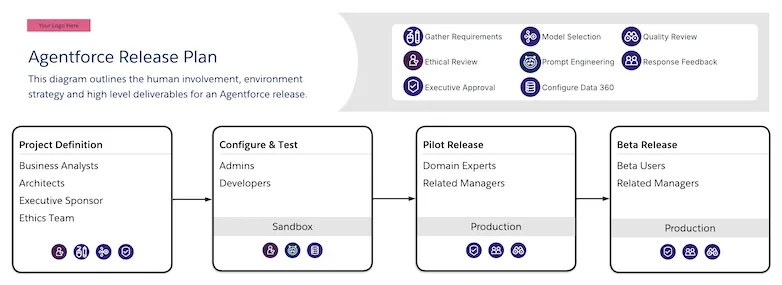
# Agentforce Release Plan
 ## Description
A roadmap diagram detailing the deliverables for an initial Agentforce project release. It includes stages such as Project Definition, Configure and Test, Pilot Release, and Beta Release.
## Downloadable Links
- [Lucid](https://lucid.app/lucidchart/editNewOrRegister/241905d5-9a36-451d-952a-e43390349502)
- [Image](https://architect.salesforce.com/ns-assets/reference-architectures/generative-ai-release-plan.webp)
# Agentforce Roadmap
## Description
A roadmap diagram detailing the deliverables for an initial Agentforce project release. It includes stages such as Project Definition, Configure and Test, Pilot Release, and Beta Release.
## Downloadable Links
- [Lucid](https://lucid.app/lucidchart/editNewOrRegister/241905d5-9a36-451d-952a-e43390349502)
- [Image](https://architect.salesforce.com/ns-assets/reference-architectures/generative-ai-release-plan.webp)
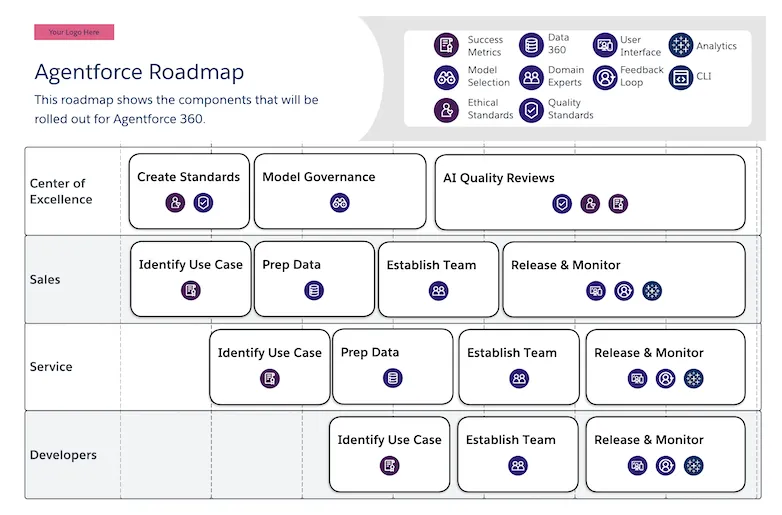
# Agentforce Roadmap
 ## Description
A roadmap diagram showing the stages for rolling out Agentforce features across a Salesforce Customer 360 implementation. This includes stages such as _Create Standards, Model Governance, Prep Data, Establish Team,_ and _Release & Monitor_. Swimlanes include Center of Excellence, Sales, Service, and Developers.
## Downloadable Links
- [Lucid](https://lucid.app/lucidchart/editNewOrRegister/1d9723f0-0835-4dc2-9cbb-01b2e97c91e8)
- [Image](https://architect.salesforce.com/ns-assets/reference-architectures/generative-ai-roadmap.webp)
# Agentforce System Landscape
## Description
A roadmap diagram showing the stages for rolling out Agentforce features across a Salesforce Customer 360 implementation. This includes stages such as _Create Standards, Model Governance, Prep Data, Establish Team,_ and _Release & Monitor_. Swimlanes include Center of Excellence, Sales, Service, and Developers.
## Downloadable Links
- [Lucid](https://lucid.app/lucidchart/editNewOrRegister/1d9723f0-0835-4dc2-9cbb-01b2e97c91e8)
- [Image](https://architect.salesforce.com/ns-assets/reference-architectures/generative-ai-roadmap.webp)
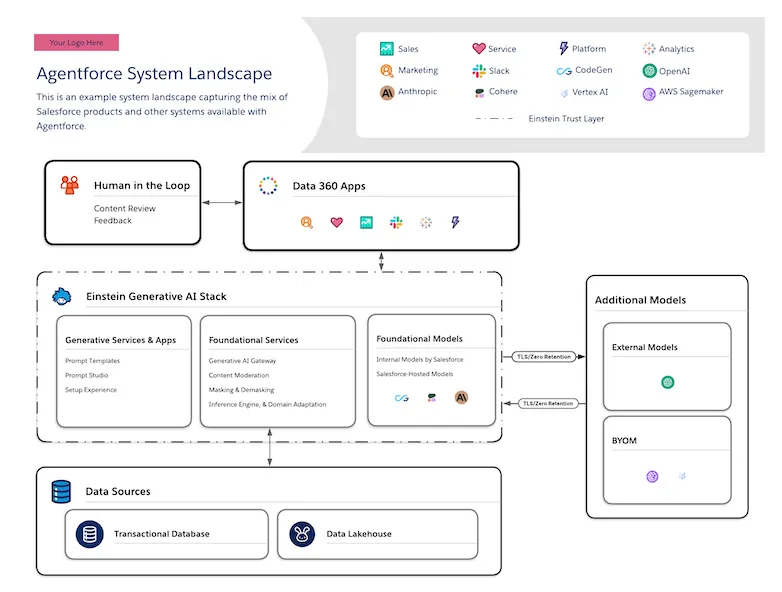
# Agentforce System Landscape
 ## Description
A system landscape capturing the mix of Salesforce products and other technology systems available with Agentforce. It shows how the Einstein trust layer and generative AI stack (prompt templates, LLM gateway, external models, BYOM) combine with Data 360 to provide a powerful foundation on which to build powerful agentic applications.
## Downloadable Links
- [Lucid](https://lucid.app/lucidchart/editNewOrRegister/28e332b9-b4d5-4780-8220-12e097f0dc58)
- [Image](https://architect.salesforce.com/ns-assets/reference-architectures/einstein-system-landscape.webp)
# Asynchronous Processing Via Platform Events
## Description
A system landscape capturing the mix of Salesforce products and other technology systems available with Agentforce. It shows how the Einstein trust layer and generative AI stack (prompt templates, LLM gateway, external models, BYOM) combine with Data 360 to provide a powerful foundation on which to build powerful agentic applications.
## Downloadable Links
- [Lucid](https://lucid.app/lucidchart/editNewOrRegister/28e332b9-b4d5-4780-8220-12e097f0dc58)
- [Image](https://architect.salesforce.com/ns-assets/reference-architectures/einstein-system-landscape.webp)
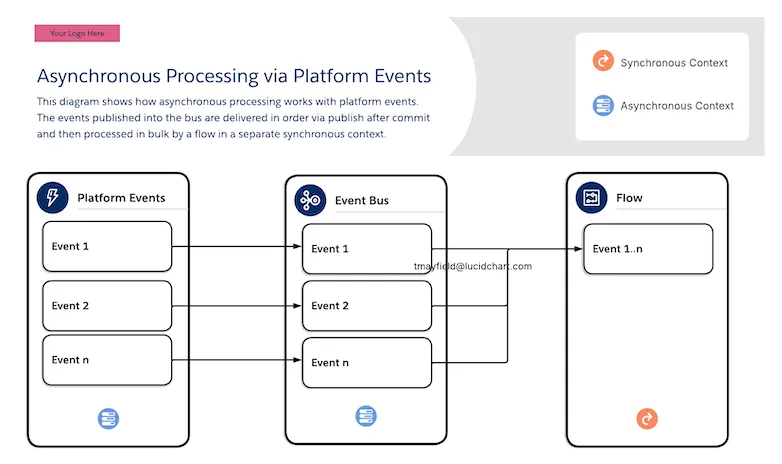
# Asynchronous Processing Via Platform Events
 ## Description
The diagram illustrates an interaction process flow for asynchronous processing using platform events, showing how events are published into the event bus as part of a broader architecture pattern. This pattern is designed for scenarios where a process needs to trigger downstream work without blocking the main transaction, letting Salesforce handle the heavy lifting asynchronously.
## Downloadable Links:
- [Lucid](https://lucid.app/lucidchart/editNew/73e12d46-2c45-4d7c-bcf4-a2ca7596ed4c)
- [Image](https://architect.salesforce.com/ns-assets/reference-architectures/asynchronous-processing-via-platform-events.webp)
# Business Capability Map
## Description
The diagram illustrates an interaction process flow for asynchronous processing using platform events, showing how events are published into the event bus as part of a broader architecture pattern. This pattern is designed for scenarios where a process needs to trigger downstream work without blocking the main transaction, letting Salesforce handle the heavy lifting asynchronously.
## Downloadable Links:
- [Lucid](https://lucid.app/lucidchart/editNew/73e12d46-2c45-4d7c-bcf4-a2ca7596ed4c)
- [Image](https://architect.salesforce.com/ns-assets/reference-architectures/asynchronous-processing-via-platform-events.webp)
# Business Capability Map
 ## Description
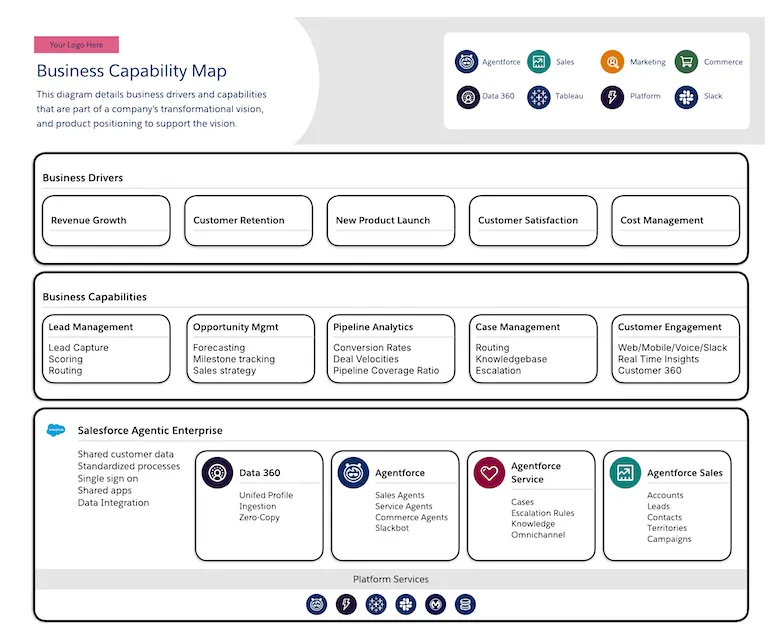
A template capability map for depicting business drivers and capabilities with high-level product positioning.
Business drivers are the high-level strategic goals or external pressures that push an organization to change how it operates.
Example business drivers include:
- Revenue Growth
- Operational Cost Reduction
- Customer Retention
## Downloadable Links
- [Lucid](https://lucid.app/lucidchart/editNewOrRegister/fe6ccc24-6a13-4e0f-8076-1e5af8b08466)
- [Image](https://architect.salesforce.com/ns-assets/reference-architectures/business-capability-map.webp)
# Capability Map
Capability maps provide a visual representation of business and technical capabilities, illustrating how different products and services support organizational objectives. These diagrams help architects and stakeholders understand the relationship between business drivers, capabilities, and the underlying technology stack. They serve as strategic planning tools that enable better alignment between business goals and technical implementation.
This section contains 4 reference diagrams related to capability maps:
| Diagram Name | Description |
| --------------------------------------------------------------------------------------------------------------- | -------------------------------------------------------------------------------------------------------------- |
| [Business Capability Map](/docs/architect/reference-diagrams/guide/business-capability-map) | A template capability map for depicting business drivers and capabilities with high-level product positioning. |
| [Data 360 Technical Capability Map](/docs/architect/reference-diagrams/guide/data-360-technical-capability-map) | A capability map that shows Data 360 technical capabilities and the product mix involved in supporting them. |
| [Loyalty Management Capability Map](/docs/architect/reference-diagrams/guide/loyalty-management-capability-map) | A capability map that shows loyalty management services with high-level product positioning. |
| [Center Of Excellence](/docs/architect/reference-diagrams/guide/center-of-excellence) | A diagram detailing how a Center of Excellence (CoE) bridges executive stakeholders and IT. |
# Capability Roadmap
## Description
A template capability map for depicting business drivers and capabilities with high-level product positioning.
Business drivers are the high-level strategic goals or external pressures that push an organization to change how it operates.
Example business drivers include:
- Revenue Growth
- Operational Cost Reduction
- Customer Retention
## Downloadable Links
- [Lucid](https://lucid.app/lucidchart/editNewOrRegister/fe6ccc24-6a13-4e0f-8076-1e5af8b08466)
- [Image](https://architect.salesforce.com/ns-assets/reference-architectures/business-capability-map.webp)
# Capability Map
Capability maps provide a visual representation of business and technical capabilities, illustrating how different products and services support organizational objectives. These diagrams help architects and stakeholders understand the relationship between business drivers, capabilities, and the underlying technology stack. They serve as strategic planning tools that enable better alignment between business goals and technical implementation.
This section contains 4 reference diagrams related to capability maps:
| Diagram Name | Description |
| --------------------------------------------------------------------------------------------------------------- | -------------------------------------------------------------------------------------------------------------- |
| [Business Capability Map](/docs/architect/reference-diagrams/guide/business-capability-map) | A template capability map for depicting business drivers and capabilities with high-level product positioning. |
| [Data 360 Technical Capability Map](/docs/architect/reference-diagrams/guide/data-360-technical-capability-map) | A capability map that shows Data 360 technical capabilities and the product mix involved in supporting them. |
| [Loyalty Management Capability Map](/docs/architect/reference-diagrams/guide/loyalty-management-capability-map) | A capability map that shows loyalty management services with high-level product positioning. |
| [Center Of Excellence](/docs/architect/reference-diagrams/guide/center-of-excellence) | A diagram detailing how a Center of Excellence (CoE) bridges executive stakeholders and IT. |
# Capability Roadmap
 ## Description
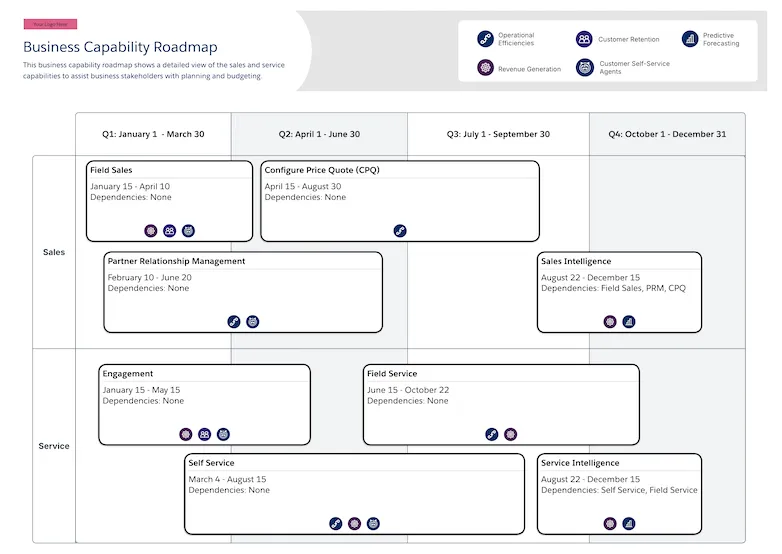
A visual roadmap that streamlines resource planning and budgeting by grouping capabilities and identifying implementation order, dependencies, and value.
For each capability in this diagram, it is common to have a dedicated [Component Roadmap](/docs/architect/reference-diagrams/guide/component-roadmap) to drill into the details of the delivery.
## Downloadable Links
- [Lucid](https://lucid.app/lucidchart/editNewOrRegister/12103374-8b95-49bb-b7ad-b0f8154ccec6)
- [Image](https://architect.salesforce.com/ns-assets/reference-architectures/capability-roadmap.webp)
# Center Of Excellence
## Description
A visual roadmap that streamlines resource planning and budgeting by grouping capabilities and identifying implementation order, dependencies, and value.
For each capability in this diagram, it is common to have a dedicated [Component Roadmap](/docs/architect/reference-diagrams/guide/component-roadmap) to drill into the details of the delivery.
## Downloadable Links
- [Lucid](https://lucid.app/lucidchart/editNewOrRegister/12103374-8b95-49bb-b7ad-b0f8154ccec6)
- [Image](https://architect.salesforce.com/ns-assets/reference-architectures/capability-roadmap.webp)
# Center Of Excellence
 ## Description
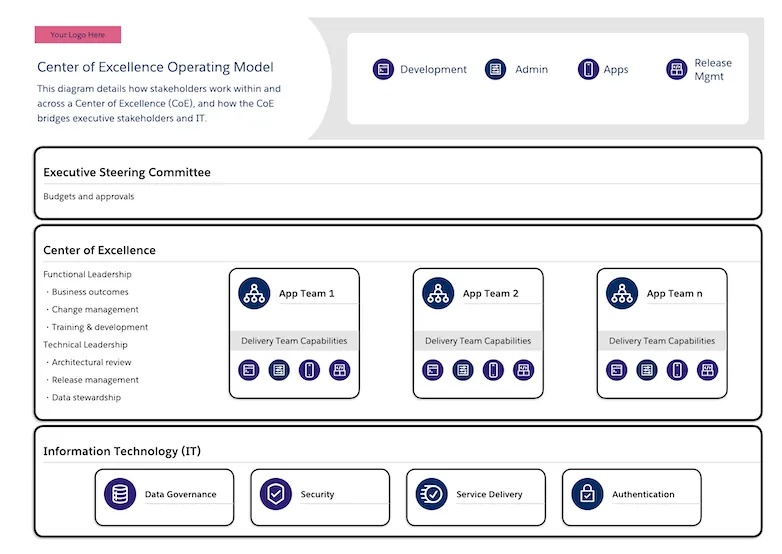
A diagram showing how a Center of Excellence (CoE) bridges executive stakeholders and IT.
It highlights how functional and technical leadership capabilities are central to a CoE.
Centers of Excellence provide expertise and guidance across the enterprise.
They provide value with activities such as:
- Establishing best practices for the implementation of the solutions
- Enforce adherence to corporate standards and industry standard practices
- As product experts, educate and train the project teams in the products
- Solve hard problems that arise during implementation
## Downloadable Links
- [Lucid](https://lucid.app/lucidchart/editNewOrRegister/59956c3b-3c73-469b-87a4-44c6dad948e5)
- [Image](https://architect.salesforce.com/ns-assets/reference-architectures/center-of-excellence.webp)
# Claim Check
## Description
A diagram showing how a Center of Excellence (CoE) bridges executive stakeholders and IT.
It highlights how functional and technical leadership capabilities are central to a CoE.
Centers of Excellence provide expertise and guidance across the enterprise.
They provide value with activities such as:
- Establishing best practices for the implementation of the solutions
- Enforce adherence to corporate standards and industry standard practices
- As product experts, educate and train the project teams in the products
- Solve hard problems that arise during implementation
## Downloadable Links
- [Lucid](https://lucid.app/lucidchart/editNewOrRegister/59956c3b-3c73-469b-87a4-44c6dad948e5)
- [Image](https://architect.salesforce.com/ns-assets/reference-architectures/center-of-excellence.webp)
# Claim Check
 ## Description
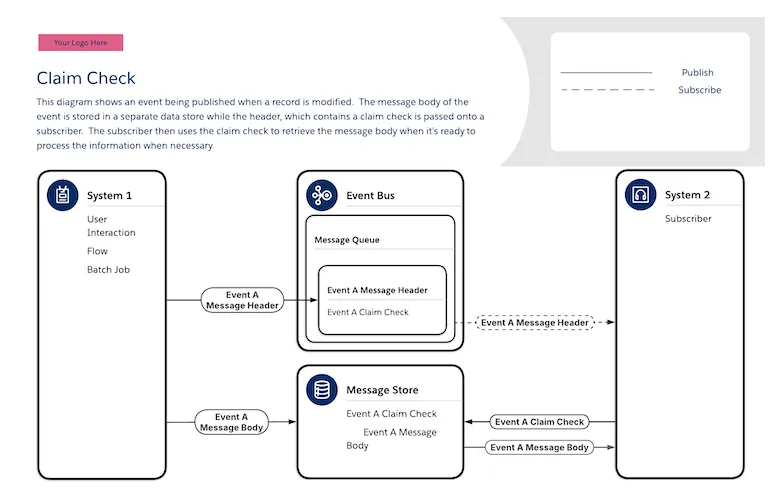
This diagram shows the claim check pattern. This pattern publishes and event to an event bus when a record is modified. The message body of the event is stored in a separate data store while the header, which contains a claim check, is passed onto a subscriber. The subscriber then uses the claim check to retrieve the message body when it's ready to process the information.
## Downloadable Links
- [Lucid](https://lucid.app/lucidchart/editNewOrRegister/0699a470-11ca-4291-88d6-a6399142a1ca)
- [Image](https://architect.salesforce.com/ns-assets/reference-architectures/claim-check.webp)
# Component Roadmap
## Description
This diagram shows the claim check pattern. This pattern publishes and event to an event bus when a record is modified. The message body of the event is stored in a separate data store while the header, which contains a claim check, is passed onto a subscriber. The subscriber then uses the claim check to retrieve the message body when it's ready to process the information.
## Downloadable Links
- [Lucid](https://lucid.app/lucidchart/editNewOrRegister/0699a470-11ca-4291-88d6-a6399142a1ca)
- [Image](https://architect.salesforce.com/ns-assets/reference-architectures/claim-check.webp)
# Component Roadmap
 ## Description
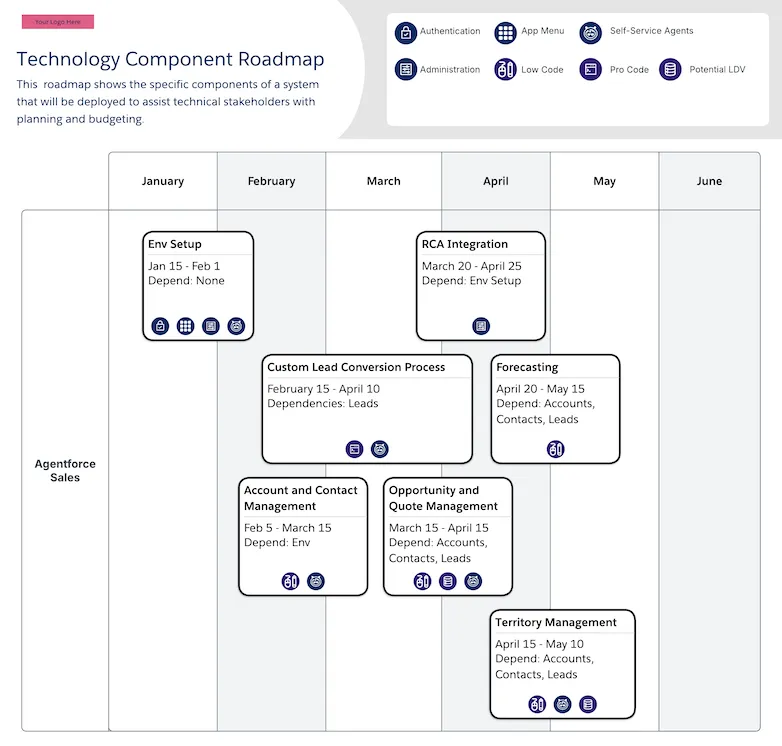
This diagram contains a visual roadmap that optimizes resource planning and budgeting by identifying system functionality, relevant features, implementation order, timeframes, and stakeholder dependencies.
This diagram is usually used as a detail view of one box in a [Capability Roadmap](/docs/architect/reference-diagrams/guide/capability-roadmap).
For each component in this diagram, it is common to have a dedicated [Feature Roadmap](/docs/architect/reference-diagrams/guide/feature-roadmap) to drill into the details of the feature delivery.
## Downloadable Links
- [Lucid](https://lucid.app/lucidchart/editNewOrRegister/2ca75fbd-af2e-45fd-a636-01255f1fb0cf)
- [Image](https://architect.salesforce.com/ns-assets/reference-architectures/component-roadmap.webp)
# Customer 360 Marketing System Landscape
## Description
This diagram contains a visual roadmap that optimizes resource planning and budgeting by identifying system functionality, relevant features, implementation order, timeframes, and stakeholder dependencies.
This diagram is usually used as a detail view of one box in a [Capability Roadmap](/docs/architect/reference-diagrams/guide/capability-roadmap).
For each component in this diagram, it is common to have a dedicated [Feature Roadmap](/docs/architect/reference-diagrams/guide/feature-roadmap) to drill into the details of the feature delivery.
## Downloadable Links
- [Lucid](https://lucid.app/lucidchart/editNewOrRegister/2ca75fbd-af2e-45fd-a636-01255f1fb0cf)
- [Image](https://architect.salesforce.com/ns-assets/reference-architectures/component-roadmap.webp)
# Customer 360 Marketing System Landscape
 ## Description
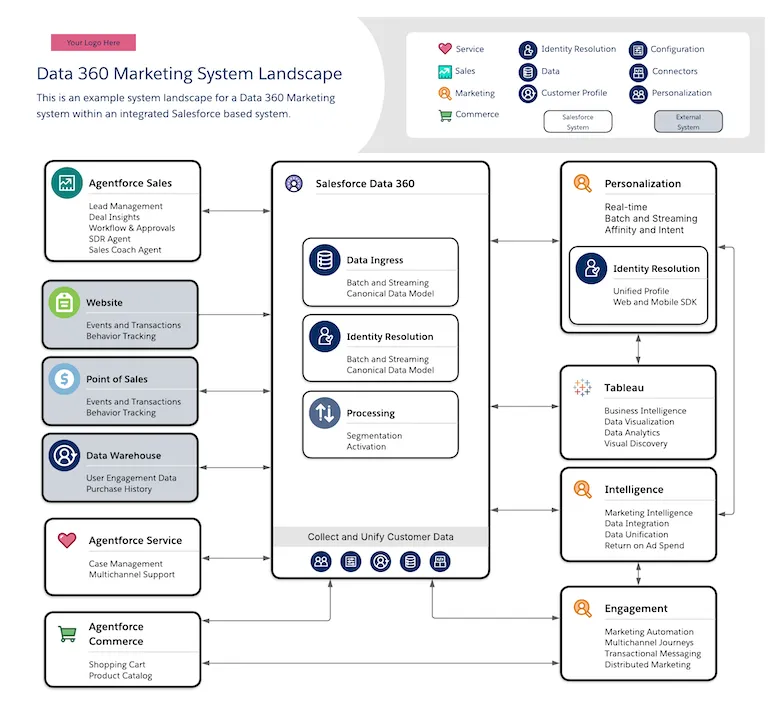
This is a system landscape diagram for a Customer 360 implementation, including Agentforce Sales, Agentforce Service, Agentforce Commerce, Tableau, and Data 360. It shows how different components within an integrated Salesforce solution communicate with each other using native connectors and custom connectors. It includes capabilities such as Data Ingress, Identity Resolution, Segmentation, and Activation.
## Downloadable Links
- [Lucid](https://lucid.app/lucidchart/editNewOrRegister/e83190b9-5d7d-4468-aff9-882c9086e73f)
- [Image](https://architect.salesforce.com/ns-assets/reference-architectures/data-360-marketing.webp)
# Customer Personalization Flow
## Description
This is a system landscape diagram for a Customer 360 implementation, including Agentforce Sales, Agentforce Service, Agentforce Commerce, Tableau, and Data 360. It shows how different components within an integrated Salesforce solution communicate with each other using native connectors and custom connectors. It includes capabilities such as Data Ingress, Identity Resolution, Segmentation, and Activation.
## Downloadable Links
- [Lucid](https://lucid.app/lucidchart/editNewOrRegister/e83190b9-5d7d-4468-aff9-882c9086e73f)
- [Image](https://architect.salesforce.com/ns-assets/reference-architectures/data-360-marketing.webp)
# Customer Personalization Flow
 ## Description
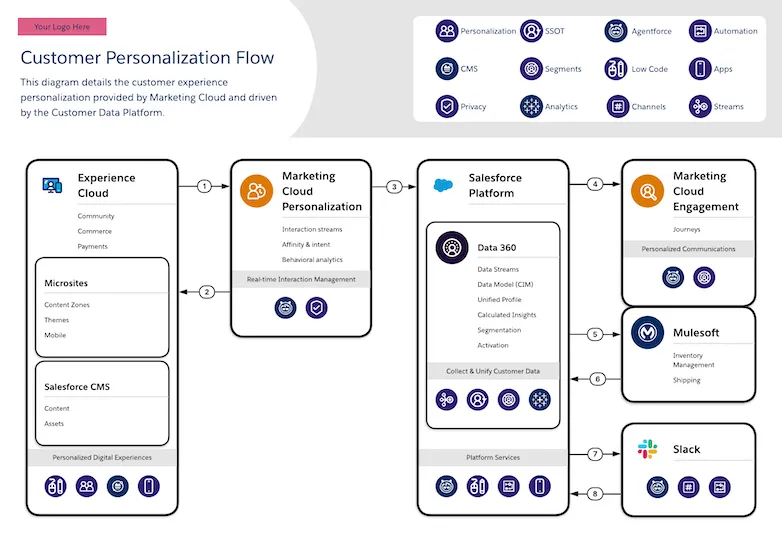
This diagram shows time-based interactions involved in the end-to-end flow of information from customer interactions on the Experience Cloud site to back-end automation in Marketing Cloud and Slack. MuleSoft orchestrates integrations to back-end systems, Slack connects everyone on the team, and Marketing Cloud closes the loop with the customer journey. This architecture also makes use of AIforce and Data 360 products.
## Downloadable Links
- [Lucid](https://lucid.app/lucidchart/editNewOrRegister/b13e3166-d3a1-4621-b275-242638f3f9af)
- [Image](https://architect.salesforce.com/ns-assets/reference-architectures/customer-personalization-flow.webp)
# Data 360 Batch Activation and Event Driven Action Architecture
## Description
This diagram shows time-based interactions involved in the end-to-end flow of information from customer interactions on the Experience Cloud site to back-end automation in Marketing Cloud and Slack. MuleSoft orchestrates integrations to back-end systems, Slack connects everyone on the team, and Marketing Cloud closes the loop with the customer journey. This architecture also makes use of AIforce and Data 360 products.
## Downloadable Links
- [Lucid](https://lucid.app/lucidchart/editNewOrRegister/b13e3166-d3a1-4621-b275-242638f3f9af)
- [Image](https://architect.salesforce.com/ns-assets/reference-architectures/customer-personalization-flow.webp)
# Data 360 Batch Activation and Event Driven Action Architecture
 ## Description
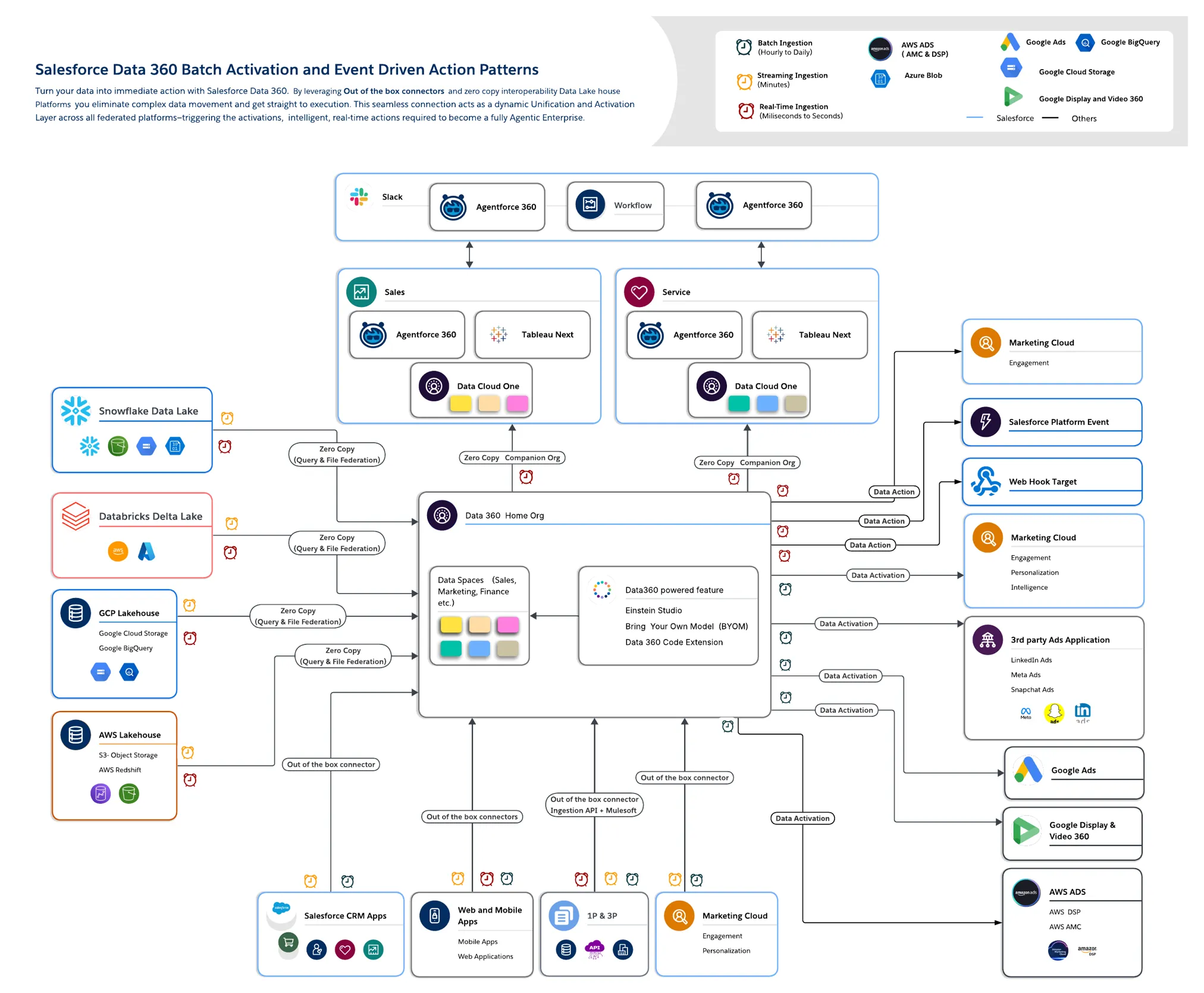
This is a diagram depicting Salesforce Data 360 in an end-to-end solution for marketing activations. It shows how to build a complete solution with products such as Home Orgs, Companion Orgs, Data Cloud One, Agentforce 360, Agentforce Sales, Marketing Cloud, and Tableau Next.
## Downloadable Links
- [Lucid](https://lucid.app/lucidchart/editNew/620837ec-bb08-4f1e-af26-1164fc5f789c)
- [Image](https://architect.salesforce.com/ns-assets/data360_ref_arch/data360-actions-activations.webp)
# Data 360 Customer Zero Implementation Architecture
## Description
This is a diagram depicting Salesforce Data 360 in an end-to-end solution for marketing activations. It shows how to build a complete solution with products such as Home Orgs, Companion Orgs, Data Cloud One, Agentforce 360, Agentforce Sales, Marketing Cloud, and Tableau Next.
## Downloadable Links
- [Lucid](https://lucid.app/lucidchart/editNew/620837ec-bb08-4f1e-af26-1164fc5f789c)
- [Image](https://architect.salesforce.com/ns-assets/data360_ref_arch/data360-actions-activations.webp)
# Data 360 Customer Zero Implementation Architecture
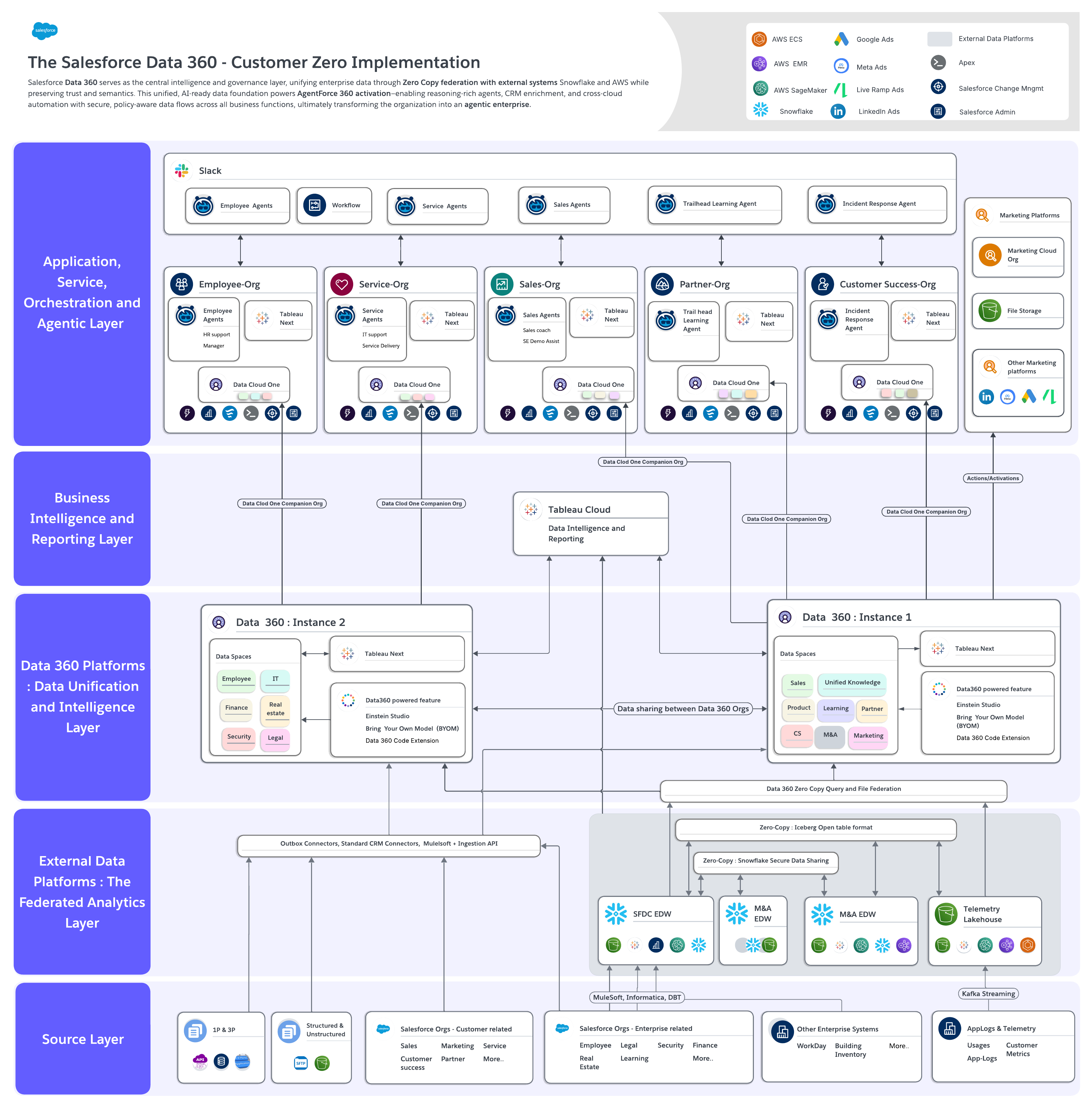 ## Description
An end-to-end diagram depicting Salesforce Data 360 as implemented within Salesforce as our Customer Zero program. Salesforce Data 360 serves as the central intelligence and governance layer, unifying enterprise data through Zero Copy federation with external systems Snowflake and AWS while preserving trust and semantics. This unified, AI-ready data foundation powers AgentForce 360 activation—enabling reasoning-rich agents, CRM enrichment, and cross-cloud automation with secure, policy-aware data flows across all business functions, ultimately transforming the organization into an agentic enterprise.
## Downloadable Links
- [Lucid](https://lucid.app/lucidchart/editNew/af215946-127b-4b47-95b9-a7c158be351b)
- [Image](https://architect.salesforce.com/ns-assets/data360_ref_arch/sfdc_customer_zero_implementation.png)
# Data 360 Technical Capability Map
## Description
An end-to-end diagram depicting Salesforce Data 360 as implemented within Salesforce as our Customer Zero program. Salesforce Data 360 serves as the central intelligence and governance layer, unifying enterprise data through Zero Copy federation with external systems Snowflake and AWS while preserving trust and semantics. This unified, AI-ready data foundation powers AgentForce 360 activation—enabling reasoning-rich agents, CRM enrichment, and cross-cloud automation with secure, policy-aware data flows across all business functions, ultimately transforming the organization into an agentic enterprise.
## Downloadable Links
- [Lucid](https://lucid.app/lucidchart/editNew/af215946-127b-4b47-95b9-a7c158be351b)
- [Image](https://architect.salesforce.com/ns-assets/data360_ref_arch/sfdc_customer_zero_implementation.png)
# Data 360 Technical Capability Map
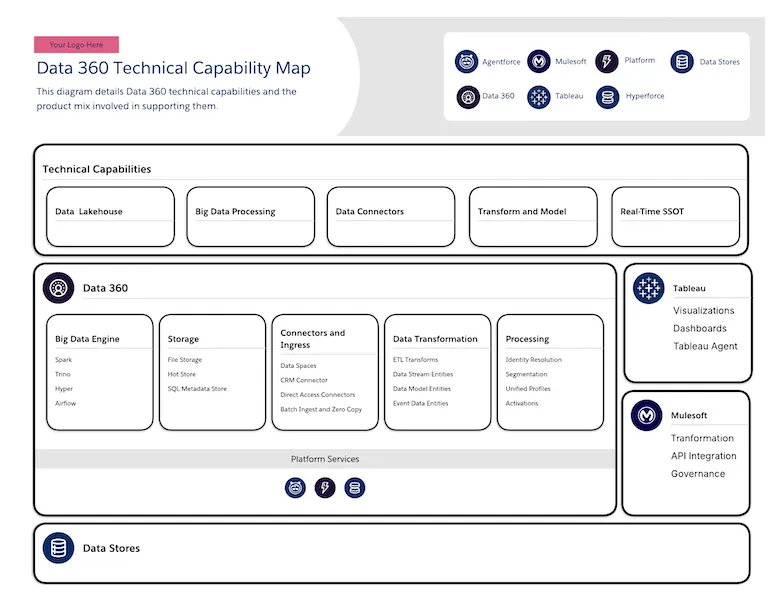 ## Description
A capability map that shows Data 360 technical capabilities and the product mix involved in supporting them. It includes capabilities such as Data Lakehouse, Big Data Processing, Data Connectors, Transforms, Models, and Single Source of Truth. This diagram also shows how Tableau and MuleSoft fit into a complete solution.
## Downloadable Links
- [Lucid](https://lucid.app/lucidchart/editNewOrRegister/9b36e287-525d-472c-92ec-729bca136540)
- [Image](https://architect.salesforce.com/ns-assets/reference-architectures/data-360-technical-capability-map.webp)
# External Integrations Via Http
## Description
A capability map that shows Data 360 technical capabilities and the product mix involved in supporting them. It includes capabilities such as Data Lakehouse, Big Data Processing, Data Connectors, Transforms, Models, and Single Source of Truth. This diagram also shows how Tableau and MuleSoft fit into a complete solution.
## Downloadable Links
- [Lucid](https://lucid.app/lucidchart/editNewOrRegister/9b36e287-525d-472c-92ec-729bca136540)
- [Image](https://architect.salesforce.com/ns-assets/reference-architectures/data-360-technical-capability-map.webp)
# External Integrations Via Http
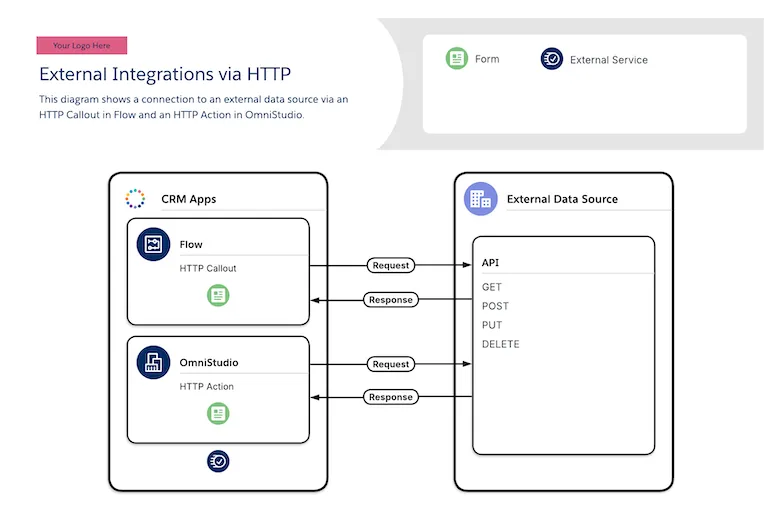 ## Description
This is an example solution architecture diagram from the Building Forms Decision Guide that shows a connection to an external data source via an HTTP Callout in Flow and an HTTP Action in OmniStudio. It shows the familiar request and response pattern of HTTP.
## Downloadable Links
- [Lucid](https://lucid.app/lucidchart/editNewOrRegister/161cc130-341d-4c6d-84dc-00ca6aa00462)
- [Image](https://architect.salesforce.com/ns-assets/reference-architectures/external-integrations-via-http.webp)
# Feature Roadmap
## Description
This is an example solution architecture diagram from the Building Forms Decision Guide that shows a connection to an external data source via an HTTP Callout in Flow and an HTTP Action in OmniStudio. It shows the familiar request and response pattern of HTTP.
## Downloadable Links
- [Lucid](https://lucid.app/lucidchart/editNewOrRegister/161cc130-341d-4c6d-84dc-00ca6aa00462)
- [Image](https://architect.salesforce.com/ns-assets/reference-architectures/external-integrations-via-http.webp)
# Feature Roadmap
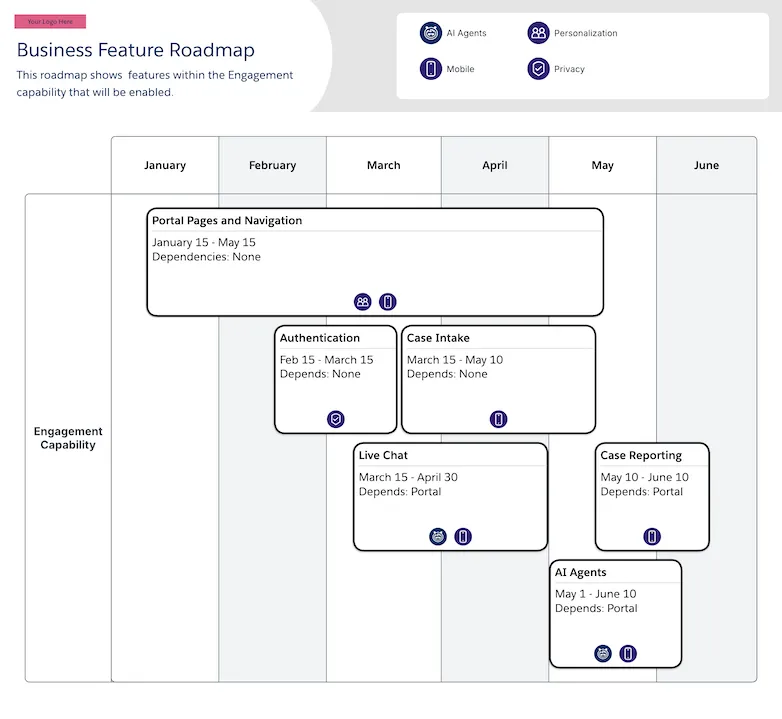 ## Description
A visual roadmap diagram that enhances collaboration between business and technical teams by identifying feature implementation order, dependencies, and additional functionality for planning purposes.
This diagram is usually used as a detail view of one box in a [Component Roadmap](/docs/architect/reference-diagrams/guide/component-roadmap).
## Downloadable Links
- [Lucid](https://lucid.app/lucidchart/editNewOrRegister/8e43258e-b21b-4525-87bf-8e5ba96f4032)
- [Image](https://architect.salesforce.com/ns-assets/reference-architectures/feature-roadmap.webp)
# Hospitality Loyalty Management Process
## Description
A visual roadmap diagram that enhances collaboration between business and technical teams by identifying feature implementation order, dependencies, and additional functionality for planning purposes.
This diagram is usually used as a detail view of one box in a [Component Roadmap](/docs/architect/reference-diagrams/guide/component-roadmap).
## Downloadable Links
- [Lucid](https://lucid.app/lucidchart/editNewOrRegister/8e43258e-b21b-4525-87bf-8e5ba96f4032)
- [Image](https://architect.salesforce.com/ns-assets/reference-architectures/feature-roadmap.webp)
# Hospitality Loyalty Management Process
 ## Description
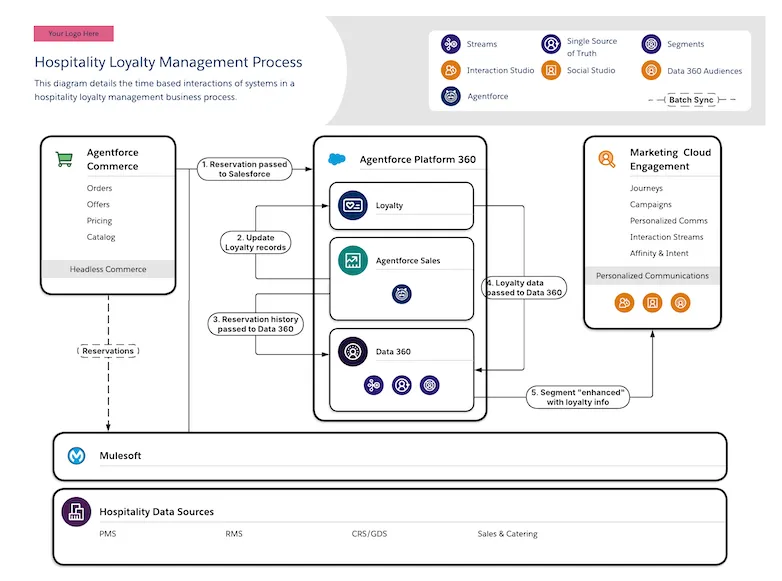
The time based interactions of systems in a hospitality loyalty management process. This flow traces the process through Agentforce Commerce, Agentforce Sales, Agentforce Platform, Data 360, Marketing Cloud Engagement, MuleSoft, and external data sources.
## Downloadable Links
- [Lucid](https://lucid.app/lucidchart/editNewOrRegister/899f5366-4dea-4da7-81af-dc3939aece42)
- [Image](https://architect.salesforce.com/ns-assets/reference-architectures/hospitality-loyalty-management-process.webp)
## Introduction
Diagrams are an essential tool and a key part of architectural work. They enable us to communicate many different ideas to many different kinds of stakeholders.
Diagrams help delivery teams stay aligned, by serving as a single source of truth about the realities of implementations and products. Diagrams are also a critical way to empower business stakeholders to make the right purchasing and technology decisions.
**Diagrams should always:**
- Read left to right and top to bottom, as closely as possible
- Convey a message concisely, with an appropriate scope of information for readability
- Utilize [Salesforce Diagrams Standard Components](/docs/architect/reference-diagrams/guide/kit-of-parts), including Cards and a Header with a clear description describing the content, scope and purpose of the diagram
## Diagram Scope
The scope of a diagram should be limited to only the critical information to convey for a specific topic. Anything that is not required to capture the message you intend to communicate should be excluded. Multiple diagrams can (and should) be created to capture varying concepts, in order to more clearly communicate and narrow the focus of diagram content.
- Define the critical information/message you need to convey to your audience
- Classify logical scope(s) in order to focus the information to capture the message
- Identify the most appropriate diagram type(s) to use as templates
## Diagram Types
Salesforce Diagrams has defined our most useful/popular types of diagrams in order to help you easily utilize templates and understand diagramming conventions. Our current resources are classified as:
### Capability Maps
- Capture the property mix and relevant, key capabilities included in a solution
- Focus on functionality, business drivers and values
✨ Find Capability Maps in the [Reference Architecture Gallery](/docs/architect/reference-diagrams/guide/section-capability-map)
### System Landscapes
- Capture the products and/or technical systems involved in a given implementation
- Focus on the properties, specific property aspects, and connections across properties
✨ Find System Landscape examples & templates in the [Reference Architecture Gallery](/docs/architect/reference-diagrams/guide/section-system-landscape)
### Solution Architectures
- Include products or technologies with integration, behavior and/or functionality
- Focus on the detailed connections and/or communication aspects across properties
✨ Find Solution Architecture examples & templates in the [Reference Architecture Gallery](/docs/architect/reference-diagrams/guide/section-solution-architecture)
### Roadmaps
- Help organizations plan and visualize the strategic implementation of capabilities, components, features, and systems over time
- Provide a clear view of implementation order, dependencies, and priorities
✨ Find Roadmap examples & templates in the [Reference Architecture Gallery](/docs/architect/reference-diagrams/guide/section-roadmap)
### Interaction / Process / Flows
- Capture time-based steps, data flows, or interactions required to support a process
- Focus on and clarify (with sequenced numbering) the order of aspects/properties
✨ Find examples & templates of Interaction, Process, and Flow diagrams in the [Reference Architecture Gallery](/docs/architect/reference-diagrams/guide/section-interaction-process-flow)
### Data Models / ERDs
- Capture entities (objects), relationships and concepts for metadata implementations
✨ Find Data Model examples & templates in the [Data Model Gallery](https://developer.salesforce.com/docs/platform/data-models/guide/get-started.html)
See examples of the Diagram Types in the [Reference Architecture Gallery](/diagrams) or our dedicated [Data Model Gallery](https://developer.salesforce.com/docs/platform/data-models/guide/get-started.html). Utilize a template to quickly/easily create a diagram for your use case.
## Steps to create a diagram:
- Define the **scope** of the message you need to convey:
- _Think about your audience, what properties/aspects you need to depict, what information is necessary to capture the message, and what can be excluded_
- Ensure there is a **Header** with a clear **Title** and a concise, thoughtfully-worded **Description** that captures the purpose, scope and message of your diagram
## Description
The time based interactions of systems in a hospitality loyalty management process. This flow traces the process through Agentforce Commerce, Agentforce Sales, Agentforce Platform, Data 360, Marketing Cloud Engagement, MuleSoft, and external data sources.
## Downloadable Links
- [Lucid](https://lucid.app/lucidchart/editNewOrRegister/899f5366-4dea-4da7-81af-dc3939aece42)
- [Image](https://architect.salesforce.com/ns-assets/reference-architectures/hospitality-loyalty-management-process.webp)
## Introduction
Diagrams are an essential tool and a key part of architectural work. They enable us to communicate many different ideas to many different kinds of stakeholders.
Diagrams help delivery teams stay aligned, by serving as a single source of truth about the realities of implementations and products. Diagrams are also a critical way to empower business stakeholders to make the right purchasing and technology decisions.
**Diagrams should always:**
- Read left to right and top to bottom, as closely as possible
- Convey a message concisely, with an appropriate scope of information for readability
- Utilize [Salesforce Diagrams Standard Components](/docs/architect/reference-diagrams/guide/kit-of-parts), including Cards and a Header with a clear description describing the content, scope and purpose of the diagram
## Diagram Scope
The scope of a diagram should be limited to only the critical information to convey for a specific topic. Anything that is not required to capture the message you intend to communicate should be excluded. Multiple diagrams can (and should) be created to capture varying concepts, in order to more clearly communicate and narrow the focus of diagram content.
- Define the critical information/message you need to convey to your audience
- Classify logical scope(s) in order to focus the information to capture the message
- Identify the most appropriate diagram type(s) to use as templates
## Diagram Types
Salesforce Diagrams has defined our most useful/popular types of diagrams in order to help you easily utilize templates and understand diagramming conventions. Our current resources are classified as:
### Capability Maps
- Capture the property mix and relevant, key capabilities included in a solution
- Focus on functionality, business drivers and values
✨ Find Capability Maps in the [Reference Architecture Gallery](/docs/architect/reference-diagrams/guide/section-capability-map)
### System Landscapes
- Capture the products and/or technical systems involved in a given implementation
- Focus on the properties, specific property aspects, and connections across properties
✨ Find System Landscape examples & templates in the [Reference Architecture Gallery](/docs/architect/reference-diagrams/guide/section-system-landscape)
### Solution Architectures
- Include products or technologies with integration, behavior and/or functionality
- Focus on the detailed connections and/or communication aspects across properties
✨ Find Solution Architecture examples & templates in the [Reference Architecture Gallery](/docs/architect/reference-diagrams/guide/section-solution-architecture)
### Roadmaps
- Help organizations plan and visualize the strategic implementation of capabilities, components, features, and systems over time
- Provide a clear view of implementation order, dependencies, and priorities
✨ Find Roadmap examples & templates in the [Reference Architecture Gallery](/docs/architect/reference-diagrams/guide/section-roadmap)
### Interaction / Process / Flows
- Capture time-based steps, data flows, or interactions required to support a process
- Focus on and clarify (with sequenced numbering) the order of aspects/properties
✨ Find examples & templates of Interaction, Process, and Flow diagrams in the [Reference Architecture Gallery](/docs/architect/reference-diagrams/guide/section-interaction-process-flow)
### Data Models / ERDs
- Capture entities (objects), relationships and concepts for metadata implementations
✨ Find Data Model examples & templates in the [Data Model Gallery](https://developer.salesforce.com/docs/platform/data-models/guide/get-started.html)
See examples of the Diagram Types in the [Reference Architecture Gallery](/diagrams) or our dedicated [Data Model Gallery](https://developer.salesforce.com/docs/platform/data-models/guide/get-started.html). Utilize a template to quickly/easily create a diagram for your use case.
## Steps to create a diagram:
- Define the **scope** of the message you need to convey:
- _Think about your audience, what properties/aspects you need to depict, what information is necessary to capture the message, and what can be excluded_
- Ensure there is a **Header** with a clear **Title** and a concise, thoughtfully-worded **Description** that captures the purpose, scope and message of your diagram
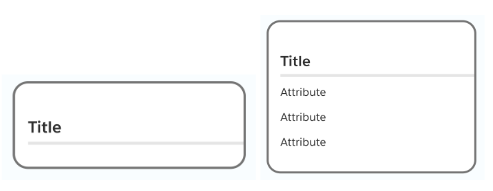
 - Utilize **Cards** to capture the properties (systems, concepts, entities, etc.)
- Capture property details or key aspects / capabilities as needed in **Card Attributes**
- Utilize **Cards** to capture the properties (systems, concepts, entities, etc.)
- Capture property details or key aspects / capabilities as needed in **Card Attributes**
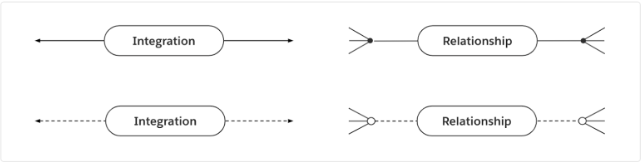
 - Depict relationships as needed with **Connectors** between your card properties
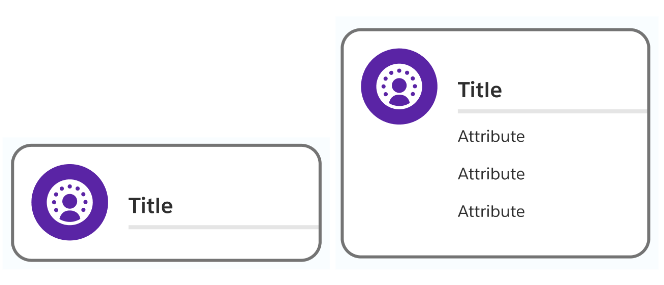
 - Incorporate **Card Icons** where useful, available and/or appropriate
 - Use **Footers** and **Footer icons** to capture any other key property aspects
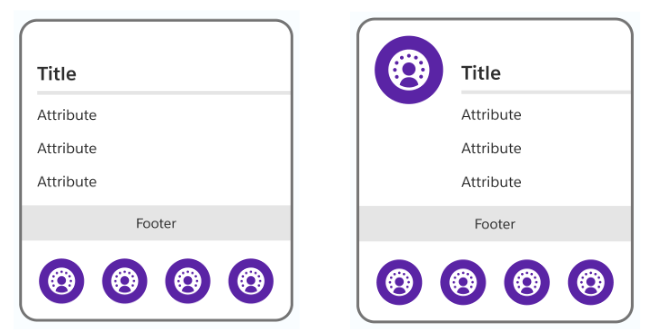 **Warning:** due to a current limitation with Lucidchart, the footer icons in diagrams that are created from a template become undocked from the card. You will need to re-dock the icons by dragging them into the center of the footer.
See the [Standard Components page](/docs/architect/reference-diagrams/guide/kit-of-parts) for more details and best practices.
**Have Salesforce Diagrams input or questions?** Please let us know your thoughts [here](https://docs.google.com/forms/d/e/1FAIpQLSe5RmVA2ZtpfGlR2u436FA4QN6QmJGdAWxtZ_AcRLMAH_US9Q/viewform?usp=sf_link).
# Interaction Process Flow
Interaction process flow diagrams illustrate the sequence of interactions, data flows, and process steps between system components, services, and users. These diagrams help architects and developers understand how different parts of a system communicate, how events propagate through the architecture, and how asynchronous and synchronous processes are orchestrated. They provide essential documentation for understanding system behavior, identifying bottlenecks, and optimizing process flows.
This section contains 6 reference diagrams related to interaction process flow:
| Diagram Name | Description |
| ----------------------------------------------------------------------------------------------------------------------------------- | ------------------------------------------------------------------------------------------------------------------------------------------------------------------------ |
| [Asynchronous Processing Via Platform Events](/docs/architect/reference-diagrams/guide/asynchronous-processing-via-platform-events) | Shows how asynchronous processing works with platform events. The events published into the bus are consumed by subscribers for processing. |
| [Claim Check](/docs/architect/reference-diagrams/guide/claim-check) | Shows an event being published when a record is modified. The message body of the event is stored in a database, and only a reference is passed through the message bus. |
| [Customer Personalization Flow](/docs/architect/reference-diagrams/guide/customer-personalization-flow) | Shows time-based interactions involved in the end-to-end flow of information from customer interactions through personalization engines to delivery systems. |
| [External Integrations Via Http](/docs/architect/reference-diagrams/guide/external-integrations-via-http) | An example solution architecture diagram from the Building Forms Decision Guide that shows external integrations using HTTP protocols. |
| [Hospitality Loyalty Management Process](/docs/architect/reference-diagrams/guide/hospitality-loyalty-management-process) | Shows time-based interactions of systems in a hospitality loyalty management process. |
| [Queuing](/docs/architect/reference-diagrams/guide/queuing) | Shows an example of the Queuing pattern that depicts an event being published and written to a queue, with subscribers processing events in order. |
# Loyalty Management Capability Map
**Warning:** due to a current limitation with Lucidchart, the footer icons in diagrams that are created from a template become undocked from the card. You will need to re-dock the icons by dragging them into the center of the footer.
See the [Standard Components page](/docs/architect/reference-diagrams/guide/kit-of-parts) for more details and best practices.
**Have Salesforce Diagrams input or questions?** Please let us know your thoughts [here](https://docs.google.com/forms/d/e/1FAIpQLSe5RmVA2ZtpfGlR2u436FA4QN6QmJGdAWxtZ_AcRLMAH_US9Q/viewform?usp=sf_link).
# Interaction Process Flow
Interaction process flow diagrams illustrate the sequence of interactions, data flows, and process steps between system components, services, and users. These diagrams help architects and developers understand how different parts of a system communicate, how events propagate through the architecture, and how asynchronous and synchronous processes are orchestrated. They provide essential documentation for understanding system behavior, identifying bottlenecks, and optimizing process flows.
This section contains 6 reference diagrams related to interaction process flow:
| Diagram Name | Description |
| ----------------------------------------------------------------------------------------------------------------------------------- | ------------------------------------------------------------------------------------------------------------------------------------------------------------------------ |
| [Asynchronous Processing Via Platform Events](/docs/architect/reference-diagrams/guide/asynchronous-processing-via-platform-events) | Shows how asynchronous processing works with platform events. The events published into the bus are consumed by subscribers for processing. |
| [Claim Check](/docs/architect/reference-diagrams/guide/claim-check) | Shows an event being published when a record is modified. The message body of the event is stored in a database, and only a reference is passed through the message bus. |
| [Customer Personalization Flow](/docs/architect/reference-diagrams/guide/customer-personalization-flow) | Shows time-based interactions involved in the end-to-end flow of information from customer interactions through personalization engines to delivery systems. |
| [External Integrations Via Http](/docs/architect/reference-diagrams/guide/external-integrations-via-http) | An example solution architecture diagram from the Building Forms Decision Guide that shows external integrations using HTTP protocols. |
| [Hospitality Loyalty Management Process](/docs/architect/reference-diagrams/guide/hospitality-loyalty-management-process) | Shows time-based interactions of systems in a hospitality loyalty management process. |
| [Queuing](/docs/architect/reference-diagrams/guide/queuing) | Shows an example of the Queuing pattern that depicts an event being published and written to a queue, with subscribers processing events in order. |
# Loyalty Management Capability Map
 ## Description
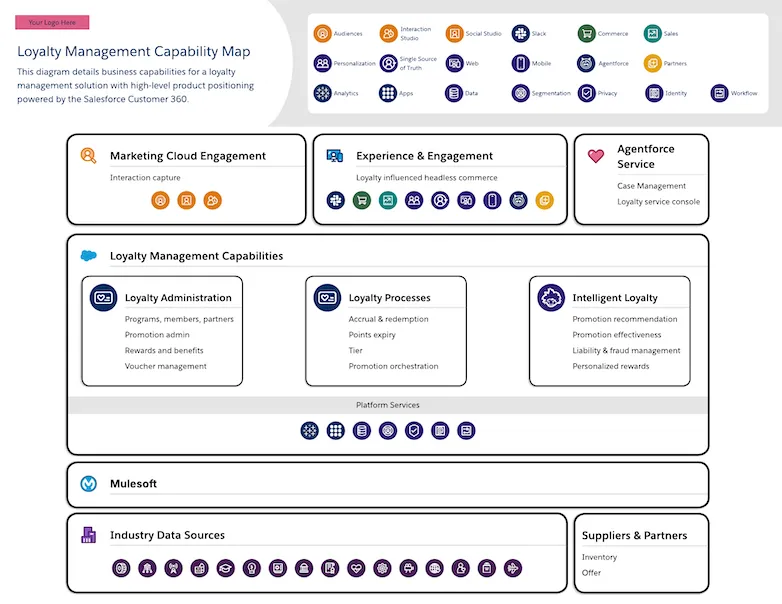
This capability map diagram shows loyalty management services with high-level product positioning. It includes capabilities such as Loyalty Administration, Processing, and Analytics. This solution uses Salesforce products such as Marketing Cloud Engagement, Agentforce Service, and MuleSoft.
## Downloadable Links
- [Lucid](https://lucid.app/lucidchart/editNewOrRegister/d41ccba2-71ea-449a-8497-ea95396102b4)
- [Image](https://architect.salesforce.com/ns-assets/reference-architectures/loyalty-management-capability-map.webp)
# Loyalty Management Solution Architecture
## Description
This capability map diagram shows loyalty management services with high-level product positioning. It includes capabilities such as Loyalty Administration, Processing, and Analytics. This solution uses Salesforce products such as Marketing Cloud Engagement, Agentforce Service, and MuleSoft.
## Downloadable Links
- [Lucid](https://lucid.app/lucidchart/editNewOrRegister/d41ccba2-71ea-449a-8497-ea95396102b4)
- [Image](https://architect.salesforce.com/ns-assets/reference-architectures/loyalty-management-capability-map.webp)
# Loyalty Management Solution Architecture
 ## Description
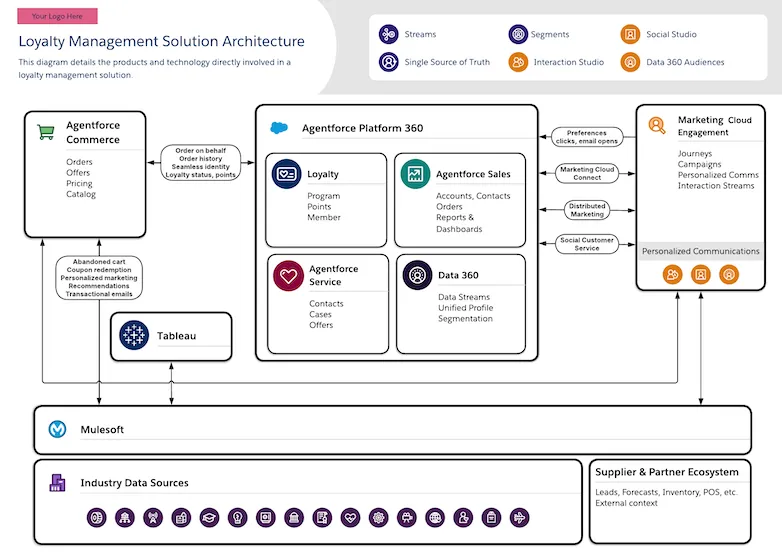
An architecture diagram that depicts the products and capabilities directly involved in a loyalty management solution. This includes Agentforce Commerce, Agentforce Sales, Agentforce Service, Marketing Cloud Engagement, MuleSoft, Data 360, and Tableau for analytics.
## Downloadable Links
- [Lucid](https://lucid.app/lucidchart/editNewOrRegister/217c76c7-b8c4-44ed-aade-a7ae3fb8df0a)
- [Image](https://architect.salesforce.com/ns-assets/reference-architectures/loyalty-management-solution-architecture.webp)
# Queuing
## Description
An architecture diagram that depicts the products and capabilities directly involved in a loyalty management solution. This includes Agentforce Commerce, Agentforce Sales, Agentforce Service, Marketing Cloud Engagement, MuleSoft, Data 360, and Tableau for analytics.
## Downloadable Links
- [Lucid](https://lucid.app/lucidchart/editNewOrRegister/217c76c7-b8c4-44ed-aade-a7ae3fb8df0a)
- [Image](https://architect.salesforce.com/ns-assets/reference-architectures/loyalty-management-solution-architecture.webp)
# Queuing
 ## Description
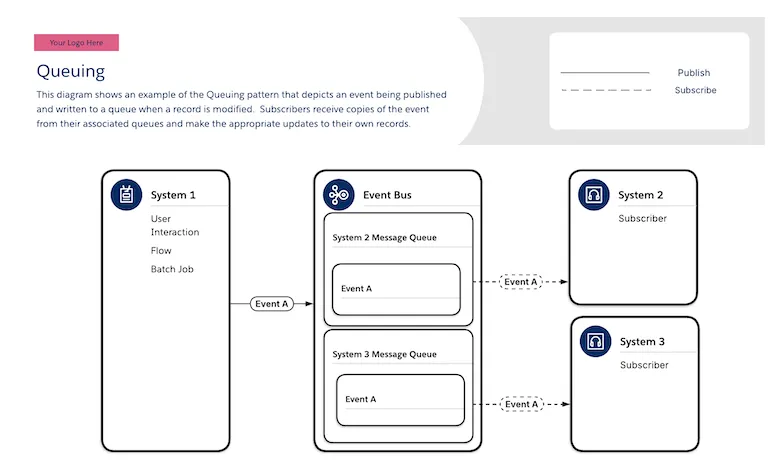
Shows an example of the Queuing pattern that depicts an event being published and written to a queue when a record is modified. Subscribers receive copies of the event from their associated queues and make the appropriate updates to their own records.
## Downloadable Links
- [Lucid](https://lucid.app/lucidchart/editNewOrRegister/0cef151e-5b48-4237-bbe4-a774eee152ab)
- [Image](https://architect.salesforce.com/ns-assets/reference-architectures/queuing.webp)
# Retail System Landscape
## Description
Shows an example of the Queuing pattern that depicts an event being published and written to a queue when a record is modified. Subscribers receive copies of the event from their associated queues and make the appropriate updates to their own records.
## Downloadable Links
- [Lucid](https://lucid.app/lucidchart/editNewOrRegister/0cef151e-5b48-4237-bbe4-a774eee152ab)
- [Image](https://architect.salesforce.com/ns-assets/reference-architectures/queuing.webp)
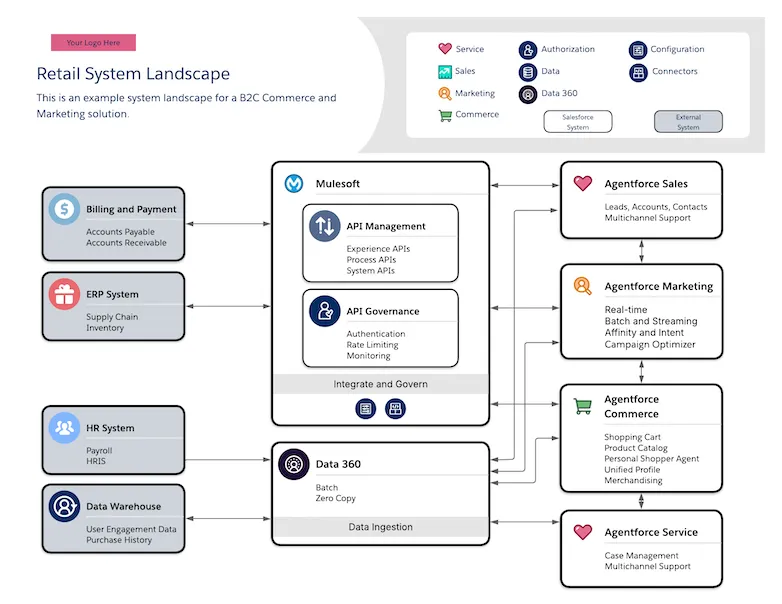
# Retail System Landscape
 ## Description
A system landscape showing a B2C Commerce and Marketing solution, indicating the mix of Salesforce products and other technologies involved in the implementation such as MuleSoft, Data 360, Agentforce Sales, Agentforce Marketing, Agentforce Commerce and Agentforce Service. It includes capabilities such as Marketing Automation, Interaction Management, Product Catalog, and Segmentation.
## Downloadable Links
- [Lucid](https://lucid.app/lucidchart/editNewOrRegister/4d6b109a-ea3e-46c2-bab6-84a07efd9ac5)
- [Image](https://architect.salesforce.com/ns-assets/reference-architectures/retail-system-landscape.webp)
# Roadmap
Roadmap diagrams help organizations plan and visualize the strategic implementation of capabilities, components, features, and systems over time. These diagrams enable architects and project managers to streamline resource planning, optimize budgeting, and enhance collaboration between business and technical teams. They provide a clear view of implementation order, dependencies, and priorities, helping stakeholders understand the phased approach to delivering complex Salesforce solutions.
This section contains 6 reference diagrams related to roadmaps:
| Diagram Name | Description |
| ---------------------------------------------------------------------------------------------- | ------------------------------------------------------------------------------------------------------------------------------------------------------------------------------------------------ |
| [Capability Roadmap](/docs/architect/reference-diagrams/guide/capability-roadmap) | A visual roadmap that streamlines resource planning and budgeting by grouping capabilities and identifying implementation order, dependencies, and value. |
| [Component Roadmap](/docs/architect/reference-diagrams/guide/component-roadmap) | A visual roadmap that optimize resource planning and budgeting by identifying system functionality, relevant features, implementation order, timeframes, and stakeholder dependencies. |
| [Feature Roadmap](/docs/architect/reference-diagrams/guide/feature-roadmap) | A visual roadmap that enhances collaboration between business and technical teams by identifying feature implementation order, dependencies, and additional functionality for planning purposes. |
| [Agentforce Release Plan](/docs/architect/reference-diagrams/guide/generative-ai-release-plan) | A diagram detailing the deliverables for an initial generative AI project release. |
| [Agentforce Roadmap](/docs/architect/reference-diagrams/guide/generative-ai-roadmap) | An example roadmap showing components for rolling out AI across a Salesforce Customer 360 implementation. |
| [System Roadmap](/docs/architect/reference-diagrams/guide/system-roadmap) | Simplify resource planning and budgeting by identifying system implementation order, dependencies, and feature priorities. |
## Introduction
This document provides an overview of Salesforce entity relationship diagram (ERD) notation and conventions to help you clearly interpret the product data models available in the [data model gallery](https://developer.salesforce.com/docs/platform/data-models/guide/get-started.html).
An ERD, also known as a data model, is a graphical representation of an information system. It shows the relationships among people, objects, places, concepts, and events in that system. It is a logical model that conveys the functional structure of data. In Salesforce ERDs, entities typically map to an object in the Salesforce database.
## Entities
An entity is a thing or object of significance, whether real or conceptual, about which information needs to be known or held.
Entities are represented in the diagrams as boxes with rounded corners. Each entity box typically provides two labels (where applicable):
- The logical name of the entity (e.g. “Salesforce Entity” in the example shown here). This may correspond to the singular label of the represented Salesforce object, but not always.
- The “physical” API Name or Developer Name of the object in your Salesforce organization (e.g. “_API Name_” in the example). For managed package objects, the API name listed in the diagram typically does not include the managed package namespace (“vlocity_ins**”, for example) unless the Salesforce or Industry cloud uses multiple managed packages. The end of the API name for managed package objects denotes the type of custom object used: “**c” for regular custom objects and custom settings, “**mdt” for custom metadata, “**x” for external objects.
Entity boxes may also list one or more attributes that are representative of the attributes of that entity. An attribute is preceded by either a “#” or a “-” character.
- A “#” indicates an attribute that is part of the logical unique key of the entity. In the example diagram, “User Key Attribute” is considered the user primary key of the entity.
- A “•” indicates a non-key attribute.
### Entity Formatting
Each entity relationship diagram illustrates the Salesforce data model from the perspective of a specified cloud such as Sales Cloud, Service Cloud, or Marketing Cloud. The color scheme of the diagram reflects the cloud in focus. All industry clouds such as Financial Service Cloud, Health Cloud, and Media Cloud use a the same Industry color scheme.
The color of a given entity on the diagram also has a specific meaning. The focus cloud color is indicated using its Salesforce branded color, including some examples below.
The following section will review the different entity formatting referring to the Sales Cloud example legend below:
### Cloud Entity
An entity with the colors of the focus cloud represents an object that comes with the license for that cloud.
### Related Entity
An entity with a white fill and black border represents an object that comes with a different license than the focus cloud and that is not extended by the focus cloud license. Account and Contact entities shown on a Sales or Service Cloud ERD, for example, will be shown as white with a black border since those objects are available with a platform license.
### Extended Related Entity
An entity with a light gray fill and black border represents an object that comes with a different license than the focus cloud, but the focus cloud extends that object. For example, Commerce Cloud extends the base Product2 object with additional fields. Extensions include additional fields, relationships, and record types.
### External Entity
Entities with no borders are virtual. When used in a diagram, these boxes acknowledge the existence of an entity in the logical model for the domain, but the entity is not implemented as a physical object in Salesforce. The data for this entity is expected to be accessed via external API calls or Salesforce Connect in the deployed solution.
### Record Type Entity
Entities with a dashed border are modeled as record types in Salesforce. In the example shown here, the Business Account, Billing Account, Consumer Account and Service Account subtypes have a dashed border because they map to record types delivered with the Communications Cloud managed package.
### Conceptual Entity
Entities with a dotted border are virtual. Neither record types nor a separate object are used to differentiate these subtypes in the Salesforce solution. These subtypes logically depict a concept from the domain that helps to illustrate the functionality of the data model.
### Supertype and Subtype Entities
A subtype of an entity is the definition of a subset of its occurrences. When a set of subtypes is added within a supertype entity, the supertype entity depicts the common attributes and relationships while the subtype entities show attributes and relationships specific to the subtype. In the diagram notation, subtypes are mutually exclusive, meaning that any single record must be of a single subtype.
Subtypes can have nested subtypes that further differentiate the occurrences. Subtypes in the diagrams are logical but they can map to a physical representation in one of three ways. The solidness of the subtype entity border defines how the subtype is implemented in the Salesforce data model.
Subtype entities with a solid border have an actual object that tracks the occurrences of that subtype. In the example shown here, the External User subtype of Contact has a solid border because Contacts that are registered as External Users are tracked with a record in the User object.
## Relationships
A relationship is a named, significant association between two entities.
The markings and text on or around the lines describe the cardinality, optionality, and meaning of the relationship.
### Relationship Cardinality
Cardinality indicates the relative numbers of occurrences on each side of the relationship. In the notation, the ends of a relationship line indicate the cardinality of the relationship on that end. A crow's foot on an end indicates that many entity occurrences on that end can relate to each occurrence on the opposite end. The lack of a crow's foot on an end indicates that at most one entity occurrence on that end can relate to a given occurrence on the other end.
### Parent-Child Relationships
Salesforce supports two kinds of [relationship fields](https://developer.salesforce.com/docs/atlas.en-us.object_reference.meta/object_reference/field_types.htm#i1435823): lookup fields and parent-child (aka master-detail) fields. Parent-Child fields are like required lookups but they apply additional coupling between the related entities. Records on the many side of the relationship are cascade-deleted when the parent record is deleted. Also the visibility of the detail records is controlled by the visibility of the parent record.
To illustrate the difference between a child-parent relationship and a lookup relationship, Salesforce ERDs borrow the diamond notation from UML. A diamond on the singular side of a relationship means that the entity on that side plays the master role in the relationship. The entity on the many side of such a relationship is the detail or child entity and can be thought of as contained within the parent entity.
### Relationship Optionality
Optionality indicates whether the relationship is required or not for an occurrence on each end. As a concept, optionality is closely related to cardinality and the notation reflects that closeness. Optionality is indicated at each end of a relationship through a circle or bar across the line on the other end of the relationship. Why on the other end of the relationship? To include the optionality mark-up on the same side of the line as the cardinality.
On the many (that is, crow’s foot) side of the relationship, there is almost always a circle on the line. This means there can be zero-to-many occurrences on the many side of the relationship for each occurrence on the singular side of the relationship.
On the singular side of the relationship, a circle and a bar indicate an optional relationship for the entity on the crow’s foot side of the relationship. The circle and bar mean there can be zero or one occurrences on the singular side of the relationship for each occurrence on the many side.
Alternatively on the singular side of the relationship, double bars indicate a required relationship for the entity on the many side of the relationship. The double bars mean there must be one and only one occurrence on the singular side of the relationship for each occurrence on the many side.
The optionality of a relationship may be shown as required even though the underlying physical relationship in Salesforce is optional. For example, the AccountId field on Contact is physically an optional relationship, but if you ignore Private Contacts, the direct relationship of a Contact to an Account is logically required. The optionality indicator is used sparingly. In most cases, the optionality shown in the ERD reflects the underlying optionality of the relationship.
### Relationship Meaning
Beyond cardinality and optionality, each relationship between two entities expresses a certain meaning that distinguishes that relationship from other relationships between the same two entities. Relationship end names, such as “part of” and “made up of” in the diagram above, define the nature of the relationship.
When you combine the cardinality, optionality, and end names of a relationship, they can be used to form a sentence that describes the relationship.
From left to right: Each (may/must) be (one and only one / one or more) .
From right to left: Each (may/must) be (one and only one / one or more) .
For example,
From left to right: “Each Contact must be primarily a contact for one and only one Account.” From right to left: “Each Account may be primarily represented by one or more Contacts.”
### Relationship Color Coding
Relationship lines are color-coded. Relationships added by the cloud in focus for the diagram are drawn in a color. Black lines represent a relationship that comes with a different license than the focus cloud.
### Recursive Relationships
Relationships can be between two occurrences of the same entity. This is called a recursive relationship. A curved relationship line is used to denote recursive relationships.
### Mutually Exclusive Relationships
Salesforce ERDs typically exclude most business rules in order to focus on the structure of the data model, but a mutually exclusive relationship is one business rule that is informative to the structure so it is noted. A mutually exclusive relationship indicates that only one of the several relationships included in the arc will be used for any given occurrence. Note that two, three, or more relationships can participate in the same mutually exclusive relationship. A sentence that describes the mutually exclusive relationship shown here could be: “Each Entity may be an instance of one and only one First Other Entity or one and only one Second Other Entity.”
Note that in the Salesforce ERDs, a broken relationship line that passes through the arc is not a part of the mutually exclusive relationship.
## Layout Conventions
Official Salesforce product ERDs follow layout conventions to improve readability. These layout conventions include the following:
- Relationship lines should always be straight.
- Relationship lines should be drawn vertically or horizontally. In rare occasions where this is not possible, use a straight line on a diagonal.
- In order to keep relationship lines straight, entity boxes can be resized (taller or wider) to provide a landing place for the relationships between the two entities. The more important entities (which have more relationships landing on them) are shown larger on the diagram reinforcing their importance.
- Throughout a single ERD, the crow’s feet on relationships should be consistently on the left-side and/or top-side of the relationship line (upside-down layout) – or consistently on the right-side and/or bottom-side of the relationship line (right-side-up layout). This convention provides clarity as it results in similar entities gathered in the same area of the diagram, which is helpful for understanding the entities. Using the upside-down layout does result in diagrams appearing upside-down with child entities falling above or to the left of parent entities – however, this ensures that the most specific entities in the diagram fall in the top-left corner of the diagram, which makes the diagrams more distinguishable from each other and recognizable. Using the right-side-up layout convention results in the same common entities falling in the top left of every diagram, but child entities will be below or to the right of parent entities.
Close adherence to these layout conventions results in a clean and easy-to-read diagram.
Be sure to check the [data model gallery](https://developer.salesforce.com/docs/platform/data-models/guide) for the latest Salesforce Data Models that follow this standard.
# Salesforce Role Hierarchy
## Description
A system landscape showing a B2C Commerce and Marketing solution, indicating the mix of Salesforce products and other technologies involved in the implementation such as MuleSoft, Data 360, Agentforce Sales, Agentforce Marketing, Agentforce Commerce and Agentforce Service. It includes capabilities such as Marketing Automation, Interaction Management, Product Catalog, and Segmentation.
## Downloadable Links
- [Lucid](https://lucid.app/lucidchart/editNewOrRegister/4d6b109a-ea3e-46c2-bab6-84a07efd9ac5)
- [Image](https://architect.salesforce.com/ns-assets/reference-architectures/retail-system-landscape.webp)
# Roadmap
Roadmap diagrams help organizations plan and visualize the strategic implementation of capabilities, components, features, and systems over time. These diagrams enable architects and project managers to streamline resource planning, optimize budgeting, and enhance collaboration between business and technical teams. They provide a clear view of implementation order, dependencies, and priorities, helping stakeholders understand the phased approach to delivering complex Salesforce solutions.
This section contains 6 reference diagrams related to roadmaps:
| Diagram Name | Description |
| ---------------------------------------------------------------------------------------------- | ------------------------------------------------------------------------------------------------------------------------------------------------------------------------------------------------ |
| [Capability Roadmap](/docs/architect/reference-diagrams/guide/capability-roadmap) | A visual roadmap that streamlines resource planning and budgeting by grouping capabilities and identifying implementation order, dependencies, and value. |
| [Component Roadmap](/docs/architect/reference-diagrams/guide/component-roadmap) | A visual roadmap that optimize resource planning and budgeting by identifying system functionality, relevant features, implementation order, timeframes, and stakeholder dependencies. |
| [Feature Roadmap](/docs/architect/reference-diagrams/guide/feature-roadmap) | A visual roadmap that enhances collaboration between business and technical teams by identifying feature implementation order, dependencies, and additional functionality for planning purposes. |
| [Agentforce Release Plan](/docs/architect/reference-diagrams/guide/generative-ai-release-plan) | A diagram detailing the deliverables for an initial generative AI project release. |
| [Agentforce Roadmap](/docs/architect/reference-diagrams/guide/generative-ai-roadmap) | An example roadmap showing components for rolling out AI across a Salesforce Customer 360 implementation. |
| [System Roadmap](/docs/architect/reference-diagrams/guide/system-roadmap) | Simplify resource planning and budgeting by identifying system implementation order, dependencies, and feature priorities. |
## Introduction
This document provides an overview of Salesforce entity relationship diagram (ERD) notation and conventions to help you clearly interpret the product data models available in the [data model gallery](https://developer.salesforce.com/docs/platform/data-models/guide/get-started.html).
An ERD, also known as a data model, is a graphical representation of an information system. It shows the relationships among people, objects, places, concepts, and events in that system. It is a logical model that conveys the functional structure of data. In Salesforce ERDs, entities typically map to an object in the Salesforce database.
## Entities
An entity is a thing or object of significance, whether real or conceptual, about which information needs to be known or held.
Entities are represented in the diagrams as boxes with rounded corners. Each entity box typically provides two labels (where applicable):
- The logical name of the entity (e.g. “Salesforce Entity” in the example shown here). This may correspond to the singular label of the represented Salesforce object, but not always.
- The “physical” API Name or Developer Name of the object in your Salesforce organization (e.g. “_API Name_” in the example). For managed package objects, the API name listed in the diagram typically does not include the managed package namespace (“vlocity_ins**”, for example) unless the Salesforce or Industry cloud uses multiple managed packages. The end of the API name for managed package objects denotes the type of custom object used: “**c” for regular custom objects and custom settings, “**mdt” for custom metadata, “**x” for external objects.
Entity boxes may also list one or more attributes that are representative of the attributes of that entity. An attribute is preceded by either a “#” or a “-” character.
- A “#” indicates an attribute that is part of the logical unique key of the entity. In the example diagram, “User Key Attribute” is considered the user primary key of the entity.
- A “•” indicates a non-key attribute.
### Entity Formatting
Each entity relationship diagram illustrates the Salesforce data model from the perspective of a specified cloud such as Sales Cloud, Service Cloud, or Marketing Cloud. The color scheme of the diagram reflects the cloud in focus. All industry clouds such as Financial Service Cloud, Health Cloud, and Media Cloud use a the same Industry color scheme.
The color of a given entity on the diagram also has a specific meaning. The focus cloud color is indicated using its Salesforce branded color, including some examples below.
The following section will review the different entity formatting referring to the Sales Cloud example legend below:
### Cloud Entity
An entity with the colors of the focus cloud represents an object that comes with the license for that cloud.
### Related Entity
An entity with a white fill and black border represents an object that comes with a different license than the focus cloud and that is not extended by the focus cloud license. Account and Contact entities shown on a Sales or Service Cloud ERD, for example, will be shown as white with a black border since those objects are available with a platform license.
### Extended Related Entity
An entity with a light gray fill and black border represents an object that comes with a different license than the focus cloud, but the focus cloud extends that object. For example, Commerce Cloud extends the base Product2 object with additional fields. Extensions include additional fields, relationships, and record types.
### External Entity
Entities with no borders are virtual. When used in a diagram, these boxes acknowledge the existence of an entity in the logical model for the domain, but the entity is not implemented as a physical object in Salesforce. The data for this entity is expected to be accessed via external API calls or Salesforce Connect in the deployed solution.
### Record Type Entity
Entities with a dashed border are modeled as record types in Salesforce. In the example shown here, the Business Account, Billing Account, Consumer Account and Service Account subtypes have a dashed border because they map to record types delivered with the Communications Cloud managed package.
### Conceptual Entity
Entities with a dotted border are virtual. Neither record types nor a separate object are used to differentiate these subtypes in the Salesforce solution. These subtypes logically depict a concept from the domain that helps to illustrate the functionality of the data model.
### Supertype and Subtype Entities
A subtype of an entity is the definition of a subset of its occurrences. When a set of subtypes is added within a supertype entity, the supertype entity depicts the common attributes and relationships while the subtype entities show attributes and relationships specific to the subtype. In the diagram notation, subtypes are mutually exclusive, meaning that any single record must be of a single subtype.
Subtypes can have nested subtypes that further differentiate the occurrences. Subtypes in the diagrams are logical but they can map to a physical representation in one of three ways. The solidness of the subtype entity border defines how the subtype is implemented in the Salesforce data model.
Subtype entities with a solid border have an actual object that tracks the occurrences of that subtype. In the example shown here, the External User subtype of Contact has a solid border because Contacts that are registered as External Users are tracked with a record in the User object.
## Relationships
A relationship is a named, significant association between two entities.
The markings and text on or around the lines describe the cardinality, optionality, and meaning of the relationship.
### Relationship Cardinality
Cardinality indicates the relative numbers of occurrences on each side of the relationship. In the notation, the ends of a relationship line indicate the cardinality of the relationship on that end. A crow's foot on an end indicates that many entity occurrences on that end can relate to each occurrence on the opposite end. The lack of a crow's foot on an end indicates that at most one entity occurrence on that end can relate to a given occurrence on the other end.
### Parent-Child Relationships
Salesforce supports two kinds of [relationship fields](https://developer.salesforce.com/docs/atlas.en-us.object_reference.meta/object_reference/field_types.htm#i1435823): lookup fields and parent-child (aka master-detail) fields. Parent-Child fields are like required lookups but they apply additional coupling between the related entities. Records on the many side of the relationship are cascade-deleted when the parent record is deleted. Also the visibility of the detail records is controlled by the visibility of the parent record.
To illustrate the difference between a child-parent relationship and a lookup relationship, Salesforce ERDs borrow the diamond notation from UML. A diamond on the singular side of a relationship means that the entity on that side plays the master role in the relationship. The entity on the many side of such a relationship is the detail or child entity and can be thought of as contained within the parent entity.
### Relationship Optionality
Optionality indicates whether the relationship is required or not for an occurrence on each end. As a concept, optionality is closely related to cardinality and the notation reflects that closeness. Optionality is indicated at each end of a relationship through a circle or bar across the line on the other end of the relationship. Why on the other end of the relationship? To include the optionality mark-up on the same side of the line as the cardinality.
On the many (that is, crow’s foot) side of the relationship, there is almost always a circle on the line. This means there can be zero-to-many occurrences on the many side of the relationship for each occurrence on the singular side of the relationship.
On the singular side of the relationship, a circle and a bar indicate an optional relationship for the entity on the crow’s foot side of the relationship. The circle and bar mean there can be zero or one occurrences on the singular side of the relationship for each occurrence on the many side.
Alternatively on the singular side of the relationship, double bars indicate a required relationship for the entity on the many side of the relationship. The double bars mean there must be one and only one occurrence on the singular side of the relationship for each occurrence on the many side.
The optionality of a relationship may be shown as required even though the underlying physical relationship in Salesforce is optional. For example, the AccountId field on Contact is physically an optional relationship, but if you ignore Private Contacts, the direct relationship of a Contact to an Account is logically required. The optionality indicator is used sparingly. In most cases, the optionality shown in the ERD reflects the underlying optionality of the relationship.
### Relationship Meaning
Beyond cardinality and optionality, each relationship between two entities expresses a certain meaning that distinguishes that relationship from other relationships between the same two entities. Relationship end names, such as “part of” and “made up of” in the diagram above, define the nature of the relationship.
When you combine the cardinality, optionality, and end names of a relationship, they can be used to form a sentence that describes the relationship.
From left to right: Each (may/must) be (one and only one / one or more) .
From right to left: Each (may/must) be (one and only one / one or more) .
For example,
From left to right: “Each Contact must be primarily a contact for one and only one Account.” From right to left: “Each Account may be primarily represented by one or more Contacts.”
### Relationship Color Coding
Relationship lines are color-coded. Relationships added by the cloud in focus for the diagram are drawn in a color. Black lines represent a relationship that comes with a different license than the focus cloud.
### Recursive Relationships
Relationships can be between two occurrences of the same entity. This is called a recursive relationship. A curved relationship line is used to denote recursive relationships.
### Mutually Exclusive Relationships
Salesforce ERDs typically exclude most business rules in order to focus on the structure of the data model, but a mutually exclusive relationship is one business rule that is informative to the structure so it is noted. A mutually exclusive relationship indicates that only one of the several relationships included in the arc will be used for any given occurrence. Note that two, three, or more relationships can participate in the same mutually exclusive relationship. A sentence that describes the mutually exclusive relationship shown here could be: “Each Entity may be an instance of one and only one First Other Entity or one and only one Second Other Entity.”
Note that in the Salesforce ERDs, a broken relationship line that passes through the arc is not a part of the mutually exclusive relationship.
## Layout Conventions
Official Salesforce product ERDs follow layout conventions to improve readability. These layout conventions include the following:
- Relationship lines should always be straight.
- Relationship lines should be drawn vertically or horizontally. In rare occasions where this is not possible, use a straight line on a diagonal.
- In order to keep relationship lines straight, entity boxes can be resized (taller or wider) to provide a landing place for the relationships between the two entities. The more important entities (which have more relationships landing on them) are shown larger on the diagram reinforcing their importance.
- Throughout a single ERD, the crow’s feet on relationships should be consistently on the left-side and/or top-side of the relationship line (upside-down layout) – or consistently on the right-side and/or bottom-side of the relationship line (right-side-up layout). This convention provides clarity as it results in similar entities gathered in the same area of the diagram, which is helpful for understanding the entities. Using the upside-down layout does result in diagrams appearing upside-down with child entities falling above or to the left of parent entities – however, this ensures that the most specific entities in the diagram fall in the top-left corner of the diagram, which makes the diagrams more distinguishable from each other and recognizable. Using the right-side-up layout convention results in the same common entities falling in the top left of every diagram, but child entities will be below or to the right of parent entities.
Close adherence to these layout conventions results in a clean and easy-to-read diagram.
Be sure to check the [data model gallery](https://developer.salesforce.com/docs/platform/data-models/guide) for the latest Salesforce Data Models that follow this standard.
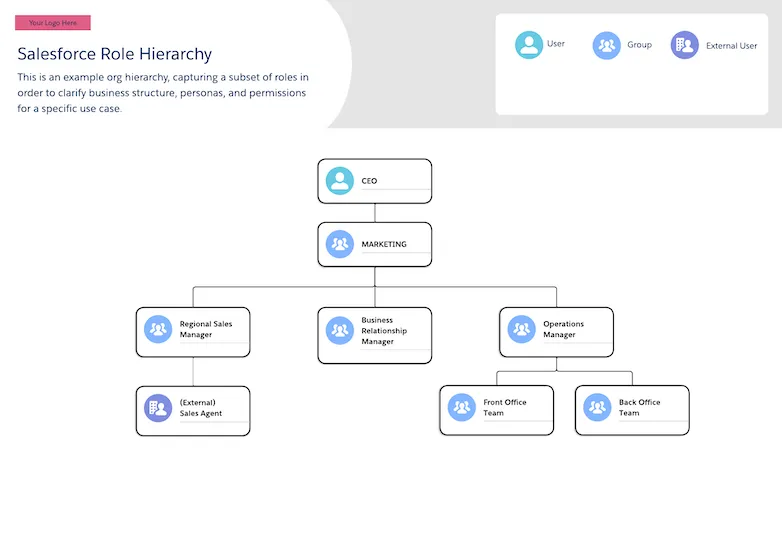
# Salesforce Role Hierarchy
 ## Description
A diagram depicting an example org hierarchy, capturing a subset of roles in order to clarify business structure, personas, and permissions for a specific use case.
This isn't a typical Landscape diagram, but is similar in that it shows a conceptual plan for how roles are related and model the business domain.
## Downloadable Links
- [Lucid](https://lucid.app/lucidchart/editNewOrRegister/4fe3cd5e-0ccf-4ffd-9f7c-a418ce615c67)
- [Image](https://architect.salesforce.com/ns-assets/reference-architectures/salesforce-role-hierarchy.webp)
# Single Org Architecture
## Description
A diagram depicting an example org hierarchy, capturing a subset of roles in order to clarify business structure, personas, and permissions for a specific use case.
This isn't a typical Landscape diagram, but is similar in that it shows a conceptual plan for how roles are related and model the business domain.
## Downloadable Links
- [Lucid](https://lucid.app/lucidchart/editNewOrRegister/4fe3cd5e-0ccf-4ffd-9f7c-a418ce615c67)
- [Image](https://architect.salesforce.com/ns-assets/reference-architectures/salesforce-role-hierarchy.webp)
# Single Org Architecture
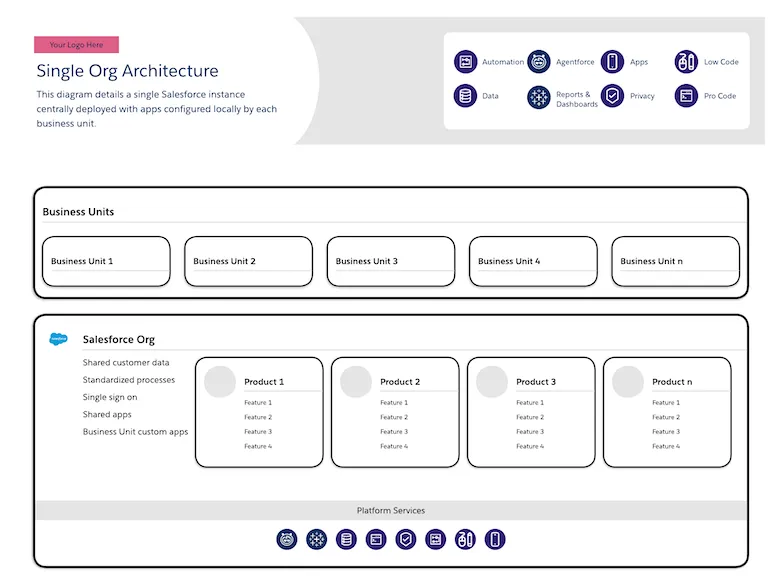 ## Description
A diagram detailing a single org strategy supporting multiple business units.
The lower box may contain the list of products in use (as depicted above) or may list the capabilities needed for the business units such as Shopping Cart, Lead Management, or Case Management.
## Downloadable Links
- [Lucid](https://lucid.app/lucidchart/editNewOrRegister/92edbe8d-18b8-4998-a851-7d1e815ea7d5)
- [Image](https://architect.salesforce.com/ns-assets/reference-architectures/single-org-architecture.webp)
# Solution Architecture
Solution architecture diagrams illustrate the technical design and implementation details of specific solutions, showing how components, services, and integrations work together to address business requirements. These diagrams provide architects and developers with a detailed view of system interactions, data flows, and architectural patterns. They serve as blueprints for implementation, helping teams understand component relationships, integration points, and technical dependencies within a solution.
This section contains 4 reference diagrams related to solution architecture:
| Diagram Name | Description |
| -------------------------------------------------------------------------------------------------------------------------------------- | -------------------------------------------------------------------------------------------------------------------------- |
| [Zero-Copy Data Integration Architecture with Data 360](/docs/architect/reference-diagrams/guide/aws-data-360) | Diagrams depicting Salesforce Data 360 using out of the box connectors for integration with various backend data services. |
| [Data 360 Customer Zero Implementation Architecture](/docs/architect/reference-diagrams/guide/sfdc-customer-zero-implementation) | An end-to-end diagram depicting Salesforce Data 360 as implemented within Salesforce as our Customer Zero program. |
| [Data 360 Batch Activation and Event Driven Action Architecture](/docs/architect/reference-diagrams/guide/data360-actions-activations) | A diagram depicting Salesforce Data 360 in an end-to-end solution for marketing activations. |
| [Loyalty Management Solution Architecture](/docs/architect/reference-diagrams/guide/loyalty-management-solution-architecture) | An architecture diagram that depicts the products and capabilities directly involved in a loyalty management solution. |
## Standard Components
Standard Components make it easy for you to build, customize, and reuse high-quality, consistent diagrams.
Salesforce recommends Lucid for architecture diagrams.
Professional styling is utilized by all the Salesforce diagram shapes and templates.
## Description
A diagram detailing a single org strategy supporting multiple business units.
The lower box may contain the list of products in use (as depicted above) or may list the capabilities needed for the business units such as Shopping Cart, Lead Management, or Case Management.
## Downloadable Links
- [Lucid](https://lucid.app/lucidchart/editNewOrRegister/92edbe8d-18b8-4998-a851-7d1e815ea7d5)
- [Image](https://architect.salesforce.com/ns-assets/reference-architectures/single-org-architecture.webp)
# Solution Architecture
Solution architecture diagrams illustrate the technical design and implementation details of specific solutions, showing how components, services, and integrations work together to address business requirements. These diagrams provide architects and developers with a detailed view of system interactions, data flows, and architectural patterns. They serve as blueprints for implementation, helping teams understand component relationships, integration points, and technical dependencies within a solution.
This section contains 4 reference diagrams related to solution architecture:
| Diagram Name | Description |
| -------------------------------------------------------------------------------------------------------------------------------------- | -------------------------------------------------------------------------------------------------------------------------- |
| [Zero-Copy Data Integration Architecture with Data 360](/docs/architect/reference-diagrams/guide/aws-data-360) | Diagrams depicting Salesforce Data 360 using out of the box connectors for integration with various backend data services. |
| [Data 360 Customer Zero Implementation Architecture](/docs/architect/reference-diagrams/guide/sfdc-customer-zero-implementation) | An end-to-end diagram depicting Salesforce Data 360 as implemented within Salesforce as our Customer Zero program. |
| [Data 360 Batch Activation and Event Driven Action Architecture](/docs/architect/reference-diagrams/guide/data360-actions-activations) | A diagram depicting Salesforce Data 360 in an end-to-end solution for marketing activations. |
| [Loyalty Management Solution Architecture](/docs/architect/reference-diagrams/guide/loyalty-management-solution-architecture) | An architecture diagram that depicts the products and capabilities directly involved in a loyalty management solution. |
## Standard Components
Standard Components make it easy for you to build, customize, and reuse high-quality, consistent diagrams.
Salesforce recommends Lucid for architecture diagrams.
Professional styling is utilized by all the Salesforce diagram shapes and templates.
 Salesforce Shape Library and Templates in Lucidchart
Find examples of how to use components in the [Reference Architecture Gallery](https://architect.salesforce.com/diagrams#reference-architecture-gallery)
## Best Practices
The following sections capture detailed best practices for the [Header](#header), [Cards](#cards), [Icons](#icons) and [Connectors](#connectors) included in the Standard Components.
## Header
The Header should be present on all diagrams and include:
- A title that can be quickly understood by your audience
- A clear description of what the diagram covers, it’s purpose and intent
- (optional) your logo or company name to convey the author
- (optional) a Key to clarify icons, designs or symbols used as classifications
The size should take up at least 10% of the diagram height and 100% of the width.
The font size of the description should be at least half the size of the title.
A Key should be included when Icons, connectors, colors, etc. are used that are not specified with titles on the diagram itself. The key should be grouped into even rows when possible.
## Cards
All properties of your diagram should be represented with a card. Cards can be resized and they can have either transparent or colored fills. There are multiple sections of the card providing variations that you can use to represent different concepts in your diagram.
### **Card Anatomy**
An example card is below, with the different sections described. The only required Card content is the Title. The other sections are available to utilize as needed for specific use cases.
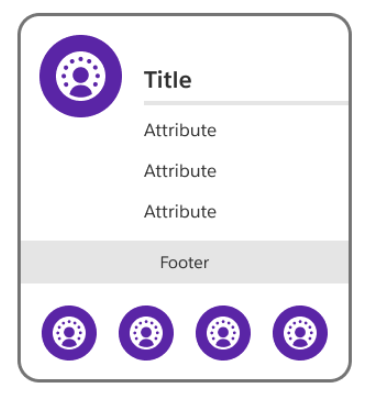 **Card Icon**
Card icons are visual assets representing the card property
**Card Title**
The card title is a name for card that can be quickly understood, capturing what property, area or concept the card represents
**Card Attributes**
Card attributes are text-based details about the property, represented as a list and used when you need to capture and convey multiple points of data
**Card Footer**
The card footer provides additional characteristics of the property. Examples include: Package/ Object/ API names, Ownership, Capabilities, etc.
**Card Footer Icons**
The footer icons section is for visual assets to display additional information about the property. Examples include: channels, shared services, capabilities, etc. Footer icons should be included / explained in your diagram key.
Warning: due to a current limitation with Lucidchart, the footer icons in diagrams that are created from a template become undocked from the card. You will need to re-dock the icons by dragging them into the center of the footer.
### **Card Variations**
Utilizing different sections provides different card variations for different uses. You can mix and match card anatomy as needed to create these variations in your diagrams. See examples below:
**Card Icon**
Card icons are visual assets representing the card property
**Card Title**
The card title is a name for card that can be quickly understood, capturing what property, area or concept the card represents
**Card Attributes**
Card attributes are text-based details about the property, represented as a list and used when you need to capture and convey multiple points of data
**Card Footer**
The card footer provides additional characteristics of the property. Examples include: Package/ Object/ API names, Ownership, Capabilities, etc.
**Card Footer Icons**
The footer icons section is for visual assets to display additional information about the property. Examples include: channels, shared services, capabilities, etc. Footer icons should be included / explained in your diagram key.
Warning: due to a current limitation with Lucidchart, the footer icons in diagrams that are created from a template become undocked from the card. You will need to re-dock the icons by dragging them into the center of the footer.
### **Card Variations**
Utilizing different sections provides different card variations for different uses. You can mix and match card anatomy as needed to create these variations in your diagrams. See examples below:
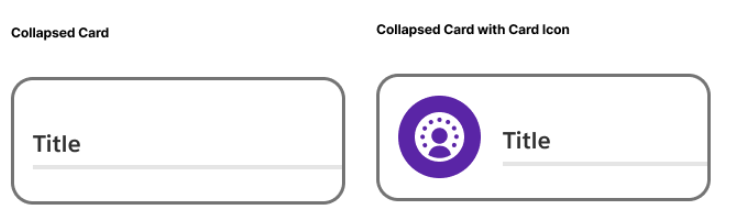
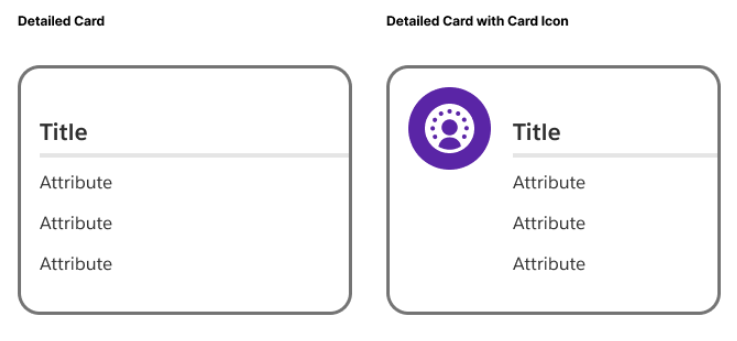
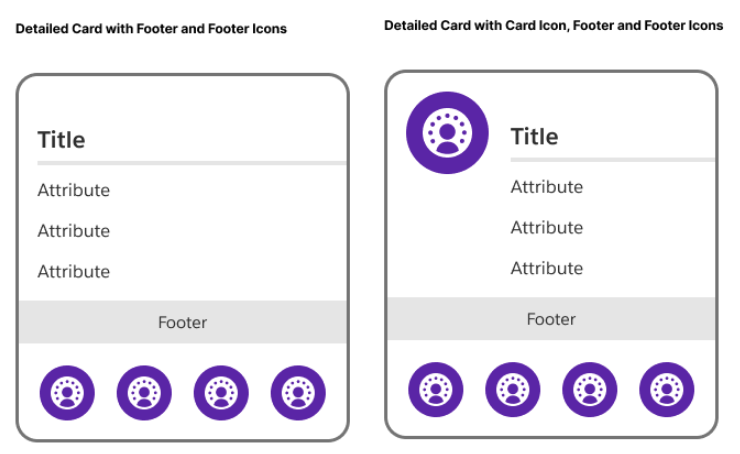 Refer to the [Reference Architecture Gallery](https://architect.salesforce.com/diagrams#reference-architecture-gallery) for ideas on how to use these variations.
Make use of the ability to adjust your cards’ size and color as needed to distinguish types and create clear, understandable diagrams.
## **Containers**
Cards can also act as containers i.e. groupings for multiple properties. You can nest cards inside of another card to represent hierarchical relationships or classify related properties as needed.
Refer to the [Reference Architecture Gallery](https://architect.salesforce.com/diagrams#reference-architecture-gallery) for ideas on how to use these variations.
Make use of the ability to adjust your cards’ size and color as needed to distinguish types and create clear, understandable diagrams.
## **Containers**
Cards can also act as containers i.e. groupings for multiple properties. You can nest cards inside of another card to represent hierarchical relationships or classify related properties as needed.
 ## **Icons**
Salesforce Diagrams provide a basic set of Salesforce Product Logos as well as additional icons to represent properties and other areas in your diagram.
## **Icons**
Salesforce Diagrams provide a basic set of Salesforce Product Logos as well as additional icons to represent properties and other areas in your diagram.
 You can find examples of how to use Icons in the [Reference Architecture Gallery](https://architect.salesforce.com/diagrams#reference-architecture-gallery)
_For additional icons, refer to the [Lightning Design System icons.](https://www.lightningdesignsystem.com/icons/)_
## Connectors
Connectors should always utilize elbow connection lines, and be straight whenever possible for greater readability.
**Connectors** represent a relationship, integration, or process step between two cards. Line styles indicate a different type of connection and should be represented in your diagram key. Endpoints indicate direction of an integration or process connector. Endpoints also indicate cardinality and ordinality on a relationship connector.
**Pills** are utilized to provide details about the connections. Refer to [Solution Architecture](/docs/architect/reference-diagrams/guide/section-solution-architecture) and [Interaction Process Flow](/docs/architect/reference-diagrams/guide/section-interaction-process-flow) diagrams for example uses of pills.
## Accessibility
Around the world, approximately [1.3 billion](https://www.salesforce.com/company/legal/508_accessibility/#:~:text=Product%20Accessibility%20Status&text=Around%20the%20world%2C%20approximately%201.3,global%20economy%20that%20includes%20everyone.) people live with some form of disability, accounting for 15% of the world’s population. Accessibility is about making your diagram understandable for all your viewers. There are two particular focus areas that can help your diagrams be more accessible: optimizing for screen readers and using color contrast appropriately.
You can find more resources on designing for accessibility on the [Salesforce Design blog](https://medium.com/salesforce-ux/tagged/accessibility).
**Screen Readers**
A screen reader is a software application that reads aloud the words in a file, app, or website. A screen reader can read diagrams to individuals who are unable to see it clearly. The best format for screen reader compatibility is PDF (Portable Document Format). Unlike images and non-accessible applications, PDFs can be accessed by screen readers for reading words, shapes, and colors. Exporting your diagrams to PDF format when sharing with others can boost accessibility.
**Color Contrast**
Increasing the color contrast is another way to help your diagram be more accessible.
People will be better able to recognize and read your diagrams when they meet the [Web Content Accessibility Guidelines (WCAG) minimum color contrast](https://www.w3.org/TR/UNDERSTANDING-WCAG20/visual-audio-contrast-contrast.html) of having a 4.5:1 ratio between the background color behind the text and the color of the text itself.
You can find examples of how to use Icons in the [Reference Architecture Gallery](https://architect.salesforce.com/diagrams#reference-architecture-gallery)
_For additional icons, refer to the [Lightning Design System icons.](https://www.lightningdesignsystem.com/icons/)_
## Connectors
Connectors should always utilize elbow connection lines, and be straight whenever possible for greater readability.
**Connectors** represent a relationship, integration, or process step between two cards. Line styles indicate a different type of connection and should be represented in your diagram key. Endpoints indicate direction of an integration or process connector. Endpoints also indicate cardinality and ordinality on a relationship connector.
**Pills** are utilized to provide details about the connections. Refer to [Solution Architecture](/docs/architect/reference-diagrams/guide/section-solution-architecture) and [Interaction Process Flow](/docs/architect/reference-diagrams/guide/section-interaction-process-flow) diagrams for example uses of pills.
## Accessibility
Around the world, approximately [1.3 billion](https://www.salesforce.com/company/legal/508_accessibility/#:~:text=Product%20Accessibility%20Status&text=Around%20the%20world%2C%20approximately%201.3,global%20economy%20that%20includes%20everyone.) people live with some form of disability, accounting for 15% of the world’s population. Accessibility is about making your diagram understandable for all your viewers. There are two particular focus areas that can help your diagrams be more accessible: optimizing for screen readers and using color contrast appropriately.
You can find more resources on designing for accessibility on the [Salesforce Design blog](https://medium.com/salesforce-ux/tagged/accessibility).
**Screen Readers**
A screen reader is a software application that reads aloud the words in a file, app, or website. A screen reader can read diagrams to individuals who are unable to see it clearly. The best format for screen reader compatibility is PDF (Portable Document Format). Unlike images and non-accessible applications, PDFs can be accessed by screen readers for reading words, shapes, and colors. Exporting your diagrams to PDF format when sharing with others can boost accessibility.
**Color Contrast**
Increasing the color contrast is another way to help your diagram be more accessible.
People will be better able to recognize and read your diagrams when they meet the [Web Content Accessibility Guidelines (WCAG) minimum color contrast](https://www.w3.org/TR/UNDERSTANDING-WCAG20/visual-audio-contrast-contrast.html) of having a 4.5:1 ratio between the background color behind the text and the color of the text itself.
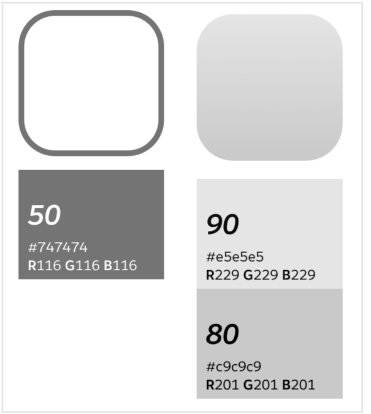 Each color in the [Salesforce color system](https://medium.com/salesforce-ux/the-salesforce-color-system-c7c6b5b9c577) has a number, between 0 and 100, associated with it. When choosing colors for your diagrams, make sure the background color behind the text is at least 50 points greater than or less than the color of the text. For example, if your background color is 80, then your text color should be no higher than 30\. Consider using the 50-point rule as needed for borders and outlines as well.
**Have Salesforce Diagrams input or questions?** Please let us know your thoughts [here](https://docs.google.com/forms/d/e/1FAIpQLSe5RmVA2ZtpfGlR2u436FA4QN6QmJGdAWxtZ_AcRLMAH_US9Q/viewform?usp=sf_link).
# System Landscape
System landscape diagrams provide a comprehensive view of an organization's technology ecosystem, illustrating the relationships between Salesforce products, external systems, and integration points. These visual representations help architects understand the complete system topology, identify dependencies, and plan strategic implementations. They serve as essential documentation for stakeholders to visualize how different components interact within a Customer 360 architecture and support business objectives.
This section contains 5 reference diagrams related to system landscape:
| Diagram Name | Description |
| ------------------------------------------------------------------------------------------------------ | ------------------------------------------------------------------------------------------------------------------------------------------------------------------ |
| [Customer 360 Marketing System Landscape](/docs/architect/reference-diagrams/guide/data-360-marketing) | A system landscape for a Customer 360 Architecture implementation. |
| [Agentforce System Landscape](/docs/architect/reference-diagrams/guide/einstein-system-landscape) | A system landscape capturing the mix of Salesforce products and other technology systems available with Agentforce. |
| [Retail System Landscape](/docs/architect/reference-diagrams/guide/retail-system-landscape) | A system landscape showing a B2C Commerce and Marketing solution, indicating the mix of Salesforce products and other technologies involved in the implementation. |
| [Salesforce Role Hierarchy](/docs/architect/reference-diagrams/guide/salesforce-role-hierarchy) | An example org hierarchy, capturing a subset of roles in order to clarify business structure, personnel relationships, and access patterns. |
| [Single Org Architecture](/docs/architect/reference-diagrams/guide/single-org-architecture) | A diagram detailing a single org strategy supporting multiple business units. |
# System Roadmap
Each color in the [Salesforce color system](https://medium.com/salesforce-ux/the-salesforce-color-system-c7c6b5b9c577) has a number, between 0 and 100, associated with it. When choosing colors for your diagrams, make sure the background color behind the text is at least 50 points greater than or less than the color of the text. For example, if your background color is 80, then your text color should be no higher than 30\. Consider using the 50-point rule as needed for borders and outlines as well.
**Have Salesforce Diagrams input or questions?** Please let us know your thoughts [here](https://docs.google.com/forms/d/e/1FAIpQLSe5RmVA2ZtpfGlR2u436FA4QN6QmJGdAWxtZ_AcRLMAH_US9Q/viewform?usp=sf_link).
# System Landscape
System landscape diagrams provide a comprehensive view of an organization's technology ecosystem, illustrating the relationships between Salesforce products, external systems, and integration points. These visual representations help architects understand the complete system topology, identify dependencies, and plan strategic implementations. They serve as essential documentation for stakeholders to visualize how different components interact within a Customer 360 architecture and support business objectives.
This section contains 5 reference diagrams related to system landscape:
| Diagram Name | Description |
| ------------------------------------------------------------------------------------------------------ | ------------------------------------------------------------------------------------------------------------------------------------------------------------------ |
| [Customer 360 Marketing System Landscape](/docs/architect/reference-diagrams/guide/data-360-marketing) | A system landscape for a Customer 360 Architecture implementation. |
| [Agentforce System Landscape](/docs/architect/reference-diagrams/guide/einstein-system-landscape) | A system landscape capturing the mix of Salesforce products and other technology systems available with Agentforce. |
| [Retail System Landscape](/docs/architect/reference-diagrams/guide/retail-system-landscape) | A system landscape showing a B2C Commerce and Marketing solution, indicating the mix of Salesforce products and other technologies involved in the implementation. |
| [Salesforce Role Hierarchy](/docs/architect/reference-diagrams/guide/salesforce-role-hierarchy) | An example org hierarchy, capturing a subset of roles in order to clarify business structure, personnel relationships, and access patterns. |
| [Single Org Architecture](/docs/architect/reference-diagrams/guide/single-org-architecture) | A diagram detailing a single org strategy supporting multiple business units. |
# System Roadmap
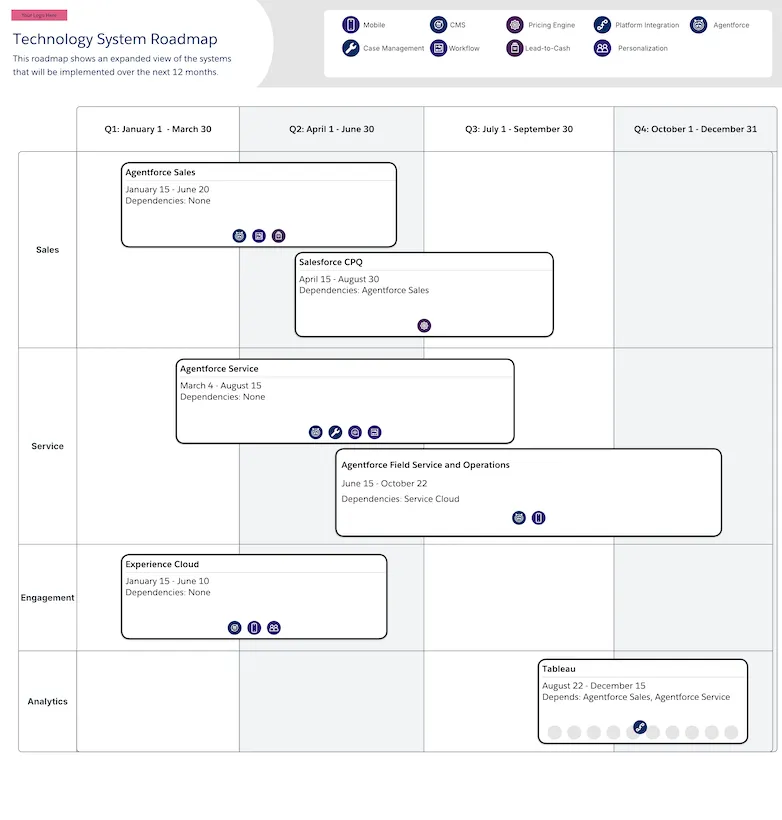 ## Description
A roadmap diagram that simplifies resource planning and budgeting by identifying system implementation order, dependencies, functional areas, and relevant features for stakeholders.
## Downloadable Links
- [Lucid](https://lucid.app/lucidchart/editNewOrRegister/ead3af9a-ddc2-492a-a8c9-7ab3943fabd7)
- [Image](https://architect.salesforce.com/ns-assets/reference-architectures/system-roadmap.webp)
# Zero-Copy Data Integration Architecture with Data 360
## Description
A roadmap diagram that simplifies resource planning and budgeting by identifying system implementation order, dependencies, functional areas, and relevant features for stakeholders.
## Downloadable Links
- [Lucid](https://lucid.app/lucidchart/editNewOrRegister/ead3af9a-ddc2-492a-a8c9-7ab3943fabd7)
- [Image](https://architect.salesforce.com/ns-assets/reference-architectures/system-roadmap.webp)
# Zero-Copy Data Integration Architecture with Data 360
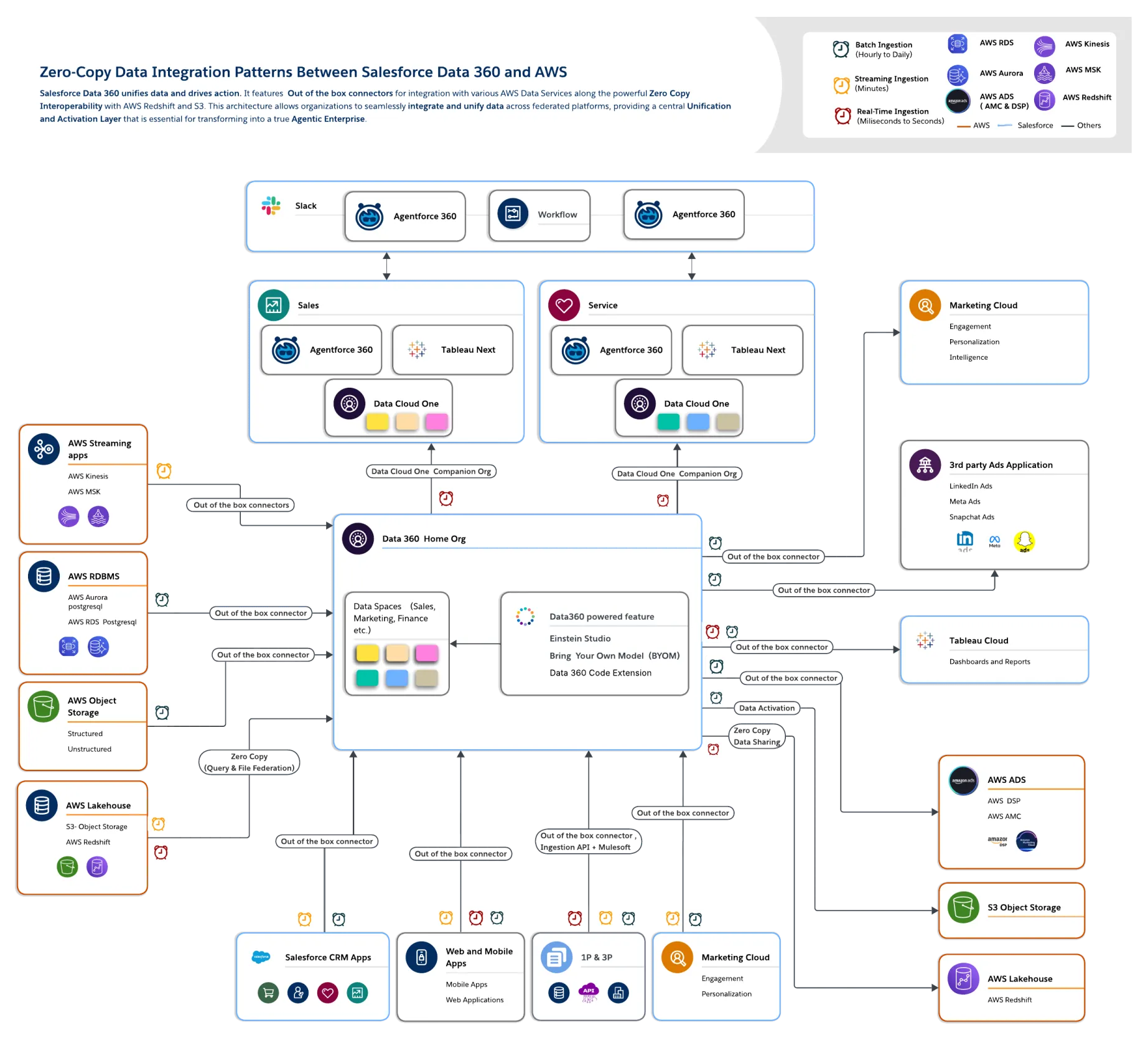 ## Description
A diagram depicting Salesforce Data 360 using out of the box connectors for integration with various AWS Data Services, along with powerful Zero Copy Interoperability with AWS Redshift and S3. This architecture allows organizations to seamlessly integrate and unify data across federated platforms, providing a central Unification and Activation Layer that is essential for transforming into a true Agentic Enterprise. It includes Salesforce products such as Agentforce 360, Tableau Next, Marketing Cloud, Data 360 and Agentforce Sales.
## Downloadable Links:
**Backend: Amazon Web Services**
- [Lucid](https://lucid.app/lucidchart/editNew/04991364-85c0-45e6-b5de-553367fbb473)
- [Image](https://architect.salesforce.com/ns-assets/data360_ref_arch/data360-aws.webp)
**Backend: Google Cloud Platform**
- [Lucid](https://lucid.app/lucidchart/editNew/4661f0e4-e86a-409b-9a98-8301cbbca74f)
- [Image](https://architect.salesforce.com/ns-assets/data360_ref_arch/data360-gcp.webp)
**Backend: Databricks**
- [Lucid](https://lucid.app/lucidchart/editNew/e74f6e22-ce6d-4b6d-a258-76ddb8f73f4e)
- [Image](https://architect.salesforce.com/ns-assets/data360_ref_arch/data360-databricks.webp)
**Backend: Snowflake**
- [Lucid](https://lucid.app/lucidchart/editNew/b02236c2-f3f4-4de8-b13b-35f67fd5390d)
- [Image](https://architect.salesforce.com/ns-assets/data360_ref_arch/data360-snf.webp)
## Description
A diagram depicting Salesforce Data 360 using out of the box connectors for integration with various AWS Data Services, along with powerful Zero Copy Interoperability with AWS Redshift and S3. This architecture allows organizations to seamlessly integrate and unify data across federated platforms, providing a central Unification and Activation Layer that is essential for transforming into a true Agentic Enterprise. It includes Salesforce products such as Agentforce 360, Tableau Next, Marketing Cloud, Data 360 and Agentforce Sales.
## Downloadable Links:
**Backend: Amazon Web Services**
- [Lucid](https://lucid.app/lucidchart/editNew/04991364-85c0-45e6-b5de-553367fbb473)
- [Image](https://architect.salesforce.com/ns-assets/data360_ref_arch/data360-aws.webp)
**Backend: Google Cloud Platform**
- [Lucid](https://lucid.app/lucidchart/editNew/4661f0e4-e86a-409b-9a98-8301cbbca74f)
- [Image](https://architect.salesforce.com/ns-assets/data360_ref_arch/data360-gcp.webp)
**Backend: Databricks**
- [Lucid](https://lucid.app/lucidchart/editNew/e74f6e22-ce6d-4b6d-a258-76ddb8f73f4e)
- [Image](https://architect.salesforce.com/ns-assets/data360_ref_arch/data360-databricks.webp)
**Backend: Snowflake**
- [Lucid](https://lucid.app/lucidchart/editNew/b02236c2-f3f4-4de8-b13b-35f67fd5390d)
- [Image](https://architect.salesforce.com/ns-assets/data360_ref_arch/data360-snf.webp)