---
schema_version: "1"
id: e4c22e288eba89ef81b0c56f5a3c11e5a4db191201bb239dd8dbadcef7c48a72
title: Data 360 Architecture
collection: architect
version: next
locale: en-us
portal_url: https://docs.salesforce.com/architect/next/en-us/fundamentals/guides/data-360-architecture.md
canonical_url: https://staging.architect.salesforce.com/docs/architect/fundamentals/guide/data-360-architecture.html
source_site: staging.architect.salesforce.com
content_type: documentation
content_hash: 51cdd1074048ab81a055ca7e1486049f35d0a040fea0c86b068eee6ed6dcf739
products:
- Fundamentals
- Architect Site Content Repo
updated_at: 2026-10-01T00:00:00Z
---
# Data 360 Architecture
## Overview
Data platforms have been evolving for over three decades. Initially, the industry was dominated by on-premise, centralized, and structured (mostly relational), operational OLTP (online transaction processing) databases. The landscape then expanded to include data warehouses: OLAP (online analytical processing) / Big Data platforms that remained relational and centralized. Cloud storage drove distributed architectures like lakehouses and disaggregated storage. However, operations platforms and analytical platforms stayed separate. Today, cloud computing and the AI revolution are fundamentally changing the data platform architecture.
Enterprises already invest in mature Big Data platforms like Snowflake, Databricks, BigQuery, and Redshift. These platforms create data silos. Enterprises don’t derive business value from this data, because they can’t act directly on the data via business flows and applications. These platforms lack agentic AI processing and can't deliver data access in real time, so they're unable to deliver AI-driven personalization at the moment of customer engagement.
Future data platforms will be characterized by unified, flexible, accessible, and open data infrastructure. At the heart of Salesforce AIforce — a new architecture that opens every layer of the platform (data, business logic, orchestration, and engagement) to any agent, model, or tool — sits Data 360, the System of Context. Built on modern compute and storage capabilities — GPUs, large memory, NVMe SSDs, and cloud storage — this architecture integrates directly with cloud computing and AI. It delivers real-time insights, powers autonomous decision-making, and drives real-time applications. This architecture supports agentic AI, predictive AI, analytics, real-time high-scale OLTP databases, data lakes, and lakehouses. These modern data platforms are designed for simplicity, scalability, agility, performance, security, availability, and cost efficiency.
### Key Trends in Next-Generation Data Platform Architecture
The following data trends drive the next-generation data platform architecture.
- **AI, Machine Learning, and Analytics at the core**: Agentic AI understands conversation/query intent and can plan, generate workflows, and automate decision making. Short- and long-term agentic memory is constructed from conversation history, personalizing agent planning, decisions, and real-time conversation modeling. Agents assist in automating operational capabilities like data governance (security, compliance, trust), performance (auto scaling for concurrency, throughput, and latency), failover and availability, and observability and maintenance. Standard capabilities include AI-powered analytics, forecasting, analytics on unstructured data (PDFs, images, audio, video), and natural language processing (NLP), which enables users to ask questions in plain language, receive contextual follow-up clarifications, drill down into results interactively, and get explainable, citation-backed answers grounded in live data. AI Models (formerly Einstein Studio) is a simplified, centralized experience for building and managing machine learning models. New built-in AI functions including Forecasting, Clustering, Sentiment Detection, Text Classification, and Multiclass Classification are now available directly in the Data 360 data processing engine, accessible from DCSQL, Batch Data Transforms, and Flow.
- **Headless and API-First Architectures:** Agentic applications increasingly require programmatic access to data and orchestration. Data 360 now supports Hosted MCP Servers (Model Context Protocol), enabling tools like Claude, Cursor, and Databricks to connect natively — no browser required.
- **Decentralization of Data but Unified Data Access**: Agents need enterprise data to derive insights, to make decisions, and to automate business activities, but that data is inherently decentralized in enterprises across disparate applications and data platforms. Unifying data involves:
- **Data Sharing** — via ingestion or federation
- **Data Preparation** — harmonizing raw data and modeling it for analytical and AI processing
- **Storage & Management** — managing data at scale for efficient access with low cost to serve (CTS)
- **Data Access** — via query and analytics mechanisms and tools that are deeply integrated with the underlying storage and data access platforms
- **Cloud-based Open Lakehouses**: Cloud-based Big Data (OLAP) platforms are converging on adopting open file formats (for example, Parquet) and table formats (for example, Iceberg), enabling data federation (“data in”) and sharing (“data out”).
- **Unstructured Data Processing**: With the emergence of generative AI, enterprises are beginning to extract valuable insights from the enterprise corpus of data that constitutes large volumes of text documents, audio transcripts, video recordings, and other media. Unstructured data processing (including chunking, vectorization, semantic search, and knowledge graphs) makes these insights possible. Retrieval augmented generation (RAG) retrieves relevant data at query time to ground agent responses in enterprise context; cache augmented generation (CAG) reuses precomputed context to reduce latency on repeated queries. Together, they power fast, agentic search. Visual data in RAG now allows agents to extract insights from diagrams and flowcharts embedded in documents using LLM and Docling image processing.
- **Knowledge Management**: Knowledge goes beyond the raw content itself (documents, articles, videos). It includes augmentation of that content by deriving meaning, curating metadata, and placing it in context to develop a shared understanding of content across an organization or enterprise. Knowledge management includes content management, knowledge extraction, graph-based representation, and navigation.
- **Rich Data Access**: Data, analytics, and AI tools must be accessible to a variety of personas, including end users, business users, admins, and analysts. Accessibility requires mechanisms such as ensemble querying (with relational, keyword, and semantic query), natural language to SQL (NL2SQL) querying, and real-time access. AI Functions in SQL run sentiment analysis and classification directly in SQL within Data 360, bridging structured querying and AI-powered enrichment.
- **Real-Time Processing**: Agentic applications make real-time decisions based on current state and new events, personalizing responses and actions on the fly. This requires the underlying data platform to support up-to-date data access from both operational and analytical stores, with low latency (point lookups and queries), high data scale, and high throughput.
- **Data Security, Governance, and Residency**: The valuable customer and personal data that's stored and modeled for agentic applications must be secured and governed with well-defined access and sharing policies. Increasingly, customers must comply with regulations that require data residency in their own country or region, especially those *in* government or *working with* governments. Data 360 now supports Platform Encryption with Bring Your Own Key (BYOK), giving enterprises full control over their encryption keys.
Salesforce Data 360 is designed for the future, to address these data trends. Data 360 is a cloud-native, metadata-driven data platform that unifies siloed data across the enterprise, allowing companies to store, model, and process their data.
This document is a guide for enterprise architects and CTOs. It details the architecture, capabilities, design principles, and use cases of Data 360. It introduces the fundamentals of the Data 360 architecture as a primer, followed by a series of deep dives into its key differentiators such as interoperability with existing data platforms, including multi-org strategy, security, governance and privacy, real-time activation, and data clean rooms.
## Design Principles
Salesforce Data 360 is built on a core set of principles that make enterprise data operational, trusted, and real-time.
- **Openness and Interoperability**: Built for multi-cloud ecosystems. Federates with major cloud data platforms without duplication, extending Customer 360 while preserving existing investments. Supports Hosted MCP Servers enabling headless, API-first integration.
- **Storage-Compute Separation**: Scales storage and processing (batch, streaming, and interactive) independently. Delivers elasticity and efficiency for high-volume, high-performance workloads.
- **Multi-Model Storage and Processing**: Supports both structured and various unstructured data types like text, image, audio, and video. Provides efficient storage, real-time and batch processing, extensible indexing, unified search, querying and analysis.
- **Metadata-Driven Design**: Applications are defined by metadata instead of by code. Metadata is treated as a first-class asset, enabling unified governance, flexibility, and deep integration into the Salesforce platform.
- **Real-Time Hybrid Processing**: Allows you to simultaneously query and unify data from both ingested sources and zero-copy federated sources in real-time. This enables you to create Unified Individual profiles, segments, and activations by combining operational data with large-scale historical or analytical datasets, optimizing for both performance and cost.
- **Intelligent and Active Data**: Continuously ingests, analyzes, and pushes insights directly into business workflows. Powers no-code, low-code, pro-code and AI-driven automation with the most current context.
- **Governance and Privacy by Design**: Lineage, access control, residency, data encryption, audit trail, and compliance are built in. Trust and regulatory confidence are reinforced at every layer.
- **One-to-Many Tenancy**: A centralized Data 360 Org is the Single Source of Truth (SSOT) for Customer 360, seamlessly supporting multi-org Salesforce environments.
- **Cloud Provider Abstraction**: The complexity of underlying cloud environments is entirely hidden from client services, allowing them to focus purely on business logic. This principle provides a consistent API and operational experience regardless of the backend cloud substrate — enabling Data 360 to run across AWS, Azure, and GCP without exposing infrastructure details to users or applications.
These principles ensure that Data 360 makes data open, intelligent, and actionable in real time.
### Platform Capabilities
Salesforce Data 360 is a modern data platform built on design principles that address current data trends. Its architecture capabilities ensure that enterprise data is trusted, unified, and actionable in real time, aligning with its guiding principles.
- **Cloud-Native Foundation**: Salesforce Data 360 runs on Hyperforce, deployed on Hyperscalers (like AWS), with an immutable, microservices-based infrastructure. It provides elastic scaling, continuous delivery, and global compliance.
- **Salesforce (Core) Metadata-Driven**: Metadata is designed, modeled, and stored as Salesforce metadata, enabling immediate use by all Salesforce applications. It's stored in a fully ACID-compliant RDBMS. This metadata ensures governance, lifecycle consistency, and deep integration with Salesforce Lightning Platform.
- **Lakehouse Storage**: Built on Apache Iceberg and Parquet, this storage combines data lake scale with warehouse governance supporting schema evolution, time travel, and high-volume updates. Data 360 stores, models, and processes structured and unstructured data with extreme-scale storage with modern, open standards, and with rich transformation and data processing capabilities for batch and event-driven workloads.
- **End-to-End Data Pipeline with Flexible Ingestion**: Covers the full lifecycle—ingest, prepare, model, unify, analyze, and activate—reducing reliance on fragmented point solutions. Supports batch, near real-time, and streaming with 270+ connectors for common use cases, and MuleSoft for custom use cases. ELT-first approach enables fast data availability with downstream transformation flexibility.
- **Enterprise Data Interoperability with Open frameworks and Federation**: Unifies siloed data across the enterprise with bidirectional, zero-copy federation with Snowflake, Databricks, BigQuery, and Redshift, avoiding data migration or duplication.
- **Data Classification, Modeling, and Organization**: Data 360 organizes data as raw ingested data, cleaned and stored data, and data modeled conforming to a common information schema known as single source of truth (SSOT). SSOT objects form the basis for defining Semantic Data Models (SDM) and other curated and application-specific models.
- **Built-in Semantic Data Modeling:** A business-friendly abstraction layer that maps raw data to business concepts (customers, revenue, engagement scores), enabling both human analysts in Tableau Next and Agentforce agents to query data using natural language and consistent definitions. This open semantic query API layer powers application-specific analytics while allowing Agentforce agents to autonomously discover, understand, and act on unified enterprise data by reasoning about business terms.
- **High Performance SQL query engine:** Supports unified Data 360 SQL queries across structured, unstructured, and graph data.
- **Low-Latency Data Stores**: Key-value storage for hot data with millisecond response times, powering personalization and event-driven scenarios. Unifies identities, interactions, and conversations into a single, trusted unified individual profile and context graph.
- **Data 360 Sandboxes:** Data 360 supports full sandbox environments for building, testing, and deploying configurations with confidence. This includes Data Kit deployment across data spaces and migration of configurations from Sandbox to Production via CLI and APIs.
- **Unstructured Data Processing Pipelines** provide flexible and extensible support for unstructured data. These pipelines handle storage, chunking, embedding generation (vectorization), metadata extraction and augmentation, summarization, indexing, knowledge extraction, intelligent document processing, and both short-term and long-term conversation memory.
- **Native Keyword, Vector, and Hybrid Indexing** for accurate and efficient unstructured data access like fast and agentic search, RAG, knowledge extraction, and agentic memory derivation.
- **Profile, Personalization, Context services** for enabling AI/ML and agentic applications.
- **Built-in governance and security** at every layer for lineage tracking, data masking, data residency, auditing, and zero-trust security to provide compliance and trust.
- **Elastic Compute Fabric**: Kubernetes-native, multi-tenant compute fabric. Runs Spark for distributed processing and Hyper for SQL workloads. Scales elastically across diverse jobs and supports isolation for running untrusted code.
All of this runs on Hyperforce, Salesforce’s cloud foundation. Hyperforce provides:
- **Zero-trust security** with encryption, isolation, and least-privilege policies.
- **Resilience** through multi-AZ deployments and platform-level fault tolerance. Enterprise-grade disaster recovery builds on this with replayable ingestion pipelines, replication, and metadata-driven rehydration across dependent ecosystems.
- **Data Residency** through provisioning each org into a customer-selected country, keeping stored data in-region.
- **Observability** with monitoring, metrics, and tracing built in.
- **Automated scale and FinOps awareness** for efficiency without cost overflow.
Data 360 does not replace existing enterprise investments. Instead, Data 360 makes the data you already have trusted, governed, and actionable—delivering real-time, AI-driven engagement where it matters most.
The following figure illustrates the Data 360 Reference Architecture:

Let’s consider a hypothetical Agentforce Loan Agent layered on Data 360 to describe an example architecture flow. Say the Loan Agent is a customer-facing agent where customers (consumers) apply for loans and get instant loan approvals.
Data 360 performs these steps as scheduled, preparing data for use by the Loan Agent.
1. Data 360 ingests structured Customer Account data from CRM and stores it in the data lake.
2. Data 360 processes unstructured company loan and financial policy data.
3. Data 360 federates personal data from external data platforms and warehouses such as Snowflake, BigQuery, and Databricks.
4. Data 360 transforms and models ingested and federated data.
5. Data 360 builds and maintains the profile data graph.
Each time a customer applies for a loan, these actions are performed.
1. A customer signs into the Loan Agent, which begins a customer session in the real-time layer. The customer’s unified profile is pulled into the real-time layer from the ingested CRM data and zero copy from the data warehouse.
2. The customer completes a loan application by providing the required information.
3. The customer uploads financial documents (like tax returns, investments, bank statements) to Data 360 for unstructured data processing.
4. Uploaded data is chunked and vectorized (embedding generation), and indexes (keyword and vector) are created.
5. Next, the customer fills out the loan application document and uploads it. Data 360 extracts the loan amount and duration in real time.
6. The Loan Agent retrieves relevant financial data using Data 360 query and hybrid search over profile and other pre-created indexes.
7. The Loan Agent activates an Approval Agent with loan data and other financial profile data to make the loan approval decision.
8. The Loan Agent responds to the customer with a decision.
9. This entire interaction between the customer and the Loan Agent is also captured and stored in Data 360.
The above example provides an overview of Data 360 architecture components used to build an agentic application like a Loan Agent. In the next section we describe the Data 360 architecture layers and components.
## Data 360 Architecture
This section covers the building blocks of Salesforce Data 360, starting with its storage model and the mechanisms for connecting, ingesting, and preparing data. It then examines how structured and unstructured data is stored, modeled, and processed, then harmonized, unified, retrieved, and activated.

Data 360 is the foundation layer — the System of Context — in the AIforce architecture, serving every agentic, analytics, and AI workload on the Salesforce platform.
### Data 360 Storage
Salesforce Data 360 uses a tiered but integrated storage model that combines the strengths of a lakehouse with real-time storage. The lakehouse layer provides scalable, cost-efficient storage for large volumes of historical and batch data, enabling advanced analytics and machine learning use cases. Real-time storage, on the other hand, handles low-latency access and high-frequency updates, ensuring that customer interactions, profiles, and engagement signals are always current. Together, these tiers allow data to move fluidly between historical and real-time contexts—delivering both depth and immediacy in a unified data foundation for personalization, AI, and activation.
#### Data Encryption
Data 360 encrypts data at rest, with support for customer-managed keys via Salesforce Shield Platform Encryption. See the Data 360 Encryption: Bring Your Own Key (BYOK) section for details.
#### Lakehouse
Data 360 features a native lakehouse architecture based on Iceberg/Parquet, designed to handle large-scale data management and processing for batch, streaming, and real-time scenarios across both structured and unstructured data for AI and analytics applications.
In cloud-based data lakes like Azure, AWS, or GCP, the fundamental storage unit is a file, typically organized into folders and hierarchies. Lakehouse enhances this structure by introducing higher-level structural and semantic abstractions to facilitate operations like querying and AI/ML processing. The primary abstraction is a table with metadata that defines its structure and semantics, incorporating elements from open-source projects like Iceberg or Delta Lake, with additional semantic layers added by Data 360.
Data 360 Lakehouse supports B2C scale, real-time ingestion, processing, schema enforcement and evolution, snapshots, and uses open storage formats.

Abstraction Layers in Lakehouse:
1. **Parquet File Abstraction**: At the base, storage consists of data lake files (for example S3 in AWS or Blob in Azure) in Parquet format. Data for a source table is stored across multiple partitions as Parquet files, with each table being a collection of these files.
2. **Iceberg Table Abstraction**: Tables are organized as folders, with data partitions stored as Parquet files within these folders. Modifications to a partition result in new Parquet files as snapshots. Iceberg manages a metadata file for each table, detailing schemas, partition specs, and snapshots.
#### Real-Time Storage
To support real-time analytics and agentic applications, Data 360 augments the Lakehouse big data storage with Low Latency Store. Data 360 Real-Time Layer processes real-time signals and engagement data in memory. However, since the memory-based storage capacity is limited, all data cannot fit and processing may not be done in real-time. Data 360 adds a low latency store to remove such limitations, enabling scalable real-time processing.
The low latency store is a petabyte scale multi-availability zone cluster of NVMe (SSD) instances on the Lakehouse. Not all data needs to be kept in the low latency store. It is a durable cache. Most data eventually makes it to the Lakehouse for long term persistence. In-session data in the real-time layer can be flushed to the low latency store for subsequent fast access. For example, in an agentic conversation, recent messages can be processed in memory; older messages can be flushed to the low latency store. If a previous conversation is required, it can be accessed within a few milliseconds from the low latency store. NVMe based storage allows for large amounts of data to be stored and accessed at millisecond latencies.
In addition, data from Lakehouse that is required for real-time processing or to augment real-time experiences is fetched and kept in the low latency store. For example, customer Profile Context is pre-fetched or brought from the Lakehouse and cached in the low latency store. Also, any lakehouse objects and other objects that are required for real-time processing during in-session processing can also be cached in the low latency store.
The low latency store supports both Data Graph APIs (create/update/lookup Data Graphs) and session stores for the real-time layer. This creates a true three-tier storage hierarchy: Memory → NVMe SSD → Lakehouse Cloud Storage.
### Data Organization
Salesforce Data 360 is engineered to standardize, harmonize, and activate all customer data — structured and unstructured — following a rigorous lifecycle that transforms raw input into a unified, current data model. Data 360's data organization model ensures every AI agent, model, and tool operates against governed, semantically consistent data.
#### Raw Ingested Data and Initial Transformations
The lifecycle begins with raw data ingested as-is from source systems — including CRM, Marketing platforms, files, and other external inputs. Data 360 handles both full data loads and continuous change events (deltas), merging incoming updates with persisted data to maintain an always-current state. To establish a baseline level of data quality from the outset, inline transformations — such as trimming whitespace, normalizing values, and field concatenation — are applied immediately during ingestion. These operations ensure data meets a minimum cleanliness standard before any deeper processing or modeling.
#### Data Lake Objects (DLOs): The Persistent Layer
Data Lake Objects (DLOs) form the core persistent storage layer within Data 360 — the long-term repository for all customer information, regardless of origin. They store clean, transformed data from ingestion, federation, and processing pipelines in a consistent, queryable, and governable form, giving downstream harmonization, analytics, and AI workloads a stable foundation to build on.
Data 360 organizes DLOs into three distinct types, each designed to capture a different category of customer data:
- **Engagement DLOs** capture behavioral and interaction data — such as clicks, transactions, campaign responses, and other signals generated through customer touchpoints. These objects provide the time-series activity history that powers segmentation, journey analytics, and real-time personalization.
- **Profile DLOs** store core identity and attribute data about individuals and accounts — including demographic information, preferences, and relationship data sourced from CRM and other systems of record. Profile DLOs form the backbone of unified customer identity within Data 360.
- **Other DLOs** accommodate reference data, lookup tables, and supplementary datasets that support enrichment and context — such as product catalogs, geographic hierarchies, or third-party data assets that augment the core customer model.
Beyond ingested source data, advanced transformations — including joins, aggregations, and calculated insights — can be applied to source DLOs to produce derived DLOs: highly curated datasets tailored for specific analytics, AI, or activation use cases. Data made available through Zero Copy Data Federation is also represented directly as DLOs, allowing externally managed data to participate in the same unified model without duplication.
**Unstructured Data** Not all customer-relevant data arrives in structured form. For unstructured content (such as text, media, and documents), Data 360 incorporates this data by extracting and persisting its structured metadata within specialized objects called Unstructured Data Lake Objects (UDLOs). These objects function as directory tables, providing a map to the physical location and context of unstructured assets. This allows architects to relate unstructured metadata with the rest of the structured customer data model, enabling unified querying and harmonization across content types.
UDLOs can be related to structured DMOs via standard foreign keys, enabling agents to retrieve both structured profile context and unstructured document context in a single unified query — valuable for agentic and generative AI applications that reason across diverse data types.
#### Data Model Objects (DMOs): The Harmonized Layer
At the heart of Data 360's data architecture is the Data Model Object (DMO) layer — the final, harmonized, and structured representation of customer data. DMOs provide a consistent, platform-native view of customer information by mapping raw and processed data from Data Lake Objects (DLOs) — including source, derived, and unstructured metadata DLOs — to the standard Customer 360 Data Model. This harmonization step is what transforms disparate, multi-source data into a coherent, unified foundation that the rest of the platform can reliably build upon.
The DMO layer is the single source of truth (SSOT) for all customer data, enabling unified profile creation, segmentation, and activation across the broader Salesforce ecosystem. DMOs ensure that every product and team operates from the same consistent, well-structured model — reducing ambiguity and increasing confidence in the data powering decisions and experiences.
Standard DMOs are defined as Schema Interfaces built directly into the platform. As standard objects evolve across Salesforce releases, DMOs automatically update to reflect those changes — keeping the harmonized layer current without manual intervention. Both custom and standard DMOs point to the same underlying DLO, so existing reports and analytics continue to work without disruption.
Analytics and reporting can be built on standard DMOs for generative AI audit and feedback use cases across Tableau Next and other Salesforce products. To further reduce the complexity of setting up and maintaining this layer, Data 360 includes an ML-driven Auto Mapping feature that recommends appropriate DMOs and field-level mappings for selected DLOs. The pre-trained MPNet model considers field names, synonyms, and data type compatibility — reducing manual mapping effort and helping prevent incorrect DMO selection.
#### Data Space: The Logical Container
A data space is the fundamental logical container for organizing all data and metadata within Data 360, including all DLOs (structured and unstructured) and DMOs. Data spaces offer a secure, isolated environment for data processing and modeling.
Data spaces act as logical and governance boundaries, enabling internal multitenancy by separating data for distinct entities such as business units, regions, or brands while maintaining enterprise-wide visibility, lineage, and compliance. They also serve as the basis for defining coarse-grained access control. For example, a large enterprise may create a separate data space for each subsidiary company within the Salesforce org.
Isolation within data spaces is enforced at multiple layers of the platform:
- **Data-level isolation**: Each DLO/DMO belongs to a single data space, meaning that queries, transformations, and object mappings cannot cross data space boundaries unless explicitly authorized.
- **Access control integration**: Permission sets are natively tied to data spaces, allowing control over read, write, and administrative operations. These controls ensure that only authorized users and services can access objects, insights, and activations within a data space.
- **Governance and audit**: All operations within a data space are logged with enterprise-grade audit trails, enabling traceability for compliance, stewardship, and regulatory reporting.
By integrating data space boundaries with Data 360’s security and governance architecture, architects can confidently implement both centralized and decentralized governance strategies while maintaining consistency across multiple clouds and business domains.
#### Compute Fabric
Data 360 compute fabric provides a unified layer for managing and executing all big data workloads, simplifying underlying infrastructure complexities. It offers a unified, cloud-agnostic interface for submitting and managing data jobs, so teams work through a single Data 360 API without managing the underlying cloud infrastructure. It also provides built-in resilience — automatic failure handling, retries, and dynamic load balancing — so workloads run reliably without manual intervention.
The compute fabric provides strong security — TLS, PKI, IAM isolation, and automated patching — and supports multitenancy, enforcing Data 360 tenancy boundaries and resource separation. It ensures security and compliance by enforcing Salesforce-certified machine images, managing service-specific IAM roles, and guaranteeing encryption both in transit and at rest.
The compute fabric also enables easy usage and cost tracking, allowing cluster utilization and costs to be segmented by service for accurate accounting. Data 360 now supports custom tagging in the Digital Wallet, enabling teams to tag and track compute usage by service, team, use case, or data space — making cost attribution and chargeback models more granular and accurate.
### Data Processing in Data 360: From Raw to Actionable
Data 360 refines and enriches raw data, complementing the data object lifecycle by preparing complex data for activation and analysis. Data 360 supports various processing types, including Batch and Streaming Data Transforms, Batch and Streaming Calculated Insights, Unstructured Data Processing, and Identity Resolution. The processing layer keeps AI agent interactions trustworthy, ensuring agents operate on governed, incrementally fresh data. To enable these diverse operations efficiently, especially in near real-time and across massive datasets, a sophisticated mechanism is required to handle data changes effectively.
#### Powering Incremental Processing
To achieve efficient, near real-time processing on terabyte-scale tables with millions of potential updates, Data 360 needs to know precisely when data changes and then process only what changed. It does this with two complementary mechanisms: native change notifications that signal when something has changed, and snapshot-based change extraction that identifies exactly what changed. This matters for more than performance; it is foundational to agentic AI correctness. Identity resolution run on stale data, or segments evaluated against out-of-date profiles, produce incorrect agent actions. Reacting to changes as they commit, rather than polling potentially stale tables, keeps agents working from the latest state of enterprise data.
This shifts the platform from actively polling the data lake to passively reacting to atomic commit events, using a standardized event format and a high-throughput delivery system. Every successful write (INSERT, UPDATE, DELETE) to an Iceberg table ends in an atomic swap of the table's current metadata pointer in the catalog. Data 360 configures the underlying object storage layer to emit a native notification whenever a new metadata snapshot is written to the table's directory.

A standardized client library consumes these notifications and can enrich them with snapshot metadata on request.
This lets downstream pipelines (streaming calculated insights, identity resolution, and segmentation) subscribe and act only when data has changed, avoiding costly full-table scans. This native-notification path applies to data ingested into Data 360's managed lakehouse.
To process those changes efficiently, Data 360 uses Iceberg snapshots to generate the stream of changed records directly, so streaming transforms and streaming calculated insights process only the altered rows instead of running an expensive snapshot diff. For large datasets this lowers cost and latency, and enables incremental identity resolution. Real-Time Insights can also reference non-real-time DMO fields, so not every upstream object has to be real-time, broadening the scope of streaming analytics.
### Connect, Ingest, and Prepare
Data 360 provides native ingestion support for Salesforce products. For external sources, it provides extensive connectivity through over 270 connectors, APIs, SDKs, and MuleSoft. Data 360 features zero-copy federation, enabling BI and analytics without data duplication. Additionally, a new Connector Hub makes browsing and searching for all Data 360 connectors easier.
#### Data 360 Connector Framework
The Data 360 connector framework (DCF) is the foundation for Data 360 connectivity. It enables ingestion, federation, and egress through a unified architecture. DCF defines the standards for building and managing connectors, from the UI for setup and administration to metadata persistence, data extraction, and delivery into the Lakehouse or via live queries against external sources. It also supports private connectivity options (such as private links, VPNs, and secure tunnels) to ensure enterprise-grade data security and compliance when connecting to customer or partner environments. By providing a consistent approach across all connectors, DCF empowers Data 360 to connect to the broader ecosystem — ensuring extensibility, reliability, and secure integration across all connector types: ingestion (batch), federation (zero-copy), and egress/activation.
#### Data 360 Connectors
Data 360 provides connectivity to a vast ecosystem of data sources, supporting both native Salesforce products and numerous external systems. This connectivity unifies siloed enterprise data and enables AI/ML, advanced analytics, real-time user activations, and agentic applications.
Data 360 offers over 270 connectors natively or through MuleSoft, APIs, and SDKs to support its end-to-end data pipeline capabilities with batch, streaming, or real-time ingestion. These connectors can be broadly categorized by the type of source system they integrate.
**Salesforce Native Connectors**
These connectors provide native data flow from Salesforce products. Examples include connectors for Salesforce CRM, Data Cloud One, Marketing Cloud Engagement, Marketing Cloud Account Engagement, and B2C Commerce. The CRM Connector is the primary bridge from the CRM system of record, supporting both full loads and incremental change capture so the data layer continuously reflects the current state of CRM. For the detailed CRM ingestion patterns and stream customization, see the dedicated [Data 360 Integration Patterns guide](https://architect.salesforce.com/docs/architect/fundamentals/guide/data360_integration_patterns_and_practices.html#bulk-data-ingestion-from-salesforce-clouds).
**External Applications and SaaS**
Connectors for various business applications and cloud services allow data ingestion from external software platforms.
Examples include Adobe Marketo Engage, Microsoft Dynamics 365, Mailchimp, Power BI, Microsoft Fabric and Airtable.
**Databases and Data Warehouses**
Data 360 connects to many relational and cloud-based data storage platforms.
Examples include Amazon Redshift, Amazon DynamoDB, Amazon RDS (MySQL, PostgreSQL, Oracle), Google BigQuery, Snowflake, and Microsoft SQL Server.
**Cloud Object Storage and File Systems**
These connectors integrate with hyperscaler storage solutions for both structured and unstructured data.
Examples include Amazon S3, Google Cloud Storage (GCS), and Azure Blob Storage.
**Streaming and Messaging Services**
Connectors that handle continuous, real-time data streams support event-driven scenarios and real-time processing.
Examples include the Amazon Kinesis Connector.
**Integration Platforms**
The MuleSoft Anypoint Connector extends Data 360's reach by integrating it with a wider range of applications and databases via the Anypoint Exchange.
**Unstructured Data Connectors**
These connectors support ingesting and referencing unstructured data — data that lacks a pre-defined model — to power capabilities including analytics, search, AI-driven automation, and generative AI applications. All of these connectors are built on the Data 360 Connector Framework, providing a consistent experience across setup, administration, and data delivery.
Examples include Box, YouTube, GitHub, Jira, Helpjuice, Adobe Experience Manager (AEM), Microsoft SharePoint, Google Drive, and web crawlers.
Paid-media and advertising-performance data (impressions, clicks, spend, conversions) reaches Data 360 through Marketing Intelligence, which is built natively on Data 360. Rather than a separate category of the Data 360 Connector Framework, these are licensed Marketing Intelligence connectors that land ad-platform data as standard Data 360 data streams and DLOs, mapped to a marketing-specific semantic data model.
#### Data Transforms
Data transformation in Data 360 cleans, enriches, and shapes raw ingested data into normalized, actionable data assets aligned with the Customer 360 data model. It supports data harmonization, quality improvement, and readiness for downstream use cases like profile unification, segmentation, and activation. Transformations use both source data lake objects (DLOs) and Data Model Objects (DMOs) as input, writing the results to new DLOs or DMOs, respectively.
Data 360 provides two primary transformation paradigms to address different data velocity requirements: batch data transforms and streaming data transforms.
##### Batch Data Transforms
Batch Data Transforms are designed for high-volume processing based on a defined schedule or on-demand trigger. This engine handles complex, resource-intensive restructuring operations.
The Batch Transform process is configured using a visual, low-code pipeline canvas that enables users to define multi-stage transformation logic. This engine supports complex restructuring operations for canonical data model alignment: data structuring and normalization. This includes pivoting (decomposing denormalized records into multiple normalized records) and flattening (restructuring hierarchical data, like JSON, into structured tables). The system’s execution mode supports both full synchronization (processing all records) and a highly efficient incremental processing mode. The incremental mode reduces processing time and resource consumption by only processing records that have changed since the last successful run. Batch transforms are ideal for tasks where real-time updates are not essential, such as periodic aggregations and complex data restructuring.
Data 360 lets you create Engagement DLOs and DMOs directly within the batch transform editor, eliminating the need to exit your workflow to manually set up targets. Data Transforms can now be deployed into any Data Space via Data Kits, enabling multi-data-space transform management from Sandbox to Production via CLI and APIs.
##### Streaming Data Transforms
Streaming data transforms process data continuously and incrementally in near real-time as it flows into the system, making them suited to low-latency use cases.
The primary interface is an SQL-first approach, where transformations are defined as a SQL SELECT query that continuously executes against the incoming stream of record changes. This engine supports core transformation functions, including data cleansing and standardization (for example, validating PII and standardizing data formats) and data enrichment and merging (using Joins and Unions). Transform results can be written directly to Engagement DMOs in streaming transform mode, enabling immediate persistence of processed engagement signals without additional pipeline steps. The engine also supports Real-Time Insights over non-real-time DMOs.
The engine supports Streaming Lookup JOINs to enable real-time data enrichment and lookups against static or slowly changing reference data, producing instant profile updates. Streaming transforms suit use cases like event monitoring, immediate personalization, and real-time profile updates.
### Zero Copy Data Federation and Data Sharing
Data 360 supports Zero Copy federation and data sharing, which eliminates the need to move or duplicate data. This capability lets users directly access data from external sources and share data with external environments, reducing complexity and storage costs while working from the freshest data.

#### Data Federation
Data 360 supports zero-copy federation with external data warehouses (Snowflake, Redshift), lakehouses (Google BigQuery, Databricks, Azure Fabric), SQL databases and many other sources. Its abstraction layers enable direct querying of external data without duplication, reducing ingestion time and storage costs while keeping information up to date.
Data 360 simplifies access to external and federated data by providing a unified metadata layer that abstracts both Salesforce and external objects. This layer enables the entire Salesforce platform and its applications to use this data.
Data 360 supports both file and query-based federation, with live query and access acceleration as shown in the figure. Labels (1) and (2) illustrate Data 360’s query (including live query pushdowns) and file-based federation for accessing data from external data lakes/warehouses/data sources; and label (3) highlights acceleration of federated access from external data lakes/data sources.
##### Query Federation
The core of Data 360’s federation capability lies in its query federation layer, which manages the complex process of accessing external data and performing intelligent query pushdowns (illustrated by label 1). Data 360 connects to and retrieves data from sources using the JDBC protocol, enhanced with additional logic for improved efficiency. The Query Federation Layer understands and translates different SQL dialects, figuring out the optimal part of the query to be pushed down to external systems for efficient processing, retrieving the results, and performing any necessary further processing to derive final insights.
Data 360 provides an optional acceleration feature for its federated capabilities. When acceleration is activated, Data 360 caches the federated data (illustrated by label 3) to achieve faster access and lower costs—as it avoids repeated, direct access to external sources. This cache is treated as an acceleration layer and is incrementally updated to quickly reflect any changes in the external source data, ensuring the accelerated view remains near real-time.
##### File Federation
Data 360 supports file-based federation (illustrated by label 2) for accessing data from external data lakes and sources. The technical basis for this zero-copy capability relies on standardization: the underlying data must be in the Apache Parquet file format and use the Apache Iceberg tabular format. Data 360 can federate into any source that exposes an Iceberg REST Catalog (IRC) for metadata and storage access, ensuring governed access to files residing outside the platform.
File Federation currently supports querying Iceberg V1 tables, while querying Iceberg V2 tables that use Merge-on-Read (row-level or equality deletes) is not currently supported; this includes many managed Iceberg tables from Snowflake and Databricks. This is an important architectural consideration for Zero Copy federation patterns involving managed Iceberg sources.
With file-based federation, Data 360’s compute framework handles all data processing because it directly accesses the underlying storage. This eliminates the need for query pushdown and managing various SQL dialects, which are required with query-based federation.
The File Federation capability also extends to unstructured data sources like hyperscaler storage solutions (S3/GCS/Azure storage), Slack and Google Drive, which can be accessed by Data 360’s unstructured processing pipelines.
#### Data Sharing
Data 360 facilitates both query-based and file-based sharing of data it manages with external data lakes and warehouses (labels 4 and 5).
##### Query-Based Sharing
For query-based data sharing, Data 360 exposes a JDBC driver by which external engines and applications can get secure access to the data. This mechanism allows external systems to connect, authenticate, and execute live queries directly against the data within Data 360.
##### File-Based Sharing (Data Share & DaaS)
The primary mechanism for file-based sharing involves two concepts: data share and data share target, which use the DaaS (Data as a Service) API.
- Granular Control: The data share concept allows customers to precisely define what objects (DLOs, DMOs, CIOs etc.) are shared externally, preventing unintended data exposure.
- Secure Targeting: It also controls the data share target, making sure that data is only available to explicitly authorized external environments, accounts, or partner organizations (for example, sharing with a specific Redshift or Databricks instance).
DaaS API provides a secure and governed interface for external engines to consume data. It grants access to both the essential metadata and the underlying table storage while preserving all the Data 360 semantics. This ensures external engines access the data in a consistent and meaningful context in a secure way.
### Private Connectivity
Many security-sensitive customers (regulated industries, public sector, large enterprises) block all public-internet access to their data lakes, which otherwise prevents Data 360 and Agentforce from reaching those environments. Because Data 360 runs on AWS, reaching a customer data lake on another hyperscaler requires a private, cross-cloud network path.
#### Private Links
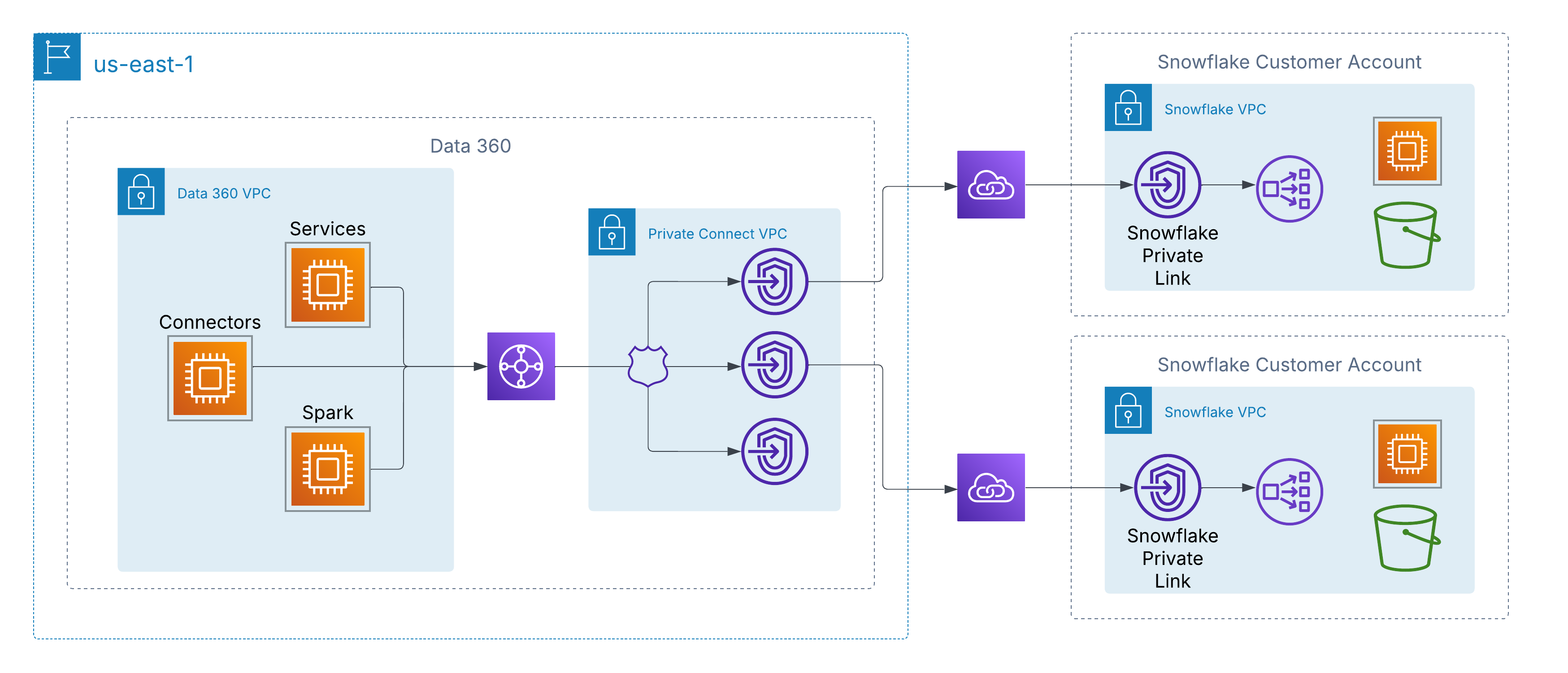 On AWS, Data 360 connects to customer-managed sources (including third-party lakes such as Snowflake) through Private Connect for Data 360 (PC4DC), built on AWS PrivateLink, so traffic never traverses the public internet. PC4DC uses a **proxyless** architecture with a unique DNS per customer, deployed to a Data 360 functional domain (FD) for dedicated capacity and tenant isolation.
#### Private Interconnect
For multi-cloud customers, Private Connect Multicloud extends the same backbone-only, zero-internet-exposure path to data lakes in Azure or Google Cloud, under two deployment models:
- **Customer-Managed Interconnect**: integrate existing private circuits (Azure ExpressRoute, Google Cloud Interconnect, Equinix Fabric) directly with Data 360’s VPCs.
- **Salesforce-Managed Interconnect**: Salesforce provisions and operates the cross-cloud link via **Equinix Fabric Cloud Router (FCR)**, exposing private endpoints in the target cloud.
For the full private-connectivity framework (AWS PrivateLink specifics, compliance alignment such as ISO 27001/SOC 2/FedRAMP, and connector-by-connector support), see the dedicated [Data 360 Security Architecture guide](https://architect.salesforce.com/docs/architect/fundamentals/guide/data360_security_architecture.html#securing-cross-cloud-data-access-the-private-connectivity-framework).
### Data Governance in Data 360
Salesforce Data 360 provides a governance framework spanning data quality, security, and adherence to regulatory mandates across the entire data lifecycle.
On AWS, Data 360 connects to customer-managed sources (including third-party lakes such as Snowflake) through Private Connect for Data 360 (PC4DC), built on AWS PrivateLink, so traffic never traverses the public internet. PC4DC uses a **proxyless** architecture with a unique DNS per customer, deployed to a Data 360 functional domain (FD) for dedicated capacity and tenant isolation.
#### Private Interconnect
For multi-cloud customers, Private Connect Multicloud extends the same backbone-only, zero-internet-exposure path to data lakes in Azure or Google Cloud, under two deployment models:
- **Customer-Managed Interconnect**: integrate existing private circuits (Azure ExpressRoute, Google Cloud Interconnect, Equinix Fabric) directly with Data 360’s VPCs.
- **Salesforce-Managed Interconnect**: Salesforce provisions and operates the cross-cloud link via **Equinix Fabric Cloud Router (FCR)**, exposing private endpoints in the target cloud.
For the full private-connectivity framework (AWS PrivateLink specifics, compliance alignment such as ISO 27001/SOC 2/FedRAMP, and connector-by-connector support), see the dedicated [Data 360 Security Architecture guide](https://architect.salesforce.com/docs/architect/fundamentals/guide/data360_security_architecture.html#securing-cross-cloud-data-access-the-private-connectivity-framework).
### Data Governance in Data 360
Salesforce Data 360 provides a governance framework spanning data quality, security, and adherence to regulatory mandates across the entire data lifecycle.
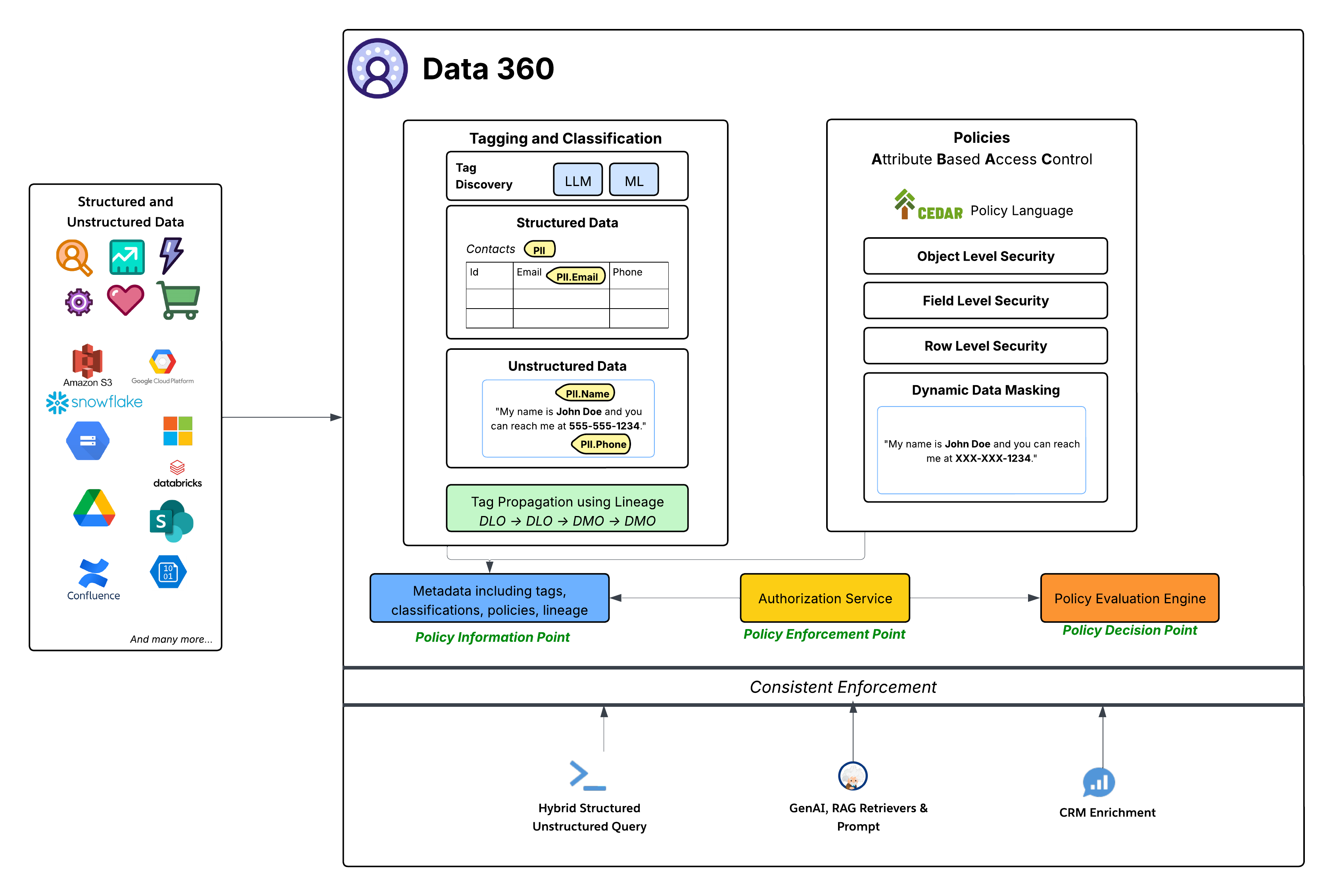 Data 360 adopts Attribute-Based Access Control (ABAC) as its core authorization model for fine-grained access, chosen over traditional Role-Based Access Control (RBAC) for the flexibility and scale that dynamic enterprise environments demand. Access decisions are evaluated at runtime from attributes of the user, the data (classification, sensitivity, data space), and the environment, rather than from pre-assigned roles alone. Policies are expressed in the CEDAR policy language and enforce object-, field-, and row-level security as well as dynamic data masking at the point of access. Automated LLM- and ML-driven tagging and classification (for example, PII.Email, PHI) propagate along data lineage (DLO → DLO → DMO), so sensitivity follows data through every transformation. Critically, this single ABAC framework enforces consistently across every consumption pattern (direct query, GenAI RAG retrieval, and CRM enrichment) and is administered natively with familiar Salesforce platform tools, avoiding a parallel governance stack.
For the full governance architecture (the Policy Information, Decision, and Enforcement Points, CEDAR policy authoring, and the tagging and classification pipeline), see the dedicated [Data 360 Security Architecture guide](https://architect.salesforce.com/docs/architect/fundamentals/guide/data360_security_architecture.html#data-governance-in-data-360-the-foundation-of-trust-control-and-intelligence).
### Data 360 Encryption: Bring Your Own Key (BYOK)
Data 360 encrypts all data at rest with Salesforce-managed keys by default. For regulated enterprises, Platform Encryption for Data 360 adds customer-managed encryption (Customer-Managed Keys, CMK), where the customer controls the root key through one of two methods. With External Key Management (EKM), the root key stays in the customer’s own AWS KMS and Data 360 calls out to it; with Bring Your Own Key (BYOK), the customer uploads their own root key material directly into Salesforce. In both cases Data 360 still generates and wraps the underlying data encryption keys, and the customer-managed root key protects data at rest and search indexes. Because no party (including Salesforce) can decrypt the data without that root key, it stays cryptographically protected even against a platform-level breach.
For setup, key rotation and lifecycle, and the EKM-versus-BYOK trade-offs, see the dedicated [Data 360 Security Architecture guide](https://architect.salesforce.com/docs/architect/fundamentals/guide/data360_security_architecture.html#foundation-of-protection-encryption-at-rest-and-in-transit).
### Data Residency and Regional Processing
Data 360 residency follows Hyperforce. Each org is provisioned into the Hyperforce region closest to the associated core Salesforce org, within a customer-selected country, and Data 360 runs on a subset of the [published Hyperforce regions](https://help.salesforce.com/s/articleView?id=000314281&type=1). Residency is set once, at provisioning, and is per-org: a single org's data resides in one region, and customers choose a country rather than a specific cloud region. Stored customer data remains in that region, with limited exceptions for operating the service (for example, support and operational access, Salesforce controller data that is not customer data, integrations to services not yet available on Hyperforce, and any movement the customer initiates).
Changing region is not an in-place operation. Data 360 cannot be migrated between regions; moving it requires de-provisioning and re-provisioning into the new region, effectively rebuilding the tenant. Data 360 also does not automatically follow its core org if that org is later migrated to a different region, so region alignment between CRM and Data 360 is an explicit provisioning concern rather than something that self-corrects. Cross-region replication, backup, and disaster recovery are provided through the Advanced Cross-Region Continuity add-on.
#### Regional Processing of AI and LLM Inference
Data-at-rest residency does not by itself guarantee that AI processing of that data stays in region. Einstein and Agentforce route generative-AI requests through geo-aware routing that prefers a model hosted in the org's own geography, but when the requested model is not available in region the request falls back to a region where that model is hosted (often the United States). The practical consequence is that an org whose stored data is pinned to, for example, an EU or Canadian region can still have prompts (and the grounding data sent with them) processed by a model hosted elsewhere, purely because the chosen model is not offered locally.
Architects designing for strict residency should treat per-region model availability as a first-class constraint, not an afterthought. Data 360 provides a Setup control that suppresses this final cross-region fallback: when it is enabled, a request that would otherwise route out of region returns an error instead, trading feature availability for a hard residency boundary. Coverage depends on the model provider, and the control prevents data from leaving rather than creating an in-region model where none exists. Where a stronger contractual boundary is required, the EU Operating Zone commits to keeping customer data within the EU, but satisfying that commitment with generative-AI features still depends on pinning to models that are actually hosted in region.
Finally, regional processing is distinct from the Einstein Trust Layer's data-handling guarantees. Zero data retention and prompt/response masking apply regardless of which region serves the request; they govern what a model provider may retain and see, not where the inference physically runs. Both matter for a residency assessment, but they answer different questions.
### Unstructured Data Storage and Processing
Data 360 supports storage and management of structured (tables), semi-structured (JSON), and unstructured data across data ingestion, processing, indexing, and query mechanisms. Data 360 supports unstructured data types beyond text, including audio, video, and images.
The image below illustrates the two sides of grounding (ingestion and retrieval).

Data 360 manages unstructured data by storing it in columns as text or in files for larger datasets. It supports data federation for unstructured content, which allows for the integration and management of data from multiple sources.
The data is then prepared and chunked, embeddings are generated, and both keyword and vector indexes are built. Data 360 hosts multiple out-of-the-box and pluggable models for chunking and embedding generation. Data 360 supports automated and configurable transcription of audio and video content for subsequent processing and indexing. The search service is used for keyword indexing. For vector indexing, Data 360 supports both native indexing (with Hyper) and dedicated vector databases. Data 360 also integrates with Salesforce Search platform to support keyword indexing on unstructured data. Such integrated multi-modal indexing in Data 360 powers search on any unstructured data, as discussed in the Agentforce Coworker section later in the document.
For retrieval, Data 360 provides APIs for search. The Hyper-based unified query facilitates ensemble queries across structured data, keyword indexes, and vector indexes, maintaining strict visibility and permissions, thus enhancing RAG and Search.
#### Extensible Pipelines
Data 360’s unstructured data indexing pipeline is a modular, extensible architecture.
**Pipeline Stages**
1. Parsing
2. Pre-Processing
3. Chunking
4. Post-Processing
5. Embedding
All stages also support LLM-based processing, letting customers write custom prompts. Both the pre-processing and post-processing phases can include multiple sequential steps, allowing complex transformations to be composed flexibly. Each stage is entirely metadata-driven, so every stage can be configured and extended from one place without code changes.
Examples of pre-processing include operations such as noise elimination, language normalization, and image understanding (optical character recognition and captioning), while post-processing stages may include metadata enrichment, semantic grouping, or advanced techniques such as Raptor chunking.
**Code Extension**
The pipeline fully supports Data 360 Code Extension, allowing enterprises to plug in custom logic at any stage. The code extension components are lightweight Python functions whose lifecycle (execution, scaling, and failure handling) is fully managed by Data 360. This lets domain-specific processing be introduced quickly while maintaining consistency and governance across the platform.
**Intelligent Context**
For setting up RAG with unstructured processing, two factors are key:
1. **Rapid Iteration**: The ability to quickly validate with sample test queries.
2. **Persona-Specific Content**: The capacity to configure content tailored to the consuming persona.
Intelligent Context is a tool designed to address both of these aspects. This interactive UI is powered by a Real-Time (RT) pipeline that executes all five previously outlined stages. The pipeline utilizes GPUs when necessary for tasks such as embedding generation and Optical Character Recognition (OCR). Furthermore, it allows customers to quickly test the RAG pipeline with an Agent before deploying the configuration for comprehensive content processing.
#### Document AI
Data 360 Document AI extracts structured, queryable data from unstructured and semi-structured documents such as invoices, resumes, lab reports, and purchase orders. Architects define an extraction schema (the fields, their types, and per-field extraction instructions) and choose between a batch pipeline over ingested documents and a transactional REST API that returns structured JSON synchronously; extracted data lands in Data Lake Objects that architects then model and route onward. For schema design, the batch-versus-transactional decision, governance, and a quick-start sequence, see the dedicated [Data 360 Document AI](https://architect.salesforce.com/docs/architect/fundamentals/guide/data360-document-ai) guide.
### Enterprise Knowledge
Enterprises possess knowledge spread across disparate systems like wikis, file shares, content management systems, internal databases, and more. This fragmentation makes it difficult for employees (especially service agents and sales reps) and customers to find relevant information efficiently. Key problems include:
- Lack of a single, unified search experience across all knowledge sources
- Inconsistent presentation and rendering of content from different sources
- Lack of access governance for sensitive information scattered across systems
- Difficulty using authoritative knowledge sources within core business workflows (for example, attaching relevant articles to a Case)
Enterprise Knowledge represents content that has been curated, either manually or automatically, from the broader pool of enterprise data. Manual curation involves deliberate actions, such as creating Salesforce Knowledge Articles or developing knowledge within external systems which is then ingested. Whether curated manually or automatically, internally within Salesforce or externally before ingestion, the outcome is value-added content distinct from raw data.
The Enterprise Knowledge Hub solution uses Data 360 capabilities for:
- **Ingestion and Storage**: CRM Connector ingests Salesforce knowledge articles, and data connector framework (DCF) unstructured connectors ingest raw content and metadata from external sources. The content is ingested into source-specific unstructured data lake objects (UDLOs) mapping to the content on SFDrive (or source in case of zero copy). Data 360 supports a variety of unstructured connectors, including web-based sources (Web Crawler, Sitemap), collaboration and file platforms (Microsoft SharePoint, Google Drive, Box), developer and support tools (GitHub, Jira, Confluence, Zendesk), knowledge management systems (Guru, Helpjuice), content platforms (Adobe Experience Manager, YouTube), and cloud storage providers (Amazon S3, Azure Storage, Google Cloud Storage).
- **Harmonization & Structuring**: The Harmonization Pipeline processes UDLO and file data, performing cleaning, normalization, enrichment (NLP, etc.), PII masking, and transformation into the harmonized intermediate format, stored in SF Drive and a harmonized UDLO (HUDLO) that maps to it.
- **Indexing**: Unstructured Pipeline (UDS) is triggered over the harmonized content and Search Indexes are configured for each harmonized UDMO (HUDMO).
- **Consumption**: Consuming applications include search, retrieval, rendering, and linking to business objects like Case. Engagement by consuming applications is collected to provide usage analytics (like clicks, reviews, etc.)
### Calculated Insights
Calculated insights (CIs) in Data 360 allow customers to define and generate aggregated metrics from their data. These metrics are then used for timely customer engagement, analysis, segmentation, and activation. CIs are defined either through no-code/low-code drag-and-drop or direct SQL authoring. The aggregated data computed by CIs is written to Lakehouse and represented as a calculated insight object (CIO).
There are two main types of calculated insights:
- **Batch Calculated Insights**: Designed for complex, high-volume data aggregation, where metrics can be computed immediately or periodically (for example, hourly, daily, or weekly).
- **Streaming Insights**: Provide the ability to generate metrics and actions from real-time event data, enabling immediate, low-latency customer engagement. Streaming CIs use Spark Structured Streaming and support windowed aggregations (for example, 60-minute tumbling windows) on high-velocity event data.
Calculated insights are defined on data model objects (DMOs) or on other calculated insight objects, and can surface real-time insights even from non-real-time DMOs. The calculated insights service manages the orchestration of both batch and streaming jobs.
Both batch and streaming computations run on Spark: batch as periodic scheduled jobs, streaming via Spark Structured Streaming. For cost efficiency, the calculated insights service groups CIs that share dependencies or source data objects into the same job.
Streaming Insights computation relies on incremental change processing: native change notifications signal when new data has arrived (avoiding costly full-table scans), and snapshot-based change extraction supplies the precise set of changed records for the engine to process incrementally.
### Identity Resolution
Identity resolution transforms disparate data from multiple sources into a single unified profile.
A unified profile isn’t a “golden record”, and identity resolution doesn’t pick winning values or override any existing data while unifying profiles. Unified profiles serve as a set of keys — often referred to as a "key ring" — that unlock your source data by identifying all matching records that relate to the same entity, within one data source or across many sources. With this information, you can select the right source system data to use for a given business use case. Data 360 Identity Resolution supports real-time engagement and activation — it is not a replacement for a Master Data Management (MDM) system like Informatica. MDM provides strict governance, stewardship workflows, and an immutable Golden Record for enterprise-wide systems of record. Data 360 IR is optimized for "best view for action right now" instead of a legally binding truth.
Identity resolution can consolidate a variety of record types, including Individuals, Accounts, and Households. It can also be used to match leads to existing accounts. Unification supports a complete Customer 360 view across both B2C and B2B scenarios.
The identity resolution pipeline is cloud-native and processes large data volumes continuously. The process involves four key stages, relying on a search index to manage matching:
- **Matching (Candidate Selection)**: The goal of the match process is to search for records that may belong to the same entity. Records are analyzed against a customizable set of rules, each of which contains a set of criteria that define what data to match at which level of strictness. To efficiently retrieve potential matches from the data store, the system generates indexes to find likely matching records using two techniques:
- **Blocking Keys**: A blocking key is a value generated from a record's data and match rules (like the first few letters of a name, normalized phone number, etc) to group potentially similar records together. Each record has multiple blocking keys that are indexed and stored as an inverted index, ensuring the system only performs detailed comparisons on small groups of records, rather than across the entire dataset.
- **Locality Sensitive Hashing (LSH)**: For match rules with fuzzy matching, hashes are generated based on embeddings from trained models.
- **Deep Matching**: After the candidate selection step creates smaller groups of potential matches, the system begins a more detailed comparison. In this stage, AI models and advanced algorithms analyze each pair of records to calculate a probabilistic match score. This score quantifies the likelihood that two records refer to the same entity by intelligently comparing fields that often contain misspellings, variations, or formatting differences. Supported match methods include Exact Match (high-fidelity identifiers like Party ID or email), Fuzzy Match (for names with variations, nicknames, or typos — scored using Jaro-Winkler and name variant algorithms), and Normalized Match (standardizes formatting, for example, stripping country codes and spaces from phone numbers before comparison).
- **Clustering and Unification**: Once matching records are identified from the candidates, they are grouped into a cluster. This process includes resolving transitive matches. For example, if Record A matches Record B, and Record B matches Record C, all three are linked into the same cluster even if A and C were never directly compared. These complete clusters form the foundational structure of the unified profile. This clustering process ensures that all related source records are correctly linked under a single, persistent identifier. The maximum supported cluster size is 50,000 records per profile. If exceeded, IR splits them into singleton profiles and logs a warning (ExceededMatchingRecordsPerCluster). This typically indicates bad data quality or overly relaxed match rules.
- **Reconciliation**: Data values from all clustered source records are evaluated using defined Reconciliation Rules (for example, *Most Frequent*, *Most Recent*, or *Source Priority*) to populate the resulting unified profile with an excerpt of profile data. Reconciliation doesn’t overwrite any existing data, as all source data is available using the keys linked to the unified profile.
#### Identity Resolution Types
The architecture supports the resolution of multiple entity types to fulfill a variety of use cases.
- **Individual Matching**: Focuses on creating the Unified Individual profiles, which link all known personal identifiers (emails, phone numbers, loyalty IDs, cookies) to a single person.
- **Account Matching**: Focuses on creating the Unified Account profiles, which link data about accounts. When matching on company names, the engine uses a finely tuned model when fuzzy matching.
- **Household Matching**: Extends the matching logic to aggregate Unified Individual records into groups of related individuals.
- **Cross Entity Matching**: Apart from unification, identity resolution also creates links between profile objects by using the same match rules. For instance, a Lead can be linked to an Account using fuzzy matching on Account Name.
#### Near Real-Time Processing
To keep the unified profile current, the identity resolution engine runs continuously in near real time. Under normal operations, identity resolution runs incrementally, processing only new or modified records, which keeps costs proportional to data change volume instead of total data size. A change to any field mapped to the profile DMOs triggers reprocessing (even fields not used in match rules); unmapped fields neither trigger it nor count toward credit consumption. Map only the fields needed for identity resolution and activation. While processing speed varies depending on how source data is received, small batches of changes can be processed by identity resolution as frequently as every 60 minutes to 24 hours for standard IR (depending on the data source), with real-time IR (Sub-Second Real-Time / SSRT) available for use cases that require profile updates within milliseconds — such as in-session personalization and live segmentation evaluation. It's important to understand the distinction between the two processing modes:
- **Near Real-Time IR (standard):** Processes new and changed records incrementally on a scheduled cadence (as frequently as every 60 minutes to 24 hours, depending on the data source). This is the default mode and is suitable for the vast majority of use cases including segmentation, activation, and Agentforce grounding. Segments and Calculated Insights run against the Data 360 Lakehouse and are updated on their own scheduled cadences (hourly, 6 hrs, 12 hrs, daily, weekly) — they are not automatically updated in sub-second time.
- **Real-Time IR (SSRT — Sub-Second Real-Time):** Enables profile updates, segment evaluation, and Calculated Insight computation within milliseconds of an event. This is a separately licensed capability (available under the Sub-Second Real-Time Profiles & Entities add-on) and is architecturally distinct from the standard near-real-time path. **Real-time segment evaluation and CI computation require the Sub-Second Real-Time Profiles & Entities add-on.**
#### Source Profile Linking
The system maintains identity link objects, specifically the IndividualIdentityLink DMO and PartyIdentificationIdentityLink DMO, that map every source record ID to its corresponding unified profile ID. This foundational data structure allows the engine to efficiently track relationships and quickly propagate changes and updates to the unified profile, ensuring that customer experiences (such as website personalization, next-best-action recommendations, and segmentation) always use the freshest available customer data. A source profile is defined as a group of records from the Individual DMOs and related objects, such as the Contact Points DMOs and Party Identifiers.
### Segmentation
Segmentation is the core process of transforming unified individual profiles into actionable audiences. The Data 360 Segmentation platform supports complex rules, aggregation-based filters, and window-based ranking at petabyte scale, over a data model of thousands of objects and relationships. Data 360 serves as the System of Context, with segmentation at the core of real-time audience evaluation.
#### Segmentation Types and Cadences
Data 360 supports various segment types to meet distinct business requirements for speed, complexity, and hierarchy:
1. **Standard Segment**: The primary, batch-processed segment type. It publishes on a customizable schedule, with a Standard Publish cadence of a minimum of 12 hours up to 24 hours, or a faster Rapid Publish cadence of 1 to 4 hours, which is optimized for recent engagement data. Rapid Segments are limited to processing 600 million total records and can publish a maximum of 24 times per day. The event lookback window for Rapid Segments is 7 days; segments error if the date range exceeds it.
2. **Real-Time Segment**: This segment completes on-demand in milliseconds for immediate action based on recent events and profile data. It is optimized for instant personalization but cannot utilize exclusion criteria or nested segments.
3. **Waterfall Segment**: A hierarchical structure of subsegments used to prioritize a customer into a single, most valuable segment if they qualify for multiple criteria.
4. **Nested Segment**: This allows for reusing an existing segment as a filter for a new, more specific segment (a refinement of a base segment), inheriting the schedule of the parent segment.
5. **Einstein Segment (AI-Generated):** Data 360 also supports Einstein Segments, where AI automatically generates segment criteria based on natural language prompts.
Data 360 surfaces two types of population counts during segment authoring:
- **Filter-Level Counts**, for direct attributes (1-to-1 traits where one match = one unique person). Use the "Calculate Population" option to identify restrictive filters causing audience drop-off.
- **Container-Level Counts**, for related attributes (groups multiple related events, for example, 50 orders, into unique individual occurrences). This count ensures that you're counting unique people rather than total transactions.
#### Segmentation Engine: Architecture Fundamentals
The segmentation engine operates on a cloud-native architecture that ensures speed, scale, and resilience.

Although Data 360 Query handles segmentation count computations, the Spark compute layer calculates the actual Segment membership. The Spark application executes Spark SQL queries on extensive customer data. This data can reside in the Data 360 Lakehouse, external systems via Zero Copy data federation, or a combination of both.
The architecture uses adaptive resource management, adjusting compute to workload size and complexity, and manages SLO adherence with adaptive durations and retry logic. Accelerated segment counts use sampling to provide rapid size estimates during segment creation, avoiding a full query run.
Observability and root-cause attribution rely on Spark execution metrics and automated error classification (for example, customer-side vs. system issues), reducing diagnosis time.
### Activation
Activation is the final step in the Data 360 lifecycle. Its core function is to transform static, segmented, unified individual profiles into actionable and enriched data and deliver this data to internal and external endpoints (such as Marketing Cloud, Commerce Cloud, and Adtech platforms like Facebook, LinkedIn, and Google). This process is designed to trigger personalized customer journeys and near real-time interactions. It supports advanced capabilities like related attributes, activation membership filtering, consent filtering, limiting, and ranking.
Activation offers three distinct methods for external delivery and channel compliance:
- **Batch Activation**: Designed for high-volume, scheduled operations such as large-scale email campaigns and advertising audience refreshes. Data is delivered by staging it to Secure Internal Buckets (Cloud Object Storage) or via Secure File Transfer, followed by an API ingest process initiated by the target system. Batch activations can utilize special refresh mode (incremental) to reduce volumes sent to and processed by Salesforce partners. Batch DMO Activations can also be published on-demand via the Connect API, eliminating reliance on manual activation scheduling.
- **Streaming Activation**: Optimized for near real-time use cases requiring event-driven automation. Delivery is achieved through direct API calls sent to the destination endpoint.
- **Activation-Triggered Flows (ATF)**: This highly platformized channel provides a no-code/low-code approach for integrating audience data with hundreds of API-enabled engagement platforms. Upon activation completion, Data 360 populates an Audience DMO, which then triggers a High Scale Flow. The Flow engine subsequently consumes the audience data and utilizes platform capabilities like External Services and Mule Outbound destinations to make calls to the final API-based destination. This method reduces the time to onboard new activation targets. ATF supports Batch DMO Activations, not just segment-based activations, allowing any DMO (Engagement, Profile, or Other category) to trigger a flow upon activation.
- **Flow-Orchestrated Activations (FOA):** FOA allows customers to call Data 360 Activations directly from the Flow canvas, using Flow's native logic (Decisions, Loops, Waits) to orchestrate fully automated, multi-channel journeys. Unlike traditional activations driven solely by segment publish schedules, FOA enables behavior-driven journeys where customers are automatically moved across channels based on real behavior (for example, email → ads → data systems).
Activation utilizes the same patterns as segmentation for job management, distributed execution, and monitoring. This includes the principles of the job orchestration service for lifecycle management and the compute layer (Spark) for processing, and relies on job telemetry for performance observability and service level objective (SLO) adherence.
Activation also includes several supporting capabilities:
**Activation Target Management** oversees the secure connections, credentials, and configurations for all destination endpoints. It guarantees that data formats and security protocols are standardized, ensuring dependable outbound delivery to various platforms, including Marketing Cloud, Adtech partners, and other external applications. Credentials are secured through Named Credentials and External Credentials, and for high-security environments, outbound connections can be restricted to Private Connect links, ensuring activation traffic remains within a private network.
Activation tailors the payload for specific targets. For Salesforce Marketing Cloud, this includes Business Unit (BU) Aware Filtering, Multi-EID support, and cross-pollination controls.
**Communication Governance** acts as a gatekeeper, ensuring data usage and communication are compliant with customer preferences and legal requirements. A centralized consent model unifies all customer preferences (from global opt-outs to channel- and purpose-specific consent) and stores them on the Unified Individual profile. During execution, the platform strictly enforces these policies by using exclusion filtering to automatically remove non-consenting individuals from the final payload. Consent flags evaluated include "Do Not Share," "Do Not Sell," and "Email Opt-Out," aligning with GDPR and CCPA requirements, with automated lineage and audit logs generated for each outbound activation event. Data 360 is also a HIPAA Covered Service under Salesforce's Business Associate Addendum, so activation supports protected health information (PHI) under a signed BAA, subject to the applicable restrictions such as PHI encryption.
Furthermore, the system applies contact point selection rules to ensure it uses the single, most compliant, and preferred contact point for the intended channel before any data is transmitted. Dynamic data masking and access controls protect sensitive data fields throughout activation.
**Auditability** provides administrators with visibility into activation events — who was included, which segment they belonged to, what consent flags were evaluated, and which target received the data. Each outbound activation generates a detailed audit log capturing the segment definition, execution timestamp, applied governance rules, and the resulting audience payload. Admins can trace individual records through the activation pipeline, from profile match to final delivery, using activation history views and data lineage tools. This supports accountability for compliance reviews, troubleshooting, and regulatory inquiries.
### Unified Query
Salesforce Data 360's Unified Query capability abstracts the complexities of diverse data stores behind a single query interface.
The Unified Query layer supports diverse consumption patterns:
- **Hybrid Structured & Unstructured Querying**: The Unified Query layer provides extensive SQL support to seamlessly query both structured data and the structured metadata of unstructured data. This is enhanced by operator extensibility via table functions, enabling specialized search across text, image, and spatial types. Hyper is extended to perform queries combining structured (relational), keyword (full-text) search, and semantic (vector) search, enabling hybrid search across all data types.
- **Accelerated Performance with Hyper**: Data 360 uses Hyper, a high-performance, in-memory engine, to accelerate complex analytical queries and interactive dashboards.
- **Unified Approach for AI & Personalization**: Unified access supports Retrieval Augmented Generation (RAG), grounding LLM responses in enterprise data.
- **Integration with Downstream Consumption**: This integration is the foundational data access layer for UI-driven experiences, APIs, Generative AI workflows, and CRM enrichment, connecting data to activation. As part of AIforce, the Connect REST API is the primary public API for headless, API-first, and MCP-based access to all Data 360 capabilities — enabling any agent, model, or tool to interact with Data 360 without a browser or UI.
### Data Actions
Data 360 is an active platform that supports the activation of pipelines in response to data events. For instance, an event, such as a drop in a customer’s account balance or a Calculated Insight detecting "High Churn Risk," can trigger a Salesforce Flow to orchestrate a corresponding action. Similarly, updates to key metrics, such as lifetime spend, can be automatically propagated to relevant applications.
Data Actions continuously monitor for data changes using native change notifications and snapshot-based change extraction. This data is evaluated against tenant-configured action rules, such as threshold monitoring or state changes. When these rules are met, a data action event, specifically a `DataObjectDataChgEvent`, is generated. This event is enriched with additional information (for example, customer loyalty status) and immediately sent to its configured destination, such as Salesforce Flow or an external application, to trigger business orchestrations.
Data 360 now includes monitoring alerts for Data Action failures. A "Data Actions Failure" alert surfaces errors in near-real-time integrations with platforms like MuleSoft and Marketing Cloud that can disrupt data synchronization across systems.
#### Customer Data Platform
Data 360 provides native CDP (Customer Data Platform) capabilities across both business-to-business (B2B) and business-to-consumer (B2C) models, building on the identity resolution and identity graphs described above. It is built natively into the Salesforce platform, letting Sales, Service, Marketing, and Commerce operate on a single unified data foundation.
Identity graphs enriched with engagement data from across channels feed the profile graphs used for analytics and segmentation.
#### Data Graphs
A key concept that supports the customer profile is the data graph. Data 360 offers an enterprise data graph in JSON format, which is a denormalized object derived from various Lakehouse tables and their interrelationships. Data Graphs can be refreshed on a batch schedule or via Streaming — an event-driven mode that provides near real-time, low-latency data propagation, keeping incrementally refreshed graphs complete even when related records arrive late or out of order.
This includes a "Profile" data graph created by CDP that encompasses a person’s purchase and browsing history, case history, product usage, and other calculated insights, and is extensible by customers and partners. Data Graphs support ABAC governance controls — access policies can restrict or filter what data is returned in queries, ensuring that even real-time profile retrieval respects row-level and field-level security.
These data graphs are tailored to specific applications and enhance generative AI prompt accuracy by providing relevant customer or user context. The real-time layer of Data 360 utilizes the Profile graph for real-time personalization and segmentation.
#### Data 360 and MCP
Data 360 is accessible as a Salesforce MCP server, allowing any AI agent, including Claude, ChatGPT, or custom-built agents, to connect directly to Data 360 capabilities without a browser or Salesforce UI. Data 360 defines what the agent knows; Agentforce defines what it's allowed to do; and the LLM defines how it reasons. Clean, unified, governed data in Data 360 ensures that agents connected via MCP don't inherit data quality issues from siloed systems.
### Real-Time Layer
Data 360’s real-time layer is backed by the Data 360 CDP and extends its concepts for real-time use cases, processing events such as web and mobile clickstreams, visits, cart data, and checkouts at millisecond latencies. It continuously monitors customer engagement and updates the unified individual profile with real-time engagement data, segments, and calculations for immediate personalization.
For example, when a consumer purchases an item on a shopping website, the real-time layer quickly detects and ingests this event, identifies the consumer, and enriches their profile with updated lifetime spend information. This allows for the personalization of their experience on the site with sub-second latency. Additionally, this layer includes capabilities for real-time triggering and responses, enabling immediate actions based on customer interactions.

Data 360's real-time platform combines a streaming pipeline, low-latency storage, and a sub-second processing layer. As interactive data is ingested from web and mobile channels, it goes through a series of rapid processes.
Web & Mobile SDKs (including a JavaScript tag-based Web SDK) and REST APIs collect behavioral and interaction data from web and mobile applications and transmit it to Data 360. Standard event types such as cart, order, catalog, and behavioral events are supported out of the box. From there, the data is routed along two parallel paths: to the Real-Time Layer for millisecond-latency processing, and to the Lakehouse Layer for integration with batch and streaming data pipelines.
The Real-Time Layer processes incoming data in the context of a user profile — whether anonymous or authenticated — updating attributes such as total spend or lifetime value to power in-session, real-time personalization. To meet strict latency requirements, the Real-Time Layer is backed by main memory and NVMe (SSD) storage, optimized for high-speed reads and writes of real-time data and customer profiles.
Once data lands in the Real-Time Layer, it passes through a series of processing steps before being committed to the Real-Time Data Graph:
- **Simple Ingest and Transformations**: The data is ingested and transformed for further processing.
- **Identity Resolution**: Exact match rules are applied to unify profiles with all existing match rules sets, so data-aware specialists don't have to create new identity resolution rules sets specifically for real-time.
- **Computed Insights**: Every engagement is evaluated; simple computations such as sum and count run in milliseconds and update the Real-Time Data Graph. Streaming Calculated Insights use Spark Structured Streaming with windowed aggregations (for example, 60-minute tumbling windows).
- **Real-Time Segments**: Every engagement data is evaluated to determine if it meets the criteria for defined real-time segments, and users are added to qualifying segments in milliseconds.
- **Real-Time Actions and Triggers**: Every engagement is evaluated against defined rules; when rules are met, a `DataObjectDataChgEvent` is generated in milliseconds and delivered to configured destinations such as Salesforce Flow (High Scale), Platform Events, Internal Webhook, or MuleSoft and external APIs.
- **Real-Time Data Graph and API**: Real-time data graph, which also includes a real-time API, allows brands to retrieve updated JSON-format data for each user, ensuring that all customer interactions are informed by the freshest data. The API delivers sub-second (P99 < 200ms) retrieval latency under normal operating conditions.
#### Personalization
Personalization is all about knowing who to target, when and where to deliver relevant content and recommendations, what to say and what frequency. Salesforce Personalization is the orchestrator of what decisions are made to optimize goal achievement through personalized experiences. It combines profile understanding via Profile Data Graphs with business context via Item Data Graphs (catalog, offers, promotions) to deliver personalized recommendations and content across channels.
Salesforce Personalization uses any data in Data 360 — including segments, real-time behavioral data, Calculated Insights, and affinities — to better target customers throughout their lifecycle.
**Personalization Services** integrates with Data 360 in the following ways:
- Interprets profile, activity, and asset data from Data 360 through a consistent set of models
- Writes engagement and interaction data back into Data 360 (as engagement DMOs), where analytics, reporting, and re-segmentation run
### Agentforce Coworker
Agentforce Coworker is the conversational AI experience built into Salesforce that understands the intent and context behind queries, surfaces the right information from across the entire enterprise, and puts plans into motion using Agentforce — all from inside the CRM search bar. It builds on existing Data 360 services and integrates deeply with Agentforce.
#### Using Data 360's Core Strengths
Our approach to Agentforce Coworker is based on these principles:
- Enterprise data is kept in siloed services or stores, with secure permissions needed for access. The ability to access this data and process it while maintaining the source permissions is vital to ensure trust.
- Cross-ranking and relevance across the complete corpus of data enable better results, which in turn can provide better context for agentic experiences.
To deliver these experiences, Agentforce Coworker is built on top of these key architectural components:
- **Connectors**: The broad set of connectors available in Data 360 enables one to access and ingest data from a wide variety of sources.
- **Unstructured Data Processing**: This is foundational for handling non-tabular content, enabling the system to derive meaning and context from diverse data. It also supports Docling parser (complex tables and layouts), LLM-Based parser (holistic document processing), Visual Data in RAG Responses (diagrams, flowcharts, infographics), and UDMO Context — enabling metadata such as Titles and URLs to be prepended directly to chunks for better agent retrieval accuracy.
- **Governance**: Ensuring enterprise-grade security, compliance, and access controls for all data consumed by search. Support for source visibility permissions ensures that the data is accessible only to authorized users, for both simple search and agentic experiences. To ensure fast retrieval, security permissions are evaluated and enforced natively by the search backends at the earliest stage of data access. For permission-aware sources, Data 360 ingests and automatically creates and applies governance policies, source permissions are inherited from the source. For non-permission-aware connectors, governance policies can be created manually using Data 360 ABAC capabilities
- **Unified Retrieval Layer**: To address the challenge of siloed data, the connectors feed into a comprehensive Unified Retrieval layer. This layer provides a single access point to all data, whether it remains in external systems accessed via Federated Search or is managed natively through advanced indexes for zero-copy and ingested data.
- **Intelligent Query Understanding**: Before retrieval, the system uses AI-powered mechanisms to interpret user intent. In addition to embedding representations of the query for semantic vector matching, it can rewrite and expand keyword-based searches to improve accuracy. The system also uses the Data 360 semantic layer (DMOs, Calculated Insights, Data Graphs) to translate natural language into precise, governed business logic, ensuring agents don't just retrieve rows, but retrieve contextually assembled entity packages.
- **Hybrid Search and Advanced Querying**: To find the most relevant information, the platform uses multiple strategies in parallel. Hybrid search provides precise keyword matching with semantic vector search on optimized chunks of data, while Full-record search simultaneously retrieves entire documents. Both are combined to ensure both semantic relevance and complete content coverage. The hybrid score is a relative relevance signal — it should not be used to compare scores across separate query executions, only within a single result set.
- **Hierarchical Ranking**: After data is retrieved, a multi-stage hierarchical ranking architecture scores, merges, and re-ranks the results from every source and method. This process creates a single, unified list that surfaces the most pertinent information for the user or agent.
#### Agentic Search Applications
Generative AI is shifting the primary consumer of enterprise search from human users to Large Language Models (LLMs). Data 360 Search is engineered from the ground up to serve both. It is optimized to handle the longer, more complex queries from agents and return the rich, contextual results necessary for programmatic consumption and reasoning loops. At the same time, the system can handle the shorter, often ambiguous queries typical of human users, providing features like snippets and highlighting for rapid assessment in a UI.
The ultimate delivery of agentic search experiences combines both approaches:
1. **Direct Search Results**: application can display a traditional list of ranked results by using a metadata-driven API built on the Data 360 unified search foundation.
2. **Agentic, multi-turn conversational answers**: agentic answers are implemented through native integration with Agentforce. This conversational experience is driven by a primary agent that orchestrates actions and queries, delegating all information retrieval tasks to a specialized, internal Search Agent.
This specialized Search Agent is optimized for enterprise information retrieval. It uses a reasoning loop to formulate and execute parallel searches to explore different facets of a user's request. It utilizes a powerful set of tools, including the Data 360 unified search for all data types and structured query languages to retrieve precise data from tables and entities. The Search Agent is grounded in the Data 360 unified search foundation, which combines keyword search and semantic vector search through Hybrid Search, ensuring both intent-based and exact-match queries are served accurately.
##### Advanced Retrieval Capabilities
The precision of agentic search is directly determined by retrieval quality. It introduced several capabilities that significantly improve retrieval accuracy for enterprise deployments:
- **Enhanced Retriever Pre-Filters**: Up to 10 pre-filters with compound AND/OR logic and LIKE operator support — a 10x increase in filtering capability. This reduces retrieval noise and keeps the AI context window focused on the most authoritative content. Pre-filters can be configured at setup time, tested in the Retriever Playground, and applied programmatically at query time.
- **Retriever Playground**: A dedicated testing environment allowing architects and data stewards to validate retriever behavior end-to-end against fully built search indexes, without invoking an LLM. Users can view retrieved chunks, scores, adjust settings, validate against ground truth, and save improved configurations.
- **Visual Data in RAG Responses**: LLM + Docling image processing enables agents to extract insights from diagrams, flowcharts, and infographics embedded in documents, not just text content.
- **Dynamic Retrievers**: A distinct retriever type whose filter values are populated from the prompt at query time, so a single retriever can serve many personas instead of requiring a separate retriever for each filter value.
### Agentic Context and Memory
By default an agent is stateless across sessions. It retains nothing from one conversation to the next, so any memory of a customer's prior preferences, decisions, or history must be rebuilt from source data or re-elicited from the user. Absent a shared substrate, each agent implements that memory itself (its own storage, retrieval, and access control), usually without inheriting the governance that applies to the underlying data. The Agentic Context Engine (ACE) is that shared substrate: a Data 360 service that provides agent memory as a governed, cross-session context store. Any agent (Agentforce or third-party) uses it instead of building and securing its own.
ACE is a headless context service: an agent registers with Data 360 and then stores and retrieves context through a consistent interface, without handling the underlying stores directly. Conversation history flows through the real-time layer and persists to the low-latency store, and the unstructured processing pipelines distill that history into durable memory (concise conversation summaries, plus profile-level facts and preferences). For each turn of a conversation, ACE assembles the relevant slice of this context and serves it to the agent — drawing on the unified individual profile for long-term, per-person context and on session state for the current interaction.
Because ACE is built on Data 360, agent memory inherits the platform's governance model. An agent operates in the security context of the user it serves, so it retrieves only the conversations and context that user is permitted to see, and memory is partitioned by data space like other Data 360 objects. (Encryption, residency, and subject-rights handling follow the platform-wide model covered in the dedicated [Data 360 Security Architecture guide](https://architect.salesforce.com/docs/architect/fundamentals/guide/data360_security_architecture.html).)
### Extending Data 360 with Custom Code
Extensibility is a key feature in the Salesforce platform. Code Extension, also referred to as Bring Your Own Code (BYOC), provides extensibility in Data 360, allowing pro-code users to run custom Python logic directly within the Data 360 environment, supplementing its rich declarative and low-code functionalities. Using Code Extension, users can securely extend Data 360 core capabilities like Batch Data Transforms and Custom chunking in Unstructured Data Pipelines (custom chunking).
Our design for Code Extension prioritizes flexibility, security, efficiency, and a streamlined developer experience. It supports two primary execution models, each tailored for specific architectural needs:
- **Script Model**:
- **Purpose**: For comprehensive custom logic requiring direct interaction with the Data 360 Lakehouse.
- **Functionality**: Customers write full Python scripts using the Code Extension SDK, enabling read and write access to the Lakehouse via SDK APIs. Scripts can read from multiple Data 360 objects, apply complex processing logic, and write results back to target objects. Ideal for custom/complex data preparation, or bespoke data manipulation, custom decryption logic, parsing of nested legacy formats (for example, XML), or complex financial calculations.
- **Isolation and Security:** While scripts access the Lakehouse, their execution is confined to a secure, isolated environment within the Data 360 runtime, preventing interference with other processes or unauthorized system access.
- **Function Model**:
- **Purpose**: Analogous to a serverless function, for modular, stateless computations invoked from existing Data 360 pipelines (for example, custom chunking in an Unstructured Pipeline).
- **Functionality**: Customer-provided functions take input, compute, and return output. Example use cases include chunking by HTML tags to preserve structural context, chunking by speaker turns to maintain conversational flow, or chunking by slide to retain presentation context — all critical for ensuring Agentforce agents retrieve the correct context from complex document structures.
- **Isolation and Security**: These functions are designed for strict isolation; they do not have direct Lakehouse access. Their execution is sandboxed, stateless, and resource-constrained, making them suitable for focused, stateless processing steps, ensuring security, predictable execution, and minimizing blast radius.
Data 360 adopts Attribute-Based Access Control (ABAC) as its core authorization model for fine-grained access, chosen over traditional Role-Based Access Control (RBAC) for the flexibility and scale that dynamic enterprise environments demand. Access decisions are evaluated at runtime from attributes of the user, the data (classification, sensitivity, data space), and the environment, rather than from pre-assigned roles alone. Policies are expressed in the CEDAR policy language and enforce object-, field-, and row-level security as well as dynamic data masking at the point of access. Automated LLM- and ML-driven tagging and classification (for example, PII.Email, PHI) propagate along data lineage (DLO → DLO → DMO), so sensitivity follows data through every transformation. Critically, this single ABAC framework enforces consistently across every consumption pattern (direct query, GenAI RAG retrieval, and CRM enrichment) and is administered natively with familiar Salesforce platform tools, avoiding a parallel governance stack.
For the full governance architecture (the Policy Information, Decision, and Enforcement Points, CEDAR policy authoring, and the tagging and classification pipeline), see the dedicated [Data 360 Security Architecture guide](https://architect.salesforce.com/docs/architect/fundamentals/guide/data360_security_architecture.html#data-governance-in-data-360-the-foundation-of-trust-control-and-intelligence).
### Data 360 Encryption: Bring Your Own Key (BYOK)
Data 360 encrypts all data at rest with Salesforce-managed keys by default. For regulated enterprises, Platform Encryption for Data 360 adds customer-managed encryption (Customer-Managed Keys, CMK), where the customer controls the root key through one of two methods. With External Key Management (EKM), the root key stays in the customer’s own AWS KMS and Data 360 calls out to it; with Bring Your Own Key (BYOK), the customer uploads their own root key material directly into Salesforce. In both cases Data 360 still generates and wraps the underlying data encryption keys, and the customer-managed root key protects data at rest and search indexes. Because no party (including Salesforce) can decrypt the data without that root key, it stays cryptographically protected even against a platform-level breach.
For setup, key rotation and lifecycle, and the EKM-versus-BYOK trade-offs, see the dedicated [Data 360 Security Architecture guide](https://architect.salesforce.com/docs/architect/fundamentals/guide/data360_security_architecture.html#foundation-of-protection-encryption-at-rest-and-in-transit).
### Data Residency and Regional Processing
Data 360 residency follows Hyperforce. Each org is provisioned into the Hyperforce region closest to the associated core Salesforce org, within a customer-selected country, and Data 360 runs on a subset of the [published Hyperforce regions](https://help.salesforce.com/s/articleView?id=000314281&type=1). Residency is set once, at provisioning, and is per-org: a single org's data resides in one region, and customers choose a country rather than a specific cloud region. Stored customer data remains in that region, with limited exceptions for operating the service (for example, support and operational access, Salesforce controller data that is not customer data, integrations to services not yet available on Hyperforce, and any movement the customer initiates).
Changing region is not an in-place operation. Data 360 cannot be migrated between regions; moving it requires de-provisioning and re-provisioning into the new region, effectively rebuilding the tenant. Data 360 also does not automatically follow its core org if that org is later migrated to a different region, so region alignment between CRM and Data 360 is an explicit provisioning concern rather than something that self-corrects. Cross-region replication, backup, and disaster recovery are provided through the Advanced Cross-Region Continuity add-on.
#### Regional Processing of AI and LLM Inference
Data-at-rest residency does not by itself guarantee that AI processing of that data stays in region. Einstein and Agentforce route generative-AI requests through geo-aware routing that prefers a model hosted in the org's own geography, but when the requested model is not available in region the request falls back to a region where that model is hosted (often the United States). The practical consequence is that an org whose stored data is pinned to, for example, an EU or Canadian region can still have prompts (and the grounding data sent with them) processed by a model hosted elsewhere, purely because the chosen model is not offered locally.
Architects designing for strict residency should treat per-region model availability as a first-class constraint, not an afterthought. Data 360 provides a Setup control that suppresses this final cross-region fallback: when it is enabled, a request that would otherwise route out of region returns an error instead, trading feature availability for a hard residency boundary. Coverage depends on the model provider, and the control prevents data from leaving rather than creating an in-region model where none exists. Where a stronger contractual boundary is required, the EU Operating Zone commits to keeping customer data within the EU, but satisfying that commitment with generative-AI features still depends on pinning to models that are actually hosted in region.
Finally, regional processing is distinct from the Einstein Trust Layer's data-handling guarantees. Zero data retention and prompt/response masking apply regardless of which region serves the request; they govern what a model provider may retain and see, not where the inference physically runs. Both matter for a residency assessment, but they answer different questions.
### Unstructured Data Storage and Processing
Data 360 supports storage and management of structured (tables), semi-structured (JSON), and unstructured data across data ingestion, processing, indexing, and query mechanisms. Data 360 supports unstructured data types beyond text, including audio, video, and images.
The image below illustrates the two sides of grounding (ingestion and retrieval).

Data 360 manages unstructured data by storing it in columns as text or in files for larger datasets. It supports data federation for unstructured content, which allows for the integration and management of data from multiple sources.
The data is then prepared and chunked, embeddings are generated, and both keyword and vector indexes are built. Data 360 hosts multiple out-of-the-box and pluggable models for chunking and embedding generation. Data 360 supports automated and configurable transcription of audio and video content for subsequent processing and indexing. The search service is used for keyword indexing. For vector indexing, Data 360 supports both native indexing (with Hyper) and dedicated vector databases. Data 360 also integrates with Salesforce Search platform to support keyword indexing on unstructured data. Such integrated multi-modal indexing in Data 360 powers search on any unstructured data, as discussed in the Agentforce Coworker section later in the document.
For retrieval, Data 360 provides APIs for search. The Hyper-based unified query facilitates ensemble queries across structured data, keyword indexes, and vector indexes, maintaining strict visibility and permissions, thus enhancing RAG and Search.
#### Extensible Pipelines
Data 360’s unstructured data indexing pipeline is a modular, extensible architecture.
**Pipeline Stages**
1. Parsing
2. Pre-Processing
3. Chunking
4. Post-Processing
5. Embedding
All stages also support LLM-based processing, letting customers write custom prompts. Both the pre-processing and post-processing phases can include multiple sequential steps, allowing complex transformations to be composed flexibly. Each stage is entirely metadata-driven, so every stage can be configured and extended from one place without code changes.
Examples of pre-processing include operations such as noise elimination, language normalization, and image understanding (optical character recognition and captioning), while post-processing stages may include metadata enrichment, semantic grouping, or advanced techniques such as Raptor chunking.
**Code Extension**
The pipeline fully supports Data 360 Code Extension, allowing enterprises to plug in custom logic at any stage. The code extension components are lightweight Python functions whose lifecycle (execution, scaling, and failure handling) is fully managed by Data 360. This lets domain-specific processing be introduced quickly while maintaining consistency and governance across the platform.
**Intelligent Context**
For setting up RAG with unstructured processing, two factors are key:
1. **Rapid Iteration**: The ability to quickly validate with sample test queries.
2. **Persona-Specific Content**: The capacity to configure content tailored to the consuming persona.
Intelligent Context is a tool designed to address both of these aspects. This interactive UI is powered by a Real-Time (RT) pipeline that executes all five previously outlined stages. The pipeline utilizes GPUs when necessary for tasks such as embedding generation and Optical Character Recognition (OCR). Furthermore, it allows customers to quickly test the RAG pipeline with an Agent before deploying the configuration for comprehensive content processing.
#### Document AI
Data 360 Document AI extracts structured, queryable data from unstructured and semi-structured documents such as invoices, resumes, lab reports, and purchase orders. Architects define an extraction schema (the fields, their types, and per-field extraction instructions) and choose between a batch pipeline over ingested documents and a transactional REST API that returns structured JSON synchronously; extracted data lands in Data Lake Objects that architects then model and route onward. For schema design, the batch-versus-transactional decision, governance, and a quick-start sequence, see the dedicated [Data 360 Document AI](https://architect.salesforce.com/docs/architect/fundamentals/guide/data360-document-ai) guide.
### Enterprise Knowledge
Enterprises possess knowledge spread across disparate systems like wikis, file shares, content management systems, internal databases, and more. This fragmentation makes it difficult for employees (especially service agents and sales reps) and customers to find relevant information efficiently. Key problems include:
- Lack of a single, unified search experience across all knowledge sources
- Inconsistent presentation and rendering of content from different sources
- Lack of access governance for sensitive information scattered across systems
- Difficulty using authoritative knowledge sources within core business workflows (for example, attaching relevant articles to a Case)
Enterprise Knowledge represents content that has been curated, either manually or automatically, from the broader pool of enterprise data. Manual curation involves deliberate actions, such as creating Salesforce Knowledge Articles or developing knowledge within external systems which is then ingested. Whether curated manually or automatically, internally within Salesforce or externally before ingestion, the outcome is value-added content distinct from raw data.
The Enterprise Knowledge Hub solution uses Data 360 capabilities for:
- **Ingestion and Storage**: CRM Connector ingests Salesforce knowledge articles, and data connector framework (DCF) unstructured connectors ingest raw content and metadata from external sources. The content is ingested into source-specific unstructured data lake objects (UDLOs) mapping to the content on SFDrive (or source in case of zero copy). Data 360 supports a variety of unstructured connectors, including web-based sources (Web Crawler, Sitemap), collaboration and file platforms (Microsoft SharePoint, Google Drive, Box), developer and support tools (GitHub, Jira, Confluence, Zendesk), knowledge management systems (Guru, Helpjuice), content platforms (Adobe Experience Manager, YouTube), and cloud storage providers (Amazon S3, Azure Storage, Google Cloud Storage).
- **Harmonization & Structuring**: The Harmonization Pipeline processes UDLO and file data, performing cleaning, normalization, enrichment (NLP, etc.), PII masking, and transformation into the harmonized intermediate format, stored in SF Drive and a harmonized UDLO (HUDLO) that maps to it.
- **Indexing**: Unstructured Pipeline (UDS) is triggered over the harmonized content and Search Indexes are configured for each harmonized UDMO (HUDMO).
- **Consumption**: Consuming applications include search, retrieval, rendering, and linking to business objects like Case. Engagement by consuming applications is collected to provide usage analytics (like clicks, reviews, etc.)
### Calculated Insights
Calculated insights (CIs) in Data 360 allow customers to define and generate aggregated metrics from their data. These metrics are then used for timely customer engagement, analysis, segmentation, and activation. CIs are defined either through no-code/low-code drag-and-drop or direct SQL authoring. The aggregated data computed by CIs is written to Lakehouse and represented as a calculated insight object (CIO).
There are two main types of calculated insights:
- **Batch Calculated Insights**: Designed for complex, high-volume data aggregation, where metrics can be computed immediately or periodically (for example, hourly, daily, or weekly).
- **Streaming Insights**: Provide the ability to generate metrics and actions from real-time event data, enabling immediate, low-latency customer engagement. Streaming CIs use Spark Structured Streaming and support windowed aggregations (for example, 60-minute tumbling windows) on high-velocity event data.
Calculated insights are defined on data model objects (DMOs) or on other calculated insight objects, and can surface real-time insights even from non-real-time DMOs. The calculated insights service manages the orchestration of both batch and streaming jobs.
Both batch and streaming computations run on Spark: batch as periodic scheduled jobs, streaming via Spark Structured Streaming. For cost efficiency, the calculated insights service groups CIs that share dependencies or source data objects into the same job.
Streaming Insights computation relies on incremental change processing: native change notifications signal when new data has arrived (avoiding costly full-table scans), and snapshot-based change extraction supplies the precise set of changed records for the engine to process incrementally.
### Identity Resolution
Identity resolution transforms disparate data from multiple sources into a single unified profile.
A unified profile isn’t a “golden record”, and identity resolution doesn’t pick winning values or override any existing data while unifying profiles. Unified profiles serve as a set of keys — often referred to as a "key ring" — that unlock your source data by identifying all matching records that relate to the same entity, within one data source or across many sources. With this information, you can select the right source system data to use for a given business use case. Data 360 Identity Resolution supports real-time engagement and activation — it is not a replacement for a Master Data Management (MDM) system like Informatica. MDM provides strict governance, stewardship workflows, and an immutable Golden Record for enterprise-wide systems of record. Data 360 IR is optimized for "best view for action right now" instead of a legally binding truth.
Identity resolution can consolidate a variety of record types, including Individuals, Accounts, and Households. It can also be used to match leads to existing accounts. Unification supports a complete Customer 360 view across both B2C and B2B scenarios.
The identity resolution pipeline is cloud-native and processes large data volumes continuously. The process involves four key stages, relying on a search index to manage matching:
- **Matching (Candidate Selection)**: The goal of the match process is to search for records that may belong to the same entity. Records are analyzed against a customizable set of rules, each of which contains a set of criteria that define what data to match at which level of strictness. To efficiently retrieve potential matches from the data store, the system generates indexes to find likely matching records using two techniques:
- **Blocking Keys**: A blocking key is a value generated from a record's data and match rules (like the first few letters of a name, normalized phone number, etc) to group potentially similar records together. Each record has multiple blocking keys that are indexed and stored as an inverted index, ensuring the system only performs detailed comparisons on small groups of records, rather than across the entire dataset.
- **Locality Sensitive Hashing (LSH)**: For match rules with fuzzy matching, hashes are generated based on embeddings from trained models.
- **Deep Matching**: After the candidate selection step creates smaller groups of potential matches, the system begins a more detailed comparison. In this stage, AI models and advanced algorithms analyze each pair of records to calculate a probabilistic match score. This score quantifies the likelihood that two records refer to the same entity by intelligently comparing fields that often contain misspellings, variations, or formatting differences. Supported match methods include Exact Match (high-fidelity identifiers like Party ID or email), Fuzzy Match (for names with variations, nicknames, or typos — scored using Jaro-Winkler and name variant algorithms), and Normalized Match (standardizes formatting, for example, stripping country codes and spaces from phone numbers before comparison).
- **Clustering and Unification**: Once matching records are identified from the candidates, they are grouped into a cluster. This process includes resolving transitive matches. For example, if Record A matches Record B, and Record B matches Record C, all three are linked into the same cluster even if A and C were never directly compared. These complete clusters form the foundational structure of the unified profile. This clustering process ensures that all related source records are correctly linked under a single, persistent identifier. The maximum supported cluster size is 50,000 records per profile. If exceeded, IR splits them into singleton profiles and logs a warning (ExceededMatchingRecordsPerCluster). This typically indicates bad data quality or overly relaxed match rules.
- **Reconciliation**: Data values from all clustered source records are evaluated using defined Reconciliation Rules (for example, *Most Frequent*, *Most Recent*, or *Source Priority*) to populate the resulting unified profile with an excerpt of profile data. Reconciliation doesn’t overwrite any existing data, as all source data is available using the keys linked to the unified profile.
#### Identity Resolution Types
The architecture supports the resolution of multiple entity types to fulfill a variety of use cases.
- **Individual Matching**: Focuses on creating the Unified Individual profiles, which link all known personal identifiers (emails, phone numbers, loyalty IDs, cookies) to a single person.
- **Account Matching**: Focuses on creating the Unified Account profiles, which link data about accounts. When matching on company names, the engine uses a finely tuned model when fuzzy matching.
- **Household Matching**: Extends the matching logic to aggregate Unified Individual records into groups of related individuals.
- **Cross Entity Matching**: Apart from unification, identity resolution also creates links between profile objects by using the same match rules. For instance, a Lead can be linked to an Account using fuzzy matching on Account Name.
#### Near Real-Time Processing
To keep the unified profile current, the identity resolution engine runs continuously in near real time. Under normal operations, identity resolution runs incrementally, processing only new or modified records, which keeps costs proportional to data change volume instead of total data size. A change to any field mapped to the profile DMOs triggers reprocessing (even fields not used in match rules); unmapped fields neither trigger it nor count toward credit consumption. Map only the fields needed for identity resolution and activation. While processing speed varies depending on how source data is received, small batches of changes can be processed by identity resolution as frequently as every 60 minutes to 24 hours for standard IR (depending on the data source), with real-time IR (Sub-Second Real-Time / SSRT) available for use cases that require profile updates within milliseconds — such as in-session personalization and live segmentation evaluation. It's important to understand the distinction between the two processing modes:
- **Near Real-Time IR (standard):** Processes new and changed records incrementally on a scheduled cadence (as frequently as every 60 minutes to 24 hours, depending on the data source). This is the default mode and is suitable for the vast majority of use cases including segmentation, activation, and Agentforce grounding. Segments and Calculated Insights run against the Data 360 Lakehouse and are updated on their own scheduled cadences (hourly, 6 hrs, 12 hrs, daily, weekly) — they are not automatically updated in sub-second time.
- **Real-Time IR (SSRT — Sub-Second Real-Time):** Enables profile updates, segment evaluation, and Calculated Insight computation within milliseconds of an event. This is a separately licensed capability (available under the Sub-Second Real-Time Profiles & Entities add-on) and is architecturally distinct from the standard near-real-time path. **Real-time segment evaluation and CI computation require the Sub-Second Real-Time Profiles & Entities add-on.**
#### Source Profile Linking
The system maintains identity link objects, specifically the IndividualIdentityLink DMO and PartyIdentificationIdentityLink DMO, that map every source record ID to its corresponding unified profile ID. This foundational data structure allows the engine to efficiently track relationships and quickly propagate changes and updates to the unified profile, ensuring that customer experiences (such as website personalization, next-best-action recommendations, and segmentation) always use the freshest available customer data. A source profile is defined as a group of records from the Individual DMOs and related objects, such as the Contact Points DMOs and Party Identifiers.
### Segmentation
Segmentation is the core process of transforming unified individual profiles into actionable audiences. The Data 360 Segmentation platform supports complex rules, aggregation-based filters, and window-based ranking at petabyte scale, over a data model of thousands of objects and relationships. Data 360 serves as the System of Context, with segmentation at the core of real-time audience evaluation.
#### Segmentation Types and Cadences
Data 360 supports various segment types to meet distinct business requirements for speed, complexity, and hierarchy:
1. **Standard Segment**: The primary, batch-processed segment type. It publishes on a customizable schedule, with a Standard Publish cadence of a minimum of 12 hours up to 24 hours, or a faster Rapid Publish cadence of 1 to 4 hours, which is optimized for recent engagement data. Rapid Segments are limited to processing 600 million total records and can publish a maximum of 24 times per day. The event lookback window for Rapid Segments is 7 days; segments error if the date range exceeds it.
2. **Real-Time Segment**: This segment completes on-demand in milliseconds for immediate action based on recent events and profile data. It is optimized for instant personalization but cannot utilize exclusion criteria or nested segments.
3. **Waterfall Segment**: A hierarchical structure of subsegments used to prioritize a customer into a single, most valuable segment if they qualify for multiple criteria.
4. **Nested Segment**: This allows for reusing an existing segment as a filter for a new, more specific segment (a refinement of a base segment), inheriting the schedule of the parent segment.
5. **Einstein Segment (AI-Generated):** Data 360 also supports Einstein Segments, where AI automatically generates segment criteria based on natural language prompts.
Data 360 surfaces two types of population counts during segment authoring:
- **Filter-Level Counts**, for direct attributes (1-to-1 traits where one match = one unique person). Use the "Calculate Population" option to identify restrictive filters causing audience drop-off.
- **Container-Level Counts**, for related attributes (groups multiple related events, for example, 50 orders, into unique individual occurrences). This count ensures that you're counting unique people rather than total transactions.
#### Segmentation Engine: Architecture Fundamentals
The segmentation engine operates on a cloud-native architecture that ensures speed, scale, and resilience.

Although Data 360 Query handles segmentation count computations, the Spark compute layer calculates the actual Segment membership. The Spark application executes Spark SQL queries on extensive customer data. This data can reside in the Data 360 Lakehouse, external systems via Zero Copy data federation, or a combination of both.
The architecture uses adaptive resource management, adjusting compute to workload size and complexity, and manages SLO adherence with adaptive durations and retry logic. Accelerated segment counts use sampling to provide rapid size estimates during segment creation, avoiding a full query run.
Observability and root-cause attribution rely on Spark execution metrics and automated error classification (for example, customer-side vs. system issues), reducing diagnosis time.
### Activation
Activation is the final step in the Data 360 lifecycle. Its core function is to transform static, segmented, unified individual profiles into actionable and enriched data and deliver this data to internal and external endpoints (such as Marketing Cloud, Commerce Cloud, and Adtech platforms like Facebook, LinkedIn, and Google). This process is designed to trigger personalized customer journeys and near real-time interactions. It supports advanced capabilities like related attributes, activation membership filtering, consent filtering, limiting, and ranking.
Activation offers three distinct methods for external delivery and channel compliance:
- **Batch Activation**: Designed for high-volume, scheduled operations such as large-scale email campaigns and advertising audience refreshes. Data is delivered by staging it to Secure Internal Buckets (Cloud Object Storage) or via Secure File Transfer, followed by an API ingest process initiated by the target system. Batch activations can utilize special refresh mode (incremental) to reduce volumes sent to and processed by Salesforce partners. Batch DMO Activations can also be published on-demand via the Connect API, eliminating reliance on manual activation scheduling.
- **Streaming Activation**: Optimized for near real-time use cases requiring event-driven automation. Delivery is achieved through direct API calls sent to the destination endpoint.
- **Activation-Triggered Flows (ATF)**: This highly platformized channel provides a no-code/low-code approach for integrating audience data with hundreds of API-enabled engagement platforms. Upon activation completion, Data 360 populates an Audience DMO, which then triggers a High Scale Flow. The Flow engine subsequently consumes the audience data and utilizes platform capabilities like External Services and Mule Outbound destinations to make calls to the final API-based destination. This method reduces the time to onboard new activation targets. ATF supports Batch DMO Activations, not just segment-based activations, allowing any DMO (Engagement, Profile, or Other category) to trigger a flow upon activation.
- **Flow-Orchestrated Activations (FOA):** FOA allows customers to call Data 360 Activations directly from the Flow canvas, using Flow's native logic (Decisions, Loops, Waits) to orchestrate fully automated, multi-channel journeys. Unlike traditional activations driven solely by segment publish schedules, FOA enables behavior-driven journeys where customers are automatically moved across channels based on real behavior (for example, email → ads → data systems).
Activation utilizes the same patterns as segmentation for job management, distributed execution, and monitoring. This includes the principles of the job orchestration service for lifecycle management and the compute layer (Spark) for processing, and relies on job telemetry for performance observability and service level objective (SLO) adherence.
Activation also includes several supporting capabilities:
**Activation Target Management** oversees the secure connections, credentials, and configurations for all destination endpoints. It guarantees that data formats and security protocols are standardized, ensuring dependable outbound delivery to various platforms, including Marketing Cloud, Adtech partners, and other external applications. Credentials are secured through Named Credentials and External Credentials, and for high-security environments, outbound connections can be restricted to Private Connect links, ensuring activation traffic remains within a private network.
Activation tailors the payload for specific targets. For Salesforce Marketing Cloud, this includes Business Unit (BU) Aware Filtering, Multi-EID support, and cross-pollination controls.
**Communication Governance** acts as a gatekeeper, ensuring data usage and communication are compliant with customer preferences and legal requirements. A centralized consent model unifies all customer preferences (from global opt-outs to channel- and purpose-specific consent) and stores them on the Unified Individual profile. During execution, the platform strictly enforces these policies by using exclusion filtering to automatically remove non-consenting individuals from the final payload. Consent flags evaluated include "Do Not Share," "Do Not Sell," and "Email Opt-Out," aligning with GDPR and CCPA requirements, with automated lineage and audit logs generated for each outbound activation event. Data 360 is also a HIPAA Covered Service under Salesforce's Business Associate Addendum, so activation supports protected health information (PHI) under a signed BAA, subject to the applicable restrictions such as PHI encryption.
Furthermore, the system applies contact point selection rules to ensure it uses the single, most compliant, and preferred contact point for the intended channel before any data is transmitted. Dynamic data masking and access controls protect sensitive data fields throughout activation.
**Auditability** provides administrators with visibility into activation events — who was included, which segment they belonged to, what consent flags were evaluated, and which target received the data. Each outbound activation generates a detailed audit log capturing the segment definition, execution timestamp, applied governance rules, and the resulting audience payload. Admins can trace individual records through the activation pipeline, from profile match to final delivery, using activation history views and data lineage tools. This supports accountability for compliance reviews, troubleshooting, and regulatory inquiries.
### Unified Query
Salesforce Data 360's Unified Query capability abstracts the complexities of diverse data stores behind a single query interface.
The Unified Query layer supports diverse consumption patterns:
- **Hybrid Structured & Unstructured Querying**: The Unified Query layer provides extensive SQL support to seamlessly query both structured data and the structured metadata of unstructured data. This is enhanced by operator extensibility via table functions, enabling specialized search across text, image, and spatial types. Hyper is extended to perform queries combining structured (relational), keyword (full-text) search, and semantic (vector) search, enabling hybrid search across all data types.
- **Accelerated Performance with Hyper**: Data 360 uses Hyper, a high-performance, in-memory engine, to accelerate complex analytical queries and interactive dashboards.
- **Unified Approach for AI & Personalization**: Unified access supports Retrieval Augmented Generation (RAG), grounding LLM responses in enterprise data.
- **Integration with Downstream Consumption**: This integration is the foundational data access layer for UI-driven experiences, APIs, Generative AI workflows, and CRM enrichment, connecting data to activation. As part of AIforce, the Connect REST API is the primary public API for headless, API-first, and MCP-based access to all Data 360 capabilities — enabling any agent, model, or tool to interact with Data 360 without a browser or UI.
### Data Actions
Data 360 is an active platform that supports the activation of pipelines in response to data events. For instance, an event, such as a drop in a customer’s account balance or a Calculated Insight detecting "High Churn Risk," can trigger a Salesforce Flow to orchestrate a corresponding action. Similarly, updates to key metrics, such as lifetime spend, can be automatically propagated to relevant applications.
Data Actions continuously monitor for data changes using native change notifications and snapshot-based change extraction. This data is evaluated against tenant-configured action rules, such as threshold monitoring or state changes. When these rules are met, a data action event, specifically a `DataObjectDataChgEvent`, is generated. This event is enriched with additional information (for example, customer loyalty status) and immediately sent to its configured destination, such as Salesforce Flow or an external application, to trigger business orchestrations.
Data 360 now includes monitoring alerts for Data Action failures. A "Data Actions Failure" alert surfaces errors in near-real-time integrations with platforms like MuleSoft and Marketing Cloud that can disrupt data synchronization across systems.
#### Customer Data Platform
Data 360 provides native CDP (Customer Data Platform) capabilities across both business-to-business (B2B) and business-to-consumer (B2C) models, building on the identity resolution and identity graphs described above. It is built natively into the Salesforce platform, letting Sales, Service, Marketing, and Commerce operate on a single unified data foundation.
Identity graphs enriched with engagement data from across channels feed the profile graphs used for analytics and segmentation.
#### Data Graphs
A key concept that supports the customer profile is the data graph. Data 360 offers an enterprise data graph in JSON format, which is a denormalized object derived from various Lakehouse tables and their interrelationships. Data Graphs can be refreshed on a batch schedule or via Streaming — an event-driven mode that provides near real-time, low-latency data propagation, keeping incrementally refreshed graphs complete even when related records arrive late or out of order.
This includes a "Profile" data graph created by CDP that encompasses a person’s purchase and browsing history, case history, product usage, and other calculated insights, and is extensible by customers and partners. Data Graphs support ABAC governance controls — access policies can restrict or filter what data is returned in queries, ensuring that even real-time profile retrieval respects row-level and field-level security.
These data graphs are tailored to specific applications and enhance generative AI prompt accuracy by providing relevant customer or user context. The real-time layer of Data 360 utilizes the Profile graph for real-time personalization and segmentation.
#### Data 360 and MCP
Data 360 is accessible as a Salesforce MCP server, allowing any AI agent, including Claude, ChatGPT, or custom-built agents, to connect directly to Data 360 capabilities without a browser or Salesforce UI. Data 360 defines what the agent knows; Agentforce defines what it's allowed to do; and the LLM defines how it reasons. Clean, unified, governed data in Data 360 ensures that agents connected via MCP don't inherit data quality issues from siloed systems.
### Real-Time Layer
Data 360’s real-time layer is backed by the Data 360 CDP and extends its concepts for real-time use cases, processing events such as web and mobile clickstreams, visits, cart data, and checkouts at millisecond latencies. It continuously monitors customer engagement and updates the unified individual profile with real-time engagement data, segments, and calculations for immediate personalization.
For example, when a consumer purchases an item on a shopping website, the real-time layer quickly detects and ingests this event, identifies the consumer, and enriches their profile with updated lifetime spend information. This allows for the personalization of their experience on the site with sub-second latency. Additionally, this layer includes capabilities for real-time triggering and responses, enabling immediate actions based on customer interactions.

Data 360's real-time platform combines a streaming pipeline, low-latency storage, and a sub-second processing layer. As interactive data is ingested from web and mobile channels, it goes through a series of rapid processes.
Web & Mobile SDKs (including a JavaScript tag-based Web SDK) and REST APIs collect behavioral and interaction data from web and mobile applications and transmit it to Data 360. Standard event types such as cart, order, catalog, and behavioral events are supported out of the box. From there, the data is routed along two parallel paths: to the Real-Time Layer for millisecond-latency processing, and to the Lakehouse Layer for integration with batch and streaming data pipelines.
The Real-Time Layer processes incoming data in the context of a user profile — whether anonymous or authenticated — updating attributes such as total spend or lifetime value to power in-session, real-time personalization. To meet strict latency requirements, the Real-Time Layer is backed by main memory and NVMe (SSD) storage, optimized for high-speed reads and writes of real-time data and customer profiles.
Once data lands in the Real-Time Layer, it passes through a series of processing steps before being committed to the Real-Time Data Graph:
- **Simple Ingest and Transformations**: The data is ingested and transformed for further processing.
- **Identity Resolution**: Exact match rules are applied to unify profiles with all existing match rules sets, so data-aware specialists don't have to create new identity resolution rules sets specifically for real-time.
- **Computed Insights**: Every engagement is evaluated; simple computations such as sum and count run in milliseconds and update the Real-Time Data Graph. Streaming Calculated Insights use Spark Structured Streaming with windowed aggregations (for example, 60-minute tumbling windows).
- **Real-Time Segments**: Every engagement data is evaluated to determine if it meets the criteria for defined real-time segments, and users are added to qualifying segments in milliseconds.
- **Real-Time Actions and Triggers**: Every engagement is evaluated against defined rules; when rules are met, a `DataObjectDataChgEvent` is generated in milliseconds and delivered to configured destinations such as Salesforce Flow (High Scale), Platform Events, Internal Webhook, or MuleSoft and external APIs.
- **Real-Time Data Graph and API**: Real-time data graph, which also includes a real-time API, allows brands to retrieve updated JSON-format data for each user, ensuring that all customer interactions are informed by the freshest data. The API delivers sub-second (P99 < 200ms) retrieval latency under normal operating conditions.
#### Personalization
Personalization is all about knowing who to target, when and where to deliver relevant content and recommendations, what to say and what frequency. Salesforce Personalization is the orchestrator of what decisions are made to optimize goal achievement through personalized experiences. It combines profile understanding via Profile Data Graphs with business context via Item Data Graphs (catalog, offers, promotions) to deliver personalized recommendations and content across channels.
Salesforce Personalization uses any data in Data 360 — including segments, real-time behavioral data, Calculated Insights, and affinities — to better target customers throughout their lifecycle.
**Personalization Services** integrates with Data 360 in the following ways:
- Interprets profile, activity, and asset data from Data 360 through a consistent set of models
- Writes engagement and interaction data back into Data 360 (as engagement DMOs), where analytics, reporting, and re-segmentation run
### Agentforce Coworker
Agentforce Coworker is the conversational AI experience built into Salesforce that understands the intent and context behind queries, surfaces the right information from across the entire enterprise, and puts plans into motion using Agentforce — all from inside the CRM search bar. It builds on existing Data 360 services and integrates deeply with Agentforce.
#### Using Data 360's Core Strengths
Our approach to Agentforce Coworker is based on these principles:
- Enterprise data is kept in siloed services or stores, with secure permissions needed for access. The ability to access this data and process it while maintaining the source permissions is vital to ensure trust.
- Cross-ranking and relevance across the complete corpus of data enable better results, which in turn can provide better context for agentic experiences.
To deliver these experiences, Agentforce Coworker is built on top of these key architectural components:
- **Connectors**: The broad set of connectors available in Data 360 enables one to access and ingest data from a wide variety of sources.
- **Unstructured Data Processing**: This is foundational for handling non-tabular content, enabling the system to derive meaning and context from diverse data. It also supports Docling parser (complex tables and layouts), LLM-Based parser (holistic document processing), Visual Data in RAG Responses (diagrams, flowcharts, infographics), and UDMO Context — enabling metadata such as Titles and URLs to be prepended directly to chunks for better agent retrieval accuracy.
- **Governance**: Ensuring enterprise-grade security, compliance, and access controls for all data consumed by search. Support for source visibility permissions ensures that the data is accessible only to authorized users, for both simple search and agentic experiences. To ensure fast retrieval, security permissions are evaluated and enforced natively by the search backends at the earliest stage of data access. For permission-aware sources, Data 360 ingests and automatically creates and applies governance policies, source permissions are inherited from the source. For non-permission-aware connectors, governance policies can be created manually using Data 360 ABAC capabilities
- **Unified Retrieval Layer**: To address the challenge of siloed data, the connectors feed into a comprehensive Unified Retrieval layer. This layer provides a single access point to all data, whether it remains in external systems accessed via Federated Search or is managed natively through advanced indexes for zero-copy and ingested data.
- **Intelligent Query Understanding**: Before retrieval, the system uses AI-powered mechanisms to interpret user intent. In addition to embedding representations of the query for semantic vector matching, it can rewrite and expand keyword-based searches to improve accuracy. The system also uses the Data 360 semantic layer (DMOs, Calculated Insights, Data Graphs) to translate natural language into precise, governed business logic, ensuring agents don't just retrieve rows, but retrieve contextually assembled entity packages.
- **Hybrid Search and Advanced Querying**: To find the most relevant information, the platform uses multiple strategies in parallel. Hybrid search provides precise keyword matching with semantic vector search on optimized chunks of data, while Full-record search simultaneously retrieves entire documents. Both are combined to ensure both semantic relevance and complete content coverage. The hybrid score is a relative relevance signal — it should not be used to compare scores across separate query executions, only within a single result set.
- **Hierarchical Ranking**: After data is retrieved, a multi-stage hierarchical ranking architecture scores, merges, and re-ranks the results from every source and method. This process creates a single, unified list that surfaces the most pertinent information for the user or agent.
#### Agentic Search Applications
Generative AI is shifting the primary consumer of enterprise search from human users to Large Language Models (LLMs). Data 360 Search is engineered from the ground up to serve both. It is optimized to handle the longer, more complex queries from agents and return the rich, contextual results necessary for programmatic consumption and reasoning loops. At the same time, the system can handle the shorter, often ambiguous queries typical of human users, providing features like snippets and highlighting for rapid assessment in a UI.
The ultimate delivery of agentic search experiences combines both approaches:
1. **Direct Search Results**: application can display a traditional list of ranked results by using a metadata-driven API built on the Data 360 unified search foundation.
2. **Agentic, multi-turn conversational answers**: agentic answers are implemented through native integration with Agentforce. This conversational experience is driven by a primary agent that orchestrates actions and queries, delegating all information retrieval tasks to a specialized, internal Search Agent.
This specialized Search Agent is optimized for enterprise information retrieval. It uses a reasoning loop to formulate and execute parallel searches to explore different facets of a user's request. It utilizes a powerful set of tools, including the Data 360 unified search for all data types and structured query languages to retrieve precise data from tables and entities. The Search Agent is grounded in the Data 360 unified search foundation, which combines keyword search and semantic vector search through Hybrid Search, ensuring both intent-based and exact-match queries are served accurately.
##### Advanced Retrieval Capabilities
The precision of agentic search is directly determined by retrieval quality. It introduced several capabilities that significantly improve retrieval accuracy for enterprise deployments:
- **Enhanced Retriever Pre-Filters**: Up to 10 pre-filters with compound AND/OR logic and LIKE operator support — a 10x increase in filtering capability. This reduces retrieval noise and keeps the AI context window focused on the most authoritative content. Pre-filters can be configured at setup time, tested in the Retriever Playground, and applied programmatically at query time.
- **Retriever Playground**: A dedicated testing environment allowing architects and data stewards to validate retriever behavior end-to-end against fully built search indexes, without invoking an LLM. Users can view retrieved chunks, scores, adjust settings, validate against ground truth, and save improved configurations.
- **Visual Data in RAG Responses**: LLM + Docling image processing enables agents to extract insights from diagrams, flowcharts, and infographics embedded in documents, not just text content.
- **Dynamic Retrievers**: A distinct retriever type whose filter values are populated from the prompt at query time, so a single retriever can serve many personas instead of requiring a separate retriever for each filter value.
### Agentic Context and Memory
By default an agent is stateless across sessions. It retains nothing from one conversation to the next, so any memory of a customer's prior preferences, decisions, or history must be rebuilt from source data or re-elicited from the user. Absent a shared substrate, each agent implements that memory itself (its own storage, retrieval, and access control), usually without inheriting the governance that applies to the underlying data. The Agentic Context Engine (ACE) is that shared substrate: a Data 360 service that provides agent memory as a governed, cross-session context store. Any agent (Agentforce or third-party) uses it instead of building and securing its own.
ACE is a headless context service: an agent registers with Data 360 and then stores and retrieves context through a consistent interface, without handling the underlying stores directly. Conversation history flows through the real-time layer and persists to the low-latency store, and the unstructured processing pipelines distill that history into durable memory (concise conversation summaries, plus profile-level facts and preferences). For each turn of a conversation, ACE assembles the relevant slice of this context and serves it to the agent — drawing on the unified individual profile for long-term, per-person context and on session state for the current interaction.
Because ACE is built on Data 360, agent memory inherits the platform's governance model. An agent operates in the security context of the user it serves, so it retrieves only the conversations and context that user is permitted to see, and memory is partitioned by data space like other Data 360 objects. (Encryption, residency, and subject-rights handling follow the platform-wide model covered in the dedicated [Data 360 Security Architecture guide](https://architect.salesforce.com/docs/architect/fundamentals/guide/data360_security_architecture.html).)
### Extending Data 360 with Custom Code
Extensibility is a key feature in the Salesforce platform. Code Extension, also referred to as Bring Your Own Code (BYOC), provides extensibility in Data 360, allowing pro-code users to run custom Python logic directly within the Data 360 environment, supplementing its rich declarative and low-code functionalities. Using Code Extension, users can securely extend Data 360 core capabilities like Batch Data Transforms and Custom chunking in Unstructured Data Pipelines (custom chunking).
Our design for Code Extension prioritizes flexibility, security, efficiency, and a streamlined developer experience. It supports two primary execution models, each tailored for specific architectural needs:
- **Script Model**:
- **Purpose**: For comprehensive custom logic requiring direct interaction with the Data 360 Lakehouse.
- **Functionality**: Customers write full Python scripts using the Code Extension SDK, enabling read and write access to the Lakehouse via SDK APIs. Scripts can read from multiple Data 360 objects, apply complex processing logic, and write results back to target objects. Ideal for custom/complex data preparation, or bespoke data manipulation, custom decryption logic, parsing of nested legacy formats (for example, XML), or complex financial calculations.
- **Isolation and Security:** While scripts access the Lakehouse, their execution is confined to a secure, isolated environment within the Data 360 runtime, preventing interference with other processes or unauthorized system access.
- **Function Model**:
- **Purpose**: Analogous to a serverless function, for modular, stateless computations invoked from existing Data 360 pipelines (for example, custom chunking in an Unstructured Pipeline).
- **Functionality**: Customer-provided functions take input, compute, and return output. Example use cases include chunking by HTML tags to preserve structural context, chunking by speaker turns to maintain conversational flow, or chunking by slide to retain presentation context — all critical for ensuring Agentforce agents retrieve the correct context from complex document structures.
- **Isolation and Security**: These functions are designed for strict isolation; they do not have direct Lakehouse access. Their execution is sandboxed, stateless, and resource-constrained, making them suitable for focused, stateless processing steps, ensuring security, predictable execution, and minimizing blast radius.
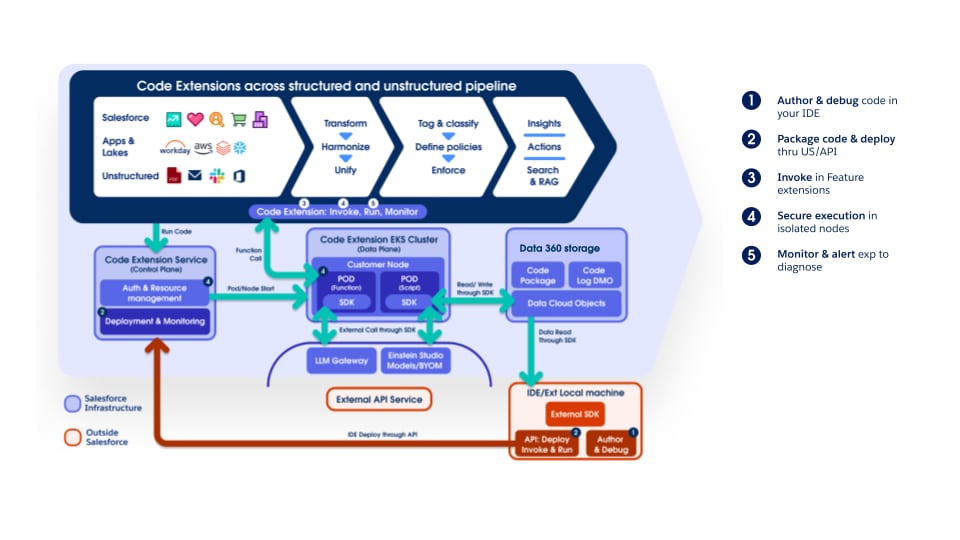 Both the Script and Function models securely execute customer code, preventing one tenant's code from affecting others or gaining unauthorized access to other tenants' data, Salesforce resources, or external resources. This layered (defense-in-depth) architecture provides an isolated execution environment for each tenant's custom code, incorporating guardrails such as logical isolation at the Kubernetes (K8s) level, network isolation, runtime sandboxing, and least-privilege permissions, all complemented by operational monitoring and incident-response readiness.
#### Securely Integrating External Calls
Beyond extending internal Data 360 features, Code Extension also enables secure invocation of external services directly from within the Data 360 execution environment. Using the Data 360 SDK, scripts and functions can invoke registered LLMs, AI/ML models (for example, a BYOM model registered in the AI Models tab), and registered external API endpoints — without data leaving the Salesforce trust boundary.
#### Developer Experience & Operational Visibility
To support a robust development lifecycle, Code Extension offers:
- **External Authoring and Debugging**: Developers can craft and debug Python code in familiar environments like VSCode, using the SDK.
- **Flexible Deployment**: Custom code can be packaged and deployed using SDK utilities, the Data 360 UI, or API, enabling integration into CI/CD.
- **Operational Logs**: Access to detailed execution logs provides transparency and aids troubleshooting in production.
### Extending Data 360 by Bringing Your Own AI Models
As enterprises accelerate AI adoption, most maintain heterogeneous ML ecosystems — including Amazon SageMaker, Google Vertex AI, Databricks and custom Python-based environments — hosting models that drive mission-critical predictions, such as credit risk scoring, churn propensity, product recommendations, and next-best-action decisions.
Traditionally, integrating these external models into Salesforce required bespoke API layers, ETL pipelines, or middleware orchestration, introducing data duplication, governance overhead, latency, and operational complexity—challenges that conflict with a unified, compliant, and real-time Customer Data Platform (CDP) vision.
**Bring Your Own Model (BYOM)**: Delivered via the AI Models tab in Data 360, addresses these challenges by enabling direct invocation of externally trained models within Salesforce workflows, Apex logic, and automation tools—without moving or replicating data. Through zero-copy federation, Data 360 is the governed single source of truth, exposing harmonized Customer 360 data for inference at external endpoints. Prediction outputs flow back in real time, powering business processes with scalable intelligence.
BYOM effectively closes the gap between data science and operational execution by decoupling model development, governed data, and consumption layers. It preserves platform independence, reduces integration complexity, accelerates AI deployment, and maintains governance over sensitive data through the Einstein Trust Layer — ensuring all BYOM model invocations route through Salesforce's trust boundary, with PII masking, audit trail, and zero data retention enforced.
The architecture operates as follows: Data 360 provides a unified customer 360 data foundation, while AI Models orchestrates connections to external ML platforms (SageMaker, Vertex AI, or custom endpoints). External models execute inference in real time, batch, or streaming modes. Salesforce layers—Flow, Apex, and Query APIs—consume outputs to deliver personalized, automated, and analytical insights across Sales, Service, Marketing, and Industry Clouds.
In addition to BYOM for connecting externally trained models, the AI Models tab now includes a no-code Model Builder for building predictive models natively within Data 360. Furthermore, a brand-new set of native AI functions is built directly into the Data 360 processing engine. These native AI functions are deeply integrated: they connect directly to DCSQL for use in the Tableau Next Semantic Layer, are available in Batch Data Transforms for Customer 360 enrichment, and can be invoked in Flow for intelligent automation.
**Bring Your Own LLM (BYO-LLM)**: Offers the same extensibility mechanism but for generative models. By enabling direct invocation of external LLMs, we allow customers to use them in the Agentforce Platform in place of Salesforce-provided models. All BYO-LLM requests route through the Einstein Trust Layer's LLM Gateway, ensuring PII masking, toxicity detection, audit trail logging, and TLS-encrypted communication are applied regardless of which external LLM is used. For enterprises, BYO-LLM allows:
- Access to fine-tuned models
- Integration of models not currently provided by Salesforce
- Usage of models in customer-provided accounts
### Data Collaboration
Modern enterprises operate within a complex data landscape characterized by two major architectural challenges:
1. **Intra-Enterprise Fragmentation**: Large organizations frequently utilize multiple Salesforce Orgs (often segmented by region, business unit, or historical acquisition) and numerous other data systems. This fragmentation creates internal data silos, making it impossible to establish a single, trusted, and unified view of the customer for real-time engagement across the business. The challenge is to unify this data without physically consolidating or duplicating it across all systems, and while keeping governance intact.
2. **Cross-Enterprise Collaboration**: Companies often need to share data with partners and suppliers for joint marketing, measurement, and business intelligence. The challenge is enabling this collaboration while protecting sensitive, proprietary data and adhering to privacy regulations like GDPR and CCPA, as well as competitive barriers.
Salesforce Data 360 addresses these challenges with a zero-copy, trust-by-design framework built on the principle of sharing access and insights instead of moving or duplicating data.
#### Data 360 Collaboration Mechanisms
Data 360 offers three collaboration mechanisms, each serving a different purpose. The right choice depends on whether the goal is centralized unification (Data Cloud One), selective cross-instance exchange (Data Sharing between Data 360 instances), or privacy-preserving collaboration across organizational boundaries (Clean Rooms).
##### Internal Enterprise Enablement with Data Cloud One
Data Cloud One is the foundational architectural solution for enterprises operating multiple Salesforce orgs. Its purpose extends beyond simple data sharing; it establishes a single, trusted customer view and enables full Data 360 platform capabilities across the entire organization.

This mechanism centers on a designated Home Org Data 360 instance, which serves as the central authority for data management and building the unified individual profile. The Home Org is the org that Data 360 is provisioned on. A Data Cloud One connection is established between Data 360 and other Salesforce orgs, called Companion Orgs. As part of the Data Cloud One connection, Data 360 shares one or more of its data spaces with each companion org, providing access to both data and metadata in each shared data space. This works through a zero-copy federation model and cross-org metadata synchronization.
Data Cloud One also allows Companion Orgs to use the Home Org’s Data 360 instance for their own activation, personalization, and intelligence needs. This strategy is essential for eliminating internal data fragmentation and ensuring all business units activate against the same, governed, and unified individual profile, maximizing the ROI of the core Data 360 implementation.
##### Data Sharing Between Data 360 Orgs
For distributed internal environments (where full centralization is not feasible) and for collaboration with trusted external partners, Data 360-to-Data 360 data sharing connects independent Data 360 instances.

This zero-copy sharing model establishes a connection between separate Data 360 tenants provisioned on different Salesforce orgs for the purpose of secure exchange of data objects (DLOs, DMOs, and CIOs). Once connected, the entire data object becomes accessible in the recipient Data 360. The recipient Data 360’s administrator can then set governance rules to manage user access to this data.
##### Privacy-First Collaboration with Data 360 Clean Room Collaboration
When collaboration requires the highest levels of privacy and compliance, or when competitive concerns forbid sharing raw data, Data 360 Clean Rooms let two or more data owners jointly analyze data and derive insights without exposing the underlying sensitive data or match identifiers.
Architecturally, Data 360 Clean Room Collaboration is built on top of the Zero-Copy Sharing framework used by Data 360-to-Data 360 data sharing, with additional layers of governance and computational constraints applied. Rather than copying data into a neutral third-party environment, computation executes in place within each participant’s governed data domain, and parties join their datasets on hashed or tokenized match keys without either party ever seeing the other’s raw identifiers.
Because Clean Rooms are natively embedded within Data 360, they reuse existing DMOs, identity resolution rules, consent models, and ABAC governance policies, eliminating duplicate security layers and reducing time-to-collaboration. External sources connected through zero-copy accelerated query federation, such as Snowflake or Databricks, can participate directly in a collaboration without first ingesting their data into Data 360. Collaborations are established either through the AppExchange, where providers publish Clean Room packages for consumers to discover and install, or through an Allow-List model for direct peer-to-peer invitations between known organizations.
For the privacy-enhancing mechanics — Private Joins, query-limiting use case templates, minimum-aggregation thresholds, and the full set of industry use cases — see the dedicated [Data 360 Clean Rooms guide](https://architect.salesforce.com/docs/architect/fundamentals/guide/data360-cleanrooms.html).
#### Data 360 and Informatica Integration
Informatica’s Intelligent Data Management Cloud (IDMC) acts as a powerful enterprise engine for feeding high-quality, reconciled data into Data 360. Through its advanced data integration capabilities, Informatica extracts, cleanses, and transforms complex data from diverse on-premises and multi-cloud systems before loading it into Data 360's Lakehouse. Furthermore, Informatica’s Master Data Management (MDM) works in tandem with Data 360 by matching, merging, and resolving identities across disparate enterprise systems to create a golden record. This record ensures that the unified individual profiles and identity resolution processes within Data 360 are built on accurate, deduplicated, and trusted enterprise-wide data.
On the governance and discoverability front, Informatica's Enterprise Data Catalog actively scans and indexes enterprise-wide metadata, providing a clear lineage of where data originates, its quality, and how it transforms. When integrated with Data 360, Informatica's catalog shares this rich technical and business metadata with Data 360's own metadata-driven architecture. This integration ensures that the data ingested or federated into Data 360 is fully governed and easily discoverable, empowering Data 360's Activation Layer, Semantic Layer and Data Governance controls to operate on trusted data assets.

## Conclusion
Data 360 is an extensible, trusted data fabric for powering next-generation AI. Its architecture addresses the problem of fragmented data, enabling organizations to unify, process, and activate all customer data at scale, using Data Federation for efficiency.
Its Data Organization establishes a harmonized view from DLOs (including unstructured data) to DMOs, all secured within partitioned Data Spaces. Data 360’s data processing capabilities (including batch and streaming transforms, calculated insights, unstructured data processing, and identity resolution) are powered by an incremental change-processing architecture, enabling efficient, near real-time processing and cost savings.
Extensibility is provided by the Code Extension architecture, securely enabling custom Python logic via Scripts or isolated Functions. A data governance framework built on attribute-based access control (ABAC) with CEDAR policies enforces granular security, dynamic data masking, and consistent enforcement across all data consumption. Segmentation and activation then translate unified individual profiles into multi-channel, real-time engagement.
Data 360's ability to unify vast, diverse data, provide real-time context via its unified query (including hybrid structured/unstructured search and Hyper acceleration), and enforce governance is central to powering AI agents. It provides the trusted, fresh, relevant data needed to ground Generative AI workflows (RAG) and to fuel the multi-turn, action-oriented capabilities of Agentforce-powered agents, so they operate with precision and accuracy.
Both the Script and Function models securely execute customer code, preventing one tenant's code from affecting others or gaining unauthorized access to other tenants' data, Salesforce resources, or external resources. This layered (defense-in-depth) architecture provides an isolated execution environment for each tenant's custom code, incorporating guardrails such as logical isolation at the Kubernetes (K8s) level, network isolation, runtime sandboxing, and least-privilege permissions, all complemented by operational monitoring and incident-response readiness.
#### Securely Integrating External Calls
Beyond extending internal Data 360 features, Code Extension also enables secure invocation of external services directly from within the Data 360 execution environment. Using the Data 360 SDK, scripts and functions can invoke registered LLMs, AI/ML models (for example, a BYOM model registered in the AI Models tab), and registered external API endpoints — without data leaving the Salesforce trust boundary.
#### Developer Experience & Operational Visibility
To support a robust development lifecycle, Code Extension offers:
- **External Authoring and Debugging**: Developers can craft and debug Python code in familiar environments like VSCode, using the SDK.
- **Flexible Deployment**: Custom code can be packaged and deployed using SDK utilities, the Data 360 UI, or API, enabling integration into CI/CD.
- **Operational Logs**: Access to detailed execution logs provides transparency and aids troubleshooting in production.
### Extending Data 360 by Bringing Your Own AI Models
As enterprises accelerate AI adoption, most maintain heterogeneous ML ecosystems — including Amazon SageMaker, Google Vertex AI, Databricks and custom Python-based environments — hosting models that drive mission-critical predictions, such as credit risk scoring, churn propensity, product recommendations, and next-best-action decisions.
Traditionally, integrating these external models into Salesforce required bespoke API layers, ETL pipelines, or middleware orchestration, introducing data duplication, governance overhead, latency, and operational complexity—challenges that conflict with a unified, compliant, and real-time Customer Data Platform (CDP) vision.
**Bring Your Own Model (BYOM)**: Delivered via the AI Models tab in Data 360, addresses these challenges by enabling direct invocation of externally trained models within Salesforce workflows, Apex logic, and automation tools—without moving or replicating data. Through zero-copy federation, Data 360 is the governed single source of truth, exposing harmonized Customer 360 data for inference at external endpoints. Prediction outputs flow back in real time, powering business processes with scalable intelligence.
BYOM effectively closes the gap between data science and operational execution by decoupling model development, governed data, and consumption layers. It preserves platform independence, reduces integration complexity, accelerates AI deployment, and maintains governance over sensitive data through the Einstein Trust Layer — ensuring all BYOM model invocations route through Salesforce's trust boundary, with PII masking, audit trail, and zero data retention enforced.
The architecture operates as follows: Data 360 provides a unified customer 360 data foundation, while AI Models orchestrates connections to external ML platforms (SageMaker, Vertex AI, or custom endpoints). External models execute inference in real time, batch, or streaming modes. Salesforce layers—Flow, Apex, and Query APIs—consume outputs to deliver personalized, automated, and analytical insights across Sales, Service, Marketing, and Industry Clouds.
In addition to BYOM for connecting externally trained models, the AI Models tab now includes a no-code Model Builder for building predictive models natively within Data 360. Furthermore, a brand-new set of native AI functions is built directly into the Data 360 processing engine. These native AI functions are deeply integrated: they connect directly to DCSQL for use in the Tableau Next Semantic Layer, are available in Batch Data Transforms for Customer 360 enrichment, and can be invoked in Flow for intelligent automation.
**Bring Your Own LLM (BYO-LLM)**: Offers the same extensibility mechanism but for generative models. By enabling direct invocation of external LLMs, we allow customers to use them in the Agentforce Platform in place of Salesforce-provided models. All BYO-LLM requests route through the Einstein Trust Layer's LLM Gateway, ensuring PII masking, toxicity detection, audit trail logging, and TLS-encrypted communication are applied regardless of which external LLM is used. For enterprises, BYO-LLM allows:
- Access to fine-tuned models
- Integration of models not currently provided by Salesforce
- Usage of models in customer-provided accounts
### Data Collaboration
Modern enterprises operate within a complex data landscape characterized by two major architectural challenges:
1. **Intra-Enterprise Fragmentation**: Large organizations frequently utilize multiple Salesforce Orgs (often segmented by region, business unit, or historical acquisition) and numerous other data systems. This fragmentation creates internal data silos, making it impossible to establish a single, trusted, and unified view of the customer for real-time engagement across the business. The challenge is to unify this data without physically consolidating or duplicating it across all systems, and while keeping governance intact.
2. **Cross-Enterprise Collaboration**: Companies often need to share data with partners and suppliers for joint marketing, measurement, and business intelligence. The challenge is enabling this collaboration while protecting sensitive, proprietary data and adhering to privacy regulations like GDPR and CCPA, as well as competitive barriers.
Salesforce Data 360 addresses these challenges with a zero-copy, trust-by-design framework built on the principle of sharing access and insights instead of moving or duplicating data.
#### Data 360 Collaboration Mechanisms
Data 360 offers three collaboration mechanisms, each serving a different purpose. The right choice depends on whether the goal is centralized unification (Data Cloud One), selective cross-instance exchange (Data Sharing between Data 360 instances), or privacy-preserving collaboration across organizational boundaries (Clean Rooms).
##### Internal Enterprise Enablement with Data Cloud One
Data Cloud One is the foundational architectural solution for enterprises operating multiple Salesforce orgs. Its purpose extends beyond simple data sharing; it establishes a single, trusted customer view and enables full Data 360 platform capabilities across the entire organization.

This mechanism centers on a designated Home Org Data 360 instance, which serves as the central authority for data management and building the unified individual profile. The Home Org is the org that Data 360 is provisioned on. A Data Cloud One connection is established between Data 360 and other Salesforce orgs, called Companion Orgs. As part of the Data Cloud One connection, Data 360 shares one or more of its data spaces with each companion org, providing access to both data and metadata in each shared data space. This works through a zero-copy federation model and cross-org metadata synchronization.
Data Cloud One also allows Companion Orgs to use the Home Org’s Data 360 instance for their own activation, personalization, and intelligence needs. This strategy is essential for eliminating internal data fragmentation and ensuring all business units activate against the same, governed, and unified individual profile, maximizing the ROI of the core Data 360 implementation.
##### Data Sharing Between Data 360 Orgs
For distributed internal environments (where full centralization is not feasible) and for collaboration with trusted external partners, Data 360-to-Data 360 data sharing connects independent Data 360 instances.

This zero-copy sharing model establishes a connection between separate Data 360 tenants provisioned on different Salesforce orgs for the purpose of secure exchange of data objects (DLOs, DMOs, and CIOs). Once connected, the entire data object becomes accessible in the recipient Data 360. The recipient Data 360’s administrator can then set governance rules to manage user access to this data.
##### Privacy-First Collaboration with Data 360 Clean Room Collaboration
When collaboration requires the highest levels of privacy and compliance, or when competitive concerns forbid sharing raw data, Data 360 Clean Rooms let two or more data owners jointly analyze data and derive insights without exposing the underlying sensitive data or match identifiers.
Architecturally, Data 360 Clean Room Collaboration is built on top of the Zero-Copy Sharing framework used by Data 360-to-Data 360 data sharing, with additional layers of governance and computational constraints applied. Rather than copying data into a neutral third-party environment, computation executes in place within each participant’s governed data domain, and parties join their datasets on hashed or tokenized match keys without either party ever seeing the other’s raw identifiers.
Because Clean Rooms are natively embedded within Data 360, they reuse existing DMOs, identity resolution rules, consent models, and ABAC governance policies, eliminating duplicate security layers and reducing time-to-collaboration. External sources connected through zero-copy accelerated query federation, such as Snowflake or Databricks, can participate directly in a collaboration without first ingesting their data into Data 360. Collaborations are established either through the AppExchange, where providers publish Clean Room packages for consumers to discover and install, or through an Allow-List model for direct peer-to-peer invitations between known organizations.
For the privacy-enhancing mechanics — Private Joins, query-limiting use case templates, minimum-aggregation thresholds, and the full set of industry use cases — see the dedicated [Data 360 Clean Rooms guide](https://architect.salesforce.com/docs/architect/fundamentals/guide/data360-cleanrooms.html).
#### Data 360 and Informatica Integration
Informatica’s Intelligent Data Management Cloud (IDMC) acts as a powerful enterprise engine for feeding high-quality, reconciled data into Data 360. Through its advanced data integration capabilities, Informatica extracts, cleanses, and transforms complex data from diverse on-premises and multi-cloud systems before loading it into Data 360's Lakehouse. Furthermore, Informatica’s Master Data Management (MDM) works in tandem with Data 360 by matching, merging, and resolving identities across disparate enterprise systems to create a golden record. This record ensures that the unified individual profiles and identity resolution processes within Data 360 are built on accurate, deduplicated, and trusted enterprise-wide data.
On the governance and discoverability front, Informatica's Enterprise Data Catalog actively scans and indexes enterprise-wide metadata, providing a clear lineage of where data originates, its quality, and how it transforms. When integrated with Data 360, Informatica's catalog shares this rich technical and business metadata with Data 360's own metadata-driven architecture. This integration ensures that the data ingested or federated into Data 360 is fully governed and easily discoverable, empowering Data 360's Activation Layer, Semantic Layer and Data Governance controls to operate on trusted data assets.

## Conclusion
Data 360 is an extensible, trusted data fabric for powering next-generation AI. Its architecture addresses the problem of fragmented data, enabling organizations to unify, process, and activate all customer data at scale, using Data Federation for efficiency.
Its Data Organization establishes a harmonized view from DLOs (including unstructured data) to DMOs, all secured within partitioned Data Spaces. Data 360’s data processing capabilities (including batch and streaming transforms, calculated insights, unstructured data processing, and identity resolution) are powered by an incremental change-processing architecture, enabling efficient, near real-time processing and cost savings.
Extensibility is provided by the Code Extension architecture, securely enabling custom Python logic via Scripts or isolated Functions. A data governance framework built on attribute-based access control (ABAC) with CEDAR policies enforces granular security, dynamic data masking, and consistent enforcement across all data consumption. Segmentation and activation then translate unified individual profiles into multi-channel, real-time engagement.
Data 360's ability to unify vast, diverse data, provide real-time context via its unified query (including hybrid structured/unstructured search and Hyper acceleration), and enforce governance is central to powering AI agents. It provides the trusted, fresh, relevant data needed to ground Generative AI workflows (RAG) and to fuel the multi-turn, action-oriented capabilities of Agentforce-powered agents, so they operate with precision and accuracy.