
|
The Salesforce Lightning Platform is a comprehensive, AI-driven platform that unifies employees, autonomous AI agents, company data, and applications into a single, trusted system to enhance productivity and customer experience. It enables the creation of an "agentic enterprise" by connecting Customer 360 apps, Data Cloud, and Slack for end-to-end automation. |
| Approach | Description | Skills Required | Licenses and Limits |
|---|---|---|---|
| Queueable Apex | Use for processes that involve long-running database operations or external web service callouts. Queueable Apex offers features such as job IDs, support for non-primitive types, and job chaining. | Pro-code | The number of licenses can increase the limits. |
| Batch Apex | Build complex, long-running processes that involve millions of records by dividing your record set and processing it in manageable chunks. | Pro-code | The number of licenses can increase the limits. |
| Scheduled Apex | Execute Apex at a scheduled time defined by a cron expression. Although the act of scheduling Apex via the cron expression is an asynchronous process, the underlying code executes synchronously when the job starts. | Pro-code | The number of licenses can increase the limits. |
| Apex Continuation Callouts | Execute callouts from Apex methods running in a synchronous transaction context. | Pro-code | No |
| Asynchronous Path (Record-Triggered Flows) | Execute an operation that you want to run on its own time. Avoid mixed DML errors that occur when you update a value on a related record that isn’t part of the record that triggered a flow. | Low-code | The number and type of licenses can increase the limits. |
| Scheduled Path (After Commit Flows) | Execute at a dynamically scheduled time after a triggering event, such as when a record is created, updated, or deleted. | Low-code | The number and type of licenses can increase the limits. |
| Scheduled Flows | Execute a flow in the background at a specified time and at a repeated frequency (daily, weekly, or once) to perform actions on a batch of records. | Low-code | The number and type of licenses can increase the limits. |
| Platform Event Triggers | Loosely couple Salesforce with external systems and communicate between asynchronous components within the Salesforce Platform. | Low-code + Pro-code | An add-on license is required for high-volume platform event use cases |
| Change Data Capture | Capture and process change events asynchronously after the database transaction is committed. | Pro-code | An add-on license is required to scale above baseline allocation. |
| Bulk API | Insert, update, upsert, query, or delete many records asynchronously and process the results later. | Pro-code | There are limits. |
| Lightning Actions | Allow Lightning pages to interact with the server without forcing users to fully refresh the page. | Low-code | No |
| Skills Required | Some of the tools outlined in this guide require code, while others can be configured declaratively. As you consider your options, think about the skillsets that your team members have. Keep in mind that even if developers are available for your initial implementation (through an implementation partner, for example), you may need to modify your solutions in the future. If your maintenance team lacks developers, a low-code option can be a better fit. |
| Type of Platform Limits Enforced | Determine the type of limits that apply to the execution. As you design your solutions, think carefully about how the volume and frequency of transactions will count toward the governor limits for the chosen approach each day. Calculate the number of executions that will occur each day. Make sure that the calculated values fall within the limits associated with your selected tools. |
| Latency | Determine how quickly the results of processing will be available in the platform. For some approaches, the changes will be nearly immediate, whereas for others it may be minutes or hours. |
| Use Case | Description | First Choice Approach | Rationale |
|---|---|---|---|
| High-performance batch processing | Any automation that must process thousands or millions of records efficiently | Batch Apex | Batch Apex provides rich APIs for interfacing with the platform and for raw speed. |
| Data Cleansing Job | A job that runs routinely, or on demand, that cleans data. Examples include de-duplication, address verification, or data consolidation. | Batch Apex | Batch Apex provides rich APIs for interfacing with the platform and for raw speed. |
| Nightly Rollup Job | Job that computes rollup data at the end of a business day. | Batch Apex | Batch Apex provides rich APIs for interfacing with the platform and for raw speed. |
| Record-Triggered Logic | Execute logic in response to a record update. | Varies | See our companion decision guide, Record Triggered Events Automation. It includes a decision tree for asynchronous use cases, including Queueable Apex, Batch Apex, Scheduled Apex, Scheduled Flow, Async Path Flows, and Change Data Capture. |
| Cascading Updates Through an Object Graph | Allows a user’s save action to complete quickly, deferring cascading updates to other objects to run asynchronously. | Queueable Apex | Queueable Apex has powerful chaining features that enable logic to divide a chain of updates into a series of asynchronous transactions. |
| Record-Specific Scheduled Processing | Automation at a future, dynamic date specific to the record (for example, 3 days before a close date). | Flow with a Scheduled Path | Scheduled paths provide a unique strength to Flow, as the platform automatically handles the scheduling, cancellation, and rescheduling of these paths if the record's data changes. |
| Invoking Multiple Slow External Services in Parallel | During a synchronous execution, multiple external services are invoked in parallel to optimize overall execution time. | Apex Continuation Callouts | Allowing multiple slow-running callouts to run in parallel minimizes the overall time to complete the work. |
| Data Migration of Records from an External System | Move large amounts of records into the Salesforce Platform from an external system. Either a one-time or regularly scheduled process. | Bulk API | This is the most efficient and limit-friendly approach for data migration. |
| Execute Additional Logic on an External System | Fire-and-forget pattern of notifying an external system of an event on the platform, then allowing that system to asynchronously process the event. | Platform Events or Change Data Capture | A pub-sub model works best here, and allows the external system to process the event when it is ready. See Event-Driven Architecture for more details on this pattern. |
| Dynamic Forms | Dynamic Forms in Salesforce Lightning App Builder break down monolithic Record Detail components into individual, configurable fields and sections. This feature allows admins to create flexible, high-performance pages by placing fields anywhere, and using visibility rules to show or hide components based on user profile, device, or data, which helps reduce page clutter. |
|---|---|
| Screen Flow | A Salesforce Screen Flow is an interactive automation tool within Flow Builder that requires user input to move through customized, step-by-step business processes. Unlike automated background flows, Screen Flows provide a wizard-like user interface to collect data, display information, or perform actions via Lightning Pages, buttons, or custom apps without writing code. |
| Omnistudio | Salesforce Omnistudio is a low-code suite of tools that are designed to rapidly build guided, industry-specific digital experiences and complex business processes. It enables developers to create pixel-perfect user interfaces (for example, guided workflows and dynamic dashboards) using drag-and-drop components like Flexcards and Omniscripts. With Omnistudio, you can declaratively create LWCs. |
| Lightning Web Components | Salesforce Lightning Web Components are lightweight, custom HTML elements that are built using HTML, CSS, and modern JavaScript, and designed to run natively in browsers for superior Salesforce UI performance. They allow developers to create custom user interfaces that coexist with Aura components, which increases development through industry standards and a detailed component ecosystem. |
| Configuration | Additional License Requirements | |
|---|---|---|
| Dynamic Forms | Low Code | None |
| Screen Flow | Low Code | None |
| Omnistudio | Low Code + Pro Code | Industries Package |
| Screen Flow plus Lightning Web Components | Low Code + Pro Code | None |
| Lightning Web Components | Pro Code | None |
| Decision Point | Guidance |
|---|---|
| Runtime Use Case Categories | |
| Form Scope and Navigation | Determine whether all fields on your form will fit logically onto a single screen, or if users need to be able to navigate between multiple screens. |
| Location | Identify the location(s) where you want to embed the form, which can range from within a Salesforce app, to a mobile app, to an external website. |
| Controller | Identify the actions or logic that must be performed behind the scenes while users are interacting with your form, including data transformations and integrations with external systems. |
| Validation | Determine whether you have any additional input validation requirements that go beyond the standard system-level validation that Salesforce provides. |
| Interaction Design | Identify the types of interactions or conditions that should trigger dynamic responses within your form. |
| Styling | Determine the level of sophistication that’s necessary for your desired styling and CSS requirements. |
| Layout | Identify your form's layout requirements (for example, the required number of columns, tabs, and accordions) and the ability to display repeating blocks of data. |
| Translation | Determine whether your form must be localized for other languages. |
| Non-Functional Considerations | |
| Security | Determine whether your form should check the user’s access before performing certain operations, whether you want to control who can access the form, and whether you want to control where the form can be embedded. |
| Object Impact | Determine whether your form will operate against a single object or against multiple objects. |
| UI Test Automation | Determine whether your DevOps processes require your form to undergo automated unit testing or automated end-to-end testing. |
| Metrics | Identify how you'd like to track your form's usage, including page views, amount of time spent on the form, completion rates, and success rates. |
| Packaging and Deployment | Determine how you want to distribute or deploy your form after it's been built. |
| Single Screen | Multi-Screen Form | Progress Indicators | Jump Navigation Between Steps/Screens | |
|---|---|---|---|---|
| Dynamic Forms | Available | Not Available | Available | Not Available |
| Screen Flow | Available | Available | Available | Not Available |
| Omnistudio | Available | Available | Available | Available |
| Screen Flow + LWC | Available | Available | Available | Available |
| LWC | Available | Not Ideal | Not Ideal | Not Ideal |
| Lightning Record Page | Lightning Home Page or App Page | Aura Experience Cloud Sites | LWR Experience cloud Sites | Embedded Snap-Ins | Utility Bar | Object-Specific Action | Global Action | Salesforce Mobile App* | Field Service Mobile | Mobile SDK | External Sites and Apps | Custom LWC | |
|---|---|---|---|---|---|---|---|---|---|---|---|---|---|
| Dynamic Forms | Available | Not Available | Not Available | Not Available | Not Available | Not Available | Not Available | Not Available | Available | Not Available | Not Available | Not Available | Not Available |
| Screen Flow | Available | Available | Available | Available | Available | Available | Available | Not Available | Available | Available** | Not Available | Not Available | Available |
| Omnistudio | Available | Available | Available | Not Available | Not Available | Available | Not Available | Not Available | Available | Not Available | Not Available | Available | Available |
| Screen Flow + LWC | Available | Available | Available | Available | Available | Available | Available | Not Available | Available | Not Available | Not Available | Not Ideal | Available |
| LWC | Available | Available | Available | Available | Available | Available | Not Available | Not Available | Available | Not Available | Not Available | Available | Available |
| *Flows and LWCs are supported in the Salesforce Mobile App, but it doesn’t support all of the ways to embed Flows and LWCs (for example, object-specific actions are supported in mobile, but utility bar items are not). **The Salesforce Field Service mobile app includes Data Capture — an offline-first forms solution built on the Flow engine with a dedicated offline runtime, supporting the latest Flow features. The app also includes the legacy Field Service Mobile Flows, which run on an older, custom offline engine, and does not support many of the latest Flow features. | |||||||||||||
| Log and Actions | Hierarchical Data Management | Operate within One Transaction | Operate Across Multiple Transactions | Integration | Modular Design and Reuse | Packaging | |
|---|---|---|---|---|---|---|---|
| Dynamic Forms | Not Available | Not Available | Not Available | Not Available | Not Available | Not Available | Available |
| Screen Flow | Available | Not Available | Available | Available | Available | Available | Available |
| Omnistudio | Available | Available | Available | Available | Available | Available | Not Available |
| Screen Flow + LWC | Available | Available | Available | Available | Available | Available | Available |
| LWC | Available | Available | Available | Available | Available | Available | Available |
| Respect System-Level Validation | Custom Field-Level Validation Specific to this Form | Custom Field-Level Validation | |
|---|---|---|---|
| Dynamic Forms | Available | Not Available | Not Available |
| Screen Flow | Available | Not Available | Not Available |
| Omnistudio | Available | Available | Available |
| Screen Flow + LWC | Available | Available | Available |
| LWC | Available | Available | Available |
| Execute Off-Screen Data Operations | Conditional Values and Calculations | Conditional Visibility | Conditional Requiredness | Conditional Formatting | Conditional Read-Only State | Conditional Disabled State | |
|---|---|---|---|---|---|---|---|
| Dynamic Forms | Not Available | Not Available | Available | Not Available | Available | Not Available | Not Available |
| Screen Flow | Available | Available* | Available | Available | Not Available | Available | Available |
| Omnistudio | Available | Available | Available | Available | Available | Available | Available |
| Screen Flow + LWC | Available | Available | Available | Available | Available | Available | Available |
| LWC | Available | Available | Available | Available | Available | Available | Available |
| *Limited to components that use a resource picker and not a static checkbox | |||||||
| Standard Event Handling(onblur, onfocus) | Custom Event Handling | |
|---|---|---|
| Dynamic Forms | Not Available | Not Available |
| Screen Flow | Not Available | Not Available |
| Omnistudio | Not Available | Available* |
| Screen Flow + LWC | Available | Available |
| LWC | Available | Available |
| *The Omnistudio Standard Runtime does not support Pub/Sub, but does support Windows postMessage | ||
| Direct Styling | Org and Experience Builder Themes | Pixel-Perfect Styling | |
|---|---|---|---|
| Dynamic Forms | Not Available | Available | Not Available |
| Screen Flow | Not Available | Available | Available** |
| Omnistudio | Available* | Not Available | Available |
| Screen Flow + LWC | Not Available | Available | Available |
| LWC | Not Available | Available | Available |
| *FlexCards only **Certain style attributes can be configured for screen components, but not CSS overrides. | |||
| 2 Columns | 4 Columns | Beyond 4 Columns | Repeating Blocks of Data | Tab Containers | Accordion Containers | |
|---|---|---|---|---|---|---|
| Dynamic Forms | Available | Not Available | Not Available | Not Available | Available | Available |
| Screen Flow | Available | Available | Not Available | Available | Not Available | Available |
| Omnistudio | Available | Available | Available | Available | Available* | Available |
| Screen Flow + LWC | Available | Available | Available | Available | Available | Available |
| LWC | Available | Available | Available | Available | Available | Available |
| *Tabs can be used if embedding data in a FlexCard in an Omniscript | ||||||
| Labels Entered in the Builder | Labels in the Code | |
|---|---|---|
| Dynamic Forms | Available* | Not Available |
| Screen Flow | Available | Available |
| Omnistudio | Available | Available |
| Screen Flow + LWC | Available | Available |
| LWC | Not Applicable | Available |
| *Field Section Headings only | ||
| Elevate User Permissions | Control Who Has Access | Restrict Allowed Locations | |
|---|---|---|---|
| Dynamic Forms | Not Available | Available | Not Available |
| Screen Flow | Available | Available | Not Available |
| Omnistudio | Not Available | Available | Not Available** |
| Screen Flow + LWC | Available | Available | Not Available |
| LWC | Available* | Available | Available |
| *Requires Apex **While Omniscripts cannot have a specified set of target locations, FlexCards can. | |||
| Unit Tests | End-to-End Automation | |
|---|---|---|
| Dynamic Forms | Not Available | Available* |
| Screen Flow | Not Available | Available* |
| Omnistudio | Available* | Available* |
| Screen Flow + LWC | Available* | Available* |
| LWC | Available | Available |
| *Requires Code | ||
| Page Views | Time Spent on Form | Track Form Completion | Track Success Rate | |
|---|---|---|---|---|
| Dynamic Forms | Available** | Not Available | Not Available | Not Available |
| Screen Flow | Available | Available* | Available | Available |
| Omnistudio | Available | Available* | Available | Available |
| Screen Flow + LWC | Available | Available* | Available | Available |
| LWC | Available** | Available* | Available | Available |
| *Available when Package-Based Omnistudio Runtime is enabled** Available by tracking parent Lightning page usage | ||||
| First Generation Managed Packages (1GP) | Second Generation Managed Packages (2GP) | Unlocked Packages | Change Sets | DevOps Center | |
|---|---|---|---|---|---|
| Dynamic Forms | Available | Available | Available | Available | Available |
| Screen Flow | Available | Available | Available | Available | Available |
| Omnistudio | Not Available | Not Available | Not Available | Not Available* | Not Available* |
| Screen Flow + LWC | Available | Available | Available | Available | Available |
| LWC | Available | Available | Available | Available | Available |
| *Use IDX Workbench to deploy Omnistudio Solutions to other orgs. | |||||
| Pattern Type | Mode/Tool | Benefits | Considerations | Outcomes |
|---|---|---|---|---|
| Data Ingestion |
Real-Time:
|
|
|
Agentforce:
|
Streaming:
|
|
|
Agentforce:
|
|
Batch:
|
|
|
Agentforce:
|
|
| Zero Copy |
Live Query:
|
|
|
Agentforce:
|
Accelerated Query (Caching):
|
|
|
Agentforce:
|
|
File Federation:
|
|
|
Agentforce:
|
 #### Data Ingestion Methods
_Data Ingestion_ methods may vary, depending upon which connector you use to ingest your data. Some connectors offer a variety of ingestion methods, while others operate only in batch or streaming mode. For a complete list of _Data 360_ connectors and available methods, check out [Data 360\: Integrations and Connectors](https://help.salesforce.com/s/articleView?id=data.c360_a_sources_targets.htm&type=5).
- **Real-Time\:**
- Provides sub-second ingestion using _Change Data Capture (CDC)_
- Suitable for time-sensitive workflows (for example, fraud detection, personalization, and operational dashboards)
- Features push transformations and aggregations within _Data 360_, which helps to reduce downstream I/O and optimize compute usage
- Supports using incremental CDC to minimize data shuffling
- **Streaming\:**
- Provides ingestion every 1–3 minutes in small increments
- Balances freshness and cost
- Suitable for campaign orchestration, near-live engagement, and operational reporting
- Supports using micro-batches to control I/O spikes
- Aggregates data at the source (if possible) to reduce transfer volumes and optimize storage
- **Batch (Scheduled Loads)\:**
- Provides periodic ingestion of large datasets (for example, hourly, daily, and weekly)
- Provides cost-efficiency and reliability for historical datasets, regulatory reporting, and compliance use cases
- Ensures that compute locality is in the same region as the source storage to enhance performance and optimize costs
#### Architect Playbook
- **Data Ingestion Use Cases\:**
- **Generate Customer 360 Unified Profiles.** Build a single source of truth for customer identities and attributes.
- **Maintain regulatory compliance datasets.** Enforce governance, lineage, and auditability for sensitive data.
- **Centralize campaign orchestration.** Ensure that marketing, sales, and service all operate from consistent, trusted datasets.
- **Design Practices\:**
- Accommodate batch ingestion for historical or low-latency-tolerant needs (for example, archival reporting or periodic snapshots).
- Use CDC or streaming APIs to maintain freshness for operational and personalization workflows to ensure near real-time updates.
- Control storage and compute growth by applying incremental loads to optimize cost and efficiency (rather than reloading entire datasets).
- Align ingestion pipelines with compute locality and incremental processing to reduce network I/O.
- Apply transformations inside _Data 360_ to avoid moving raw data unnecessarily.
- **Cost Considerations\:**
- **Real-Time Ingestion** has the highest compute and pipeline costs, which may be justified for high-value, time-sensitive workflows (for example, personalization, operational dashboards, or Agentforce-driven actions).
- **Streaming Ingestion** has moderate compute and storage costs, which may be suitable for frequent updates that can tolerate slight delays (for example, campaign orchestration or operational reporting).
- **Batch Ingestion** has lower compute costs and predictable storage, which is suitable for historical datasets or low-frequency updates. Ingesting batch data from Salesforce orgs using certain connectors is free.
- **Refresh Mode** Allows you to select _Incremental Refresh_ mode, which reduces total ingestion and compute costs. At Salesforce, we recommend using _incremental refresh_ wherever possible to optimize efficiency across all ingestion types.
- **Cost** is also impacted by I/O volume from the source to _Data 360_. Optimizing batch sizes, partitions, and regional alignment reduces transfer costs and improves performance.
- **Industry Scenarios\:**
- **Finance\:** Ingestion datasets are required for _knowing your customer (KYC)_, _Anti Money Laundering (AML)_, and fraud detection where auditability and compliance are non-negotiable.
- **Healthcare\:** Use ingestion for patient identity resolution and HIPAA-compliant records, which enables secure, unified views.
- **Retail\:** Consolidate _point of sale (POS)_, eCommerce, and loyalty program data into unified profiles for segmentation and personalization.
- **Telecom\:** Support churn prevention and usage analytics with canonical, governed subscriber data.
#### Data Ingestion Method Decision Criteria
| Feature | Real-Time Ingestion | Streaming Ingestion | Batch Ingestion |
| :----------------------------------- | :------------------------------------------------------------------------------------------------------------------------------------------------------------------------------------------ | :------------------------------------------------------------------------------------------------------------------------------------------------------------ | :----------------------------------------------------------------------------------------------------------------------------------------------------------------------------------------- |
| **Latency and Freshness** | Features sub-second latency ingestion via Ingestion APIs with _Change Data Capture (CDC)_ support. Provides continuous streaming pipelines. Suitable for low-latency operational use cases. | Features micro-batch ingestion every 1–3 minutes via native connectors. Supports incremental updates. Slight latency is expected. | Data latency is expected. Allows scheduled large-volume loads. Features periodic ingestion (hourly, daily, and weekly). Not suitable for time-sensitive operations. |
| **Primary Use Cases** | Ideal for low-latency operational and personalization use cases. Use for time-sensitive workflows. Supports event-driven workflows. Use for real-time fraud alerts and operational alerts. | Suitable for moderately urgent processes. Use for campaign orchestration, near-live engagement, and operational reporting. Use for timely campaign triggers. | Cost-efficient for massive datasets. Reliable for historical analytics. Use for historical aggregation or regulated reporting workflows. Suitable for historical or low-velocity datasets. |
| **Architectural Complexity and I/O** | Includes high cost and complex architecture. Requires low-latency source systems. I/O intensive. High-volume sources can cause saturated pipelines. | Features simpler architecture than real-time. I/O is moderate. Suitable for predictable, repeated update patterns. Batch size impacts memory and computation. | Easy to implement. I/O intensive during load windows. Network throughput may become a bottleneck for large batches. |
| **Cost Considerations** | Includes the highest compute and pipeline costs. Justifiable for high-value, time-sensitive workflows only. | Includes moderate compute and storage costs. Provides a balanced cost vs freshness approach. Suitable for frequent updates that can tolerate slight delays. | Features lower compute costs and predictable storage. Recommended for historical datasets or low-frequency updates. Ingestion via Salesforce internal pipelines is free. |
| **Design Practices** | Use incremental CDC to minimize data shuffling. Filter and use selective fields to reduce overhead. | Use micro-batches to control I/O spikes. Consider windowed aggregation to reduce processing load. | Use for archival reporting or periodic snapshots. Ensure that compute locality is in the same region as source storage for cost optimization. |
### Zero Copy Data Federation
#### Zero Copy Use Cases
Use _Zero Copy_ for real-time querying of external systems without data duplication to enable agility, freshness, and scalable access to large or transient datasets. It's suitable for live dashboards, exploratory analytics, AI/ML model training, and real-time customer engagement directly through Salesforce _Data 360_.
#### Data Ingestion Methods
_Data Ingestion_ methods may vary, depending upon which connector you use to ingest your data. Some connectors offer a variety of ingestion methods, while others operate only in batch or streaming mode. For a complete list of _Data 360_ connectors and available methods, check out [Data 360\: Integrations and Connectors](https://help.salesforce.com/s/articleView?id=data.c360_a_sources_targets.htm&type=5).
- **Real-Time\:**
- Provides sub-second ingestion using _Change Data Capture (CDC)_
- Suitable for time-sensitive workflows (for example, fraud detection, personalization, and operational dashboards)
- Features push transformations and aggregations within _Data 360_, which helps to reduce downstream I/O and optimize compute usage
- Supports using incremental CDC to minimize data shuffling
- **Streaming\:**
- Provides ingestion every 1–3 minutes in small increments
- Balances freshness and cost
- Suitable for campaign orchestration, near-live engagement, and operational reporting
- Supports using micro-batches to control I/O spikes
- Aggregates data at the source (if possible) to reduce transfer volumes and optimize storage
- **Batch (Scheduled Loads)\:**
- Provides periodic ingestion of large datasets (for example, hourly, daily, and weekly)
- Provides cost-efficiency and reliability for historical datasets, regulatory reporting, and compliance use cases
- Ensures that compute locality is in the same region as the source storage to enhance performance and optimize costs
#### Architect Playbook
- **Data Ingestion Use Cases\:**
- **Generate Customer 360 Unified Profiles.** Build a single source of truth for customer identities and attributes.
- **Maintain regulatory compliance datasets.** Enforce governance, lineage, and auditability for sensitive data.
- **Centralize campaign orchestration.** Ensure that marketing, sales, and service all operate from consistent, trusted datasets.
- **Design Practices\:**
- Accommodate batch ingestion for historical or low-latency-tolerant needs (for example, archival reporting or periodic snapshots).
- Use CDC or streaming APIs to maintain freshness for operational and personalization workflows to ensure near real-time updates.
- Control storage and compute growth by applying incremental loads to optimize cost and efficiency (rather than reloading entire datasets).
- Align ingestion pipelines with compute locality and incremental processing to reduce network I/O.
- Apply transformations inside _Data 360_ to avoid moving raw data unnecessarily.
- **Cost Considerations\:**
- **Real-Time Ingestion** has the highest compute and pipeline costs, which may be justified for high-value, time-sensitive workflows (for example, personalization, operational dashboards, or Agentforce-driven actions).
- **Streaming Ingestion** has moderate compute and storage costs, which may be suitable for frequent updates that can tolerate slight delays (for example, campaign orchestration or operational reporting).
- **Batch Ingestion** has lower compute costs and predictable storage, which is suitable for historical datasets or low-frequency updates. Ingesting batch data from Salesforce orgs using certain connectors is free.
- **Refresh Mode** Allows you to select _Incremental Refresh_ mode, which reduces total ingestion and compute costs. At Salesforce, we recommend using _incremental refresh_ wherever possible to optimize efficiency across all ingestion types.
- **Cost** is also impacted by I/O volume from the source to _Data 360_. Optimizing batch sizes, partitions, and regional alignment reduces transfer costs and improves performance.
- **Industry Scenarios\:**
- **Finance\:** Ingestion datasets are required for _knowing your customer (KYC)_, _Anti Money Laundering (AML)_, and fraud detection where auditability and compliance are non-negotiable.
- **Healthcare\:** Use ingestion for patient identity resolution and HIPAA-compliant records, which enables secure, unified views.
- **Retail\:** Consolidate _point of sale (POS)_, eCommerce, and loyalty program data into unified profiles for segmentation and personalization.
- **Telecom\:** Support churn prevention and usage analytics with canonical, governed subscriber data.
#### Data Ingestion Method Decision Criteria
| Feature | Real-Time Ingestion | Streaming Ingestion | Batch Ingestion |
| :----------------------------------- | :------------------------------------------------------------------------------------------------------------------------------------------------------------------------------------------ | :------------------------------------------------------------------------------------------------------------------------------------------------------------ | :----------------------------------------------------------------------------------------------------------------------------------------------------------------------------------------- |
| **Latency and Freshness** | Features sub-second latency ingestion via Ingestion APIs with _Change Data Capture (CDC)_ support. Provides continuous streaming pipelines. Suitable for low-latency operational use cases. | Features micro-batch ingestion every 1–3 minutes via native connectors. Supports incremental updates. Slight latency is expected. | Data latency is expected. Allows scheduled large-volume loads. Features periodic ingestion (hourly, daily, and weekly). Not suitable for time-sensitive operations. |
| **Primary Use Cases** | Ideal for low-latency operational and personalization use cases. Use for time-sensitive workflows. Supports event-driven workflows. Use for real-time fraud alerts and operational alerts. | Suitable for moderately urgent processes. Use for campaign orchestration, near-live engagement, and operational reporting. Use for timely campaign triggers. | Cost-efficient for massive datasets. Reliable for historical analytics. Use for historical aggregation or regulated reporting workflows. Suitable for historical or low-velocity datasets. |
| **Architectural Complexity and I/O** | Includes high cost and complex architecture. Requires low-latency source systems. I/O intensive. High-volume sources can cause saturated pipelines. | Features simpler architecture than real-time. I/O is moderate. Suitable for predictable, repeated update patterns. Batch size impacts memory and computation. | Easy to implement. I/O intensive during load windows. Network throughput may become a bottleneck for large batches. |
| **Cost Considerations** | Includes the highest compute and pipeline costs. Justifiable for high-value, time-sensitive workflows only. | Includes moderate compute and storage costs. Provides a balanced cost vs freshness approach. Suitable for frequent updates that can tolerate slight delays. | Features lower compute costs and predictable storage. Recommended for historical datasets or low-frequency updates. Ingestion via Salesforce internal pipelines is free. |
| **Design Practices** | Use incremental CDC to minimize data shuffling. Filter and use selective fields to reduce overhead. | Use micro-batches to control I/O spikes. Consider windowed aggregation to reduce processing load. | Use for archival reporting or periodic snapshots. Ensure that compute locality is in the same region as source storage for cost optimization. |
### Zero Copy Data Federation
#### Zero Copy Use Cases
Use _Zero Copy_ for real-time querying of external systems without data duplication to enable agility, freshness, and scalable access to large or transient datasets. It's suitable for live dashboards, exploratory analytics, AI/ML model training, and real-time customer engagement directly through Salesforce _Data 360_.
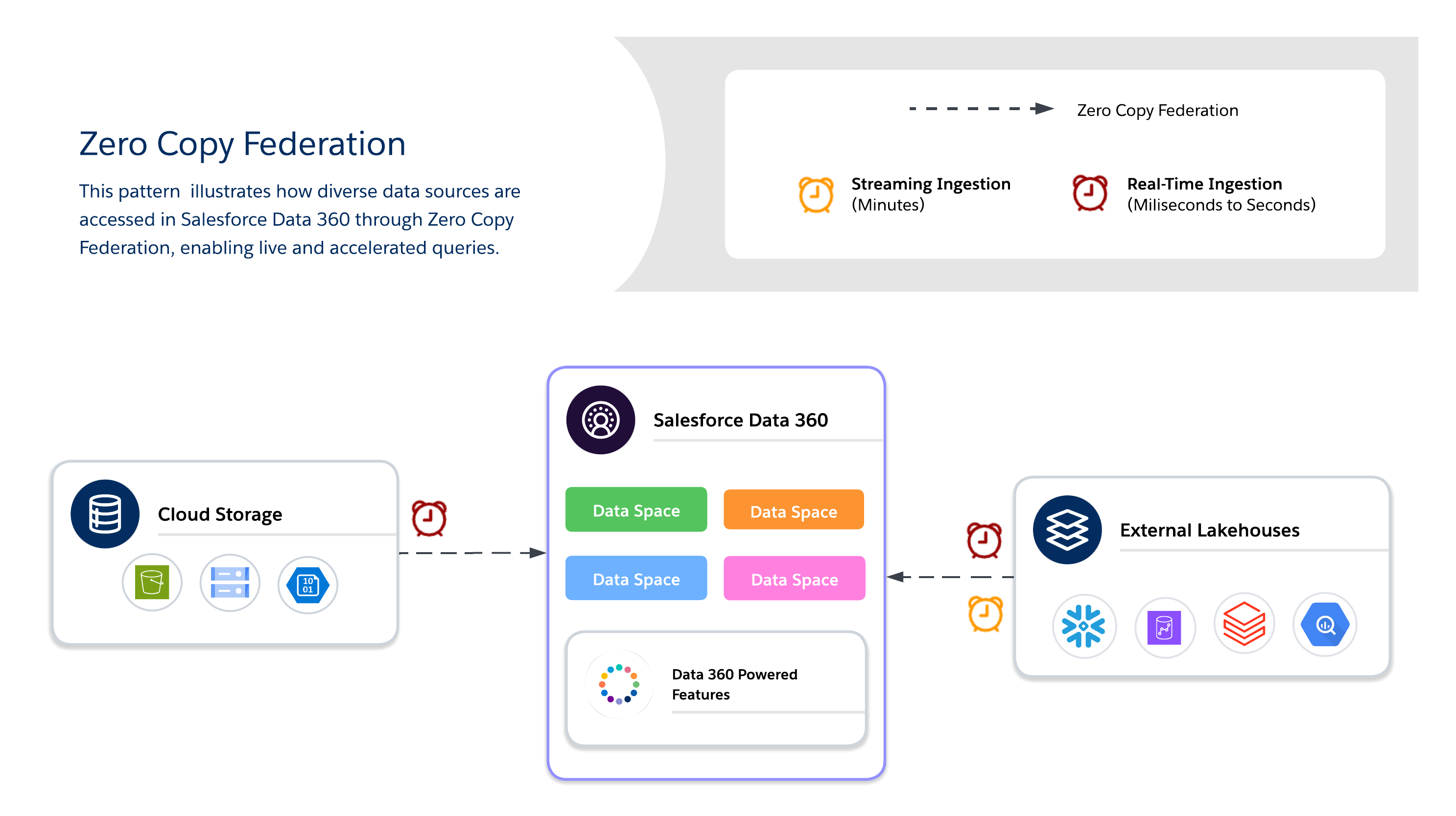 #### Zero Copy Methods
When using _Zero Copy_, architects must choose between three available data federation methods, each of which offers its own tradeoffs between freshness, performance, and cost.
- **Live Query**
- Runs queries directly against external systems (for example, _Snowflake_, _Google BigQuery_, _Redshift_, _Databricks_, and so on) with no data duplication.
- Minimizes data movement over the network and reduces I/O on the Salesforce _Data 360_ computation, which is optimal when predicates and aggregations can be pushed down.
- Suitable for real-time insights and low-latency operational dashboards.
- Dependent upon external system performance.
- **Caching (Accelerated Query)**
- Temporarily stores cached copies of federated data in Salesforce _Data 360_.
- Reduces repeated query costs and latency for frequently accessed datasets with configurable duration (minutes to days).
- Data isn't permanently copied or fully governed, so freshness is managed via scheduled refreshes from the source.
- _Incremental refresh_ supports upserts only. Deleted records aren't removed from the cache.
- Perform a full refresh periodically to ensure that the cache remains in sync with the source.
- **Note\:** The _Snowflake_ connector supports the _Unload_ function, which enhances acceleration rates by using a Snowflake-initiated staging bucket. This is enabled by default, but it can be disabled by editing the connection.
- **File Federation**
- Provides direct, read-only access to large-scale datasets in object stores (for example, _S3_ and _GCS_ with _Iceberg_).
- Suitable for AI/ML workloads, historical analytics, and petabyte-scale reporting without moving data.
- Query performance depends heavily on object format, partitioning, and network I/O. Large scans may generate substantial I/O if they aren't optimized.
#### Architect Playbook
- **Use Cases**
- **Real-time personalization and adaptive workflows** deliver dynamic offers, recommendations, and next-best actions as customer behaviors change.
- **Live dashboards and operational analytics** power business-critical dashboards and KPIs directly from external warehouses.
- **AI/ML model training with large external datasets** leverage petabyte-scale data from data lakes and warehouses without moving it via file federation.
- **Industry Scenarios**
- **Retail/Media\:** Enable personalized recommendations and real-time customer engagement by federating clickstream or content interaction data.
- **Finance\:** Run fraud detection and risk scoring in near-real time by querying external warehouses without duplicating sensitive data.
- **Tech/Enterprise\:** Support cross-cloud reporting, IT service dashboards, and operational analytics when datasets reside in multiple systems.
- **Design Practices**
- **Live Query**
- Use for high-QPS, low-latency queries when freshness is critical.
- Push predicates and aggregations to the external system to reduce data shuffling over the network.
- Avoid queries that unnecessarily scan massive data volumes.
- Consider partition pruning and filters instead.
- **File Federation**
- Access petabyte-scale datasets in object stores without ingestion.
- Minimize latency and egress costs by keeping object storage in the same Cloud region as Salesforce computation.
- Use partitioned, columnar formats (Parquet/ORC) and pushdown filters to reduce I/O and network transfer.
- Leverage query and predicate pushdown to filter and aggregate data at the source, which reduces data movement.
- Avoid cross-region data access—unless it's absolutely necessary—because it increases I/O, latency, and costs.
- **Caching (Accelerated Query)**
- Cache frequently accessed datasets to balance cost and performance.
- Configure refresh intervals to balance freshness vs. query cost.
- **Compliance\:** Enforce governance at the source by leveraging _row-level security (RLS)_ and masking policies directly within federated systems.
- Here are a few best practices for uniform RLS and masking across platforms\:
- **Use a Centralized Enterprise ID.** Map users and entities in Salesforce _Data 360_ to a unique, centralized enterprise identifier that corresponds to identities in external systems.
- **Align Security Policies.** Ensure that RLS and masking policies in federated systems are applied based on the mapped identity. This preserves compliance when querying external data.
- **Standardize Identity Schemas.** Maintain consistent identity attributes (email, user ID, customer ID, and so on) across all data sources to avoid mismatches and access violations.
- **Cost Considerations**
- **Live Query\:** In the pay-per-query model, costs accrue on external lake house computation, which may cause spikes with high QPS. This is suitable for freshness-critical use cases where the value is greater than the cost variability.
- **Accelerated Query (Caching)\:** This method lowers query cost (as compared to _Live Query)_ by reducing hits to the source system; however, it adds to batch data ingestion costs for filling and refreshing the cache. This is suitable for frequently-accessed datasets.
- **File Federation\:** This is the cheapest storage option as data in Object Store; however, query costs depend on the file size, partitioning, and pruning. This is suitable for historical or bulk data at petabyte scale.
#### Zero Copy Method Decision Criteria
| Decision Point | Live Query | Caching (Accelerated Query) | File Federation |
| :----------------------- | :---------------------------------------------------------------------------------------------------------------------------------------------------------------------------------------------------------------------------- | :--------------------------------------------------------------------------------------------------------------------------------------------------------- | :------------------------------------------------------------------------------------------------------------------------------------------------------------------------------------------------------------------------------------------------------------------------------------------------------------------------------------------------------------------------------------------------------------------------------------------------------------------------------- |
| **Data Source Location** | External data lake houses (for example, _Snowflake_, _Google BigQuery_, _Redshift_, and _Databricks_) | External data lake houses (for example, _Snowflake_, _Google BigQuery_, _Redshift_, and _Databricks_) | Object Stores or Cloud data lakes (for example, _S3_, _ADLS_, and _GCS_), which often use open-table formats like _Iceberg_. |
| **Purpose/Use Case** | Suitable for interactive analysis and real-time dashboards. Suitable for real-time personalization and dynamic workflows. | Suitable for when queries are frequent, but slightly stale results are acceptable. Suitable for BI dashboards and segmentation. | Suitable for large-scale batch processing and AI/ML model training. Suitable for historical analytics and petabyte-scale reporting. |
| **Freshness/Latency** | Provides maximum freshness Runs queries directly in real time. Supports sub-second decisioning when the source system is optimized for low-latency queries with effective predicate pushdown. | Use when slightly stale results are acceptable. Freshness depends on the cache interval, which is configurable from 15 minutes to 7 days. | Suitable for batch-heavy, throughput-intensive jobs. Not suitable for real-time dashboarding. |
| **Access Pattern** | Suitable for infrequent or ad-hoc queries where freshness is critical and query volume is low. Costs spike significantly at high QPS, so it's important to evaluate caching (Accelerated Query) when query frequency is high. | Suitable for high-frequency read scenarios. Improves performance for frequent access patterns. | Provides r*ead-only* access. Suitable for petabyte-scale datasets without ingestion. |
| **Performance Drivers** | Highly dependent upon external source system performance. Suitable for when predicates and aggregations can be pushed down to the source. | Reduces latency when compared to repeated live queries. Performance depends on cache management and intervals. | Performance depends heavily on object format, partitioning, and external system throughput. Use partitioned, columnar formats (Parquet/ORC). |
| **Cost Implications** | This is a pay-per-query model, so costs accrue on external lake house computations. It's cost-effective for infrequent queries, but expenses may spike with high QPS volume. | The cost is lower than repeated live queries. It reduces the need to repeatedly query the external source, but it adds cache storage and refresh overhead. | This is the cheapest storage option. For same-region, same-cloud AWS setups (for example, _S3_ in US-East-1 with a _Data Cloud_ tenant that's also in US-East-1), credits aren't consumed for the rows that are accessed. Cross-region or cross-Cloud configurations (for example, _Azure_, _GCS_, or different _AWS_ regions) incur credit consumption for the rows that are accessed. Query costs also depend on file size, partitioning, and predicate pushdown optimization. |
| **Key Consideration** | Avoid unfiltered queries that scan massive data volumes unnecessarily. | This approach requires cache management. Not suitable for sub-second decisioning. | Query performance relies heavily on optimization via partitioning and predicate pushdown. |
### Hybrid Approach
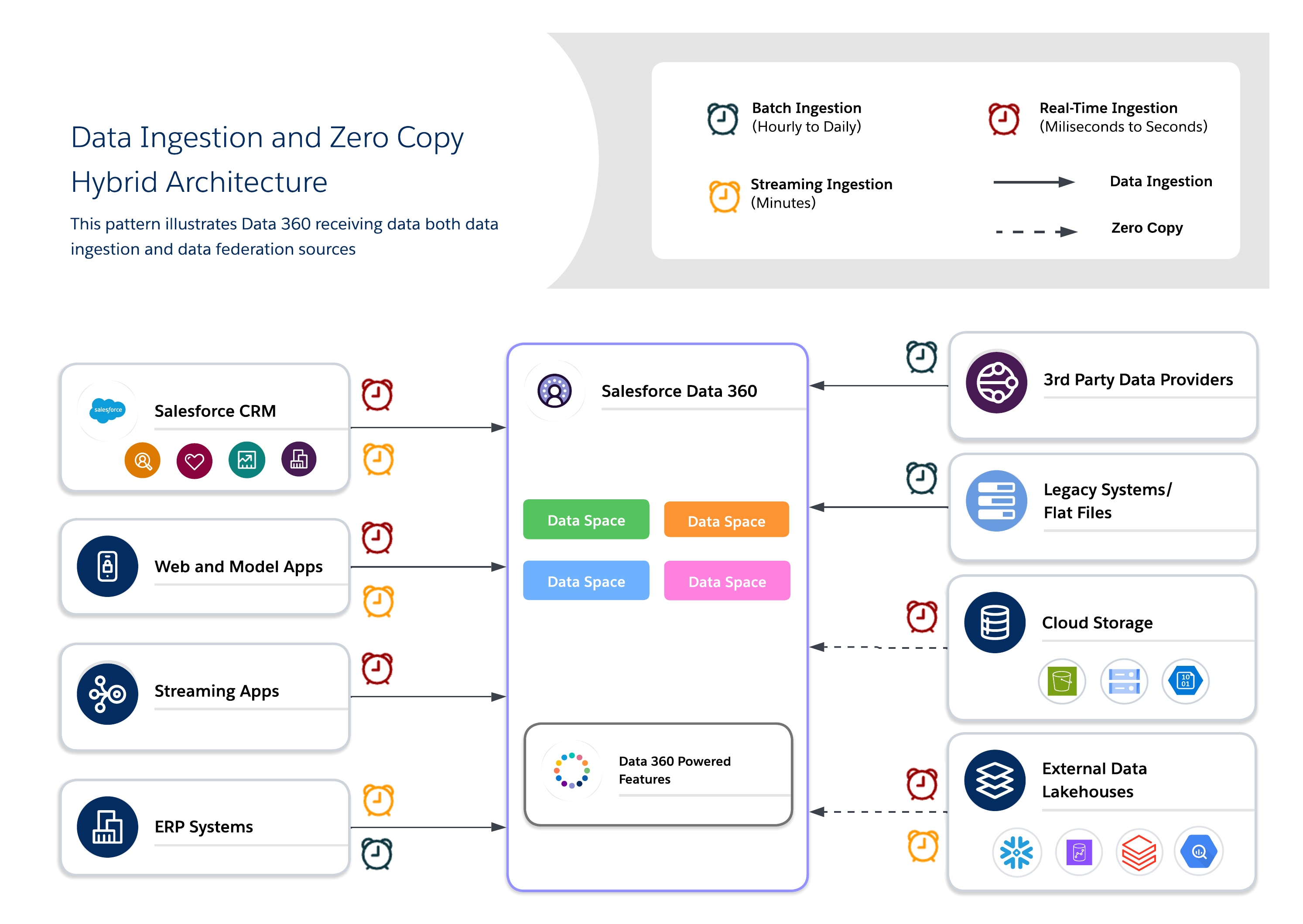
Hybrid architectures enable architects to anchor critical datasets in _Data 360_ for centralized governance while also leveraging federated queries for freshness, reduced duplication, and scalable access to large, external datasets. This approach balances I/O, compute locality, cost, and compliance requirements.
#### Hybrid Use Cases
Use a hybrid approach for balanced governance, freshness, and operational efficiency by combining data ingestion and zero copy to deliver real-time, actionable insights. Use ingestion for high-value, regulated datasets where traceability, RLS, and masking are required, and federation for ephemeral or high-volume datasets where freshness and performance are key.
#### Zero Copy Methods
When using _Zero Copy_, architects must choose between three available data federation methods, each of which offers its own tradeoffs between freshness, performance, and cost.
- **Live Query**
- Runs queries directly against external systems (for example, _Snowflake_, _Google BigQuery_, _Redshift_, _Databricks_, and so on) with no data duplication.
- Minimizes data movement over the network and reduces I/O on the Salesforce _Data 360_ computation, which is optimal when predicates and aggregations can be pushed down.
- Suitable for real-time insights and low-latency operational dashboards.
- Dependent upon external system performance.
- **Caching (Accelerated Query)**
- Temporarily stores cached copies of federated data in Salesforce _Data 360_.
- Reduces repeated query costs and latency for frequently accessed datasets with configurable duration (minutes to days).
- Data isn't permanently copied or fully governed, so freshness is managed via scheduled refreshes from the source.
- _Incremental refresh_ supports upserts only. Deleted records aren't removed from the cache.
- Perform a full refresh periodically to ensure that the cache remains in sync with the source.
- **Note\:** The _Snowflake_ connector supports the _Unload_ function, which enhances acceleration rates by using a Snowflake-initiated staging bucket. This is enabled by default, but it can be disabled by editing the connection.
- **File Federation**
- Provides direct, read-only access to large-scale datasets in object stores (for example, _S3_ and _GCS_ with _Iceberg_).
- Suitable for AI/ML workloads, historical analytics, and petabyte-scale reporting without moving data.
- Query performance depends heavily on object format, partitioning, and network I/O. Large scans may generate substantial I/O if they aren't optimized.
#### Architect Playbook
- **Use Cases**
- **Real-time personalization and adaptive workflows** deliver dynamic offers, recommendations, and next-best actions as customer behaviors change.
- **Live dashboards and operational analytics** power business-critical dashboards and KPIs directly from external warehouses.
- **AI/ML model training with large external datasets** leverage petabyte-scale data from data lakes and warehouses without moving it via file federation.
- **Industry Scenarios**
- **Retail/Media\:** Enable personalized recommendations and real-time customer engagement by federating clickstream or content interaction data.
- **Finance\:** Run fraud detection and risk scoring in near-real time by querying external warehouses without duplicating sensitive data.
- **Tech/Enterprise\:** Support cross-cloud reporting, IT service dashboards, and operational analytics when datasets reside in multiple systems.
- **Design Practices**
- **Live Query**
- Use for high-QPS, low-latency queries when freshness is critical.
- Push predicates and aggregations to the external system to reduce data shuffling over the network.
- Avoid queries that unnecessarily scan massive data volumes.
- Consider partition pruning and filters instead.
- **File Federation**
- Access petabyte-scale datasets in object stores without ingestion.
- Minimize latency and egress costs by keeping object storage in the same Cloud region as Salesforce computation.
- Use partitioned, columnar formats (Parquet/ORC) and pushdown filters to reduce I/O and network transfer.
- Leverage query and predicate pushdown to filter and aggregate data at the source, which reduces data movement.
- Avoid cross-region data access—unless it's absolutely necessary—because it increases I/O, latency, and costs.
- **Caching (Accelerated Query)**
- Cache frequently accessed datasets to balance cost and performance.
- Configure refresh intervals to balance freshness vs. query cost.
- **Compliance\:** Enforce governance at the source by leveraging _row-level security (RLS)_ and masking policies directly within federated systems.
- Here are a few best practices for uniform RLS and masking across platforms\:
- **Use a Centralized Enterprise ID.** Map users and entities in Salesforce _Data 360_ to a unique, centralized enterprise identifier that corresponds to identities in external systems.
- **Align Security Policies.** Ensure that RLS and masking policies in federated systems are applied based on the mapped identity. This preserves compliance when querying external data.
- **Standardize Identity Schemas.** Maintain consistent identity attributes (email, user ID, customer ID, and so on) across all data sources to avoid mismatches and access violations.
- **Cost Considerations**
- **Live Query\:** In the pay-per-query model, costs accrue on external lake house computation, which may cause spikes with high QPS. This is suitable for freshness-critical use cases where the value is greater than the cost variability.
- **Accelerated Query (Caching)\:** This method lowers query cost (as compared to _Live Query)_ by reducing hits to the source system; however, it adds to batch data ingestion costs for filling and refreshing the cache. This is suitable for frequently-accessed datasets.
- **File Federation\:** This is the cheapest storage option as data in Object Store; however, query costs depend on the file size, partitioning, and pruning. This is suitable for historical or bulk data at petabyte scale.
#### Zero Copy Method Decision Criteria
| Decision Point | Live Query | Caching (Accelerated Query) | File Federation |
| :----------------------- | :---------------------------------------------------------------------------------------------------------------------------------------------------------------------------------------------------------------------------- | :--------------------------------------------------------------------------------------------------------------------------------------------------------- | :------------------------------------------------------------------------------------------------------------------------------------------------------------------------------------------------------------------------------------------------------------------------------------------------------------------------------------------------------------------------------------------------------------------------------------------------------------------------------- |
| **Data Source Location** | External data lake houses (for example, _Snowflake_, _Google BigQuery_, _Redshift_, and _Databricks_) | External data lake houses (for example, _Snowflake_, _Google BigQuery_, _Redshift_, and _Databricks_) | Object Stores or Cloud data lakes (for example, _S3_, _ADLS_, and _GCS_), which often use open-table formats like _Iceberg_. |
| **Purpose/Use Case** | Suitable for interactive analysis and real-time dashboards. Suitable for real-time personalization and dynamic workflows. | Suitable for when queries are frequent, but slightly stale results are acceptable. Suitable for BI dashboards and segmentation. | Suitable for large-scale batch processing and AI/ML model training. Suitable for historical analytics and petabyte-scale reporting. |
| **Freshness/Latency** | Provides maximum freshness Runs queries directly in real time. Supports sub-second decisioning when the source system is optimized for low-latency queries with effective predicate pushdown. | Use when slightly stale results are acceptable. Freshness depends on the cache interval, which is configurable from 15 minutes to 7 days. | Suitable for batch-heavy, throughput-intensive jobs. Not suitable for real-time dashboarding. |
| **Access Pattern** | Suitable for infrequent or ad-hoc queries where freshness is critical and query volume is low. Costs spike significantly at high QPS, so it's important to evaluate caching (Accelerated Query) when query frequency is high. | Suitable for high-frequency read scenarios. Improves performance for frequent access patterns. | Provides r*ead-only* access. Suitable for petabyte-scale datasets without ingestion. |
| **Performance Drivers** | Highly dependent upon external source system performance. Suitable for when predicates and aggregations can be pushed down to the source. | Reduces latency when compared to repeated live queries. Performance depends on cache management and intervals. | Performance depends heavily on object format, partitioning, and external system throughput. Use partitioned, columnar formats (Parquet/ORC). |
| **Cost Implications** | This is a pay-per-query model, so costs accrue on external lake house computations. It's cost-effective for infrequent queries, but expenses may spike with high QPS volume. | The cost is lower than repeated live queries. It reduces the need to repeatedly query the external source, but it adds cache storage and refresh overhead. | This is the cheapest storage option. For same-region, same-cloud AWS setups (for example, _S3_ in US-East-1 with a _Data Cloud_ tenant that's also in US-East-1), credits aren't consumed for the rows that are accessed. Cross-region or cross-Cloud configurations (for example, _Azure_, _GCS_, or different _AWS_ regions) incur credit consumption for the rows that are accessed. Query costs also depend on file size, partitioning, and predicate pushdown optimization. |
| **Key Consideration** | Avoid unfiltered queries that scan massive data volumes unnecessarily. | This approach requires cache management. Not suitable for sub-second decisioning. | Query performance relies heavily on optimization via partitioning and predicate pushdown. |
### Hybrid Approach
Hybrid architectures enable architects to anchor critical datasets in _Data 360_ for centralized governance while also leveraging federated queries for freshness, reduced duplication, and scalable access to large, external datasets. This approach balances I/O, compute locality, cost, and compliance requirements.
#### Hybrid Use Cases
Use a hybrid approach for balanced governance, freshness, and operational efficiency by combining data ingestion and zero copy to deliver real-time, actionable insights. Use ingestion for high-value, regulated datasets where traceability, RLS, and masking are required, and federation for ephemeral or high-volume datasets where freshness and performance are key.
 #### Architect Playbook
- **Use Cases**
- **Omni-channel engagement\:** Blend historical customer data with real-time behavior to deliver consistent, context-aware experiences.
- **AI/ML pipelines\:** Train models on curated, canonical datasets while enriching them with raw or real-time signals from external sources.
- **Mixed compliance and agility needs\:** Apply strict governance for sensitive data, and federation for operational agility.
- **Industry Scenarios**
- **Retail\:** Use _ingestion_ for identity resolution and profile unification, and _federation_ for real-time offers and personalization.
- **Healthcare\:** Maintain golden patient records via _ingestion_ while using _federation on_ IoT device streams and sensor data for immediate context.
- **Financial Services\:** Ingest regulated data into a compliance-governed lake while using _federation_ for external fraud-detection and risk-monitoring queries.
- **Design Practices**
- **Anchor Governance with Ingestion\:** Ingest high-value or regulated data into canonical models to ensure trust and compliance.
- **Use Federation for Freshness\:** Allows external lake houses to provide real-time or large-scale data access without duplication.
- **Balance Cost vs. Performance\:** Profile workloads to determine when to use _ingestion_ vs. _federation_, which minimizes unnecessary storage and query costs.
- **Apply Layered Governance\:** Enforce centralized governance for ingested data while leveraging the federated systems security controls (for example, RLS and masking).
- **Note\:** When you're designing hybrid pipelines, it's important to ensure incremental ingestion for historical datasets and push aggregations or filters to federated sources to optimize I/O and compute usage.
- **Cost Considerations**
- Weigh the total cost vs. performance by combining _ingestion_ for compliance or critical data with _federation_ when freshness is necessary.
- Account for I/O and compute distribution when mixing _ingestion_ and _federation_. To reduce the compute cost of repeated queries against source systems, use caching (Accelerated Query) for high-read, frequently-accessed federated datasets.
- Use this rule to guide the ingestion vs. federation decision\: when data is accessed frequently but changes infrequently, _Accelerated Query_ is typically more cost-effective. However, when data changes frequently (relative to access frequency), _Live Query_ or _ingestion_ is more appropriate. Here are a few cost examples\:
- **Acceleration wins\:** A dashboard that's built from 1M records and updated daily with \~10K changes is viewed 20 times per day. _Acceleration_ costs equate to roughly \~600 credits/month vs. \~4,200 credits/month for _Live Queries_.
- **Live Query wins\:** Segments that are published 20 times per day using data that changes every 30 minutes. _Live Queries_ cost roughly \~4,200 credits/month vs. \~28,800 credits/month for _acceleration_ at this refresh frequency.
## Use Case Decision Guide
Let's take a closer look at a few common archetypes that illustrate how to apply this logic.
- **The "Single Source of Truth" Archetype\: Centralize and Govern**
- **Scenario\:** You need to build compliant, unified _Customer 360_ profiles for your entire global enterprise. The data comes from a dozen different systems, it must adhere to strict _GDPR_ and _CCPA_ regulations, and it will serve as the source of truth for all marketing and service interactions.
- **Recommended Pattern\:** **Data Ingestion.** The priority here is governance, trust, and control. Ingesting the data into _Data 360_ is the only way to create a fully auditable, canonical profile that's insulated from the source systems.
- **The "Real-Time Insights" Archetype\: Analyze Without Moving**
- **Scenario\:** Your data science team needs to run exploratory queries on a massive, constantly updating transaction table in _Snowflake_. At the same time, your executive team wants a live _BI_ dashboard that's powered by that same data. Moving petabytes of data daily is slow and expensive.
- **Recommended Pattern\:** **Zero Copy Federation.** The priority here is speed, agility, and cost-efficiency at scale. _Zero Copy_ allows you to leverage the power of your existing data warehouse for real-time queries without the overhead and latency of data duplication.
- **The "Hybrid Intelligence" Archetype\: Govern the Core, Federate the Edge**
- **Scenario\:** You want to enrich your governed, ingested customer profiles with real-time behavioral signals (for example, website clicks) from a data lake. You need the stability of the core profile but the immediacy of the live data to power in-the-moment personalization.
- **Recommended Pattern\:** **A Hybrid Approach.** Use _Data Ingestion_ to create a stable, governed core for your customer data. Use _Zero Copy_ to federate the volatile, real-time "edge" data, and then join them together at query time for a complete, up-to-the-second view.
## The Path Forward
Enterprise data strategy is no longer focused on choosing a single integration pattern—it's about architecting controlled flexibility within an interoperable data ecosystem. The correct approach maps each source system to the pattern that best suits its freshness, governance, cost, and access requirements\:
- Ingest mission-critical, regulated datasets into Salesforce _Data Cloud_ for compliance, identity resolution, and operational workflows.
- Federate data via _Zero Copy_ for live, exploratory, and AI-driven analytics without duplicating storage.
- Apply _Caching (Accelerated Query)_ to reduce source system load and credit consumption when query frequency is high and data change frequency is low
Salesforce _Data 360_ on _Hyperforce_ delivers multi-region resilience and scalability. Its open lake house with _Iceberg_ tables enables computation separation and interoperability with platforms like _Snowflake_, _Databricks_, and _S3 Iceberg, which_ forms the backbone of a truly interoperable, multi-cloud data ecosystem.
As data ecosystems evolve, we must continuously balance freshness, cost, performance, and compliance to maintain architectural agility. That's why it's important to future-proof your platform by unifying ingested, governed data with federated access. This enables real-time intelligence, AI activation, and enterprise-scale personalization across Clouds, regions, and business domains.
Keep in mind that one-size-fits-all solutions don't suit most businesses. The optimal strategy maps the correct pattern to the correct business driver.
## About the Authors
**Yugandhar Bora** is a Software Engineering Architect at Salesforce who specializes in data architecture within the Data and Intelligence Applications platform. He leads _enterprise architecture review board (EARB)_ initiatives that focus on data governance and unified data models while also contributing to automated platform provisioning solutions.
**Jan Fernando** is a Principal Architect in the _Office of the Chief Architect (OCA)_ at Salesforce who joined Salesforce in 2012\. He brings a wealth of experience from his time in the startup ecosystem. Prior to joining the OCA, he spent over a decade in the _Platform_ organization, where he led several key technology transformations.
# Data 360 Provisioning
Salesforce Data 360 is a data platform built on [Hyperforce](https://www.salesforce.com/platform/public-cloud-infrastructure/) that unifies Salesforce and external data into a clear, complete, and trusted 360-degree view of every customer or account.
Enterprises often operate multiple Salesforce orgs due to mergers and acquisitions, regional operations, functional separation, or for historical reasons. Architects have several decisions about Data 360 to make, all of which impact governance, compliance, cost, latency, and the organization’s ability to scale AI and cross-org platform features.
## Guide Overview
This guide provides a framework for making provisioning decisions with Data 360. These decisions include:
- Selecting a single home org versus a multi-org configuration
- Provisioning multiple independent Data 360 instances
- Use Data Cloud One to unify orgs under a single instance
- Collaborate between independent Data 360 instances that use data sharing between Data 360 orgs
Data 360 is provisioned automatically on any production org that receives a Data 360 license. Data Cloud One is Salesforce’s multi-org connectivity architecture that allows a single home org to host the Data 360 instance, while other Salesforce orgs connect as companion orgs. The choice of which org holds the Data 360 license, and thus becomes a Data 360 home org, is a critical architectural decision with long-term consequences.
How you provision Salesforce Data 360 is a foundational architectural decision. It determines how the enterprise unifies customer data, enforces governance, and enables critical platform features, especially AI, Agentforce, and analytics across the organization. Anchoring a cluster of orgs to a single Data 360 provides a unified data model, centralized governance, and enables enterprise-wide AI readiness. Companion orgs can access shared metadata and features as if the data were local. By contrast, multiple independent Data 360 instances are appropriate when regulatory, compliance, or autonomy requirements prevent centralization. Data sharing between Data 360 orgs enables selective, zero-copy collaboration between these instances.
This decision influences who controls data governance, where data resides, how platform features are enabled, and how smoothly future integrations and AI initiatives can scale. Even for orgs that don’t currently have Data 360, it can be important to future-proof their architectures by developing a strategy for adding Data 360 access going forward. Increasingly, Salesforce features across Sales, Service, Marketing, Commerce, Industries, and Agentforce are built on Data 360\. Orgs that want to use these platform features must provision their own Data 360 or connect to a shared Data 360 as companion orgs.
This guide helps architects design a provisioning strategy that balances simplicity, enterprise-wide consistency, compliance, and scalability, ensuring the organization can confidently leverage Data 360 for Customer 360, AI, and cross-platform innovation. Use this guide to determine which orgs require Data 360, and whether to use Data Cloud One or data sharing between Data 360 orgs. This strategy establishes a firm groundwork for a Data 360-centric future.
## Products in Scope
#### Architect Playbook
- **Use Cases**
- **Omni-channel engagement\:** Blend historical customer data with real-time behavior to deliver consistent, context-aware experiences.
- **AI/ML pipelines\:** Train models on curated, canonical datasets while enriching them with raw or real-time signals from external sources.
- **Mixed compliance and agility needs\:** Apply strict governance for sensitive data, and federation for operational agility.
- **Industry Scenarios**
- **Retail\:** Use _ingestion_ for identity resolution and profile unification, and _federation_ for real-time offers and personalization.
- **Healthcare\:** Maintain golden patient records via _ingestion_ while using _federation on_ IoT device streams and sensor data for immediate context.
- **Financial Services\:** Ingest regulated data into a compliance-governed lake while using _federation_ for external fraud-detection and risk-monitoring queries.
- **Design Practices**
- **Anchor Governance with Ingestion\:** Ingest high-value or regulated data into canonical models to ensure trust and compliance.
- **Use Federation for Freshness\:** Allows external lake houses to provide real-time or large-scale data access without duplication.
- **Balance Cost vs. Performance\:** Profile workloads to determine when to use _ingestion_ vs. _federation_, which minimizes unnecessary storage and query costs.
- **Apply Layered Governance\:** Enforce centralized governance for ingested data while leveraging the federated systems security controls (for example, RLS and masking).
- **Note\:** When you're designing hybrid pipelines, it's important to ensure incremental ingestion for historical datasets and push aggregations or filters to federated sources to optimize I/O and compute usage.
- **Cost Considerations**
- Weigh the total cost vs. performance by combining _ingestion_ for compliance or critical data with _federation_ when freshness is necessary.
- Account for I/O and compute distribution when mixing _ingestion_ and _federation_. To reduce the compute cost of repeated queries against source systems, use caching (Accelerated Query) for high-read, frequently-accessed federated datasets.
- Use this rule to guide the ingestion vs. federation decision\: when data is accessed frequently but changes infrequently, _Accelerated Query_ is typically more cost-effective. However, when data changes frequently (relative to access frequency), _Live Query_ or _ingestion_ is more appropriate. Here are a few cost examples\:
- **Acceleration wins\:** A dashboard that's built from 1M records and updated daily with \~10K changes is viewed 20 times per day. _Acceleration_ costs equate to roughly \~600 credits/month vs. \~4,200 credits/month for _Live Queries_.
- **Live Query wins\:** Segments that are published 20 times per day using data that changes every 30 minutes. _Live Queries_ cost roughly \~4,200 credits/month vs. \~28,800 credits/month for _acceleration_ at this refresh frequency.
## Use Case Decision Guide
Let's take a closer look at a few common archetypes that illustrate how to apply this logic.
- **The "Single Source of Truth" Archetype\: Centralize and Govern**
- **Scenario\:** You need to build compliant, unified _Customer 360_ profiles for your entire global enterprise. The data comes from a dozen different systems, it must adhere to strict _GDPR_ and _CCPA_ regulations, and it will serve as the source of truth for all marketing and service interactions.
- **Recommended Pattern\:** **Data Ingestion.** The priority here is governance, trust, and control. Ingesting the data into _Data 360_ is the only way to create a fully auditable, canonical profile that's insulated from the source systems.
- **The "Real-Time Insights" Archetype\: Analyze Without Moving**
- **Scenario\:** Your data science team needs to run exploratory queries on a massive, constantly updating transaction table in _Snowflake_. At the same time, your executive team wants a live _BI_ dashboard that's powered by that same data. Moving petabytes of data daily is slow and expensive.
- **Recommended Pattern\:** **Zero Copy Federation.** The priority here is speed, agility, and cost-efficiency at scale. _Zero Copy_ allows you to leverage the power of your existing data warehouse for real-time queries without the overhead and latency of data duplication.
- **The "Hybrid Intelligence" Archetype\: Govern the Core, Federate the Edge**
- **Scenario\:** You want to enrich your governed, ingested customer profiles with real-time behavioral signals (for example, website clicks) from a data lake. You need the stability of the core profile but the immediacy of the live data to power in-the-moment personalization.
- **Recommended Pattern\:** **A Hybrid Approach.** Use _Data Ingestion_ to create a stable, governed core for your customer data. Use _Zero Copy_ to federate the volatile, real-time "edge" data, and then join them together at query time for a complete, up-to-the-second view.
## The Path Forward
Enterprise data strategy is no longer focused on choosing a single integration pattern—it's about architecting controlled flexibility within an interoperable data ecosystem. The correct approach maps each source system to the pattern that best suits its freshness, governance, cost, and access requirements\:
- Ingest mission-critical, regulated datasets into Salesforce _Data Cloud_ for compliance, identity resolution, and operational workflows.
- Federate data via _Zero Copy_ for live, exploratory, and AI-driven analytics without duplicating storage.
- Apply _Caching (Accelerated Query)_ to reduce source system load and credit consumption when query frequency is high and data change frequency is low
Salesforce _Data 360_ on _Hyperforce_ delivers multi-region resilience and scalability. Its open lake house with _Iceberg_ tables enables computation separation and interoperability with platforms like _Snowflake_, _Databricks_, and _S3 Iceberg, which_ forms the backbone of a truly interoperable, multi-cloud data ecosystem.
As data ecosystems evolve, we must continuously balance freshness, cost, performance, and compliance to maintain architectural agility. That's why it's important to future-proof your platform by unifying ingested, governed data with federated access. This enables real-time intelligence, AI activation, and enterprise-scale personalization across Clouds, regions, and business domains.
Keep in mind that one-size-fits-all solutions don't suit most businesses. The optimal strategy maps the correct pattern to the correct business driver.
## About the Authors
**Yugandhar Bora** is a Software Engineering Architect at Salesforce who specializes in data architecture within the Data and Intelligence Applications platform. He leads _enterprise architecture review board (EARB)_ initiatives that focus on data governance and unified data models while also contributing to automated platform provisioning solutions.
**Jan Fernando** is a Principal Architect in the _Office of the Chief Architect (OCA)_ at Salesforce who joined Salesforce in 2012\. He brings a wealth of experience from his time in the startup ecosystem. Prior to joining the OCA, he spent over a decade in the _Platform_ organization, where he led several key technology transformations.
# Data 360 Provisioning
Salesforce Data 360 is a data platform built on [Hyperforce](https://www.salesforce.com/platform/public-cloud-infrastructure/) that unifies Salesforce and external data into a clear, complete, and trusted 360-degree view of every customer or account.
Enterprises often operate multiple Salesforce orgs due to mergers and acquisitions, regional operations, functional separation, or for historical reasons. Architects have several decisions about Data 360 to make, all of which impact governance, compliance, cost, latency, and the organization’s ability to scale AI and cross-org platform features.
## Guide Overview
This guide provides a framework for making provisioning decisions with Data 360. These decisions include:
- Selecting a single home org versus a multi-org configuration
- Provisioning multiple independent Data 360 instances
- Use Data Cloud One to unify orgs under a single instance
- Collaborate between independent Data 360 instances that use data sharing between Data 360 orgs
Data 360 is provisioned automatically on any production org that receives a Data 360 license. Data Cloud One is Salesforce’s multi-org connectivity architecture that allows a single home org to host the Data 360 instance, while other Salesforce orgs connect as companion orgs. The choice of which org holds the Data 360 license, and thus becomes a Data 360 home org, is a critical architectural decision with long-term consequences.
How you provision Salesforce Data 360 is a foundational architectural decision. It determines how the enterprise unifies customer data, enforces governance, and enables critical platform features, especially AI, Agentforce, and analytics across the organization. Anchoring a cluster of orgs to a single Data 360 provides a unified data model, centralized governance, and enables enterprise-wide AI readiness. Companion orgs can access shared metadata and features as if the data were local. By contrast, multiple independent Data 360 instances are appropriate when regulatory, compliance, or autonomy requirements prevent centralization. Data sharing between Data 360 orgs enables selective, zero-copy collaboration between these instances.
This decision influences who controls data governance, where data resides, how platform features are enabled, and how smoothly future integrations and AI initiatives can scale. Even for orgs that don’t currently have Data 360, it can be important to future-proof their architectures by developing a strategy for adding Data 360 access going forward. Increasingly, Salesforce features across Sales, Service, Marketing, Commerce, Industries, and Agentforce are built on Data 360\. Orgs that want to use these platform features must provision their own Data 360 or connect to a shared Data 360 as companion orgs.
This guide helps architects design a provisioning strategy that balances simplicity, enterprise-wide consistency, compliance, and scalability, ensuring the organization can confidently leverage Data 360 for Customer 360, AI, and cross-platform innovation. Use this guide to determine which orgs require Data 360, and whether to use Data Cloud One or data sharing between Data 360 orgs. This strategy establishes a firm groundwork for a Data 360-centric future.
## Products in Scope
 |
Salesforce Data 360 is Salesforce's real-time, hyperscale data platform that harmonizes and unifies data from any source (CRM, web, mobile, or external data lakes) into a single, actionable customer profile. As a critical component of the Customer 360 platform, it powers AI, analytics, and personalized experiences across sales, service, and marketing. |
| Consideration | Why It Matters | Example Scenarios |
|---|---|---|
| Data Residency and Compliance | Determines where data is stored and processed. Regulatory rules may require specific regions or multiple instances. | A global bank provisions a Data 360 tenant on a Salesforce org geolocated in Frankfurt for GDPR compliance. They provision another tenant on an org in Virginia for its US division. |
| Governance and Security | Identify an admin and ownership of Data 360, including policy management and delegation strategies. | A multinational with strong central IT creates a dedicated home org managed by a Center of Excellence. |
| Autonomy vs. Centralization | Different leaders may want separate ownership of data. Autonomy favors multiple Data 360 orgs. Centralization favors Data Cloud One. | A holding company with independent subsidiaries allows each BU to run its own Data 360. |
| Latency and Performance | Impacts query speed and experience, especially for companion orgs connected to a Data 360 tenant across regions. | A sales team in London querying data from a Data 360 tenant in the US may see higher latency. |
| Integration Complexity | More Data 360 tenants = more pipelines, APIs, and middleware. Consolidation simplifies integration. | A retailer avoids building 10 ETL pipelines by consolidating into a Data Cloud One configuration. |
| Zero Copy Data Source Region | The cross-region access requirements for some connectors can limit the region or location of your Data 360 org. | A company has a Snowflake instance in the AWS eu-west-1 region. They can use Zero Copy to federate data to a Data 360 in their region, but can't use Zero Copy to federate to a Data 360 in the US region. |
| Private Connect Cross-Region Compatibility | Sometimes, Private Connect support depends on whether the data source is in the same region as the Data 360 tenant. | A company has a Snowflake instance in the aws-east-1 region that they want to connect to Data 360 via zero-copy. They can only establish a Private Connect network connection if the Data 360 home org is in the same region. |
| Cost and Licensing | Each Data 360 tenant adds cost. Consolidating into fewer instances optimizes spend. | A healthcare provider reduces licensing costs by adopting Data Cloud One instead of multiple independent Data 360 instances. |
| Future Scalability | Provisioning choices today set the foundation for growth. | A SaaS company starts with a single Data 360 instance but plans to expand to Data Cloud One as it acquires subsidiaries with Salesforce orgs. |
| Enterprise-Wide AI Readiness | AI features and Agentforce require a connected Data 360 tenant in every org. Provisioning decisions affect how AI models train and activate across the enterprise. | A financial services company unifies data in Data Cloud One so its Einstein AI models have access to enterprise-wide customer data. |
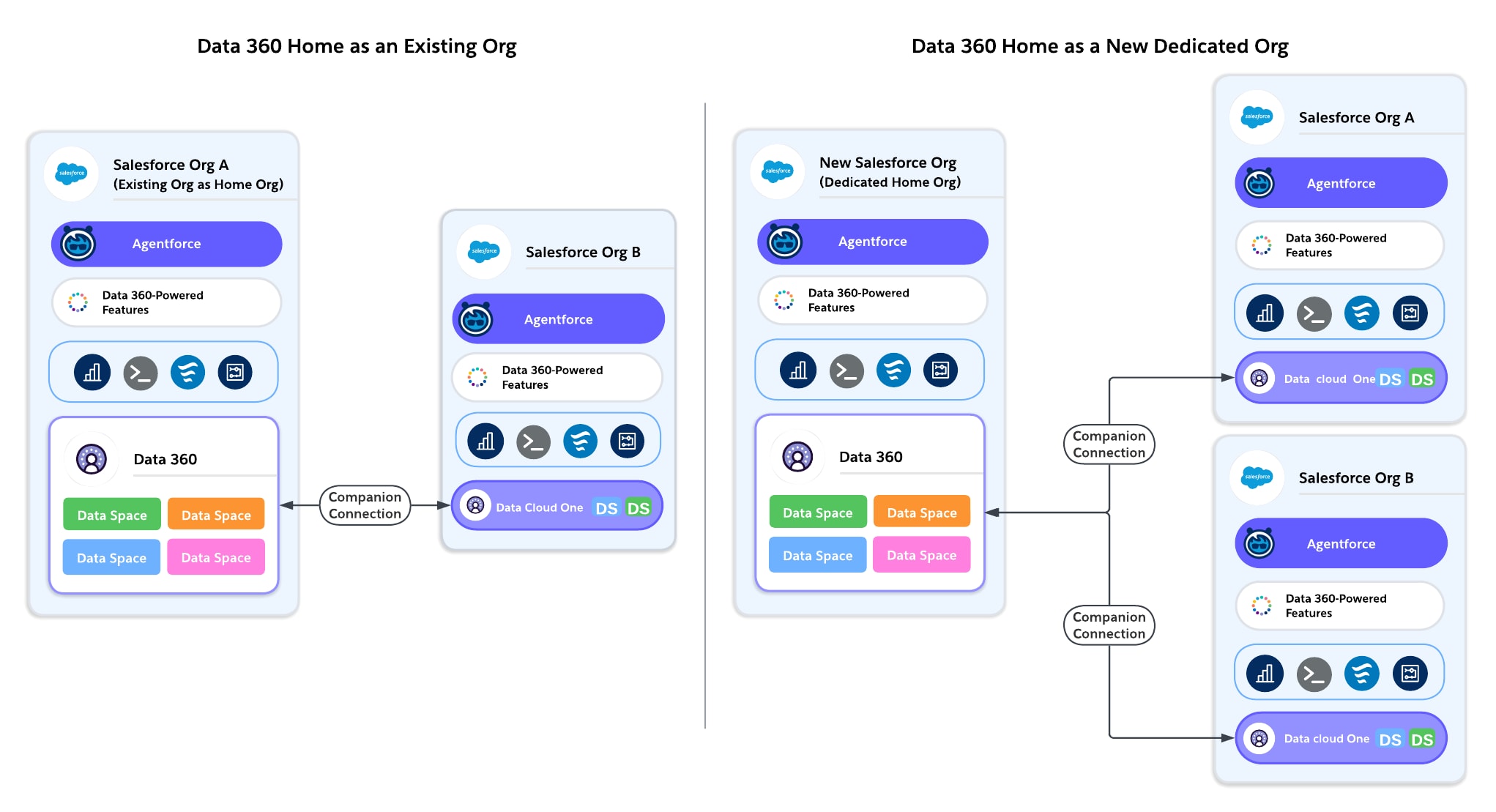 **Option A: Provision Data 360 in an Existing Org**
**Works Best For:** Customers with a single Salesforce org, or multi-org customers who already have a major centralized org where most business processes run.
**Option A: Provision Data 360 in an Existing Org**
**Works Best For:** Customers with a single Salesforce org, or multi-org customers who already have a major centralized org where most business processes run.
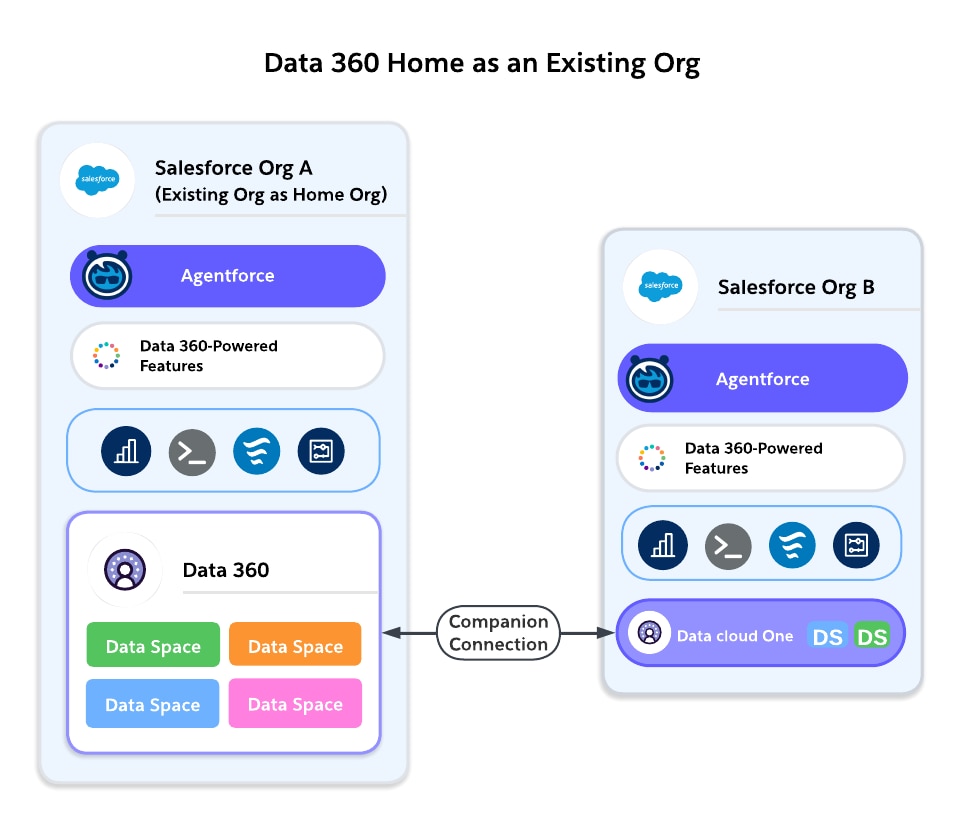 - **Pros:**
- Simplest path: Data 360 is provisioned where your CRM data lives.
- Immediate access to local Sales, Service, and Marketing data.
- No additional integration is required.
- Fewer licenses and environments to manage.
- Accelerates early adoption, pilots, and production use cases.
- **Cons:**
- Can inherit an existing org’s governance or technical debt.
- If no single “main org” exists, selecting one can create ownership debates.
- Performance tied to the org’s location; may not align with enterprise-wide residency needs.
- If multiple business units use different orgs, local provisioning can lead to fragmentation if not paired with Data Cloud One.
**Example:**
A SaaS company with one Salesforce org provisions Data 360 in that org to unify customer subscription and support data.
**Option B: Provision Data 360 in a New, Dedicated Org**
**Works Best For:** Customers with multiple Salesforce orgs who can’t align on a single major org, or enterprises with a strong Center of Excellence (CoE) model.
- **Pros:**
- Simplest path: Data 360 is provisioned where your CRM data lives.
- Immediate access to local Sales, Service, and Marketing data.
- No additional integration is required.
- Fewer licenses and environments to manage.
- Accelerates early adoption, pilots, and production use cases.
- **Cons:**
- Can inherit an existing org’s governance or technical debt.
- If no single “main org” exists, selecting one can create ownership debates.
- Performance tied to the org’s location; may not align with enterprise-wide residency needs.
- If multiple business units use different orgs, local provisioning can lead to fragmentation if not paired with Data Cloud One.
**Example:**
A SaaS company with one Salesforce org provisions Data 360 in that org to unify customer subscription and support data.
**Option B: Provision Data 360 in a New, Dedicated Org**
**Works Best For:** Customers with multiple Salesforce orgs who can’t align on a single major org, or enterprises with a strong Center of Excellence (CoE) model.
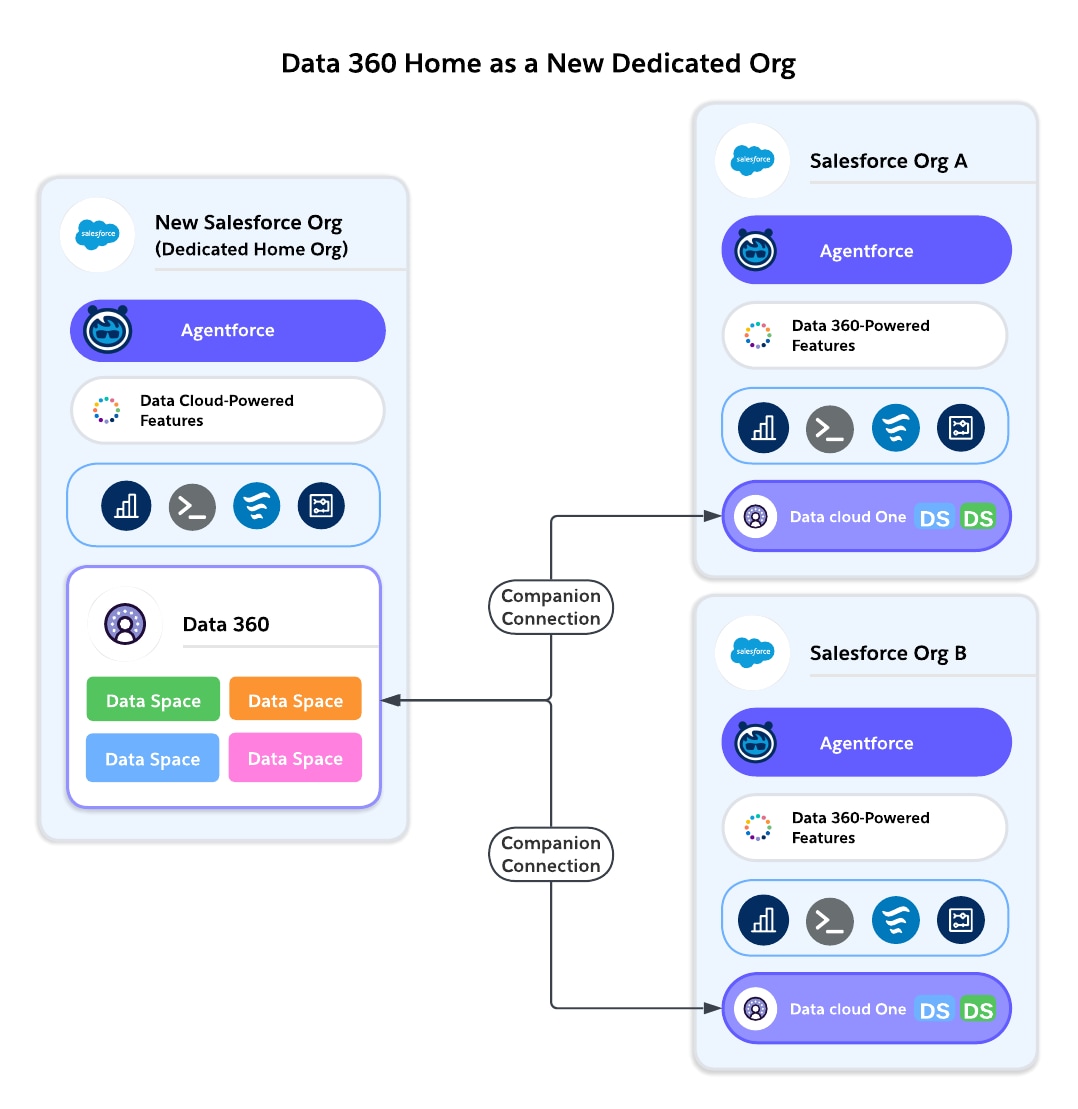 - **Pros:**
- Clean slate for governance, with no inherited org complexities.
- Centralized control across multiple lines of business.
- Flexibility to choose a region based on compliance needs.
- Acts as a neutral “shared service” org, not tied to one business unit.
- Set up for future Data Cloud One architecture (home org with multiple companion orgs).
- **Cons:**
- Customers must license a new Salesforce org on which to provision Data 360\.
- Additional integration required to connect the org to a Data 360 via a Data Cloud One companion connection.
- May add administrative overhead (user management, security, identity).
- Slower time-to-value compared to provisioning in an existing production org.
**Example:**
A multinational financial services company creates a dedicated home org to provision Data 360\. All business unit orgs (Retail, Wealth, Commercial Banking) connect as companion orgs through Data Cloud One.
**Decision Criteria**
- **Pros:**
- Clean slate for governance, with no inherited org complexities.
- Centralized control across multiple lines of business.
- Flexibility to choose a region based on compliance needs.
- Acts as a neutral “shared service” org, not tied to one business unit.
- Set up for future Data Cloud One architecture (home org with multiple companion orgs).
- **Cons:**
- Customers must license a new Salesforce org on which to provision Data 360\.
- Additional integration required to connect the org to a Data 360 via a Data Cloud One companion connection.
- May add administrative overhead (user management, security, identity).
- Slower time-to-value compared to provisioning in an existing production org.
**Example:**
A multinational financial services company creates a dedicated home org to provision Data 360\. All business unit orgs (Retail, Wealth, Commercial Banking) connect as companion orgs through Data Cloud One.
**Decision Criteria**
| Consideration | Existing Org as Home Org (Preferred Default) | New Org as Home Org (Alternative) |
|---|---|---|
| Simplicity | Builds on existing user and data structure for faster setup. Data 360 is integrated by default with the home org . |
Requires licensing and setup of a new Salesforce org, and additional administrative overhead to manage it |
| Time-to-Value | Immediate use of local CRM data | Slower ramp and integration is required. |
| Governance | Inherits existing org's basic governance model—existing users and permission sets (can be acceptable if the org is already central ). | Clean slate for governance. Ideal for COE-led models. |
| Compliance | Residency tied to existing org's region | Flexibility to select a region independent of existing orgs |
| Performance | Best performance for local CRM queries | Dependent on companion org connectivity, whether it’s same region or cross-region to the other orgs |
| Future Scalability | Works well if paired with Data Cloud One. Harder to shift later if the wrong org is chosen | Scales easily with Data Cloud One. Designed for neutrality. |
| Cost | Lower incremental cost | Higher overhead from additional environments |
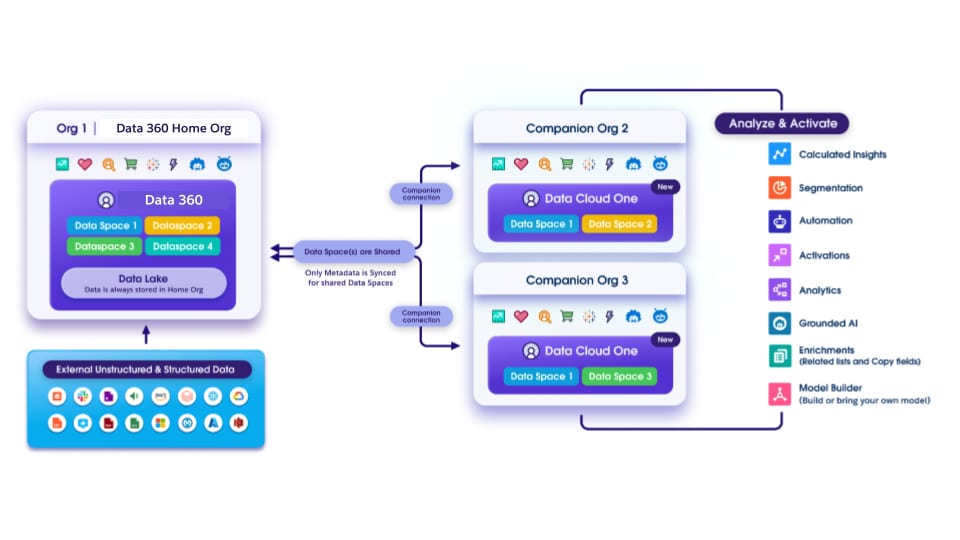 **How Data Cloud One Works**
- **Data Ingestion and Unification (Home Org)**
- All data ingestion configuration (Salesforce CRM, external sources, streaming, batch) happens from the home org only.
- The Data 360 tenant tied to the home org performs identity resolution, harmonization, modeling, and unification into trusted customer profiles.
- Data 360 administration, governance policies, tagging, and masking are applied centrally from the home org.
- **Data Space Architecture**
- From the home org, data is organized into data spaces, which act as logical containers for data, metadata, and processes.
- Enterprises can create data spaces for brands, regions, or lines of business.
- Data Space Sharing: From the home org, specific data spaces are selectively shared with companion orgs. This makes sure that only the relevant data (and associated metadata) flows to the right orgs.
- **Metadata Sharing**
Companion orgs receive metadata definitions from the home org, including data model objects (DMOs), unified profile schema, calculated insights, segments, [and more](https://help.salesforce.com/s/articleView?id=data.c360_a_companion_org_data_cloud_features.htm&type=5). These appear natively inside the companion org as if they were local assets, but they’re linked to the home org.
- **Capabilities in Home Org vs. Companion orgs**
Feature access differs between home and companion orgs. Companion orgs can’t ingest or unify data, and rely on the home org for ingestion, modeling, and unification. Companion orgs can access Data 360 data to power Data 360-powered platform features, and they can create local insights, segments, and flows on top of the shared, trusted data. In the future vision, they can also access activation features.
**How Data Cloud One Works**
- **Data Ingestion and Unification (Home Org)**
- All data ingestion configuration (Salesforce CRM, external sources, streaming, batch) happens from the home org only.
- The Data 360 tenant tied to the home org performs identity resolution, harmonization, modeling, and unification into trusted customer profiles.
- Data 360 administration, governance policies, tagging, and masking are applied centrally from the home org.
- **Data Space Architecture**
- From the home org, data is organized into data spaces, which act as logical containers for data, metadata, and processes.
- Enterprises can create data spaces for brands, regions, or lines of business.
- Data Space Sharing: From the home org, specific data spaces are selectively shared with companion orgs. This makes sure that only the relevant data (and associated metadata) flows to the right orgs.
- **Metadata Sharing**
Companion orgs receive metadata definitions from the home org, including data model objects (DMOs), unified profile schema, calculated insights, segments, [and more](https://help.salesforce.com/s/articleView?id=data.c360_a_companion_org_data_cloud_features.htm&type=5). These appear natively inside the companion org as if they were local assets, but they’re linked to the home org.
- **Capabilities in Home Org vs. Companion orgs**
Feature access differs between home and companion orgs. Companion orgs can’t ingest or unify data, and rely on the home org for ingestion, modeling, and unification. Companion orgs can access Data 360 data to power Data 360-powered platform features, and they can create local insights, segments, and flows on top of the shared, trusted data. In the future vision, they can also access activation features.
| Capability | Home Org | Companion Org |
|---|---|---|
| Connect Configure connectors, create data streams, ingest, or federate data | ✅ | ❌ |
| Harmonize and Unify Build and run data transforms and identity resolution | ✅ | ❌ |
| Govern Secure data with data space and permissions | ✅ | ✅ |
| Segment and Predict Build segments, insights, and create Einstein Studio models | ✅ | ✅ |
| Activate Everywhere activations, data actions | ✅ | ✅ |
| Platform Features: Prompt Builder, Flows, Reports, Enrichment, [and more](https://help.salesforce.com/s/articleView?id=data.c360_a_companion_org_data_cloud_features.htm&type=5) | ✅ | ✅ |
| Data 360-Powered Features: Prospecting Center, Sales and Service Cloud features, Agentforce, and more | ✅ | ✅ |
| Consideration | Multiple Independent Data 360 Orgs | One Shared Data 360 (Data Cloud One) |
|---|---|---|
| Autonomy | High autonomy for each org or business unit | Centralized governance, less autonomy per org |
| Compliance | Useful when strict separation is required (for example, regional laws) | Works best when residency allows centralization |
| Cost | Higher licensing and admin costs | More cost-efficient; one license for many orgs |
| Governance | Fragmented; policies differ per org | Centralized, consistent policies across orgs |
| Data Silos | Each org with its own view No enterprise 360 | Unified dataset, no duplication |
| AI/Analytics | Limited to each org's data | Enterprise-wide models with better accuracy |
| Complexity | More instances to manage, more integrations | Simpler architecture, fewer moving parts |
| Performance | Best for intra-org use cases | Potential increase in latency with companion org access |
| Factor | Pros | Cons |
|---|---|---|
| Data Residency | Supports regional separation while enabling collaboration. | Does not remove the need to manage multiple Data 360 orgs. |
| Data Duplication | Zero-copy; no duplication of objects. | Requires deliberate selection of objects for inclusion in each data share. |
| Governance | Sharing is explicit and deliberate (object-level). | No tags or policies flow; target org must reapply governance. |
| Complexity | Enables selective collaboration without centralization. | Requires management of multiple Data 360 orgs and data shares. |
| **AI/Analytics** | Regional AI/analytics possible; insights can be shared across orgs. | No enterprise-wide AI unless data is deliberately shared. |
| **Platform Features** | Each org's Data 360–powered features run independently. | No automatic sharing. Duplication risk if not carefully designed. |
| Cost | May reduce the need for ETL pipelines. | Still incurs the cost of multiple Data 360 orgs. Consumes credits for data queries and data sharing. |
| Consideration | Data Cloud One (Preferred for multi-org) | Data Sharing between Data 360 Orgs |
|---|---|---|
| Single Source of Truth | Yes—all orgs share a data model. | No—each Data 360 has its own data model. |
| Compliance | Works only when residency allows centralization. | Needed when residency laws prevent centralization. |
| Governance | Centralized, consistent. | Federated; deliberate object-level shares. |
| Complexity | Fewer moving parts, simpler. | More complex—requires configuration data shares and multiple Data orgs. |
| AI/Analytics | Enterprise-wide AI models. | Regional AI. Selectively share insights. |
| Platform Features | Shared Data 360 means all features work consistently across home + companions. | Features run independently in each Data 360; sharing must be explicit. |
| Area to Consider | Common Questions |
|---|---|
| Existing Tools and Landscape | Is there an existing ESB or ETL solution in place? Does the data involved have regulatory or compliance requirements? Where are the systems you're trying to integrate located (in the cloud or on-premise)? |
| Data Flow (Timing, Expected User Experience, Directionality) | Does the data need to move synchronously, asynchronously or can it be batched/scheduled? Is data replication required? What system should be the source of truth? What is the data source? What is the target destination? Is user interaction required? Does the user need to see the result of the integration? What are the needs around exception handling (retry, notify, fail)? How tightly-coupled should systems be? |
| Implementation | What is the level of effort for non-Salesforce systems? What teams are responsible for delivering integrations? What tools do they prefer to use? |
| Maintainability | What teams will be expected to maintain the integration? What skills do they currently have? What skills will they need in the future? What is the total cost of ownership over time? How important is the ability to test, debug, troubleshoot with low or pro code tools? |
| Data Volume | How much data is involved in the integration? Will you be working with Large Data Volumes (LDV)? How frequently will changes happen in bulk? What sort of impact will singleton updates have? How often will they occur? |
| Limits | Will the data need to undergo complex transformation? Does the data need to be combined from several source systems? How often will an integration take place on a per user basis? How many users total? Have you planned ahead for bulk data loads (example: initial data load for a new instance)? |
| From Salesforce to External System | From External System to Salesforce | Execution | Additional License Required | |
|---|---|---|---|---|
| Apex Actions | Available | Available | Server-Side | No |
| Change Data Capture | Available | Not Available | Server-Side | No* |
| Custom Apex (REST and SOAP Web Services) | Available | Available | Server-Side | No |
| External Services | Available | Not Available | Server-Side | No |
| Heroku Connect | Available | Available | Server-Side | Yes |
| Data 360 | Available | Available | Server-Side | Yes |
| MuleSoft Anypoint | Available | Available | Server-Side | Yes |
| Native Salesforce APIs | Not Available | Available | Server-Side | No |
| Omniscript | Available | Available | Client-Side*** | Yes |
| OmniStudio Integration Procedure | Available | Available | Server-Side | Yes |
| Outbound Messaging | Not Ideal | Not Available | Server-Side | No |
| Platform Events | Available | Available | Server-Side | No** |
| Salesforce Connect/External Objects | Available | Available | Server-Side | Yes |
| Guidance | Licensing | Timing | Volume & Scale | Delivery & Maintenance | Privacy & Security | |||||
|---|---|---|---|---|---|---|---|---|---|---|
| When to Use | Additional License | Sync (Request/Reply) or Async (Fire/Forget) | Multi-Object Support | LDV/Bulk | Testing & Deployment** | Debugging | Built-In Error Handling/Retry Behavior | Can Use with Data Encrypted at Rest | Authentication Protocol | |
| Change Data Capture | When you need to publish record-level changes made in Salesforce to an external system and don't need a custom payload. | Required | Async | No | No | Yes | With pro-code tools | Yes | Yes | OAuth |
| External Services | When you're orchestrating a process using Flow, Apex, Einstein Bots or OmniStudio and the external system APIs are described using OpenAPI specifications. | Not Required | Sync | Yes | No | Yes | With pro-code tools | No | N/A | Named Credentials |
| Heroku Connect | When you want to extend your data with bidirectional sync to enable mobile and other apps on Heroku, and you want the data to also be replicated to Salesforce. | Required | Async | Yes | Yes | No | With pro code tools | Yes | Yes, via Shield Connect | OAuth |
| OmniStudio Integration Procedure | When you need to transform data without user interaction and improve performance by processing on the server instead of the browser. | Required | Both | Yes | Yes | Yes | Declarative support | Yes | Yes | Named Credentials |
| Salesforce Connect/External Objects | When you want data to appear in the Salesforce UI, but want the data to be stored in an external system. Data is not replicated to Salesforce. | Required | Sync | No | Yes* | Yes | With pro-code tools & a declarative tracer | No | N/A | Named Credentials |
| *OData adapters older than version 4.01 are subject to callout limits. See OData Callout Rate Limit Considerations for more details. ** Testing and Deployment refers to the ability to build in a lower environment and deploy via the Metadata API, packages, or change sets to production. | ||||||||||
| Guidance | Licensing | Timing | Volume & Scale | Delivery & Maintenance | Privacy & Security | |||||
|---|---|---|---|---|---|---|---|---|---|---|
| When to Use | Additional License | Sync (Request/Reply) or Async (Fire/Forget) | Multi-Object Support | LDV/Bulk | Testing & Deployment** | Debugging | Built-In Error Handling/Retry Behavior | Can Use with Data Encrypted at Rest | Authentication Protocol | |
| Apex Actions | When you want to automate callouts to another system via Salesforce Flow. A developer can write an Apex class that a flow can invoke, or you can download a prebuilt solution from AppExchange. | Not Required | Both | Yes | No | Yes | With pro-code tools | No | Yes | Multiple |
| Event Relays | When you need to send platform events and change data capture events to Amazon EventBridge from Salesforce. Event Relays only connect to AWS Eventbridge | No | Async | Yes | No | Yes | Yes | Yes | Yes | HTTP/1.1 with TLS |
| Outbound Messaging | When you need to send SOAP messages over HTTP(S) to a designated endpoint with guaranteed receipt when triggered by a workflow rule. | Not Required | Async | No | No | Yes | Declarative support | Yes | Yes | Two-way TLS |
| Platform Events | When you need a custom-defined, structured payload for near real-time changes in Salesforce or an external system. | Not Required* | Async | Yes | No | Yes | With pro-code tools | Yes | Yes | OAuth |
| Salesforce Connect/External Objects (with custom Apex adapters) | When you want data to appear in the Salesforce UI, but want the data to be stored in an external system that cannot use standard protocols like OData or GraphQL. | Required | Both | Yes | Yes | Yes | With pro-code tools | No | N/A | Multiple |
| Data 360 | When you want harmonized data from different sources in one data store, or you want to replicate your data to other Salesforce orgs or to other external systems. | Required | Both | Yes | Yes | Yes | Yes | Yes | Yes | Multiple |
| Guidance | Licensing | Timing | Volume & Scale | Delivery & Maintenance | Privacy & Security | |||||
|---|---|---|---|---|---|---|---|---|---|---|
| When to Use | Additional License | Sync (Request/Reply) or Async (Fire/Forget) | Multi-Object Support | LDV/Bulk | Testing & Deployment** | Debugging | Built-In Error Handling/Retry Behavior | Can Use with Data Encrypted at Rest | Authentication Protocol | |
| Custom Apex | When you need more functionality than is available in low-code tools. | Not Required | Both | Yes | Yes | Yes | With pro-code tools | No | Yes* | Multiple |
| External Services | Integrating from code with external system APIs are described using OpenAPI specifications. | Not Required | Sync | Yes | No | Yes | With pro-code tools | No | N/A | Multiple |
| MuleSoft Anypoint | When you need a single enterprise-grade, unified solution to build, orchestrate, and manage your integrations; when you need to replace a legacy point-to-point architecture; or when you need API management support. | Required | Both | Yes | Yes | Yes | With pro-code tools | No | Yes* | Multiple |
| Guidance | Licensing | Timing | Volume & Scale | Delivery & Maintenance | Privacy & Security | |||||
|---|---|---|---|---|---|---|---|---|---|---|
| When to Use | Additional License | Sync (Request/Reply) or Async (Fire/Forget) | Multi-Object Support | LDV/Bulk | Testing & Deployment* | Debugging | Built-In Error Handling/Retry Behavior | Can Use with Data Encrypted at Rest | Authentication Protocol | |
| Heroku Connect | When you want to extend your data with bidirectional sync to enable mobile and other apps on Heroku, and you want the data to also be replicated to Salesforce. | Required | Async | Yes | Yes | No | With pro-code tools | Yes | Yes, via Shield Connect | OAuth |
| OmniStudio Integration Procedure | When you need to import and transform data from third-party sources without user interaction. | Required | Both | Yes | Yes | Yes | Declarative support | No | Yes | Named Credentials |
| Salesforce Connect/External Objects | When you want data to appear in the Salesforce UI, but want the data to be stored in an external system that can use standard protocols like OData or GraphQL. | Required | Sync | Yes | Yes | Yes | With pro-code tools | No | N/A | Multiple |
| Guidance | Licensing | Timing | Volume & Scale | Delivery & Maintenance | Privacy & Security | |||||
|---|---|---|---|---|---|---|---|---|---|---|
| When to Use | Additional License | Sync (Request/Reply) or Async (Fire/Forget) | Multi-Object Support | LDV/Bulk | Testing & Deployment** | Debugging | Built-In Error Handling/Retry Behavior | Can Use with Data Encrypted at Rest | Authentication Protocol | |
| Platform Events | When you need a custom-defined, structured payload for near real-time changes in Salesforce or an external system. | Not Required* | Async | Yes | No | Yes | With pro-code tools | Yes | Yes | OAuth |
| Salesforce Connect/External Objects (with custom Apex adapters) | When you need data to appear in the Salesforce UI, but want the data to be stored in an external system that cannot use OData 2.0/4.0 protocols. | Required | Both | Yes | Yes | Yes | With pro-code tools | No | N/A | Multiple |
| Data 360 | When you want harmonized data from different sources in one data store, or you want to replicate your data from other Salesforce orgs or to other external systems. Data 360 also supports virtualization for some platforms. | Required | Both | Yes | Yes | Yes | No | Yes | Yes | Multiple |
| Guidance | Licensing | Timing | Volume & Scale | Delivery & Maintenance | Privacy & Security | |||||
|---|---|---|---|---|---|---|---|---|---|---|
| When to Use | Additional License | Sync (Request/Reply) or Async (Fire/Forget) | Multi-Object Support | LDV/Bulk | Testing & Deployment**** | Debugging | Built-In Error Handling/Retry Behavior | Can Use with Data Encrypted at Rest | Authentication Protocol | |
| Custom Apex REST & SOAP Web Services | When you need more functionality than provided by the native API endpoints such as cross object processing or other complex logic. | Not Required | Both | Yes | Yes | Yes | With pro-code tools | No | Yes*** | Multiple |
| MuleSoft Anypoint | When you need a single enterprise-grade, unified solution to build, orchestrate, and manage your integrations; when you need to replace a legacy point-to-point architecture; or when you need API management support. | Required | Both | Yes | Yes | Yes | With pro-code tools | No | Yes*** | Multiple |
| Native Salesforce APIs | When you need more control or have a pro-code skill set to build integrations via REST API, SOAP API, Bulk API, or GraphQL APIs, or gRPC. | Not Required* | Both | Yes***** | Yes | Yes | With pro-code tools | Yes** | Yes*** | Multiple |
| Guidance | Cost | Timing | Volume & Scale | Delivery & Maintenance | Privacy & Security | Tools to Implement | |||||
|---|---|---|---|---|---|---|---|---|---|---|---|
| When to Use | Additional License | Sync (Request/Reply) or Async (Fire/Forget) | Multi-Object Support | LDV/Bulk | Testing & Deployment* | Debugging | Built-In Error Handling/Retry Behavior | Can Use with Data Encrypted at Rest | Authentication Protocol | Low Code → Pro Code | |
| Heroku Connect | When you want to extend your data with bidirectional sync across Salesforce orgs and also enable access to the data from mobile and other apps running on Heroku | Required | Async | Yes | Yes | No | With pro-code tools | Yes | Yes, via Shield Connect | OAuth | Low Code |
| MuleSoft Anypoint | When you need a single enterprise-grade, unified solution to build, orchestrate, and manage your integrations; when you need to replace a legacy point-to-point architecture; or when you need API management support | Required | Both | Yes | Yes | Yes | With pro-code tools | No | Yes** | Multiple | Pro Code |
| Native Salesforce APIs | When Salesforce or Heroku Connect are not an option or you need more complex processing | Not Required | Both | No | Yes | Yes | With pro-code tools | No | Yes** | Multiple | Pro Code |
| Change Data Capture | When you need to publish record-level changes made in Salesforce to an external system and don't need a custom payload. | Required | Async | No | No | Yes | With pro-code tools | Yes | Yes | OAuth | |
| Salesforce Connect with Cross-Org Adapter | When you want users in one org to view or edit records in a different org without data replication | Required | Async | Yes | Yes | Yes | With pro-code tools | N/A | N/A | Multiple | Low Code |
| Data 360 | When you want users in one org to view or edit records in a different org with data replicated in Data 360. | Required | Both | Yes | Yes | Yes | With pro-code tools | Yes | Yes | Multiple | Hybrid |
| Agentforce | Traditional Automation | Integration |
|---|---|---|
|
The Salesforce Platform is a comprehensive, AI-driven platform that unifies employees, autonomous AI agents, company data, and applications into a single, trusted system to enhance productivity and customer experience. It enables the creation of an "agentic enterprise" by connecting Customer 360 apps, Data Cloud, and Slack for end-to-end automation. |
 |
MuleSoft is Salesforce's leading integration platform that enables organizations to connect applications, data, and devices across on-premises and cloud environments. MuleSoft is a platform that gives IT the platforms to unlock data across systems, develop scalable integration and automation frameworks, and create differentiated, connected experiences - fast. |
| Decision Point | Guidance |
|---|---|
| Near real-time notifications | Event-driven architecture patterns like publish/subscribe, fanout, and streaming tend to work well in scenarios where multiple applications need to be notified of status changes or record updates in near real-time. |
| Parallel processing | Patterns such as publish/subscribe tend to work well in scenarios where large volumes of data or highly complex messages necessitate distributing the processing load among multiple systems. |
| High-volume reads | The Passed Messages and Queuing patterns are commonly used in scenarios where organizations experience surges, and the volume of messages being produced can exceed subscribers' ability to immediately process them. |
| High-volume writes | The Streaming and Queuing patterns work well in many scenarios where organizations experience surges in the number of messages produced. |
| Sending the same data to different systems | While publish/subscribe tends to be a fairly common solution for organizations that need to send the same data to multiple systems, it can be addressed by most patterns covered here. Be sure to review them in detail to find the best fit. |
| Frequent introduction of new systems or devices | The publish/subscribe, Streaming, and Queuing patterns tend to work well for scenarios where the overall landscape tends to be in flux, with new systems and devices being added regularly. In this scenario, a new system or device simply needs to become a subscriber to the event bus or associated with a queue, to begin receiving messages rather than requiring a custom point-to-point integration. |
| IoT devices | Because IoT devices typically deliver frequent updates and can also generate a surge of messages in some scenarios, the Streaming and Queuing patterns tend to work well when integrating them into an IT landscape. |
| Offline mobile devices and systems | Mobile devices that need to work in areas with low quality or nonexistent internet access or systems that may be offline at the time messages are delivered will benefit from the Queuing pattern, which enables them to connect to their queues and retrieve any relevant messages once they're back online. |
| Decision Point | Guidance/Questions to Ask |
|---|---|
| Business requirements | Is there a genuine business need for any of the functionality described in the [When to Use an Event-Driven Architecture](#when-to-use-an-event-driven-architecture) section? |
| Technical requirements | Is the integration you're designing an obvious fit for a different pattern, such as data virtualization, batch or request/reply? In other words, are you trying to fit a square peg into a round hole? |
| Processes requiring humans to wait for responses | Any integration that involves a human waiting for a response from the target system is not a good fit for event-driven architectures, as they are designed for asynchronous execution and can't guarantee a response time. Consider whether processes like this are optimal for your organization prior to implementing technical solutions. See [Well-Architected - Operational Excellence](/docs/architect/well-architected/guide/operational-excellence.html) for more information. |
| Infrequently changing source data | If the data in your source system changes so infrequently that periodic updates are sufficient, you can likely simplify your architecture by using [batch patterns](https://developer.salesforce.com/docs/atlas.en-us.integration_patterns_and_practices.meta/integration_patterns_and_practices/integ_pat_batch_data_sync.htm) instead of event-driven patterns. |
| Implementation requirements | Do the majority of systems involved in your solution support event-driven architectures? What would be required to use event-driven architectures with the systems that don't support them (for example, upgrades, customizations, or middleware)? What level of effort would be needed to meet these requirements? |
| Message structure stability | How often will your message structures need to change? Which systems will be affected by such a change and what will the remediation process be? |
| Organizational Governance | Do you have a governance structure in place to ensure that all stakeholders are informed of and able to weigh in on changes to message structures, triggers, and other architecture- and process-related decisions? |
| Required skill sets | Does your staff have experience with event-driven architectures and will they know how to support them? |
| Pattern | Near Real-Time | Unique Message Copy | Guarantee Delivery | Reduce Message Size | Transform Data |
|---|---|---|---|---|---|
| Publish / Subscribe | ✓ | ✓ | ✓ | ||
| Fanout | ✓ | ✓ | ✓ | ||
| Passed Messages | ✓ | ✓ | ✓ | ✓ | |
| Streaming | ✓ | ✓ | ✓ | ||
| Queueing | ✓ | ✓ | ✓ |
| Tool | Description | Required Skills | |
|---|---|---|---|
| MuleSoft | Anypoint Platform | Platform that enables data integration using layers of APIs. | Pro-code |
| Salesforce Pub/Sub Connector | Connector for Pub/Sub API, which provides a single interface for publishing and subscribing to platform events, real-time event monitoring events, and change data capture events. | Pro-code | |
| MuleSoft Anypoint JMS Connector | Connector that enables sending and receiving messages to queues and topics for any message service that implements the Java Message Service (JMS) specification. | Pro-code | |
| MuleSoft Anypoint Apache Kafka Connector | Connector to move data between Apache Kafka and enterprise applications and services. | Pro-code | |
| MuleSoft Anypoint Solace Connector | A connector for Solace PubSub+ event brokers with native API integration using the JCSMP Java SDK | Pro-code | |
| MuleSoft Anypoint MQ Connector | A multi-tenant, cloud messaging service that enables customers to perform advanced asynchronous messaging among their applications. | Pro-code | |
| MuleSoft Anypoint MQTT Connector | An MQTT (Message Queuing Telemetry Transport) v3.x protocol-compliant MuleSoft extension. | Pro-code | |
| MuleSoft Anypoint AMQP Connector | A connector that enables your application to publish and consume messages using an AMQP 0.9.1-compliant broker. | Pro-code | |
| MuleSoft Anypoint Event-Driven (ASync) API | Industry-agnostic language that supports the publication of event-driven APIs by separating them into event, channel, and transport layers. | Pro-code | |
| MuleSoft Anypoint MQ | Multitenant cloud messaging service that enables customers to perform advanced asynchronous messaging between their applications. | Pro-code | |
| MuleSoft Anypoint Data Streams | Framework available within MuleSoft Anypoint for publishing and subscribing to streaming data. | Pro-code | |
| Salesforce Platform | Apache Kafka on Heroku | Heroku add-on that provides Apache Kafka as a service with full platform integration into the Heroku platform. | Pro-code |
| Change Data Capture | Change events log, which publishes changes to Salesforce records. Changes include creation of a new record, updates to an existing record, deletion of a record, and undeletion of a record. | Low-code to Pro-code | |
| Outbound Messages | Actions that send XML messages to external endpoints when field values are updated within Salesforce. | Low-code | |
| Platform Events | Secure and scalable messages that contain custom event data. | Low-code to Pro-code | |
| Pub/Sub API | API that enables subscriptions to platform events, Change Data Capture events, and/or Real-Time Event Monitoring events. | Pro-code | |
| Event Relays | Enables platform events and change data capture events to be sent from Salesforce to Amazon EventBridge. Note that Event Relays only connect to AWS Eventbridge. | Low-code | |
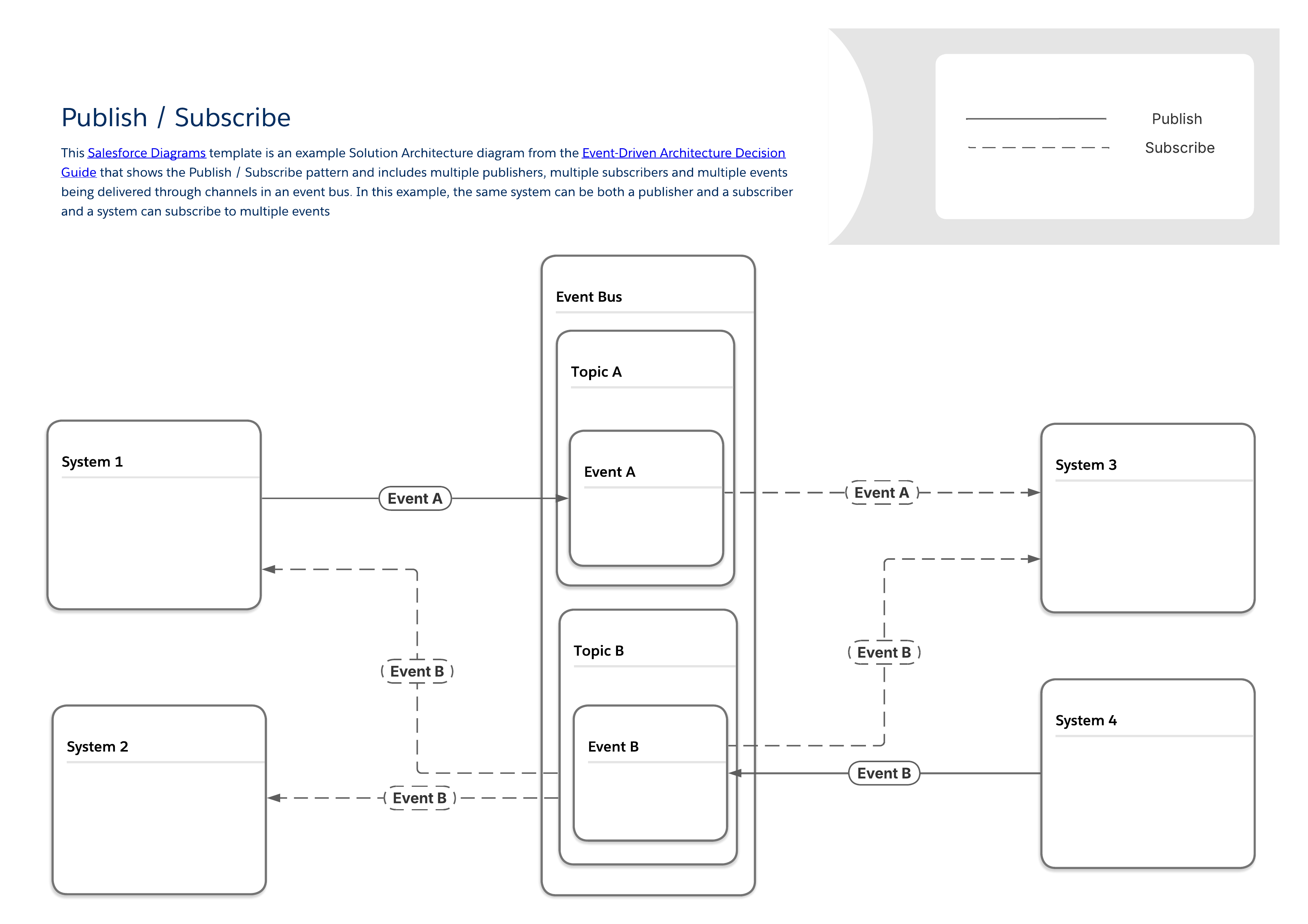 #### Tools Relevant to the Publish/Subscribe Pattern
| Event Flow and Behavior | Payload Considerations | ||||||
|---|---|---|---|---|---|---|---|
| Available Tools | Required Skills | Publish Via | Subscribe Via | Replay Period | Payload Structure | Payload Limits | |
| MuleSoft | Anypoint Platform | Pro-code | APIs | APIs | As Configured | User Defined | None |
| Salesforce Pub/Sub Connector | Pro-code | APIs | APIs | As Configured | User Defined | None | |
| MuleSoft Anypoint JMS Connector | Pro-code | APIs | APIs | As Configured | User Defined | None | |
| MuleSoft Anypoint Apache Kafka Connector | Pro-code | APIs | APIs | As Configured | User Defined | None | |
| MuleSoft Anypoint Solace Connector | Pro-code | APIs | APIs | As Configured | User Defined | None | |
| MuleSoft Anypoint MQ Connector | Pro-code | APIs | APIs | As Configured | User Defined | None | |
| MuleSoft Anypoint MQTT Connector | Pro-code | APIs | APIs | As Configured | User Defined | None | |
| MuleSoft Anypoint AMQP Connector | Pro-code | APIs | APIs | As Configured | User Defined | None | |
| MuleSoft Anypoint Event-Driven (ASync) API | Pro-code | APIs | APIs | As Configured | User Defined | None | |
| MuleSoft Anypoint MQ | Pro-code | APIs | APIs | As Configured | User Defined | None | |
| Salesforce Platform | Apache Kafka on Heroku | Pro-code | APIs, record changes in Heroku Postgres | N/A | 1-6 weeks | User Defined | User Defined |
| Change Data Capture | Low-code to Pro-code | Record Changes | Apex, APIs, Lightning Web Components (LWC) | 3 days | Predefined | 1 MB | |
| Outbound Messages* | Low-code | Flow and Workflow Rules | N/A | 24 hours | User Defined | 100 notifications per message | |
| Platform Events | Low-code to Pro-code | APIs, Apex, Flow | Apex, APIs, Flow, LWC | 3 days | User Defined | 1 MB | |
| Pub/Sub API | Pro-code | Pub/Sub API or APIs, Apex, Flow | Pub/Sub API | 3 days | User Defined | 1 MB | |
| Event Relays** | Low-code | Platform Events, Change Data Capture | API | 3 days | User Defined | 1 MB | |
| *Salesforce will continue to support outbound messages within current functional capabilities, but does not plan to make further investments in this technology. **Event Relays only connect to AWS Eventbridge | |||||||
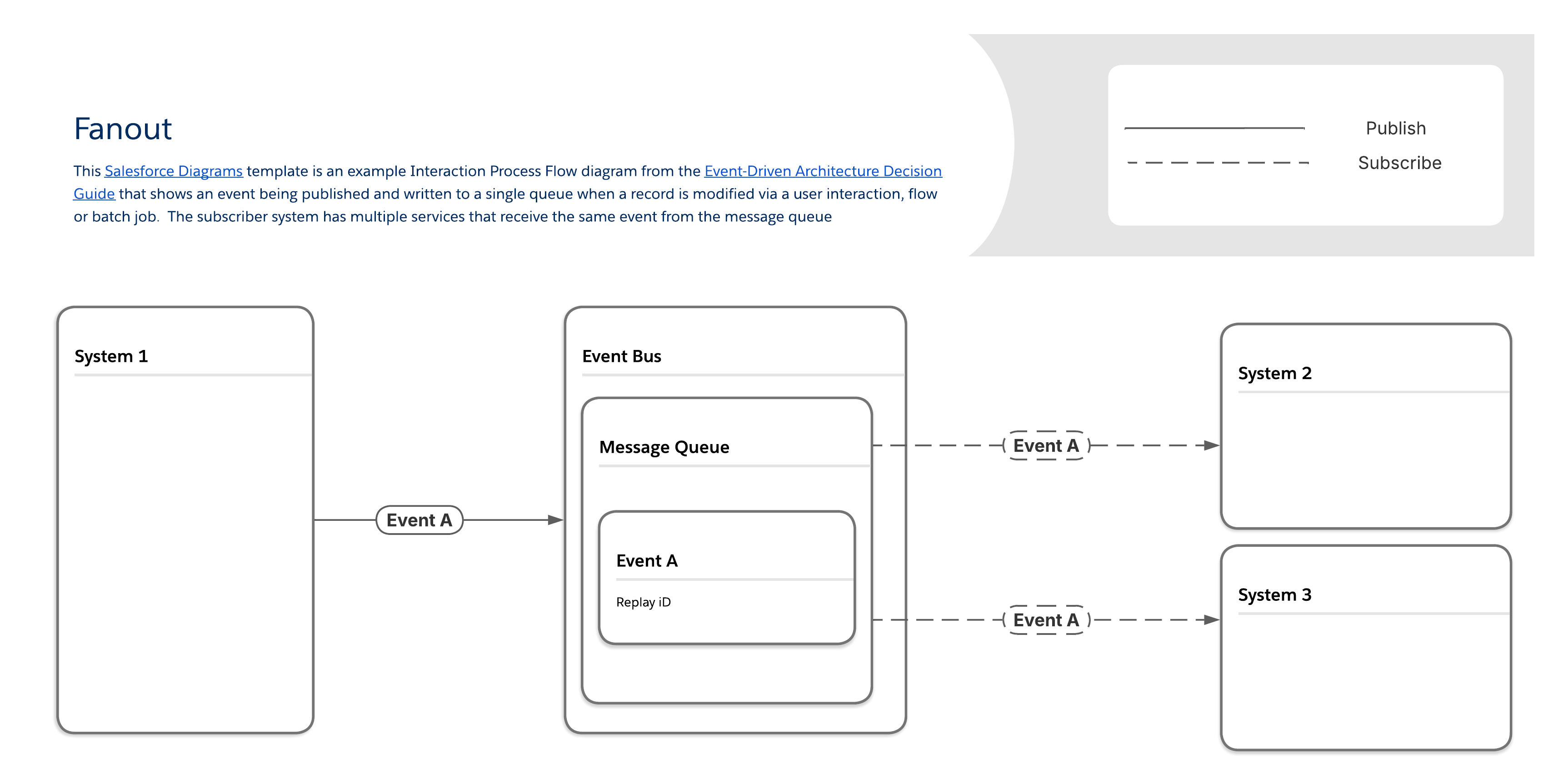 #### Tools Relevant to the Fanout Pattern
| Event Flow and Behavior | Payload Considerations | ||||||
|---|---|---|---|---|---|---|---|
| Available Tools | Required Skills | Publish Via | Subscribe Via | Replay Period | Payload Structure | Payload Limits | |
| MuleSoft | MuleSoft Anypoint JMS Connector | Pro-code | APIs | APIs | As Configured | User Defined | None |
| Salesforce Pub/Sub Connector | Pro-code | APIs | APIs | As Configured | User Defined | None | |
| MuleSoft Anypoint Apache Kafka Connector | Pro-code | APIs | APIs | As Configured | User Defined | None | |
| MuleSoft Anypoint Solace Connector | Pro-code | APIs | APIs | As Configured | User Defined | None | |
| MuleSoft Anypoint MQ Connector | Pro-code | APIs | APIs | As Configured | User Defined | None | |
| MuleSoft Anypoint MQTT Connector | Pro-code | APIs | APIs | As Configured | User Defined | None | |
| MuleSoft Anypoint AMQP Connector | Pro-code | APIs | APIs | As Configured | User Defined | None | |
| MuleSoft Anypoint MQ | Pro-code | APIs | APIs | As Configured | User Defined | None | |
| Salesforce Platform | Apache Kafka on Heroku | Pro-code | APIs, record changes in Heroku Postgres | N/A | 1-6 weeks | User Defined | User Defined |
| Change Data Capture | Low-code to Pro-code | Record Changes | Apex, APIs, Lightning Web Components (LWC) | 3 days | Predefined | 1 MB | |
| Platform Events | Low-code to Pro-code | APIs, Apex, Flow | Apex, APIs, Flow, LWC | 3 days | User Defined | 1 MB | |
| Pub/Sub API | Pro-code | Pub/Sub API or Apex, APIs, Flow | Pub/Sub API | 3 days | User Defined | 1 MB | |
| Event Relays* | Low-code | Platform Events, Change Data Capture | API | 3 days | User Defined | 1 MB | |
| *Event Relays only send data to AWS Eventbridge | |||||||
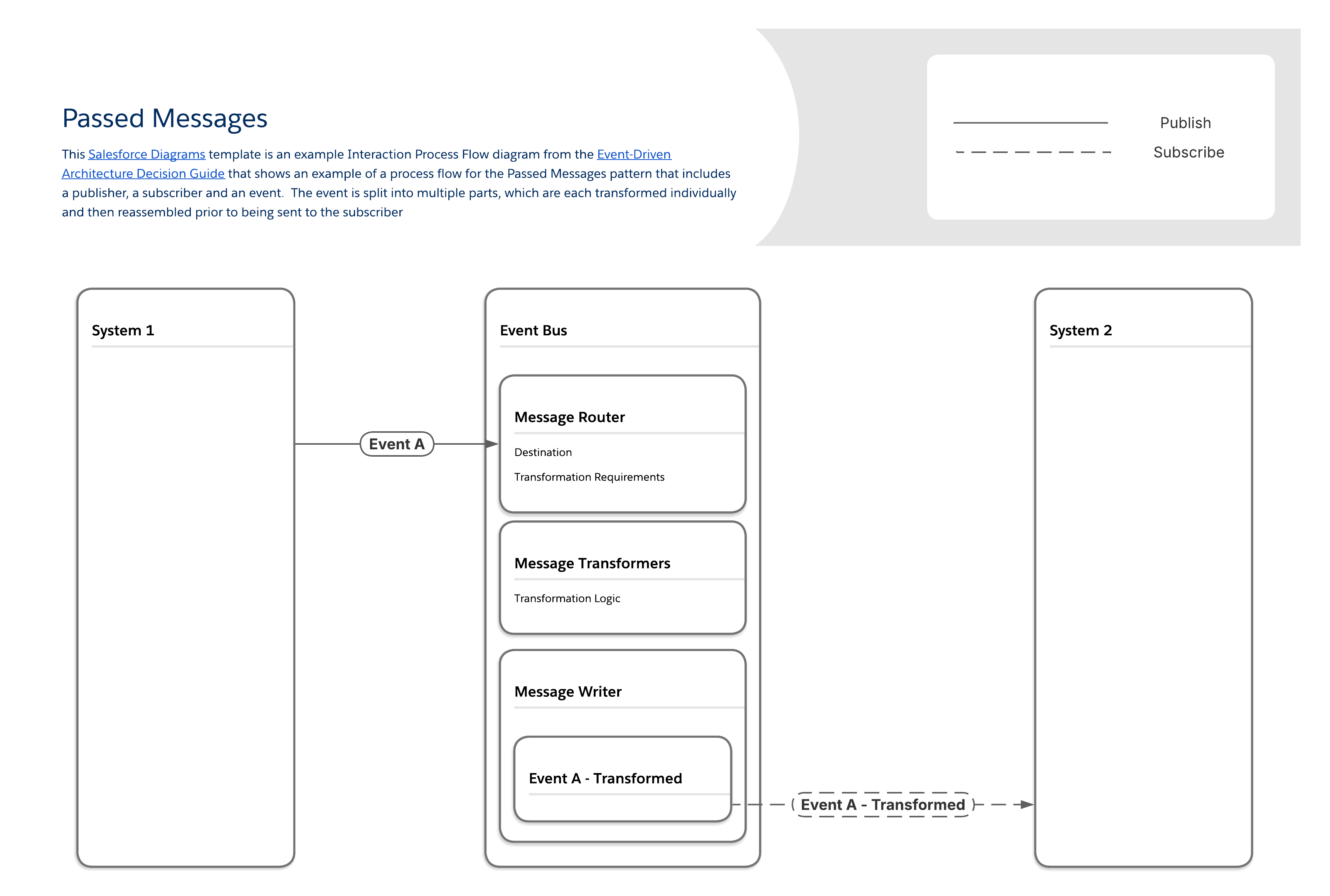 #### Tools Relevant to the Passed Messages Pattern
| Event Flow and Behavior | Payload Considerations | ||||||
|---|---|---|---|---|---|---|---|
| Available Tools | Required Skills | Publish Via | Subscribe Via | Replay Period | Payload Structure | Payload Limits | |
| MuleSoft | MuleSoft Anypoint Apache Kafka Connector | Pro-code | APIs | APIs | As Configured | User Defined | None |
| Salesforce Pub/Sub Connector | Pro-code | APIs | APIs | As Configured | User Defined | None | |
| Salesforce Platform | Apache Kafka on Heroku | Pro-code | APIs, record changes in Heroku Postgres | N/A | 1-6 weeks | User Defined | User Defined |
| Change Data Capture | Low-code to Pro-code | Record Changes | Apex, APIs, Lightning Web Components (LWC) | 3 days | Predefined | 1 MB | |
| Platform Events | Low-code to Pro-code | APIs, Apex, Flow | Apex, APIs, Flow, LWC | 3 days | User Defined | 1 MB | |
| Pub/Sub API | Pro-code | Pub/Sub API or APIs, Apex Flow | Pub/Sub API | 3 days | User Defined | 1 MB | |
| Event Relays* | Low-code | Platform Events, Change Data Capture | API | 3 days | User Defined | 1 MB | |
| *Event Relays only send data to AWS Eventbridge | |||||||
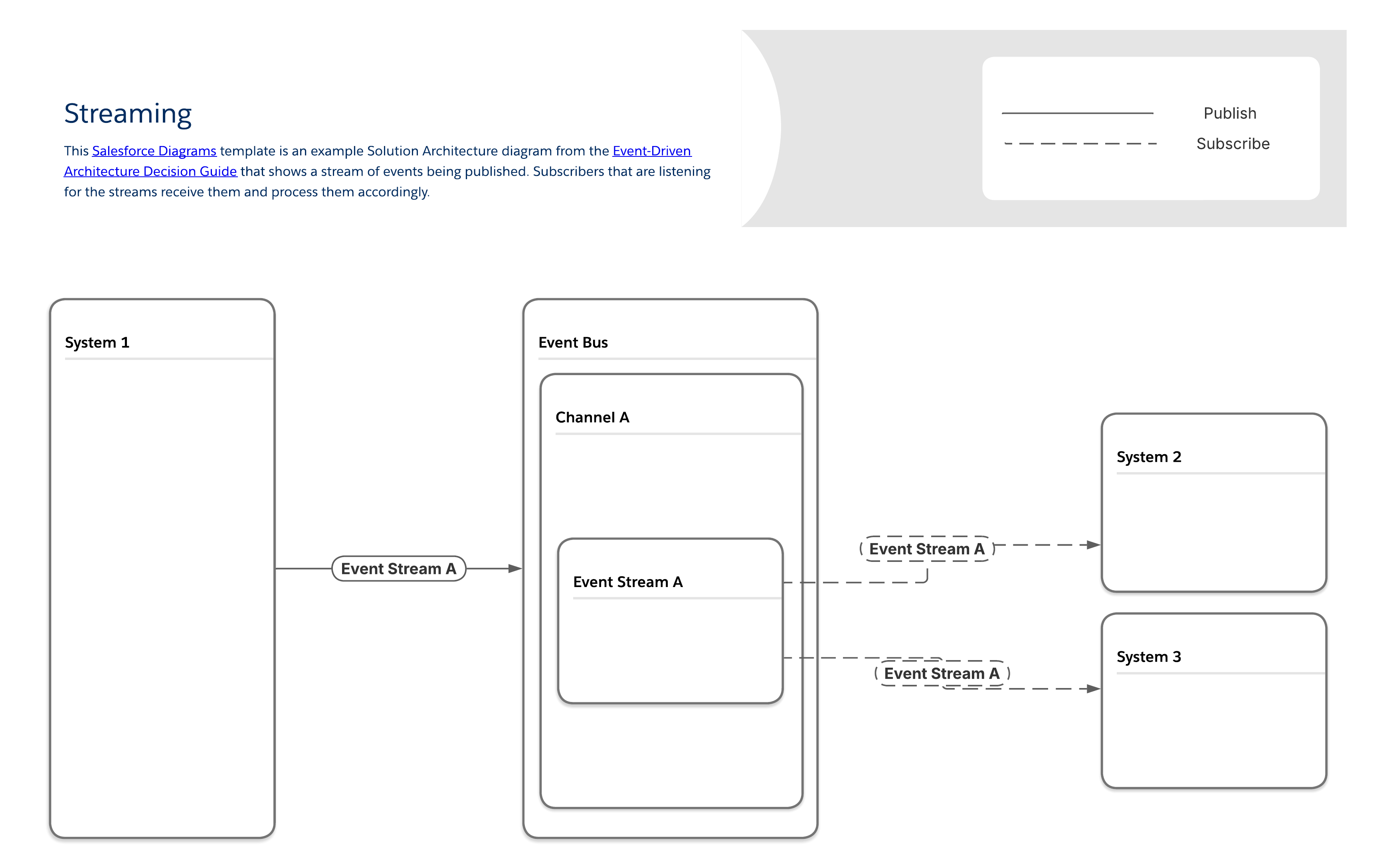 #### Tools Relevant to the Streaming Pattern
| Event Flow and Behavior | Payload Considerations | ||||||
|---|---|---|---|---|---|---|---|
| Available Tools | Required Skills | Publish Via | Subscribe Via | Replay Period | Payload Structure | Payload Limits | |
| MuleSoft | MuleSoft Anypoint Data Streams | Pro-code | APIs | APIs | As Configured | User Defined | None |
| Salesforce Pub/Sub Connector | Pro-code | APIs | APIs | As Configured | User Defined | None | |
| MuleSoft Anypoint Apache Kafka Connector | Pro-code | APIs | APIs | As Configured | User Defined | None | |
| Salesforce Platform | Apache Kafka on Heroku | Pro-code | APIs, record changes in Heroku Postgres | N/A | 1-6 weeks | User Defined | User Defined |
| Pub/Sub API | Pro-code | Pub/Sub API or APIs, Apex Flow | Pub/Sub API | 3 days | User Defined | 1 MB | |
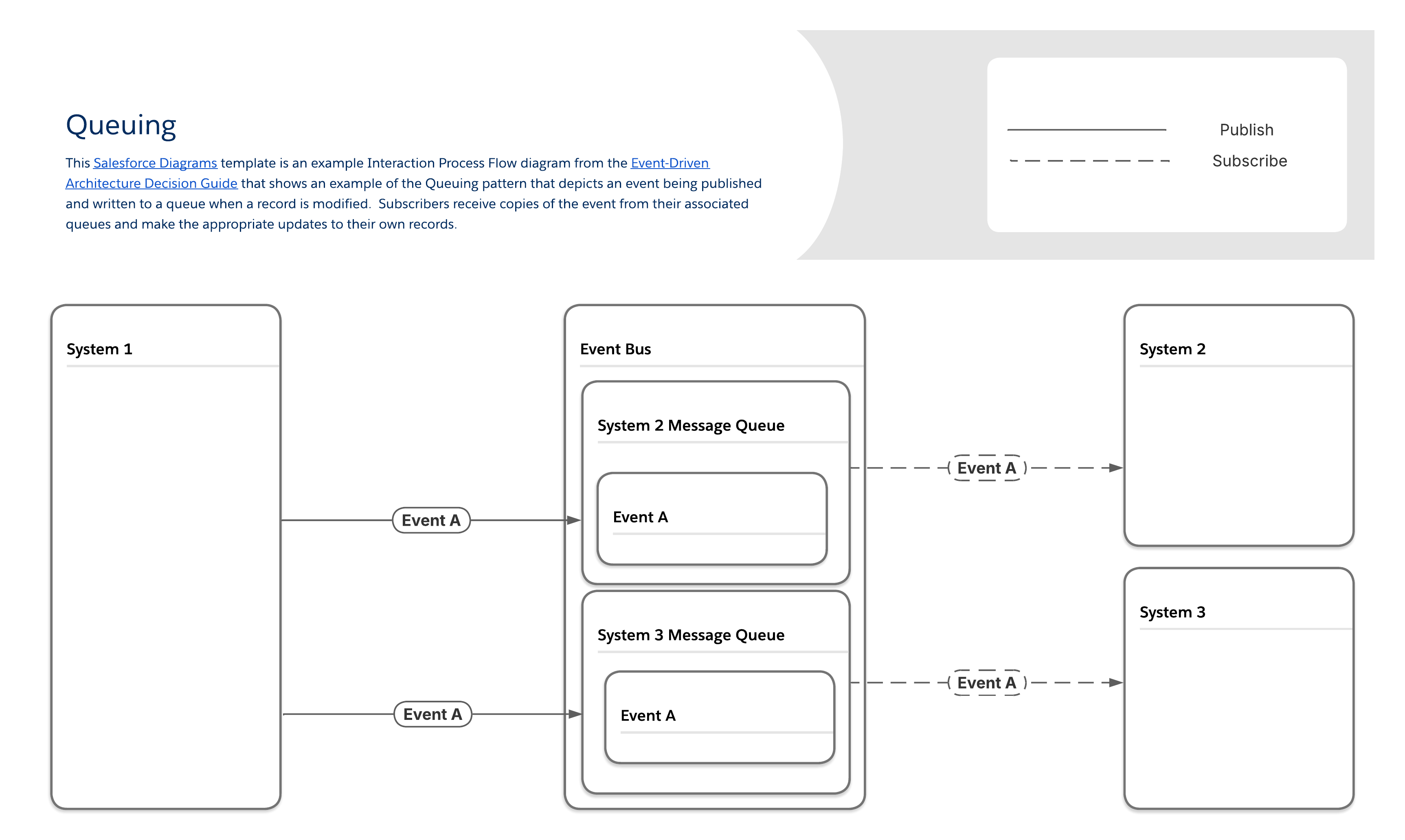 #### Tools Relevant to the Queuing Pattern
| Event Flow and Behavior | Payload Considerations | ||||||
|---|---|---|---|---|---|---|---|
| Available Tools | Required Skills | Publish Via | Subscribe Via | Replay Period | Payload Structure | Payload Limits | |
| MuleSoft | MuleSoft Anypoint MQ | Pro-code | APIs | APIs | As Configured | User Defined | None |
| Salesforce Pub/Sub Connector | Pro-code | APIs | APIs | As Configured | User Defined | None | |
| MuleSoft Anypoint Apache Kafka Connector | Pro-code | APIs | APIs | As Configured | User Defined | None | |
| MuleSoft Anypoint MQ Connector | Pro-code | APIs | APIs | As Configured | User Defined | None | |
| MuleSoft Anypoint MQTT Connector | Pro-code | APIs | APIs | As Configured | User Defined | None | |
| MuleSoft Anypoint AMQP Connector | Pro-code | APIs | APIs | As Configured | User Defined | None | |
| Salesforce Platform | Apache Kafka on Heroku | Pro-code | APIs, record changes in Heroku Postgres | N/A | 1-6 weeks | User Defined | User Defined |
| Change Data Capture | Low-code to Pro-code | Record Changes | Apex, APIs, Lightning Web Components (LWC) | 3 days | Predefined | 1 MB | |
| Platform Events | Low-code to Pro-code | APIs, Apex, Flow | Apex, APIs, Flow, LWC | 3 days | User Defined | 1 MB | |
| Pub/Sub API | Pro-code | Pub/Sub API or APIs, Apex, Flow | Pub/Sub API | 3 days | User Defined | 1 MB | |
| Event Relays* | Low-code | Platform Events, Change Data Capture | API | 3 days | User Defined | 1 MB | |
| *Event Relays only send data to AWS Eventbridge | |||||||
| Flow | Salesforce Flow is a powerful, point-and-click automation tool that lets users build complex business processes, screens, and logic visually using Flow Builder, without writing code. It automates tasks like data updates, sending emails, and guiding users, offering flexibility through types like Screen Flows (user interaction) and Triggered Flows (record/scheduled events). |
| Apex | Salesforce Apex is a proprietary, object-oriented programming language for the Salesforce platform, similar to Java, used to build custom business logic, automate processes, and extend core CRM functionalities beyond declarative tools. |
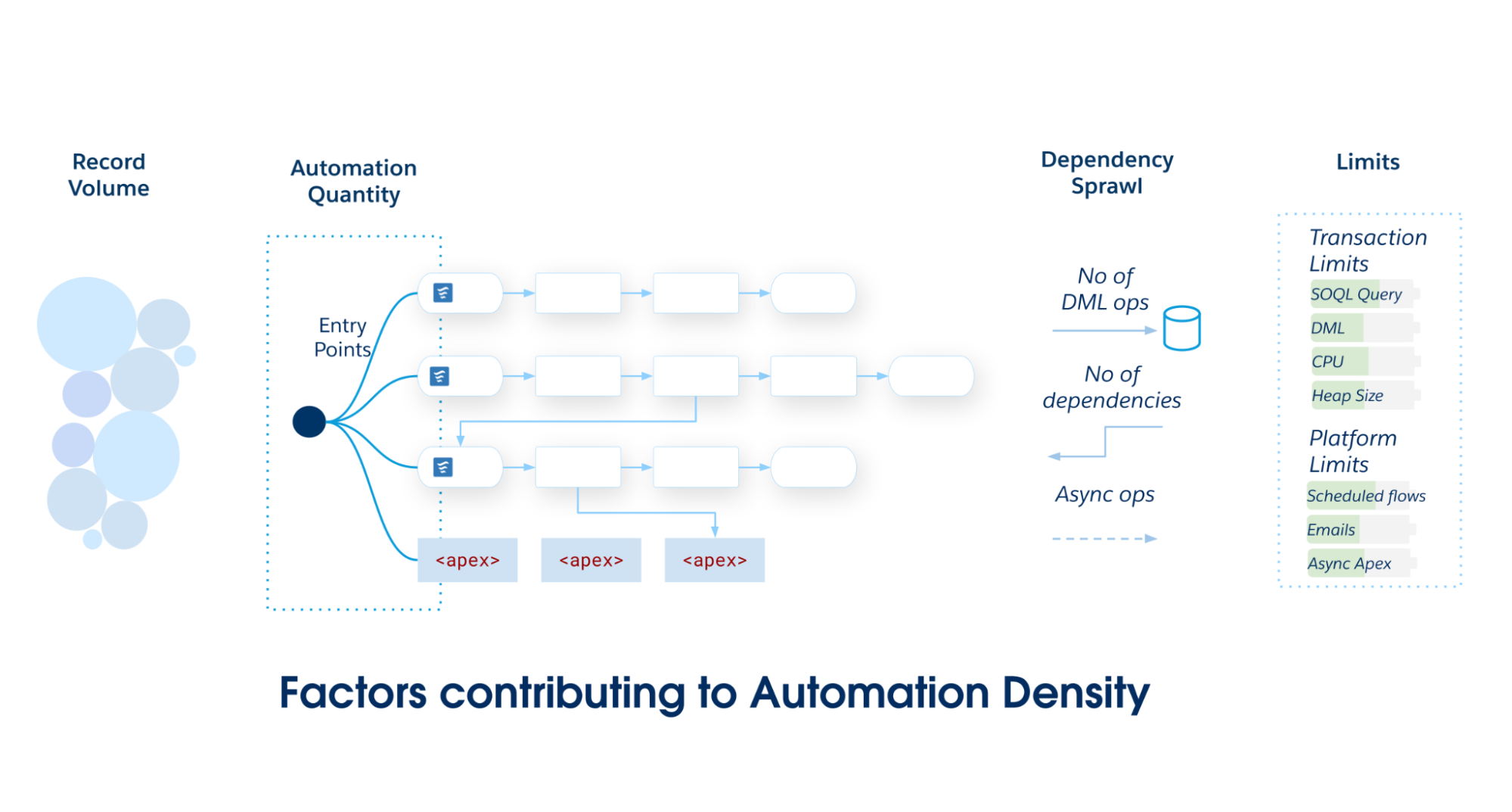 As the scope and complexity of your Salesforce application grows, commit to a single primary entry point—either Record-Triggered Flow or Apex Triggers. Avoid partitioning automations across multiple mechanisms on a single Salesforce Object, as it leads to poor maintainability and fragmented governance.
### The Density Selection Matrix
Use this matrix to determine the required architectural standard for your Salesforce Object.
- **Record-Triggered Flow** is the preferred solution for low automation density. It offers a balance of power and accessibility that is ideal for automations that are straightforward and independent of each other.
- **The hybrid pattern (Record-Triggered Flow with Invocable Apex)** is a powerful and maintainable choice for medium-density automations with rising complexity. This pattern empowers teams to maintain ordered choreography in declarative Flow while delegating compute-heavy operations to Apex, balancing accessibility with performance.
- **Apex triggers** provide the necessary building blocks for a solid architectural foundation to support high-density automations. The performance, granular control, and object-oriented abstraction and polymorphism of Apex are better suited for managing the complexity and scale of these scenarios.
As the scope and complexity of your Salesforce application grows, commit to a single primary entry point—either Record-Triggered Flow or Apex Triggers. Avoid partitioning automations across multiple mechanisms on a single Salesforce Object, as it leads to poor maintainability and fragmented governance.
### The Density Selection Matrix
Use this matrix to determine the required architectural standard for your Salesforce Object.
- **Record-Triggered Flow** is the preferred solution for low automation density. It offers a balance of power and accessibility that is ideal for automations that are straightforward and independent of each other.
- **The hybrid pattern (Record-Triggered Flow with Invocable Apex)** is a powerful and maintainable choice for medium-density automations with rising complexity. This pattern empowers teams to maintain ordered choreography in declarative Flow while delegating compute-heavy operations to Apex, balancing accessibility with performance.
- **Apex triggers** provide the necessary building blocks for a solid architectural foundation to support high-density automations. The performance, granular control, and object-oriented abstraction and polymorphism of Apex are better suited for managing the complexity and scale of these scenarios.
| Density Level | Automation Quantity | Data Volume (Batch Size) | Dependency Sprawl | Architectural Standard |
|---|---|---|---|---|
| Low | < 15 Automations |
Standard User-driven UI interactions or small API loads (1–200 records) |
Discrete Self-contained logic. 0–1 downstream DML operations on the same object or a related object. |
Record-Triggered Flow |
| Medium | 15–30 Automations |
Moderate Standard batch processing (with logic requiring careful bulkification) |
Coupled Parent/Child updates 2–4 downstream DML operations. Risk of recursion |
Hybrid Pattern Flow + invocable Apex |
| High | > 30 Automations |
High Large data volumes with bulk API loads (2,000 – 10,000+ records) |
Complex and Recursive Deep dependency graph (5+ downstream DML operations). Risk of triangular recursion loops |
Apex Trigger Metadata Framework |
| Capability | Record-Triggered Flow | Apex Trigger |
|---|---|---|
| Speed of delivery and maintenance | Recommended The visual user interface of Flow Builder allows administrators and other declarative builders to create and modify automation faster than writing, testing, and deploying Apex code. This interface empowers a broader range of team members to deliver business value and reduces the dependency on specialized developer resources for simple tasks. |
Requires expertise Apex requires properly skilled software developers to implement, test, and maintain the code. |
| Modularity | Available Record-triggered flows are modular by default. Instead of monolithic logic, teams build discrete flows for specific requirements and choreograph them together using Flow Trigger Explorer. This modularity enables isolated modification and simple extension, vastly reducing the long-term cost of ownership. |
Available Apex is divided into functional modules by design. Each Apex class is intended to implement a single module of functionality. |
| Visibility and governance | Recommended The visual nature of Flow provides an intuitive representation of business logic. Flow Trigger Explorer provides a consolidated view of all flows on an object, making it easier for architects and administrators to understand, govern, and troubleshoot without reading code. |
Requires expertise Using a metadata framework to organize triggers is advantageous, but Apex requires a disciplined development team to keep the code organized and maintainable. |
| High-performance bulk data processing | Not recommended There is an elevated risk of hitting governor limits when dealing with complex logic or large data volumes. |
Recommended Apex code executes closer to the platform's core services and offers developers enhanced control over query optimization, data handling, and algorithmic efficiency. This results in better performance and scale, especially in complex scenarios involving large data volumes. |
| Robust logic and data structures | Available The Flow Transform Element can help with some complex processing tasks. However, Flow lacks native Map and Set data structures, making complex data processing cumbersome and computationally inefficient. |
Recommended Apex provides full access to Map, Set, and programmatic loops for highly efficient, bulk-safe data manipulation. As a full-featured programming language, Apex also provides access to complex logical constructs, data structures, and design patterns that can help solve complex business problems in a maintainable and efficient manner. Apex includes a rich standard library of advanced functions (for example, BusinessHours, Crypto) not currently available in declarative tools. |
| Transaction control | Not Available Flow provides no access to `Database.savepoint`, `Database.rollback`, or partially successful DML operations for partial transaction commits or rollbacks. |
Available Apex provides full, granular control over transaction integrity and complex error recovery scenarios. |
| Email distribution | Recommended Sending preconfigured email alerts from a record-triggered flow is easy and scalable. Custom email alerts can be crafted and distributed at runtime. Custom emails are subject to daily email send limits. |
Available Apex can generate and send custom email messages. All emails sent from Apex are subject to the daily email send limits. |
| Applying platform safeguards | Recommended Flow includes built-in protections, such as auto-bulkification and automatic retries. These safeguards increase the speed to value and prevent performance pitfalls that otherwise require complex, manual coding. |
Manual implementation required Safeguards like bulkification must be explicitly coded (for example, managing collections and avoiding SOQL inside loops). Automatic retries are not native to triggers and require complex custom logic to implement. |
| Asynchronous processing | Available Flow offers easy mechanisms for automations which require a separate transaction in an asynchronous path. These automations are subject to daily limits. |
Available Apex enables full control via Change Data Capture and queueable events that are handled by a decoupled trigger subscriber. |
| Scheduled processing | Recommended Flow's scheduled paths provide a unique and powerful scheduling capability (for example, "fire 3 days before close date"). This capability includes automatic cancellation and rescheduling if the record's data changes. These automations are subject to daily limits. |
Not Available An Apex trigger cannot natively schedule a temporal, record-specific event with automatic cancellation. While scheduled Apex exists, it is a fundamentally different mechanism that runs at a specific time and is not scheduled during an individual record's processing as part of a trigger. |
| Ordering and choreography | Available The Flow Trigger Explorer allows administrators to define a relative execution order for multiple flows on the same object. |
Available A trigger framework provides granular control over the exact order of automations. |
| Same-record field updates | Available (before save) Record-Triggered Flow is the most performant declarative option for updating the triggering record before the initial DML commit. |
Available (before save) Apex provides the highest performance offering with minimal overhead. |
| Cross-object CRUD | Available (after-save) Flow is suitable for simple, low-complexity, cross-object DML operations. |
Available (after-save) Apex provides superior control over deduplication, error handling, and performance for cross-object DML operations. |
| Deduplication of expensive computation | Available Flow excels at eliminating redundant queries and DML statements via automatic bulkification. However, state cannot be cached or shared between different flow triggers or across multiple invocations of the same flow within one transaction. This limitation may become important in extreme performance scenarios. |
Recommended Apex provides mechanisms for deduplicating expensive operations. Developers can leverage transactional caching using static properties and variables, and platform-level caching using Platform Cache, to store and reuse data. These techniques are important for reducing the consumption of transactional governor limits, such as SOQL queries, and ensuring high performance and scalability. |
| Custom error handling | Available The CustomError element can block a save operation and display a message to the user. |
Recommended The addError() method provides flexible field-level and conditional error messaging. |
| Use Case | Description | Best-Fit | Rationale |
|---|---|---|---|
| High-performance batch processing | Any automation that must process thousands of records efficiently | Apex | Apex provides rich APIs for interfacing with the platform and for raw speed. |
| Complex data processing | Scenarios that require advanced data manipulation | Apex | Apex provides data structures, such as Map and Set, that are not natively available in Flow, and can be critical for writing performant, bulk-safe code. |
| Transactional control | Control mechanisms such as savepoints, rollbacks, and partial commits | Apex | Apex provides access to mechanisms such as Database.savepoint and Database.rollback, and has the ability to process partially successful DML operations. |
| Sophisticated custom validation | Data validation across multiple fields in a record | Apex | While Flow can prevent a save with the `CustomError` element, it is not available in all flow types—including subflows. The Apex addError() method provides multiple field-specific error messages that can be added to a record at any time during trigger processing. |
| Moderately complex logic within a simple process | Logic and data manipulation of moderate complexity, simplified by a standard library of advanced functions, occurring as part of an uncomplicated process | Flow + Apex | Record-Triggered Flow acts as the orchestration layer, while high-complexity operations are encapsulated within Invocable Apex. |
| Simple to moderately complex logic | Data manipulation of low to moderate complexity, with trigger updates to both the primary and related data objects | Flow | Flow is typically the go-to option, as it is based on a declarative model that makes it approachable to both admins and developers. |
| Notifications and outbound messages | Sending outbound emails and messages | Flow | Flow makes sending email alerts and outbound messages on record changes easy and highly scalable. |
| Scheduled processing | Automation at a future, dynamic date (for example, 3 days before a close date) | Flow | Scheduled paths provide a unique strength to Flow, as the platform automatically handles the scheduling, cancellation, and rescheduling of these paths if the record's data changes. |
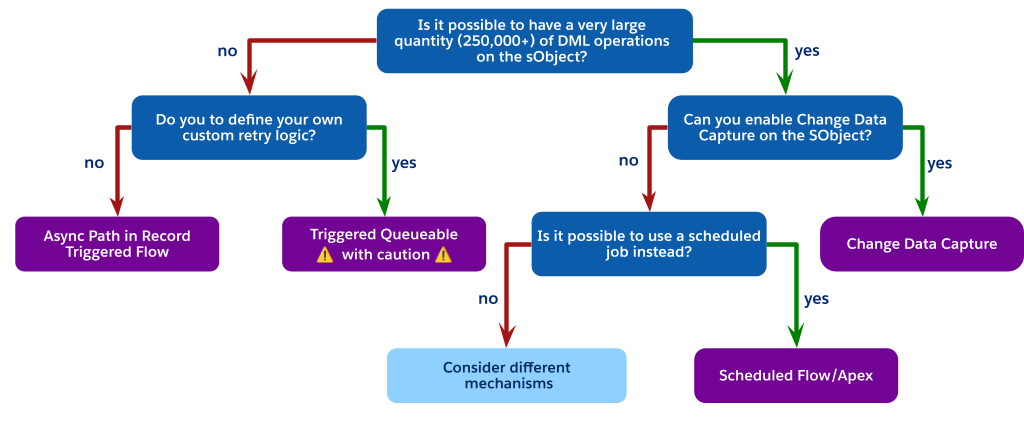 ### The Scheduled Job Alternative
As the flowchart indicates, when you are faced with high-volume DML operations but cannot use Change Data Capture (perhaps due to object limits), the best architectural choice is often to avoid a trigger-invoked process entirely.
Instead, consider using a scheduled process. This can be either a Scheduled Flow or Scheduled Apex. Required steps are:
1. Perform a simple, low‑cost update in the synchronous trigger. For example, set a `Status__c` field to "pending processing" or insert a low‑cost related record, such as a Chatter post, to indicate that the record needs processing.
2. Create a scheduled job, either a scheduled flow or scheduled Apex, that runs periodically, such as every 15 minutes or every hour.
3. Have the scheduled job query for all records in the pending state, execute the complex logic in a controlled, high-volume context, and then update the records as processed.
This pattern fully decouples the heavy processing from the user's synchronous save, is not subject to the one-job-per-transaction limit of a trigger-fired batch, and provides a highly scalable and governable solution for non-real-time requirements.
If the latency of a scheduled job is not acceptable for the business requirements, and you are still constrained from using CDC or a trigger-fired queueable, this indicates a significant architectural mismatch. At this point, different mechanisms must be considered. Reevaluating the core application design may lead to certain conclusions, such as:
- Purchasing the add-on to remove CDC object limits.
- Fundamentally challenging the business requirement to determine if near real-time processing is truly a "must-have" or if the latency of a scheduled job is an acceptable trade-off for platform stability.
## Non-Functional Considerations
In addition to the decision points, you will need to factor in non-functional considerations such as complexity and standards.
### Complexity
The level of complexity in an implementation is part of a solution's total cost of ownership, as well as its ability to adapt to changing business requirements. Complexity can impact any implementation if best practices aren't followed. In the _Related Best Practices_ section of this document, there are recommendations to reduce the amount of complexity in your solution, including these patterns:
- Hybrid Pattern: Invocable Apex for Complex Logic in Flow
- Using a Metadata Framework for Apex Triggers
- Mega-Flows vs. Multiple Flows
### Processes and Standards
Documentation is as important as the automation itself. It not only ensures maintainability, it is also critical for AI and agent-based tools. Documentation helps you understand and manage your business processes.
**In Flow**
- Establish a consistent naming convention for all elements and variables.
- Use the Description field for the flow to explain its overall purpose, trigger criteria, and intended outcome.
- Use the Description field on each individual element (for example, `Get Records`, `Action`, `Transform`). This practice is the best way to convey intent. It's especially important for invocable actions and subflows, where the description is the primary place to explain the complex logic performed by the action.
**In Apex**
- Comment your code clearly to explain the _why_ behind your logic, not just the _what_.
- If using a metadata-driven framework, ensure your metadata records include and populate a human-readable Description field to explain what each handler class does and when it should run.
DevOps and source control is part of a mature development lifecycle. Always use a source control tool like Git for Salesforce projects. Both Apex classes and Salesforce Flows are metadata that define your business logic, and they must be versioned and managed.
Within the context of management of record-triggered automations, a modern DevOps pipeline provides essential benefits.
- **Automated Quality Checks:** Tools like [Salesforce Code Analyzer](https://developer.salesforce.com/docs/platform/salesforce-code-analyzer/overview) can be configured to run automatically in your pipeline. Static analysis can detect problematic patterns in both automation tools before they are promoted, flagging issues like inefficient `Get Records` elements inside a Flow loop or `SOQL` queries inside an Apex for loop, which are common causes of performance degradation.
- **Regression Prevention:** As your automation density grows, a change to one Flow or Apex class can have unintended consequences for other automations on the same object. A robust DevOps testing strategy, where automated Apex tests are run against any proposed change, is the most reliable way to ensure a new Flow version doesn't break existing Apex logic (and vice versa).
- **Collaboration and Visibility:** Source control is the "single source of truth." It allows admins and developers to work on automation for the same object in parallel. It also provides an invaluable audit trail: when a production process breaks, you can instantly see _who_ changed the automation, _when_ they changed it, and — via commit messages — _why_ they changed it.
For teams with a mix of admins and developers, [DevOps Center](https://help.salesforce.com/s/articleView?id=platform.devops_center_overview.htm&type=5) provides a unified interface to help choreograph all of these steps, making a scalable, source-control-based development process accessible to everyone on the team.
This combined discipline of documentation and DevOps ensures the long-term health and maintainability of your org, which will benefit every architect and admin who follows you.
## Related Best Practices
The decision guide above is best used before planning your implementation. It is targeted at helping you choose the best product for your use cases. After product selection, it is important to understand existing best practices for your implementation.
### Exploit the Hybrid Pattern: Invocable Apex for Complex Logic in Flow
The _One Tool Per Object_ principle is critical for managing high-density automation, but don't interpret it as a binary choice between a purely declarative or a purely programmatic stack. A more effective and maintainable architectural pattern leverages a Hybrid model: position Record-Triggered Flow as the orchestration layer, while encapsulating high-complexity operations within Invocable Apex.
### The Scheduled Job Alternative
As the flowchart indicates, when you are faced with high-volume DML operations but cannot use Change Data Capture (perhaps due to object limits), the best architectural choice is often to avoid a trigger-invoked process entirely.
Instead, consider using a scheduled process. This can be either a Scheduled Flow or Scheduled Apex. Required steps are:
1. Perform a simple, low‑cost update in the synchronous trigger. For example, set a `Status__c` field to "pending processing" or insert a low‑cost related record, such as a Chatter post, to indicate that the record needs processing.
2. Create a scheduled job, either a scheduled flow or scheduled Apex, that runs periodically, such as every 15 minutes or every hour.
3. Have the scheduled job query for all records in the pending state, execute the complex logic in a controlled, high-volume context, and then update the records as processed.
This pattern fully decouples the heavy processing from the user's synchronous save, is not subject to the one-job-per-transaction limit of a trigger-fired batch, and provides a highly scalable and governable solution for non-real-time requirements.
If the latency of a scheduled job is not acceptable for the business requirements, and you are still constrained from using CDC or a trigger-fired queueable, this indicates a significant architectural mismatch. At this point, different mechanisms must be considered. Reevaluating the core application design may lead to certain conclusions, such as:
- Purchasing the add-on to remove CDC object limits.
- Fundamentally challenging the business requirement to determine if near real-time processing is truly a "must-have" or if the latency of a scheduled job is an acceptable trade-off for platform stability.
## Non-Functional Considerations
In addition to the decision points, you will need to factor in non-functional considerations such as complexity and standards.
### Complexity
The level of complexity in an implementation is part of a solution's total cost of ownership, as well as its ability to adapt to changing business requirements. Complexity can impact any implementation if best practices aren't followed. In the _Related Best Practices_ section of this document, there are recommendations to reduce the amount of complexity in your solution, including these patterns:
- Hybrid Pattern: Invocable Apex for Complex Logic in Flow
- Using a Metadata Framework for Apex Triggers
- Mega-Flows vs. Multiple Flows
### Processes and Standards
Documentation is as important as the automation itself. It not only ensures maintainability, it is also critical for AI and agent-based tools. Documentation helps you understand and manage your business processes.
**In Flow**
- Establish a consistent naming convention for all elements and variables.
- Use the Description field for the flow to explain its overall purpose, trigger criteria, and intended outcome.
- Use the Description field on each individual element (for example, `Get Records`, `Action`, `Transform`). This practice is the best way to convey intent. It's especially important for invocable actions and subflows, where the description is the primary place to explain the complex logic performed by the action.
**In Apex**
- Comment your code clearly to explain the _why_ behind your logic, not just the _what_.
- If using a metadata-driven framework, ensure your metadata records include and populate a human-readable Description field to explain what each handler class does and when it should run.
DevOps and source control is part of a mature development lifecycle. Always use a source control tool like Git for Salesforce projects. Both Apex classes and Salesforce Flows are metadata that define your business logic, and they must be versioned and managed.
Within the context of management of record-triggered automations, a modern DevOps pipeline provides essential benefits.
- **Automated Quality Checks:** Tools like [Salesforce Code Analyzer](https://developer.salesforce.com/docs/platform/salesforce-code-analyzer/overview) can be configured to run automatically in your pipeline. Static analysis can detect problematic patterns in both automation tools before they are promoted, flagging issues like inefficient `Get Records` elements inside a Flow loop or `SOQL` queries inside an Apex for loop, which are common causes of performance degradation.
- **Regression Prevention:** As your automation density grows, a change to one Flow or Apex class can have unintended consequences for other automations on the same object. A robust DevOps testing strategy, where automated Apex tests are run against any proposed change, is the most reliable way to ensure a new Flow version doesn't break existing Apex logic (and vice versa).
- **Collaboration and Visibility:** Source control is the "single source of truth." It allows admins and developers to work on automation for the same object in parallel. It also provides an invaluable audit trail: when a production process breaks, you can instantly see _who_ changed the automation, _when_ they changed it, and — via commit messages — _why_ they changed it.
For teams with a mix of admins and developers, [DevOps Center](https://help.salesforce.com/s/articleView?id=platform.devops_center_overview.htm&type=5) provides a unified interface to help choreograph all of these steps, making a scalable, source-control-based development process accessible to everyone on the team.
This combined discipline of documentation and DevOps ensures the long-term health and maintainability of your org, which will benefit every architect and admin who follows you.
## Related Best Practices
The decision guide above is best used before planning your implementation. It is targeted at helping you choose the best product for your use cases. After product selection, it is important to understand existing best practices for your implementation.
### Exploit the Hybrid Pattern: Invocable Apex for Complex Logic in Flow
The _One Tool Per Object_ principle is critical for managing high-density automation, but don't interpret it as a binary choice between a purely declarative or a purely programmatic stack. A more effective and maintainable architectural pattern leverages a Hybrid model: position Record-Triggered Flow as the orchestration layer, while encapsulating high-complexity operations within Invocable Apex.
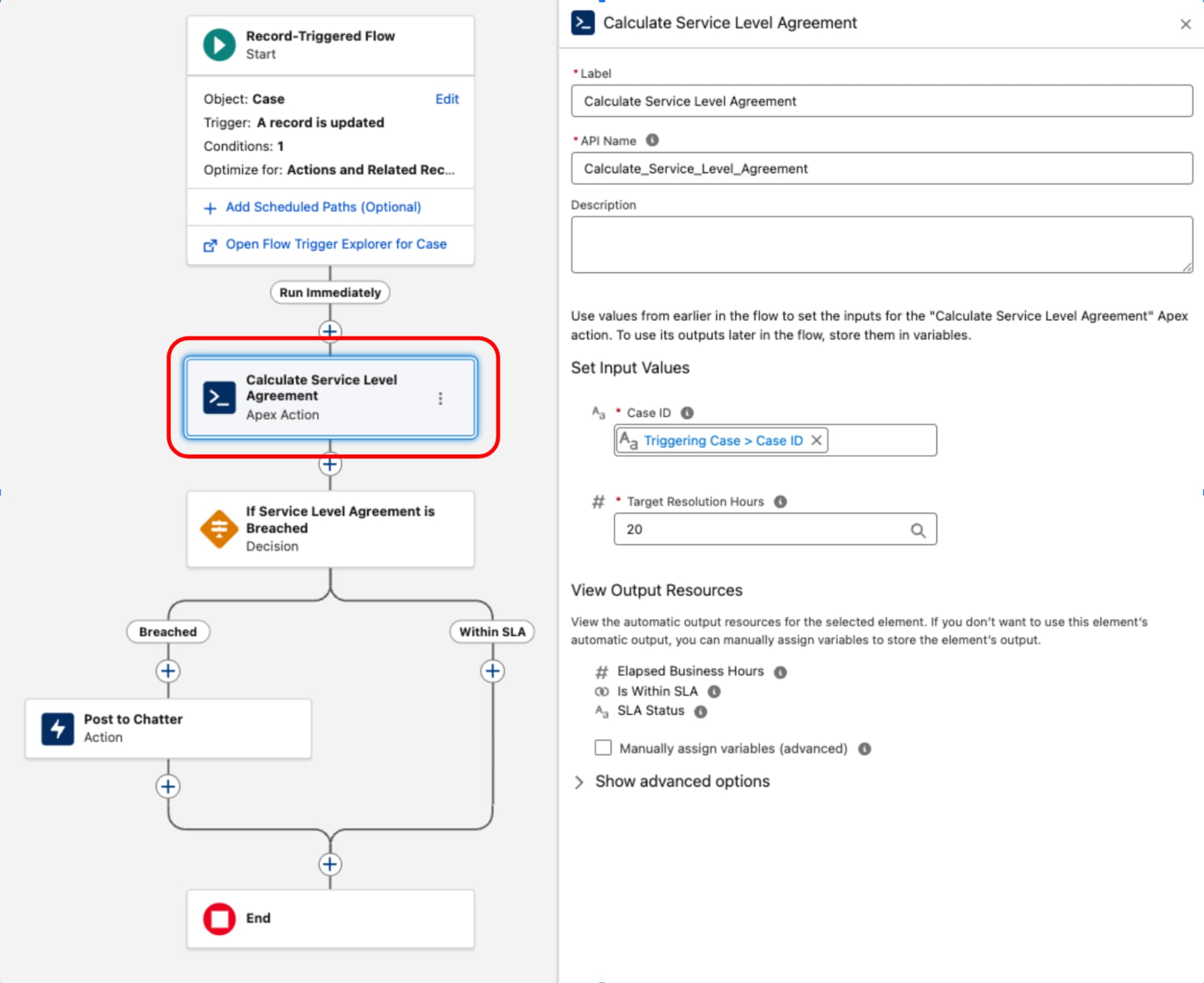 #### The Orchestration Layer: Flow
Record-Triggered Flow serves as the orchestrating layer for the business process. It owns the entry criteria and execution context (the _what_ and _when_). By retaining decision logic and routing within this layer, the architecture's process topology remains transparent and manageable via the Flow Trigger Explorer, preventing critical business logic from being obscured within code.
#### The Complex Component: Invocable Apex
One common example of a complex component is the implementation of Service Level Agreement (SLA) calculations for Case records. Since the BusinessHours object and its related logic — critical for accurate calculations that exclude non-working hours and holidays — is not natively accessible in Flow, a dedicated Apex class is used. This class, often named something like `ServiceLevelAgreementCalculator`, is designed with a single static method, annotated with `@InvocableMethod`, to calculate the elapsed business hours, determine if the SLA is "Within Target" or "Breached," and return a structured output. This approach encapsulates the complex, high-performance logic in Apex while allowing it to be seamlessly executed and integrated into the declarative orchestration layer of a record-triggered flow.
Once the Apex `ServiceLevelAgreementCalculator` class is defined, it's available for use within a record-triggered flow:
This pattern demonstrates a strict separation of concerns. The declarative layer is used to manage the transaction lifecycle and orchestration while code is used for high-complexity execution. By treating code as a functional utility rather than the foundation, we balance performance and maintainability.
#### Key Gains with the Hybrid Pattern
**Modularity**: The decision pivots away from the singularity of using Apex or Flow for the entire process. Instead, the architecture encapsulates complex logic into discrete, bulk-safe, and independently testable units. These units function as reusable components consumed by the declarative layer, ensuring the automation scales without complicating the architectural design.
**Reusability**: Logic is decoupled from the trigger event. A well‑designed code unit (such as an `InvocableMethod`) is written one time but leveraged across multiple entry points: Record-triggered flows, screen flows, or external integrations. This code reuse eliminates redundant development.
**Maintainability**: The process flow logic remains visible and manageable within the declarative Flow. This centralization drastically reduces debugging overhead and ensures that the system's execution order is deterministic and transparent.
#### Limitations and Trade-Offs of the Hybrid Pattern
While the hybrid model of using invocable Apex from Flow is powerful, it is not a one-size-fits-all approach. Architects must be aware of the specific limitations and trade-offs before committing to a hybrid solution.
- **No before-save support**: This is the most critical limitation. Invocable Actions are only available in the after-save context (flows for actions and related records). They cannot be used in the high-performance before-save context (flows for fast-field updates). Therefore, this pattern cannot be used to delegate same-record field updates. Do that high‑performance work using native Flow elements in a before-save flow or within a before‑context Apex trigger.
- **No after-undelete support:** Record-Triggered Flow currently does not support the after-undelete context. If a Salesforce Object has a business requirement to run automation when a record is restored from the recycle bin, an Apex trigger is the only solution.
- **Performance overhead in high-volume scenarios:** The transition from the Flow runtime to the Apex runtime is not a zero-cost operation. While generally fast, the act of dropping into an Invocable Action from Flow's runtime is not as computationally fast as native execution that stays entirely within an Apex trigger. For most medium-density automations, this micro-overhead is a negligible and worthwhile trade-off for the increased accessibility. However, for extreme high-performance, high-volume scenarios, a pure Apex-only framework will have a raw compute speed advantage.
### Strategies for Legacy Automation
While the automation density heuristic provides definitive guidance for newer greenfield architecture, the reality of enterprise Salesforce environments is often more nuanced. In mature orgs, it is common to find record-triggered flows and Apex triggers operating on the same Salesforce Object. This scenario is distinct from the hybrid pattern explained earlier: here, the flows and Apex triggers are not coupled nor designed to work together.
This coexistence is often a result of evolving platform capabilities or legacy technical debt. While this is a tolerated operational state, architects must treat it as a calculated trade-off rather than an end state.
The fragmented orchestration causes significant governance and maintenance overhead, making development, testing, and incident handling activities disjointed and cumbersome. This leads to increased Time to Resolution (TTR) and operational complexity.
- For new Salesforce Objects, adhere to the automation density principle as the primary guide.
- For existing Salesforce Objects with a hybrid footprint and dual apex trigger and record-triggered flow entry points, assess the density and then architect to refactor to a maintainable hybrid state.
- For low density, refactor Apex triggers to record-triggered flows, and specify order of execution, bringing them to a single automation entry point.
- For medium density, refactor complex mega-flows into a subset of flows, with the right order of execution. Introduce Apex triggers only when absolutely necessary, for example to support after undelete context.
- For high density, favor implementing Apex triggers.
### Using a Metadata Framework for Apex Triggers
As an organization's business processes on the Salesforce platform mature, the volume and complexity of record-triggered automation inevitably increase. A foundational best practice is to maintain _one Apex trigger per Salesforce Object_. This rule is critical because the platform does not guarantee the execution order of multiple triggers on the same object for the same event. This limitation can lead to non-deterministic behavior, race conditions, and difficult-to-debug issues.
However, adhering to the _one trigger_ principle introduces an architectural challenge: how to manage and orchestrate all the business logic invoked from that single entry point in a maintainable, scalable way.
#### The Limitations of Classic Trigger Handlers
The first evolution of this architecture was the Classic Trigger Handler pattern. In this approach, the single Apex trigger delegates all its logic to a corresponding handler class (for example, `OpportunityTriggerHandler`). This method separates the logic from the trigger file and provides developers with deterministic control over the order of execution within the handler class's methods (for example, `afterInsert()`).
While an improvement, this pattern often leads to monolithic handler classes. Over time, as more business requirements are added, the class becomes large, difficult to manage, and hard to test in isolation. The execution order of all individual processes is hard-coded within a single method, making the class prone to merge conflicts, dramatically increasing the governance and maintenance overhead in a large enterprise environment.
#### The Solution: A Metadata-Driven Trigger Framework
To resolve the core issues of modularity and orchestration, architects shift to a **Metadata-Driven Trigger Framework**. This is a significant architectural leap that decouples the automation logic itself from the configuration of _how_ and _when_ it runs.
This framework is built on three key advantages:
- **Partitioning:** Instead of a single handler class, the core business logic is broken down into small, atomic Apex classes (for example, a `RecalculateAccountValues` class or a `NotifySalesLeads` class), with each class adhering to the _Single Responsibility Principle_. This modularity makes logic easier to test, debug, and understand in isolation.
- **Order and choreography:** The execution order is no longer hard-coded in Apex. Instead, it is declaratively defined by configuration records, typically stored in a custom metadata type (for example, `TriggerAction__mdt`). This allows administrators to re-order, add, or remove automation actions simply by modifying a metadata record, which does not require a deployment or code change.
- **Bypass functionality:** The framework provides standardized, granular bypass functionality. Each automation action can be configured via its metadata record to be turned off globally, or bypassed for specific administrative users by referencing a custom permission.
The single Apex trigger for the object then serves only as a dynamic dispatcher. It contains no business logic, but instead instantiates a central `MetadataTriggerHandler` class. This handler queries the custom metadata records to dynamically determine the execution sequence and invoke the correct atomic Apex classes in the prescribed order. Automation is unified under a single, transparent, and governable layer.
### Deduplicating Expensive Operations in the Transaction
An important benefit of using Apex in a robust framework is the ability to manage transactional state and optimize performance by eliminating redundant work. As logic accumulates, it's common for different automations within the save order to independently execute the same expensive operations, consuming valuable governor limits and increasing the DML operation time.
The framework is architected to address this with two primary strategies:
- **Shared state management:** Within the scope of a single Apex transaction, static properties and variables are leveraged to cache data. This ensures that an expensive operation, like a `SOQL` query for a configuration setting, only executes once, even if the automation logic is invoked multiple times across different records or phases of the trigger. Consumption of transactional limits is significantly reduced.
- **Platform cache utilization:** To go beyond simple intra-transaction caching, use the platform cache to avoid querying the entire database for certain data. This managed, in-memory cache is ideal for retrieving data that is non-primitive, read frequently across the codebase, and immutable throughout the course of a transaction (for example, profiles, roles, business hours). Using the `Cache.CacheBuilder` interface, the system checks the cache first and only performs the database query if the data is not present, maximizing performance and scalability.
### Use Before-Save for Same-Record Updates
Always use a before-save update when your automation only needs to change field values on the record that starts the transaction. This applies to both fast-field updates in Flow (which run before save) and before-context logic in Apex Triggers (before insert, before update).
This pattern is performant, regardless of which tool is used, because it avoids a second DML operation and a recursive save cycle. The changes are made to the record in memory _before_ it is committed to the database, and are saved as part of the original transaction. The overhead of a second save, which would otherwise re-execute the entire save order and fire all automation again, is eliminated.
### Preventing Uncontrolled Recursion
Uncontrolled recursion is a common pitfall in after-update triggers, where a trigger's logic performs a DML update that in turn causes the same trigger to fire again. This creates an infinite loop that eventually terminates with a governor limit exception. While static boolean flags or collections of processed record Ids have historically been used to prevent such recursion, a more precise and robust pattern is to gate the logic by comparing field values between the new and old versions of the record itself.
Execute the logic only if a specific field of interest has actually changed. This prevents the trigger from running its logic on subsequent DML operations within the same transaction where the critical data remains unchanged.
#### Controlling Recursion in Record-Triggered Flow
In a record-triggered flow, prevent uncontrolled recursion by setting the flow to run only when the record is updated to meet the condition requirements:
#### The Orchestration Layer: Flow
Record-Triggered Flow serves as the orchestrating layer for the business process. It owns the entry criteria and execution context (the _what_ and _when_). By retaining decision logic and routing within this layer, the architecture's process topology remains transparent and manageable via the Flow Trigger Explorer, preventing critical business logic from being obscured within code.
#### The Complex Component: Invocable Apex
One common example of a complex component is the implementation of Service Level Agreement (SLA) calculations for Case records. Since the BusinessHours object and its related logic — critical for accurate calculations that exclude non-working hours and holidays — is not natively accessible in Flow, a dedicated Apex class is used. This class, often named something like `ServiceLevelAgreementCalculator`, is designed with a single static method, annotated with `@InvocableMethod`, to calculate the elapsed business hours, determine if the SLA is "Within Target" or "Breached," and return a structured output. This approach encapsulates the complex, high-performance logic in Apex while allowing it to be seamlessly executed and integrated into the declarative orchestration layer of a record-triggered flow.
Once the Apex `ServiceLevelAgreementCalculator` class is defined, it's available for use within a record-triggered flow:
This pattern demonstrates a strict separation of concerns. The declarative layer is used to manage the transaction lifecycle and orchestration while code is used for high-complexity execution. By treating code as a functional utility rather than the foundation, we balance performance and maintainability.
#### Key Gains with the Hybrid Pattern
**Modularity**: The decision pivots away from the singularity of using Apex or Flow for the entire process. Instead, the architecture encapsulates complex logic into discrete, bulk-safe, and independently testable units. These units function as reusable components consumed by the declarative layer, ensuring the automation scales without complicating the architectural design.
**Reusability**: Logic is decoupled from the trigger event. A well‑designed code unit (such as an `InvocableMethod`) is written one time but leveraged across multiple entry points: Record-triggered flows, screen flows, or external integrations. This code reuse eliminates redundant development.
**Maintainability**: The process flow logic remains visible and manageable within the declarative Flow. This centralization drastically reduces debugging overhead and ensures that the system's execution order is deterministic and transparent.
#### Limitations and Trade-Offs of the Hybrid Pattern
While the hybrid model of using invocable Apex from Flow is powerful, it is not a one-size-fits-all approach. Architects must be aware of the specific limitations and trade-offs before committing to a hybrid solution.
- **No before-save support**: This is the most critical limitation. Invocable Actions are only available in the after-save context (flows for actions and related records). They cannot be used in the high-performance before-save context (flows for fast-field updates). Therefore, this pattern cannot be used to delegate same-record field updates. Do that high‑performance work using native Flow elements in a before-save flow or within a before‑context Apex trigger.
- **No after-undelete support:** Record-Triggered Flow currently does not support the after-undelete context. If a Salesforce Object has a business requirement to run automation when a record is restored from the recycle bin, an Apex trigger is the only solution.
- **Performance overhead in high-volume scenarios:** The transition from the Flow runtime to the Apex runtime is not a zero-cost operation. While generally fast, the act of dropping into an Invocable Action from Flow's runtime is not as computationally fast as native execution that stays entirely within an Apex trigger. For most medium-density automations, this micro-overhead is a negligible and worthwhile trade-off for the increased accessibility. However, for extreme high-performance, high-volume scenarios, a pure Apex-only framework will have a raw compute speed advantage.
### Strategies for Legacy Automation
While the automation density heuristic provides definitive guidance for newer greenfield architecture, the reality of enterprise Salesforce environments is often more nuanced. In mature orgs, it is common to find record-triggered flows and Apex triggers operating on the same Salesforce Object. This scenario is distinct from the hybrid pattern explained earlier: here, the flows and Apex triggers are not coupled nor designed to work together.
This coexistence is often a result of evolving platform capabilities or legacy technical debt. While this is a tolerated operational state, architects must treat it as a calculated trade-off rather than an end state.
The fragmented orchestration causes significant governance and maintenance overhead, making development, testing, and incident handling activities disjointed and cumbersome. This leads to increased Time to Resolution (TTR) and operational complexity.
- For new Salesforce Objects, adhere to the automation density principle as the primary guide.
- For existing Salesforce Objects with a hybrid footprint and dual apex trigger and record-triggered flow entry points, assess the density and then architect to refactor to a maintainable hybrid state.
- For low density, refactor Apex triggers to record-triggered flows, and specify order of execution, bringing them to a single automation entry point.
- For medium density, refactor complex mega-flows into a subset of flows, with the right order of execution. Introduce Apex triggers only when absolutely necessary, for example to support after undelete context.
- For high density, favor implementing Apex triggers.
### Using a Metadata Framework for Apex Triggers
As an organization's business processes on the Salesforce platform mature, the volume and complexity of record-triggered automation inevitably increase. A foundational best practice is to maintain _one Apex trigger per Salesforce Object_. This rule is critical because the platform does not guarantee the execution order of multiple triggers on the same object for the same event. This limitation can lead to non-deterministic behavior, race conditions, and difficult-to-debug issues.
However, adhering to the _one trigger_ principle introduces an architectural challenge: how to manage and orchestrate all the business logic invoked from that single entry point in a maintainable, scalable way.
#### The Limitations of Classic Trigger Handlers
The first evolution of this architecture was the Classic Trigger Handler pattern. In this approach, the single Apex trigger delegates all its logic to a corresponding handler class (for example, `OpportunityTriggerHandler`). This method separates the logic from the trigger file and provides developers with deterministic control over the order of execution within the handler class's methods (for example, `afterInsert()`).
While an improvement, this pattern often leads to monolithic handler classes. Over time, as more business requirements are added, the class becomes large, difficult to manage, and hard to test in isolation. The execution order of all individual processes is hard-coded within a single method, making the class prone to merge conflicts, dramatically increasing the governance and maintenance overhead in a large enterprise environment.
#### The Solution: A Metadata-Driven Trigger Framework
To resolve the core issues of modularity and orchestration, architects shift to a **Metadata-Driven Trigger Framework**. This is a significant architectural leap that decouples the automation logic itself from the configuration of _how_ and _when_ it runs.
This framework is built on three key advantages:
- **Partitioning:** Instead of a single handler class, the core business logic is broken down into small, atomic Apex classes (for example, a `RecalculateAccountValues` class or a `NotifySalesLeads` class), with each class adhering to the _Single Responsibility Principle_. This modularity makes logic easier to test, debug, and understand in isolation.
- **Order and choreography:** The execution order is no longer hard-coded in Apex. Instead, it is declaratively defined by configuration records, typically stored in a custom metadata type (for example, `TriggerAction__mdt`). This allows administrators to re-order, add, or remove automation actions simply by modifying a metadata record, which does not require a deployment or code change.
- **Bypass functionality:** The framework provides standardized, granular bypass functionality. Each automation action can be configured via its metadata record to be turned off globally, or bypassed for specific administrative users by referencing a custom permission.
The single Apex trigger for the object then serves only as a dynamic dispatcher. It contains no business logic, but instead instantiates a central `MetadataTriggerHandler` class. This handler queries the custom metadata records to dynamically determine the execution sequence and invoke the correct atomic Apex classes in the prescribed order. Automation is unified under a single, transparent, and governable layer.
### Deduplicating Expensive Operations in the Transaction
An important benefit of using Apex in a robust framework is the ability to manage transactional state and optimize performance by eliminating redundant work. As logic accumulates, it's common for different automations within the save order to independently execute the same expensive operations, consuming valuable governor limits and increasing the DML operation time.
The framework is architected to address this with two primary strategies:
- **Shared state management:** Within the scope of a single Apex transaction, static properties and variables are leveraged to cache data. This ensures that an expensive operation, like a `SOQL` query for a configuration setting, only executes once, even if the automation logic is invoked multiple times across different records or phases of the trigger. Consumption of transactional limits is significantly reduced.
- **Platform cache utilization:** To go beyond simple intra-transaction caching, use the platform cache to avoid querying the entire database for certain data. This managed, in-memory cache is ideal for retrieving data that is non-primitive, read frequently across the codebase, and immutable throughout the course of a transaction (for example, profiles, roles, business hours). Using the `Cache.CacheBuilder` interface, the system checks the cache first and only performs the database query if the data is not present, maximizing performance and scalability.
### Use Before-Save for Same-Record Updates
Always use a before-save update when your automation only needs to change field values on the record that starts the transaction. This applies to both fast-field updates in Flow (which run before save) and before-context logic in Apex Triggers (before insert, before update).
This pattern is performant, regardless of which tool is used, because it avoids a second DML operation and a recursive save cycle. The changes are made to the record in memory _before_ it is committed to the database, and are saved as part of the original transaction. The overhead of a second save, which would otherwise re-execute the entire save order and fire all automation again, is eliminated.
### Preventing Uncontrolled Recursion
Uncontrolled recursion is a common pitfall in after-update triggers, where a trigger's logic performs a DML update that in turn causes the same trigger to fire again. This creates an infinite loop that eventually terminates with a governor limit exception. While static boolean flags or collections of processed record Ids have historically been used to prevent such recursion, a more precise and robust pattern is to gate the logic by comparing field values between the new and old versions of the record itself.
Execute the logic only if a specific field of interest has actually changed. This prevents the trigger from running its logic on subsequent DML operations within the same transaction where the critical data remains unchanged.
#### Controlling Recursion in Record-Triggered Flow
In a record-triggered flow, prevent uncontrolled recursion by setting the flow to run only when the record is updated to meet the condition requirements:
 If you choose to use an entry criteria formula in your flow, you can prevent runaway recursion by comparing the `$Record` global variable (representing the new values) with the `$RecordPrior` global variable (representing the original values before the save). For example, to ensure that a flow only runs if the Amount field on an Opportunity has changed, use this in the entry criteria:
```
$Record.Amount != $Record__Prior.Amount
```
#### Controlling Recursion in Apex
Compare field values from the new version of the record, `Trigger.new`, with the field values from the old version of the record, `Trigger.oldMap`, to see if the specific change you're looking for has occurred. This approach makes sure that the automation is idempotent and only runs when necessary, making the system more efficient and preventing catastrophic recursive loops.
### Bypassing Automation
A well-architected Salesforce organization requires a consistent and reliable mechanism to bypass automation. This is not an optional feature, but a core operational requirement for maintaining data integrity and enabling administrative tasks.
A bypass framework is essential for some scenarios:
- When loading large volumes of data, firing triggers for every record can drastically slow down the process, cause limit exceptions, and create erroneous related records and notifications. A bypass allows the data to be inserted cleanly and efficiently.
- An integration user may need to synchronize data from an external system of record. The automation that normally fires for a user-initiated change (for example, sending an email, creating a task) may be undesirable or redundant when the change originates from another system.
- Administrators or support staff may need to perform corrective updates on records. A bypass mechanism allows them to make these changes without triggering the standard business automation, which could have unintended consequences.
**Custom permissions**: The modern, scalable standard for implementing bypass logic is custom permissions. These are superior to older methods for several reasons:
- **Flexibility:** Custom permissions can be assigned to users via permission sets. This practice aligns with the modern Salesforce security and access model, allowing for granular and flexible assignment. A bypass can be granted to a specific user, or even temporarily with a specific expiration date/time.
- **Maintainability:** Using custom permissions avoids hard coding profiles or users into automation logic. If a user's role changes or a new profile needs bypass access, the change is a simple Permission Set assignment, not a code or flow modification that requires a deployment.
- **Scalability:** Custom permissions provide a scalable framework for managing exceptions across a complex user base. They can be assigned to users via permission set, permission set groups, or profiles. Their association to a permission set or profile is also representable in source metadata.
**Implementation patterns**: Apply a consistent bypass pattern to all record-triggered automation in the organization.
**Bypassing a record-triggered flow**: The most efficient way to bypass a flow is to prevent it from running at all. This is achieved by adding a condition to the flow's entry criteria.
- In the Start element of the record-triggered flow, set the Condition Requirements to Formula Evaluates to True.
- In the formula builder, incorporate a check for the custom permission using the `$Permission` global variable. Combine the check with your existing entry criteria.
- Formula pattern:
```
( ) && NOT($Permission.Bypass_This_Flow)
```
- This pattern ensures that the flow only runs if the user _does not_ have the specified custom permission assigned. This check is performed before the flow interview is even created, making it the most performant approach.
**Bypassing an Apex Trigger Framework**: In Apex, integrate the bypass logic directly into the metadata-driven trigger framework, allowing for granular control.
- The `TriggerAction__mdt` custom metadata type should include a text field, for example, `BypassPermission__c`.
- In the `MetadataTriggerHandler` class, before dynamically executing an action, the code should read the value from this field.
- If the field is populated, the handler uses the `FeatureManagement.checkPermission()` method to determine if the current running user has the specified custom permission.
- If `checkPermission()` returns true, the handler skips that specific action and proceeds to the next one in the sequence.
- This pattern is powerful because it allows for both a global bypass (if all `TriggerAction__mdt` records reference the same permission) and a granular per-action bypass (if different records reference different permissions, or some have no bypass permission at all).
### Mega-Flows vs. Multiple Flows
It is an anti-pattern to consolidate all of an object's automation into a single, massive mega-flow. Consolidating into one flow versus splitting logic into multiple, well-conditioned flows does not have a major impact on performance. The most significant performance gains come from:
- Using before-save flows for same-record field updates.
- Writing precise entry conditions to ensure flows are excluded from running on changes that do not impact their specific use case.
[Flow Trigger Explorer](https://trailhead.salesforce.com/content/learn/modules/record-triggered-flows/meet-flow-trigger-explorer) allows you to assign an order value to each flow on an object, guaranteeing a sequential execution order.
If you choose to use an entry criteria formula in your flow, you can prevent runaway recursion by comparing the `$Record` global variable (representing the new values) with the `$RecordPrior` global variable (representing the original values before the save). For example, to ensure that a flow only runs if the Amount field on an Opportunity has changed, use this in the entry criteria:
```
$Record.Amount != $Record__Prior.Amount
```
#### Controlling Recursion in Apex
Compare field values from the new version of the record, `Trigger.new`, with the field values from the old version of the record, `Trigger.oldMap`, to see if the specific change you're looking for has occurred. This approach makes sure that the automation is idempotent and only runs when necessary, making the system more efficient and preventing catastrophic recursive loops.
### Bypassing Automation
A well-architected Salesforce organization requires a consistent and reliable mechanism to bypass automation. This is not an optional feature, but a core operational requirement for maintaining data integrity and enabling administrative tasks.
A bypass framework is essential for some scenarios:
- When loading large volumes of data, firing triggers for every record can drastically slow down the process, cause limit exceptions, and create erroneous related records and notifications. A bypass allows the data to be inserted cleanly and efficiently.
- An integration user may need to synchronize data from an external system of record. The automation that normally fires for a user-initiated change (for example, sending an email, creating a task) may be undesirable or redundant when the change originates from another system.
- Administrators or support staff may need to perform corrective updates on records. A bypass mechanism allows them to make these changes without triggering the standard business automation, which could have unintended consequences.
**Custom permissions**: The modern, scalable standard for implementing bypass logic is custom permissions. These are superior to older methods for several reasons:
- **Flexibility:** Custom permissions can be assigned to users via permission sets. This practice aligns with the modern Salesforce security and access model, allowing for granular and flexible assignment. A bypass can be granted to a specific user, or even temporarily with a specific expiration date/time.
- **Maintainability:** Using custom permissions avoids hard coding profiles or users into automation logic. If a user's role changes or a new profile needs bypass access, the change is a simple Permission Set assignment, not a code or flow modification that requires a deployment.
- **Scalability:** Custom permissions provide a scalable framework for managing exceptions across a complex user base. They can be assigned to users via permission set, permission set groups, or profiles. Their association to a permission set or profile is also representable in source metadata.
**Implementation patterns**: Apply a consistent bypass pattern to all record-triggered automation in the organization.
**Bypassing a record-triggered flow**: The most efficient way to bypass a flow is to prevent it from running at all. This is achieved by adding a condition to the flow's entry criteria.
- In the Start element of the record-triggered flow, set the Condition Requirements to Formula Evaluates to True.
- In the formula builder, incorporate a check for the custom permission using the `$Permission` global variable. Combine the check with your existing entry criteria.
- Formula pattern:
```
( ) && NOT($Permission.Bypass_This_Flow)
```
- This pattern ensures that the flow only runs if the user _does not_ have the specified custom permission assigned. This check is performed before the flow interview is even created, making it the most performant approach.
**Bypassing an Apex Trigger Framework**: In Apex, integrate the bypass logic directly into the metadata-driven trigger framework, allowing for granular control.
- The `TriggerAction__mdt` custom metadata type should include a text field, for example, `BypassPermission__c`.
- In the `MetadataTriggerHandler` class, before dynamically executing an action, the code should read the value from this field.
- If the field is populated, the handler uses the `FeatureManagement.checkPermission()` method to determine if the current running user has the specified custom permission.
- If `checkPermission()` returns true, the handler skips that specific action and proceeds to the next one in the sequence.
- This pattern is powerful because it allows for both a global bypass (if all `TriggerAction__mdt` records reference the same permission) and a granular per-action bypass (if different records reference different permissions, or some have no bypass permission at all).
### Mega-Flows vs. Multiple Flows
It is an anti-pattern to consolidate all of an object's automation into a single, massive mega-flow. Consolidating into one flow versus splitting logic into multiple, well-conditioned flows does not have a major impact on performance. The most significant performance gains come from:
- Using before-save flows for same-record field updates.
- Writing precise entry conditions to ensure flows are excluded from running on changes that do not impact their specific use case.
[Flow Trigger Explorer](https://trailhead.salesforce.com/content/learn/modules/record-triggered-flows/meet-flow-trigger-explorer) allows you to assign an order value to each flow on an object, guaranteeing a sequential execution order.
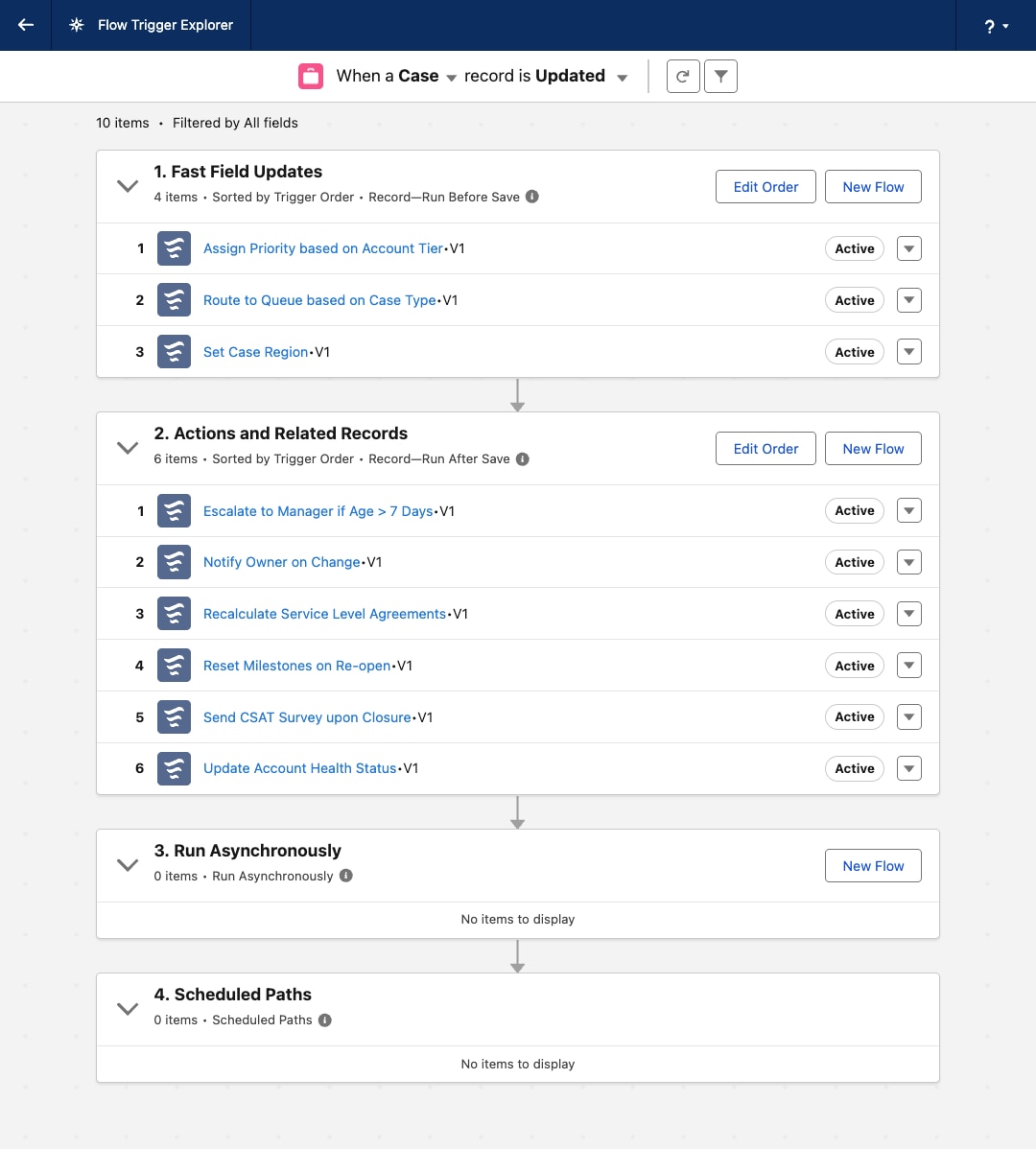 ## Resources
| Apex | Flow | Operations |
|---|---|---|