---
schema_version: "1"
id: c32ac63ec92eb7907de2d443f6a939c0aa8e5b1be08feff07df49ff870fc1dea
title: Define a Token Exchange Handler
collection: admin
version: current
locale: en-us
portal_url: https://docs.salesforce.com/admin/current/en-us/xcloud/264-0-0/remoteaccess_token_exchange_handler_define.md
canonical_url: https://help.salesforce.com/s/articleView?id=xcloud.remoteaccess_token_exchange_handler_define.htm&release=264.0.0&type=5
source_site: help.salesforce.com
content_type: documentation
content_hash: 97f9900908921b474268c60ca1baf32bc167e35468a0f9327b4f3191ab1c357b
description: To finish creating a token exchange handler, define the handler on the Token Exchange Handlers page in Setup, or use Metadata API to define a new OauthTokenExchangeHandler metadata type.
products:
- Security
- Cross Cloud
release: "264"
---
# Define a Token Exchange Handler
To finish creating a token exchange handler, define the handler on the Token Exchange Handlers page in Setup, or use Metadata API to define a new OauthTokenExchangeHandler metadata type.
### Required Editions
Available in: Enterprise, Performance, Unlimited, and Developer Editions

Important Where possible, we changed noninclusive terms to align with our company value of Equality. We maintained certain terms to avoid any effect on customer implementations.
- **[Define a Handler in Setup](https://help.salesforce.com/s/articleView?id=xcloud.remoteaccess_token_exchange_handler_define.htm&release=264.0.0&type=5)**
Define a handler from the Token Exchange Handlers page in Setup.
- **[Define a Handler via Metadata API](https://help.salesforce.com/s/articleView?id=xcloud.remoteaccess_token_exchange_handler_define.htm&release=264.0.0&type=5)**
Define an OauthTokenExchangeHandler metadata type.
## Define a Handler in Setup
Define a handler from the Token Exchange Handlers page in Setup.
1. From Setup, in the Quick Find box, enter Token, and then select **Token Exchange Handlers**.
2. Click **Create Token Exchange Handler**.
3. Enter a name and an API name. The API name must be unique.
4. Enter a description for the handler.
5. Select the types of tokens that you want the handler to support.
6. Optionally, to configure the handler to create users when it can’t find them in Salesforce, select **Allow this handler to create users**. If this setting is enabled, the handler doesn’t actually insert a user. It creates a User object that Salesforce automatically inserts for you.
7. Associate an Apex class with the handler definition.
- To generate an Apex handler template, select **Create Apex class template**. Salesforce creates an autogenerated handler and saves it under the name `AutocreatedTokenExchHandler.`. To customize the handler, find it on the Apex Classes page in Setup and edit the code to suit your use case.

Important The autogenerated handler gives you a place to start, but it isn't ready as-is. Make sure you customize and test it.
- To use a handler that you created, for Apex Class, select a token exchange handler Apex class that extends the `Auth.Oauth2TokenExchangeHandler` class.
8. Save the handler.
- To save the handler and enable it, click **Save and Enable**. Enabling the handler means it’s in an enabled state, but doesn’t mean it’s associated with any external client apps or connected apps yet.
- To save the handler without enabling, click **Save**. You can always enable it later.
The new handler appears in your list view on the Token Exchange Handlers page. To enable or disable it, click  and select **Enable** or **Disable**.
Next, enable apps for the token exchange handler.
## Define a Handler via Metadata API
Define an OauthTokenExchangeHandler metadata type.
Make sure that you have the right permissions to work with Metadata API. See [Metadata API Edit Access](https://developer.salesforce.com/docs/atlas.en-us.api_meta.meta/api_meta/meta_modify_metadata_perm.htm) in the Metadata API Developer Guide.
To work with Metadata API, use the Salesforce Extensions for Visual Studio Code on Salesforce CLI, or use a developer tool of your choice. For more information, see [Metadata API Developer Tools](https://developer.salesforce.com/docs/atlas.en-us.api_meta.meta/api_meta/meta_developer_tools.htm) in the Metadata API Developer Guide.
Metadata API supports [file-based and CRUD-based development](https://developer.salesforce.com/docs/atlas.en-us.api_meta.meta/api_meta/meta_dev_platforms.htm). These steps cover how to define the handler with file-based development.
1. Create a package.xml manifest file that references the OauthTokenExchangeHandler metadata type. Here’s an example. This example uses `*` to retrieve all components of the handler’s metadata definition.
```markup
*OauthTokenExchangeHandler60.0
```
2. Create a directory called oauthtokenexchangehandlers.
3. In the oauthtokenexchangehandlers directory, create a file called .oauthtokenexchangehandler. This file defines the handler.
4. In the .oauthtokenexchangehandler file, create the handler definition.
For now, include these fields. Don’t add an enablements field yet—add this field when you associate the handler with an app after you deploy it.
For a full description of each field, see [OauthTokenExchangeHandler](https://developer.salesforce.com/docs/atlas.en-us.api_meta.meta/api_meta/meta_oauthtokenexchangehandler.htm) in the Metadata API Developer Guide.
| Field | Description |
| --- | --- |
| description | A description for the handler. |
| developerName | The handler’s developer name, such as `MyHandler`. |
| isAccessTokenSupported | Indicates whether the handler supports access tokens. |
| isEnabled | Indicates whether the handler is enabled. For now, set this field to `false`. |
| isIdTokenSupported | Indicates whether the handler supports ID tokens. |
| isJwtSupported | Indicates whether the handler supports tokens in a JSON Web Token (JWT) format. |
| isProtected | Indicates whether the handler is protected. See [Protected Components in Managed Packages](https://developer.salesforce.com/docs/atlas.en-us.pkg1_dev.meta/pkg1_dev/packaging_protected_components.htm). |
| isRefreshTokenSupported | Indicates whether the handler supports refresh tokens. |
| isSaml2Supported | Indicates whether the handler supports SAML 2.0 assertions. |
| isUserCreationAllowed | Indicates whether the handler can set up User objects, which Salesforce uses to automatically insert users. |
| masterLabel | A user-friendly name for the handler. |
| tokenHandlerApex | The Apex class that handles validation and subject mapping. Use the Apex class you created. |
Here’s an example file.
```markup
MyTokenExchangeHandlerMy token exchange handlertruefalsefalsetruefalsefalsefalsetrueMyTokenExchangeHandlerMyOauthTokenExchangeHandler
```
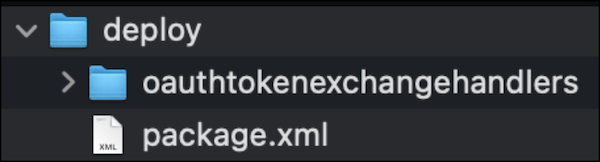
5. Create a directory called deploy, and move the package.xml file and the oauthtokenexchangehandlers folder containing your .oauthtokenexchangehandler file into the new directory.
Here’s how the file structure looks.
6. Compress the directory into a .zip file.
7. Using your metadata development tool, use the `deploy()` call to deploy the .zip file to your org.
Next, use Metadata API to enable the token exchange handler for a connected app or external client app.