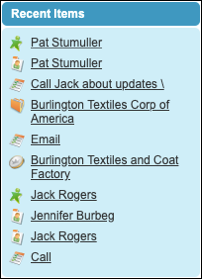
In the Recent Items section of the Salesforce sidebar, you’ll find a list of
up to 10 items (records, documents, custom objects, and the like) you’ve most recently added, edited, or viewed.
Required Editions
| Available in: both Salesforce Classic and Lightning Experience |
| Available in: all editions except Database.com and
Starter
|
Lightning Experience
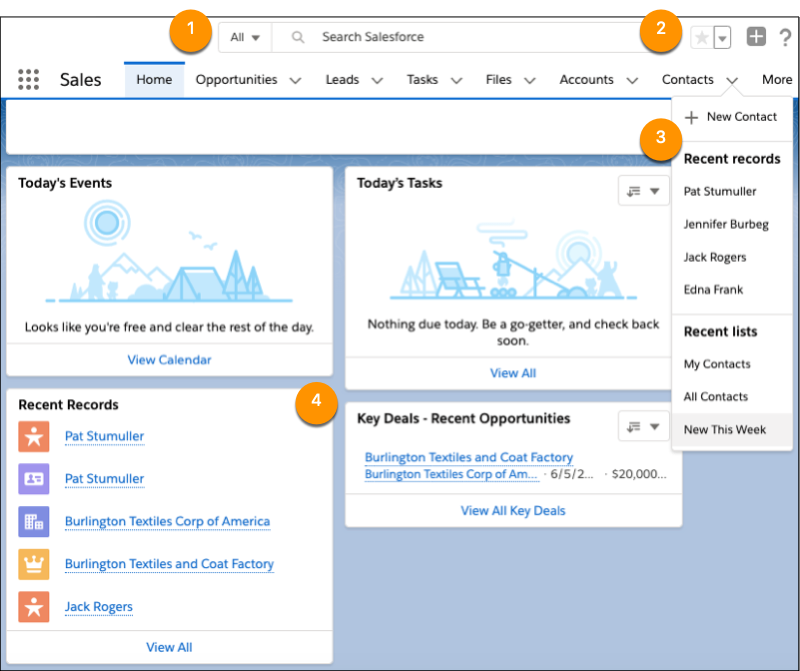
- View items you’ve recently searched for when you click in the search box
(1).
- In the header, access your favorite pages by clicking the dropdown beside the
star icon (2).
- In the navigation bar, see your recently accessed records for any item by
selecting the dropdown next to the item name (3).
- From the home page, click the name of a recent item in the Recent Records
component (4).
Salesforce Classic
The Recent Items section of the Salesforce sidebar lists up to 10 items that
you’ve most recently added, edited, or viewed. To open an item’s detail or edit
page, click its link. To view more information about an item, hover your mouse over
the link. If you don’t see any information, your admin didn’t enable this
feature.