---
schema_version: "1"
id: a35312fa7d7e9e9bbc4eb69b7c484cad120fbea3da29f0871ed7be6f59bd5622
title: Set Up the CRM Analytics Live App in a VPC
collection: admin
version: current
locale: en-us
portal_url: https://docs.salesforce.com/admin/current/en-us/xcloud/264-0-0/quip_vpc_ea_live_app.md
canonical_url: https://help.salesforce.com/s/articleView?id=xcloud.quip_vpc_ea_live_app.htm&release=264.0.0&type=5
source_site: help.salesforce.com
content_type: documentation
content_hash: fdbb560437e9a80c05f75eed3c8585d9291bd7819c30aa37a9e7bf5ba30cc39e
description: Set up your organization to use CRM Analytics dashboards in Quip VPC. After you set it up, users can see and update filters directly in their documents.
products:
- Quip
- Cross Cloud
release: "264"
---
# Set Up the CRM Analytics Live App in a VPC
Set up your organization to use CRM Analytics dashboards in Quip VPC. After you set it up, users can see and update filters directly in their documents.
### Required Editions
Available in: Lightning Experience
User Permissions Needed
To configure the CRM Analytics live app:
Customize Application
To access the CRM Analytics live app in Quip, users need a CRM Analytics Growth or CRM Analytics Plus license.
1. In Salesforce, go to the Setup page.
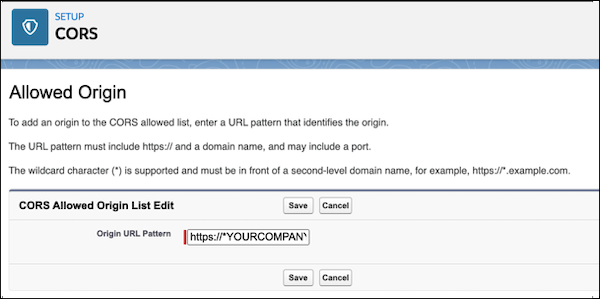
2. In the Quick Find box, enter CORS and click **New**.
3. For the Origin URL Pattern, enter https://\*YOURCOMPANY.qvpc-apps.com.
4. In the Quick Find box, enter Analytics.
5. Under Analytics, click **Allowlist**, and then **New**.
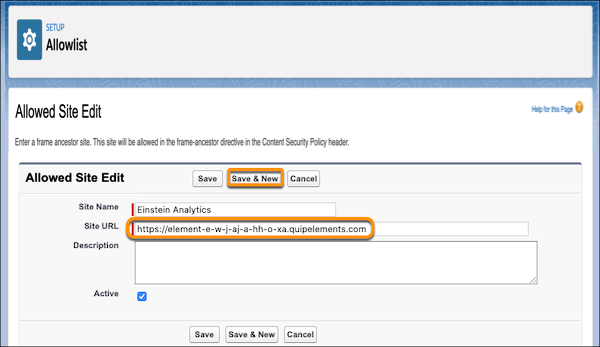
6. Enter a site name. To make it easier to identify later, we recommend naming it TableauCRMQuip.
7. For the site URL, enter https://element-e-w-j9j-a-hh-o-xa.YOURCOMPANY.qvpc-apps.com.
8. Click **Save and New**.
9. Use the CRM Analytics live app in a sandbox org.
1. Enter a site name.
2. Enter your Quip site URL using the format https://YOURCOMPANY-sbx.YOURCOMPANY.onquip.com. Save the action.
10. Use the Einstein Anlytics live app in production.
1. Enter a site name.
2. Enter your Quip site URL using the format https://YOURCOMPANY.onquip.com. Save the action.
11. In Setup, add these URLs as Trusted URLs with all Content Security Policy (CSP) directives selected.
- https://\*.salesforce-experience.com
- Sandbox: https://YOURCOMPANY-sbx.YOURCOMPANY.onquip.com
- Production: https://YOURCOMPANY.onquip.com
- https://\*.salesforce.com
- https://\*.force.com
If https://\*force.com is already a CSP trusted site, don’t readd it.
- https://\*.site.com
- https://\*.salesforce-sites.com
To let your VPC users add CRM Analytics dashboards in Quip, [enable the CRM Analytics live app.](https://help.salesforce.com/s/articleView?id=xcloud.quip_vpc_live_app.htm&release=264.0.0&type=5 "Give your new VPC users access to first-party live apps in a document, like the Salesforce List, Salesforce Record, or CRM Analytics live app.")