Use Live Paste to duplicate information across documents, gather distributed content in
a central document, or reference pertinent information across related documents.
Required Editions
| Available in: Quip desktop app, Quip iOS mobile app, and Quip
on web |
-
In the source document, copy the content.
-
In another document, paste the content.
-
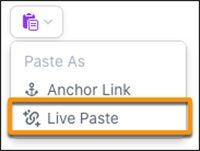
Open the Paste menu, and select Live Paste.
A purple line next to the content indicates that it’s synced to a source document via Live
Paste. The reference content retains the format of the source content.