
Let your teammates know about an important part of the document conversation by broadcasting, forwarding, or linking to it.
Required Editions
| Available in: Quip desktop app, Quip iOS mobile app, and Quip on web |
- Hover over the comment or message.
-
Click the ellipsis or Message Options menu.
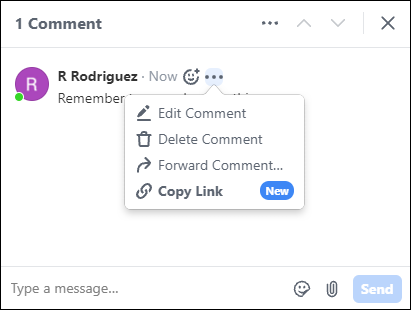
-
Select one of these two options.
Forward Comment Send the comment or message to one or more people. You can search for recipients by name and include additional text, emojis, and attachments with your forwarded comment or message. Recipients are notified by a Quip alert. Copy Link Copy a direct link to the comment or message that you can then paste wherever you need it. The link goes directly to the comment or message so that recipients don’t have to sift through the whole document conversation.