
Add lightweight org charts and relationship maps to your documents. Build relationship maps in your Account Plans with imported Salesforce record data. Create custom and Salesforce cards to manage customer relationships, key stakeholders, and relationship health from an Account Plan.
Required Editions
| Available in: Lightning Experience |

 Watch a Demo
(English only)
Watch a Demo
(English only)
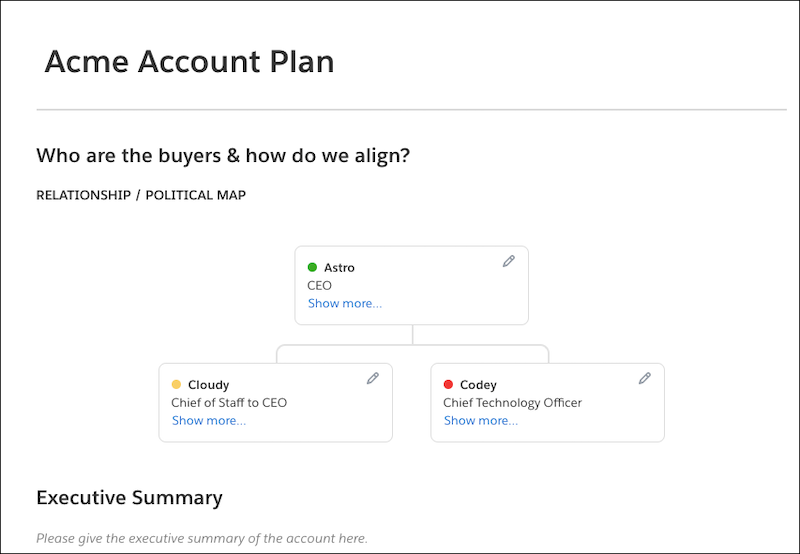
Create custom relationship maps in a document. Your users can map out key stakeholders, easily identify deal detractors and influencers, and more.
Help your sales reps be proactive in account planning with customizable Salesforce relationship maps. Create cards from Salesforce Contact records to visualize key stakeholders and sync edits back to Salesforce. Add custom cards to your Salesforce maps to organize data that doesn’t exist in Salesforce or that doesn’t belong there. Your map’s Salesforce data stays up to date so that your team is always in sync and can collaborate effectively.
Add relationship maps to Account Plans so that your sales reps can easily pinpoint an account’s important contacts and history. Add color indicators to a card based on a custom field to make information scannable. For deal detractors, create a Relationship field with a Detractor picklist option, and associate Detractor with the color red. After you mark a user’s card as a Detractor, it appears with a red color status indicator.
- Create a Custom Relationship Map in Quip
Build a lightweight relationship map with custom data in your documents. - Create a Salesforce Relationship Map
Use Salesforce data to build a lightweight relationship map in your documents. Create a map with Salesforce record data or add custom cards to build a hybrid map. - Considerations for the Relationship Map Live App
As you use the Relationship Map live app, keep in mind these considerations. - Relationship Map Live App Glossary
Search for terms and brush up on your Quip Relationship Map live app knowledge.