---
schema_version: "1"
id: 7af36faa12f1301609be8b010df47840c258dcbf38e96f5d31fb8ef98d084d97
title: Install the Quip Setup Starter Managed Package
collection: admin
version: current
locale: en-us
portal_url: https://docs.salesforce.com/admin/current/en-us/xcloud/264-0-0/quip_install.md
canonical_url: https://help.salesforce.com/s/articleView?id=xcloud.quip_install.htm&release=264.0.0&type=5
source_site: help.salesforce.com
content_type: documentation
content_hash: 86eec4cc2edc323a58851edc965175c7cebca8346c9a9de46a65e17b91fa5544
description: Get a taste of Salesforce integration features with the Quip Setup Starter managed package. After you connect your Quip site to Salesforce, install the managed package to set up Quip Lightning components, add templates to Salesforce records, and set up automation.
products:
- Quip
- Cross Cloud
release: "264"
---
# Install the Quip Setup Starter Managed Package
Get a taste of Salesforce integration features with the Quip Setup Starter managed package. After you connect your Quip site to Salesforce, install the managed package to set up Quip Lightning components, add templates to Salesforce records, and set up automation.
### Required Editions
Available in: Lightning Experience
User Permissions Needed
To install the Quip Setup Starter managed package:
Customize Application
To assign a permission set license:
Manage Users
To create a permission set:
Manage Profiles and Permission Sets
Only a Salesforce and Quip admin can connect Quip and Salesforce.
When you install the Quip Setup Starter managed package, you get the following features.
- Quip connection check: Before you can use Salesforce integration features, check to make that your Quip site and Salesforce org are connected and ready to go.
- Embedded Quip documents: Create Quip Account Plan and Opportunity Notes templates and embed them in a Salesforce record. You can also create your own documents and embed them in a record layout of your choice.
- Automate Quip processes: Manage embedded documents, send document notifications, and set up a live deal feed with Quip actions in Process Builder and Flow.
1. Click the installation link on the download page. You can install the managed package on a production or sandbox org.
- Production org: https://sfdc.co/quipsetupstarter
- Sandbox org: https://sfdc.co/quipsetupstarter\_sandbox
2. Select **Install for Admins Only**.
If you receive a request to approve third-party access, click **Yes** and **Continue**. Approving this request allows the street-level routing and optimization services to function.
3. If a message indicates that the installation is taking longer than expected, click **Done**.
You receive an email notification when the installation is complete.
After the package is installed, the App Launcher includes the Quip Setup Starter app.
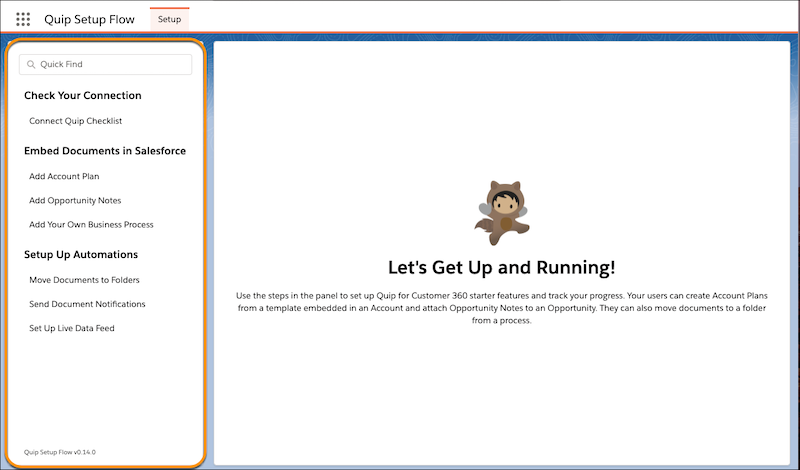
Launch the Quip Setup Starter from the App Launcher. Use the panel to check your Quip connection, embed documents, and set up Quip automation.

- **[Reset Managed Package Features](https://help.salesforce.com/s/articleView?id=xcloud.quip_managed_package_revert.htm&release=264.0.0&type=5)**
Undo changes made to your Salesforce org by the Quip Setup Starter managed package.