---
schema_version: "1"
id: df059ba9ae7df1120151dcfbd925f1014d971d56e1b52b8f46b78b7172194919
title: Set Up the CRM Analytics Live App in Quip
collection: admin
version: current
locale: en-us
portal_url: https://docs.salesforce.com/admin/current/en-us/xcloud/264-0-0/quip_einstein_analytics_setup.md
canonical_url: https://help.salesforce.com/s/articleView?id=xcloud.quip_einstein_analytics_setup.htm&release=264.0.0&type=5
source_site: help.salesforce.com
content_type: documentation
content_hash: f742f3375607d8110ed2f6b0862b9b08b4f826c12ee66e68323fed1937dcfa26
description: Set up your organization to use CRM Analytics dashboards in Quip. After you set it up, users can see and update filters directly in their documents and slides.
products:
- Quip
- Cross Cloud
release: "264"
---
# Set Up the CRM Analytics Live App in Quip
Set up your organization to use CRM Analytics dashboards in Quip. After you set it up, users can see and update filters directly in their documents and slides.
### Required Editions
Available in: Lightning Experience
User Permissions Needed
To configure the CRM Analytics live app:
Customize Application
To access the CRM Analytics live app in Quip, users need a CRM Analytics Growth or CRM Analytics Plus license.
1. In Salesforce, go to the Setup page.
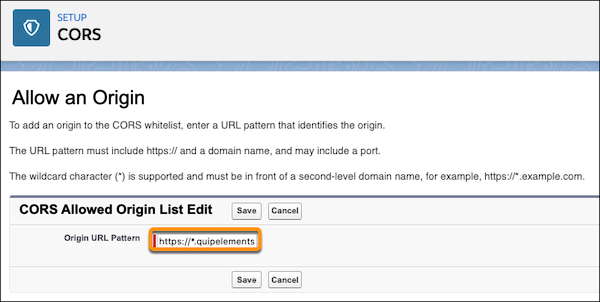
2. In the Quick Find box, enter CORS and click **New**.
3. For the Origin URL Pattern, enter https://\*.quipelements.com
4. In the Quick Find box, enter Analytics.
5. Under Analytics, click **Allowlist**, and then **New**.
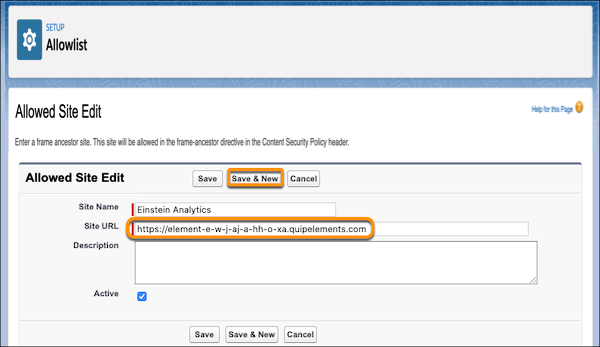
6. Enter a site name. To make it easier to identify later, we recommend naming it TableauCRMQuip.
7. For the site URL, enter https://element-e-w-j-aj-a-hh-o-xa.quipelements.com.
8. Click **Save and New**.
9. Enter your Quip site name.
10. Enter your Quip site URL using the format https://yourquipsite.quip.com. Save the action.
11. In Setup, add these URLs as Trusted URLs with all Content Security Policy (CSP) directives selected. For details, see [Manage Trusted URLs](https://help.salesforce.com/s/articleView?id=xcloud.security_trusted_urls_manage.htm&type=5&language=en_US).
- https://\*.salesforce-experience.com
- https://yourquipsite.quip.com
- https://\*.salesforce.com
- https://\*.force.com
If https://\*force.com is already a CSP trusted site, don’t readd it.
- https://\*.site.com
- https://\*.salesforce-sites.com
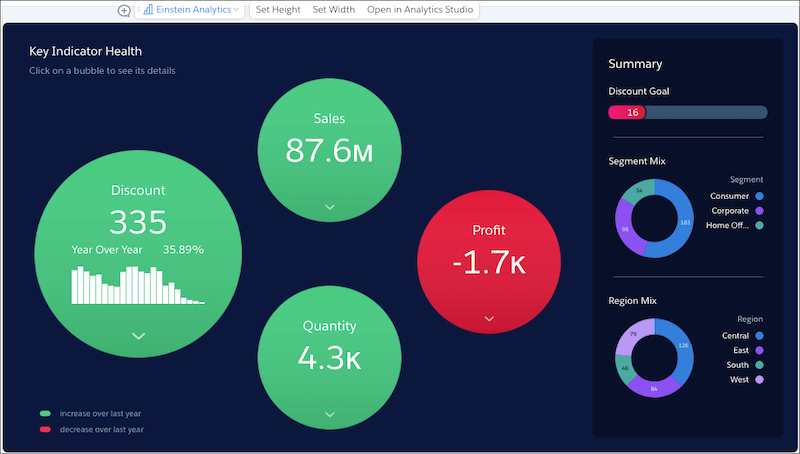
Your users can now add CRM Analytics dashboards to their documents with a simple @CRM Analytics.

Example