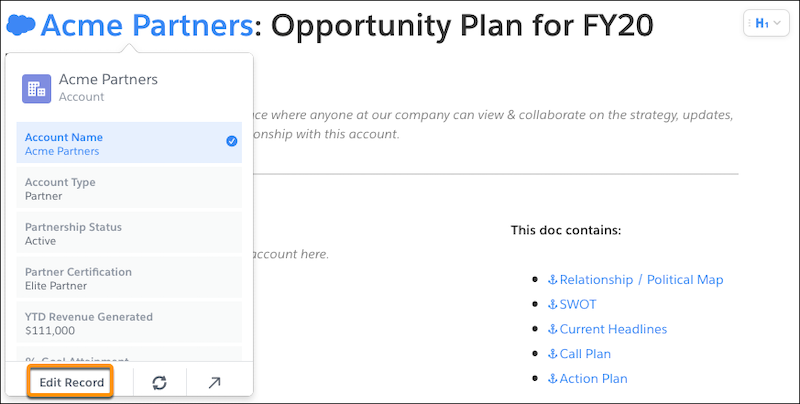
Add live Salesforce data to your documents, spreadsheets, and Account Plans without
getting in the way of your formatting. With in-line data mentions, data reads like normal text but
stays up to date and syncs with Salesforce. Edit the record fields from the data mentions, making
it easier to keep your Salesforce work in Quip.
Required Editions
| Available in: Lightning Experience |
Keep your Account Plans up to date and account specific. Use live Salesforce data mentions to
create a hybrid Quip and Salesforce experience. Create a custom spreadsheet in Quip that pulls
data from multiple sources and includes live Salesforce data mentions at the field level.
Collaboration with other teams is a breeze when all your data is in one place.
- Decide Between Template Data Mentions and Mail Merge
Templates save time copying and pasting, standardize your business practices, and help you get the most out of your Salesforce data. To auto-fill your embedded templates with data from a Salesforce record, you can use Salesforce Template Data Mentions or mail merge syntax.
- Set Up Salesforce Data Mentions
Let users @mention Salesforce data in documents in line without manually refreshing it.
- Add a Salesforce Data Mention
Use Salesforce data seamlessly in your documents and spreadsheets with Salesforce Data Mentions. Mention live data from Salesforce to see dynamic fields that stay updated with the latest Salesforce data. Update fields from your documents and spreadsheets and sync them to Salesforce.
- Add a Salesforce Template Data Mention
As you set up your templates, use Salesforce Template Data Mentions instead of mail merge syntax. When a user creates a document from your embedded template, the Salesforce Data Mentions automatically populate with record’s data and continue to stay up to date.
- Considerations and Limitations for Salesforce Data Mentions
As you use Salesforce Data Mentions and Salesforce Template Data Mentions, keep in mind these considerations.