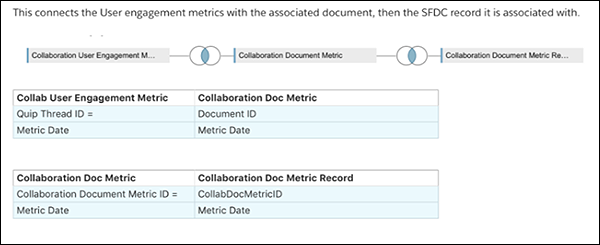
To associate Quip user engagement metrics with a Salesforce record, link the
Collaboration User Engagement Metric object to the Collaboration Document Metric Record
object.
Required Editions
| Available in: Lightning Experience |
-
To connect the Collaboration User Engagement Metric to the Collaboration Document Metric,
use CRM Analytics.
- Match the Quip Thread ID of the Collaboration User Engagement Metric
to the Document ID of the Collaboration Document Metric.
- Match the Metric Date fields on both objects.
-
Also in CRM Analytics, connect the Collaboration Document Metric to the Collaboration
Document Metric Record.
- Match the Id field from Collaboration Document Metric to the
CollabDocMetricId field of the Collaboration Document Metric
Record.
- Match the Metric Date fields on both objects.
Now the Collaboration User Engagement Metric has a record ID in the same row, which came
from the Collaboration Document Metric Record table. This configuration creates the same data
that was previously tracked through the CollabUserEngmntRecordLinks
object.