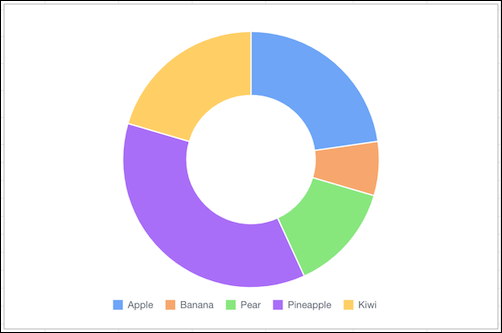
Use a donut chart when you have a grouping and want to show not only the proportion of a
single value for each group member against the total, but also the total amount
itself.
Required Editions
| Available in: Quip desktop app, Quip iOS mobile app, and Quip
on web |
Data Options for Donut Charts
To customize data in donut charts, open the Chart Editor, and click the
Customize tab.
- Style: Change the position of the chart legend, or hide it entirely. Select the colors for
the chart’s background and border.
- Series: Apply data labels to show values directly in the chart, and set the labels’ position
and color.
Sample Data for Donut Charts
| Fruits |
Quantity |
| Apple |
10 |
| Banana |
3 |
| Pear |
6 |
| Pineapple |
16 |
| Kiwi |
9 |