---
schema_version: "1"
id: c652c1313f9bda24c061d1523476e6513666e5990c3677dcfb0039146a7e9bb7
title: Add a Salesforce Data Mention
collection: admin
version: current
locale: en-us
portal_url: https://docs.salesforce.com/admin/current/en-us/xcloud/264-0-0/quip_add_data_mention.md
canonical_url: https://help.salesforce.com/s/articleView?id=xcloud.quip_add_data_mention.htm&release=264.0.0&type=5
source_site: help.salesforce.com
content_type: documentation
content_hash: cb7599b3fb8d81d270b800bb2143965aa9f4e3945efa53f7955aa7a4835e13a3
description: Use Salesforce data seamlessly in your documents and spreadsheets with Salesforce Data Mentions. Mention live data from Salesforce to see dynamic fields that stay updated with the latest Salesforce data. Update fields from your documents and spreadsheets and sync them to Salesforce.
products:
- Quip
- Cross Cloud
release: "264"
---
# Add a Salesforce Data Mention
Use Salesforce data seamlessly in your documents and spreadsheets with Salesforce Data Mentions. Mention live data from Salesforce to see dynamic fields that stay updated with the latest Salesforce data. Update fields from your documents and spreadsheets and sync them to Salesforce.
### Required Editions
Available in: Lightning Experience
To add a Salesforce Data Mention to a document or spreadsheet, you need view access to the Salesforce record or field. To edit the data mention, you need edit access in Salesforce.
To insert a Salesforce Data Mention, you can:
- @Mention Salesforce Data Mention and enter the record name.
- @Mention the record name and select the field.
- Select **Salesforce Data Mention** from the Insert menu.
- Paste a Salesforce record URL in a document. You can then choose to show the URL as a Salesforce data mention and decide whether to mention the record or a specific record field.
#### See Also
- [How Does Live Data Work in Quip?](https://help.salesforce.com/s/articleView?id=xcloud.live_data_quip.htm&release=264.0.0&type=5 "Learn about the different live data integrations you can add to your documents, spreadsheets, and templates.")
- [Live Data on the Quip Mobile App](https://help.salesforce.com/s/articleView?id=xcloud.quip_live_data_mobile.htm&release=264.0.0&type=5 "Learn about which live data integrations work on the Quip mobile app.")
## Add a Salesforce Data Mention to a Document
Mention live data from a Salesforce record or field in your documents without breaking the flow of your content.
### Required Editions
Available in: Lightning Experience
1. To add a data mention starting from a record, @mention the record name in a document.
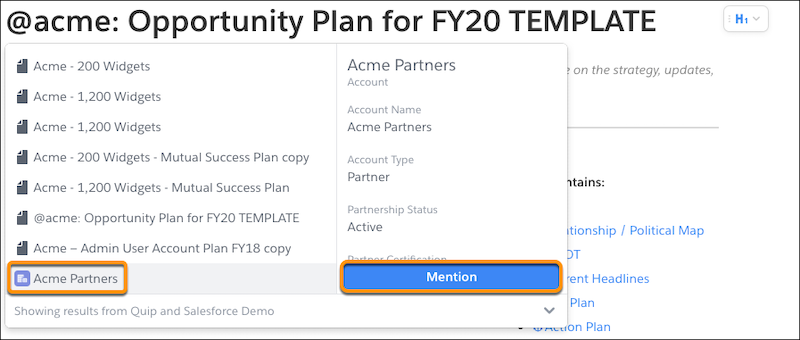
2. Click **Mention**.
3. To mention a record field, enter or select the field name.
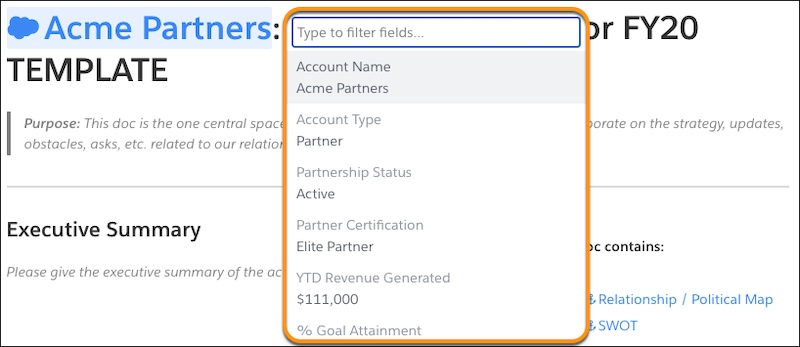
4. To see a compact layout of the record, hover over the data mention. To update record fields, click **Edit Record**.
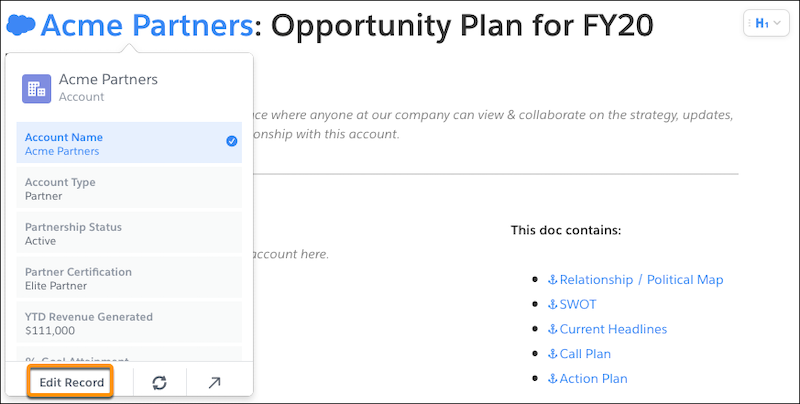
5. To add available fields from the record to your layout, edit the fields or click **Customize Layout**.
6. Click **Save to Salesforce**. Edits that aren’t saved to Salesforce are lost.
Salesforce Data Mentions added to your documents update automatically with the latest Salesforce data.
## Add a Salesforce Data Mention to a Spreadsheet
Mention live data from a Salesforce record or field in your spreadsheets to keep calculations and more up to date.
### Required Editions
Available in: Lightning Experience
1. To add a data mention starting from a record, @mention the record name in the spreadsheet.
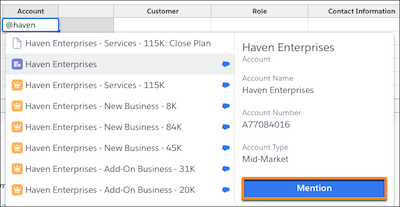
2. Click **Mention**.
3. To mention a record field, enter or select the field name.
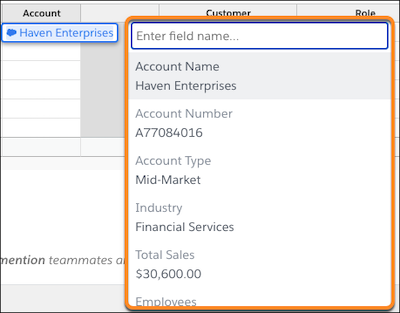
4. To see a compact layout of the record, hover over the data mention. To update record fields, click **Edit Record**.

Salesforce Data Mentions added to your spreadsheets update automatically with the latest Salesforce data.