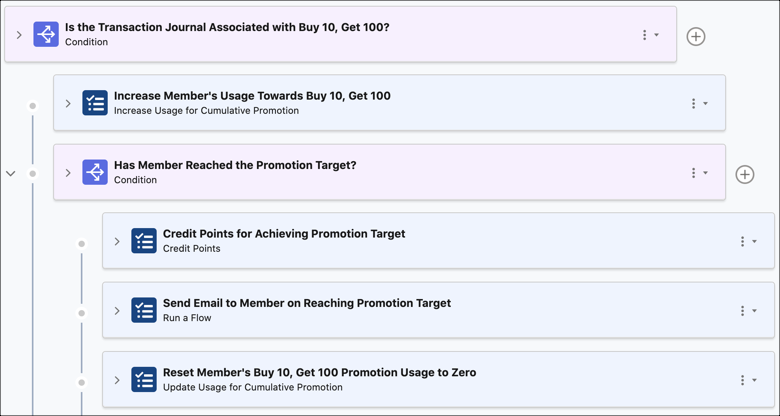
The program manager of Cloud Kicks Inner Circle has set up a loyalty program process that processes Accrual type transactions in real time. The process must credit points to the member's points balance and update the member's usage of a cumulative promotion if the promotion is associated with the transaction journal. If the member reaches the promotion's target, points must be credited to the member.
Required Editions
| Available in: Lightning Experience |
| Available in: Enterprise, Performance, Unlimited, and Developer Editions with Loyalty Management |
Explore and Learn
Watch this video to understand how you can create a process to credit points to members for their activities.
If you aren’t able to watch the video in full screen, open the
video on a new tab:  Use Loyalty Management Promotion Setup to
Reward Member Purchases.
Use Loyalty Management Promotion Setup to
Reward Member Purchases.
Scenario
Here are the business scenarios of the loyalty program process:
- Members must be credited points that are worth twice the transaction amount for a non-qualifying currency named Reward Points.
- A cumulative promotion is running between February 1 and April 30, 2022 for which the member
must purchase 10 products across multiple transactions to get an additional 100 Reward Points.
- The promotion is named Buy 10, Get 100.
- The promotion record contains the details of the number of points that must be credited and the promotion period.
- An email must be sent to the member if they achieve the target for the promotion with the
current transaction.
The flow to send an email to the member has already been configured by the admin and it is of the type Loyalty Management Flow. The flow is named Send Email to Member for Reaching Buy 10, Get 100 Promotion Target.
Loyalty Program Process
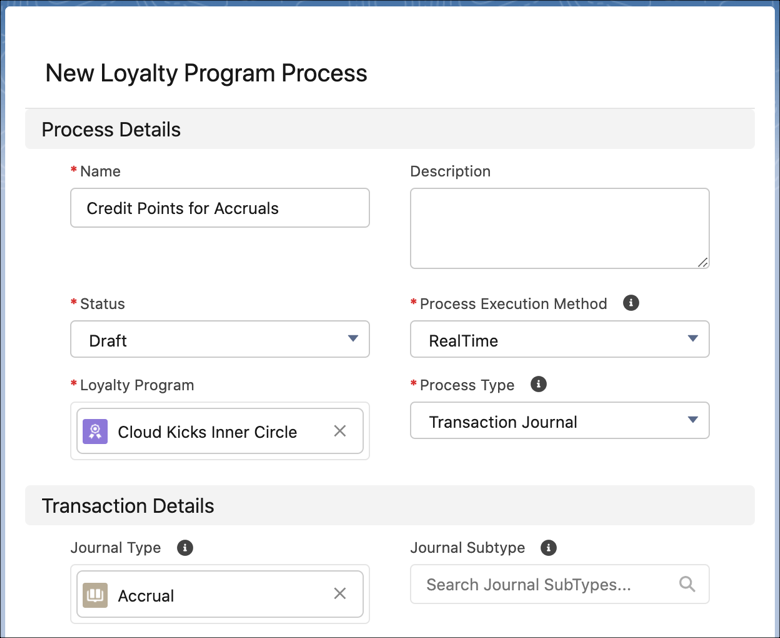
Here's how the loyalty program process is defined.
| Field Name | Value |
|---|---|
| Name | Credit Points for Accruals |
| Status | Draft |
| Process Execution Mode | RealTime |
| Loyalty Program | Cloud Kicks Inner Circle |
| Process Type | Transaction Journal |
| Journal Type | Accrual |
Parameter
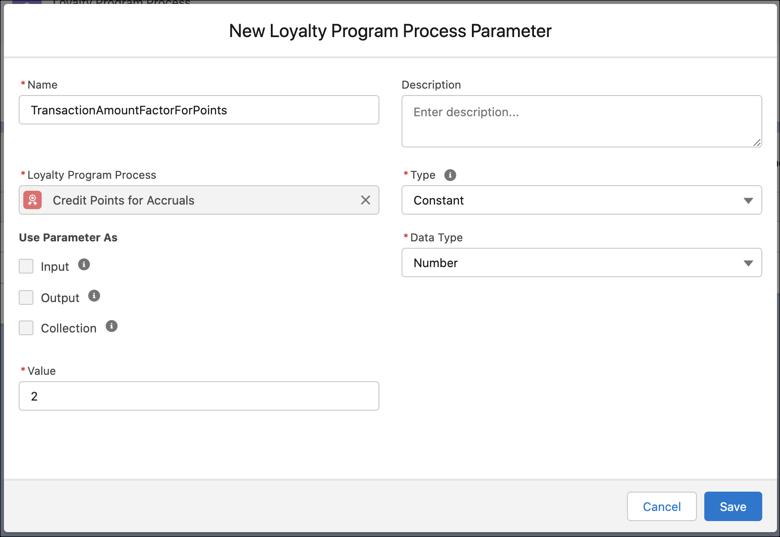
The process requires one constant parameter that stores a number. The number represents the factor by which the transaction amount must be calculated to determine the points to be credited for a transaction journal. This value is stored as a parameter to ensure that if the factor changes, the rule doesn't need to be deactivated to update the factor.
| Field Name | Value |
|---|---|
| Name | TransactionAmountFactorForPoints |
| Loyalty Program Process | Credit Points for Accruals |
| Type | Constant |
| Data Type | Number |
| Value | 2 |
Rule to Credit Points
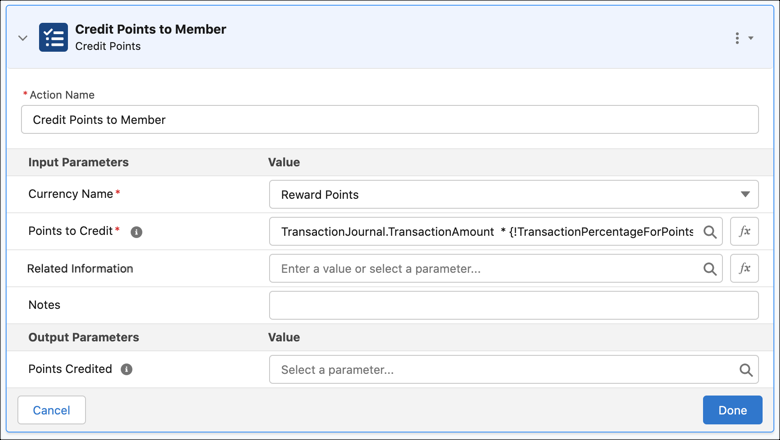
The rule is only used to credit points to the member for every Accrual type transaction journal.
| Field Name | Value |
|---|---|
| Name | Credit Points |
| Loyalty Program Process | Credit Points for Accruals |
| Start Date | Jan 1, 2022 |
Steps in the Credit Points Rule
Here's the only step that's added to the Credit Points rule.
| Step Type | Name | Input Field Value | Output Field Value |
|---|---|---|---|
| Credit Points action | Credit Points to Member |
|
— |
Rule to Credit Points on Reaching Promotion Target
The rule is used to verify whether the transaction is associated with a cumulative promotion and update the member's usage toward attaining the promotion. The rule also credits points to the member if the member reaches the promotion's target. An email is sent out to inform the member that points have been credited for achieving the promotion target. After points are credited to the member for the promotion, the member's promotion usage is reset to zero.
| Field Name | Value |
|---|---|
| Name | Update Member's Promotion Usage and Credit Points on Reaching Promotion Target |
| Loyalty Program Process | Credit Points for Accruals |
| Promotion | Buy 10, Get 100 |
| Previous Process Rule | Credit Points |
Steps in the Increment Promotion Usage Rule
Here are the steps that were added to the Increment Promotion Usage rule.
Step 1: Check Whether Transaction is Associated with Buy 10, Get 100 Promotion
| Step Type | Name | Condition | Filter Criteria |
|---|---|---|---|
| Condition | Is the Transaction Journal Associated with Buy 10, Get 100? | All conditions are met (AND) |
|
Step 1.1: Increase Member Usage for the Promotion
| Step Type | Name | Parent Step | Input Field Value | Output Field Value |
|---|---|---|---|---|
| Increase Usage for Cumulative Promotion action | Increase Member's Usage Towards Buy 10, Get 100 | Is the Transaction Journal Associated with Buy 10, Get 100? | Usage Increment for Cumulative Promotion: Transaction Journal > Quantity | — |
Step 1.2: Check Whether the Member Has Achieved the Promotion Target
| Step Type | Name | Parent Step | Condition | Filter Criteria |
|---|---|---|---|---|
| Condition | Has Member Reached the Promotion Target? | Is the Transaction Journal Associated with Buy 10, Get 100? | All conditions are met (AND) |
|
Step 1.2.1: Credit Points for Reaching Promotion Target
| Step Type | Name | Parent Step | Input Field Value | Output Field Value |
|---|---|---|---|---|
| Credit Points action | Credit Points for Achieving Promotion Target | Has Member Reached the Promotion Target? |
|
— |
Step 1.2.2: Send Email to Member on Reaching Promotion Target
| Step Type | Name | Parent Step | Input Field Value | Output Field Value |
|---|---|---|---|---|
| Run a Flow action | Send Email to Member on Reaching Promotion Target | Has Member Reached the Promotion Target? | — | — |
Step 1.2.3: Reset Member's Promotion Usage to Zero
| Step Type | Name | Parent Step | Input Field Value | Output Field Value |
|---|---|---|---|---|
| Update Usage for Cumulative Promotion action | Reset Member's Buy 10, Get 100 Promotion Usage to Zero | Has Member Reached the Promotion Target? | New Usage for Cumulative Promotion: 0 | — |