The program manager of Cloud Kicks Inner Circle has set up a loyalty program process that processes Redemption type transactions in real time. The process must debit points from the member's points balance and issue a voucher if members buy a promoted product.
Required Editions
| Available in: Lightning Experience |
| Available in: Enterprise, Performance, Unlimited, and Developer Editions with Loyalty Management |
Scenario
Here are the business scenarios of the loyalty program process:
- Members must be debited points for a non-qualifying currency named Reward Points.
- A decision table decides the number of points that must be debited from the member based
on the quantity and the brand of the product purchased.
The standard type decision table is named Decide Points to Redeem. The rules that the decision table evaluates to provide the number of points to redeem is stored in a custom object named Redemption Catalog.
- A standard promotion is running between February 1 and February 28, 2022 for the Super Kicks
product, and members are issued a voucher if they purchase the product.
- The promotion is named Buy Super Kicks, Get a Voucher.
- The value of the voucher is based on the member’s tier:
- Silver: $10
- Gold: $15
- Platinum: $25
The name of the tier group is Inner Circle Tier Group.
- The voucher definition is already available in the Loyalty Management app and is named
Super Kicks Discount.
In the voucher definition, the Effective Date field is selected as February 1, 2022 and the Expiration Date is selected as February 28, 2022.
Loyalty Program Process
Here's how the loyalty program process is defined.
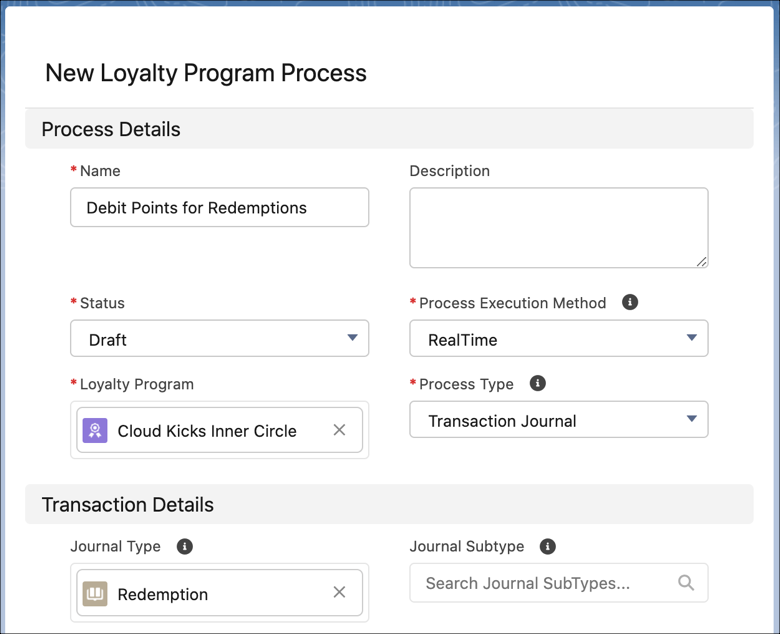
| Field Name | Value |
|---|---|
| Name | Debit Points for Redemptions |
| Status | Draft |
| Process Execution Mode | RealTime |
| Loyalty Program | Cloud Kicks Inner Circle |
| Process Type | Transaction Journal |
| Journal Type | Redemption |
Parameters
The process requires these parameters.
| Parameter Number | Field Name | Value | Reason |
|---|---|---|---|
| 1 | Name | DecisionTableOutcomeType | Stores the type of outcome provided by the Decide Points to Redeem decision table. |
| Loyalty Program Process | Debit Points for Redemptions | ||
| Type | Variable | ||
| Data Type | Text | ||
| 2 | Name | PointsToDebit | Stores the number of points that must be debited from the member's points balance. The value is provided as an output by the Decide Points to Redeem decision table. |
| Loyalty Program Process | Debit Points for Redemptions | ||
| Type | Variable | ||
| Data Type | Sobject | ||
| Object | Redemption Catalog | ||
| 3 | Name | MemberPointsBalance | Stores the points balance of the member. |
| Loyalty Program Process | Debit Points for Redemptions | ||
| Type | Variable | ||
| Data Type | Number | ||
| Decimal Places | 2 | ||
| 4 | Name | MemberEscrowPointsBalance | Stores the escrow points balance of the member. |
| Loyalty Program Process | Debit Points for Redemptions | ||
| Type | Variable | ||
| Data Type | Number | ||
| Decimal Places | 2 | ||
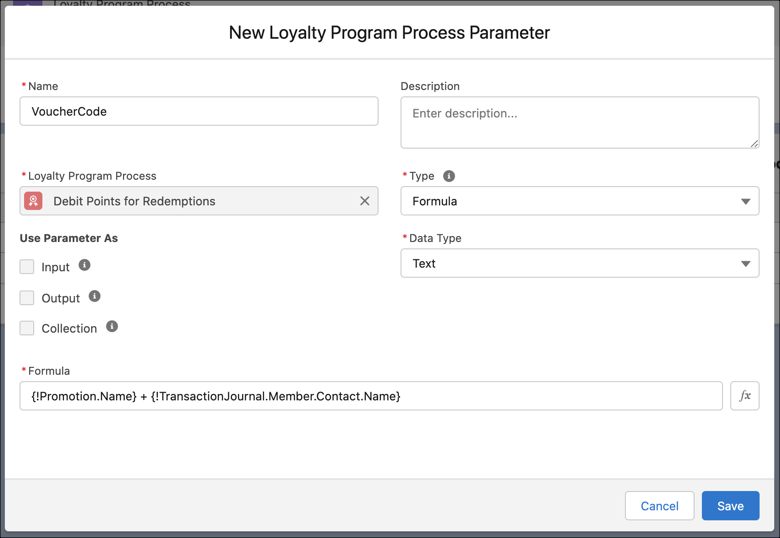
| 5 | Name | VoucherCode | Generates unique code for each issued voucher. |
| Loyalty Program Process | Debit Points for Redemptions | ||
| Type | Formula | ||
| Data Type | Text | ||
| Formula | {!Promotion.Name} + {!TransactionJournal.Member.Contact.Name} | ||
| 6 | Name | MemberTier | Stores the member's tier. |
| Loyalty Program Process | Debit Points for Redemptions | ||
| Type | Variable | ||
| Data Type | Text | ||
| 7 | Name | VoucherValue | Assigns the voucher value based on the member's tier. |
| Loyalty Program Process | Debit Points for Redemptions | ||
| Type | Variable | ||
| Data Type | Number | ||
| Decimal Places | 0 |
Rule to Debit Points
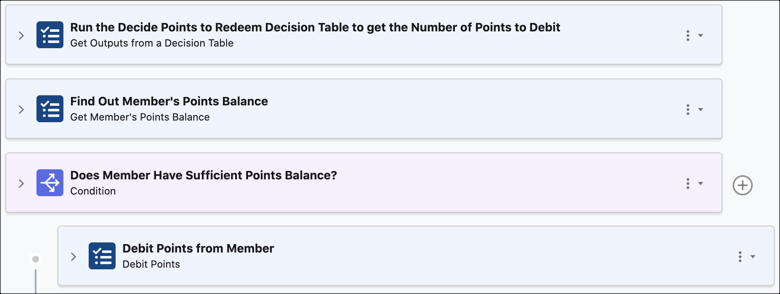
The rule is only used to debit points from the member's points balance for every Redemption type transaction journal.
| Field Name | Value |
|---|---|
| Name | Debit Points |
| Loyalty Program Process | Debit Points for Redemptions |
| Start Date | Jan 1, 2022 |
| Step Type | Name | Child Step Of | Input Field Value | Output Field Value |
|---|---|---|---|---|
| Debit Points action | Debit Points from Member | Does Member Have Sufficient Points Balance? |
|
— |
Steps in the Debit Points Rule
Here are the steps that were added to the Debit Points rule.
Step 1: Find Out the Number of Points to be Debited
| Step Type | Name | Input Field Value | Output Field Value |
|---|---|---|---|
| Get Outputs from a Decision Table action | Run the Decide Points to Redeem Decision Table to get the Number of Points to Debit |
|
|
Step 2: Get Member's Points Balance
| Step Type | Name | Input Field Value | Output Field Value |
|---|---|---|---|
| Get Member's Points Balance action | Find Out Member's Points Balance | Currency Name: Reward Points |
|
Step 3: Check if Member Has Sufficient Points Balance
| Step Type | Name | Condition | Filter Criteria |
|---|---|---|---|
| Condition | Does Member Have Sufficient Points Balance? | All conditions are met (AND) |
|
Step 3.1: Debits Points from Member
Rule to Issue Vouchers
This rule is associated with a promotion and is used to issue a voucher to members who have availed the promotion.
| Field Name | Value |
|---|---|
| Name | Issue Voucher for Super Kicks Promotion |
| Loyalty Program Process | Debit Points for Redemptions |
| Promotion | Buy Super Kicks, Get a Voucher |
| Previous Process Rule | Debit Points |
Steps in the Issue Voucher for Super Kicks Promotion Rule
Here are the steps that were added to the Issue Voucher for Super Kicks Promotion rule.
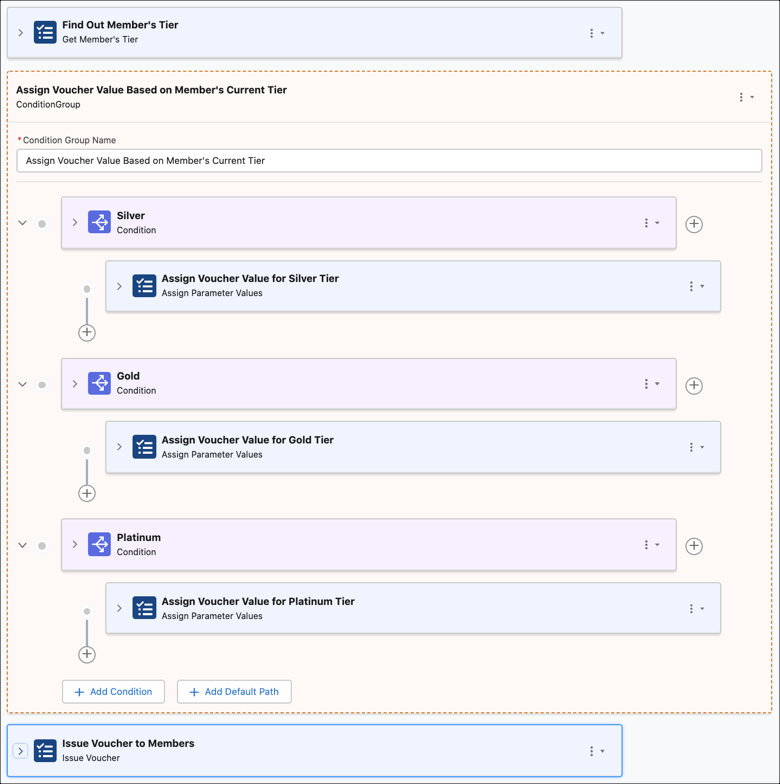
Step 1: Get Member's Tier Group
| Step Type | Name | Input Field Value | Output Field Value |
|---|---|---|---|
| Get Member's Tier action | Find Out Member's Tier | Tier Group: Inner Circle Tier Group | Member Tier: MemberTier (parameter) |
Step 2: Add a Condition Group
The name of the condition group is Assign Voucher Value Based on Member's Current Tier.
| Step Type | Name | Parent Step | Condition Criteria or Input Field Values | Filter Criteria or Output Field Values |
|---|---|---|---|---|
| Condition | Filter Only Silver Tier Members | — | All conditions are met (AND) |
|
| Assign Parameter Values action | Assign Voucher Value for Silver Tier Members | Filter Only Silver Tier Members |
|
— |
| Condition | Filter Only Gold Tier Members | — | All conditions are met (AND) |
|
| Assign Parameter Values action | Assign Voucher Value for Gold Tier Members | Filter Only Gold Tier Members |
|
— |
| Condition | Filter Only Platinum Tier Members | — | All conditions are met (AND) |
|
| Assign Parameter Values action | Assign Voucher Value for Platinum Tier Members | Filter Only Platinum Tier Members |
|
— |
Step 3: Issue Vouchers to Eligible Members
| Step Type | Name | Parent Step | Input Field Values | Output Field Values |
|---|---|---|---|---|
| Issue Voucher action | Issue Voucher to Members | — |
|
— |