
Use the Proactive Asset Service Setup page to walk through the steps for Data Cloud prerequisites, installation prerequisites, and then install Proactive Asset Service.
From Setup, in the Quick Find box, enter Proactive Asset Service, and then select Proactive Asset Service (CRMA). This setup page leads you through everything you need to do for the successful installation of Proactive Asset Service.
As you progress through the setup steps, refresh the page to update the steps that are complete.
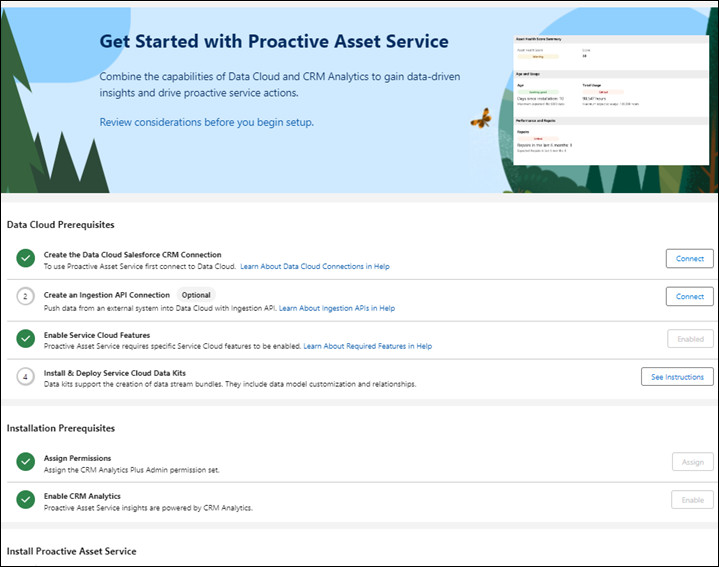
- Create a Data Cloud Salesforce CRM Connection
Before installing the Service data bundle and Proactive Asset Service, connect Data Cloud to Salesforce CRM. - Create an Ingestion API Connection
Push data from an external system into Data Cloud with Ingestion API. - Enable Service Cloud Features
For Proactive Asset Service to work as expected, enable specific Service Cloud features. - Install and Deploy the Service Cloud Data Kit
The Service data kit includes the Service data bundle and provides the necessary data streams and data mappings for Proactive Asset Service. - Assign Permissions
Select who can use the Proactive Asset Service. - Enable CRM Analytics
To use Proactive Asset Service, enable CRM Analytics and set up permissions. - Install and Enable Proactive Asset Service Intelligence
After data is ingested into Data Cloud and CRM Analytics is enabled, you’re ready to install Proactive Asset Service. - Embed Dashboards
The Service Cloud data bundle and Field Service data bundles create the Field Service data streams and data mappings. When you install Proactive Asset Service, the Field Service data model objects provide the data for visualization in CRM Analytic dashboards. - Trigger Flows with Data Cloud Data
A flow initiated by the Data Cloud begins operating once specific criteria within a Data Model Object (DMO) or Calculated Insight Object (CIO) are satisfied. - Enrich Your Org with 360 Data and Insights
Create related list and copy field enrichments for your record pages with data from Data Cloud.