
For the managed package runtime, how many extract steps you need depends on how the object types you are extracting from are related. There are three basic scenarios: single, single with relationship notation, and multiple.
 This information is for Omnistudio for Managed Packages. For Omnistudio on standard runtime, see Omnistudio Help.
-
Extracting data from a single object type, for example, Cases, requires only one extract step.
-
Extracting data from a primary object and one or more parent objects also requires only one extract step. An example is extracting Cases with some Account data for each Case. See Relationship Notation versus Multiple Extract Steps (Managed Package).
-
Extracting data from a primary object and one or more child objects requires at least two extract steps, one for each object type. An example is extracting an Account and all the Cases associated with that Account.
For example, to find Cases by Case Number, you can use a filter such as CaseNumber = Number in the extract step:
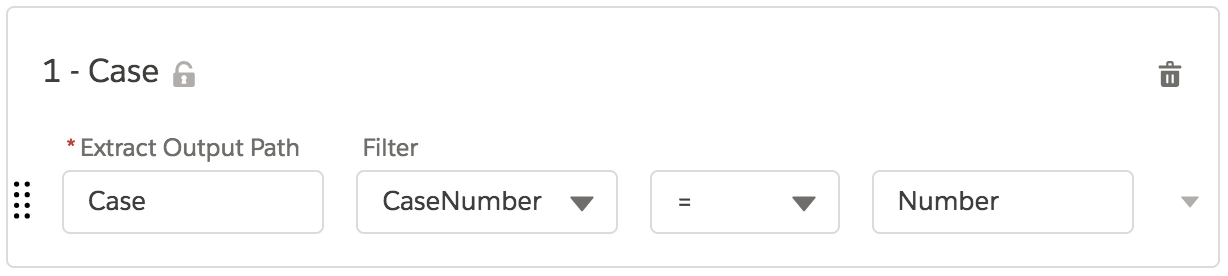
The objects are queried in the order that you specify them in extract steps, which is important for the third scenario, when you need to use data from a previously-read object to filter a subsequent object.
For example, to find all the cases associated with a specific account, you can read the account with a basic filter such as Id = Id in the first extract step, then read the cases with a filter such as AccountId = Acct:Id in the second extract step. (The AccountId is a Case field; the Acct:Id is a reference to the Id field of the Account.)
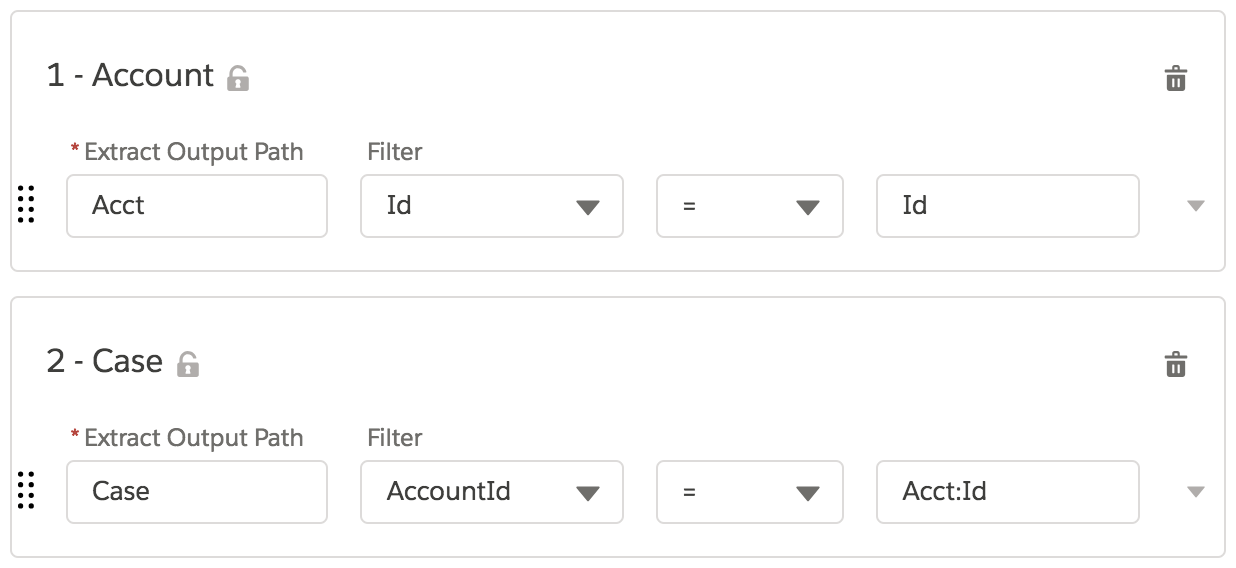
This data is read into the extraction step JSON, and the Extract Step JSON pane on the right shows the top-level hierarchy defined by the output paths that you specify on this tab.
By default, if a value is null, no node is created for the field in the output JSON. To ensure that a node is created, regardless of whether the field is null, go to the Options tab and check Overwrite Target For All Null Inputs.