
For the managed package runtime, the Tracking Service in Omnistudio for Managed Packages is an event-tracking service that captures details of actions that users perform. You can use the service to track any type of event. For example, you can track the time it takes to complete the steps in an Omniscript to identify process improvements.
 This information is for Omnistudio for Managed Packages. For Omnistudio on standard runtime, see Omnistudio Help.
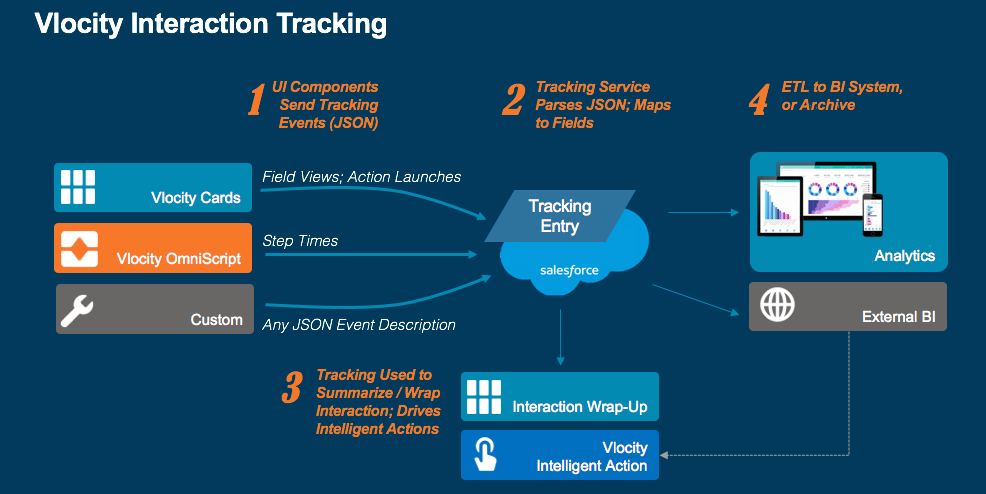
The Tracking Service writes data to the Tracking Entry object: VlocityTrackingEntry__c. Managed Packages components, including Vlocity
Intelligence, OmniAnalytics, Omniscripts, Cards Framework, and Integration Procedures , can
call the Tracking Service. The Tracking Entry object contains the custom fields to ensure
the service works, and you can add fields to hold additional data you want to track.
The Tracking Service class receives JSON data and writes it to the Tracking Entry object.
The class matches JSON keys to Salesforce custom field names and writes the JSON values to
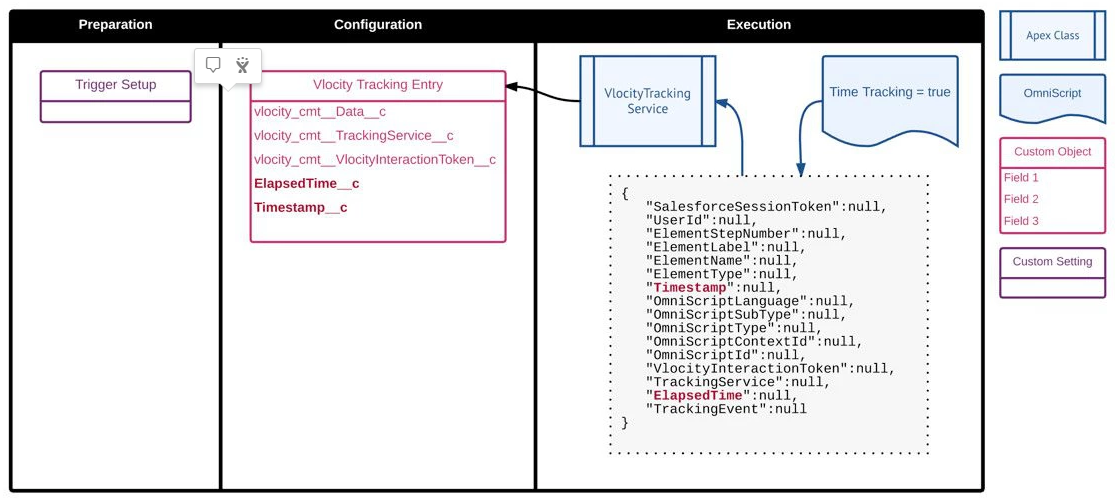
the field values. For example, the class writes the value held in the JSON key ElapsedTime to the custom field ElapsedTime__c.
This diagram shows how an out-of-box Omniscript would use the Tracking Service.
- Enable Tracking for Components (Omnistudio for Managed Packages) (Managed Package)
For the managed package runtime, you can enable tracking for components by configuring triggers. - Vlocity Components Event Tracking (Managed Package)
For the managed package runtime, tracking data is stored in theVlocityTrackingEntry__cobject. Some data, listed here, is tracked for all components and event types. Vlocity OmniAnalytics tracks many additional fields for all of its events. You can also add custom fields to the data being tracked. - Vlocity OmniAnalytics Event Tracking (Managed Package)
For the managed package runtime, OmniAnalytics tracking data is stored in the VlocityTrackingEntry__c object. Some data is tracked for all event types of all OmniAnalytics components: Flexcards, Omniscripts, and Integration Procedures. - Omniscript Event Tracking (Managed Package)
For the managed package runtime, for Omniscripts, the following events are tracked. For Outcome events, the user's SaveForLater and Cancel events are logged by default. To configure the value logged for a Done action, set its Outcome property. - Integration Procedure Event Tracking (Managed Package)
For the managed package runtime, for Integration Procedures, the following events are tracked. When one Integration Procedure calls another, and you enable tracking only in the calling Integration Procedure, events in the called Integration Procedure are also tracked. - Cards Framework Event Tracking (Managed Package)
For the managed package runtime, the Vlocity Tracking Service is an event-tracking service that can capture details about how Vlocity users interact with the Cards Framework. - Vlocity Intelligence Event Tracking (Managed Package)
For the managed package runtime, for Vlocity Intelligence, View, Accept, and Reject events are tracked. - Event Tracking for Custom Fields (Managed Package)
For the managed package runtime, for Integration Procedures and Omniscripts, you can add your own custom fields to the data stored by the Tracking Service. In Summer '20 and later releases, you can add custom fields to Flexcards as well. - Tracking Session Interaction Id (Managed Package)
For the managed package runtime, to associate all the events tracked for a single session, the tracking system logs an Interaction Id that is unique for the session. To provide this Id from an Omniscript or Integration Procedure, add a key/value pair to the Tracking Custom Data field in the Configuration section. - Tracking Data Preprocessor (Managed Package)
For the managed package runtime, before the tracking service executes its own logic, it calls any interface implementations named TrackOmniScript or TrackCard, enabling you to preprocess tracking data. For example, this implementation uses the customer ID submitted by an Omniscript to add customer detail to the event data.