
For the managed package runtime, using OmniAnalytics, you can track user interactions to answer questions such as which advertisements get the most responses and how many users who begin a purchasing process complete it. OmniAnalytics can track user interactions with LWC Omniscripts and Flexcards with or without a third-party system such as Google Analytics.
 This information is for Omnistudio for Managed Packages. For Omnistudio on standard runtime, see Omnistudio Help.
All Industries products, including Salesforce Industries Communications, Media, and Energy, Vlocity Insurance, and Vlocity Government, can use OmniAnalytics for Managed Packages.

Data Flows
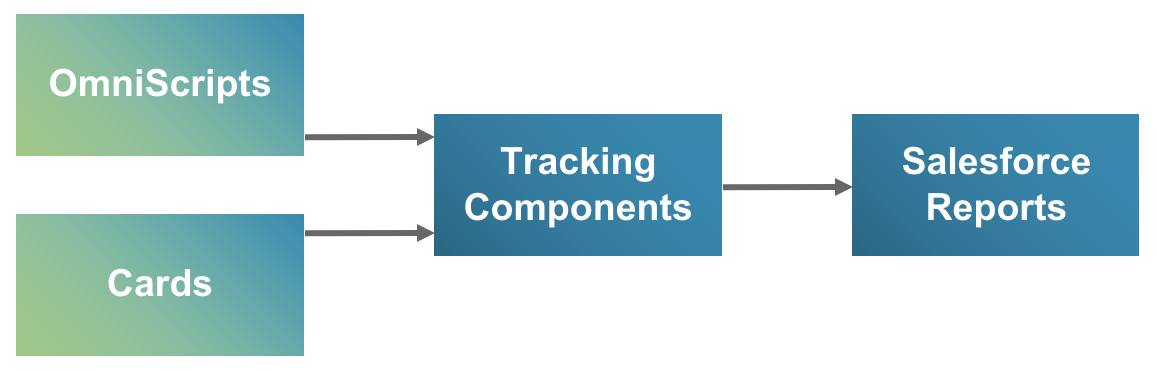
In OmniAnalytics, user interaction data flows from Omniscripts and Flexcards, through tracking components, and into Salesforce reports, either built-in or custom.
User interaction data from OmniAnalytics can also flow from Omniscripts and Flexcards, through tracking components, and into a third-party system such as Google Analytics.
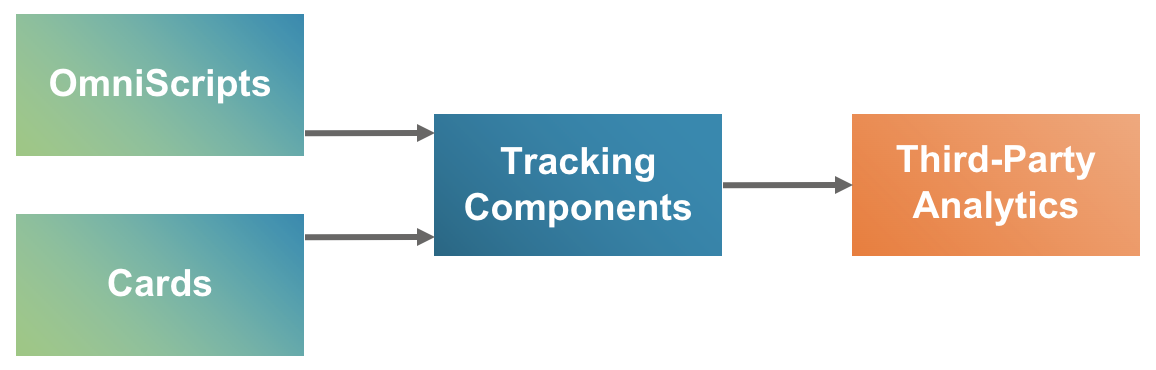
You can send the same data to Salesforce reports, a third-party system, or both.
Using OmniAnalytics, you can control what data you send, how it’s structured, and where it goes without editing templates or writing a script.
Types of Data Collected
Vlocity OmniAnalytics collects data that helps answer questions such as:
-
Which items presented to users are they most interested in?
-
Where are we losing users in the flow?
-
Are some steps too slow to load or too hard to understand?
Specifically, OmniAnalytics collects data about:
-
Clicks per product, offer, or promotion impression
-
Clicks per UI action impression
-
Percent of Omniscripts completed
-
Percent of Omniscript steps completed
-
Load time for Flexcards, Omniscripts, and Omniscript steps
-
Viewing time for Flexcards, Omniscripts, and Omniscript steps
Next Steps
OmniAnalytics has user setup, two standard workflows, and some advanced topics:
-
Edit User Profiles to Enable OmniAnalytics Access (Managed Package) and Edit Sharing Settings to Enable OmniAnalytics Access for Guest Users (Managed Package) — Give users access to OmniAnalytics.
-
Workflow to Configure Internal OmniAnalytics (Managed Package) — Track user interactions without a third-party tag manager.
-
Workflow to Configure OmniAnalytics with Google Analytics (Managed Package) — Track user interactions in combination with Google Analytics and Google Tag Manager.
-
Additional OmniAnalytics Customizations (Managed Package) — Configure inclusion rules for events, other third-party analytics vendors, and static resources.
If you follow the workflow examples, the first workflow is a prerequisite for the second.
- Edit User Profiles to Enable OmniAnalytics Access (Managed Package)
For the managed package runtime, in the Salesforce Winter '21 release, a critical update enforces user profile restrictions for Apex classes that Aura and Lightning Web Components use. To configure OmniAnalytics, users must have permission in their profiles or permission sets to access the FetchStaticResourceUrl and OmniAnalyticsController Apex classes. - Edit Sharing Settings to Enable OmniAnalytics Access for Guest Users (Managed Package)
For the managed package runtime, to have read-only access to OmniAnalytics, guest users must have sharing settings in their profiles for the Vlocity Tracking Group, Vlocity Web Tracking Configuration, and Omni User Session objects. - Workflow to Configure Internal OmniAnalytics (Managed Package)
For the managed package runtime, Vlocity OmniAnalytics can track user interactions with Omniscripts and Flexcards without the use of a third-party tag manager. - Workflow to Configure OmniAnalytics with Google Analytics (Managed Package)
For the managed package runtime, Vlocity OmniAnalytics can track user interactions with Omniscripts and Flexcards in combination with Google Analytics and Google Tag Manager. - Workflow for Adding Ecommerce Data to the Example Omniscript and Card (Managed Package)
For the managed package runtime, Google Analytics Ecommerce requires specific kinds of data. You must add this data to the Messaging Framework Omniscript properties and the Flexcard Custom Fields. Then when the Omniscript runs and the Flexcard is used, they send this data to Google Analytics. - Workflow for Creating a Tracking Configuration and Adding Event Types (Managed Package)
For the managed package runtime, a Vlocity Web Tracking Configuration specifies a third-party tag manager and account to which to send tracking data. Vlocity Web Tracking Event Types specify data formats for specific events. In the workflow example, Event Types pass Omniscript data to Google Analytics. - Edit the Vlocity Tracking Group for Google Analytics (Managed Package)
For the managed package runtime, you can edit a Vlocity Tracking Group to send its data to Google Analytics without changing the components it includes. - Interact with the Example Omniscript and Card (Managed Package)
For the managed package runtime, to generate tracking data, you must interact with the example Omniscript and Flexcard as if you were an end user. - View the Tracking Data in Google Analytics (Managed Package)
For the managed package runtime, in the Workflow to Configure OmniAnalytics with Google Analytics documentation, after you view the example Omniscript and Card, you can view the data in Google Analytics. This is the final step in the workflow. - Additional OmniAnalytics Customizations (Managed Package)
For the managed package runtime, additional OmniAnalytics customizations include inclusion rules for Vlocity Web Tracking Event Types, configuration of other third-party analytics vendors aside from Google Analytics, and using a static resource instead of a Visualforce page.