For the managed package runtime, looping calculations take a starting point, an endpoint, and an interval. At run time,
the calculation procedure runs in a loop from start to end per interval. Each run uses the
same input variables, plus an index variable that you can
use in the calculation.
 This information is for Omnistudio for Managed Packages. For Omnistudio on standard runtime, see Omnistudio Help.
Calculation procedures support looping calculations starting in the Vlocity Insurance Winter '18 Major Release.
For example, you can create a looping calculation procedure for a life insurance policy. The looping calculation procedure calculates the policy value for each year from the current age of the policy holder to the policy holder's age at the end of the policy term. The calculation takes a current age (35 years), end age (65 years), and an interval of 1 to calculate on an annual basis. The calculation runs, looping 30 times. All input variables remaining constant, but the index starts at 35 and increments by one through 65. The output shows the user the value of the policy each year from the start date to the end of the term.
To set up looping, see Configure a Calculation Procedure for Looping (Managed Package).
Index Variable
The index variable becomes available when you set
Enable Looping on the Calculation Procedure Version. To add it to calculation steps,
type index in a calculation step.
When a calculation procedure has looping set up and enabled, it increments index based on the looping Interval variable (whatever you've named it), from looping start until
looping end. You can then use index to change the
calculation on each looping pass. For example, you can add it to an Age to increment the value of Age for each loop.

The system-provided index variable does not show
up in the list of variables. You don't need to create it.
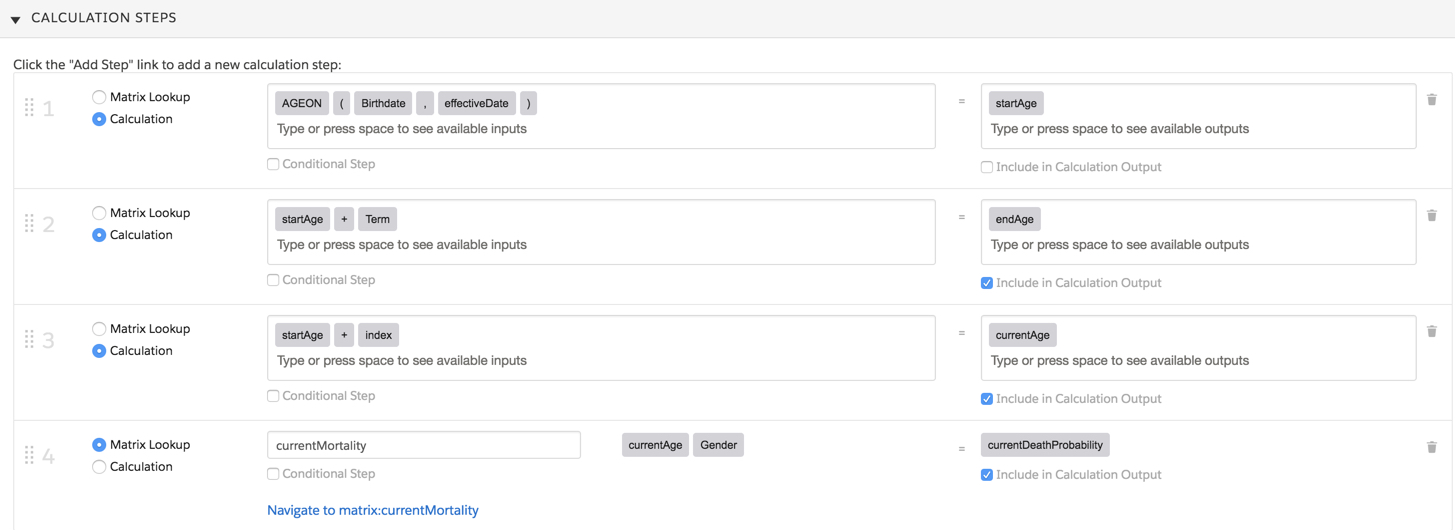
In this example, calculation step 3 is set up to calculate the year of the policy, looping per interval (one year). Step 4 calculates the age of the policy holder, looping per interval (one), starting with the policy holder's age at the start of the policy.
PREVIOUS Function
You can use the PREVIOUS function to get the
previous looped iteration's result. The calculation step can use this function to access
a previous iteration's variable results and calculate it with other variables.
PREVIOUS accepts the following:
-
Variable name
Usually set up as a constant of type
Text -
previousIteratorThe index of the previous iteration result set from which to get the value for the variable
-
ITERATIONSystem-provided variable for accumulated results
In this example, the PREVIOUS function uses
previous iterations to calculate the cash value of the policy per iteration (one).

Example 1: Calculation Procedure Simulation
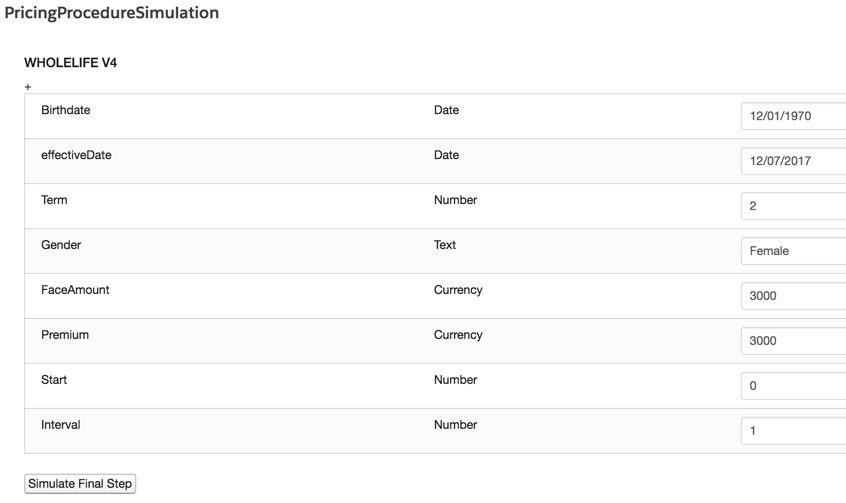
For this example, the term = 2 (years), the start = 0 (year zero of the term), and the increment = 1 (year).
The output JSON for this simulation is:
{
   "output": [
      {
         "calculationResults": [
            {
               "index": 0,
               "intervalNumber": 0,
               "deathBenefit": 3000,
               "deathBenefitGuaranty": 3000,
               "cashValue": 0,
               "intervalDividend": 0,
               "cashInvestment": 2995.83,
               "cashInsurance": 4.17,
               "deathProbability": 0.00139,
               "currentMortality__currentDeathProbability": 0.002402,
               "currentAge": 47,
               "intervalDate": "2017-12-07",
               "endAge": 52,
               "ID": "input"
            },
            {
               "index": 1,
               "intervalNumber": 1,
               "deathBenefit": 5995.83,
               "deathBenefitGuaranty": 3000,
               "cashValue": 2995.83,
               "intervalDividend": 0,
               "cashInvestment": 2996.52,
               "cashInsurance": 3.48,
               "deathProbability": 0.00116,
               "currentMortality__currentDeathProbability": 0.002639,
               "currentAge": 48,
               "intervalDate": "2018-12-07",
               "endAge": 52,
               "ID": "input"
            },
            {
               "index": 2,
               "intervalNumber": 2,
               "deathBenefit": 8992.35,
               "deathBenefitGuaranty": 3000,
               "cashValue": 5992.35,
               "intervalDividend": 44.94,
               "cashInvestment": 2997.33,
               "cashInsurance": 2.67,
               "deathProbability": 0.00089,
               "currentMortality__currentDeathProbability": 0.002903,
               "currentAge": 49,
               "intervalDate": "2019-12-07",
               "endAge": 52,
               "ID": "input"
            }
         ],
         "aggregationResults": {}
      }
   ]
}
Example 2: Omniscript
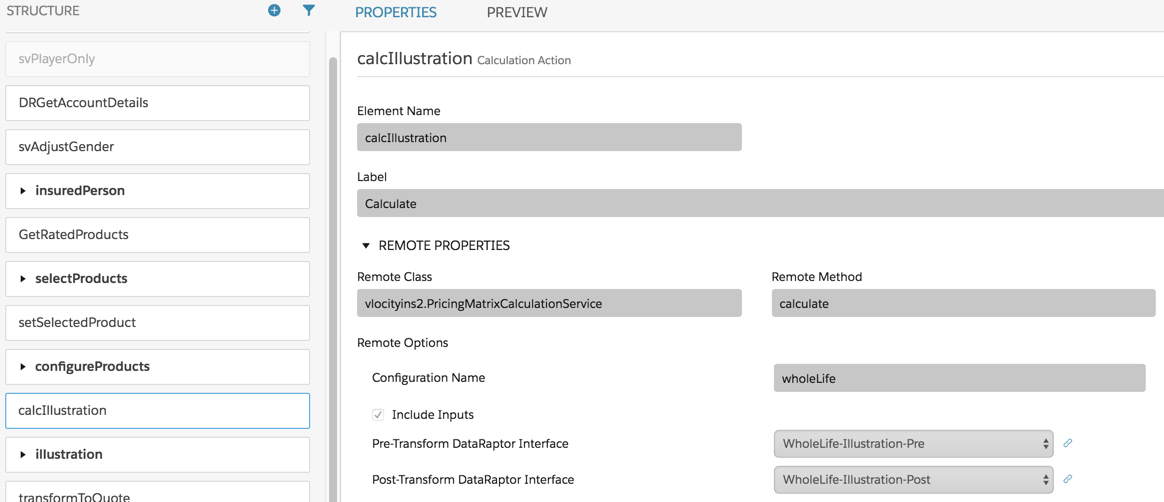
In this example, the looping calculation procedure is added to an Omniscript as a Calculation Action.
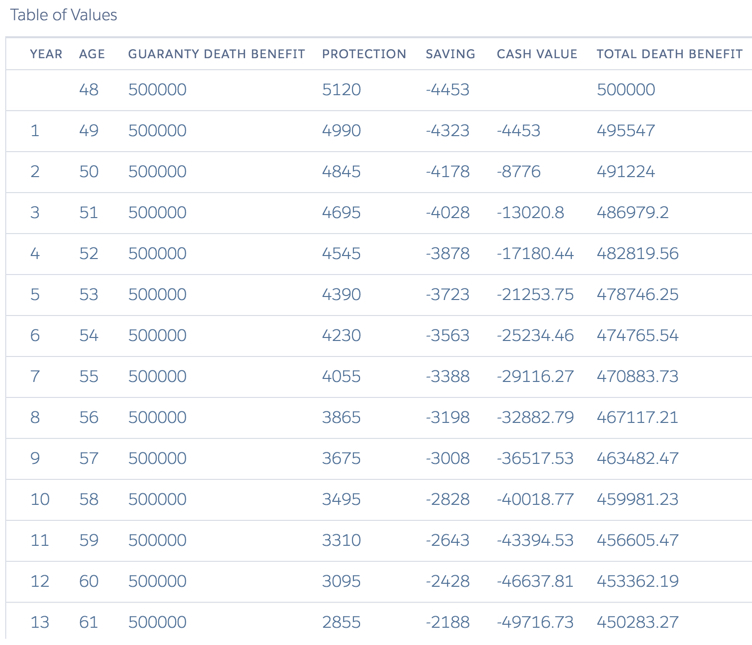
The looping calculation creates a list of results. You can display these results in a format of your choice. In the example below, a custom template displays the results in a table that shows the values of the policy year over year (incremented by 1).