For the managed package runtime, you can test the input and output of a Data Mapper Extract on the Preview tab.
 This information is for Omnistudio for Managed Packages. For Omnistudio on standard runtime, see Omnistudio Help.
- Go to the Preview tab.
-
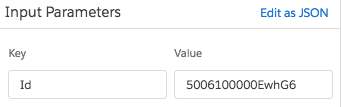
Specify Key/Value pairs in the Input Parameters panel.
As an alternative, you can click Edit as JSON and specify the input in JSON format.
- To observe the effects of caching when testing the Data Mapper Extract, deselect the Ignore Cache checkbox. See Cache for Omnistudio Data Mappers (Managed Package).
- Click Execute.
The Response panel displays the resulting data, and the Debug Log panel displays the results of the Salesforce queries issued by the Data Mapper.
For example, if the Data Mapper filters Accounts based on an Id provided by an Omniscript, a Key/Value pair such as the following enables you to test the Data Mapper using a specific Account Id.