
For the managed package runtime, all calculation matrices have the characteristics that standard calculation matrices have. Other types have characteristics that standard calculation matrices lack. All calculation matrices have input columns, output columns, and versions.
 This information is for Omnistudio for Managed Packages. For Omnistudio on standard runtime, see Omnistudio Help.
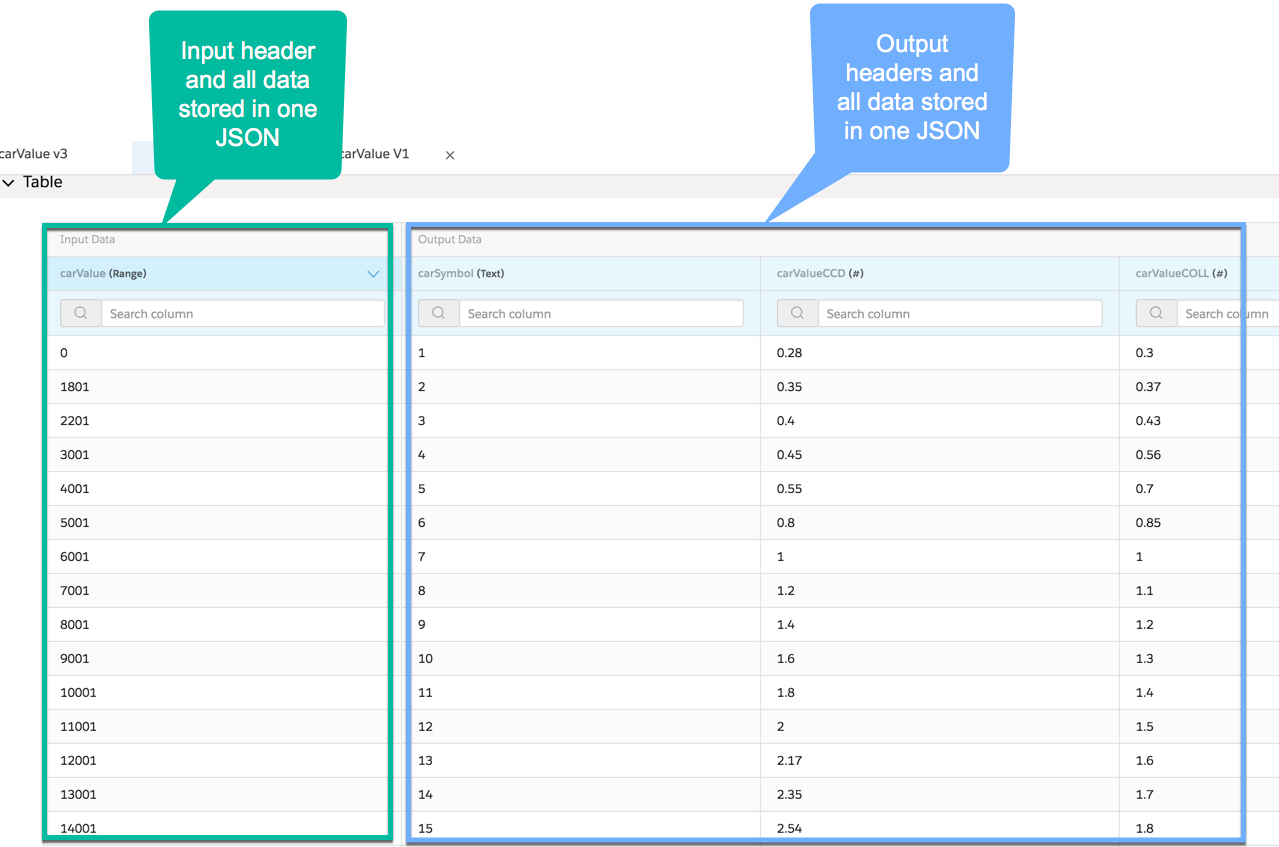
A calculation matrix is a Vlocity rating table that is structured and stored as follows:
-
One input column or a set of input columns
-
Input column header names must match inputs, such as attributes and remote options
-
Each input or set of inputs must be unique
-
Vlocity stores all input column header names and all input data in one JSON
-
-
One output column or a set of output columns
-
Outputs and sets of outputs don't need to be unique
-
Vlocity stores all output column header names and all output data in one JSON
-
You can have multiple versions of the same calculation matrix enabled at the same time. Vlocity uses the start date/time, end date/time, and priority (highest number is highest priority, so 2 is higher priority than 1) to determine which version of the matrix to use.
If the start date/time of one version of a calculation matrix overlaps the end date/time of another calculation matrix, you can set priorities on them to enable Vlocity to determine which one to use. If a call to a calculation matrix specifies an effective date, Vlocity uses that date to find the correct matrix. If a date isn't specified, Vlocity uses today as the effective date.
The call to the calculation matrix finds the right hash, matches the input, unpacks the output JSON, finds the correct output, and returns it.