---
schema_version: "1"
id: 3e6a36ae1614ecf17bee7c5d4e53851b40224ac005a0d67e5b8b2968b9f2d647
title: Setup and Script Configuration Reference (Managed Package)
collection: admin
version: current
locale: en-us
portal_url: https://docs.salesforce.com/admin/current/en-us/xcloud/264-0-0/os_setup_and_script_configuration_reference.md
canonical_url: https://help.salesforce.com/s/articleView?id=xcloud.os_setup_and_script_configuration_reference.htm&release=264.0.0&type=5
source_site: help.salesforce.com
content_type: documentation
content_hash: 03169a78a10f475418737fbef6931e6733fc874baf4ec8bdf057b13788c95826
description: For the managed package runtime, the Script Configuration defines the name, type, subtype, language, and currency of an Omniscript. The Script Configuration also provides multiple configuration options to define both the appearance and behavior of the Omniscript further.
products:
  - Omnistudio
release: "264"
---
# Setup and Script Configuration Reference (Managed Package)

For the managed package runtime, the Script Configuration defines the name, type, subtype, language, and currency of an Omniscript. The Script Configuration also provides multiple configuration options to define both the appearance and behavior of the Omniscript further.

![Managed Package app icon](https://sf-zdocs-cdn-prod.zoominsoftware.com/tdta-xcloud-omnistudio_for_managed_packages-264-0-0-production-enus/aa2554ec-624a-4ee6-8da4-6435670e6e62/resources-global/_corporate/images/managedpackageicon.png) This information is for Omnistudio for Managed Packages. For Omnistudio on standard runtime, see [Omnistudio Help](https://help.salesforce.com/s/articleView?id=xcloud.os_omnistudio_standard.htm&language=en_US).

Beginning with the Vlocity Insurance and Health Spring '20, the Vlocity LWC Omniscript designer enables you to preview dynamic web forms as you build them using a drag interface with WYSIWYG editing.

![Note](https://sf-zdocs-cdn-prod.zoominsoftware.com/tdta-xcloud-omnistudio_for_managed_packages-264-0-0-production-enus/aa2554ec-624a-4ee6-8da4-6435670e6e62/images/icon_note.png)

Note

When creating or editing an Omniscript in the designer, see script configuration properties in the Setup panel.

## Setup Properties Exclusive to the LWC Omniscript Designer

<table class="slds-table slds-table_bordered slds-max-medium-table_stacked slds-m-bottom_small ">
        <colgroup>
          <col>
          <col>
        </colgroup>
        <thead class="slds-text-title_caps ">
          <tr class="">
            <th scope="col" class="slds-cell-wrap" style="vertical-align:top;" id="d300259e65">
              <p style="margin-bottom:0;">Property</p>
            </th>
            <th scope="col" class="slds-cell-wrap" style="vertical-align:top;" id="d300259e71">
              <p style="margin-bottom:0;">Description</p>
            </th>
          </tr>
        </thead>
        <tbody>
          <tr class="">
            <td data-label="Property" class="slds-cell-wrap" style="vertical-align:top;" headers="d300259e65 ">
              <p style="margin-bottom:0;">
                <strong class="uicontrol">Custom Lightning Stylesheet File Name</strong>
              </p>
            </td>

            <td data-label="Description" class="slds-cell-wrap" style="vertical-align:top;" headers="d300259e71 ">
              <p style="margin-bottom:0;">Enter the name of a static resource that contains a CSS file to apply
                custom SLDS styling.</p>
            </td>

          </tr>
          <tr class="">
            <td data-label="Property" class="slds-cell-wrap" style="vertical-align:top;" headers="d300259e65 ">
              <p style="margin-bottom:0;">
                <strong class="uicontrol">Custom Newport Stylesheet File Name</strong>
              </p>
            </td>

            <td data-label="Description" class="slds-cell-wrap" style="vertical-align:top;" headers="d300259e71 ">
              <p style="margin-bottom:0;">Enter the name of a static resource that contains a CSS file to apply
                custom Newport styling.</p>
            </td>

          </tr>
          <tr class="">
            <td data-label="Property" class="slds-cell-wrap" style="vertical-align:top;" headers="d300259e65 ">
              <p style="margin-bottom:0;">
                <strong class="uicontrol">Default Error Message</strong>
              </p>
            </td>

            <td data-label="Description" class="slds-cell-wrap" style="vertical-align:top;" headers="d300259e71 ">
              <p style="margin-bottom:0;">Sets a script-wide default error message that displays if an error
                message for a specific action doesn’t exist.</p>
            </td>

          </tr>
          <tr class="">
            <td data-label="Property" class="slds-cell-wrap" style="vertical-align:top;" headers="d300259e65 ">
              <p style="margin-bottom:0;">
                <strong class="uicontrol">Enable SEO</strong>
              </p>
            </td>

            <td data-label="Description" class="slds-cell-wrap" style="vertical-align:top;" headers="d300259e71 ">
              <p style="margin-bottom:0;">Make your Omniscript's URL available to search engines.</p>
            </td>

          </tr>
          <tr class="">
            <td data-label="Property" class="slds-cell-wrap" style="vertical-align:top;" headers="d300259e65 ">
              <p style="margin-bottom:0;">
                <strong class="uicontrol">Fixed Footer On Mobile</strong>
              </p>
            </td>

            <td data-label="Description" class="slds-cell-wrap" style="vertical-align:top;" headers="d300259e71 ">
              <p style="margin-bottom:0;">Sets footer buttons to a fixed position on mobile devices.</p>
            </td>

          </tr>
          <tr class="">
            <td data-label="Property" class="slds-cell-wrap" style="vertical-align:top;" headers="d300259e65 ">
              <p style="margin-bottom:0;">
                <strong class="uicontrol">Lightning Design System Design Token Overrides</strong>
              </p>
            </td>

            <td data-label="Description" class="slds-cell-wrap" style="vertical-align:top;" headers="d300259e71 ">
              <p style="margin-bottom:0;">Override Salesforce's Lightning Design System design tokens.</p>
            </td>

          </tr>
          <tr class="">
            <td data-label="Property" class="slds-cell-wrap" style="vertical-align:top;" headers="d300259e65 ">
              <p style="margin-bottom:0;">
                <strong class="uicontrol">Scroll Animation</strong>
              </p>
            </td>

            <td data-label="Description" class="slds-cell-wrap" style="vertical-align:top;" headers="d300259e71 ">
              <p style="margin-bottom:0;">Select On to add a smooth scroll animation to your Omniscript.</p>
            </td>

          </tr>
          <tr class="">
            <td data-label="Property" class="slds-cell-wrap" style="vertical-align:top;" headers="d300259e65 ">
              <p style="margin-bottom:0;">
                <strong class="uicontrol">Tracking Business Category</strong>
              </p>
            </td>

            <td data-label="Description" class="slds-cell-wrap" style="vertical-align:top;" headers="d300259e71 ">
              <p style="margin-bottom:0;">Define a business category for a tracking entry. For example,
                ecommerce.</p>
            </td>

          </tr>
          <tr class="">
            <td data-label="Property" class="slds-cell-wrap" style="vertical-align:top;" headers="d300259e65 ">
              <p style="margin-bottom:0;">
                <strong class="uicontrol">Tracking Business Event</strong>
              </p>
            </td>

            <td data-label="Description" class="slds-cell-wrap" style="vertical-align:top;" headers="d300259e71 ">
              <p style="margin-bottom:0;">Define a business tracking event for a tracking entry. For example,
                Payment Plan.</p>
            </td>

          </tr>
        </tbody>
      </table>

## Script Configuration Properties Exclusive to LWC Omniscripts

Beginning with Vlocity Insurance and Vlocity Health Summer '19, Omniscripts support Lightning web components.

<table class="slds-table slds-table_bordered slds-max-medium-table_stacked slds-m-bottom_small ">
        <colgroup>
          <col>
          <col>
          <col>
        </colgroup>
        <thead class="slds-text-title_caps ">
          <tr class="">
            <th scope="col" class="slds-cell-wrap" style="vertical-align:top;" id="d300259e267">
              <p style="margin-bottom:0;">Property</p>
            </th>
            <th scope="col" class="slds-cell-wrap" style="vertical-align:top;" id="d300259e273">
              <p style="margin-bottom:0;">Description</p>
            </th>
            <th scope="col" class="slds-cell-wrap" style="vertical-align:top;" id="d300259e279">
              <p style="margin-bottom:0;">Example</p>
            </th>
          </tr>
        </thead>
        <tbody>
          <tr class="">
            <td data-label="Property" class="slds-cell-wrap" style="vertical-align:top;" headers="d300259e267 ">
              <p>
                <strong class="uicontrol">commitOnChange</strong>
              </p>
              <p style="margin-bottom:0;">Available beginning with Vlocity Insurance and Health Winter '20 and
                Vlocity CME Winter '20.</p>
            </td>

            <td data-label="Description" class="slds-cell-wrap" style="vertical-align:top;" headers="d300259e273 ">
              <p style="margin-bottom:0;">In LWC Omniscripts, validation runs when a user clicks out of a field by
                using the onBlur function. In Angular Omniscripts, validation runs when a
                user types in a field by using the onChange function.</p>
            </td>

            <td data-label="Example" class="slds-cell-wrap" style="vertical-align:top;" headers="d300259e279 ">
              <p style="margin-bottom:0;">n/a</p>
            </td>

          </tr>
          <tr class="">
            <td data-label="Property" class="slds-cell-wrap" style="vertical-align:top;" headers="d300259e267 ">
              <p style="margin-bottom:0;">
                <strong class="uicontrol">Deploy LWC</strong>
              </p>
            </td>

            <td data-label="Description" class="slds-cell-wrap" style="vertical-align:top;" headers="d300259e273 ">
              <p style="margin-bottom:0;">Redeploy an active Omniscript if the previously generated LWC Omniscript
                fails to deploy by clicking <strong class="uicontrol">Deploy LWC</strong>.</p>
            </td>

            <td data-label="Example" class="slds-cell-wrap" style="vertical-align:top;" headers="d300259e279 ">
              <p style="margin-bottom:0;">Activate and Deploy Omniscripts </p>
            </td>

          </tr>
          <tr class="">
            <td data-label="Property" class="slds-cell-wrap" style="vertical-align:top;" headers="d300259e267 ">
              <p style="margin-bottom:0;">
                <strong class="uicontrol">Download LWC</strong>
              </p>
            </td>

            <td data-label="Description" class="slds-cell-wrap" style="vertical-align:top;" headers="d300259e273 ">
              <p style="margin-bottom:0;">Review the auto-generated Omniscript LWC by clicking <strong class="uicontrol">Download
                  LWC</strong>.</p>
            </td>

            <td data-label="Example" class="slds-cell-wrap" style="vertical-align:top;" headers="d300259e279 ">
              <p style="margin-bottom:0;">n/a</p>
            </td>

          </tr>
          <tr class="">
            <td data-label="Property" class="slds-cell-wrap" style="vertical-align:top;" headers="d300259e267 ">
              <p style="margin-bottom:0;">
                <strong class="uicontrol">Element Type To LWC Component Mapping</strong>
              </p>
            </td>

            <td data-label="Description" class="slds-cell-wrap" style="vertical-align:top;" headers="d300259e273 ">
              <p style="margin-bottom:0;">Enables a custom Lightning web component to override all elements of a
                specific Element Type.</p>
            </td>

            <td data-label="Example" class="slds-cell-wrap" style="vertical-align:top;" headers="d300259e279 ">Add Custom Lightning Web Components to an Omniscript
            </td>

          </tr>
          <tr class="">
            <td data-label="Property" class="slds-cell-wrap" style="vertical-align:top;" headers="d300259e267 ">
              <p style="margin-bottom:0;">
                <strong class="uicontrol">Enable LWC</strong>
              </p>
            </td>

            <td data-label="Description" class="slds-cell-wrap" style="vertical-align:top;" headers="d300259e273 ">
              <p style="margin-bottom:0;">Enables the Omniscript to use the Vlocity Lightning Web Component
                framework.</p>
            </td>

            <td data-label="Example" class="slds-cell-wrap" style="vertical-align:top;" headers="d300259e279 ">
              <p style="margin-bottom:0;">Create an LWC Omniscript </p>
            </td>

          </tr>
          <tr class="">
            <td data-label="Property" class="slds-cell-wrap" style="vertical-align:top;" headers="d300259e267 ">
              <p style="margin-bottom:0;">
                <strong class="uicontrol">Pub/Sub</strong>
              </p>
            </td>

            <td data-label="Description" class="slds-cell-wrap" style="vertical-align:top;" headers="d300259e273 ">
              <p style="margin-bottom:0;">Sends custom parameters as a key/value pair when an action fires a
                pub/sub event that enables communication between Lightning Web
                Components.</p>
            </td>

            <td data-label="Example" class="slds-cell-wrap" style="vertical-align:top;" headers="d300259e279 ">
              <p style="margin-bottom:0;">n/a</p>
            </td>

          </tr>
          <tr class="">
            <td data-label="Property" class="slds-cell-wrap" style="vertical-align:top;" headers="d300259e267 ">
              <p style="margin-bottom:0;">
                <strong class="uicontrol">Step Chart Placement</strong>
              </p>
            </td>

            <td data-label="Description" class="slds-cell-wrap" style="vertical-align:top;" headers="d300259e273 ">
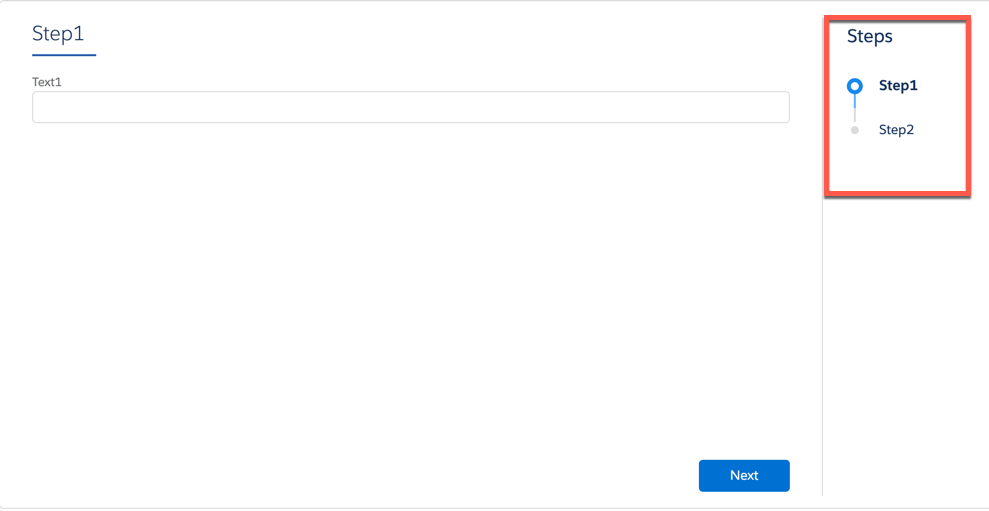
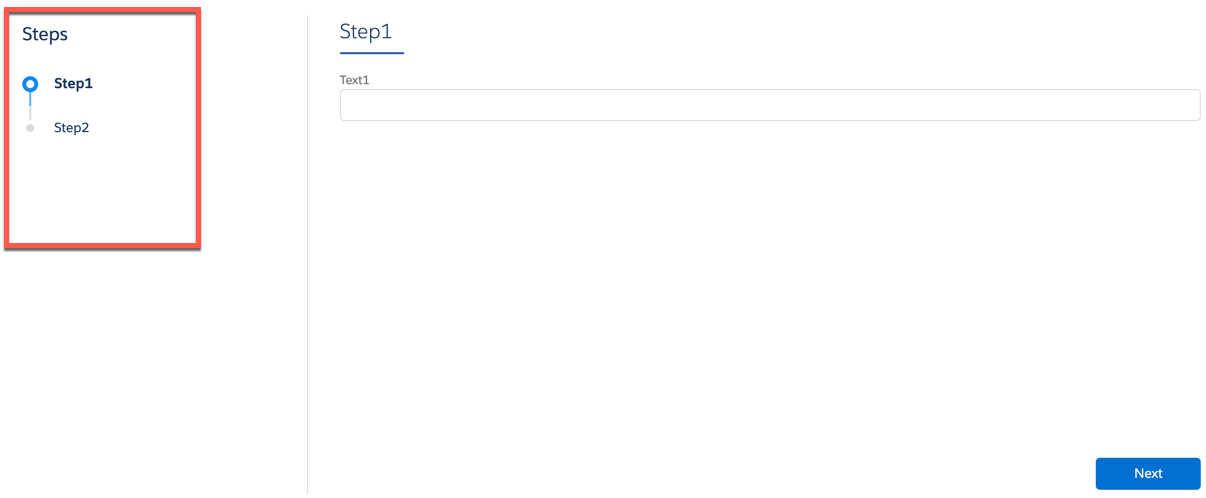
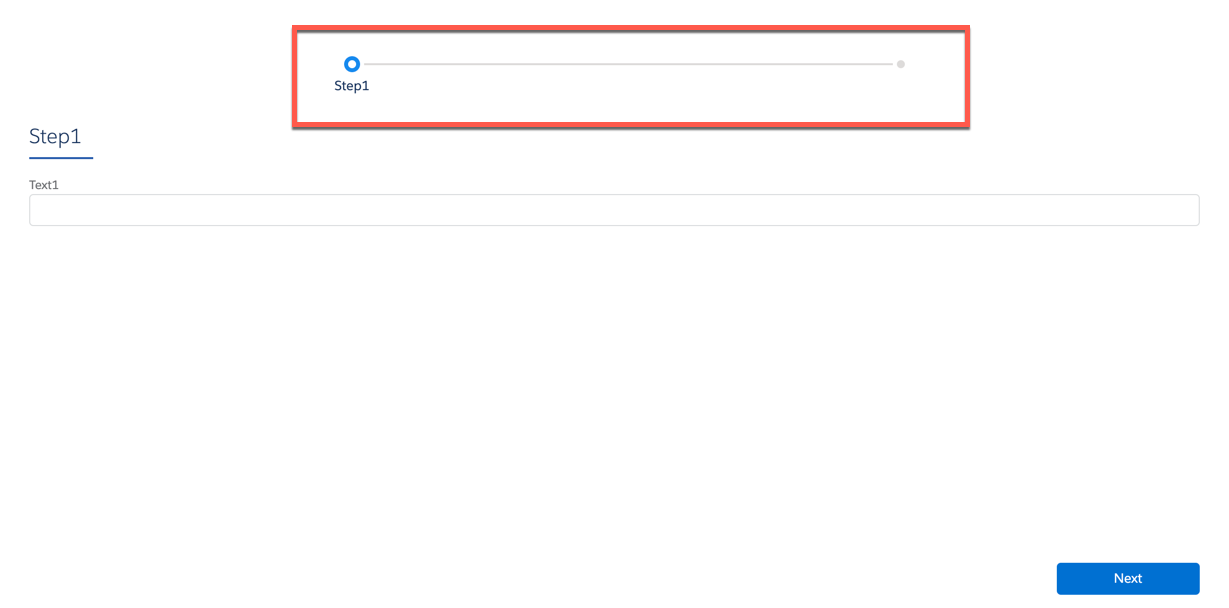
              <p style="margin-bottom:0;">Exclusive to LWC Omniscripts using Lightning styling, set the Step Chart
                to display to the right, to the left, or on top of the Omniscript.</p>
            </td>

            <td data-label="Example" class="slds-cell-wrap" style="vertical-align:top;" headers="d300259e279 ">
              <p>Right:</p>
              <div><img style="width:100px;" src="https://sf-zdocs-cdn-prod.zoominsoftware.com/tdta-xcloud-omnistudio_for_managed_packages-264-0-0-production-enus/aa2554ec-624a-4ee6-8da4-6435670e6e62/omnistudio_for_managed_packages/images/owc_step_chart_right.png" alt="image"></div>
              <p>Left:</p>
              <div><img style="width:100px;" src="https://sf-zdocs-cdn-prod.zoominsoftware.com/tdta-xcloud-omnistudio_for_managed_packages-264-0-0-production-enus/aa2554ec-624a-4ee6-8da4-6435670e6e62/omnistudio_for_managed_packages/images/owc_step_chart_left.png" alt="image"></div>
              <p>Top:</p>
              <div><img style="width:100px;" src="https://sf-zdocs-cdn-prod.zoominsoftware.com/tdta-xcloud-omnistudio_for_managed_packages-264-0-0-production-enus/aa2554ec-624a-4ee6-8da4-6435670e6e62/omnistudio_for_managed_packages/images/owc_step_chart_top.png" alt="image"></div>
            </td>

          </tr>
        </tbody>
      </table>

## Script Configuration Properties

<table class="slds-table slds-table_bordered slds-max-medium-table_stacked slds-m-bottom_small ">
        <colgroup>
          <col style="width:25%">
          <col style="width:25%">
          <col style="width:25%">
          <col style="width:25%">
        </colgroup>
        <thead class="slds-text-title_caps ">
          <tr class="">
            <th scope="col" class="slds-cell-wrap" style="vertical-align:top;" id="d300259e514">
              <p style="margin-bottom:0;">Property Label</p>
            </th>
            <th scope="col" class="slds-cell-wrap" style="vertical-align:top;" id="d300259e520">
              <p style="margin-bottom:0;">Description</p>
            </th>
            <th scope="col" class="slds-cell-wrap" style="vertical-align:top;" id="d300259e526">
              <p style="margin-bottom:0;">LWC Enabled</p>
            </th>
            <th scope="col" class="slds-cell-wrap" style="vertical-align:top;" id="d300259e532">
              <p style="margin-bottom:0;">Example</p>
            </th>
          </tr>
        </thead>
        <tbody>
          <tr class="">
            <td data-label="Property Label" class="slds-cell-wrap" style="vertical-align:top;" headers="d300259e514 ">
              <p style="margin-bottom:0;">
                <strong class="uicontrol">Cancel Options</strong>
              </p>
            </td>

            <td data-label="Description" class="slds-cell-wrap" style="vertical-align:top;" headers="d300259e520 ">
              <p style="margin-bottom:0;">Enables customization of the cancel link's behavior.</p>
            </td>

            <td data-label="LWC Enabled" class="slds-cell-wrap" style="vertical-align:top;" headers="d300259e526 ">
              <p style="margin-bottom:0;">Yes</p>
            </td>

            <td data-label="Example" class="slds-cell-wrap" style="vertical-align:top;" headers="d300259e532 ">
              <p style="margin-bottom:0;">Configuring the Cancel Link in an Omniscript </p>
            </td>

          </tr>
          <tr class="">
            <td data-label="Property Label" class="slds-cell-wrap" style="vertical-align:top;" headers="d300259e514 ">
              <p style="margin-bottom:0;">
                <strong class="uicontrol">Console Tab Label</strong>
              </p>
            </td>

            <td data-label="Description" class="slds-cell-wrap" style="vertical-align:top;" headers="d300259e520 ">
              <p style="margin-bottom:0;">Applies text to the console tab where the Omniscript is embedded. The
                Console Tab Label and Console Tab Icon settings in Omniscript only
                applies if the Omniscript owns the entire tab or subtab. The Console Tab
                Label and Console Tab Icon settings aren't used if the Omniscript is
                embedded on a page with other components.</p>
            </td>

            <td data-label="LWC Enabled" class="slds-cell-wrap" style="vertical-align:top;" headers="d300259e526 ">
              <p style="margin-bottom:0;">Available starting with Vlocity Insurance and Health Winter '20 and
                Vlocity CME Winter '20.</p>
            </td>

            <td data-label="Example" class="slds-cell-wrap" style="vertical-align:top;" headers="d300259e532 ">
              <p style="margin-bottom:0;">n/a</p>
            </td>

          </tr>
          <tr class="">
            <td data-label="Property Label" class="slds-cell-wrap" style="vertical-align:top;" headers="d300259e514 ">
              <p style="margin-bottom:0;">
                <strong class="uicontrol">Console Tab Icon</strong>
              </p>
            </td>

            <td data-label="Description" class="slds-cell-wrap" style="vertical-align:top;" headers="d300259e520 ">
              <p style="margin-bottom:0;">Applies an icon to the console tab where the Omniscript is embedded. The
                Console Tab Label and Console Tab Icon settings in Omniscript only
                applies if the Omniscript owns the entire tab or subtab. The Console Tab
                Label and Console Tab Icon settings aren't used if the Omniscript is
                embedded on a page with other components.</p>
            </td>

            <td data-label="LWC Enabled" class="slds-cell-wrap" style="vertical-align:top;" headers="d300259e526 ">
              <p style="margin-bottom:0;">Available starting with Vlocity Insurance and Health Winter '20 and
                Vlocity CME Winter '20.</p>
            </td>

            <td data-label="Example" class="slds-cell-wrap" style="vertical-align:top;" headers="d300259e532 ">
              <p style="margin-bottom:0;">n/a</p>
            </td>

          </tr>
          <tr class="">
            <td data-label="Property Label" class="slds-cell-wrap" style="vertical-align:top;" headers="d300259e514 ">
              <p style="margin-bottom:0;">
                <strong class="uicontrol">Currency Code</strong>
              </p>
            </td>

            <td data-label="Description" class="slds-cell-wrap" style="vertical-align:top;" headers="d300259e520 ">
              <p style="margin-bottom:0;">By default, Omniscript uses an org's default currency in single-currency
                orgs and a user's currency in multi-currency orgs. Override the default
                currency by configuring the currency code field. Add the currency code as
                a static value or pass it in from a URL using the OmniScriptCurrencyCode
                parameter. For example, set the currency code JPY or pass it in as a URL
                parameter, c__OmniScriptCurrencyCode=JPY.</p>
            </td>

            <td data-label="LWC Enabled" class="slds-cell-wrap" style="vertical-align:top;" headers="d300259e526 ">
              <p style="margin-bottom:0;">Yes</p>
            </td>

            <td data-label="Example" class="slds-cell-wrap" style="vertical-align:top;" headers="d300259e532 ">
              <p style="margin-bottom:0;">In a VisualForce page that displays an Omniscript, by setting the
                strOmniScriptCurrencyCode to a currency code.</p>
            </td>

          </tr>
          <tr class="">
            <td data-label="Property Label" class="slds-cell-wrap" style="vertical-align:top;" headers="d300259e514 ">
              <p style="margin-bottom:0;">
                <strong class="uicontrol">Custom HTML Templates</strong>
              </p>
            </td>

            <td data-label="Description" class="slds-cell-wrap" style="vertical-align:top;" headers="d300259e520 ">
              <p style="margin-bottom:0;">Enter CSS to modify the Omniscript or enter HTML templates to override
                Omniscript's default templates.</p>
            </td>

            <td data-label="LWC Enabled" class="slds-cell-wrap" style="vertical-align:top;" headers="d300259e526 ">
              <p style="margin-bottom:0;">No</p>
            </td>

            <td data-label="Example" class="slds-cell-wrap" style="vertical-align:top;" headers="d300259e532 ">
              <p style="margin-bottom:0;">Using Custom Templates </p>
            </td>

          </tr>
          <tr class="">
            <td data-label="Property Label" class="slds-cell-wrap" style="vertical-align:top;" headers="d300259e514 ">
              <p style="margin-bottom:0;">
                <strong class="uicontrol">Custom JavaScript</strong>
              </p>
            </td>

            <td data-label="Description" class="slds-cell-wrap" style="vertical-align:top;" headers="d300259e520 ">
              <p style="margin-bottom:0;">Enter custom JavaScript that is run, or available, when an Omniscript
                initializes.</p>
            </td>

            <td data-label="LWC Enabled" class="slds-cell-wrap" style="vertical-align:top;" headers="d300259e526 ">
              <p style="margin-bottom:0;">No</p>
            </td>

            <td data-label="Example" class="slds-cell-wrap" style="vertical-align:top;" headers="d300259e532 ">
              <p style="margin-bottom:0;">n/a</p>
            </td>

          </tr>
          <tr class="">
            <td data-label="Property Label" class="slds-cell-wrap" style="vertical-align:top;" headers="d300259e514 ">
              <p style="margin-bottom:0;">
                <strong class="uicontrol">Description</strong>
              </p>
            </td>

            <td data-label="Description" class="slds-cell-wrap" style="vertical-align:top;" headers="d300259e520 ">
              <p style="margin-bottom:0;">Shown on the list view on the Omniscript Designer home page.</p>
            </td>

            <td data-label="LWC Enabled" class="slds-cell-wrap" style="vertical-align:top;" headers="d300259e526 ">
              <p style="margin-bottom:0;">Yes</p>
            </td>

            <td data-label="Example" class="slds-cell-wrap" style="vertical-align:top;" headers="d300259e532 ">
              <p style="margin-bottom:0;">n/a</p>
            </td>

          </tr>
          <tr class="">
            <td data-label="Property Label" class="slds-cell-wrap" style="vertical-align:top;" headers="d300259e514 ">
              <p style="margin-bottom:0;">
                <strong class="uicontrol">Element Type To HTML Template Mapping</strong>
              </p>
            </td>

            <td data-label="Description" class="slds-cell-wrap" style="vertical-align:top;" headers="d300259e520 ">
              <p style="margin-bottom:0;">Applies a template override to every element of a specific type. The
                element type is specified in the left field, and the template is
                specified in the field on the right.</p>
            </td>

            <td data-label="LWC Enabled" class="slds-cell-wrap" style="vertical-align:top;" headers="d300259e526 ">
              <p style="margin-bottom:0;">No</p>
            </td>

            <td data-label="Example" class="slds-cell-wrap" style="vertical-align:top;" headers="d300259e532 ">
              <p style="margin-bottom:0;">n/a</p>
            </td>

          </tr>
          <tr class="">
            <td data-label="Property Label" class="slds-cell-wrap" style="vertical-align:top;" headers="d300259e514 ">
              <p style="margin-bottom:0;">
                <strong class="uicontrol">Enable Tracking</strong>
              </p>
            </td>

            <td data-label="Description" class="slds-cell-wrap" style="vertical-align:top;" headers="d300259e520 ">
              <p style="margin-bottom:0;">Enables Omniscript to track how long steps and actions take. The times
                are stored in the Data JSON.</p>
            </td>

            <td data-label="LWC Enabled" class="slds-cell-wrap" style="vertical-align:top;" headers="d300259e526 ">
              <p style="margin-bottom:0;">Available starting with Vlocity Insurance and Health Winter '20 and
                Vlocity CME Winter '20.</p>
            </td>

            <td data-label="Example" class="slds-cell-wrap" style="vertical-align:top;" headers="d300259e532 ">
              <p style="margin-bottom:0;">Omniscript Custom Event Tracking </p>
            </td>

          </tr>
          <tr class="">
            <td data-label="Property Label" class="slds-cell-wrap" style="vertical-align:top;" headers="d300259e514 ">
              <p style="margin-bottom:0;">
                <strong class="uicontrol">Enable Unload Warning</strong>
              </p>
            </td>

            <td data-label="Description" class="slds-cell-wrap" style="vertical-align:top;" headers="d300259e520 ">
              <p style="margin-bottom:0;">Triggers a <strong class="uicontrol">Leave Site?</strong> warning when reloading,
                navigating away, or closing the window.</p>
            </td>

            <td data-label="LWC Enabled" class="slds-cell-wrap" style="vertical-align:top;" headers="d300259e526 ">
              <p style="margin-bottom:0;">Yes</p>
            </td>

            <td data-label="Example" class="slds-cell-wrap" style="vertical-align:top;" headers="d300259e532 ">
              <p style="margin-bottom:0;">n/a</p>
            </td>

          </tr>
          <tr class="">
            <td data-label="Property Label" class="slds-cell-wrap" style="vertical-align:top;" headers="d300259e514 ">
              <p style="margin-bottom:0;">
                <strong class="uicontrol">Error Messages</strong>
              </p>
            </td>

            <td data-label="Description" class="slds-cell-wrap" style="vertical-align:top;" headers="d300259e520 ">
              <p style="margin-bottom:0;">Enables custom error messages that replace the default error
                messages.</p>
            </td>

            <td data-label="LWC Enabled" class="slds-cell-wrap" style="vertical-align:top;" headers="d300259e526 ">
              <p style="margin-bottom:0;">No</p>
            </td>

            <td data-label="Example" class="slds-cell-wrap" style="vertical-align:top;" headers="d300259e532 ">
              <p style="margin-bottom:0;">Customize Omniscript Error Messages </p>
            </td>

          </tr>
          <tr class="">
            <td data-label="Property Label" class="slds-cell-wrap" style="vertical-align:top;" headers="d300259e514 ">
              <p style="margin-bottom:0;">
                <strong class="uicontrol">Fetch Picklist Values At Script Load</strong>
              </p>
            </td>

            <td data-label="Description" class="slds-cell-wrap" style="vertical-align:top;" headers="d300259e520 ">
              <p style="margin-bottom:0;">Enables picklist values to be retrieved at script load when selected. If
                the setting is deselected, picklists are fetched at design time.</p>
            </td>

            <td data-label="LWC Enabled" class="slds-cell-wrap" style="vertical-align:top;" headers="d300259e526 ">
              <p style="margin-bottom:0;">Available starting with Vlocity Insurance and Health Winter '20 and
                Vlocity CME Winter '20.</p>
            </td>

            <td data-label="Example" class="slds-cell-wrap" style="vertical-align:top;" headers="d300259e532 ">
              <p style="margin-bottom:0;">n/a</p>
            </td>

          </tr>
          <tr class="">
            <td data-label="Property Label" class="slds-cell-wrap" style="vertical-align:top;" headers="d300259e514 ">
              <p style="margin-bottom:0;">
                <strong class="uicontrol">Enable Logging Metrics</strong>
              </p>
            </td>

            <td data-label="Description" class="slds-cell-wrap" style="vertical-align:top;" headers="d300259e520 ">
              <p style="margin-bottom:0;">Sends data to Salesforce about which Omniscript elements are used at
                runtime. Doesn't include hidden actions and steps. Doesn't collect user
                data.</p>
            </td>

            <td data-label="LWC Enabled" class="slds-cell-wrap" style="vertical-align:top;" headers="d300259e526 ">
              <p style="margin-bottom:0;">Yes</p>
            </td>

            <td data-label="Example" class="slds-cell-wrap" style="vertical-align:top;" headers="d300259e532 ">
              <p style="margin-bottom:0;">n/a</p>
            </td>

          </tr>
          <tr class="">
            <td data-label="Property Label" class="slds-cell-wrap" style="vertical-align:top;" headers="d300259e514 ">
              <p style="margin-bottom:0;">
                <strong class="uicontrol">Enable Logging Metrics for Hidden Actions and
                  Steps</strong>
              </p>
            </td>

            <td data-label="Description" class="slds-cell-wrap" style="vertical-align:top;" headers="d300259e520 ">
              <p style="margin-bottom:0;">Sends data to Salesforce about which Omniscript hidden actions and
                steps are used at runtime. Doesn't collect user data. Not selected by
                default due to possible decreased performance.</p>
            </td>

            <td data-label="LWC Enabled" class="slds-cell-wrap" style="vertical-align:top;" headers="d300259e526 ">
              <p style="margin-bottom:0;">Yes</p>
            </td>

            <td data-label="Example" class="slds-cell-wrap" style="vertical-align:top;" headers="d300259e532 ">
              <p style="margin-bottom:0;">n/a</p>
            </td>

          </tr>
          <tr class="">
            <td data-label="Property Label" class="slds-cell-wrap" style="vertical-align:top;" headers="d300259e514 ">
              <p style="margin-bottom:0;">
                <strong class="uicontrol">Hide Step Chart</strong>
              </p>
            </td>

            <td data-label="Description" class="slds-cell-wrap" style="vertical-align:top;" headers="d300259e520 ">
              <p style="margin-bottom:0;">Removes the Step Chart from the UI when selected.</p>
            </td>

            <td data-label="LWC Enabled" class="slds-cell-wrap" style="vertical-align:top;" headers="d300259e526 ">
              <p style="margin-bottom:0;">Yes</p>
            </td>

            <td data-label="Example" class="slds-cell-wrap" style="vertical-align:top;" headers="d300259e532 ">
              <p style="margin-bottom:0;">n/a</p>
            </td>

          </tr>
          <tr class="">
            <td data-label="Property Label" class="slds-cell-wrap" style="vertical-align:top;" headers="d300259e514 ">
              <p style="margin-bottom:0;">
                <strong class="uicontrol">Knowledge Options</strong>
              </p>
            </td>

            <td data-label="Description" class="slds-cell-wrap" style="vertical-align:top;" headers="d300259e520 ">
              <p style="margin-bottom:0;">Enables Salesforce Knowledge to be integrated with Omniscript.</p>
            </td>

            <td data-label="LWC Enabled" class="slds-cell-wrap" style="vertical-align:top;" headers="d300259e526 ">
              <p style="margin-bottom:0;">Available starting with Vlocity Insurance and Health Winter '20 and
                Vlocity CME Winter '20.</p>
            </td>

            <td data-label="Example" class="slds-cell-wrap" style="vertical-align:top;" headers="d300259e532 ">
              <p style="margin-bottom:0;">Integrate Salesforce Knowledge with Classic Omniscript </p>
            </td>

          </tr>
          <tr class="">
            <td data-label="Property Label" class="slds-cell-wrap" style="vertical-align:top;" headers="d300259e514 ">
              <p style="margin-bottom:0;">
                <strong class="uicontrol">Label Outside Of Field</strong>
              </p>
            </td>

            <td data-label="Description" class="slds-cell-wrap" style="vertical-align:top;" headers="d300259e520 ">
              <p style="margin-bottom:0;">Displays the label outside of the field when selected.</p>
            </td>

            <td data-label="LWC Enabled" class="slds-cell-wrap" style="vertical-align:top;" headers="d300259e526 ">
              <p style="margin-bottom:0;">No</p>
            </td>

            <td data-label="Example" class="slds-cell-wrap" style="vertical-align:top;" headers="d300259e532 ">&nbsp;</td>

          </tr>
          <tr class="">
            <td data-label="Property Label" class="slds-cell-wrap" style="vertical-align:top;" headers="d300259e514 ">
              <p style="margin-bottom:0;">
                <strong class="uicontrol">Language</strong>
              </p>
            </td>

            <td data-label="Description" class="slds-cell-wrap" style="vertical-align:top;" headers="d300259e520 ">
              <p style="margin-bottom:0;">Type, SubType, and Language define the unique identity of the Omniscript:
                there can be only one Omniscript with the same Type, SubType, and
                Language active at any time.</p>
            </td>

            <td data-label="LWC Enabled" class="slds-cell-wrap" style="vertical-align:top;" headers="d300259e526 ">
              <p style="margin-bottom:0;">Yes</p>
            </td>

            <td data-label="Example" class="slds-cell-wrap" style="vertical-align:top;" headers="d300259e532 ">
              <p style="margin-bottom:0;">Create Multi-Language Omniscripts </p>
            </td>

          </tr>
          <tr class="">
            <td data-label="Property Label" class="slds-cell-wrap" style="vertical-align:top;" headers="d300259e514 ">
              <p style="margin-bottom:0;">
                <strong class="uicontrol">Merge Saved Data JSON</strong>
              </p>
            </td>

            <td data-label="Description" class="slds-cell-wrap" style="vertical-align:top;" headers="d300259e520 ">
              <p style="margin-bottom:0;">Enables saved Omniscript instances to merge data from the saved instance
                into an updated and redeployed Omniscript. When the setting is
                deselected, users start a new instance of the updated Omniscript.</p>
            </td>

            <td data-label="LWC Enabled" class="slds-cell-wrap" style="vertical-align:top;" headers="d300259e526 ">
              <p style="margin-bottom:0;">Yes</p>
            </td>

            <td data-label="Example" class="slds-cell-wrap" style="vertical-align:top;" headers="d300259e532 ">
              <p style="margin-bottom:0;">Configure Save Options </p>
            </td>

          </tr>
          <tr class="">
            <td data-label="Property Label" class="slds-cell-wrap" style="vertical-align:top;" headers="d300259e514 ">
              <p style="margin-bottom:0;">
                <strong class="uicontrol">Omniscript Name</strong>
              </p>
            </td>

            <td data-label="Description" class="slds-cell-wrap" style="vertical-align:top;" headers="d300259e520 ">
              <p style="margin-bottom:0;">Shown on the list view on the Omniscript Designer home page.</p>
            </td>

            <td data-label="LWC Enabled" class="slds-cell-wrap" style="vertical-align:top;" headers="d300259e526 ">
              <p style="margin-bottom:0;">Yes</p>
            </td>

            <td data-label="Example" class="slds-cell-wrap" style="vertical-align:top;" headers="d300259e532 ">
              <p style="margin-bottom:0;">n/a</p>
            </td>

          </tr>
          <tr class="">
            <td data-label="Property Label" class="slds-cell-wrap" style="vertical-align:top;" headers="d300259e514 ">
              <p style="margin-bottom:0;">
                <strong class="uicontrol">Persistent Component</strong>
              </p>
            </td>

            <td data-label="Description" class="slds-cell-wrap" style="vertical-align:top;" headers="d300259e520 ">
              <p style="margin-bottom:0;">Enables the addition of persistent components, including Cart and
                Knowledge.</p>
            </td>

            <td data-label="LWC Enabled" class="slds-cell-wrap" style="vertical-align:top;" headers="d300259e526 ">
              <p style="margin-bottom:0;">No</p>
            </td>

            <td data-label="Example" class="slds-cell-wrap" style="vertical-align:top;" headers="d300259e532 ">
              <p style="margin-bottom:0;">n/a</p>
            </td>

          </tr>
          <tr class="">
            <td data-label="Property Label" class="slds-cell-wrap" style="vertical-align:top;" headers="d300259e514 ">
              <p style="margin-bottom:0;">
                <strong class="uicontrol">Reusable</strong>
              </p>
            </td>

            <td data-label="Description" class="slds-cell-wrap" style="vertical-align:top;" headers="d300259e520 ">
              <p style="margin-bottom:0;">Enables the Omniscript to be embedded into another Omniscript when
                selected.</p>
            </td>

            <td data-label="LWC Enabled" class="slds-cell-wrap" style="vertical-align:top;" headers="d300259e526 ">
              <p style="margin-bottom:0;">Yes</p>
            </td>

            <td data-label="Example" class="slds-cell-wrap" style="vertical-align:top;" headers="d300259e532 ">
              <p style="margin-bottom:0;">Embedding a reusable Omniscript </p>
            </td>

          </tr>
          <tr class="">
            <td data-label="Property Label" class="slds-cell-wrap" style="vertical-align:top;" headers="d300259e514 ">
              <p style="margin-bottom:0;">
                <strong class="uicontrol">Save Options</strong>
              </p>
            </td>

            <td data-label="Description" class="slds-cell-wrap" style="vertical-align:top;" headers="d300259e520 ">
              <p style="margin-bottom:0;">Enables Omniscript data to be written to the OmniScriptInstance__c
                object, including the Data JSON, full JSON, and attachments.</p>
            </td>

            <td data-label="LWC Enabled" class="slds-cell-wrap" style="vertical-align:top;" headers="d300259e526 ">
              <p style="margin-bottom:0;">Available starting with Vlocity Insurance and Health Winter '20 and
                Vlocity CME Winter '20.</p>
            </td>

            <td data-label="Example" class="slds-cell-wrap" style="vertical-align:top;" headers="d300259e532 ">
              <p style="margin-bottom:0;">Save and Resume an Omniscript </p>
            </td>

          </tr>
          <tr class="">
            <td data-label="Property Label" class="slds-cell-wrap" style="vertical-align:top;" headers="d300259e514 ">
              <p style="margin-bottom:0;">
                <strong class="uicontrol">Seed Data JSON</strong>
              </p>
            </td>

            <td data-label="Description" class="slds-cell-wrap" style="vertical-align:top;" headers="d300259e520 ">
              <p style="margin-bottom:0;">Seed Data JSON enables the Omniscript to be seeded with data on launch.
                It doesn’t allow for referencing other data with the <code>%element%</code> syntax or use of expressions.
                For more robust functionality, use the Set Values action.</p>
            </td>

            <td data-label="LWC Enabled" class="slds-cell-wrap" style="vertical-align:top;" headers="d300259e526 ">
              <p style="margin-bottom:0;">Yes</p>
            </td>

            <td data-label="Example" class="slds-cell-wrap" style="vertical-align:top;" headers="d300259e532 ">
              <p style="margin-bottom:0;">Seed Data into an Omniscript </p>
            </td>

          </tr>
          <tr class="">
            <td data-label="Property Label" class="slds-cell-wrap" style="vertical-align:top;" headers="d300259e514 ">
              <p style="margin-bottom:0;">
                <strong class="uicontrol">SubType</strong>
              </p>
            </td>

            <td data-label="Description" class="slds-cell-wrap" style="vertical-align:top;" headers="d300259e520 ">
              <p style="margin-bottom:0;">Type, SubType, and Language define the unique identity of the Omniscript:
                there can be only one Omniscript with the same Type, SubType, and
                Language active at any time. Special characters aren’t allowed.</p>
            </td>

            <td data-label="LWC Enabled" class="slds-cell-wrap" style="vertical-align:top;" headers="d300259e526 ">
              <p style="margin-bottom:0;">Yes</p>
            </td>

            <td data-label="Example" class="slds-cell-wrap" style="vertical-align:top;" headers="d300259e532 ">
              <p style="margin-bottom:0;">n/a</p>
            </td>

          </tr>
          <tr class="">
            <td data-label="Property Label" class="slds-cell-wrap" style="vertical-align:top;" headers="d300259e514 ">
              <p style="margin-bottom:0;">
                <strong class="uicontrol">Session Storage</strong>
              </p>
            </td>

            <td data-label="Description" class="slds-cell-wrap" style="vertical-align:top;" headers="d300259e520 ">
              <p style="margin-bottom:0;">Sends custom parameters as a key/value pair when an action fires a
                session storage event that enables temporary data storage.</p>
            </td>

            <td data-label="LWC Enabled" class="slds-cell-wrap" style="vertical-align:top;" headers="d300259e526 ">
              <p style="margin-bottom:0;">Yes</p>
            </td>

            <td data-label="Example" class="slds-cell-wrap" style="vertical-align:top;" headers="d300259e532 ">
              <p style="margin-bottom:0;">n/a</p>
            </td>

          </tr>
          <tr class="">
            <td data-label="Property Label" class="slds-cell-wrap" style="vertical-align:top;" headers="d300259e514 ">
              <p style="margin-bottom:0;">
                <strong class="uicontrol">Tracking Custom Data</strong>
              </p>
            </td>

            <td data-label="Description" class="slds-cell-wrap" style="vertical-align:top;" headers="d300259e520 ">
              <p style="margin-bottom:0;">Log custom data to the Vlocity Tracking Entry table by adding Key/Value
                pairs. Requires the Vlocity Tracking Service to be enabled in Custom
                Settings.</p>
            </td>

            <td data-label="LWC Enabled" class="slds-cell-wrap" style="vertical-align:top;" headers="d300259e526 ">
              <p style="margin-bottom:0;">Available starting with Vlocity Insurance and Health Winter '20 and
                Vlocity CME Winter '20.</p>
            </td>

            <td data-label="Example" class="slds-cell-wrap" style="vertical-align:top;" headers="d300259e532 ">
              <p style="margin-bottom:0;">n/a</p>
            </td>

          </tr>
          <tr class="">
            <td data-label="Property Label" class="slds-cell-wrap" style="vertical-align:top;" headers="d300259e514 ">
              <p style="margin-bottom:0;">
                <strong class="uicontrol">Type</strong>
              </p>
            </td>

            <td data-label="Description" class="slds-cell-wrap" style="vertical-align:top;" headers="d300259e520 ">
              <p style="margin-bottom:0;">Type, SubType, and Language define the unique identity of the Omniscript:
                there can be only one Omniscript with the same Type, SubType, and
                Language active at any time. Special characters aren’t allowed.</p>
            </td>

            <td data-label="LWC Enabled" class="slds-cell-wrap" style="vertical-align:top;" headers="d300259e526 ">
              <p style="margin-bottom:0;">Yes</p>
            </td>

            <td data-label="Example" class="slds-cell-wrap" style="vertical-align:top;" headers="d300259e532 ">
              <p style="margin-bottom:0;">n/a</p>
            </td>

          </tr>
          <tr class="">
            <td data-label="Property Label" class="slds-cell-wrap" style="vertical-align:top;" headers="d300259e514 ">
              <p style="margin-bottom:0;">
                <strong class="uicontrol">Visualforce Pages Available In Preview</strong>
              </p>
            </td>

            <td data-label="Description" class="slds-cell-wrap" style="vertical-align:top;" headers="d300259e520 ">
              <p style="margin-bottom:0;">To make a custom Visualforce available in the Omniscript preview player
                dropdown, enter a Key/Value pair.</p>
            </td>

            <td data-label="LWC Enabled" class="slds-cell-wrap" style="vertical-align:top;" headers="d300259e526 ">
              <p style="margin-bottom:0;">No</p>
            </td>

            <td data-label="Example" class="slds-cell-wrap" style="vertical-align:top;" headers="d300259e532 ">
              <p style="margin-bottom:0;">n/a</p>
            </td>

          </tr>
          <tr class="">
            <td data-label="Property Label" class="slds-cell-wrap" style="vertical-align:top;" headers="d300259e514 ">
              <p style="margin-bottom:0;">
                <strong class="uicontrol">Window PostMessage</strong>
              </p>
            </td>

            <td data-label="Description" class="slds-cell-wrap" style="vertical-align:top;" headers="d300259e520 ">
              <p style="margin-bottom:0;">Sends custom parameters as a key/value pair when an action fires a
                postMessage event that enables cross-window communication.</p>
            </td>

            <td data-label="LWC Enabled" class="slds-cell-wrap" style="vertical-align:top;" headers="d300259e526 ">
              <p style="margin-bottom:0;">Yes</p>
            </td>

            <td data-label="Example" class="slds-cell-wrap" style="vertical-align:top;" headers="d300259e532 ">
              <p style="margin-bottom:0;">n/a</p>
            </td>

          </tr>
        </tbody>
      </table>