
For the managed package runtime, when loading data into a sequence of objects, you can propagate data directly from one object to another related object. For example, you can use an Omnistudio Data Mapper Load to support an Omniscript that creates an Account and a Contact for the Account.
To link the Account to its Contact, the Data Mapper must perform the following sequence of operations:
 This information is for Omnistudio for Managed Packages. For Omnistudio on standard runtime, see Omnistudio Help.
- Create the Account.
- Create the Contact.
- Link the Account and Contact records by populating the Contact record’s AccountId field with the Id of the Account record.
To handle this type of relationship, link the objects in the Data Mapper Designer.
- On the Objects tab, navigate to the source object (Contact in the preceding example) and click Add Link.
-
For each field you want to link, configure these settings:
- Domain Object Field — The source field from this object (AccountId in the preceding example).
-
Linked Object — Another object in the sequence (Account in
the preceding example).
- Linked Field — The target field in the linked object (Id in the preceding example).

Example To create a Case with a new Account and Contact associated, link the objects as shown
in the following figure. The Contact is associated with the account by AccountId, and the
case is associated with the contact by ContactId.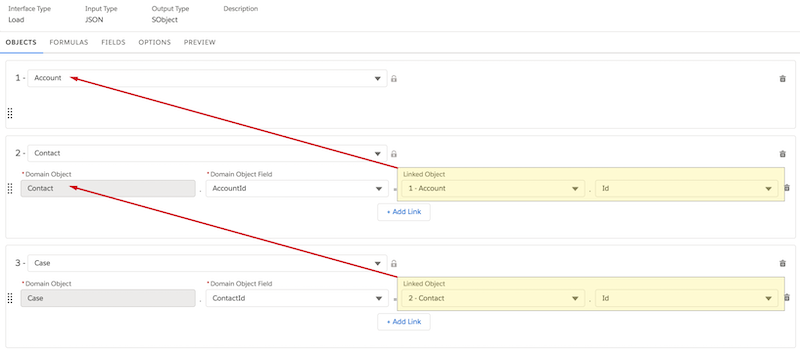
For an example that uses link mapping, see Create a Contact for an Existing Account (Managed Package).