
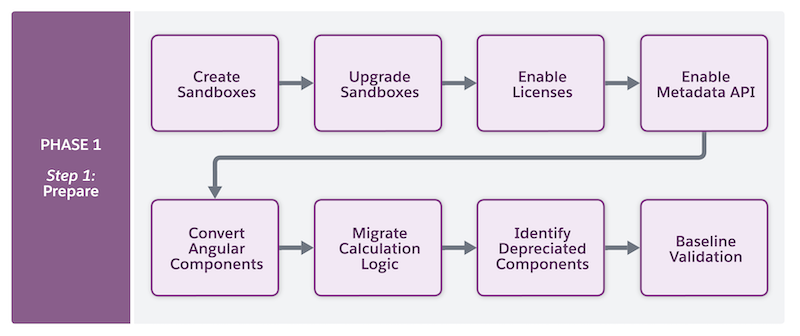
Before starting the migration process, prepare your org by completing these steps:
-
Create dedicated development and testing sandboxes: Set up a development org and a
testing sandbox from your production org. Perform the migration in the development org,
then push the changes to the testing sandbox. See Sandboxes for Omnistudio Migration and Sandbox Licenses and Storage Limits by Type.
 Important We recommend creating the development and testing sandboxes at the same time so that there is no difference in the metadata in both sandboxes. This avoids any deployment issues.
 -
Upgrade your sandboxes: For a smooth migration and to avoid any version related issues,
upgrade your development and testing sandboxes to the latest Vlocity Industries managed
package (CME, INS, PS) version Winter ‘26 or later.
See Omnistudio managed package versions:See Salesforce Industries Cloud versions:
- Provision the Omnistudio license and assign permission set licenses: In both sandboxes, provision the Omnistudio license to make the Omnistudio standard objects available in the org. Then, assign Omnistudio permission set licenses to grant users access to the objects. See Omnistudio Permission Sets.
- Enable Metadata API: In both sandboxes, enable the Omnistudio Metadata API setting. See Enable Omnistudio Metadata API Support and Troubleshooting Errors After Enabling Omnistudio Metadata.
-
In the development sandbox, convert or rebuild Angular components:
- Vlocity and Lightning web component (LWC) cards: To make the components compatible with the Omnistudio standard runtime, rebuild all existing Vlocity and LWC cards as Flexcards on standard objects.
- Angular Omniscripts: To make the components compatible with the Omnistudio standard runtime, convert all Angular Omniscripts to LWC Omniscripts or rebuild them on standard objects.
- If you already converted Angular Omniscripts to LWC Omniscripts, review them for elements that are not supported in Omnistudio standard runtime.
-
In the development sandbox, migrate your calculation logic to Business Rules Engine
(BRE):
- Migrate calculation procedures to expression sets in BRE.
- Migrate calculation matrices to decision matrices in BRE.
- After this transition, update your Omnistudio components to use the new BRE-based logic.
 Note Expression sets and decision matrices are part of BRE, not Omnistudio. BRE has its own setup and configuration requirements.
See Calculation Matrix and Procedure Migration to Business Rules Engine.
- Omniscript containing Action Blocks: If your Omniscript contains Action Blocks, create and activate a new version of the Omniscript to make sure that the migration process completes successfully and all dependencies are correctly mapped.
- Identify deprecated components: Check your implementations to understand what features are supported on Omnistudio. If your implementations contain deprecated components such as Intelligence Actions and OmniForm Actions, reconfigure your setup.
- Baseline validation: Run a baseline validation by executing end-to-end integration flows, and then save the results for comparison and future validation.
- Sandboxes for Omnistudio Migration
Create two dedicated sandboxes: a migration development sandbox for converting your Omnistudio components to work with the standard runtime, and a migration testing sandbox for thoroughly testing migrated Omnistudio components before you deploy to production.