---
schema_version: "1"
id: ea2f872b2e6fe8098484c10fe1bd045a55b2a9c7448ecbafcf2fcc110e2500d8
title: LWC Omniscript Changes and Enhancements (Managed Package)
collection: admin
version: current
locale: en-us
portal_url: https://docs.salesforce.com/admin/current/en-us/xcloud/264-0-0/os_lwc_omniscript_changes_and_enhancements.md
canonical_url: https://help.salesforce.com/s/articleView?id=xcloud.os_lwc_omniscript_changes_and_enhancements.htm&release=264.0.0&type=5
source_site: help.salesforce.com
content_type: documentation
content_hash: 783fdd0b0986227926adada2f36e3ecbfd3f4815e01efb01fa298a80767364c4
description: For the managed package runtime, beginning with the Vlocity Insurance and Health Summer '19 and Vlocity Communications, Media, and Energy Fall '19 releases, Vlocity supports the Salesforce Lightning Web Component programming model.
products:
  - Omnistudio
release: "264"
---
# LWC Omniscript Changes and Enhancements (Managed Package)

For the managed package runtime, beginning with the Vlocity Insurance and Health Summer '19 and Vlocity Communications, Media, and Energy Fall '19 releases, Vlocity supports the Salesforce Lightning Web Component programming model.

![Managed Package app icon](https://sf-zdocs-cdn-prod.zoominsoftware.com/tdta-xcloud-omnistudio_for_managed_packages-264-0-0-production-enus/aa2554ec-624a-4ee6-8da4-6435670e6e62/resources-global/_corporate/images/managedpackageicon.png) This information is for Omnistudio for Managed Packages. For Omnistudio on standard runtime, see [Omnistudio Help](https://help.salesforce.com/s/articleView?id=xcloud.os_omnistudio_standard.htm&language=en_US).

Changes in functionality affect configuration and performance of your LWC Omniscripts.

Beginning with the Vlocity Insurance and Health Summer '19 and Vlocity Communications, Media, and Energy Fall '19 releases, Vlocity supports the Salesforce Lightning Web Component programming model.

## Changes and Enhancements for Vlocity Insurance and Health and Vlocity CME Summer '20

All of the LWC Omniscript changes and enhancements apply to both the LWC Omniscript Designer and the Classic Omniscript Designer.

Download the LWC HTML, CSS, and ReadMe files for this release by clicking [here](https://volt.my.salesforce.com/sfc/p/o0000000IKm8/a/3m000000Mh1f/vZJONozI9LUKXLn8Qihx1wvGBwtTODtlBUJr_18YRjM).

## LWC OmniOut

Run an Omniscript on an external site by using the LWC OmniOut in your external application. OmniOut enables apps to run an Omniscript that connects to Salesforce and external APIs to send and receive data.

## Added Omniscript Element Support

LWC Omniscript supports these elements:

<table class="slds-table slds-table_bordered slds-max-medium-table_stacked slds-m-bottom_small ">
        <colgroup>
          <col>
          <col>
          <col>
        </colgroup>
        <thead class="slds-text-title_caps ">
          <tr class="">
            <th scope="col" class="slds-cell-wrap" style="vertical-align:top;" id="d108092e91">
              <p style="margin-bottom:0;">Element</p>
            </th>
            <th scope="col" class="slds-cell-wrap" style="vertical-align:top;" id="d108092e97">
              <p style="margin-bottom:0;">LWC Behavior</p>
            </th>
            <th scope="col" class="slds-cell-wrap" style="vertical-align:top;" id="d108092e103">
              <p style="margin-bottom:0;">Angular Behavior</p>
            </th>
          </tr>
        </thead>
        <tbody>
          <tr class="">
            <td data-label="Element" class="slds-cell-wrap" style="vertical-align:top;" headers="d108092e91 ">
              <p style="margin-bottom:0;">PDF Action </p>
            </td>

            <td data-label="LWC Behavior" class="slds-cell-wrap" style="vertical-align:top;" headers="d108092e97 ">
              <p style="margin-bottom:0;">No change</p>
            </td>

            <td data-label="Angular Behavior" class="slds-cell-wrap" style="vertical-align:top;" headers="d108092e103 ">
              <p style="margin-bottom:0;">No change</p>
            </td>

          </tr>
        </tbody>
      </table>

## New Properties

New LWC Omniscript properties appear in the LWC Omniscript Designer only.

## Added Property Support

LWC Omniscript supports these Omniscript properties:

<table class="slds-table slds-table_bordered slds-max-medium-table_stacked slds-m-bottom_small ">
        <colgroup>
          <col>
          <col>
          <col>
        </colgroup>
        <thead class="slds-text-title_caps ">
          <tr class="">
            <th scope="col" class="slds-cell-wrap" style="vertical-align:top;" id="d108092e167">
              <p style="margin-bottom:0;">Property</p>
            </th>
            <th scope="col" class="slds-cell-wrap" style="vertical-align:top;" id="d108092e173">
              <p style="margin-bottom:0;">LWC Behavior</p>
            </th>
            <th scope="col" class="slds-cell-wrap" style="vertical-align:top;" id="d108092e179">
              <p style="margin-bottom:0;">Angular Behavior</p>
            </th>
          </tr>
        </thead>
        <tbody>
          <tr class="">
            <td data-label="Property" class="slds-cell-wrap" style="vertical-align:top;" headers="d108092e167 ">
              <p style="margin-bottom:0;">
                <strong class="uicontrol">Enable Unload Warning</strong>
              </p>
            </td>

            <td data-label="LWC Behavior" class="slds-cell-wrap" style="vertical-align:top;" headers="d108092e173 ">
              <p style="margin-bottom:0;">No change</p>
            </td>

            <td data-label="Angular Behavior" class="slds-cell-wrap" style="vertical-align:top;" headers="d108092e179 ">
              <p style="margin-bottom:0;">No change</p>
            </td>

          </tr>
        </tbody>
      </table>

## New Functionalities

These new functionalities are exclusive to LWC Omniscripts:

<table class="slds-table slds-table_bordered slds-max-medium-table_stacked slds-m-bottom_small ">
        <colgroup>
          <col>
          <col>
        </colgroup>
        <thead class="slds-text-title_caps ">
          <tr class="">
            <th scope="col" class="slds-cell-wrap" style="vertical-align:top;" id="d108092e235">
              <p style="margin-bottom:0;">Functionality</p>
            </th>
            <th scope="col" class="slds-cell-wrap" style="vertical-align:top;" id="d108092e241">
              <p style="margin-bottom:0;">Description</p>
            </th>
          </tr>
        </thead>
        <tbody>
          <tr class="">
            <td data-label="Functionality" class="slds-cell-wrap" style="vertical-align:top;" headers="d108092e235 ">
              <p style="margin-bottom:0;">
                <strong class="uicontrol">Browser Navigation</strong>
              </p>
            </td>

            <td data-label="Description" class="slds-cell-wrap" style="vertical-align:top;" headers="d108092e241 ">
              <p style="margin-bottom:0;">A browser's forward and back buttons navigate an LWC Omniscript to the
                next or previous Step.</p>
            </td>

          </tr>
          <tr class="">
            <td data-label="Functionality" class="slds-cell-wrap" style="vertical-align:top;" headers="d108092e235 ">
              <p style="margin-bottom:0;">
                <strong class="uicontrol">Custom Styling Support for RTL Language</strong>
              </p>
            </td>

            <td data-label="Description" class="slds-cell-wrap" style="vertical-align:top;" headers="d108092e241 ">
              <p style="margin-bottom:0;">Add custom styling for right-to-left languages using static
                resources.</p>
            </td>

          </tr>
          <tr class="">
            <td data-label="Functionality" class="slds-cell-wrap" style="vertical-align:top;" headers="d108092e235 ">
              <p style="margin-bottom:0;">
                <strong class="uicontrol">Download Off-Platform LWC </strong>
              </p>
            </td>

            <td data-label="Description" class="slds-cell-wrap" style="vertical-align:top;" headers="d108092e241 ">
              <p style="margin-bottom:0;">Download the Omniscript LWC to add it to OmniOut. </p>
            </td>

          </tr>
          <tr class="">
            <td data-label="Functionality" class="slds-cell-wrap" style="vertical-align:top;" headers="d108092e235 ">
              <p style="margin-bottom:0;">
                <strong class="uicontrol">Expanded Google Maps Response Node</strong>
              </p>
            </td>

            <td data-label="Description" class="slds-cell-wrap" style="vertical-align:top;" headers="d108092e241 ">
              <p style="margin-bottom:0;">Type Ahead's Google Maps functionality returns an expanded response
                containing more JSON nodes.</p>
            </td>

          </tr>
          <tr class="">
            <td data-label="Functionality" class="slds-cell-wrap" style="vertical-align:top;" headers="d108092e235 ">
              <p style="margin-bottom:0;">
                <strong class="uicontrol">Improved Readability</strong>
              </p>
            </td>

            <td data-label="Description" class="slds-cell-wrap" style="vertical-align:top;" headers="d108092e241 ">
              <p style="margin-bottom:0;">Readability has been improved for screenreaders.</p>
            </td>

          </tr>
          <tr class="">
            <td data-label="Functionality" class="slds-cell-wrap" style="vertical-align:top;" headers="d108092e235 ">
              <p style="margin-bottom:0;">
                <strong class="uicontrol">Messaging Framework</strong>
              </p>
            </td>

            <td data-label="Description" class="slds-cell-wrap" style="vertical-align:top;" headers="d108092e241 ">
              <p style="margin-bottom:0;">Pass a value in the c__messagingKey URL parameter to change the node that
                stores the messaging payload for window.postMessage and session storage
                message. </p>
            </td>

          </tr>
          <tr class="">
            <td data-label="Functionality" class="slds-cell-wrap" style="vertical-align:top;" headers="d108092e235 ">
              <p style="margin-bottom:0;">
                <strong class="uicontrol">Place Custom LWC Elements in Blocks</strong>
              </p>
            </td>

            <td data-label="Description" class="slds-cell-wrap" style="vertical-align:top;" headers="d108092e241 ">
              <p style="margin-bottom:0;">Custom LWC Elements are usable in a non-repeatable Block element. The
                Block cannot be nested.</p>
            </td>

          </tr>
          <tr class="">
            <td data-label="Functionality" class="slds-cell-wrap" style="vertical-align:top;" headers="d108092e235 ">
              <p style="margin-bottom:0;">
                <strong class="uicontrol">Run Omniscripts with OmniOut </strong>
              </p>
            </td>

            <td data-label="Description" class="slds-cell-wrap" style="vertical-align:top;" headers="d108092e241 ">
              <p style="margin-bottom:0;">Add OmniOut to an application to run Omniscripts on a third-party
                website.</p>
            </td>

          </tr>
          <tr class="">
            <td data-label="Functionality" class="slds-cell-wrap" style="vertical-align:top;" headers="d108092e235 ">
              <p style="margin-bottom:0;">
                <strong class="uicontrol">Translate Tooltip Help Text in Multi-Language
                  Omniscripts</strong>
              </p>
            </td>

            <td data-label="Description" class="slds-cell-wrap" style="vertical-align:top;" headers="d108092e241 ">
              <p style="margin-bottom:0;">Provide translations for tooltip help text in multi-language Omniscripts
                by defining and adding custom labels.</p>
            </td>

          </tr>
        </tbody>
      </table>

## Added Functionality Support

LWC Omniscript supports these Omniscript functionalities:

<table class="slds-table slds-table_bordered slds-max-medium-table_stacked slds-m-bottom_small ">
        <colgroup>
          <col>
          <col>
          <col>
        </colgroup>
        <thead class="slds-text-title_caps ">
          <tr class="">
            <th scope="col" class="slds-cell-wrap" style="vertical-align:top;" id="d108092e437">
              <p style="margin-bottom:0;">Functionality</p>
            </th>
            <th scope="col" class="slds-cell-wrap" style="vertical-align:top;" id="d108092e443">
              <p style="margin-bottom:0;">LWC Behavior</p>
            </th>
            <th scope="col" class="slds-cell-wrap" style="vertical-align:top;" id="d108092e449">
              <p style="margin-bottom:0;">Angular Behavior</p>
            </th>
          </tr>
        </thead>
        <tbody>
          <tr class="">
            <td data-label="Functionality" class="slds-cell-wrap" style="vertical-align:top;" headers="d108092e437 ">
              <p style="margin-bottom:0;">
                <strong class="uicontrol">Beta support for right-to-left languages</strong>
              </p>
            </td>

            <td data-label="LWC Behavior" class="slds-cell-wrap" style="vertical-align:top;" headers="d108092e443 ">
              <p style="margin-bottom:0;">Multi-language and single language Omniscripts provide beta support for
                right-to-left languages.</p>
            </td>

            <td data-label="Angular Behavior" class="slds-cell-wrap" style="vertical-align:top;" headers="d108092e449 ">
              <p style="margin-bottom:0;">No change</p>
            </td>

          </tr>
          <tr class="">
            <td data-label="Functionality" class="slds-cell-wrap" style="vertical-align:top;" headers="d108092e437 ">
              <p style="margin-bottom:0;">
                <strong class="uicontrol">Mobile View in App Builder</strong>
              </p>
            </td>

            <td data-label="LWC Behavior" class="slds-cell-wrap" style="vertical-align:top;" headers="d108092e443 ">
              <p style="margin-bottom:0;">Preview how your Omniscript displays on a mobile device by Lightning App
                Builder's device view to Phone.</p>
            </td>

            <td data-label="Angular Behavior" class="slds-cell-wrap" style="vertical-align:top;" headers="d108092e449 ">
              <p style="margin-bottom:0;">No change</p>
            </td>

          </tr>
        </tbody>
      </table>

## Changes and Enhancements for Vlocity Insurance and Health Spring '20 and Vlocity CME Summer '20

Download the HTML, CSS, and ReadMe files for this release by clicking [here](https://volt.my.salesforce.com/sfc/p/o0000000IKm8/a/3m0000005uk5/pNCl8lE_lxOZfTHjuY4BfIiPpP0MFqgn3sIKiSoUD84).

## New Elements

These new elements are available in LWC Omniscripts.

<table class="slds-table slds-table_bordered slds-max-medium-table_stacked slds-m-bottom_small ">
        <colgroup>
          <col>
          <col>
        </colgroup>
        <thead class="slds-text-title_caps ">
          <tr class="">
            <th scope="col" class="slds-cell-wrap" style="vertical-align:top;" id="d108092e542">
              <p style="margin-bottom:0;">Element</p>
            </th>
            <th scope="col" class="slds-cell-wrap" style="vertical-align:top;" id="d108092e548">
              <p style="margin-bottom:0;">Description</p>
            </th>
          </tr>
        </thead>
        <tbody>
          <tr class="">
            <td data-label="Element" class="slds-cell-wrap" style="vertical-align:top;" headers="d108092e542 ">
              <p style="margin-bottom:0;">Action Block </p>
            </td>

            <td data-label="Description" class="slds-cell-wrap" style="vertical-align:top;" headers="d108092e548 ">
              <p style="margin-bottom:0;">Groups Action elements together to enable backend calls to fire
                asynchronously using the same configuration.</p>
            </td>

          </tr>
          <tr class="">
            <td data-label="Element" class="slds-cell-wrap" style="vertical-align:top;" headers="d108092e542 ">
              <p style="margin-bottom:0;">Data Mapper Turbo Extract Action </p>
            </td>

            <td data-label="Description" class="slds-cell-wrap" style="vertical-align:top;" headers="d108092e548 ">
              <p style="margin-bottom:0;">Invokes an Omnistudio Data Mapper Turbo Extract.</p>
            </td>

          </tr>
        </tbody>
      </table>

## Added Omniscript Element Support

LWC Omniscript supports these elements:

<table class="slds-table slds-table_bordered slds-max-medium-table_stacked slds-m-bottom_small ">
        <colgroup>
          <col>
          <col>
          <col>
        </colgroup>
        <thead class="slds-text-title_caps ">
          <tr class="">
            <th scope="col" class="slds-cell-wrap" style="vertical-align:top;" id="d108092e612">
              <p style="margin-bottom:0;">Element</p>
            </th>
            <th scope="col" class="slds-cell-wrap" style="vertical-align:top;" id="d108092e618">
              <p style="margin-bottom:0;">LWC Behavior</p>
            </th>
            <th scope="col" class="slds-cell-wrap" style="vertical-align:top;" id="d108092e624">
              <p style="margin-bottom:0;">Angular Behavior</p>
            </th>
          </tr>
        </thead>
        <tbody>
          <tr class="">
            <td data-label="Element" class="slds-cell-wrap" style="vertical-align:top;" headers="d108092e612 ">
              <p style="margin-bottom:0;">Calculation Action </p>
            </td>

            <td data-label="LWC Behavior" class="slds-cell-wrap" style="vertical-align:top;" headers="d108092e618 ">
              <p style="margin-bottom:0;">Calculation Action's Pre-Transform Data Mapper Interface and
                Post-Transform Data Mapper Interface properties are now in the remote
                properties section. This enables both Data Mappers to run in a single Apex
                call.</p>
            </td>

            <td data-label="Angular Behavior" class="slds-cell-wrap" style="vertical-align:top;" headers="d108092e624 ">
              <p style="margin-bottom:0;">Calculation Action's Pre-Transform Data Mapper Interface and
                Post-Transform Data Mapper Interface properties are now in the remote
                properties section. This enables both Data Mappers to run in a single Apex
                call.</p>
            </td>

          </tr>
          <tr class="">
            <td data-label="Element" class="slds-cell-wrap" style="vertical-align:top;" headers="d108092e612 ">
              <p style="margin-bottom:0;">Delete Action </p>
            </td>

            <td data-label="LWC Behavior" class="slds-cell-wrap" style="vertical-align:top;" headers="d108092e618 ">
              <p style="margin-bottom:0;">No change</p>
            </td>

            <td data-label="Angular Behavior" class="slds-cell-wrap" style="vertical-align:top;" headers="d108092e624 ">
              <p style="margin-bottom:0;">No change</p>
            </td>

          </tr>
          <tr class="">
            <td data-label="Element" class="slds-cell-wrap" style="vertical-align:top;" headers="d108092e612 ">
              <p style="margin-bottom:0;"> Disclosure </p>
            </td>

            <td data-label="LWC Behavior" class="slds-cell-wrap" style="vertical-align:top;" headers="d108092e618 ">
              <p style="margin-bottom:0;">No change</p>
            </td>

            <td data-label="Angular Behavior" class="slds-cell-wrap" style="vertical-align:top;" headers="d108092e624 ">
              <p style="margin-bottom:0;">No change</p>
            </td>

          </tr>
          <tr class="">
            <td data-label="Element" class="slds-cell-wrap" style="vertical-align:top;" headers="d108092e612 ">
              <p style="margin-bottom:0;">Matrix Action </p>
            </td>

            <td data-label="LWC Behavior" class="slds-cell-wrap" style="vertical-align:top;" headers="d108092e618 ">
              <p style="margin-bottom:0;">No change</p>
            </td>

            <td data-label="Angular Behavior" class="slds-cell-wrap" style="vertical-align:top;" headers="d108092e624 ">
              <p style="margin-bottom:0;">No change</p>
            </td>

          </tr>
          <tr class="">
            <td data-label="Element" class="slds-cell-wrap" style="vertical-align:top;" headers="d108092e612 ">
              <p style="margin-bottom:0;">Set Errors Action </p>
            </td>

            <td data-label="LWC Behavior" class="slds-cell-wrap" style="vertical-align:top;" headers="d108092e618 ">
              <p style="margin-bottom:0;">No change</p>
            </td>

            <td data-label="Angular Behavior" class="slds-cell-wrap" style="vertical-align:top;" headers="d108092e624 ">
              <p style="margin-bottom:0;">No change</p>
            </td>

          </tr>
        </tbody>
      </table>

## New Properties

These new properties are exclusive to LWC Omniscripts:

<table class="slds-table slds-table_bordered slds-max-medium-table_stacked slds-m-bottom_small ">
        <colgroup>
          <col>
          <col>
        </colgroup>
        <thead class="slds-text-title_caps ">
          <tr class="">
            <th scope="col" class="slds-cell-wrap" style="vertical-align:top;" id="d108092e761">
              <p style="margin-bottom:0;">Property</p>
            </th>
            <th scope="col" class="slds-cell-wrap" style="vertical-align:top;" id="d108092e767">
              <p style="margin-bottom:0;">Description</p>
            </th>
          </tr>
        </thead>
        <tbody>
          <tr class="">
            <td data-label="Property" class="slds-cell-wrap" style="vertical-align:top;" headers="d108092e761 ">
              <p style="margin-bottom:0;">Send only Extra Payload</p>
            </td>

            <td data-label="Description" class="slds-cell-wrap" style="vertical-align:top;" headers="d108092e767 ">
              <p style="margin-bottom:0;">Pass an Extra Payload's Key/Value pairs without sending an Omniscript's
                data JSON by using the Send Only Extra Payload property available in
                these actions: Calculation Action, HTTP Action, Integration Procedure
                Action, and Remote Action.</p>
            </td>

          </tr>
          <tr class="">
            <td data-label="Property" class="slds-cell-wrap" style="vertical-align:top;" headers="d108092e761 ">
              <p style="margin-bottom:0;">Step: Messaging Framework</p>
            </td>

            <td data-label="Description" class="slds-cell-wrap" style="vertical-align:top;" headers="d108092e767 ">
              <p style="margin-bottom:0;">Steps support the pubsub, window post message, and session storage
                message properties. </p>
            </td>

          </tr>
        </tbody>
      </table>

## Added Property Support

LWC Omniscript supports these Omniscript properties:

<table class="slds-table slds-table_bordered slds-max-medium-table_stacked slds-m-bottom_small ">
        <colgroup>
          <col>
          <col>
          <col>
        </colgroup>
        <thead class="slds-text-title_caps ">
          <tr class="">
            <th scope="col" class="slds-cell-wrap" style="vertical-align:top;" id="d108092e830">
              <p style="margin-bottom:0;">Property</p>
            </th>
            <th scope="col" class="slds-cell-wrap" style="vertical-align:top;" id="d108092e836">
              <p style="margin-bottom:0;">LWC Behavior</p>
            </th>
            <th scope="col" class="slds-cell-wrap" style="vertical-align:top;" id="d108092e842">
              <p style="margin-bottom:0;">Angular Behavior</p>
            </th>
          </tr>
        </thead>
        <tbody>
          <tr class="">
            <td data-label="Property" class="slds-cell-wrap" style="vertical-align:top;" headers="d108092e830 ">
              <p style="margin-bottom:0;"> Conditional View: Set element to readonly if false </p>
            </td>

            <td data-label="LWC Behavior" class="slds-cell-wrap" style="vertical-align:top;" headers="d108092e836 ">
              <p style="margin-bottom:0;">The conditional view property takes precedence over an element's Read
                Only property.</p>
            </td>

            <td data-label="Angular Behavior" class="slds-cell-wrap" style="vertical-align:top;" headers="d108092e842 ">
              <p style="margin-bottom:0;">The element's Read Only property takes precedence.</p>
            </td>

          </tr>
          <tr class="">
            <td data-label="Property" class="slds-cell-wrap" style="vertical-align:top;" headers="d108092e830 ">
              <p style="margin-bottom:0;">Conditional View: Set required element to optional if false </p>
            </td>

            <td data-label="LWC Behavior" class="slds-cell-wrap" style="vertical-align:top;" headers="d108092e836 ">
              <p style="margin-bottom:0;">The conditional view property takes precedence over an element's Required
                property.</p>
            </td>

            <td data-label="Angular Behavior" class="slds-cell-wrap" style="vertical-align:top;" headers="d108092e842 ">
              <p style="margin-bottom:0;">The element's Required property takes precedence.</p>
            </td>

          </tr>
          <tr class="">
            <td data-label="Property" class="slds-cell-wrap" style="vertical-align:top;" headers="d108092e830 ">
              <p style="margin-bottom:0;"> Repeat </p>
            </td>

            <td data-label="LWC Behavior" class="slds-cell-wrap" style="vertical-align:top;" headers="d108092e836 ">
              <p style="margin-bottom:0;">No change</p>
            </td>

            <td data-label="Angular Behavior" class="slds-cell-wrap" style="vertical-align:top;" headers="d108092e842 ">
              <p style="margin-bottom:0;">No change</p>
            </td>

          </tr>
        </tbody>
      </table>

## New Functionalities

These new functionalities are exclusive to LWC Omniscripts:

<table class="slds-table slds-table_bordered slds-max-medium-table_stacked slds-m-bottom_small ">
        <colgroup>
          <col>
          <col>
        </colgroup>
        <thead class="slds-text-title_caps ">
          <tr class="">
            <th scope="col" class="slds-cell-wrap" style="vertical-align:top;" id="d108092e937">
              <p style="margin-bottom:0;">Functionality</p>
            </th>
            <th scope="col" class="slds-cell-wrap" style="vertical-align:top;" id="d108092e943">
              <p style="margin-bottom:0;">Description</p>
            </th>
          </tr>
        </thead>
        <tbody>
          <tr class="">
            <td data-label="Functionality" class="slds-cell-wrap" style="vertical-align:top;" headers="d108092e937 ">
              <p style="margin-bottom:0;">Custom Stylesheet Static Resource </p>
            </td>

            <td data-label="Description" class="slds-cell-wrap" style="vertical-align:top;" headers="d108092e943 ">
              <p style="margin-bottom:0;">Add custom styling to an Omniscript using a custom style sheet static
                resource.</p>
            </td>

          </tr>
          <tr class="">
            <td data-label="Functionality" class="slds-cell-wrap" style="vertical-align:top;" headers="d108092e937 ">
              <p style="margin-bottom:0;">Enable LWC Omniscripts with UpperCase Type</p>
            </td>

            <td data-label="Description" class="slds-cell-wrap" style="vertical-align:top;" headers="d108092e943 ">
              <p style="margin-bottom:0;">Create LWC Omniscripts or convert Angular Omniscripts with a Type that
                begins with an uppercase letter with no additional configuration. </p>
            </td>

          </tr>
          <tr class="">
            <td data-label="Functionality" class="slds-cell-wrap" style="vertical-align:top;" headers="d108092e937 ">
              <p style="margin-bottom:0;">Inline Omniscripts </p>
            </td>

            <td data-label="Description" class="slds-cell-wrap" style="vertical-align:top;" headers="d108092e943 ">
              <p style="margin-bottom:0;">Display Omniscripts inline in Community and Lightning pages.</p>
            </td>

          </tr>
          <tr class="">
            <td data-label="Functionality" class="slds-cell-wrap" style="vertical-align:top;" headers="d108092e937 ">
              <p style="margin-bottom:0;">Navigate to Additional PageReference Types</p>
            </td>

            <td data-label="Description" class="slds-cell-wrap" style="vertical-align:top;" headers="d108092e943 ">
              <p style="margin-bottom:0;">Direct users to an App, Community Named Page, Logout, or Login page using
                the Navigate Action. </p>
            </td>

          </tr>
          <tr class="">
            <td data-label="Functionality" class="slds-cell-wrap" style="vertical-align:top;" headers="d108092e937 ">
              <p style="margin-bottom:0;">Override the Edit Block LWC </p>
            </td>

            <td data-label="Description" class="slds-cell-wrap" style="vertical-align:top;" headers="d108092e943 ">
              <p style="margin-bottom:0;">Override an Edit Block LWC, Edit Block New LWC, and Edit Block Label LWC,
                to add custom functionality and styling to an Edit Block.</p>
            </td>

          </tr>
          <tr class="">
            <td data-label="Functionality" class="slds-cell-wrap" style="vertical-align:top;" headers="d108092e937 ">
              <p style="margin-bottom:0;">Override the Model LWC </p>
            </td>

            <td data-label="Description" class="slds-cell-wrap" style="vertical-align:top;" headers="d108092e943 ">
              <p style="margin-bottom:0;">Extend and override the Omniscript Modal LWC.</p>
            </td>

          </tr>
          <tr class="">
            <td data-label="Functionality" class="slds-cell-wrap" style="vertical-align:top;" headers="d108092e937 ">
              <p style="margin-bottom:0;">Override the Save For Later Acknowledgement LWC </p>
            </td>

            <td data-label="Description" class="slds-cell-wrap" style="vertical-align:top;" headers="d108092e943 ">
              <p style="margin-bottom:0;">Override the Save For Later Acknowledgment LWC to add customizations.</p>
            </td>

          </tr>
          <tr class="">
            <td data-label="Functionality" class="slds-cell-wrap" style="vertical-align:top;" headers="d108092e937 ">
              <p style="margin-bottom:0;">Override the Type Ahead LWC </p>
            </td>

            <td data-label="Description" class="slds-cell-wrap" style="vertical-align:top;" headers="d108092e943 ">
              <p style="margin-bottom:0;">The LWC Type Ahead element's LWC Component Override field overrides the
                Type Ahead component instead of overriding the Type Ahead Block
                component.</p>
            </td>

          </tr>
          <tr class="">
            <td data-label="Functionality" class="slds-cell-wrap" style="vertical-align:top;" headers="d108092e937 ">
              <p style="margin-bottom:0;">SEO Omniscripts </p>
            </td>

            <td data-label="Description" class="slds-cell-wrap" style="vertical-align:top;" headers="d108092e943 ">
              <p style="margin-bottom:0;">Enable Omniscripts to appear in online searches and direct users to
                specific Steps in the Omniscript by configuring Omniscript's SEO
                options.</p>
            </td>

          </tr>
          <tr class="">
            <td data-label="Functionality" class="slds-cell-wrap" style="vertical-align:top;" headers="d108092e937 ">
              <p style="margin-bottom:0;">SLDS Token Override </p>
            </td>

            <td data-label="Description" class="slds-cell-wrap" style="vertical-align:top;" headers="d108092e943 ">
              <p style="margin-bottom:0;">Add customizations to SLDS Design Tokens in the Omniscript.</p>
            </td>

          </tr>
          <tr class="">
            <td data-label="Functionality" class="slds-cell-wrap" style="vertical-align:top;" headers="d108092e937 ">
              <p style="margin-bottom:0;">Stateful Omniscripts </p>
            </td>

            <td data-label="Description" class="slds-cell-wrap" style="vertical-align:top;" headers="d108092e943 ">
              <p style="margin-bottom:0;">Store the state of an Omniscript's progression in the URL to direct users
                to specific Steps in an Omniscript and temporarily store data.</p>
            </td>

          </tr>
          <tr class="">
            <td data-label="Functionality" class="slds-cell-wrap" style="vertical-align:top;" headers="d108092e937 ">
              <p style="margin-bottom:0;">Time Tracking in Navigate Action</p>
            </td>

            <td data-label="Description" class="slds-cell-wrap" style="vertical-align:top;" headers="d108092e943 ">
              <p style="margin-bottom:0;">The Navigate Action supports time tracking. The action is tracked in the
                StepActionTime time tracking entry. </p>
            </td>

          </tr>
        </tbody>
      </table>

## Added Functionality Support

LWC Omniscript supports these Omniscript functionalities:

<table class="slds-table slds-table_bordered slds-max-medium-table_stacked slds-m-bottom_small ">
        <colgroup>
          <col>
          <col>
          <col>
        </colgroup>
        <thead class="slds-text-title_caps ">
          <tr class="">
            <th scope="col" class="slds-cell-wrap" style="vertical-align:top;" id="d108092e1158">
              <p style="margin-bottom:0;">Functionality</p>
            </th>
            <th scope="col" class="slds-cell-wrap" style="vertical-align:top;" id="d108092e1164">
              <p style="margin-bottom:0;">LWC Behavior</p>
            </th>
            <th scope="col" class="slds-cell-wrap" style="vertical-align:top;" id="d108092e1170">
              <p style="margin-bottom:0;">Angular Behavior</p>
            </th>
          </tr>
        </thead>
        <tbody>
          <tr class="">
            <td data-label="Functionality" class="slds-cell-wrap" style="vertical-align:top;" headers="d108092e1158 ">
              <p style="margin-bottom:0;">Cancel</p>
            </td>

            <td data-label="LWC Behavior" class="slds-cell-wrap" style="vertical-align:top;" headers="d108092e1164 ">
              <p style="margin-bottom:0;">Add a cancel option to an LWC Omniscript by configuring the Navigate
                Action. </p>
            </td>

            <td data-label="Angular Behavior" class="slds-cell-wrap" style="vertical-align:top;" headers="d108092e1170 ">
              <p style="margin-bottom:0;">The Cancel button options appear in the Script Configuration's
                <strong class="uicontrol">Cancel Options</strong> section.
              </p>
            </td>

          </tr>
          <tr class="">
            <td data-label="Functionality" class="slds-cell-wrap" style="vertical-align:top;" headers="d108092e1158 ">
              <p style="margin-bottom:0;">Edit Block Cards </p>
            </td>

            <td data-label="LWC Behavior" class="slds-cell-wrap" style="vertical-align:top;" headers="d108092e1164 ">
              <p style="margin-bottom:0;">Override the Card with an LWC to add customizations.</p>
            </td>

            <td data-label="Angular Behavior" class="slds-cell-wrap" style="vertical-align:top;" headers="d108092e1170 ">
              <p style="margin-bottom:0;">Use templates to add customizations to the Card.</p>
            </td>

          </tr>
          <tr class="">
            <td data-label="Functionality" class="slds-cell-wrap" style="vertical-align:top;" headers="d108092e1158 ">
              <p style="margin-bottom:0;">Multi-Language Omniscripts </p>
            </td>

            <td data-label="LWC Behavior" class="slds-cell-wrap" style="vertical-align:top;" headers="d108092e1164 ">
              <ul>
                <li>
                  <p>Add and access custom labels in custom LWCs.</p>
                </li>

                <li>
                  <p>Provides Beta support for right-to-left languages.</p>
                </li>

                <li>
                  <p>Requires different custom label translations</p>
                </li>

              </ul>
            </td>

            <td data-label="Angular Behavior" class="slds-cell-wrap" style="vertical-align:top;" headers="d108092e1170 ">
              <ul>
                <li>
                  <p>Angular Multi-Language Omniscripts cannot use LWCs.</p>
                </li>

                <li>
                  <p>Supports right-to-left languages</p>
                </li>

                <li>
                  <p>Requires different custom label translations</p>
                </li>

              </ul>
            </td>

          </tr>
        </tbody>
      </table>

## Changes and Enhancements for Vlocity Insurance and Health Winter '20 and Vlocity CME Winter '20

## New Properties

These new properties are exclusive to LWC Omniscripts:

<table class="slds-table slds-table_bordered slds-max-medium-table_stacked slds-m-bottom_small ">
        <colgroup>
          <col>
          <col>
        </colgroup>
        <thead class="slds-text-title_caps ">
          <tr class="">
            <th scope="col" class="slds-cell-wrap" style="vertical-align:top;" id="d108092e1311">
              <p style="margin-bottom:0;">Property</p>
            </th>
            <th scope="col" class="slds-cell-wrap" style="vertical-align:top;" id="d108092e1317">
              <p style="margin-bottom:0;">Description</p>
            </th>
          </tr>
        </thead>
        <tbody>
          <tr class="">
            <td data-label="Property" class="slds-cell-wrap" style="vertical-align:top;" headers="d108092e1311 ">
              <p style="margin-bottom:0;">Action Message</p>
            </td>

            <td data-label="Description" class="slds-cell-wrap" style="vertical-align:top;" headers="d108092e1317 ">
              <p style="margin-bottom:0;">Enables custom action messages to render under an action's loading
                spinner when an Action runs. </p>
            </td>

          </tr>
          <tr class="">
            <td data-label="Property" class="slds-cell-wrap" style="vertical-align:top;" headers="d108092e1311 ">
              <p style="margin-bottom:0;">Display Outside Omniscript</p>
            </td>

            <td data-label="Description" class="slds-cell-wrap" style="vertical-align:top;" headers="d108092e1317 ">
              <p style="margin-bottom:0;">Enables Knowledge base articles to display in a separate Lightning web
                component in a Lightning page.</p>
            </td>

          </tr>
          <tr class="">
            <td data-label="Property" class="slds-cell-wrap" style="vertical-align:top;" headers="d108092e1311 ">
              <p style="margin-bottom:0;">Merge Saved Data JSON into updated Omniscript</p>
            </td>

            <td data-label="Description" class="slds-cell-wrap" style="vertical-align:top;" headers="d108092e1317 ">
              <p style="margin-bottom:0;">Enables a saved Omniscript to merge data into an updated version of the
                Omniscript. </p>
            </td>

          </tr>
        </tbody>
      </table>

## Added Property Support

LWC Omniscript supports these Omniscript properties:

- Console Tab Title and Console Tab Icon
- Custom Tracking Data
- Enable Tracking
- Fetch Picklist Values At Script Load
- Hide
- Knowledge
- Repeat - Only Block elements are supported

## New Functionalities

These new functionalities are exclusive to LWC Omniscripts:

- Make remote calls from any custom LWC using the Common Action Utility. .
- View Knowledge Base articles outside of the Omniscript using the Vlocity Omniscript Knowledge Base Component.
- Pass parameters into LWC Omniscripts in a Community.
- Launch an Omniscript from a Card in a Community.
- Override the default save for later error message with a custom message.
- Pass events to an LWC Omniscript in the `c_vlocEvents` parameter, and fire the event by configuring the Navigate Action.
- Hide the Next and Previous button on a Step by setting the width for each button to **0**.
- Override the Step Chart Lightning web component.
- The Omniscript Base Mixin component includes methods to enable these functionalities:
    
    - Navigating to a Step
    - Saving a state in a disconnected callback
    - Clearing a saved state when a user navigates to a previous Step
    - Making remote calls
    - Applying response data to an Omniscript's data JSON
- In LWC Omniscripts, validation runs when a user clicks out of a field by using the onBlur function. In Angular Omniscripts, validation runs when a user types in a field by using the onChange function.
    
    To enable the LWC Omniscript to run validation when a user types:
    
    - In the Setup properties, click **Edit as JSON**.
    - Add the property "commitOnChange": true.
    - Preview the behavior.
        
        ![Note](https://sf-zdocs-cdn-prod.zoominsoftware.com/tdta-xcloud-omnistudio_for_managed_packages-264-0-0-production-enus/aa2554ec-624a-4ee6-8da4-6435670e6e62/images/icon_note.png)
        
        Note
        
        In LWC Omniscripts, the onChange behavior runs after a half-second delay.

## Added Functionality Support

LWC Omniscript supports these Omniscript functionalities:

- Displaying Knowledgebase articles in Omniscript.
- Saving and resuming Omniscripts. Saving and resuming LWC Omniscripts requires additional configuration due to new behavior.
- Group elements support the validation framework. For example, when a Group element, such as a Block, is hidden, validation does not apply to any element inside of the hidden group element.
- Prefilling repeatable blocks.

## Added Omniscript Element Support

LWC Omniscript supports these elements:

<table class="slds-table slds-table_bordered slds-max-medium-table_stacked slds-m-bottom_small ">
        <colgroup>
          <col>
          <col>
          <col>
        </colgroup>
        <thead class="slds-text-title_caps ">
          <tr class="">
            <th scope="col" class="slds-cell-wrap" style="vertical-align:top;" id="d108092e1634">
              <p style="margin-bottom:0;">Element</p>
            </th>
            <th scope="col" class="slds-cell-wrap" style="vertical-align:top;" id="d108092e1640">
              <p style="margin-bottom:0;">LWC Behavior</p>
            </th>
            <th scope="col" class="slds-cell-wrap" style="vertical-align:top;" id="d108092e1646">
              <p style="margin-bottom:0;">Angular Behavior</p>
            </th>
          </tr>
        </thead>
        <tbody>
          <tr class="">
            <td data-label="Element" class="slds-cell-wrap" style="vertical-align:top;" headers="d108092e1634 ">
              <p style="margin-bottom:0;">Block </p>
            </td>

            <td data-label="LWC Behavior" class="slds-cell-wrap" style="vertical-align:top;" headers="d108092e1640 ">
              <p style="margin-bottom:0;">No change</p>
            </td>

            <td data-label="Angular Behavior" class="slds-cell-wrap" style="vertical-align:top;" headers="d108092e1646 ">
              <p style="margin-bottom:0;">No change</p>
            </td>

          </tr>
          <tr class="">
            <td data-label="Element" class="slds-cell-wrap" style="vertical-align:top;" headers="d108092e1634 ">
              <p style="margin-bottom:0;">Edit Block</p>
            </td>

            <td data-label="LWC Behavior" class="slds-cell-wrap" style="vertical-align:top;" headers="d108092e1640 ">
              <p style="margin-bottom:0;">The Edit Block replaces HTML templates with the Select Modes
                property.</p>
            </td>

            <td data-label="Angular Behavior" class="slds-cell-wrap" style="vertical-align:top;" headers="d108092e1646 ">
              <p style="margin-bottom:0;">Edit Block uses HTML templates to display different Edit Block
                styles.</p>
            </td>

          </tr>
          <tr class="">
            <td data-label="Element" class="slds-cell-wrap" style="vertical-align:top;" headers="d108092e1634 ">
              <p style="margin-bottom:0;">Email Action </p>
            </td>

            <td data-label="LWC Behavior" class="slds-cell-wrap" style="vertical-align:top;" headers="d108092e1640 ">
              <p style="margin-bottom:0;">No change</p>
            </td>

            <td data-label="Angular Behavior" class="slds-cell-wrap" style="vertical-align:top;" headers="d108092e1646 ">
              <p style="margin-bottom:0;">No change</p>
            </td>

          </tr>
          <tr class="">
            <td data-label="Element" class="slds-cell-wrap" style="vertical-align:top;" headers="d108092e1634 ">
              <p style="margin-bottom:0;">DocuSign Envelope </p>
            </td>

            <td data-label="LWC Behavior" class="slds-cell-wrap" style="vertical-align:top;" headers="d108092e1640 ">
              <p style="margin-bottom:0;">No change</p>
            </td>

            <td data-label="Angular Behavior" class="slds-cell-wrap" style="vertical-align:top;" headers="d108092e1646 ">
              <p style="margin-bottom:0;">No change</p>
            </td>

          </tr>
          <tr class="">
            <td data-label="Element" class="slds-cell-wrap" style="vertical-align:top;" headers="d108092e1634 ">
              <p style="margin-bottom:0;">DocuSign Signature</p>
            </td>

            <td data-label="LWC Behavior" class="slds-cell-wrap" style="vertical-align:top;" headers="d108092e1640 ">
              <p style="margin-bottom:0;">LWC Omniscripts use a new Visuaforce page to render the DocuSign
                Signature modal. To use the DocuSign Signature Action in Communities, add
                user profile permission for the Visualforce page.</p>
            </td>

            <td data-label="Angular Behavior" class="slds-cell-wrap" style="vertical-align:top;" headers="d108092e1646 ">
              <p style="margin-bottom:0;">The Visualforce page does not exist.</p>
            </td>

          </tr>
          <tr class="">
            <td data-label="Element" class="slds-cell-wrap" style="vertical-align:top;" headers="d108092e1634 ">
              <p style="margin-bottom:0;">File</p>
            </td>

            <td data-label="LWC Behavior" class="slds-cell-wrap" style="vertical-align:top;" headers="d108092e1640 ">
              <p>Supports uploads up to 2GB.</p>
              <div class="slds-box slds-box_x-small slds-theme_shade slds-m-top_medium slds-m-bottom_medium">
                <div class="slds-media slds-media_responsive">
                  <div class="slds-media__figure"><span class="slds-icon_container slds-icon_container_circle slds-icon-note-note"><img style="margin-bottom:0;" src="https://sf-zdocs-cdn-prod.zoominsoftware.com/tdta-xcloud-omnistudio_for_managed_packages-264-0-0-production-enus/aa2554ec-624a-4ee6-8da4-6435670e6e62/images/icon_note.png" alt="Note"></span></div>
                  <div class="slds-media__body" style="padding-top:.5rem;padding-bottom:.5rem;"><span class="slds-text-title_caps">Note</span>
                    <p>The Image and File elements do not work in the LWC preview due to a
                      Salesforce limitation. When Image and File elements are required in a
                      Step, the LWC Preview cannot advance past the Step. Vlocity recommends
                      marking File and Image elements as Required only before activating the
                      Omniscript.</p>
                  </div>
                </div>
              </div>
            </td>

            <td data-label="Angular Behavior" class="slds-cell-wrap" style="vertical-align:top;" headers="d108092e1646 ">
              <p style="margin-bottom:0;">Supports uploads up to 25 MB.</p>
            </td>

          </tr>
          <tr class="">
            <td data-label="Element" class="slds-cell-wrap" style="vertical-align:top;" headers="d108092e1634 ">
              <p style="margin-bottom:0;">Image</p>
            </td>

            <td data-label="LWC Behavior" class="slds-cell-wrap" style="vertical-align:top;" headers="d108092e1640 ">
              <p>Supports uploads up to 2 GB. </p>
              <div class="slds-box slds-box_x-small slds-theme_shade slds-m-top_medium slds-m-bottom_medium">
                <div class="slds-media slds-media_responsive">
                  <div class="slds-media__figure"><span class="slds-icon_container slds-icon_container_circle slds-icon-note-note"><img style="margin-bottom:0;" src="https://sf-zdocs-cdn-prod.zoominsoftware.com/tdta-xcloud-omnistudio_for_managed_packages-264-0-0-production-enus/aa2554ec-624a-4ee6-8da4-6435670e6e62/images/icon_note.png" alt="Note"></span></div>
                  <div class="slds-media__body" style="padding-top:.5rem;padding-bottom:.5rem;"><span class="slds-text-title_caps">Note</span>
                    <p>The Image and File elements do not work in the LWC preview because
                      they use Salesforce components. When Image and File elements are
                      required in a Step, the LWC Preview cannot advance past the Step.
                      Vlocity recommends marking File and Image elements as Required only
                      before activating the Omniscript.</p>
                  </div>
                </div>
              </div>
            </td>

            <td data-label="Angular Behavior" class="slds-cell-wrap" style="vertical-align:top;" headers="d108092e1646 ">
              <p style="margin-bottom:0;">Supports uploads up to 25 MB.</p>
            </td>

          </tr>
          <tr class="">
            <td data-label="Element" class="slds-cell-wrap" style="vertical-align:top;" headers="d108092e1634 ">
              <p style="margin-bottom:0;">Messaging</p>
            </td>

            <td data-label="LWC Behavior" class="slds-cell-wrap" style="vertical-align:top;" headers="d108092e1640 ">
              <p style="margin-bottom:0;">Validation runs when a user clicks out of a field. </p>
            </td>

            <td data-label="Angular Behavior" class="slds-cell-wrap" style="vertical-align:top;" headers="d108092e1646 ">
              <p style="margin-bottom:0;">Validation runs when a user types.</p>
            </td>

          </tr>
          <tr class="">
            <td data-label="Element" class="slds-cell-wrap" style="vertical-align:top;" headers="d108092e1634 ">
              <p style="margin-bottom:0;">Password </p>
            </td>

            <td data-label="LWC Behavior" class="slds-cell-wrap" style="vertical-align:top;" headers="d108092e1640 ">
              <p style="margin-bottom:0;">No change</p>
            </td>

            <td data-label="Angular Behavior" class="slds-cell-wrap" style="vertical-align:top;" headers="d108092e1646 ">
              <p style="margin-bottom:0;">No change</p>
            </td>

          </tr>
          <tr class="">
            <td data-label="Element" class="slds-cell-wrap" style="vertical-align:top;" headers="d108092e1634 ">
              <p style="margin-bottom:0;">Type Ahead Block </p>
            </td>

            <td data-label="LWC Behavior" class="slds-cell-wrap" style="vertical-align:top;" headers="d108092e1640 ">
              <p style="margin-bottom:0;">The Type Ahead Block displays a progress bar instead of a spinner when
                retrieving data results.</p>
            </td>

            <td data-label="Angular Behavior" class="slds-cell-wrap" style="vertical-align:top;" headers="d108092e1646 ">
              <p style="margin-bottom:0;">There is no progress-bar component</p>
            </td>

          </tr>
        </tbody>
      </table>

## Changes and Enhancements for Vlocity Insurance and Health Summer '19 and Vlocity Communications, Media, and Energy Fall '19

## Changes in Functionality

<table class="slds-table slds-table_bordered slds-max-medium-table_stacked slds-m-bottom_small ">
        <colgroup>
          <col>
          <col>
          <col>
        </colgroup>
        <thead class="slds-text-title_caps ">
          <tr class="">
            <th scope="col" class="slds-cell-wrap" style="vertical-align:top;" id="d108092e1906">
              <p style="margin-bottom:0;">Functionality</p>
            </th>
            <th scope="col" class="slds-cell-wrap" style="vertical-align:top;" id="d108092e1912">
              <p style="margin-bottom:0;">LWC Behavior</p>
            </th>
            <th scope="col" class="slds-cell-wrap" style="vertical-align:top;" id="d108092e1918">
              <p style="margin-bottom:0;">Angular Behavior</p>
            </th>
          </tr>
        </thead>
        <tbody>
          <tr class="">
            <td data-label="Functionality" class="slds-cell-wrap" style="vertical-align:top;" headers="d108092e1906 ">
              <p style="margin-bottom:0;">Conditional View</p>
            </td>

            <td data-label="LWC Behavior" class="slds-cell-wrap" style="vertical-align:top;" headers="d108092e1912 ">
              <p style="margin-bottom:0;">LWC supports <strong class="uicontrol">Hide element if false</strong>.</p>
            </td>

            <td data-label="Angular Behavior" class="slds-cell-wrap" style="vertical-align:top;" headers="d108092e1918 ">
              <p style="margin-bottom:0;">Angular supports all <strong class="uicontrol">Conditional View</strong> options.</p>
            </td>

          </tr>
          <tr class="">
            <td data-label="Functionality" class="slds-cell-wrap" style="vertical-align:top;" headers="d108092e1906 ">
              <p style="margin-bottom:0;">Currency Element</p>
            </td>

            <td data-label="LWC Behavior" class="slds-cell-wrap" style="vertical-align:top;" headers="d108092e1912 ">
              <p style="margin-bottom:0;">Optionally display a Currency code in addition to the Currency
                symbol.</p>
            </td>

            <td data-label="Angular Behavior" class="slds-cell-wrap" style="vertical-align:top;" headers="d108092e1918 ">
              <p style="margin-bottom:0;">Displays the Currency symbol</p>
            </td>

          </tr>
          <tr class="">
            <td data-label="Functionality" class="slds-cell-wrap" style="vertical-align:top;" headers="d108092e1906 ">
              <p style="margin-bottom:0;">Data Preview</p>
            </td>

            <td data-label="LWC Behavior" class="slds-cell-wrap" style="vertical-align:top;" headers="d108092e1912 ">
              <p style="margin-bottom:0;">In addition to the ContextId functionality, test data in the Omniscript's
                Data panel by adding Key/Value pairs. </p>
            </td>

            <td data-label="Angular Behavior" class="slds-cell-wrap" style="vertical-align:top;" headers="d108092e1918 ">
              <p style="margin-bottom:0;">Angular cannot test additional data.</p>
            </td>

          </tr>
          <tr class="">
            <td data-label="Functionality" class="slds-cell-wrap" style="vertical-align:top;" headers="d108092e1906 ">
              <p style="margin-bottom:0;"> HTTP Action for Integration Procedures </p>
            </td>

            <td data-label="LWC Behavior" class="slds-cell-wrap" style="vertical-align:top;" headers="d108092e1912 ">
              <p style="margin-bottom:0;">To use an HTTP Action that calls Apex, you must add the Salesforce org's
                domain into a Remote Site's <strong class="uicontrol">Remote Site URL</strong> field. </p>
            </td>

            <td data-label="Angular Behavior" class="slds-cell-wrap" style="vertical-align:top;" headers="d108092e1918 ">
              <p style="margin-bottom:0;">HTTP Actions calling Apex do not require a Remote Site.</p>
            </td>

          </tr>
          <tr class="">
            <td data-label="Functionality" class="slds-cell-wrap" style="vertical-align:top;" headers="d108092e1906 ">
              <p style="margin-bottom:0;">Input Fields</p>
            </td>

            <td data-label="LWC Behavior" class="slds-cell-wrap" style="vertical-align:top;" headers="d108092e1912 ">
              <p style="margin-bottom:0;">LWC supports placeholder text in Input fields.</p>
            </td>

            <td data-label="Angular Behavior" class="slds-cell-wrap" style="vertical-align:top;" headers="d108092e1918 ">
              <p style="margin-bottom:0;">Angular does not support placeholder text in Input fields.</p>
            </td>

          </tr>
          <tr class="">
            <td data-label="Functionality" class="slds-cell-wrap" style="vertical-align:top;" headers="d108092e1906 ">
              <p style="margin-bottom:0;">Launching an Activated Script</p>
            </td>

            <td data-label="LWC Behavior" class="slds-cell-wrap" style="vertical-align:top;" headers="d108092e1912 ">
              <p style="margin-bottom:0;">The <strong class="uicontrol">How to Launch Activated Script</strong> modal now
                displays an LWC tab that provides code to embed or launch a URL
                addressable LWC Omniscript.</p>
            </td>

            <td data-label="Angular Behavior" class="slds-cell-wrap" style="vertical-align:top;" headers="d108092e1918 ">
              <p style="margin-bottom:0;">Clicking the <strong class="uicontrol">How to Launch an Activated Script</strong>
                opens a modal that contains information on embedding an Omniscript and
                launching an Omniscript from a URL.</p>
            </td>

          </tr>
          <tr class="">
            <td data-label="Functionality" class="slds-cell-wrap" style="vertical-align:top;" headers="d108092e1906 ">
              <p style="margin-bottom:0;">Lightning</p>
            </td>

            <td data-label="LWC Behavior" class="slds-cell-wrap" style="vertical-align:top;" headers="d108092e1912 ">
              <p style="margin-bottom:0;">LWC Omniscripts use pure SLDS.</p>
            </td>

            <td data-label="Angular Behavior" class="slds-cell-wrap" style="vertical-align:top;" headers="d108092e1918 ">
              <p style="margin-bottom:0;">Angular Omniscripts do not use pure SLDS.</p>
            </td>

          </tr>
          <tr class="">
            <td data-label="Functionality" class="slds-cell-wrap" style="vertical-align:top;" headers="d108092e1906 ">
              <p style="margin-bottom:0;">Previewing an Omniscript</p>
            </td>

            <td data-label="LWC Behavior" class="slds-cell-wrap" style="vertical-align:top;" headers="d108092e1912 ">
              <p style="margin-bottom:0;">Omniscripts using custom Lightning web components must be active before
                previewing.</p>
            </td>

            <td data-label="Angular Behavior" class="slds-cell-wrap" style="vertical-align:top;" headers="d108092e1918 ">
              <p style="margin-bottom:0;">Angular Omniscripts support previewing Inactive and Active Omniscripts
                with custom templates.</p>
            </td>

          </tr>
          <tr class="">
            <td data-label="Functionality" class="slds-cell-wrap" style="vertical-align:top;" headers="d108092e1906 ">
              <p style="margin-bottom:0;">Single-step rendering</p>
            </td>

            <td data-label="LWC Behavior" class="slds-cell-wrap" style="vertical-align:top;" headers="d108092e1912 ">
              <ul>
                <li>
                  <p>LWC Omniscripts load and render Steps individually, resulting in
                    faster initial load times</p>
                </li>

                <li>
                  <p>Actions receive smaller data sets because the data JSON only
                    contains prefilled data and data from Steps that have rendered</p>
                </li>

                <li>
                  <p>Data, including data from previous Steps, is accessible to a Step
                    containing conditionals, formulas, and merge fields once the Step
                    renders</p>
                </li>

                <li>
                  <p>Previously loaded Steps containing conditionals, formulas, and
                    merge fields can evaluate data JSON when it becomes available</p>
                </li>

                <li>
                  <p>A future Step containing conditionals, formulas, and merge fields
                    will not have access to the data JSON until the Step renders</p>
                </li>

                <li>
                  <p>Prefill data present in the data JSON loads into a Step once the
                    Step renders</p>
                </li>

              </ul>
            </td>

            <td data-label="Angular Behavior" class="slds-cell-wrap" style="vertical-align:top;" headers="d108092e1918 ">
              <ul>
                <li>
                  <p>Loads all of the Omniscript's Steps when the Omniscript first
                    loads</p>
                </li>

                <li>
                  <p>The Omniscript's data JSON is present for every Step after the
                    initial load</p>
                </li>

                <li>
                  <p>Actions receive the entire set of data JSON that is present</p>
                </li>

                <li>
                  <p>Merge fields in future Steps can access the data JSON</p>
                </li>

                <li>
                  <p>Formulas in future Steps can access the data JSON</p>
                </li>

              </ul>
            </td>

          </tr>
          <tr class="">
            <td data-label="Functionality" class="slds-cell-wrap" style="vertical-align:top;" headers="d108092e1906 ">
              <p style="margin-bottom:0;">Step Chart Navigation</p>
            </td>

            <td data-label="LWC Behavior" class="slds-cell-wrap" style="vertical-align:top;" headers="d108092e1912 ">
              <ul>
                <li>
                  <p>Navigating to a future step is not possible, even if there are no
                    Actions between the Steps</p>
                </li>

                <li>
                  <p>Navigate back to any previously loaded Step by clicking the Step in
                    the Step Chart.</p>
                </li>

              </ul>
            </td>

            <td data-label="Angular Behavior" class="slds-cell-wrap" style="vertical-align:top;" headers="d108092e1918 ">
              <ul>
                <li>
                  <p>Advance to a future Step by clicking the Step in the Step Chart if
                    no Actions exist between the Steps.</p>
                </li>

                <li>
                  <p>Navigate back to a previously loaded step by clicking the Step in
                    the Step Chart.</p>
                </li>

              </ul>
            </td>

          </tr>
          <tr class="">
            <td data-label="Functionality" class="slds-cell-wrap" style="vertical-align:top;" headers="d108092e1906 ">
              <p style="margin-bottom:0;">Step Instruction Field</p>
            </td>

            <td data-label="LWC Behavior" class="slds-cell-wrap" style="vertical-align:top;" headers="d108092e1912 ">
              <p style="margin-bottom:0;">Merge fields are usable in the Step Instruction field.</p>
            </td>

            <td data-label="Angular Behavior" class="slds-cell-wrap" style="vertical-align:top;" headers="d108092e1918 ">
              <p style="margin-bottom:0;">Merge fields are not usable in the Step Instruction field.</p>
            </td>

          </tr>
          <tr class="">
            <td data-label="Functionality" class="slds-cell-wrap" style="vertical-align:top;" headers="d108092e1906 ">
              <p style="margin-bottom:0;">Type</p>
            </td>

            <td data-label="LWC Behavior" class="slds-cell-wrap" style="vertical-align:top;" headers="d108092e1912 ">
              <p style="margin-bottom:0;">An LWC Omniscript's <strong class="uicontrol">Type</strong> must begin with a
                lowercase letter. You cannot use case-sensitivity to define a Type's
                unique name if another Omniscript with the same Type exists. For example,
                if you have an Angular Omniscript with an existing Type named
                <kbd>Test</kbd>, you cannot create an LWC Omniscript with
                a Type named <kbd>test</kbd>.
              </p>
            </td>

            <td data-label="Angular Behavior" class="slds-cell-wrap" style="vertical-align:top;" headers="d108092e1918 ">
              <p style="margin-bottom:0;">The Omniscript's Type must be a unique name that is not case-sensitive.
                For example, if a Type named <kbd>Test</kbd> exists, you
                cannot enter <kbd>test</kbd> as a Type.</p>
            </td>

          </tr>
          <tr class="">
            <td data-label="Functionality" class="slds-cell-wrap" style="vertical-align:top;" headers="d108092e1906 ">
              <p style="margin-bottom:0;">UI Validation</p>
            </td>

            <td data-label="LWC Behavior" class="slds-cell-wrap" style="vertical-align:top;" headers="d108092e1912 ">
              <ul>
                <li>
                  <p>Validation runs when a User clicks out of a field</p>
                </li>

                <li>
                  <p>Validation runs when a User submits a Step</p>
                  <div class="slds-box slds-box_x-small slds-theme_shade slds-m-top_medium slds-m-bottom_medium">
                    <div class="slds-media slds-media_responsive">
                      <div class="slds-media__figure"><span class="slds-icon_container slds-icon_container_circle slds-icon-note-note"><img style="margin-bottom:0;" src="https://sf-zdocs-cdn-prod.zoominsoftware.com/tdta-xcloud-omnistudio_for_managed_packages-264-0-0-production-enus/aa2554ec-624a-4ee6-8da4-6435670e6e62/images/icon_note.png" alt="Note"></span></div>
                      <div class="slds-media__body" style="padding-top:.5rem;padding-bottom:.5rem;"><span class="slds-text-title_caps">Note</span>
                        <p>The Step always runs the validation and ignores the Step's
                          Validation Required property.</p>
                      </div>
                    </div>
                  </div>

                </li>

                <li>
                  <p>When a User submits a Step, error messages appear inline with the
                    Element</p>
                </li>

                <li>
                  <p>Validation runs for typed values and values set by an API</p>
                </li>

                <li>
                  <p>Validation methods are accessible in custom Lightning web
                    components.</p>
                </li>

              </ul>
            </td>

            <td data-label="Angular Behavior" class="slds-cell-wrap" style="vertical-align:top;" headers="d108092e1918 ">
              <ul>
                <li>
                  <p>Validation runs when a User types</p>
                </li>

                <li>
                  <p>When a User submits a step, error messages appear in a modal</p>
                </li>

              </ul>
            </td>

          </tr>
          <tr class="">
            <td data-label="Functionality" class="slds-cell-wrap" style="vertical-align:top;" headers="d108092e1906 ">
              <p style="margin-bottom:0;">URL Element</p>
            </td>

            <td data-label="LWC Behavior" class="slds-cell-wrap" style="vertical-align:top;" headers="d108092e1912 ">
              <p>Accepts a broader range of URL patterns, including:</p>
              <ul>
                <li>
                  <p>
                    <kbd>http://www.xyz.com</kbd>
                  </p>
                </li>

                <li>
                  <p>
                    <kbd>https://www.xyz.com</kbd>
                  </p>
                </li>

                <li>
                  <p>
                    <kbd>www.xyz.com</kbd>
                  </p>
                </li>

                <li>
                  <p>
                    <kbd>test.xyz.com</kbd>
                  </p>
                </li>

              </ul>
            </td>

            <td data-label="Angular Behavior" class="slds-cell-wrap" style="vertical-align:top;" headers="d108092e1918 ">
              <p style="margin-bottom:0;">Accepts a pattern of <kbd>http://www.xyz.com</kbd>
              </p>
            </td>

          </tr>
        </tbody>
      </table>

## Script Configuration Properties Exclusive to LWC Omniscripts

<table class="slds-table slds-table_bordered slds-max-medium-table_stacked slds-m-bottom_small ">
        <colgroup>
          <col>
          <col>
          <col>
        </colgroup>
        <thead class="slds-text-title_caps ">
          <tr class="">
            <th scope="col" class="slds-cell-wrap" style="vertical-align:top;" id="d108092e2455">
              <p style="margin-bottom:0;">Property</p>
            </th>
            <th scope="col" class="slds-cell-wrap" style="vertical-align:top;" id="d108092e2461">
              <p style="margin-bottom:0;">Purpose</p>
            </th>
            <th scope="col" class="slds-cell-wrap" style="vertical-align:top;" id="d108092e2467">
              <p style="margin-bottom:0;">Example</p>
            </th>
          </tr>
        </thead>
        <tbody>
          <tr class="">
            <td data-label="Property" class="slds-cell-wrap" style="vertical-align:top;" headers="d108092e2455 ">
              <p style="margin-bottom:0;">Deploy LWC</p>
            </td>

            <td data-label="Purpose" class="slds-cell-wrap" style="vertical-align:top;" headers="d108092e2461 ">
              <p style="margin-bottom:0;">Redeploy an active Omniscript if the previously generated LWC Omniscript
                fails to deploy by clicking <strong class="uicontrol">Deploy LWC</strong>.</p>
            </td>

            <td data-label="Example" class="slds-cell-wrap" style="vertical-align:top;" headers="d108092e2467 ">
              <p style="margin-bottom:0;">Activate and Deploy Omniscripts </p>
            </td>

          </tr>
          <tr class="">
            <td data-label="Property" class="slds-cell-wrap" style="vertical-align:top;" headers="d108092e2455 ">
              <p style="margin-bottom:0;">Download LWC</p>
            </td>

            <td data-label="Purpose" class="slds-cell-wrap" style="vertical-align:top;" headers="d108092e2461 ">
              <p style="margin-bottom:0;">Review the auto-generated Omniscript LWC by clicking <strong class="uicontrol">Download
                  LWC</strong>.</p>
            </td>

            <td data-label="Example" class="slds-cell-wrap" style="vertical-align:top;" headers="d108092e2467 ">
              <p style="margin-bottom:0;">n/a</p>
            </td>

          </tr>
          <tr class="">
            <td data-label="Property" class="slds-cell-wrap" style="vertical-align:top;" headers="d108092e2455 ">
              <p style="margin-bottom:0;">Element Type To LWC Component Mapping</p>
            </td>

            <td data-label="Purpose" class="slds-cell-wrap" style="vertical-align:top;" headers="d108092e2461 ">
              <p style="margin-bottom:0;">Enables a custom Lightning web component to override all elements of a
                specific Element Type.</p>
            </td>

            <td data-label="Example" class="slds-cell-wrap" style="vertical-align:top;" headers="d108092e2467 ">
              <p style="margin-bottom:0;">Add custom Lightning web components to an Omniscript </p>
            </td>

          </tr>
          <tr class="">
            <td data-label="Property" class="slds-cell-wrap" style="vertical-align:top;" headers="d108092e2455 ">
              <p style="margin-bottom:0;">Enable LWC</p>
            </td>

            <td data-label="Purpose" class="slds-cell-wrap" style="vertical-align:top;" headers="d108092e2461 ">
              <p style="margin-bottom:0;">Enables the Omniscript to use the Vlocity Lightning Web Component
                framework.</p>
            </td>

            <td data-label="Example" class="slds-cell-wrap" style="vertical-align:top;" headers="d108092e2467 ">Create an LWC Omniscript</td>

          </tr>
          <tr class="">
            <td data-label="Property" class="slds-cell-wrap" style="vertical-align:top;" headers="d108092e2455 ">
              <p style="margin-bottom:0;">Step Chart Options</p>
            </td>

            <td data-label="Purpose" class="slds-cell-wrap" style="vertical-align:top;" headers="d108092e2461 ">
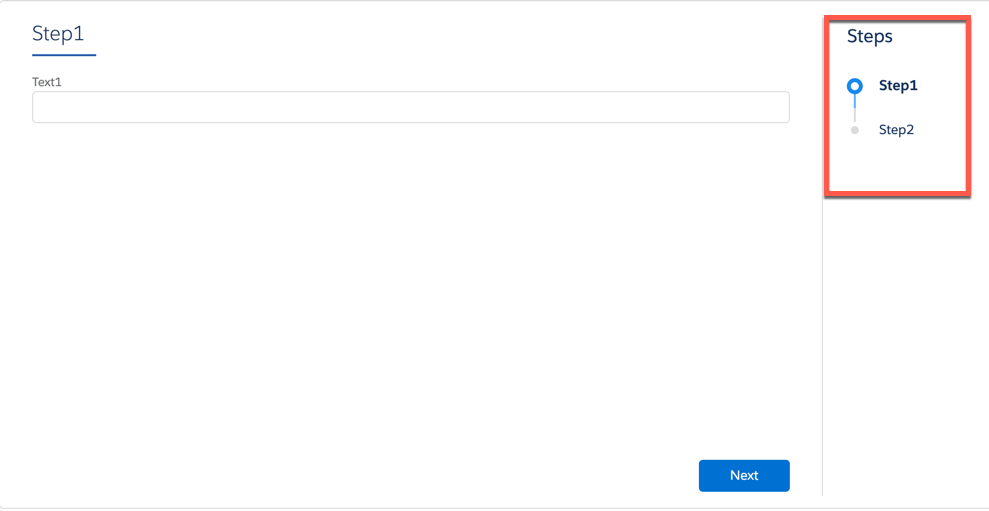
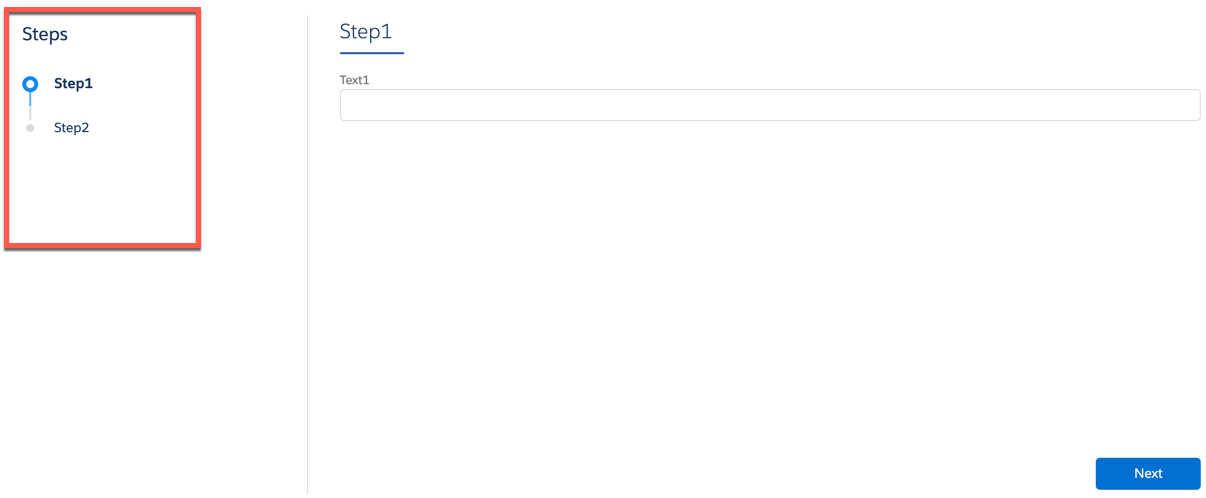
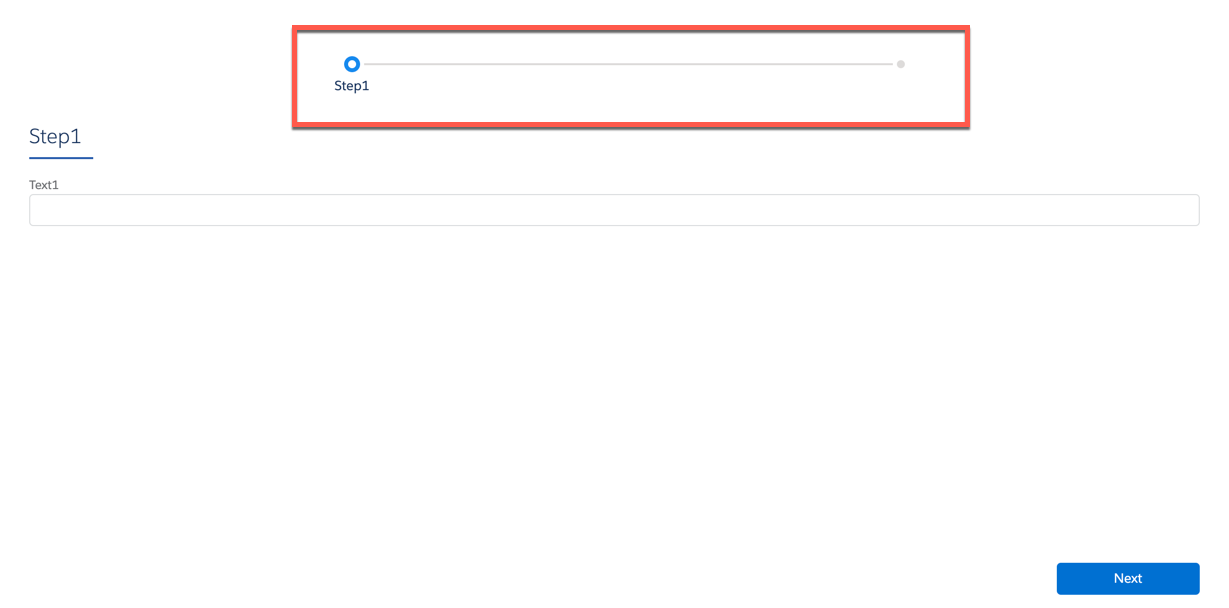
              <p style="margin-bottom:0;">Exclusive to LWC Omniscripts using Lightning styling, set the Step Chart
                to display to the right, to the left, or on top of the Omniscript.</p>
            </td>

            <td data-label="Example" class="slds-cell-wrap" style="vertical-align:top;" headers="d108092e2467 ">
              <p>Right:</p>
              <div><img style="width:100px;" src="https://sf-zdocs-cdn-prod.zoominsoftware.com/tdta-xcloud-omnistudio_for_managed_packages-264-0-0-production-enus/aa2554ec-624a-4ee6-8da4-6435670e6e62/omnistudio_for_managed_packages/images/owc_step_chart_right.png" alt="image"></div>
              <p>Left:</p>
              <div><img style="width:100px;" src="https://sf-zdocs-cdn-prod.zoominsoftware.com/tdta-xcloud-omnistudio_for_managed_packages-264-0-0-production-enus/aa2554ec-624a-4ee6-8da4-6435670e6e62/omnistudio_for_managed_packages/images/owc_step_chart_left.png" alt="image"></div>
              <p>Top:</p>
              <div><img style="width:100px;" src="https://sf-zdocs-cdn-prod.zoominsoftware.com/tdta-xcloud-omnistudio_for_managed_packages-264-0-0-production-enus/aa2554ec-624a-4ee6-8da4-6435670e6e62/omnistudio_for_managed_packages/images/owc_step_chart_top.png" alt="image"></div>
            </td>

          </tr>
        </tbody>
      </table>

## Elements Exclusive to LWC Omniscripts

<table class="slds-table slds-table_bordered slds-max-medium-table_stacked slds-m-bottom_small ">
        <colgroup>
          <col>
          <col>
        </colgroup>
        <thead class="slds-text-title_caps ">
          <tr class="">
            <th scope="col" class="slds-cell-wrap" style="vertical-align:top;" id="d108092e2619">
              <p style="margin-bottom:0;">Element</p>
            </th>
            <th scope="col" class="slds-cell-wrap" style="vertical-align:top;" id="d108092e2625">
              <p style="margin-bottom:0;">Description</p>
            </th>
          </tr>
        </thead>
        <tbody>
          <tr class="">
            <td data-label="Element" class="slds-cell-wrap" style="vertical-align:top;" headers="d108092e2619 ">
              <p style="margin-bottom:0;">Custom LWC</p>
            </td>

            <td data-label="Description" class="slds-cell-wrap" style="vertical-align:top;" headers="d108092e2625 ">
              <p style="margin-bottom:0;">The Custom LWC element enables custom components that do not extend an
                Omniscript element to exist in Omniscript.</p>
            </td>

          </tr>
          <tr class="">
            <td data-label="Element" class="slds-cell-wrap" style="vertical-align:top;" headers="d108092e2619 ">
              <p style="margin-bottom:0;">Navigate Action</p>
            </td>

            <td data-label="Description" class="slds-cell-wrap" style="vertical-align:top;" headers="d108092e2625 ">
              <p style="margin-bottom:0;">The Navigate Action enables the Omniscript to open different Salesforce
                experiences and external endpoints.</p>
            </td>

          </tr>
        </tbody>
      </table>

## Element Changes

- Elements that support Lightning web components display a Lightning icon in the available components section of an Omniscript.
- The LWC Component Override property enables custom Lightning web components to override an individual element's component.