
For the managed package runtime, Flexcards supports versioning and cloning. You can create an identical copy of a Flexcard based on how you want to use the new version.
 This information is for Omnistudio for Managed Packages. For Omnistudio on standard runtime, see Omnistudio Help.
|
Purpose |
Version or Clone? |
|---|---|
|
To update a Flexcard already published on Lighting or Community pages, and elsewhere. |
Version |
|
To make slight modifications to an existing Flexcard to test behavior and layout. |
Version |
|
To create a new Flexcard but copy over layout, settings, or both. |
Clone |
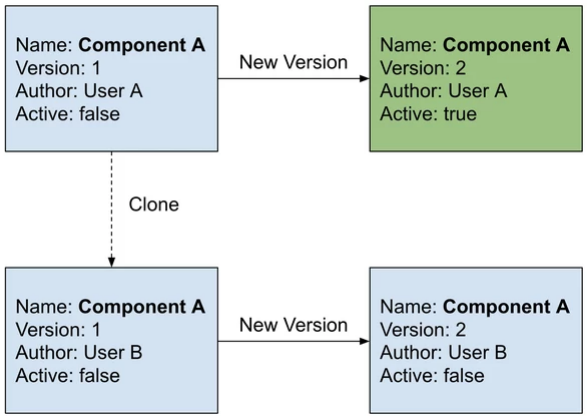
- Flexcards Versioning (Managed Package)
For the managed package runtime, Flexcards supports versioning. You can create an identical copy of a Flexcard by creating a new version and keeping other versions with the same name, and author, but with a new version number. Create a new version when you want to make slight modifications to a Flexcard already published to Lighting or Community pages, and elsewhere. - Flexcards Cloning (Managed Package)
For the managed package runtime, Flexcards supports cloning. You can create a new Flexcard by cloning a current one to update the Author and/or Name, and copy over layout and/or settings. - Flexcard Naming Conventions (Managed Package)
For the managed package runtime, follow requirements when naming Flexcards and Flexcard elements to prevent errors when working with the Flexcard Designer and importing Flexcards as datapacks. For example, you may run into issues when importing a Flexcard with the same name as one that already exists in your org.