
For the managed package runtime, Flexcards supports versioning. You can create an identical copy of a Flexcard by creating a new version and keeping other versions with the same name, and author, but with a new version number. Create a new version when you want to make slight modifications to a Flexcard already published to Lighting or Community pages, and elsewhere.
 This information is for Omnistudio for Managed Packages. For Omnistudio on standard runtime, see Omnistudio Help.
The name, author, and version combination must be unique for each component in an org. Only one version of a component can be active at a time. When you create a new version of a Flexcard in the Flexcard Designer, the version number increases by 1 and the Status is inactive. See Create a New Version of a Flexcard (Managed Package).
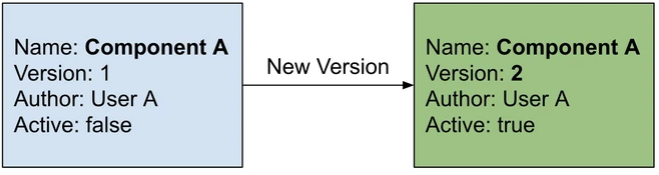
When you create a new version of a Flexcard in the Flexcard Designer, a new version is created dynamically. You can't choose the author or name of the new version. To create a new Flexcard based on a current Flexcard, and to update the Author and/or Name, you must clone your Flexcard. See Clone a Flexcard (Managed Package).
The following table describes the fields involved in the versioning process:
|
Field |
Description |
|---|---|
|
Name |
Flexcards are requested by name. |
|
Author |
Specifies the user organization that created the Flexcard. Use author names that describe the team creating the content. |
|
Version |
An integer that increases by one with every new version. |
|
Active |
Indicates whether a record is active for run time use. One active record per name is allowed in an org. Activating a component deactivates all other versions of the component with the same name. Only active records are exported when a DataPack is created. |
- Create a New Version of a Flexcard (Managed Package)
For the managed package runtime, create a new version of a Flexcard in the Flexcard Designer when you want to make slight modifications to a current. Creating a version of a Flexcard makes an exact copy with a version number equal to the latest version number plus one. For example, if you already have two versions, the new version number will be 3.