
For the managed package runtime, use the Data JSON feature in the Flexcard Designer's Preview tab to see how your data source populates the elements on the rendered cards of your Flexcard component. Detect potential issues at run time. The Data JSON panel updates when you interact with the Flexcard, such as when entering data in an input field or clicking an actionable item.
 This information is for Omnistudio for Managed Packages. For Omnistudio on standard runtime, see Omnistudio Help.
|
Required Versions |
|---|
|
Available beginning Summer '21. |
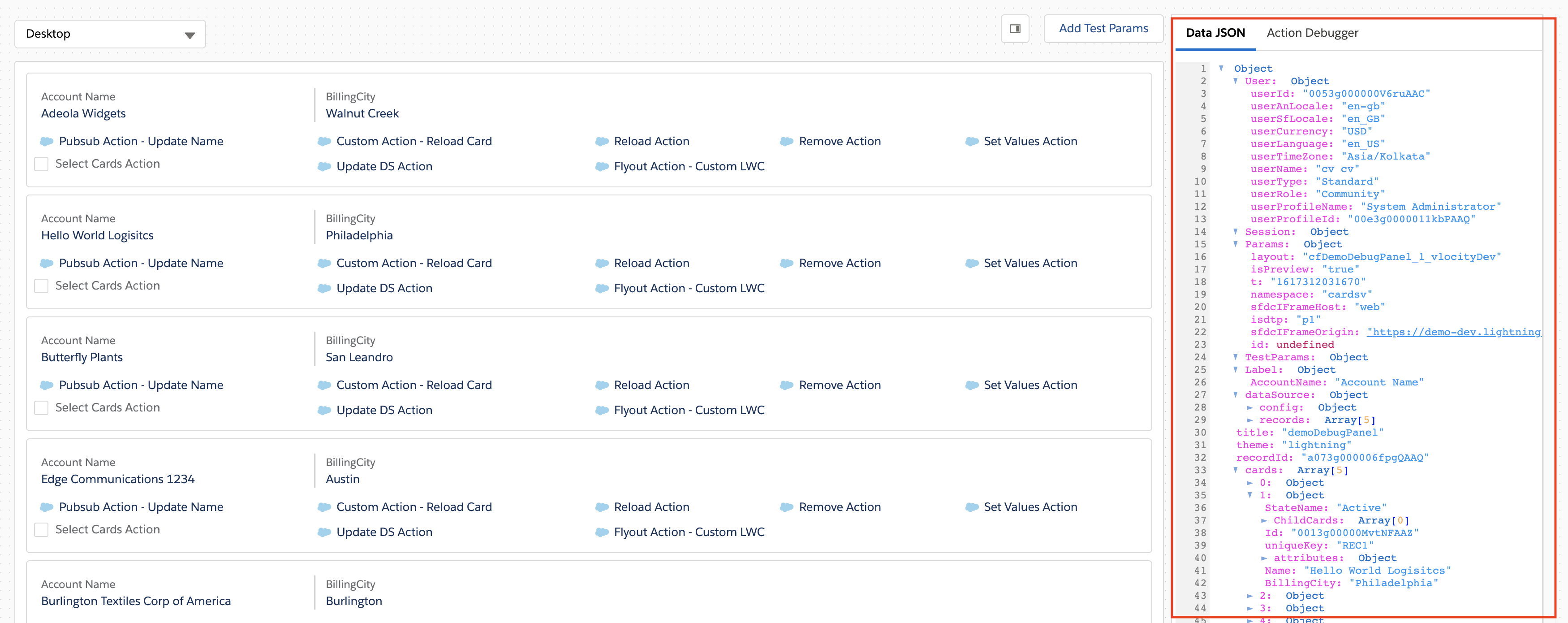
The following table lists the Data JSON's available objects and the information each object provides:
|
Object |
Description |
|---|---|
|
cards |
Displays information about rendered cards based on the data displayed and state conditions applied. For example, if your Flexcard displays information about an Account and the data source returns 3 accounts with no conditions applied, then the cards object shows 3 card objects. Each card object displays the card's state name, data fields, attributes, and child Flexcards. The uniqueKey distinguishes the card objects from each other.  Note
If your Flexcard has a child Flexcard, only its name appears in the Data JSON panel. |
|
dataSource |
Displays the array of records returned from the data source and the settings configured in the Setup panel, such as the data source type and delay time. Displays additional settings depending on your data source type. See Configure a Data Source on a Flexcard (Managed Package). |
|
Label |
Displays custom labels fetched for the Flexcard. See Add Custom Labels to Supported Fields on a Flexcard (Managed Package). |
|
Params |
Displays Salesforce page parameters, such as namespace. |
|
recordId |
Displays the Id of the Flexcard page as seen in the URL when you are in the Flexcard Designer. |
|
Session |
Displays the Session Variables defined in the Setup panel. See Add Session Variables to a Flexcard (Managed Package). |
|
TestParams |
Displays test parameters defined in the Add Test Params feature. See Flexcards Preview 'Add Test Params' Properties (Managed Package). |
|
theme |
Displays the Flexcard theme as selected when the Flexcard was created. |
|
title |
Displays the Flexcard name as defined when the Flexcard was created. |
|
User |
Displays logged-in user information. See Flexcard Context Variables. |
- View a Flexcard's Data JSON (Managed Package)
For the managed package runtime, view your Flexcard's data JSON from the Preview tab of the Flexcard Designer. Look for potential issues in how your data source populates elements before publishing your Flexcard or sending data to another component. The Data JSON panel updates when you interact with the Flexcard, such as when entering data in an input field or clicking an action.