
For the managed package runtime, you can fill a PDF using elements from an Omniscript.
 This information is for Omnistudio for Managed Packages. For Omnistudio on standard runtime, see Omnistudio Help.
Required Items:
- Adobe Acrobat Pro
- An existing fillable form (either unsecured or you have the password)
PDF Requirements:
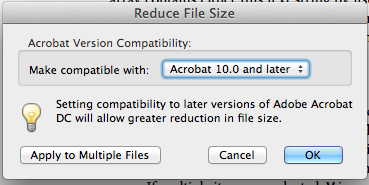
- PDF must be a Linearized PDF, Version 1.5 or above. You can save a PDF as Linearized
Version 1.7 by clicking Save as Other, and then
Reduced Size PDF, and then Acrobat 10.0 and
later.
- Vlocity doesn’t support the List Box PDF Form field type (Multi-Select fields) in the PDF.
- The PDF Form Field Values for Radio Buttons and Dropdowns must be logically
mappable. For example, a Radio Button on a PDF form can't have two options with the
same name.
 Note Firefox and Safari browsers can’t fill some fields without taking additional steps. To use Firefox and Safari, see Configuring your browser to use the Adobe PDF plug-in.
Omniscript PDF generation supports only Latin-1 characters. For a full list of these characters, see page 997 of the PDF Reference, Sixth Edition.
- The PDF can be launched in a Firefox, Safari, or Chrome browser.
- Prepare your PDF.
- Upload the PDF to Salesforce as a Document.
What’s next: Create an Omnistudio Data Mapper Interface to Map Omniscript Data to a PDF (Managed Package).
- Create an Omnistudio Data Mapper Interface to Map Omniscript Data to a PDF (Managed Package)
For the managed package runtime, after you create the Omniscript and upload your PDF, you must create a Data Mapper to map the information from the Omniscript to the PDF. - Map Omniscript Fields to a PDF (Managed Package)
For the managed package runtime, populate a PDF with Omniscript data by mapping the Omniscript JSON data to the PDF. - Add a PDF Action to an Omniscript (Managed Package)
For the managed package runtime, populate a PDF with Omniscript data using the PDF Action.