
For the managed package runtime, using a cache to store frequently accessed, infrequently updated data saves round trips to the database and improves performance. Use Cache Blocks if some parts of the Integration Procedure update data, or if you need different cached data to expire at different times. For example, current weather data changes more frequently than user session data.
 This information is for Omnistudio for Managed Packages. For Omnistudio on standard runtime, see Omnistudio Help.
Cache Blocks are available in Summer '19 and later releases.
It's important to allocate space in the VlocityAPIResponse cache partition and to understand how top-level Integration Procedure caching interacts with Cache Blocks. See Cache for Omnistudio Data Mappers (Managed Package).
A Cache Block saves the output of the steps within it to a session or org cache in the VlocityAPIResponse cache partition for quick retrieval.
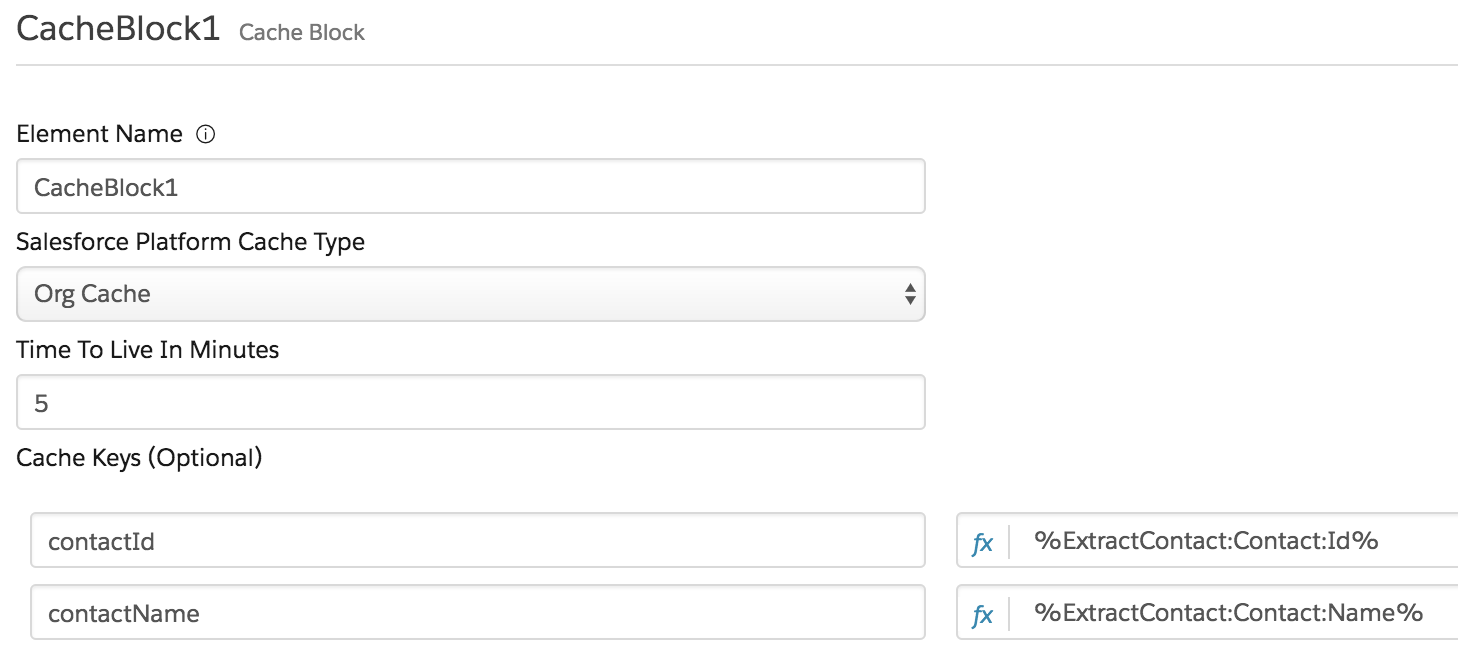
Here’s an example Cache Block configuration:
Test Options for Cache-Block Caching in Preview
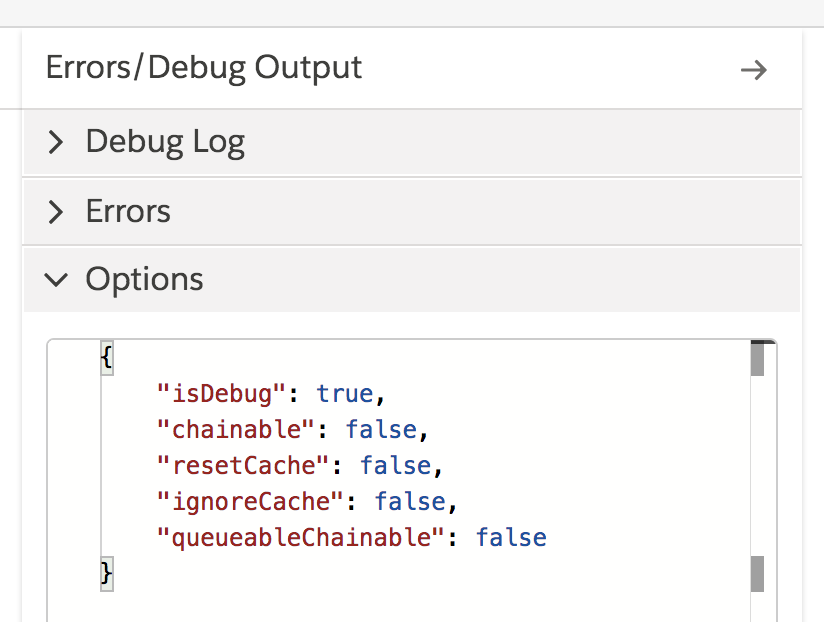
When you test an Integration Procedure that includes a Cache Block in the Preview tab, you can use two caching settings in the Options JSON section. These settings also affect top-level caching but have no effect on the metadata cache.
-
ignoreCache— Doesn't clear or save data to the cache. The default value istrue. Use this setting to test Integration Procedure steps without the possible interference of caching effects. -
resetCache— Forces data to be saved to the cache. The default value isfalse. Use this setting as part of testing caching itself.

To test caching, be sure to set ignoreCache to
false. See Create a Cache Block Example (Managed Package).
The Options pane on the Preview tab looks like this:
You can pass
ignoreCache and resetCache as parameters when you invoke an Integration Procedure that
uses caching using a REST API. For example, you can include ?resetCache=true in the URL to force caching. See Integration Procedure Invocation Using POST (Managed Package).
Cache Block JSON Nodes
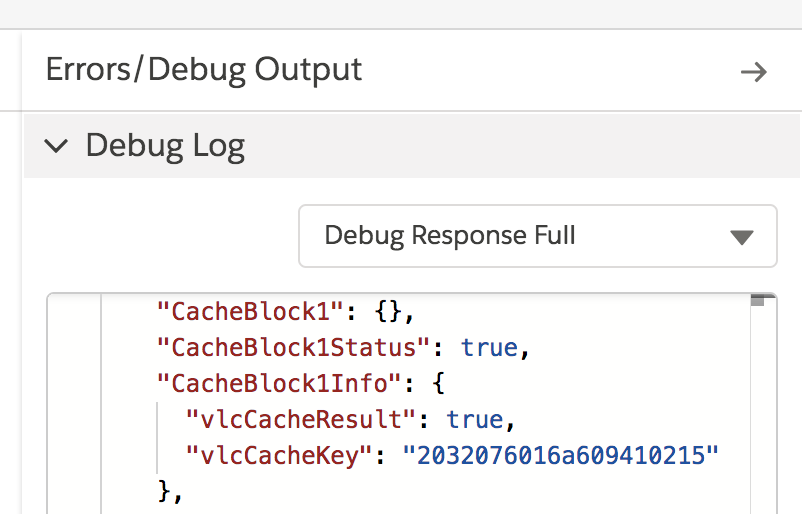
An active Integration Procedure that uses a Cache Block can include the following JSON nodes in its Debug Log output, which is visible on the Preview tab:
-
vlcCacheKey— Key for any data stored in the cache -
vlcCacheResult— Included and set to true if data is retrieved from the cache -
vlcCacheEnabled— Included and set to false if theignoreCachesetting disables caching -
vlcCacheException— Any caching errors
These nodes are under the Info node for the Cache
Block. For example, if the Cache Block is named CacheBlock1, these nodes are under the
CacheBlock1Info node. For example:
Apex Methods to Clear Cache Block Data
Cache-clearing methods are available in Winter '20 and later releases. If you must clear Cache Block data from the cache, follow the instructions in this topic, but execute one of these lines of code instead:
IntegrationProcedureService.clearSessionCache('Type_Subtype', 'blockName', new Map<String, Object>{'key' => 'value'});

IntegrationProcedureService.clearOrgCache('Type_Subtype', 'blockName', new Map<String, Object>{'key' => 'value'});

IntegrationProcedureService.clearSessionCache('vlcCacheKey');

IntegrationProcedureService.clearOrgCache('vlcCacheKey');
You can clear all cached data for an Integration Procedure, including session cache data, org cache data, and metadata. Follow the instructions in this topic, but execute this line of code instead, specifying the Integration Procedure's Type and Subtype:
IntegrationProcedureService.clearAllCache('Type_Subtype');For example, execute the following code if:
-
You want to clear a Cache Block key in the Org Cache
-
The Type_Subtype parameter for the Integration Procedure is LastNames_Cached
-
The Cache Block is named CacheContacts
-
The cache key you want to clear is ContactLastName
-
The key's value is Smith
IntegrationProcedureService.clearOrgCache('LastNames_Cached', 'CacheContacts', new Map<String, Object>{'ContactLastName' => 'Smith'});The following example clears the session cache using a vlcCacheKey value:
IntegrationProcedureService.clearSessionCache('2032076016a1745801061oc');- Cache Block Properties (Managed Package)
For the managed package runtime, these properties are unique to or function in a unique manner in Cache Blocks. Use Cache Blocks if some parts of the Integration Procedure update data and therefore shouldn't be cached, or if different cached data should expire at different times. - Create a Cache Block Example (Managed Package)
For the managed package runtime, an Integration Procedure accepts a list of first or last names and retrieves Contacts having those names. A Cache Block improves Contact retrieval performance.