---
schema_version: "1"
id: e9c32d65ea136abfa2d68a5a51886a20de5ee23db9f256625771c0fee4e7d8be
title: Embed Flexcards in an LWC Omniscript (Managed Package)
collection: admin
version: current
locale: en-us
portal_url: https://docs.salesforce.com/admin/current/en-us/xcloud/264-0-0/os_embed_flexcards_in_an_lwc_omniscript.md
canonical_url: https://help.salesforce.com/s/articleView?id=xcloud.os_embed_flexcards_in_an_lwc_omniscript.htm&release=264.0.0&type=5
source_site: help.salesforce.com
content_type: documentation
content_hash: aaae82bd871a513dc1df4f881d31cd406ccabb38da8d02ffe05564e5216bc59a
description: For the managed package runtime, embed a Flexcard Lightning Web Component in an Omniscript by using the Custom LWC element. Flexcards can receive data from the LWC Omniscript and perform any action available in the Flexcard.
products:
  - Omnistudio
release: "264"
---
# Embed Flexcards in an LWC Omniscript (Managed Package)

For the managed package runtime, embed a Flexcard Lightning Web Component in an Omniscript by using the Custom LWC element. Flexcards can receive data from the LWC Omniscript and perform any action available in the Flexcard.

Before you begin:

![Managed Package app icon](https://sf-zdocs-cdn-prod.zoominsoftware.com/tdta-xcloud-omnistudio_for_managed_packages-264-0-0-production-enus/aa2554ec-624a-4ee6-8da4-6435670e6e62/resources-global/_corporate/images/managedpackageicon.png) This information is for Omnistudio for Managed Packages. For Omnistudio on standard runtime, see [Omnistudio Help](https://help.salesforce.com/s/articleView?id=xcloud.os_omnistudio_standard.htm&language=en_US).

1. Ensure your Flexcard includes Omniscript support.
2. (Optional) Configure a Flexcard to receive data from Omniscript.

To embed Flexcards in an LWC Omniscript:

1. In an LWC enabled Omniscript, drag the Custom LWC element into a Step.
2. In the Custom LWC's **Lightning Web Component Name** property, enter the Flexcard component's name and prepend cf to the beginning of the name. For example, a Flexcard named Account Card must be entered as cfAccountCard.
    
    ![Example of Card Name syntax when referenced in OmniScript's Custom Lightning Web Component element.](https://sf-zdocs-cdn-prod.zoominsoftware.com/tdta-xcloud-omnistudio_for_managed_packages-264-0-0-production-enus/aa2554ec-624a-4ee6-8da4-6435670e6e62/omnistudio_for_managed_packages/images/card_custom_lwc_os.png)
3. In **Property Name**, enter a property that the Flexcard expects to receive by converting the property to an HTML attribute format. Three options enable you to pass data into the Flexcard from your Omniscript. Each data option requires you to pass data as an HTML attribute. For example, if a Flexcard receives the property recordId, you must enter record-id in the property name field to pass the property correctly.
    
    <table class="slds-table slds-table_bordered slds-max-medium-table_stacked slds-m-bottom_small ">
            <colgroup>
              <col>
              <col>
              <col>
            </colgroup>
            <thead class="slds-text-title_caps ">
              <tr class="">
                <th scope="col" class="slds-cell-wrap" style="vertical-align:top;" id="d188834e109">
                  <p style="margin-bottom:0;">Property Name Option</p>
                </th>
                <th scope="col" class="slds-cell-wrap" style="vertical-align:top;" id="d188834e115">
                  <p style="margin-bottom:0;">Description</p>
                </th>
                <th scope="col" class="slds-cell-wrap" style="vertical-align:top;" id="d188834e121">
                  <p style="margin-bottom:0;">Example</p>
                </th>
              </tr>
            </thead>
            <tbody>
              <tr class="">
                <td data-label="Property Name Option" class="slds-cell-wrap" style="vertical-align:top;" headers="d188834e109 ">
                  <p style="margin-bottom:0;">
                    <strong class="uicontrol">record-id</strong>
                  </p>
                </td>

                <td data-label="Description" class="slds-cell-wrap" style="vertical-align:top;" headers="d188834e115 ">
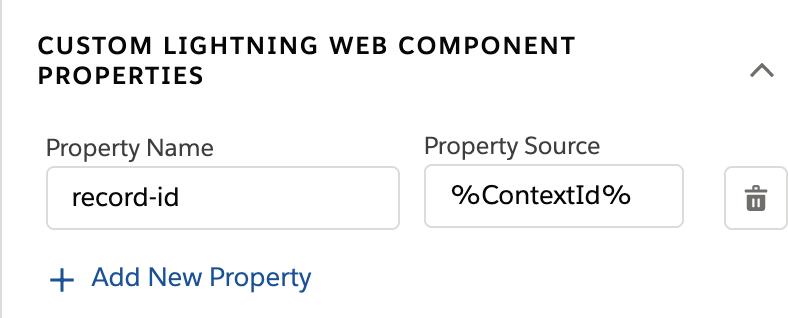
                  <p style="margin-bottom:0;">Pass a record id into a Flexcard using the
                    <strong class="uicontrol">record-id</strong> property. Flexcards use record
                    ids to perform data queries.
                  </p>
                </td>

                <td data-label="Example" class="slds-cell-wrap" style="vertical-align:top;" headers="d188834e121 ">
                  <div><img style="width:100px;" src="https://sf-zdocs-cdn-prod.zoominsoftware.com/tdta-xcloud-omnistudio_for_managed_packages-264-0-0-production-enus/aa2554ec-624a-4ee6-8da4-6435670e6e62/omnistudio_for_managed_packages/images/html_attribute_format.png" alt="Example of the property name syntax used to pass properties from OmniScript into a Card."></div>
                </td>

              </tr>
              <tr class="">
                <td data-label="Property Name Option" class="slds-cell-wrap" style="vertical-align:top;" headers="d188834e109 ">
                  <p style="margin-bottom:0;">
                    <strong class="uicontrol">parent-attribute</strong>
                  </p>
                </td>

                <td data-label="Description" class="slds-cell-wrap" style="vertical-align:top;" headers="d188834e115 ">
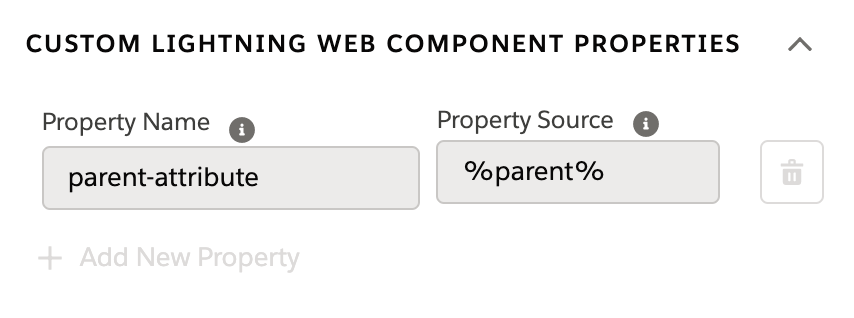
                  <p style="margin-bottom:0;">Pass a parent object containing parent attributes such as Parent.id
                    into the Flexcard. Use merge fields in Flexcard queries and
                    fields.</p>
                </td>

                <td data-label="Example" class="slds-cell-wrap" style="vertical-align:top;" headers="d188834e121 ">
                  <div><img style="width:100px;" src="https://sf-zdocs-cdn-prod.zoominsoftware.com/tdta-xcloud-omnistudio_for_managed_packages-264-0-0-production-enus/aa2554ec-624a-4ee6-8da4-6435670e6e62/omnistudio_for_managed_packages/images/parent_attribute.png" alt="Example parent-attribute property configuration."></div>
                </td>

              </tr>
              <tr class="">
                <td data-label="Property Name Option" class="slds-cell-wrap" style="vertical-align:top;" headers="d188834e109 ">
                  <p>
                    <strong class="uicontrol">parent-data</strong>
                  </p>
                  <p>AND</p>
                  <p style="margin-bottom:0;">
                    <strong class="uicontrol">records</strong>
                  </p>
                </td>

                <td data-label="Description" class="slds-cell-wrap" style="vertical-align:top;" headers="d188834e115 ">
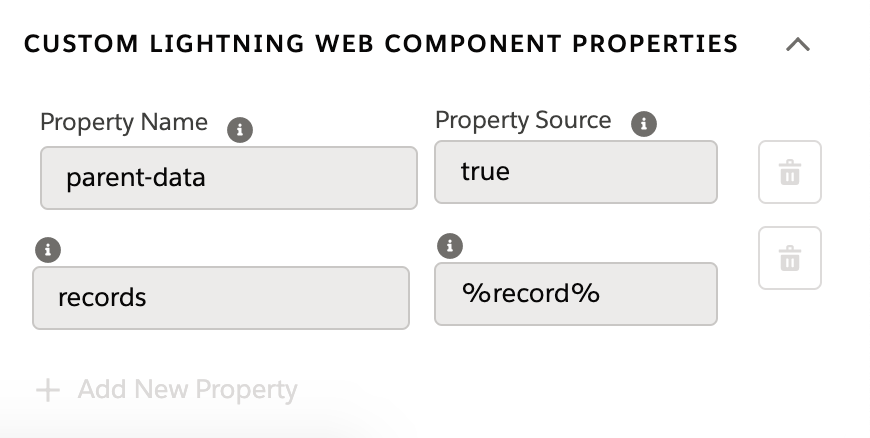
                  <p>Map data to Flexcard fields directly without running a query. The
                    <strong class="uicontrol">parent-data</strong> property is a boolean that
                    Flexcards uses to determine whether to run a query or parse over a
                    set of records.
                  </p>
                  <div class="slds-box slds-box_x-small slds-theme_shade slds-m-top_medium slds-m-bottom_medium">
                    <div class="slds-media slds-media_responsive">
                      <div class="slds-media__figure"><span class="slds-icon_container slds-icon_container_circle slds-icon-note-note"><img style="margin-bottom:0;" src="https://sf-zdocs-cdn-prod.zoominsoftware.com/tdta-xcloud-omnistudio_for_managed_packages-264-0-0-production-enus/aa2554ec-624a-4ee6-8da4-6435670e6e62/images/icon_note.png" alt="Note"></span></div>
                      <div class="slds-media__body" style="padding-top:.5rem;padding-bottom:.5rem;"><span class="slds-text-title_caps">Note</span> If you set <strong class="uicontrol">parent-data</strong> to
                        <strong class="uicontrol">true</strong>, you can’t update the data source of
                        the Flexcard. Specifically, if you call an Update Data Source
                        action in a Flexcard embedded in a custom Lightning Web Component
                        Omniscript with the Standalone property disabled, then the action
                        overrides any changes by the user.
                      </div>
                    </div>
                  </div>
                </td>

                <td data-label="Example" class="slds-cell-wrap" style="vertical-align:top;" headers="d188834e121 ">
                  <div><img style="width:100px;" src="https://sf-zdocs-cdn-prod.zoominsoftware.com/tdta-xcloud-omnistudio_for_managed_packages-264-0-0-production-enus/aa2554ec-624a-4ee6-8da4-6435670e6e62/omnistudio_for_managed_packages/images/parent_data.png" alt="Example parent-data property name and records property configuration."></div>
                </td>

              </tr>
              <tr class="">
                <td data-label="Property Name Option" class="slds-cell-wrap" style="vertical-align:top;" headers="d188834e109 ">
                  <strong class="uicontrol">listen-os-data-change</strong>
                </td>

                <td data-label="Description" class="slds-cell-wrap" style="vertical-align:top;" headers="d188834e115 ">
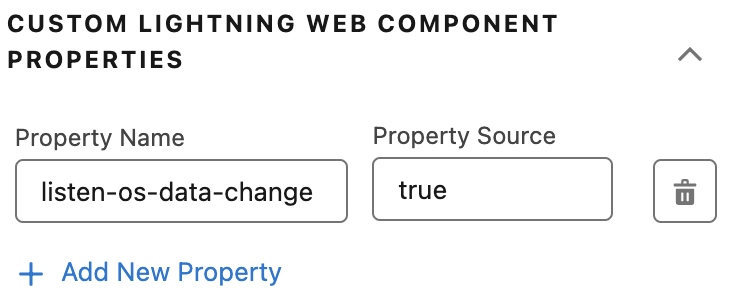
                  <p style="margin-bottom:0;">Update the Flexcard whenever the passed-in Omniscript data
                    changes.</p>
                </td>

                <td data-label="Example" class="slds-cell-wrap" style="vertical-align:top;" headers="d188834e121 ">
                  <div><img style="width:250px;" src="https://sf-zdocs-cdn-prod.zoominsoftware.com/tdta-xcloud-omnistudio_for_managed_packages-264-0-0-production-enus/aa2554ec-624a-4ee6-8da4-6435670e6e62/omnistudio_for_managed_packages/images/listen-os-data-change.png" alt="Example parent-data property name and records property configuration."></div>
                </td>

              </tr>
            </tbody>
          </table>
4. In **Property Source**, using merge field syntax, enter one of these options based on your property name:
    
    <table class="slds-table slds-table_bordered slds-max-medium-table_stacked slds-m-bottom_small ">
            <colgroup>
              <col>
              <col>
            </colgroup>
            <thead class="slds-text-title_caps ">
              <tr class="">
                <th scope="col" class="slds-cell-wrap" style="vertical-align:top;" id="d188834e285">
                  <p style="margin-bottom:0;">Property Name</p>
                </th>
                <th scope="col" class="slds-cell-wrap" style="vertical-align:top;" id="d188834e291">
                  <p style="margin-bottom:0;">Property Source</p>
                </th>
              </tr>
            </thead>
            <tbody>
              <tr class="">
                <td data-label="Property Name" class="slds-cell-wrap" style="vertical-align:top;" headers="d188834e285 ">
                  <p style="margin-bottom:0;">
                    <strong class="uicontrol">record-id</strong>
                  </p>
                </td>

                <td data-label="Property Source" class="slds-cell-wrap" style="vertical-align:top;" headers="d188834e291 ">
                  <p style="margin-bottom:0;">Enter a JSON node that contains. For example, to pass a record id
                    stored in the ContextId node, enter
                    <kbd>%ContextId%</kbd>. To avoid Flexcard loading
                    issues, don’t use the merge field syntax to reference a custom LWC.
                    For example, if the name of the LWC is customlwc1, don’t use
                    <kbd>%customlwc1%</kbd>.
                  </p>
                </td>

              </tr>
              <tr class="">
                <td data-label="Property Name" class="slds-cell-wrap" style="vertical-align:top;" headers="d188834e285 ">
                  <p style="margin-bottom:0;">
                    <strong class="uicontrol">parent-attribute</strong>
                  </p>
                </td>

                <td data-label="Property Source" class="slds-cell-wrap" style="vertical-align:top;" headers="d188834e291 ">
                  <p style="margin-bottom:0;">Enter a JSON node containing an object.</p>
                </td>

              </tr>
              <tr class="">
                <td data-label="Property Name" class="slds-cell-wrap" style="vertical-align:top;" headers="d188834e285 ">
                  <p>
                    <strong class="uicontrol">parent-data</strong>
                  </p>
                  <p>AND</p>
                  <p style="margin-bottom:0;">
                    <strong class="uicontrol">records</strong>
                  </p>
                </td>

                <td data-label="Property Source" class="slds-cell-wrap" style="vertical-align:top;" headers="d188834e291 ">
                  <p>Set parent-data's property source to
                    <kbd>true</kbd>.
                  </p>
                  <p style="margin-bottom:0;">Set records equal to an object containing a record or an array of
                    records. Flexcards parses over these records and maps the nodes to
                    Flexcard fields.</p>
                </td>

              </tr>
              <tr class="">
                <td data-label="Property Name" class="slds-cell-wrap" style="vertical-align:top;" headers="d188834e285 ">
                  <strong class="uicontrol">listen-os-data-change</strong>
                </td>

                <td data-label="Property Source" class="slds-cell-wrap" style="vertical-align:top;" headers="d188834e291 ">
                  <p style="margin-bottom:0;">Enter <kbd>true</kbd> to update the Flexcard
                    whenever the passed-in Omniscript data changes.</p>
                </td>

              </tr>
            </tbody>
          </table>
5. (Optional) Rerender and refresh the Flexcards save state whenever a user navigates to the step. In the Flexcards Designer, disable Omniscript support, then in the Omniscript Designer, open the Custom LWC element and check **Standalone Mode**.
6. (Optional) Beginning with Summer '21, provide Selectable Items in your Omniscript using Flexcards.
7. Save and Activate the Script.
8. Preview the Omniscript.
    
    ![Note](https://sf-zdocs-cdn-prod.zoominsoftware.com/tdta-xcloud-omnistudio_for_managed_packages-264-0-0-production-enus/aa2554ec-624a-4ee6-8da4-6435670e6e62/images/icon_note.png)
    
    Note
    
    LWC Omniscripts using custom Lightning web components must be active to preview the Omniscript.