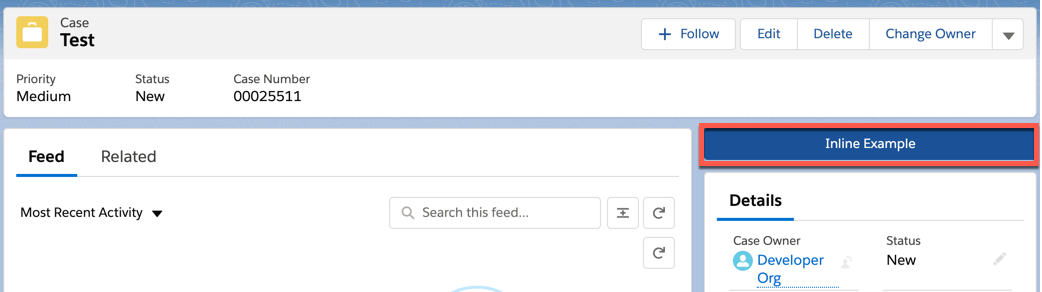
For the managed package runtime, enable LWC Omniscripts to run inline without leaving the context of a page. An inline Omniscript renders as a button that, when clicked, launches the Omniscript inline. The record id of a page passes into an inline Omniscript as a Context Id automatically. You can render more than one inline Omniscript on a page beginning in Vlocity Insurance and Health Summer '20 and CME Fall '20 .
 This information is for Omnistudio for Managed Packages. For Omnistudio on standard runtime, see Omnistudio Help.
|
Required Versions |
|---|
|
Available beginning with Vlocity Insurance and Health Spring '20 and Vlocity CME Summer '20. |
Ensure your Omniscript is active.
Running Omniscripts in inline mode disables SEO Enabled and Save For Later.
- From the Community or App Builder, add an activated Omniscript to a page.
-
In the Omniscript component, check the inline checkbox.
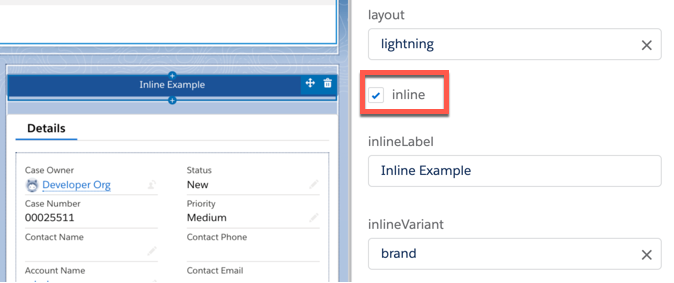
- In the inlineLabel field, enter the text to display on the button.
- (Optional) Choose an inlineVariant to alter the button's appearance.
- (Optional) Enable events to fire by enabling Cancel Options.
-
Click Save, and preview the Omniscript.