For the managed package runtime, the housing community provides clients with a self-service portal to interact with the agency and property management.
 This information is for Omnistudio for Managed Packages. For Omnistudio on standard runtime, see Omnistudio Help.
It’s possible to automate the creation of an external (Salesforce Community) user after a prospective tenant fills out the initial intake form, requesting assistance. To automate that user creation, follow these steps.
To create an external user when a form is submitted:
-
Add a Remote Action to the end of the
Omniscript and configure the settings as follows:
Remote Class = ExternalUserSelfRegistration Remote Method = selfReg -
Create elements in the Omniscript for
Username and Password.
Alternatively, if an email address is already an element in the form, you can set the
email address as the username. If no password element is added, a system-generated
email is sent to the user with instructions for setting up their password for the
portal. There are two optional remote options to add as Key/Value pairs:
-
profileId: To create a user with a different profile than the default one set up in the community, enter profileId as the key and the Id of the profile as the value.
-
sendEmail: To decide if a confirmation email is sent to new users, enter a boolean in the value field.
-
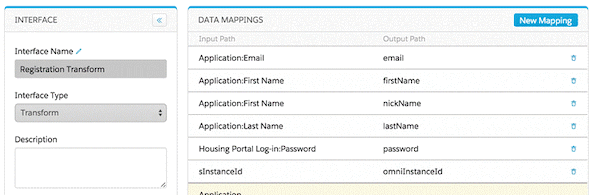
- Create a Pre-Transform Omnistudio Data Mapper Interface to add to the remote action. The purpose of the Pre-Transform Data Mapper Interface is to map fields in the application (such as Name, Email, Password) to the required inputs for registration.