
For the managed package runtime, an Integration
Procedure retrieves and reserializes the value of a name
variable from the TestReserializeApex Apex class.
 This information is for Omnistudio for Managed Packages. For Omnistudio on standard runtime, see Omnistudio Help.
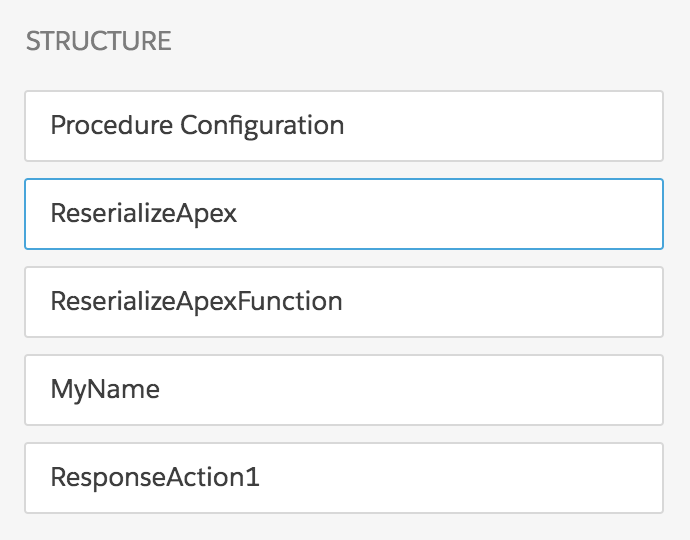
The Integration Procedure has these components:
-
A Remote Action, named ReserializeApex
-
A Set Values component, named ReserializeApexFunction
-
A Set Values component, named MyName
-
A Response Action, named ResponseAction1
The Structure panel looks like this:
- From the Vlocity Integration Procedures tab, click New.
- Provide an Integration Procedure Name, a Type, and a SubType, and click Save.
-
Drag a Remote Action component into the Structure panel and give it the following
settings:
Property
Value
Element Name
ReserializeApex
Remote Class
TestReserializeApex
Remote Method
random
Remote Options, Key
reserialize
Remote Options, Value
false
A Remote Method value is required, but it can be anything, because this Integration Procedure doesn't invoke a method.
A step in the test of this Integration Procedure will ask you to change the Remote Options Value.
-
Drag a Set Values component into the Structure panel and give it the following
settings:
Property
Value
Element Name
ReserializeApexFunction
Element Value Map, Element Name
result
Element Value Map, Value
=RESERIALIZE(%ReserializeApex%)
Response JSON Path
result
Response JSON Node
ReserializeApex
-
Drag another Set Values component into the Structure panel and give it the
following settings:
Property
Value
Element Name
MyName
Element Value Map, Element Name
Full Name
Element Value Map, Value
%ReserializeApex:result:name%
- Drag a Response Action component into the Structure panel and check the Return Full Data JSON checkbox.