
For the managed package runtime, an Integration Procedure accepts an Account Id and an array of first and last names and creates new Contacts for the specified Account. It also includes a step that deletes these Contacts, which you can optionally disable.
 This information is for Omnistudio for Managed Packages. For Omnistudio on standard runtime, see Omnistudio Help.
To download a data pack of this example for Omnistudio for Managed Packages, click here.

The Integration Procedure has these components:
-
An optional Set Values component, named SetValues1
-
A Loop Block component, named LoopBlock1
-
A Data Mapper Post Action component within the Loop Block, named CreateContact
-
A Data Mapper Load that creates a new Contact for an existing Account, named NewContactForAccount
-
A Delete Action component within the Loop Block, named DeleteContact
-
A Response Action, named ResponseAction1
The Structure panel looks like this:
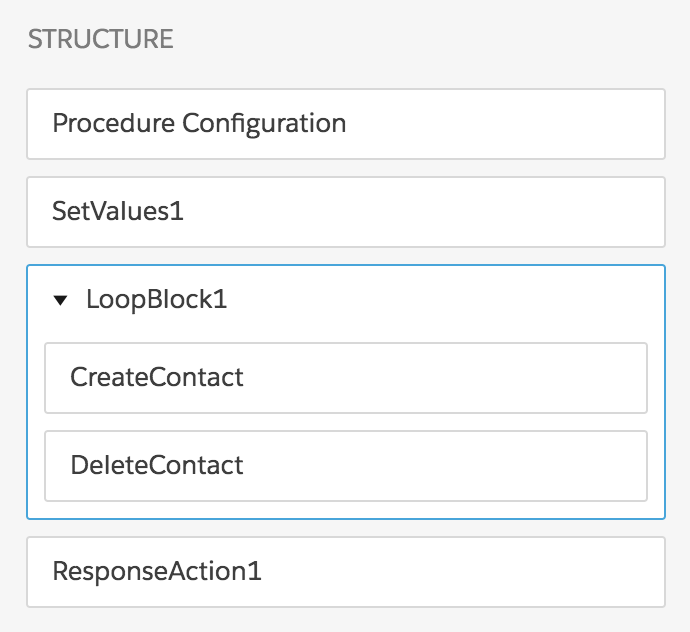
To build this Integration Procedure:
- From the Vlocity Integration Procedures tab, click New.
- Provide a unique Integration Procedure Name, a Type that can be a category, and a unique SubType, then click Save. You only have to save this one time.
-
Drag a Loop Block into the Structure panel and give it the following settings:
Property
Description
Loop List
Set this value to
Contacts.Additional Loop Output
Set the Key to
CreateContactand the Value to%CreateContact%to return all iterations of data generated by the Data Mapper Post Action component. - To create the Data Mapper Load that the Data Mapper Post Action calls, create the second example in Omnistudio Data Mapper Load Examples (Managed Package) and name it NewContactForAccount.
-
Drag a Data Mapper Post Action component within the Loop Block and give it the following settings:
Property
Description
Name
Set this value to
CreateContact.Data Mapper Interface
Set this value to
NewContactForAccount.Additional Input
Set the first Key to
AccountIdand its value to%AccountId%.Set the second Key to
Nameand its value to%Contacts:Name%. -
Drag a Delete Action component within the Loop Block and give it the following settings:
Property
Description
Name
Set this value to
DeleteContact.Delete SObject:
Type
Set this value to
Contact.Delete SObject:
Path To Id
Set this value to
%CreateContact:Contact_1:Id%. - Drag a Response Action below the Loop Block and check Return Full Data JSON.
- Go to the Preview tab and click Edit as JSON.
-
Copy this JSON data and paste it into the Input Parameters panel, substituting
names of your choice:
{ "AccountId": "0016100001BKL4uAAH", "Contacts": [ { "Name": { "First": "John", "Last": "Doe" } }, { "Name": { "First": "June", "Last": "Doe" } } ] } -
Click Execute. If you built the Integration Procedure
correctly, the output looks something like this:
{
  "response": {},
  "ResponseAction1Status": true,
  "LoopBlock1": [
    {
      "CreateContact": {
        "ActualTime": 793,
        "CpuTime": 537,
        "Contact_2": [
          {
            "UpsertSuccess": true,
            "Id": "0034N00001qh5hVQAQ",
            "AccountId": "0016100001BKL4uAAH",
            "LastName": "Doe",
            "FirstName": "John"
          }
        ],
        "Account_1": [
          {
            "UpsertSuccess": true,
            "Id": "0016100001BKL4uAAH"
          }
        ],
        "error": "OK",
        "responseType": "SObject"
      },
      "DeleteContactStatus": true,
      "CreateContactStatus": true,
      "LoopBlockIterationStatus": true,
      "LoopBlockIterationIndex": 1
    },
    {
      "CreateContact": {
        "ActualTime": 1262,
        "CpuTime": 799,
        "Contact_2": [
          {
            "UpsertSuccess": true,
            "Id": "0034N00001qh5hWQAQ",
            "AccountId": "0016100001BKL4uAAH",
            "LastName": "Doe",
            "FirstName": "June"
          }
        ],
        "Account_1": [
          {
            "UpsertSuccess": true,
            "Id": "0016100001BKL4uAAH"
          }
        ],
        "error": "OK",
        "responseType": "SObject"
      },
      "DeleteContactStatus": true,
      "CreateContactStatus": true,
      "LoopBlockIterationStatus": true,
      "LoopBlockIterationIndex": 2
    }
  ],
  "LoopBlock1Status": true,
  "SetValues1": {
    "Contacts": [
      {
        "Name": {
          "Last": "Doe",
          "First": "John"
        }
      },
      {
        "Name": {
          "Last": "Doe",
          "First": "June"
        }
      }
    ],
    "AccountId": "0016100001BKL4uAAH"
  },
  "SetValues1Status": true,
  "options": {
    "chainable": false
  }
}
To correct a component, click it in the Structure panel and edit its properties.