
For the managed package runtime, beginning with the Vlocity Insurance and Health Summer '19 and Vlocity Communications, Media, and Energy Fall '19 releases, Vlocity supports the Salesforce Lightning Web Component programming model.
 This information is for Omnistudio for Managed Packages. For Omnistudio on standard runtime, see Omnistudio Help.

Important Before you begin, you must create an Integration Procedure before you can
follow the steps on this page.
Reduce server processing time and increase performance. Use an Integration Procedure to generate and return actions to an LWC Card at run time.
- Click the Enable LWC button on a card to enable Smart Actions.
- In a card state, select an sObject from the Salesforce Object Type dropdown.
- In the Id Field for Actions field, add the ContextId available from the card's data source, such as Id.
-
Click the arrow next to the Smart Actions to reveal smart
action options.
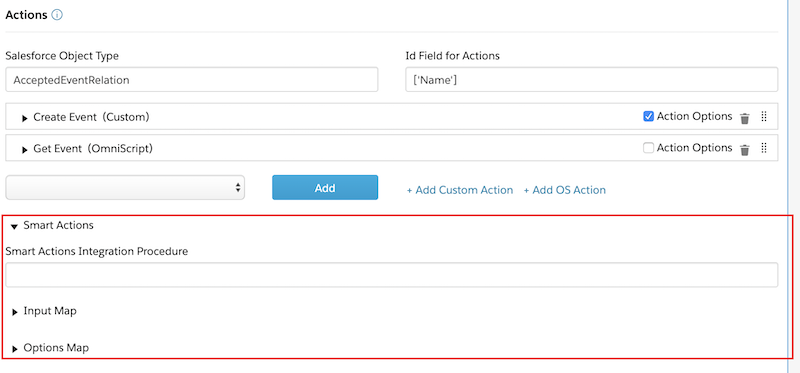
 Note Prior to Vlocity Insurance and Health Winter '20 and Vlocity CME Winter '20, you must click the Actions dropdown to select Smart Actions.
-
Click into the IP Name input field and select an existing
Integration Procedure from the list that appears. The Integration Procedure must
include an Intelligence Action for Integration Procedures.
Note We recommend that you use Vlocity Intelligence. However, you can use your own machine learning framework with the schema outlined on this page.The Integration Procedure must return the following schema. A Vlocity Intelligence Action returns this schema by default.
[ { "OfferRecommendation": "test", "targetObjectType": "Vlocity Action", "targetObjectKey": "open-claim", "virtualResourceId": null, "virtualResourceData": null, "rejectLast": null, "rejectDecay": 0, "acceptLast": null, "acceptDecay": 0, "viewLast": null, "viewDecay": 0, "currentMachine": "smartCard", "contextId": "02i3u0000099Ul0AAE", "info": null, "attachment": { "Icons_-_Lightning_Design_System-3": "00P3u00000dqZ1REAU", "Smartcard": "00P3u00000dk5JvEAI", "Ranking": "00P3u00000dZWuaEAG" }, "scaledRawScore": 100, "formattedAggregatedScore": 1, "aggregatedScore": 1, "componentScores": [ { "scoreParameters": [ { "score": 100, "objectTypeString": "vlocityins2__Attribute__c", "name": "OpenClaim", "identifier": "openClaim" } ], "scaledScore": 1, "normalizedScore": 1, "rawMaxScore": 100, "rawMinScore": 0, "scaledRawScore": 100, "rawMultiplier": 1, "rawScore": 100, "scoringComponentName": "VqScoringImplProfileMatch" } ], "resource": { "vlocityins2__TargetObjectType__c": "Vlocity Action", "vlocityins2__TargetObjectKey__c": "open-claim", "vlocityins2__IsActive__c": true, "vlocityins2__Headline__c": "There is open claim!", "vlocityins2__EffectiveDate__c": "2019-11-07T08:00:00.000Z", "vlocityins2__Description__c": "There is open claim. Please handle.", "SystemModstamp": "2019-12-18T22:19:25.000Z", "LastModifiedById": "0056A000000taWIQAY", "LastModifiedDate": "2019-12-18T22:19:25.000Z", "CreatedById": "0056A000000taWIQAY", "CreatedDate": "2019-11-13T01:59:48.000Z", "Name": "Open Claim", "IsDeleted": false, "OwnerId": "0056A000000taWIQAY", "Id": "a3k3u000000OJ8NAAW" } },... ] -
Enter the values for these settings if the Integration Procedure requires
them:
- Input Map: Enter name-value pairs in this field to send input parameters to the Integration Procedure.
- Options Map: Enter name-value pairs in this field to send optional parameters to the Integration Procedure.