---
schema_version: "1"
id: 9d07364b53afb7dcf00c10c6381d2ed6d78342ca6b272e1e8fb56c0dfd3b10a9
title: Communicate from Omniscript to a Lightning Web Component (Managed Package)
collection: admin
version: current
locale: en-us
portal_url: https://docs.salesforce.com/admin/current/en-us/xcloud/264-0-0/os_communicate_with_omniscript_from_a_lightning_web_component.md
canonical_url: https://help.salesforce.com/s/articleView?id=xcloud.os_communicate_with_omniscript_from_a_lightning_web_component.htm&release=264.0.0&type=5
source_site: help.salesforce.com
content_type: documentation
content_hash: 0f4ae8cfeae1dbad2459dbcb9002df3f84354e57d49acf341a23a822ade0a99b
description: For the managed package runtime, send data from Omniscript actions and steps to other Lightning web components using the Publish and Subscribe property.
products:
  - Omnistudio
release: "264"
---
# Communicate from Omniscript to a Lightning Web Component (Managed Package)

For the managed package runtime, send data from Omniscript actions and steps to other Lightning web components using the Publish and Subscribe property.

![Managed Package app icon](https://sf-zdocs-cdn-prod.zoominsoftware.com/tdta-xcloud-omnistudio_for_managed_packages-264-0-0-production-enus/aa2554ec-624a-4ee6-8da4-6435670e6e62/resources-global/_corporate/images/managedpackageicon.png) This information is for Omnistudio for Managed Packages. For Omnistudio on standard runtime, see [Omnistudio Help](https://help.salesforce.com/s/articleView?id=xcloud.os_omnistudio_standard.htm&language=en_US).

The Pub/Sub property enables action and step elements to send data in key-value pairs to other Lightning web components. Lightning web components must register the Omniscript component's event name and add code to handle the data sent from the event.

Before You Begin

Review the documentation on using the `pubsub` module. See [Communicate Between Components](https://developer.salesforce.com/docs/component-library/documentation/en/lwc/lwc.events_pubsub).

![Note](https://sf-zdocs-cdn-prod.zoominsoftware.com/tdta-xcloud-omnistudio_for_managed_packages-264-0-0-production-enus/aa2554ec-624a-4ee6-8da4-6435670e6e62/images/icon_note.png)

Note The `pubsub` module doesn’t operate when the Standard Runtime is enabled. Work around this limitation by using `window post message` (wpm) or `session storage message` (ssm). For more information, see [Message with Window Post Messages and Session Storage Messages.](https://help.salesforce.com/s/articleView?id=xcloud.os_message_with_window_post_messages_and_session_storage_messages_11635.htm&type=5&language=en_US)

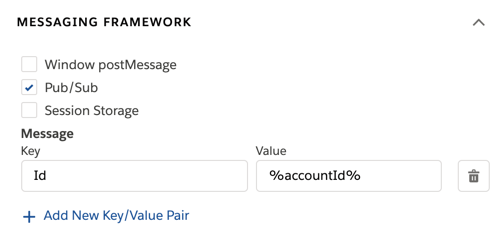
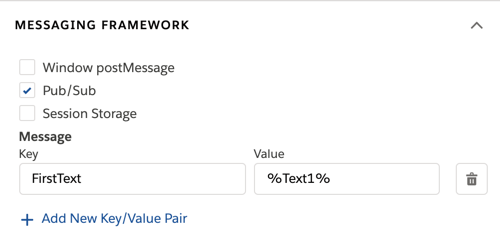
1. In an Omniscript action or step, in the Properties panel, under Messaging Framework, select **Pub/Sub**.
2. In the Key and Value fields, configure the data to pass to another Lightning web component.
    1. For Key, enter a name to store the value.
    2. For Value, enter data to pass to the Lightning web component. The field accepts merge syntax.
        
        <table class="slds-table slds-table_bordered slds-max-medium-table_stacked slds-m-bottom_small ">
                <colgroup>
                  <col>
                  <col>
                </colgroup>
                <thead class="slds-text-title_caps ">
                  <tr class="">
                    <th scope="col" class="slds-cell-wrap" style="vertical-align:top;" id="d257787e111">
                      <p style="margin-bottom:0;">Action Example</p>
                    </th>
                    <th scope="col" class="slds-cell-wrap" style="vertical-align:top;" id="d257787e117">
                      <p style="margin-bottom:0;">Step Example</p>
                    </th>
                  </tr>
                </thead>
                <tbody>
                  <tr class="">
                    <td data-label="Action Example" class="slds-cell-wrap" style="vertical-align:top;" headers="d257787e111 ">
                      <p>Pass data from the action's response in the Value field using
                        merge syntax. For example, to pass the response node
                        <kbd>"accountId"</kbd>, enter
                        <kbd>%accountId%</kbd> for the value.
                      </p>
                      <div><img style="width:200px;" src="https://sf-zdocs-cdn-prod.zoominsoftware.com/tdta-xcloud-omnistudio_for_managed_packages-264-0-0-production-enus/aa2554ec-624a-4ee6-8da4-6435670e6e62/omnistudio_for_managed_packages/images/owc_action_key_value.png" alt="image"></div>
                    </td>

                    <td data-label="Step Example" class="slds-cell-wrap" style="vertical-align:top;" headers="d257787e117 ">
                      <p>Pass data from an element within the step using merge syntax.
                        For example, to pass a text element named
                        <kbd>Text1</kbd>, enter
                        <kbd>%Text1%</kbd> for the value.
                      </p>
                      <div><img style="width:200px;" src="https://sf-zdocs-cdn-prod.zoominsoftware.com/tdta-xcloud-omnistudio_for_managed_packages-264-0-0-production-enus/aa2554ec-624a-4ee6-8da4-6435670e6e62/omnistudio_for_managed_packages/images/owc_step_pubsub.png" alt="image"></div>
                    </td>

                  </tr>
                </tbody>
              </table>
3. Activate the Omniscript.
4. In a Lightning web component that receives data from the action or step, import the `pubsub` module. Using this example, replace `ns` with the namespace of your Vlocity package.
    
    ```
    import pubsub from 'ns/pubsub';
    ```
5. In the Lightning web component, register the pubsub event using this code without replacing anything. The event must register after the component renders.
    
    <table class="slds-table slds-table_bordered slds-max-medium-table_stacked slds-m-bottom_small ">
            <colgroup>
              <col>
              <col>
            </colgroup>
            <thead class="slds-text-title_caps ">
              <tr class="">
                <th scope="col" class="slds-cell-wrap" style="vertical-align:top;" id="d257787e217">
                  <p style="margin-bottom:0;">Action pubsub Event</p>
                </th>
                <th scope="col" class="slds-cell-wrap" style="vertical-align:top;" id="d257787e223">
                  <p style="margin-bottom:0;">Step pubsub Event</p>
                </th>
              </tr>
            </thead>
            <tbody>
              <tr class="">
                <td data-label="Action pubsub Event" class="slds-cell-wrap" style="vertical-align:top;" headers="d257787e217 ">
                  <pre class="line-numbers slds-box slds-box_x-small slds-theme_shade slds-m-top_medium slds-m-bottom_medium slds-scrollable_x"><code>pubsub.register('omniscript_action', {
    data: this.handleOmniAction.bind(this),
});</code></pre>
                </td>

                <td data-label="Step pubsub Event" class="slds-cell-wrap" style="vertical-align:top;" headers="d257787e223 ">
                  <pre class="line-numbers slds-box slds-box_x-small slds-theme_shade slds-m-top_medium slds-m-bottom_medium slds-scrollable_x"><code>pubsub.register('omniscript_step', {
    data: this.handleOmniStepLoadData.bind(this),
});</code></pre>
                </td>

              </tr>
            </tbody>
          </table>
6. In the Lightning web component, create a pubsub event handler.
    
    <table class="slds-table slds-table_bordered slds-max-medium-table_stacked slds-m-bottom_small ">
            <colgroup>
              <col>
              <col>
            </colgroup>
            <thead class="slds-text-title_caps ">
              <tr class="">
                <th scope="col" class="slds-cell-wrap" style="vertical-align:top;" id="d257787e271">
                  <p style="margin-bottom:0;">Action Event Handler Example</p>
                </th>
                <th scope="col" class="slds-cell-wrap" style="vertical-align:top;" id="d257787e277">
                  <p style="margin-bottom:0;">Step Event Handler Example</p>
                </th>
              </tr>
            </thead>
            <tbody>
              <tr class="">
                <td data-label="Action Event Handler Example" class="slds-cell-wrap" style="vertical-align:top;" headers="d257787e271 ">
                  <pre class="line-numbers slds-box slds-box_x-small slds-theme_shade slds-m-top_medium slds-m-bottom_medium slds-scrollable_x"><code>handleOmniAction(data) {
  // perform logic to handle the Action's response data
}</code></pre>
                </td>

                <td data-label="Step Event Handler Example" class="slds-cell-wrap" style="vertical-align:top;" headers="d257787e277 ">
                  <pre class="line-numbers slds-box slds-box_x-small slds-theme_shade slds-m-top_medium slds-m-bottom_medium slds-scrollable_x"><code>handleOmniStepLoadData(data) {
  // perform logic to handle the pubsub data from the Step
}</code></pre>
                </td>

              </tr>
            </tbody>
          </table>
7. If different actions or steps require different logic, use a switch statement to describe how to handle the event. For information on switch statements, see [switch](https://developer.mozilla.org/en-US/docs/Web/JavaScript/Reference/Statements/switch).
    
    <table class="slds-table slds-table_bordered slds-max-medium-table_stacked slds-m-bottom_small ">
            <colgroup>
              <col>
              <col>
            </colgroup>
            <thead class="slds-text-title_caps ">
              <tr class="">
                <th scope="col" class="slds-cell-wrap" style="vertical-align:top;" id="d257787e328">
                  <p style="margin-bottom:0;">Action Example</p>
                </th>
                <th scope="col" class="slds-cell-wrap" style="vertical-align:top;" id="d257787e334">
                  <p style="margin-bottom:0;">Step Example</p>
                </th>
              </tr>
            </thead>
            <tbody>
              <tr class="">
                <td data-label="Action Example" class="slds-cell-wrap" style="vertical-align:top;" headers="d257787e328 ">
                  <p>Access the action's Element Name using <code>data.name</code>.</p>
                  <pre class="line-numbers slds-box slds-box_x-small slds-theme_shade slds-m-top_medium slds-m-bottom_medium slds-scrollable_x"><code>handleOmniAction(data) {
  switch(data.name) {
    case 'SomeNameForAction':
      this.handleSomeNameForAction(data);
      break;
    case 'SomeNameForAction2':
      this.handleSomeNameForAction2(data);
      break;
    default:
      // handle default case
  }
}

handleSomeNameForAction(data) {
    // perform some logic specific to SomeNameForAction action
    // that has element name = "SomeNameForAction"
}

handleSomeNameForAction2(data) {
    // perform some logic specific to SomeNameForAction2 action
    // that has element name = "SomeNameForAction2"
}</code></pre>
                </td>

                <td data-label="Step Example" class="slds-cell-wrap" style="vertical-align:top;" headers="d257787e334 ">
                  <p>Access the step's Element Name using <code>data.name</code>.</p>
                  <pre class="line-numbers slds-box slds-box_x-small slds-theme_shade slds-m-top_medium slds-m-bottom_medium slds-scrollable_x"><code>handleOmniStepLoadData(data) {
  switch(data.name) {
    case 'FirstStep':
      this.handleOmniFirstStepLoadData(data);
      break;
    case 'SecondStep':
      this.handleOmniSecondStepLoadData(data);
      break;
    default:
      // handle default case
  }
}

handleOmniFirstStepLoadData(data) {
    // perform some logic specific when a Step element which name is
    // FirstStep is loaded
}

handleOmniSecondStepLoadData(data) {
    // perform some logic specific when a Step element which name is
    // SecondStep is loaded
}</code></pre>
                </td>

              </tr>
              <tr class="">
                <td data-label="Action Example" class="slds-cell-wrap" style="vertical-align:top;" headers="d257787e328 ">
                  <p>Access the action's Element Type using <code>data.type</code>.</p>
                  <pre class="line-numbers slds-box slds-box_x-small slds-theme_shade slds-m-top_medium slds-m-bottom_medium slds-scrollable_x"><code>handleOmniAction(data) {
  switch(data.type) {
    case 'Integration Procedure Action':
      this.handleIPActionPubsubEvents(data);
      break;
    case 'Remote Action':
      this.handleRemoteActionPubsubEvents(data);
      break;
    default:
      // handle default case
  }
}

handleIPActionPubsubEvents(data) {
    // perform some logic specific to Integration Procedure Actions
}

handleRemoteActionPubsubEvents(data) {
    // perform some logic specific to Remote Actions
}</code></pre>
                </td>

                <td data-label="Step Example" class="slds-cell-wrap" style="vertical-align:top;" headers="d257787e334 ">
                  <p style="margin-bottom:0;">n/a</p>
                </td>

              </tr>
            </tbody>
          </table>