
For the managed package runtime, conditionally apply styles to a Flexcard element. Change style features such as text color, background image, and responsiveness when a condition based on the value of a data field is met. For example, add a red border around a billing Flexcard when the bill status is past due.
 This information is for Omnistudio for Managed Packages. For Omnistudio on standard runtime, see Omnistudio Help.
|
Required Versions |
|---|
|
Available beginning Summer '21. |
- Select the element on a state in your Flexcard, and click + Add Conditional Style from the Style panel.
- In Conditional Style Name, enter a unique name for the visible label for your conditional style. The name must be different than any other conditional style name on the same element.
- To add a condition based on the value of a data field, click + Add Condition. See Add Conditions to a Flexcard Element (Managed Package) on how to configure conditions.
- Click Save.
-
Your new condition appears below the Default.
When you add a conditional style, a Default section is added to the top of the Style panel. When your conditions aren’t met, the default styles apply.
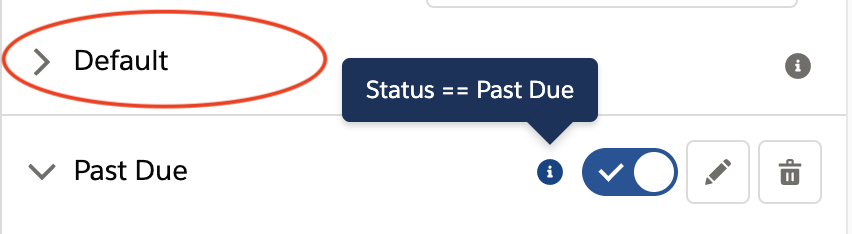
- (Optional) To determine what conditions are applied, hover over the tooltip "i" icon next to the conditional style name.
-
(Optional) To edit a conditional style, click its pencil (
 )
icon.
)
icon.
-
(Optional) To switch between how your element looks when the conditions are
applied and not applied, select the conditional style's toggle button (
 ).
).
-
(Optional) To delete a conditional style, click its trash (
 ) icon.
What’s next: Preview your Flexcard. See Preview a Flexcard (Managed Package).
- Flexcards Conditional Style Properties (Managed Package)
For the managed package runtime, add Conditional Style properties are configurable from the Style panel in the Flexcard Designer when you select an element. Conditionally apply styles to an element depending on the value of a data field.