---
schema_version: "1"
id: 44f1b189934a4b2baa5bbbfb0b10c195fd4eef2408dcdf30c89f3dca6ec0146e
title: Monitor App Security on the Insights Page
collection: admin
version: current
locale: en-us
portal_url: https://docs.salesforce.com/admin/current/en-us/xcloud/264-0-0/monitor_app_insights.md
canonical_url: https://help.salesforce.com/s/articleView?id=xcloud.monitor_app_insights.htm&release=264.0.0&type=5
source_site: help.salesforce.com
content_type: documentation
content_hash: bc74893f2ddf23f1bef4241b11881a629a27ad586307c0a870b66f9d2aec0f46
description: Use the Insights page to check whether your org's connected apps and external client apps comply with Salesforce's required OAuth and proof-of-possession controls. For apps that you develop, turn on the missing controls to come into compliance with Salesforce requirements. For apps developed elsewhere, contact the app developer and consider disabling the app until the developer updates the security controls. These controls are critical to protecting your org and data from known cyber threats.
products:
- Security
- Cross Cloud
release: "264"
---
# Monitor App Security on the Insights Page
Use the Insights page to check whether your org's connected apps and external client apps comply with Salesforce's required OAuth and proof-of-possession controls. For apps that you develop, turn on the missing controls to come into compliance with Salesforce requirements. For apps developed elsewhere, contact the app developer and consider disabling the app until the developer updates the security controls. These controls are critical to protecting your org and data from known cyber threats.
### Required Editions
Available in: Lightning Experience
Available in: Professional, Enterprise, Unlimited, and Developer Editions
User Permissions Needed
To edit local external client apps
Create, edit, and delete External Client Apps
The Insights page checks each app against two groups of Salesforce-required controls. An app complies when it meets all three OAuth controls and at least one proof-of-possession control.

Note Apps that are created and controlled by Salesforce don't show up in the Insights page.
**OAuth Controls** All required.
- [Refresh Token Rotation](https://help.salesforce.com/s/articleView?id=005316711&type=1&language=en_US)
- [Proof Key for Code Exchange](https://help.salesforce.com/s/articleView?id=xcloud.remoteaccess_pkce.htm&language=en_US) (PKCE)
- [Refresh Token Time to Live (TTL)](https://developer.salesforce.com/docs/platform/isvforce/guide/secure-code-ac-eca.html)
**Proof of Possession Controls** At least one required.
- [Refresh Token IP Allowlist](https://help.salesforce.com/s/articleView?id=xcloud.set_ip_allowlist_for_refresh_tokens.htm&language=en_US)
- [Demonstrating Proof-of-Possession](https://help.salesforce.com/s/articleView?id=xcloud.remoteaccess_dpop_guide.htm.htm&language=en_US) (DPoP)
The Insights page shows apps that are local to your org (Local) and apps that were developed elsewhere (Packaged). Apps in your org that you didn't develop show the status of their security controls, but only the app developer can manage them.
1. From Setup, in the Quick Find box, enter Insights, and then select **Insights**.
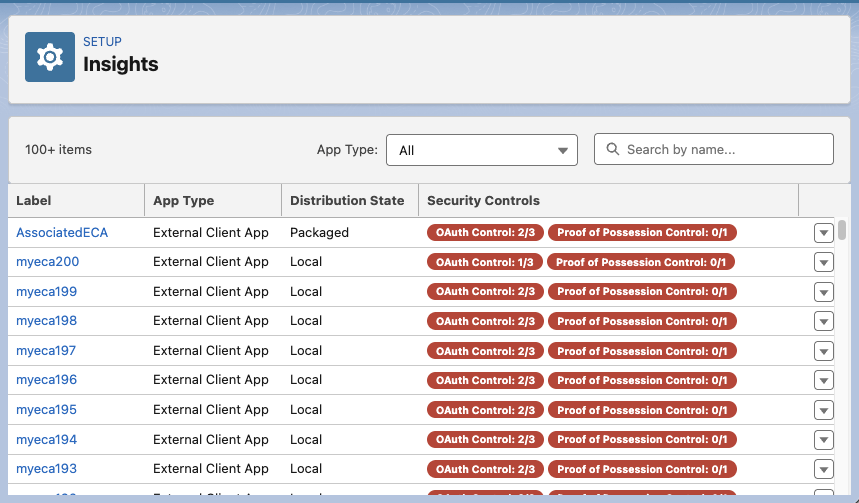
2. To narrow the list, select an **App Type**, or search by name.
3. In the Security Controls column, find apps with failing controls.
4. From that app's actions menu, select **Configure Security Posture**.
5. Review the controls listed in the Security Posture window.
- If the app's Distribution State is Local, click **Manage App** and turn on the missing controls.
- If the Distribution State is Packaged, contact the app developer at the address listed in the Security Posture window. To turn off the app until the developer updates it, click **Disable**.