
Use the Mobile App Designer to build screens, connect data, set the app's appearance, and preview the result.
The designer has three modes:
- Edit
- Add and arrange components.
- Screen Map
- View all screens and the navigation between them.
- Preview
- View a high-fidelity device or web preview.
Mobile App Designer
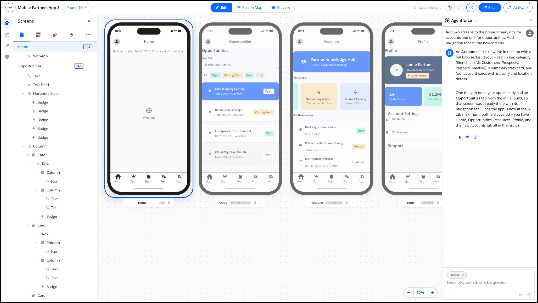
The workspace includes components, screens, add-ons, tab bar, theme, properties, and agent panels.

Note Your work isn’t saved automatically. Select Save to keep your
changes.
- Add and Edit Components
Add a component to a screen and configure its properties. - Set Component Actions
Configure what happens when a user selects a component. - Work with Screens
Use the screens panel to manage screens and their components. - Build with Agentforce
Use plain language to ask Agentforce to change your app. - Bind Components to Data
Connect your app's components to live Salesforce data in two phases. First add a data source to a screen, then bind components to the fields in that source. - Add a Theme to Your App
Apply brand colors and spacing across the app. - Configure Add-ons
Enable and place features such as Agentforce, notifications, and calendar. - Save Your App
Save changes and resolve validation errors before deployment. - Preview Your App
Preview the app in the designer or on an iOS or Android device.